Computer Vision
Chap.4 : Segmentation
SUB CODE: 3171614
SEMESTER: 7TH IT
PREPARED BY:
PROF. KHUSHALI B. KATHIRIYA
Outline
• Active Contours
• Split and Merge
• Watershed
• Region Splitting and Merging
• Graph-based Segmentation
• Mean shift and Model finding
• Normalized Cut
Prepared by: Prof. Khushali B Kathiriya
2
Active Contours
PREPARED BY:
PROF. KHUSHALI B. KATHIRIYA
Active Contour (Boundary Detection)
• Segmentation is a section of image processing for the separation or segregation
of information from the required target region of the image. There are different
techniques used for segmentation of pixels of interest from the image.
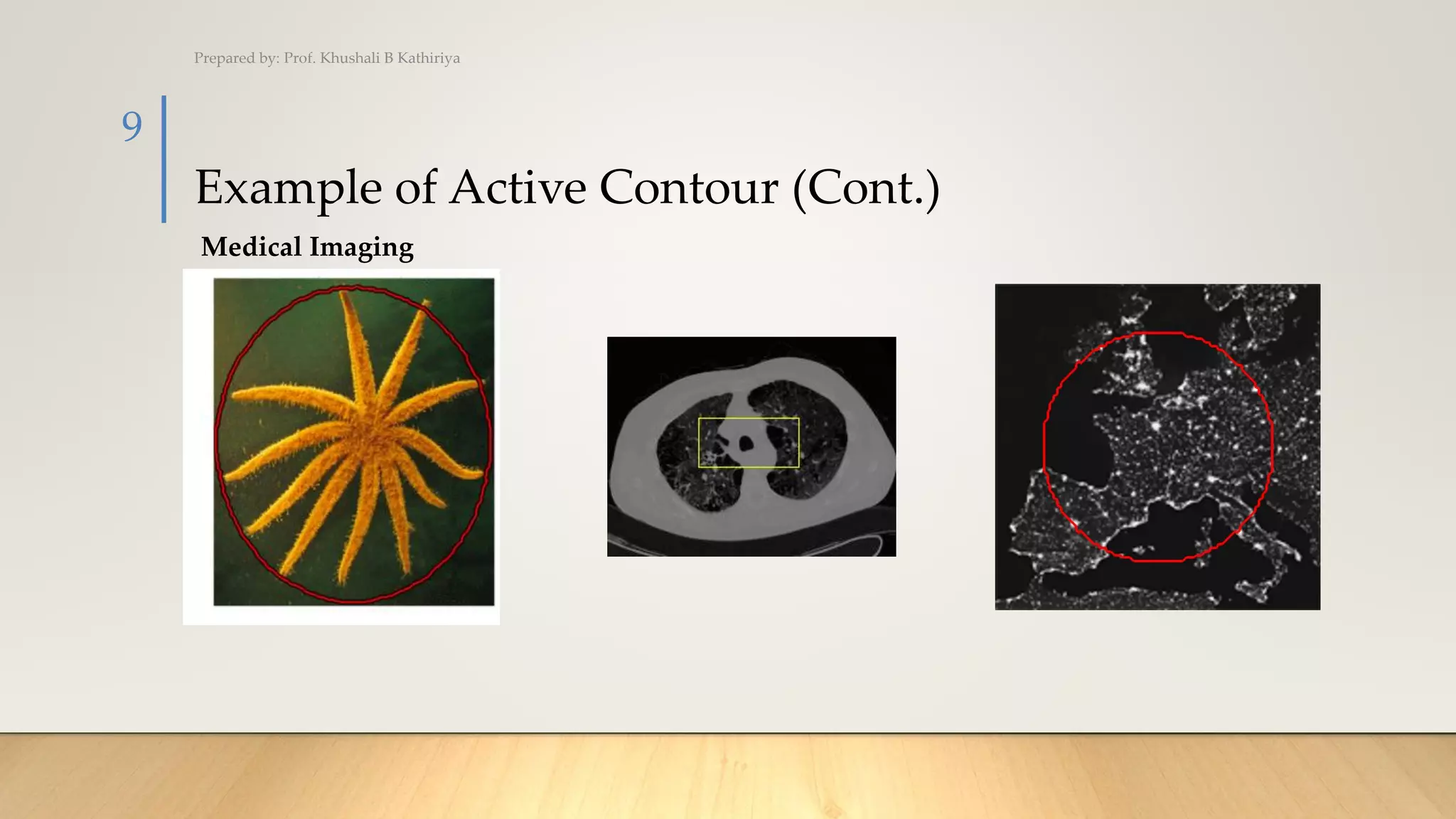
• Active contour is one of the active models in segmentation techniques, which
makes use of the energy constraints and forces in the image for separation of
region of interest. Active contour defines a separate boundary or curvature for
the regions of target object for segmentation.
Prepared by: Prof. Khushali B Kathiriya
4
Active Contour(Cont.)
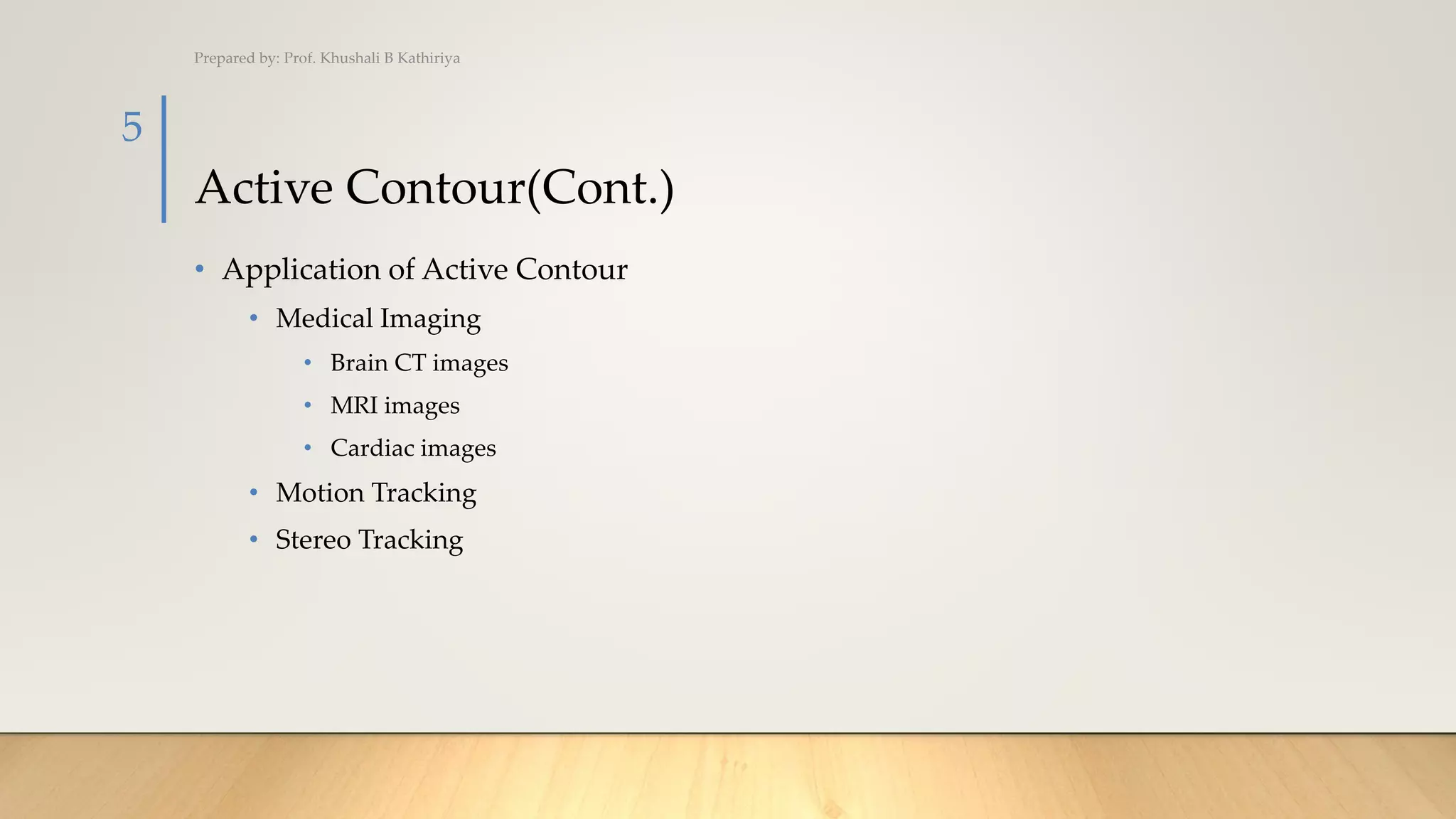
• Application of Active Contour
• Medical Imaging
• Brain CT images
• MRI images
• Cardiac images
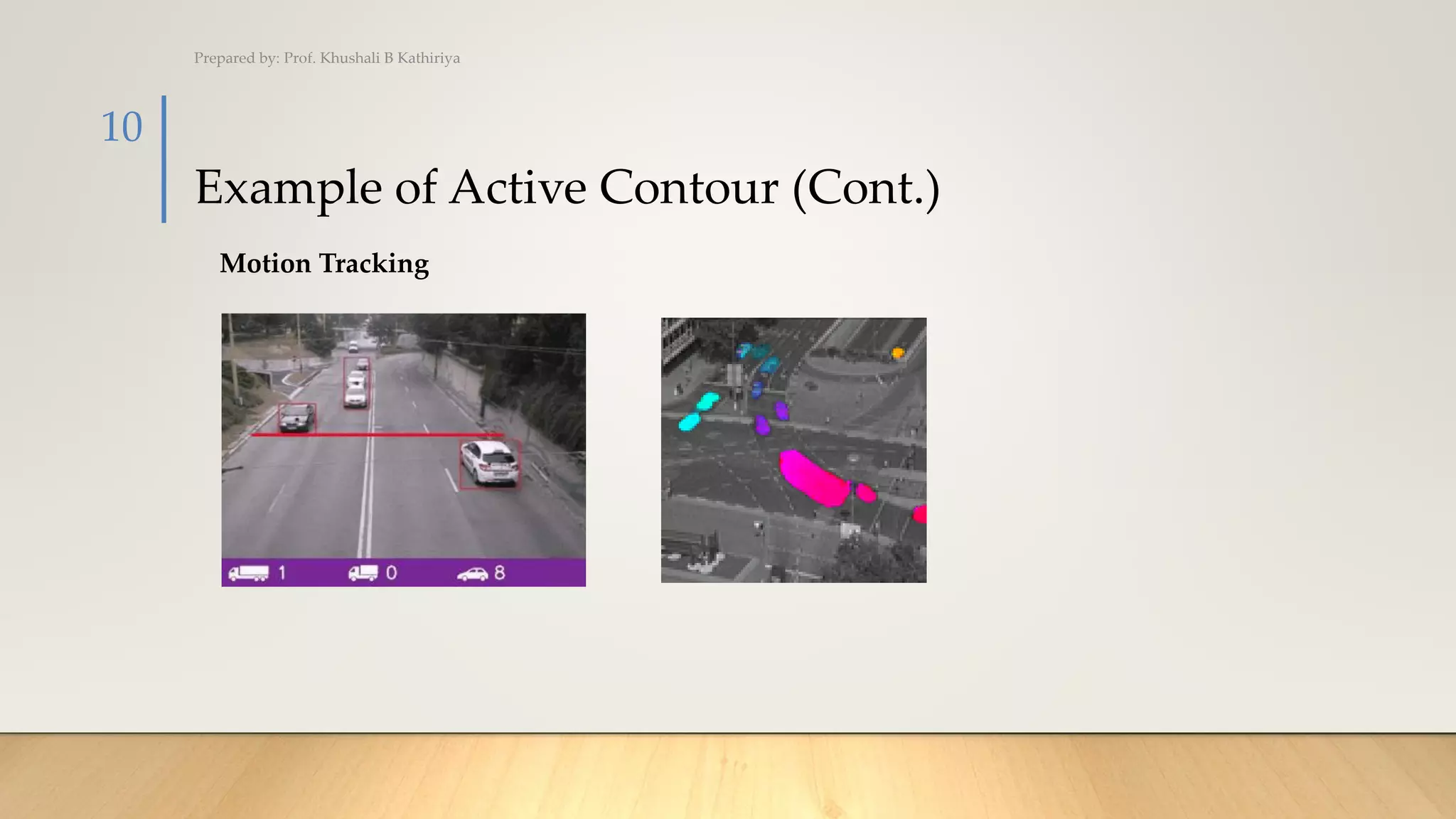
• Motion Tracking
• Stereo Tracking
Prepared by: Prof. Khushali B Kathiriya
5
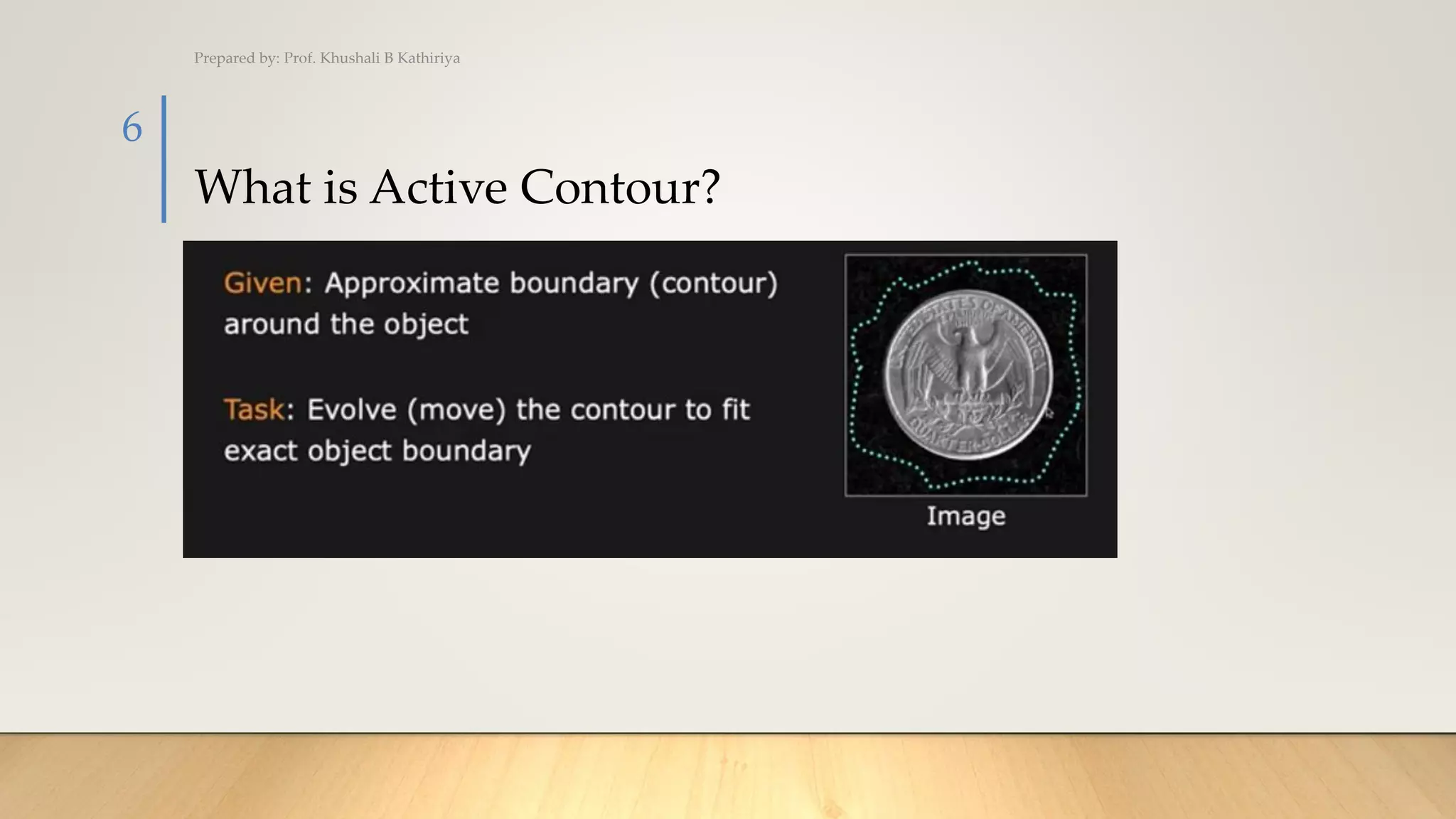
What is Active Contour?
Prepared by: Prof. Khushali B Kathiriya
6
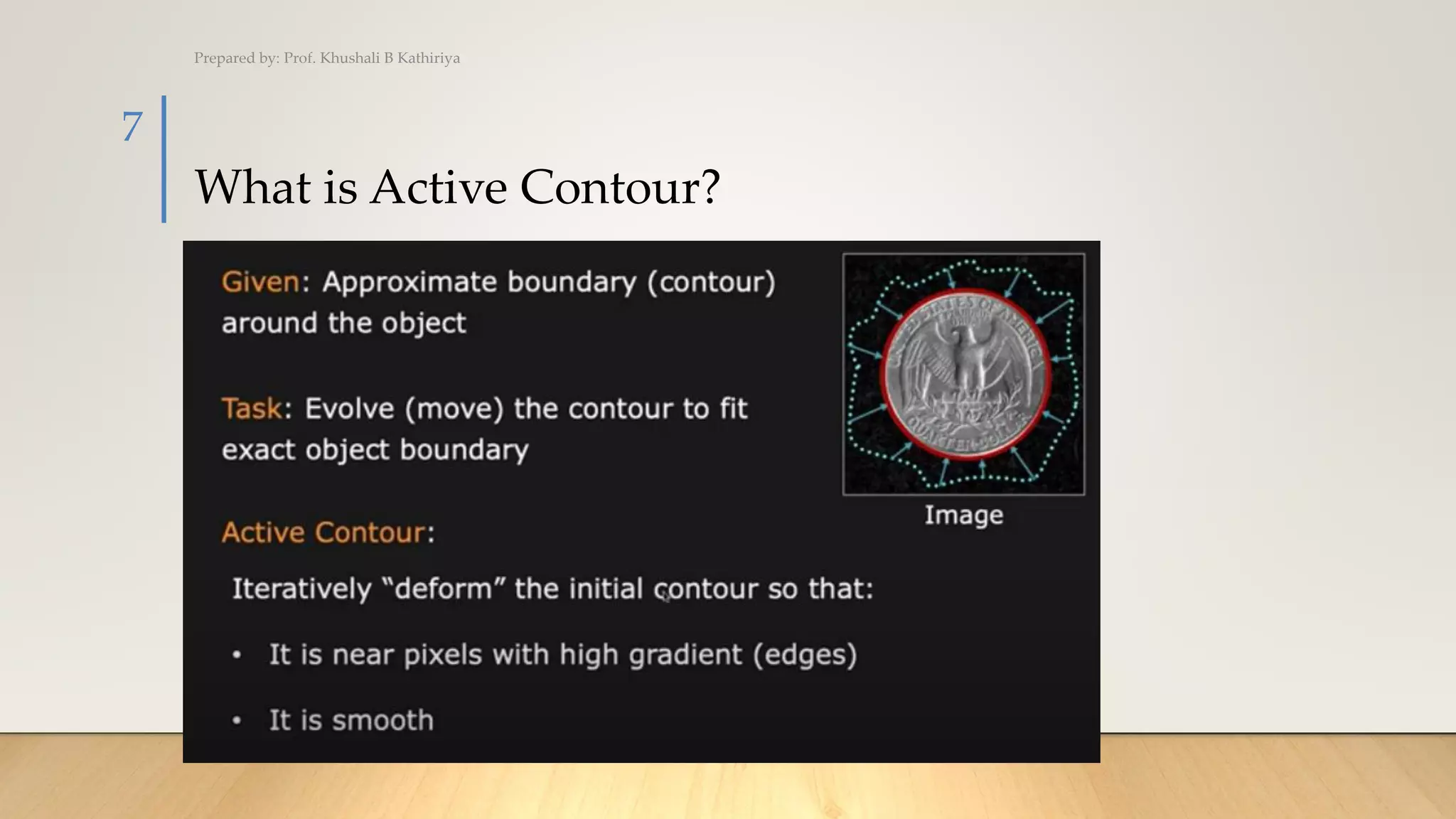
What is Active Contour?
Prepared by: Prof. Khushali B Kathiriya
7
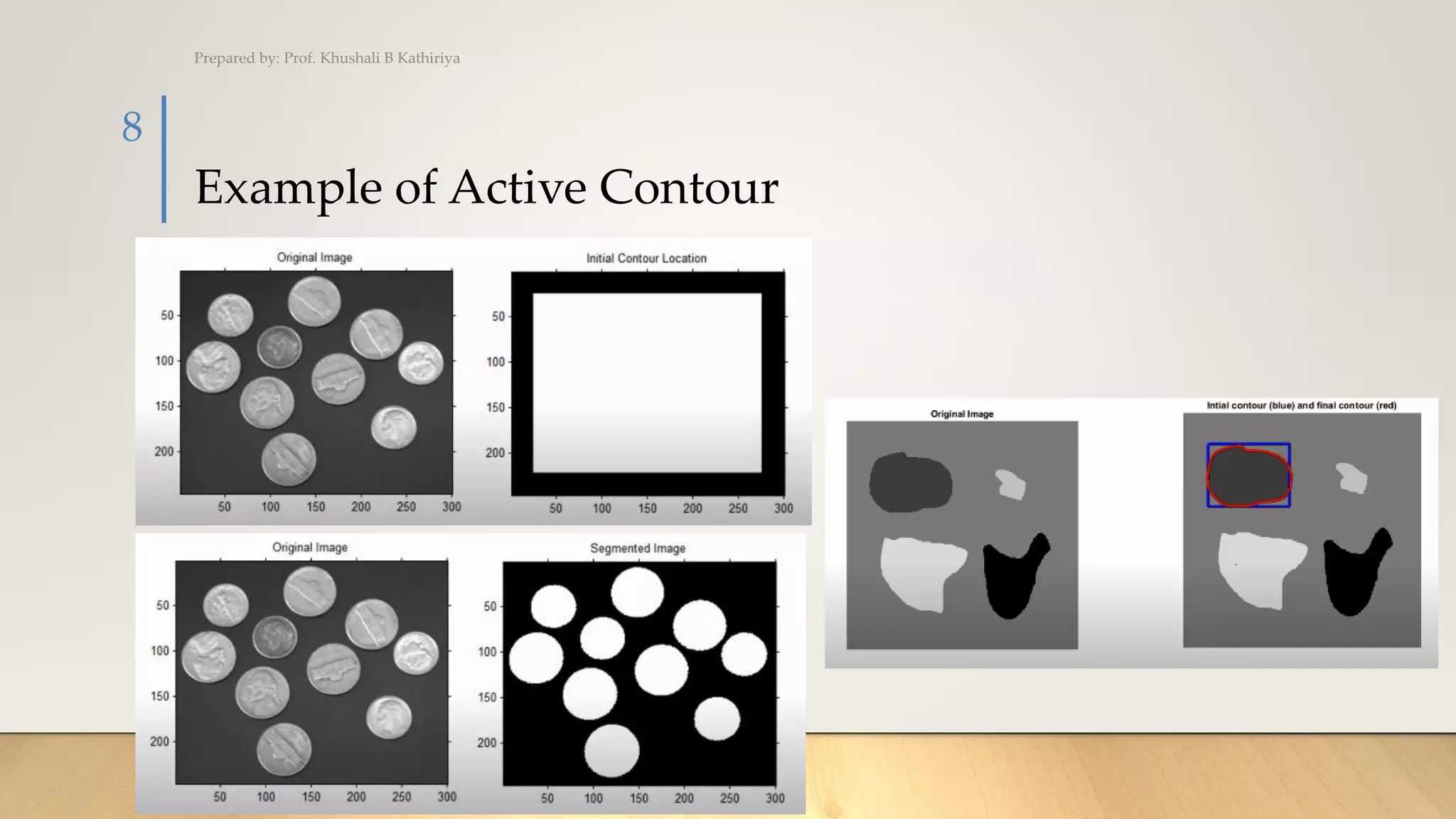
Example of Active Contour
Prepared by: Prof. Khushali B Kathiriya
8
Example of Active Contour (Cont.)
Prepared by: Prof. Khushali B Kathiriya
9
Medical Imaging
Example of Active Contour (Cont.)
Prepared by: Prof. Khushali B Kathiriya
10
Motion Tracking
Split and Merge
PREPARED BY:
PROF. KHUSHALI B. KATHIRIYA
Split and Merge
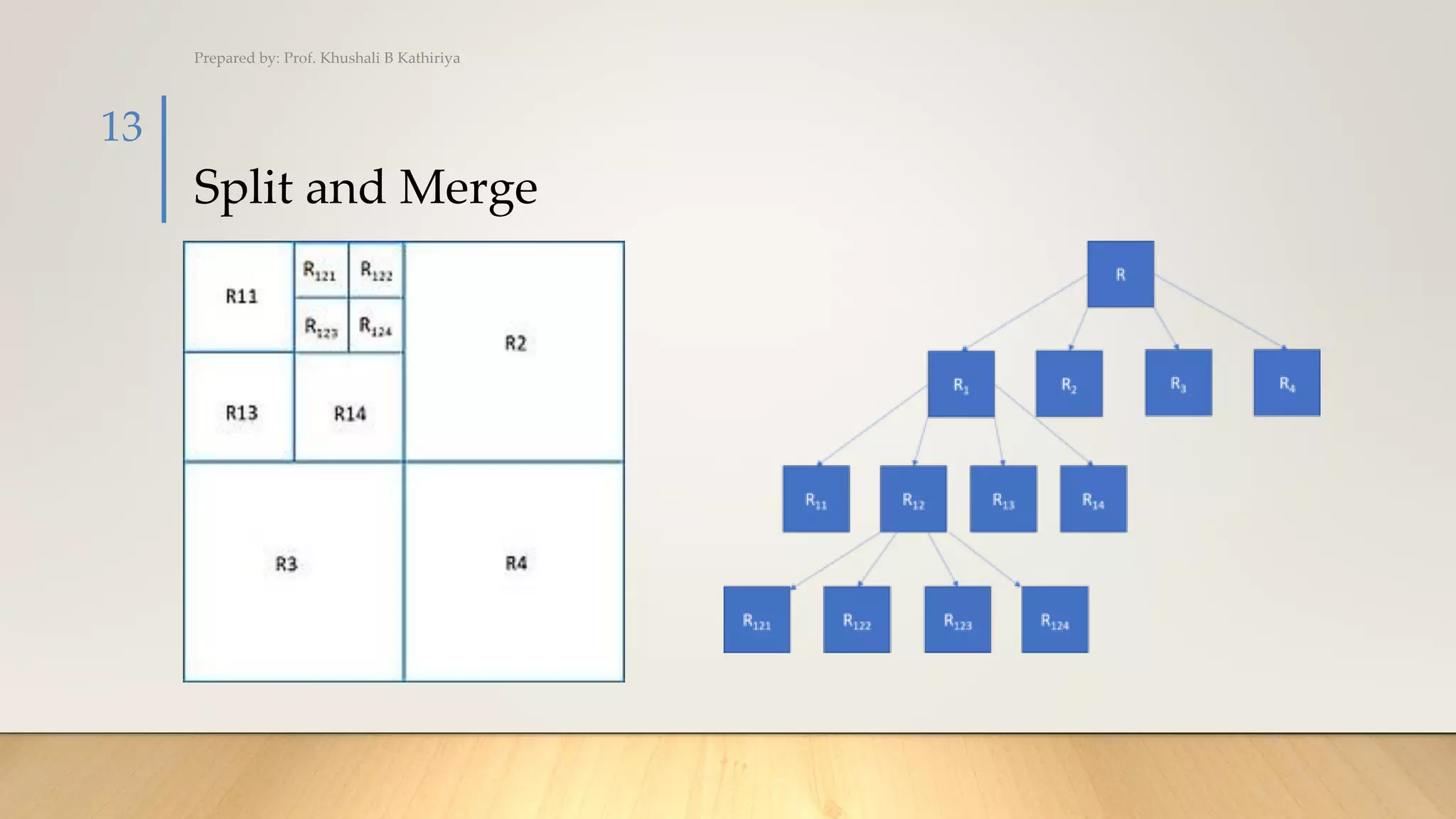
• Split and merge segmentation is an image processing technique used
to segment an image. The image is successively split into quadrants based on
a homogeneity criterion and similar regions are merged to create the segmented
result. The technique incorporates a quadtree data structure, meaning that there
is a parent-child node relationship. The total region is a parent, and each of the
four splits is a child.
Prepared by: Prof. Khushali B Kathiriya
12
Split and Merge
Prepared by: Prof. Khushali B Kathiriya
13
Split and Merge Example
• The following example shows the segmentation of a gray scale image using
matlab. The homogeneity criterion is thresholding, max(region)-min(region) < 10
for a region to be homogeneous.
Prepared by: Prof. Khushali B Kathiriya
14
Split and Merge Example
• The blocks created during splitting are shown in the following picture:
Prepared by: Prof. Khushali B Kathiriya
15
Split and Merge Example
• And the segmented image is below.
Prepared by: Prof. Khushali B Kathiriya
16
Region Split and Merge
PREPARED BY:
PROF. KHUSHALI B. KATHIRIYA
Region Split and Merge Example (Cont.)
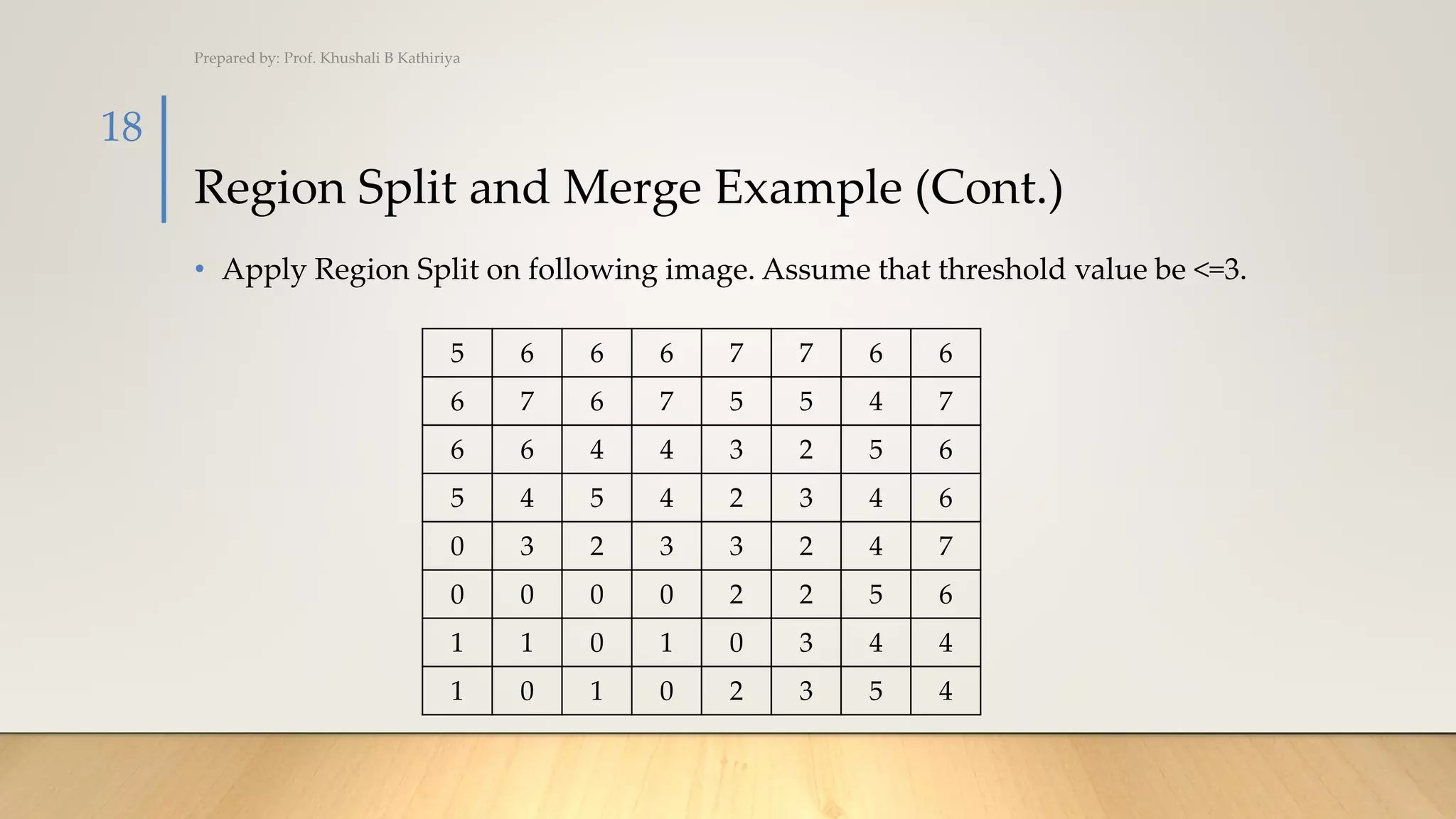
• Apply Region Split on following image. Assume that threshold value be <=3.
Prepared by: Prof. Khushali B Kathiriya
18
5 6 6 6 7 7 6 6
6 7 6 7 5 5 4 7
6 6 4 4 3 2 5 6
5 4 5 4 2 3 4 6
0 3 2 3 3 2 4 7
0 0 0 0 2 2 5 6
1 1 0 1 0 3 4 4
1 0 1 0 2 3 5 4
Region Split and Merge Example (Cont.)
• Step 1: Identify Max and Min pixel value from the whole image
• Max = 7
• Min = 0
• Max-Min= 7
• 7 <= 3 (Condition false)
• Split image
Prepared by: Prof. Khushali B Kathiriya
19
5 6 6 6 7 7 6 6
6 7 6 7 5 5 4 7
6 6 4 4 3 2 5 6
5 4 5 4 2 3 4 6
0 3 2 3 3 2 4 7
0 0 0 0 2 2 5 6
1 1 0 1 0 3 4 4
1 0 1 0 2 3 5 4
Region Split and Merge Example (Cont.)
• Step 1: Identify Max and Min pixel value from the whole image
• Max = 7
• Min = 0
• Max-Min= 7
• 7 <= 3 (Condition false)
• Split R image into R1a,R2b,cR3,R4d
Prepared by: Prof. Khushali B Kathiriya
20
5 6 6 6 7 7 6 6
6 7 6 7 5 5 4 7
6 6 4 4 3 2 5 6
5 4 5 4 2 3 4 6
0 3 2 3 3 2 4 7
0 0 0 0 2 2 5 6
1 1 0 1 0 3 4 4
1 0 1 0 2 3 5 4
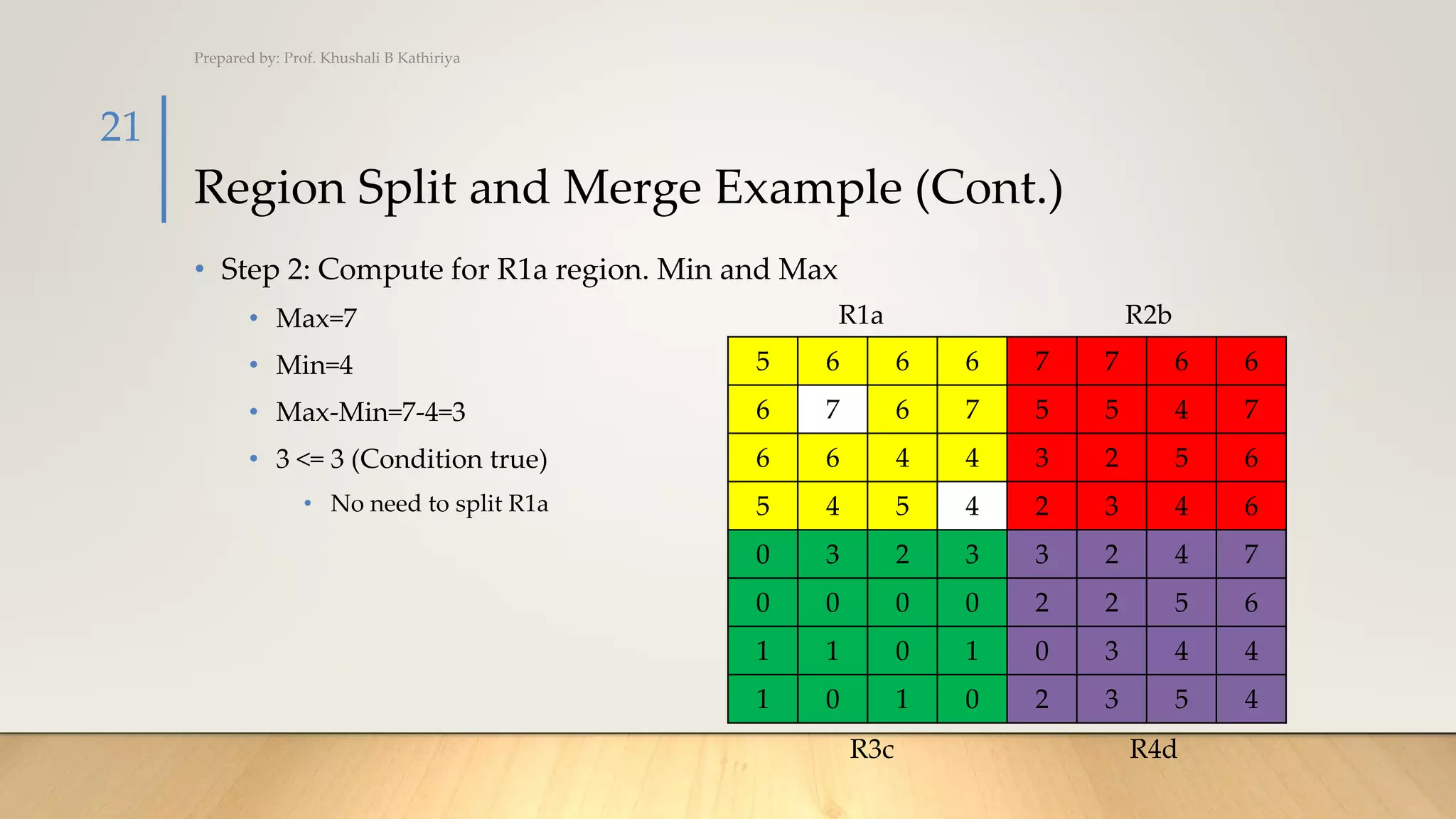
R1a R2b
R3c R4d
Region Split and Merge Example (Cont.)
• Step 2: Compute for R1a region. Min and Max
• Max=7
• Min=4
• Max-Min=7-4=3
• 3 <= 3 (Condition true)
• No need to split R1a
Prepared by: Prof. Khushali B Kathiriya
21
5 6 6 6 7 7 6 6
6 7 6 7 5 5 4 7
6 6 4 4 3 2 5 6
5 4 5 4 2 3 4 6
0 3 2 3 3 2 4 7
0 0 0 0 2 2 5 6
1 1 0 1 0 3 4 4
1 0 1 0 2 3 5 4
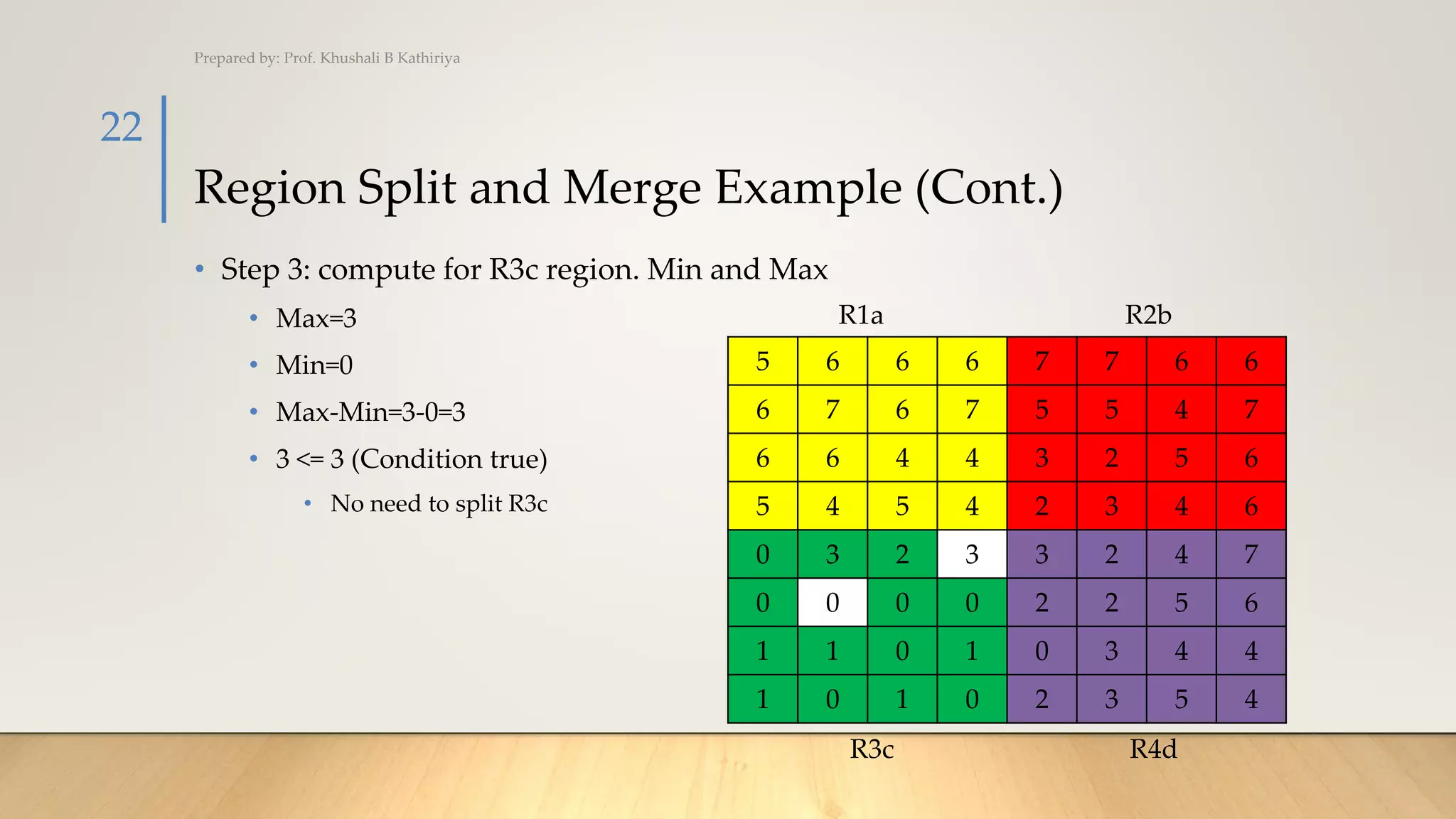
R1a R2b
R3c R4d
Region Split and Merge Example (Cont.)
• Step 3: compute for R3c region. Min and Max
• Max=3
• Min=0
• Max-Min=3-0=3
• 3 <= 3 (Condition true)
• No need to split R3c
Prepared by: Prof. Khushali B Kathiriya
22
5 6 6 6 7 7 6 6
6 7 6 7 5 5 4 7
6 6 4 4 3 2 5 6
5 4 5 4 2 3 4 6
0 3 2 3 3 2 4 7
0 0 0 0 2 2 5 6
1 1 0 1 0 3 4 4
1 0 1 0 2 3 5 4
R1a R2b
R3c R4d
Region Split and Merge Example (Cont.)
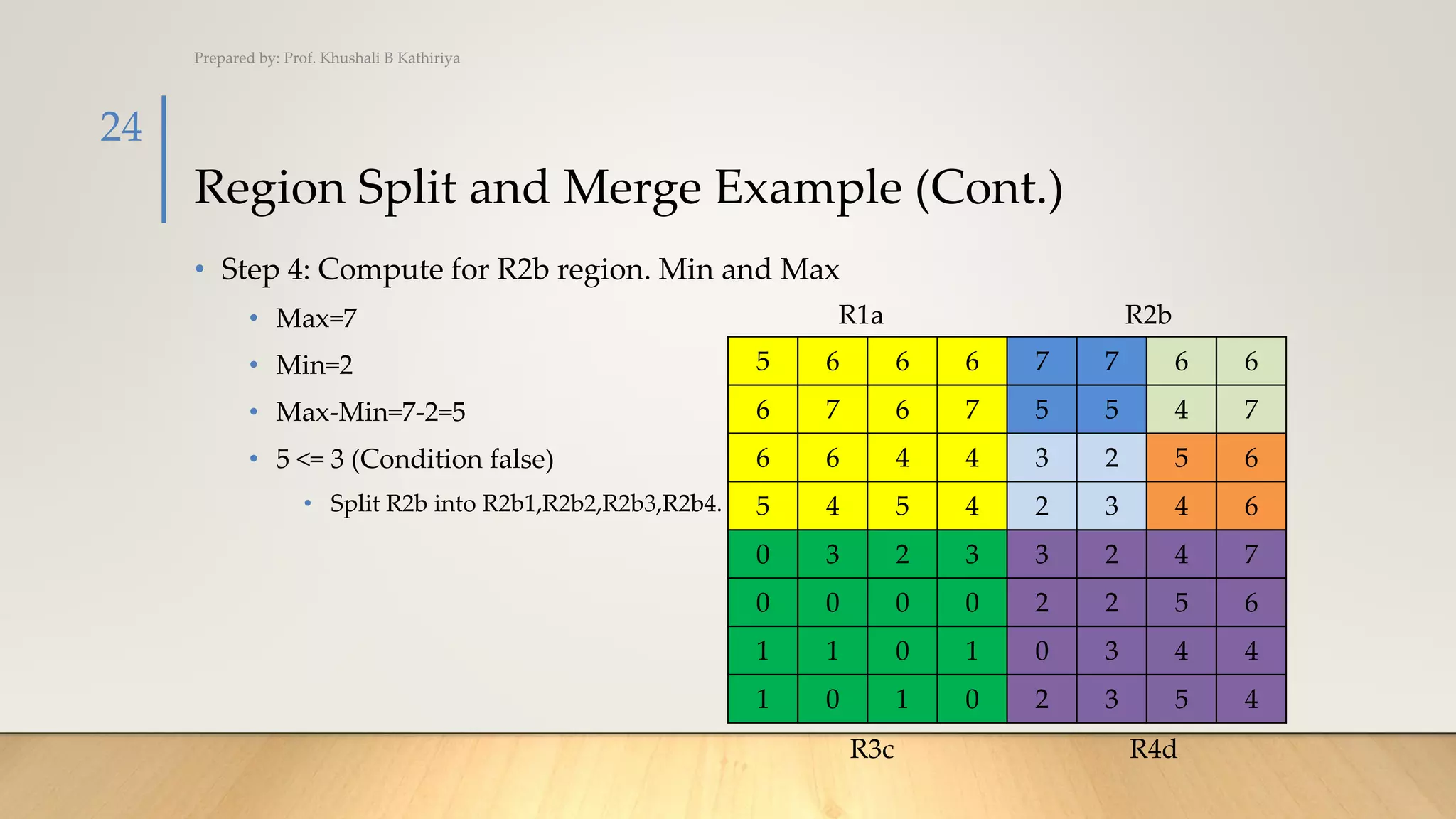
• Step 4: Compute for R2b region. Min and Max
• Max=7
• Min=2
• Max-Min=7-2=5
Prepared by: Prof. Khushali B Kathiriya
23
5 6 6 6 7 7 6 6
6 7 6 7 5 5 4 7
6 6 4 4 3 2 5 6
5 4 5 4 2 3 4 6
0 3 2 3 3 2 4 7
0 0 0 0 2 2 5 6
1 1 0 1 0 3 4 4
1 0 1 0 2 3 5 4
R1a R2b
R3c R4d
Region Split and Merge Example (Cont.)
• Step 4: Compute for R2b region. Min and Max
• Max=7
• Min=2
• Max-Min=7-2=5
• 5 <= 3 (Condition false)
• Split R2b into R2b1,R2b2,R2b3,R2b4.
Prepared by: Prof. Khushali B Kathiriya
24
5 6 6 6 7 7 6 6
6 7 6 7 5 5 4 7
6 6 4 4 3 2 5 6
5 4 5 4 2 3 4 6
0 3 2 3 3 2 4 7
0 0 0 0 2 2 5 6
1 1 0 1 0 3 4 4
1 0 1 0 2 3 5 4
R1a R2b
R3c R4d
Region Split and Merge Example (Cont.)
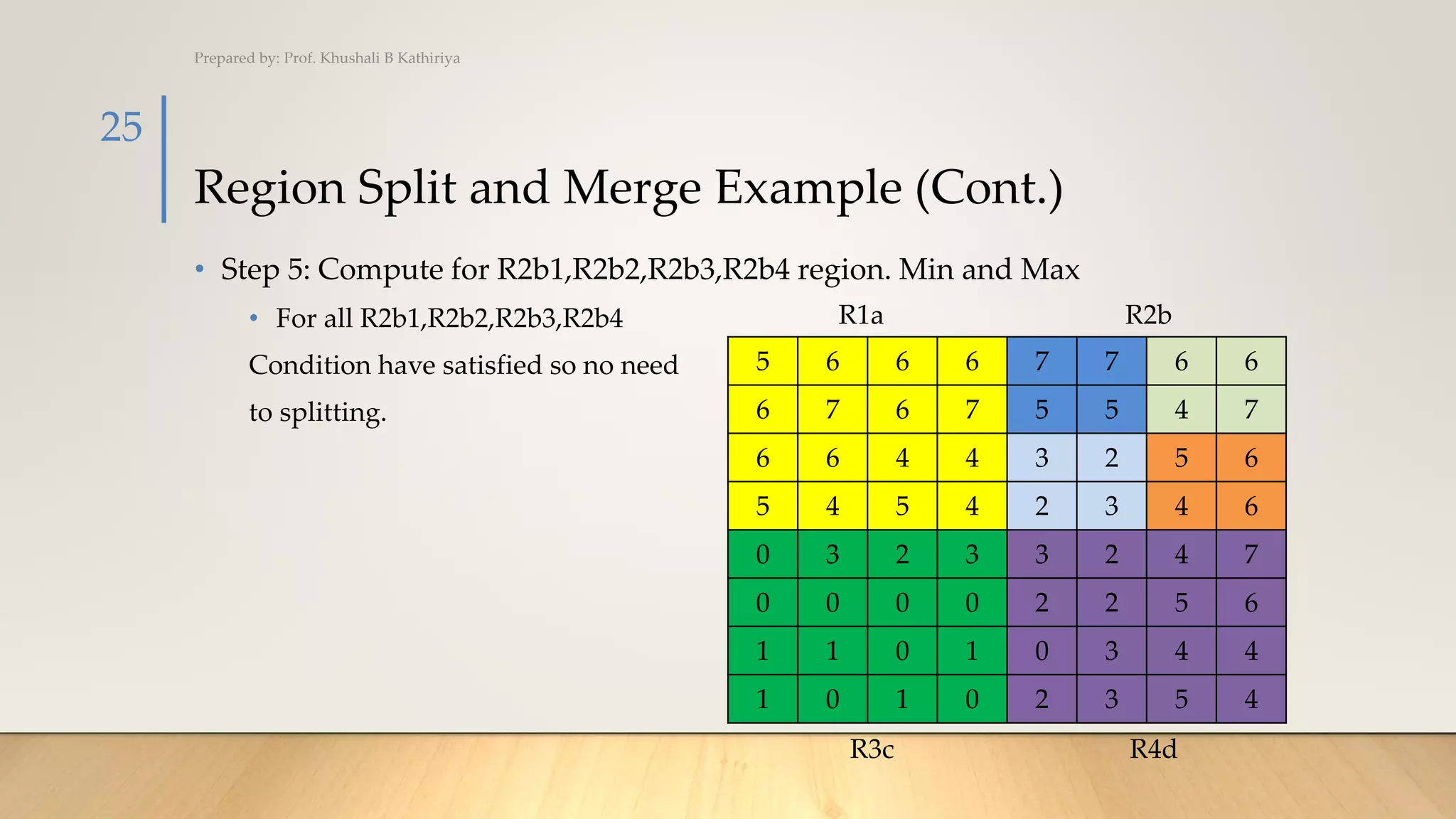
• Step 5: Compute for R2b1,R2b2,R2b3,R2b4 region. Min and Max
• For all R2b1,R2b2,R2b3,R2b4
Condition have satisfied so no need
to splitting.
Prepared by: Prof. Khushali B Kathiriya
25
5 6 6 6 7 7 6 6
6 7 6 7 5 5 4 7
6 6 4 4 3 2 5 6
5 4 5 4 2 3 4 6
0 3 2 3 3 2 4 7
0 0 0 0 2 2 5 6
1 1 0 1 0 3 4 4
1 0 1 0 2 3 5 4
R1a R2b
R3c R4d
Region Split and Merge Example (Cont.)
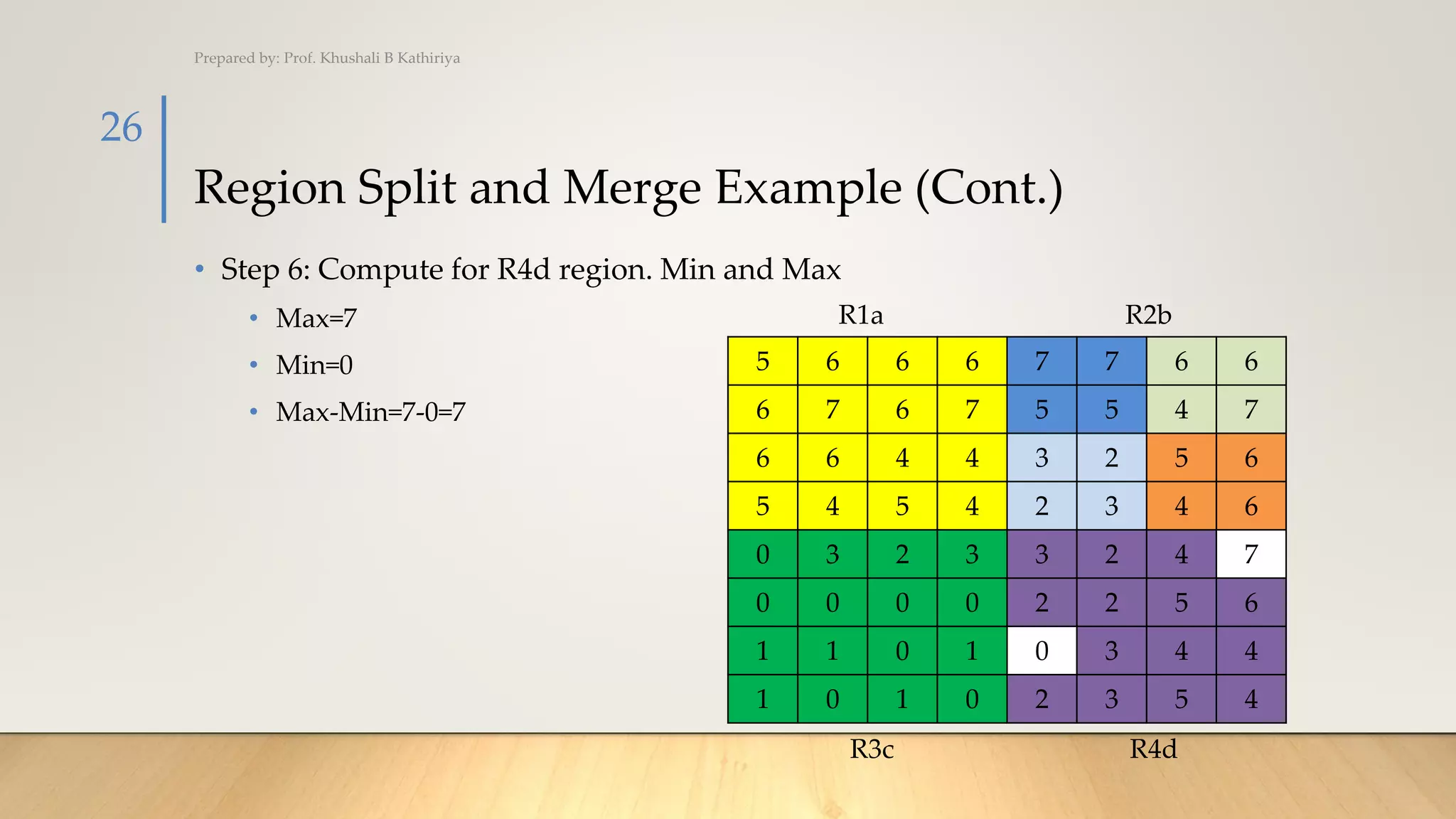
• Step 6: Compute for R4d region. Min and Max
• Max=7
• Min=0
• Max-Min=7-0=7
Prepared by: Prof. Khushali B Kathiriya
26
5 6 6 6 7 7 6 6
6 7 6 7 5 5 4 7
6 6 4 4 3 2 5 6
5 4 5 4 2 3 4 6
0 3 2 3 3 2 4 7
0 0 0 0 2 2 5 6
1 1 0 1 0 3 4 4
1 0 1 0 2 3 5 4
R1a R2b
R3c R4d
Region Split and Merge Example (Cont.)
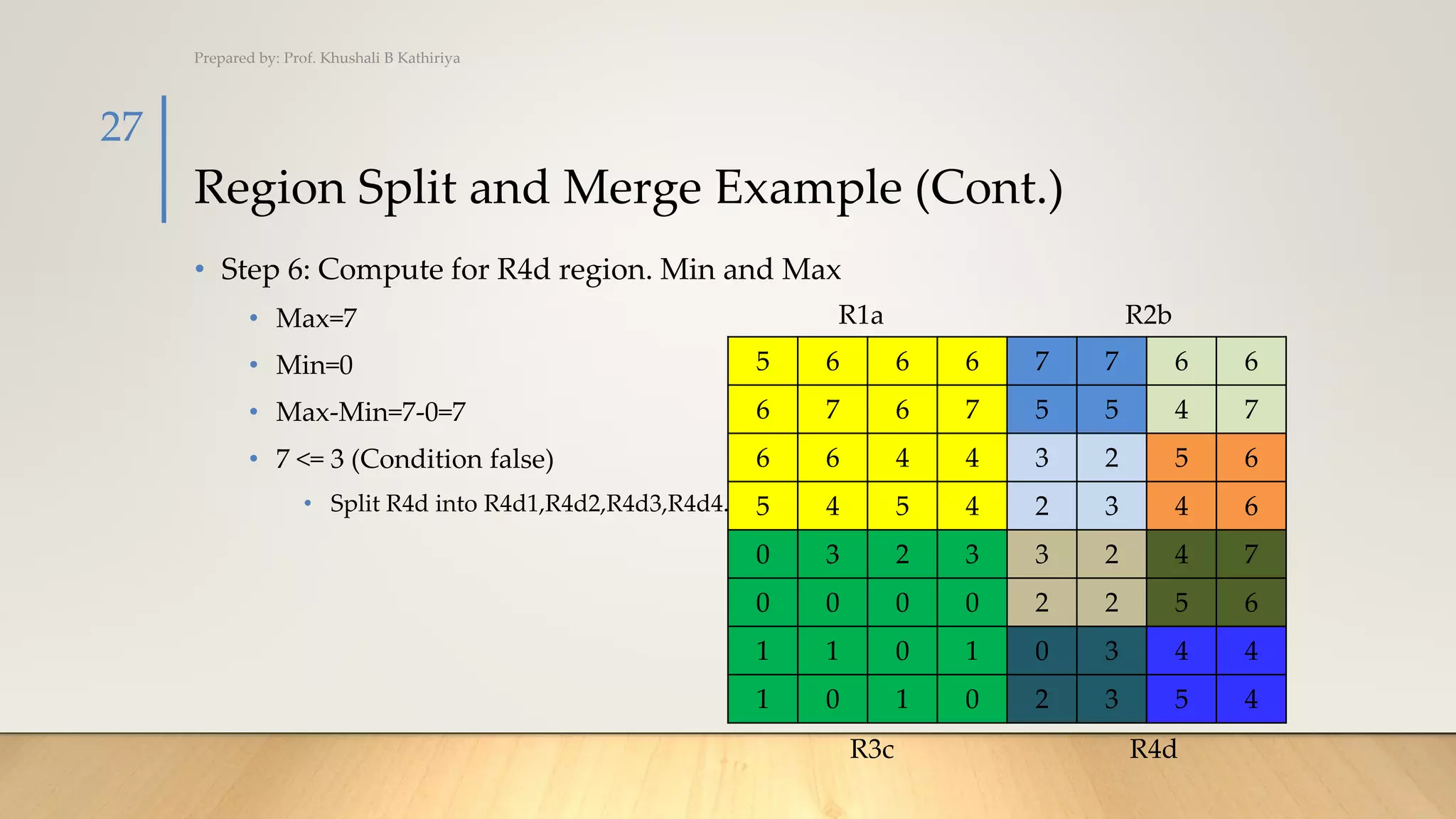
• Step 6: Compute for R4d region. Min and Max
• Max=7
• Min=0
• Max-Min=7-0=7
• 7 <= 3 (Condition false)
• Split R4d into R4d1,R4d2,R4d3,R4d4.
Prepared by: Prof. Khushali B Kathiriya
27
5 6 6 6 7 7 6 6
6 7 6 7 5 5 4 7
6 6 4 4 3 2 5 6
5 4 5 4 2 3 4 6
0 3 2 3 3 2 4 7
0 0 0 0 2 2 5 6
1 1 0 1 0 3 4 4
1 0 1 0 2 3 5 4
R1a R2b
R3c R4d
Region Split and Merge Example (Cont.)
• Step 7: Compute for R4d1,R4d2,R4d3,R4d4 region. Min and Max
• For all R4d1,R4d2,R4d3,R4d4
Condition have satisfied so no need
to splitting.
Prepared by: Prof. Khushali B Kathiriya
28
5 6 6 6 7 7 6 6
6 7 6 7 5 5 4 7
6 6 4 4 3 2 5 6
5 4 5 4 2 3 4 6
0 3 2 3 3 2 4 7
0 0 0 0 2 2 5 6
1 1 0 1 0 3 4 4
1 0 1 0 2 3 5 4
R1a R2b
R3c R4d
Watershed Segmentation
PREPARED BY:
PROF. KHUSHALI B. KATHIRIYA
Watershed Segmentation
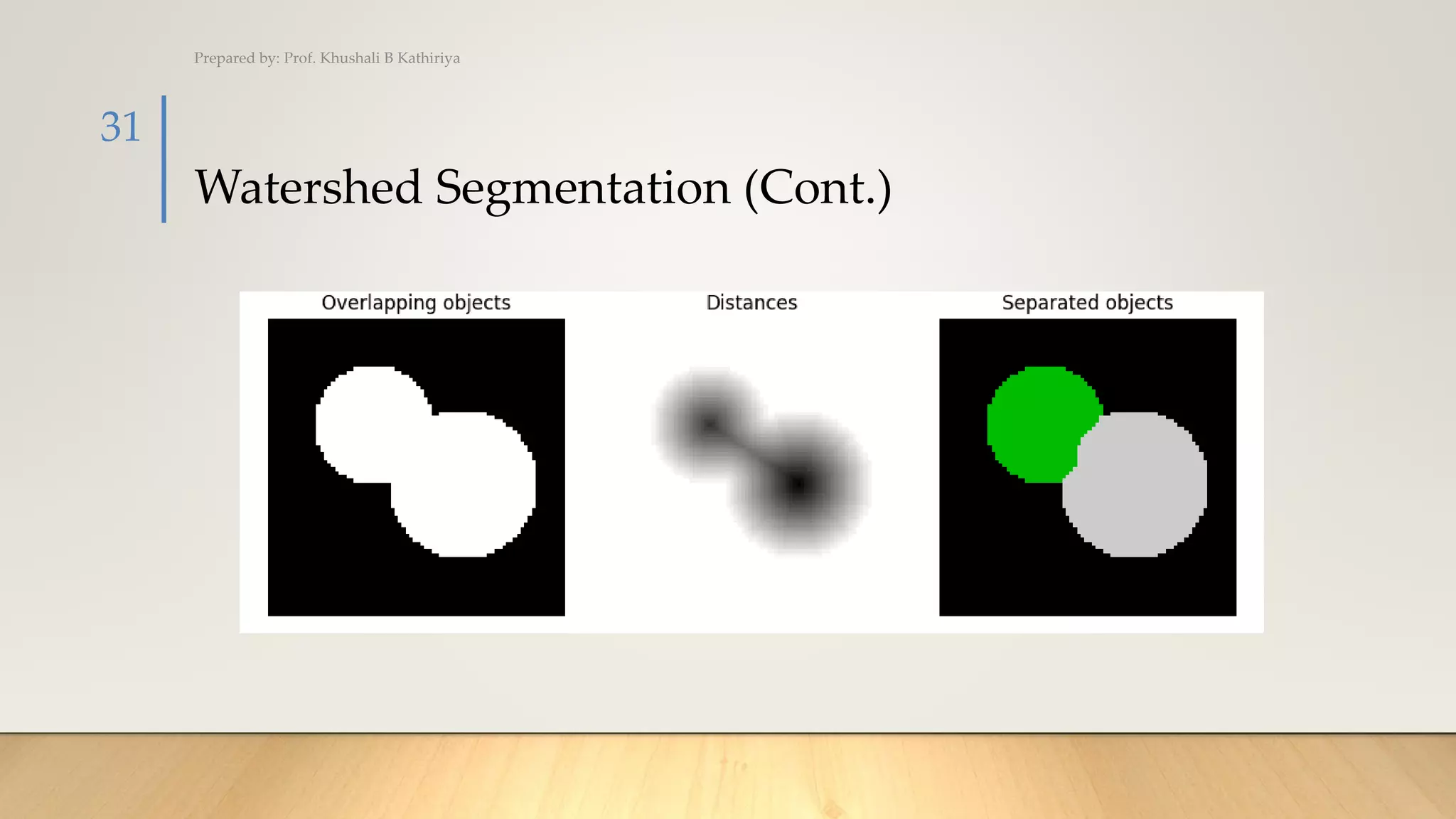
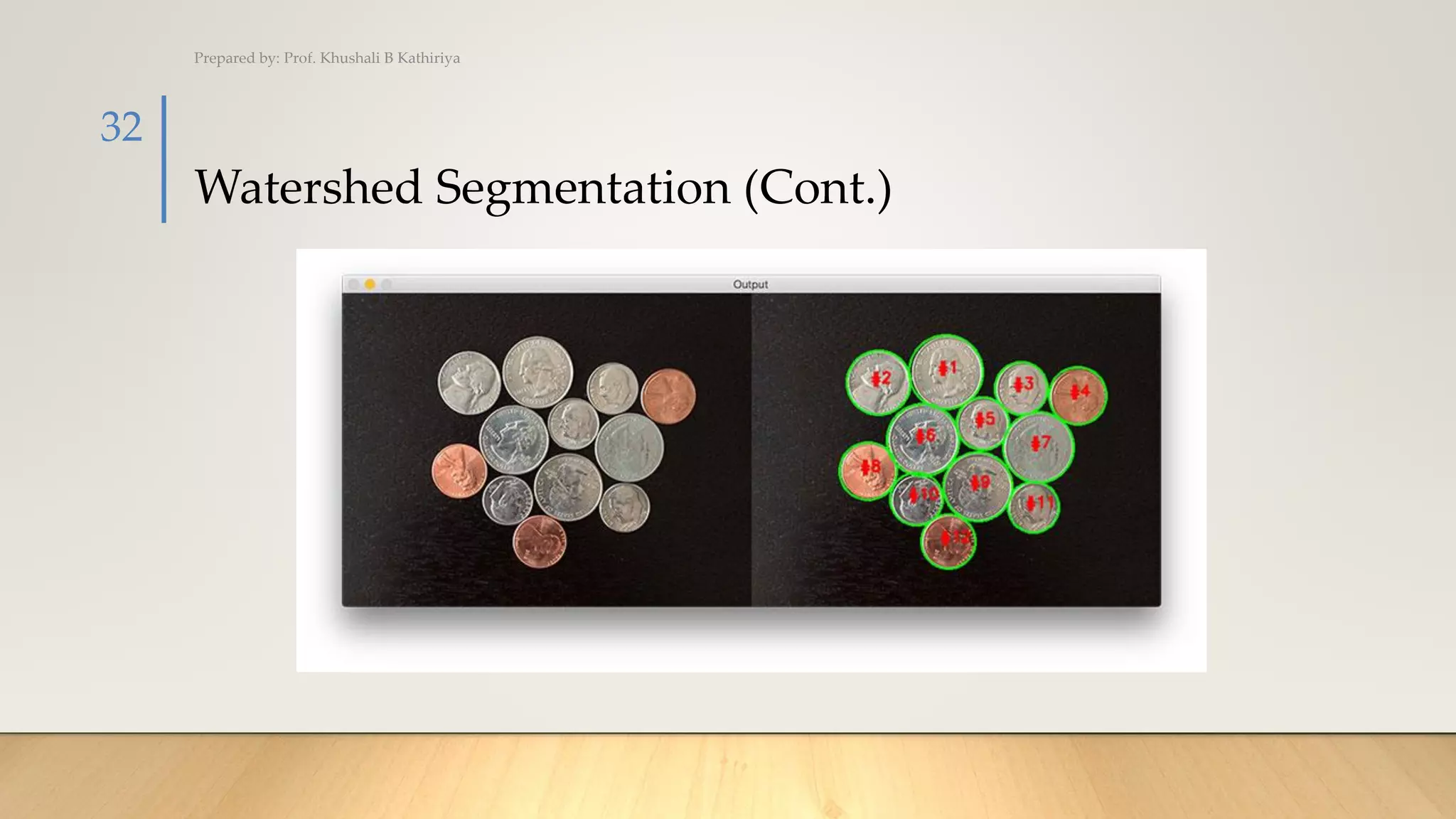
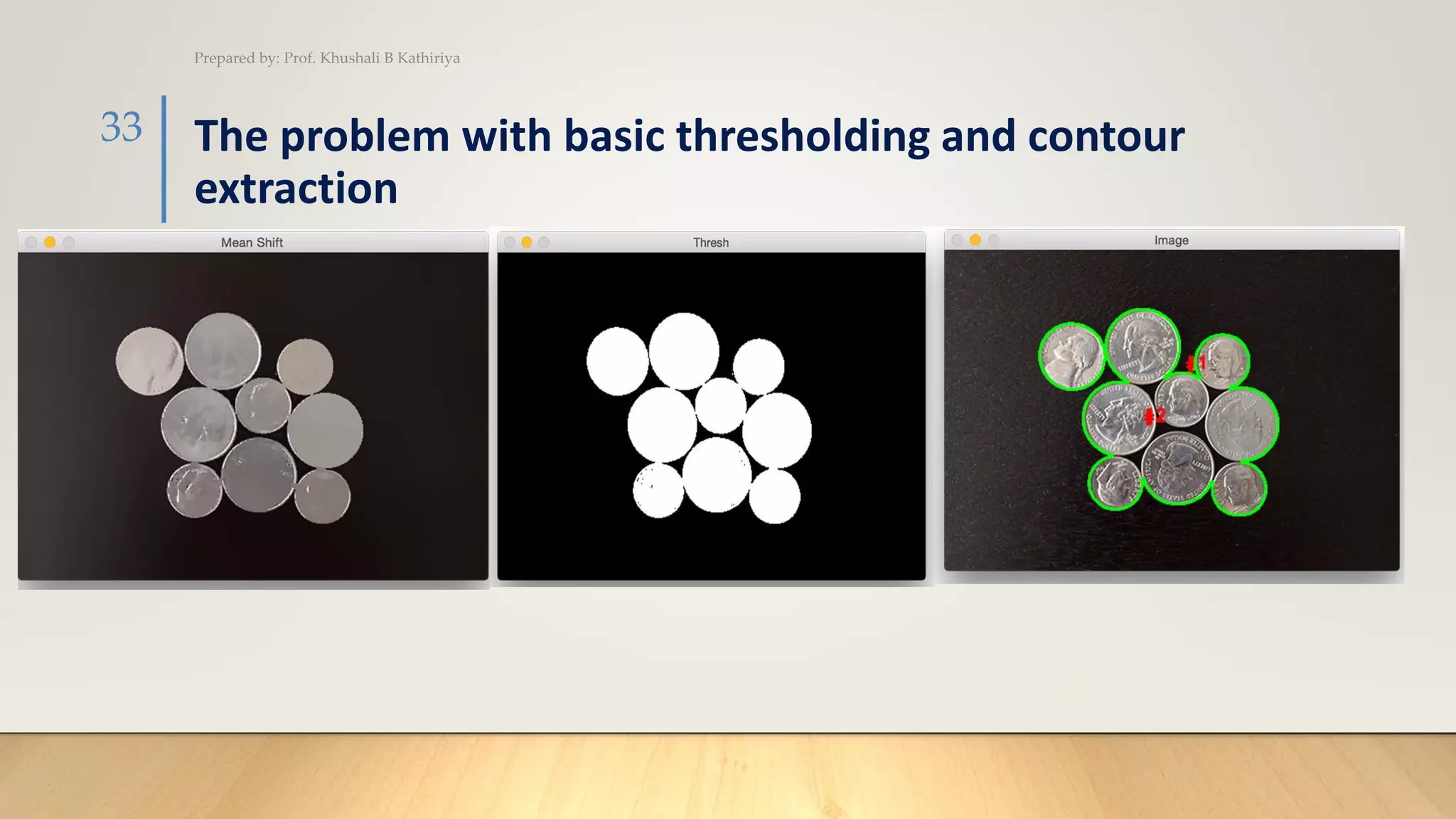
• The watershed algorithm is a classic algorithm used for segmentation and is
especially useful when extracting touching or overlapping objects in images, such
as the coins in the figure above.
• Using traditional image processing methods such as thresholding and contour
detection, we would be unable to extract each individual coin from the image —
but by leveraging the watershed algorithm, we are able to detect and extract
each coin without a problem.
• When utilizing the watershed algorithm we must start with user-defined markers.
These markers can be either manually defined via point-and-click, or we
can automatically or heuristically define them using methods such as thresholding
and/or morphological operations.
Prepared by: Prof. Khushali B Kathiriya
30
Watershed Segmentation (Cont.)
Prepared by: Prof. Khushali B Kathiriya
31
Watershed Segmentation (Cont.)
Prepared by: Prof. Khushali B Kathiriya
32
The problem with basic thresholding and contour
extraction
Prepared by: Prof. Khushali B Kathiriya
33
Using the watershed algorithm for segmentation
Prepared by: Prof. Khushali B Kathiriya
34
Graph based Segmentation
PREPARED BY:
PROF. KHUSHALI B. KATHIRIYA
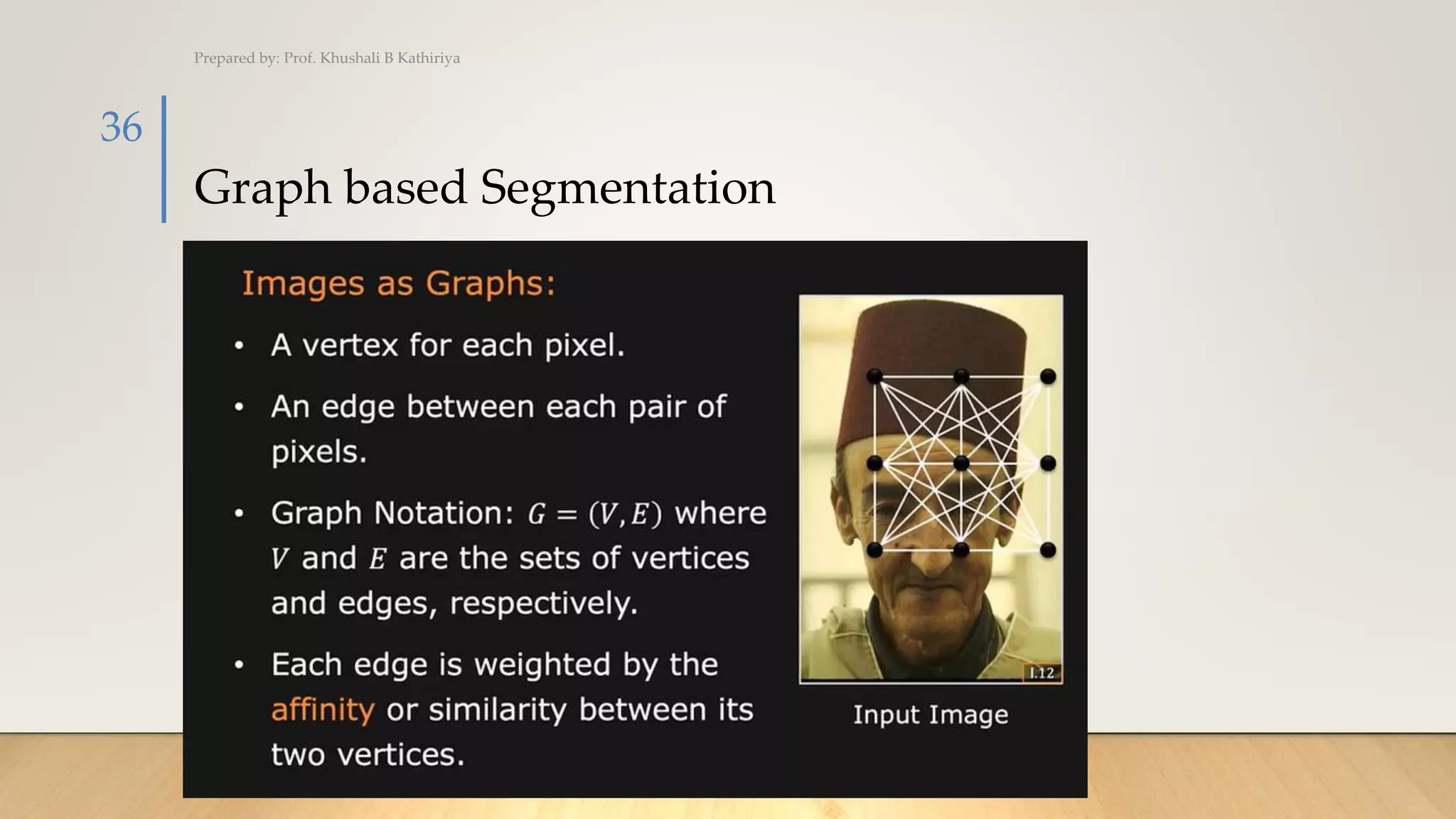
Graph based Segmentation
Prepared by: Prof. Khushali B Kathiriya
36
Measuring Affinity
Prepared by: Prof. Khushali B Kathiriya
37
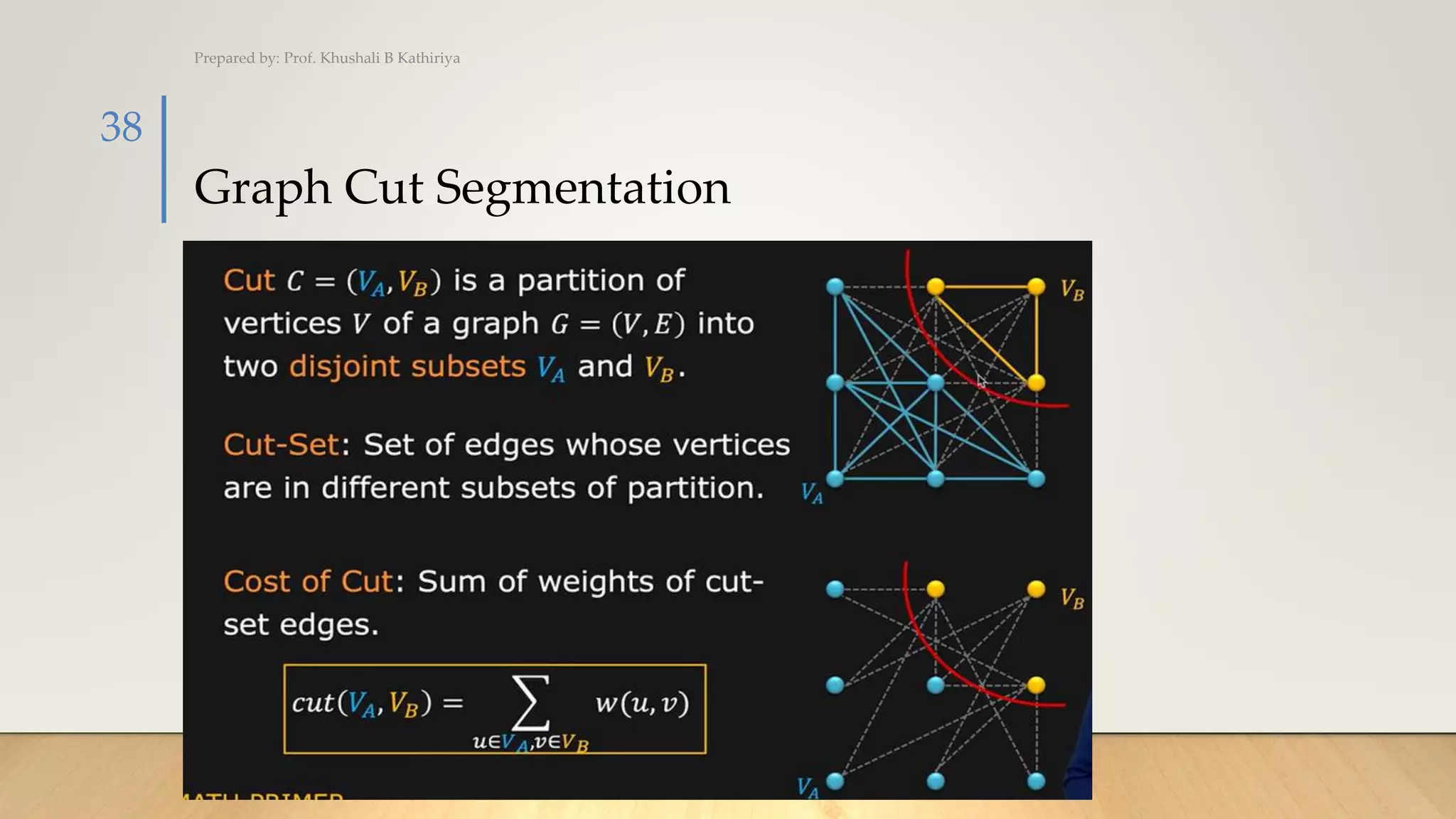
Graph Cut Segmentation
Prepared by: Prof. Khushali B Kathiriya
38
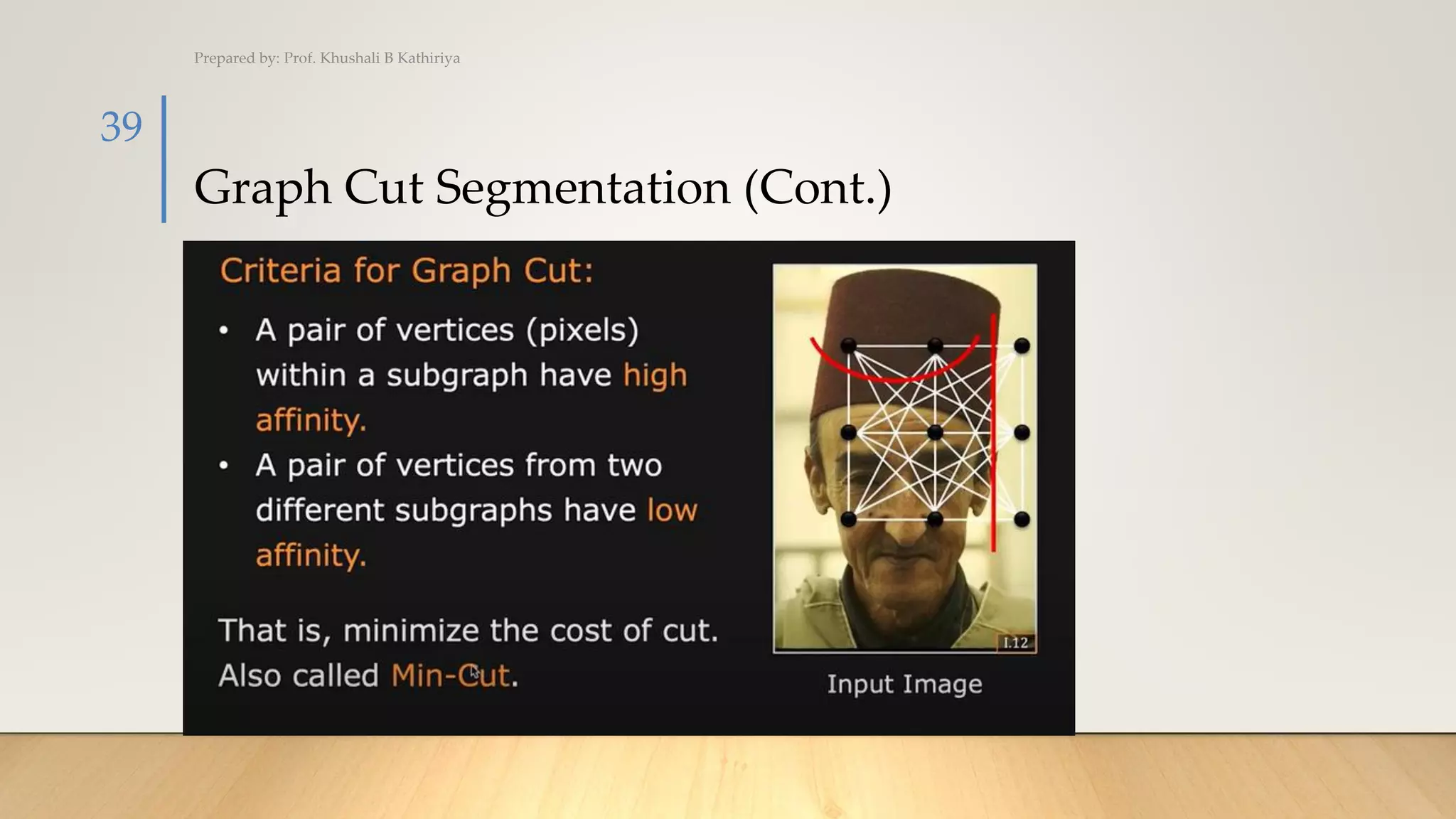
Graph Cut Segmentation (Cont.)
Prepared by: Prof. Khushali B Kathiriya
39
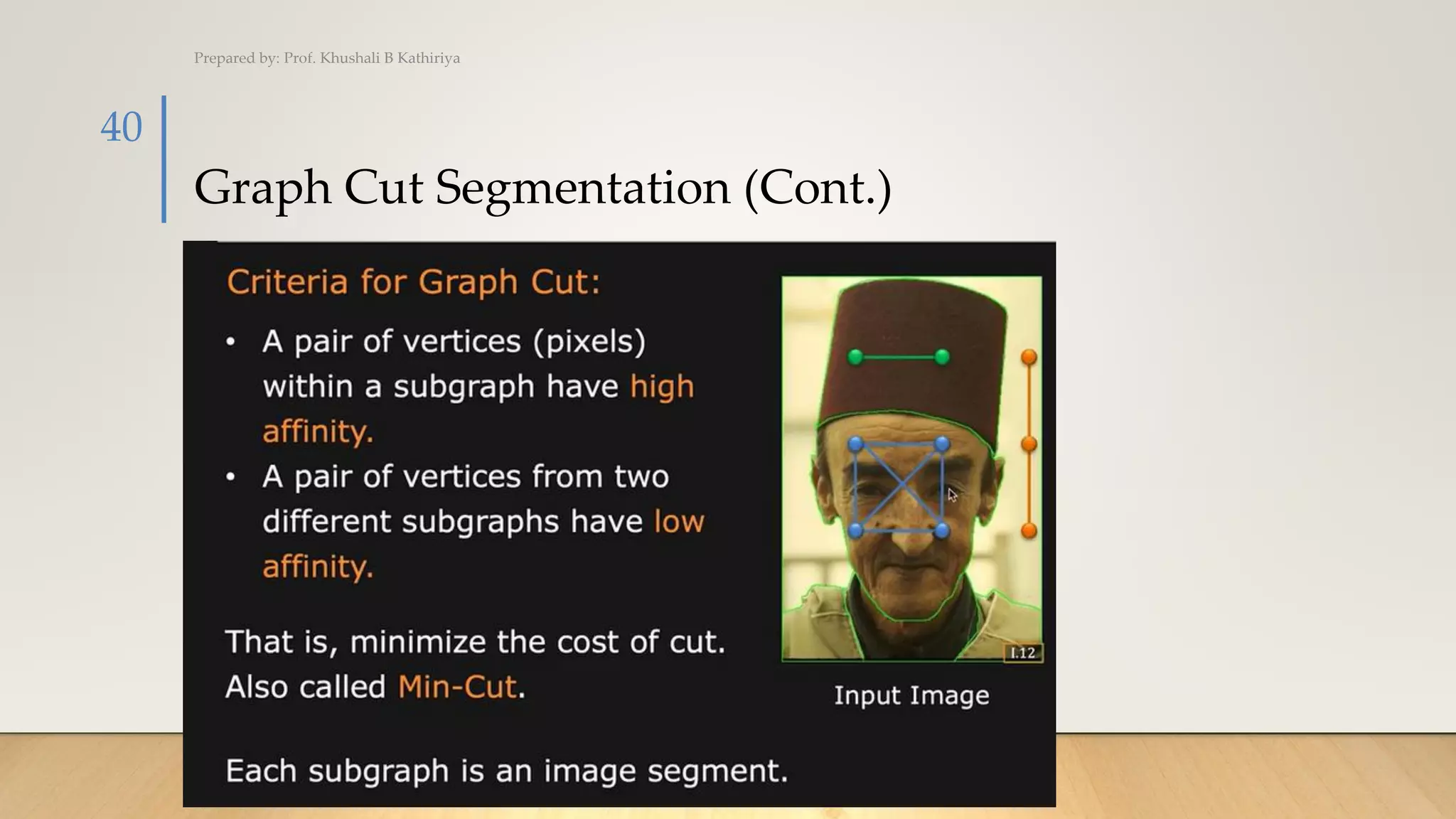
Graph Cut Segmentation (Cont.)
Prepared by: Prof. Khushali B Kathiriya
40
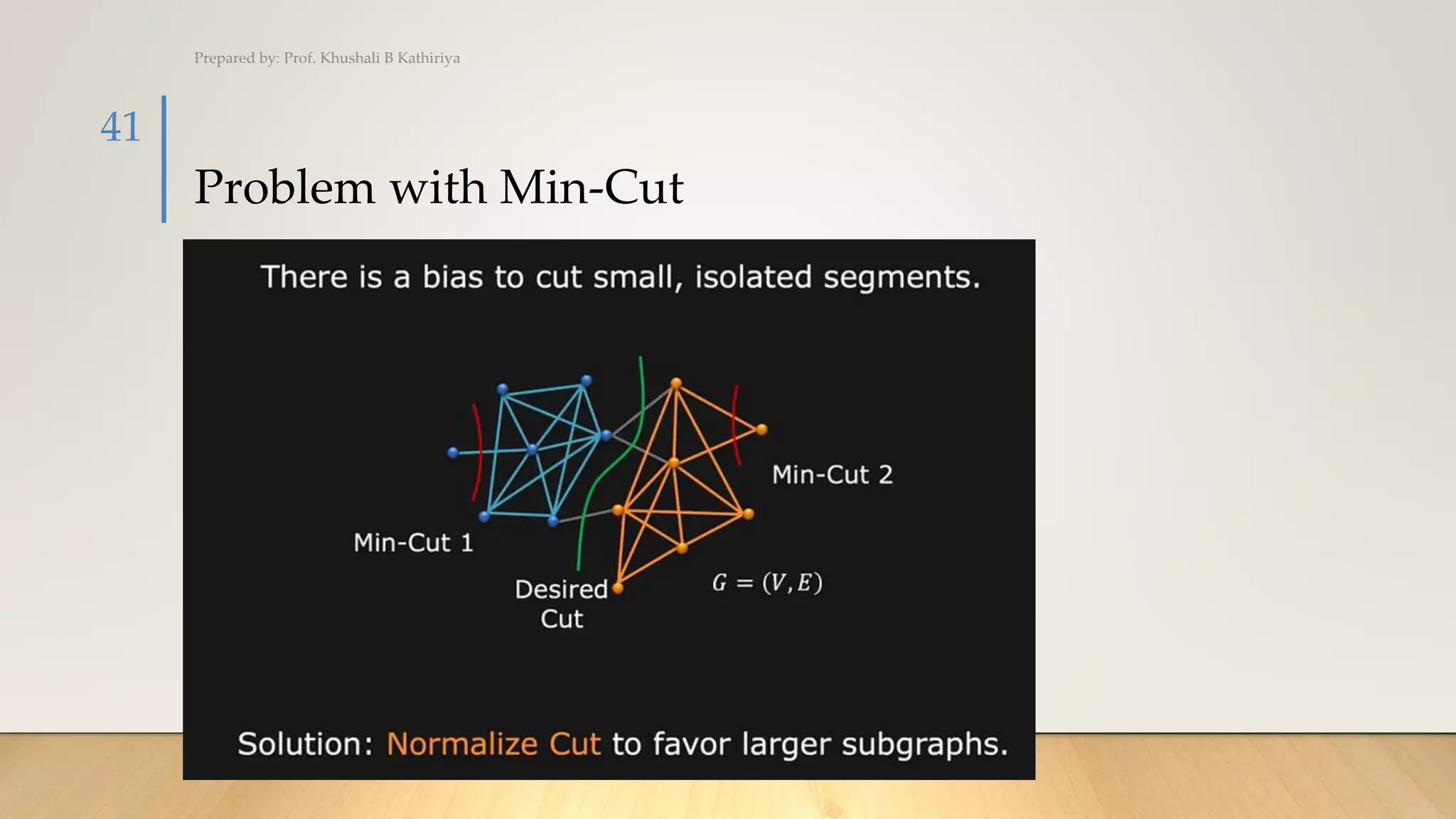
Problem with Min-Cut
Prepared by: Prof. Khushali B Kathiriya
41
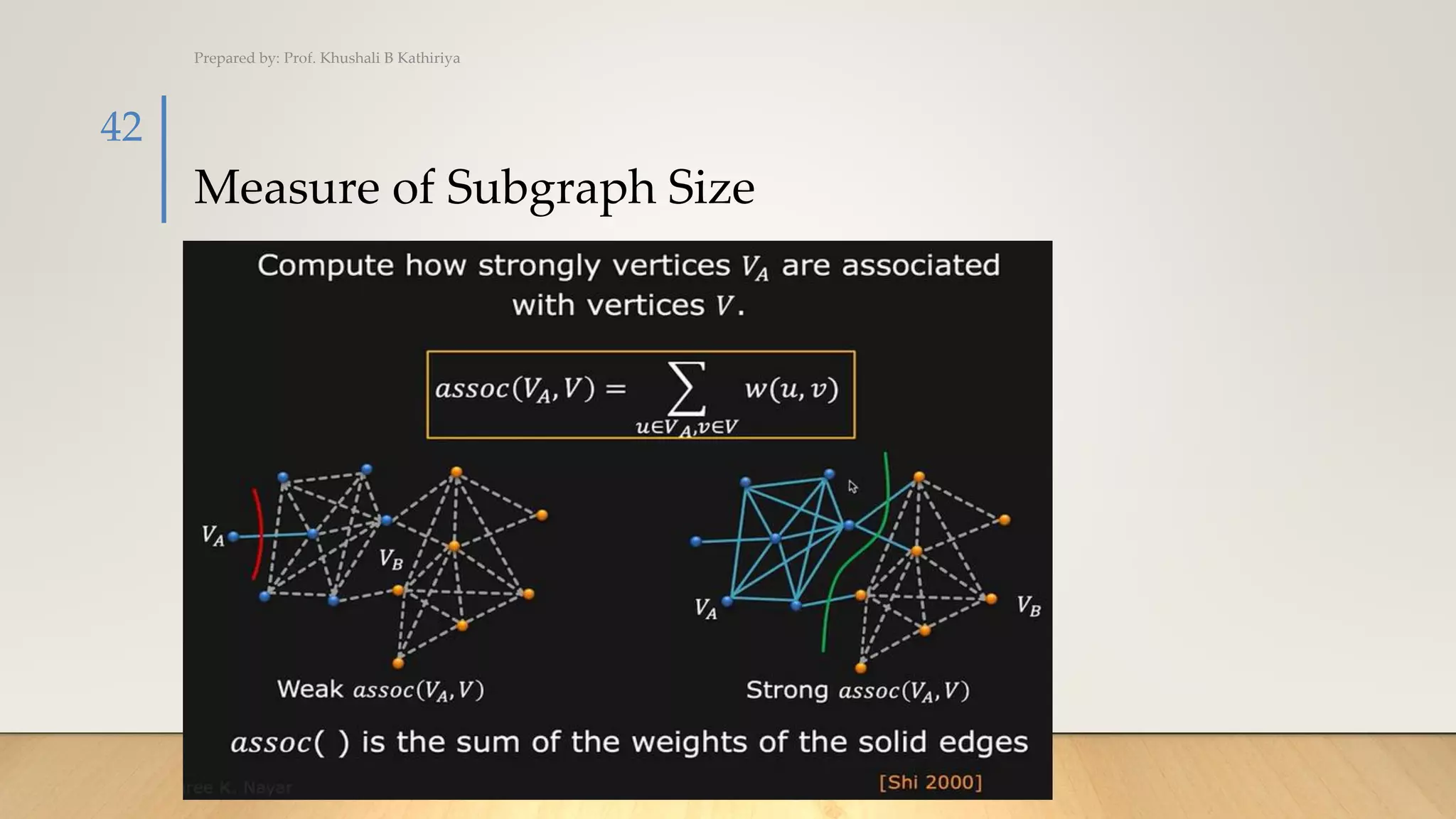
Measure of Subgraph Size
Prepared by: Prof. Khushali B Kathiriya
42
Normalized Cut (Ncut)
PREPARED BY:
PROF. KHUSHALI B. KATHIRIYA
Normalized Cut(Ncut)
Prepared by: Prof. Khushali B Kathiriya
44
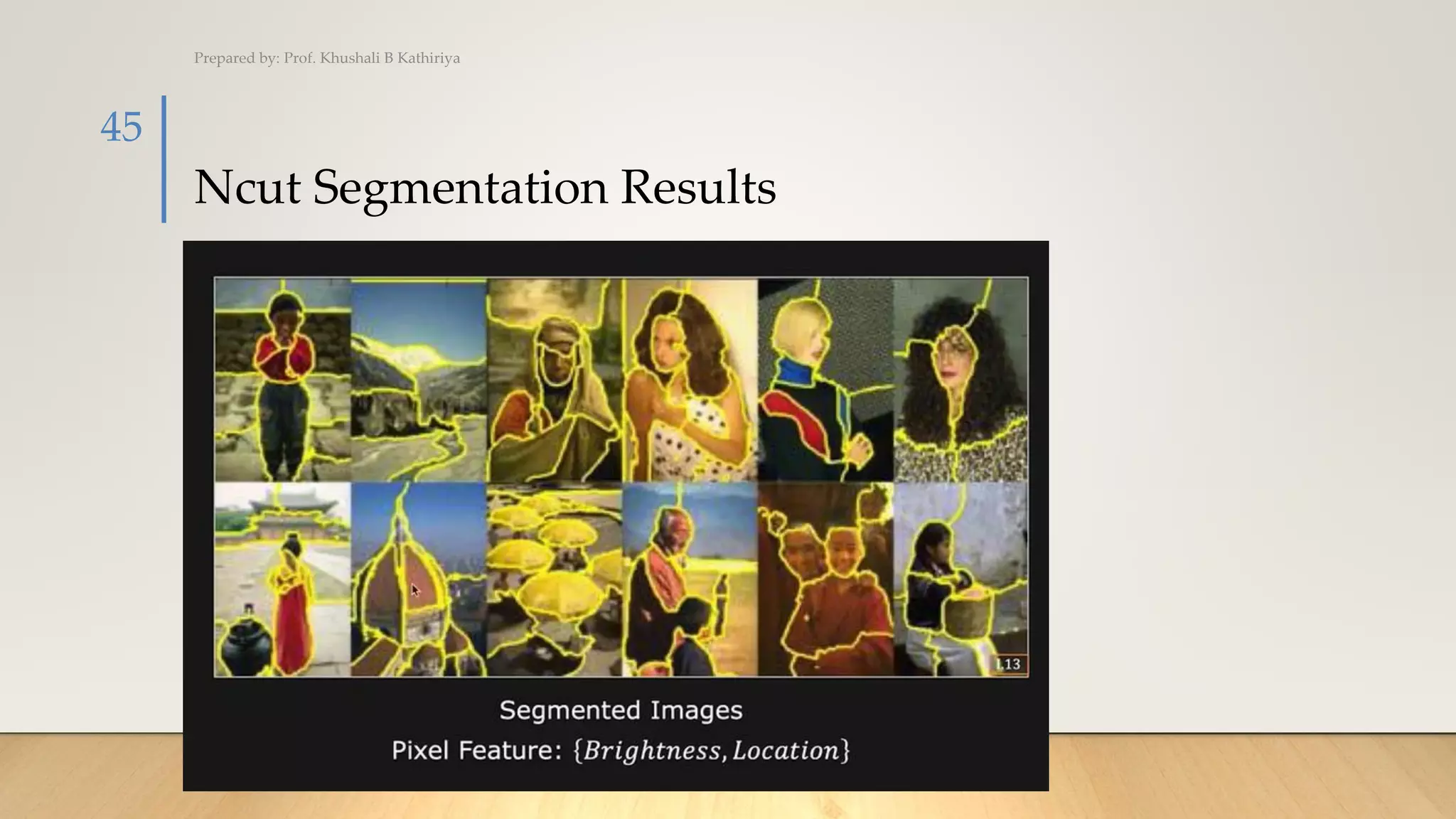
Ncut Segmentation Results
Prepared by: Prof. Khushali B Kathiriya
45
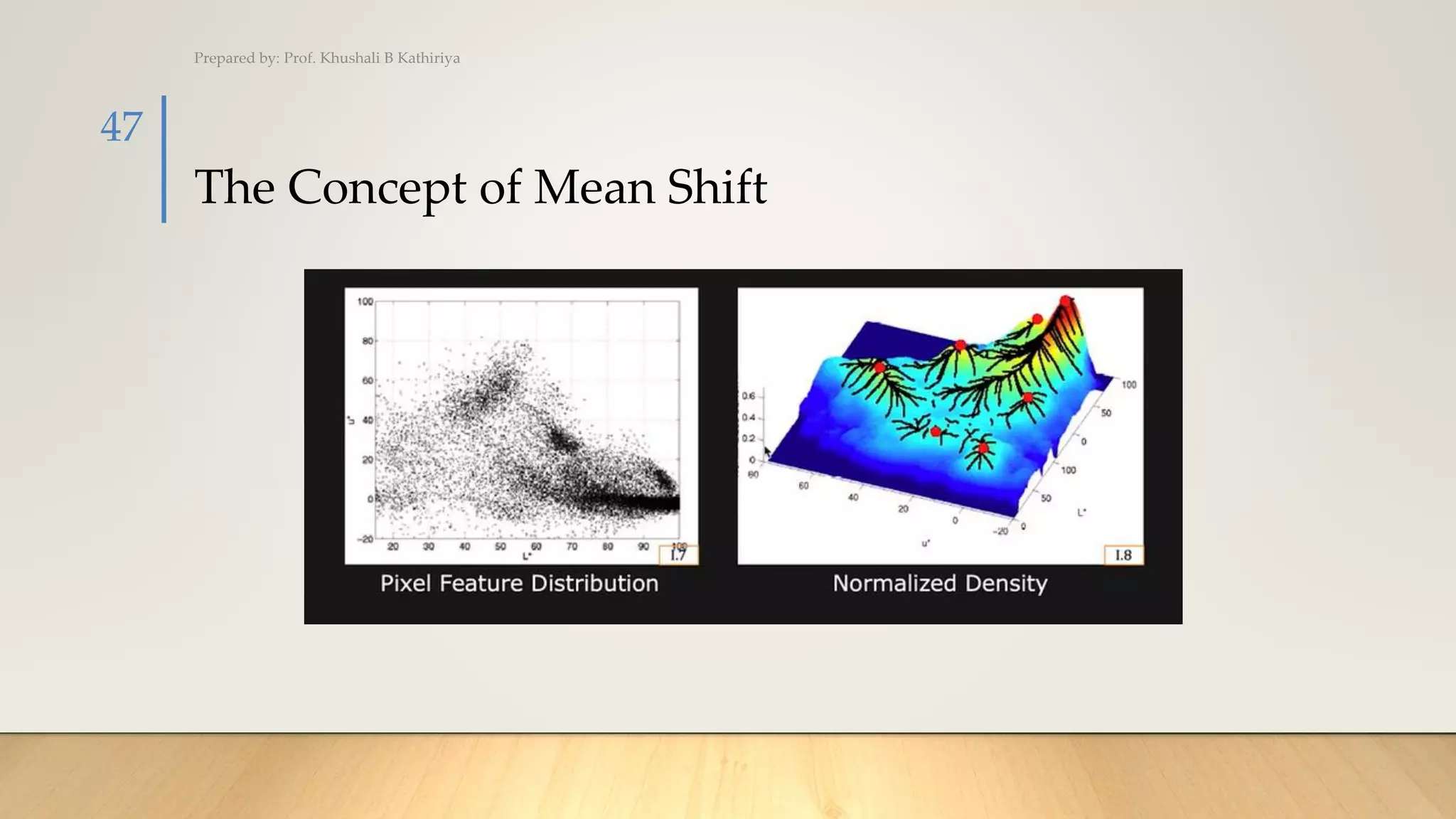
The Concept of Mean Shift
PREPARED BY:
PROF. KHUSHALI B. KATHIRIYA
The Concept of Mean Shift
Prepared by: Prof. Khushali B Kathiriya
47
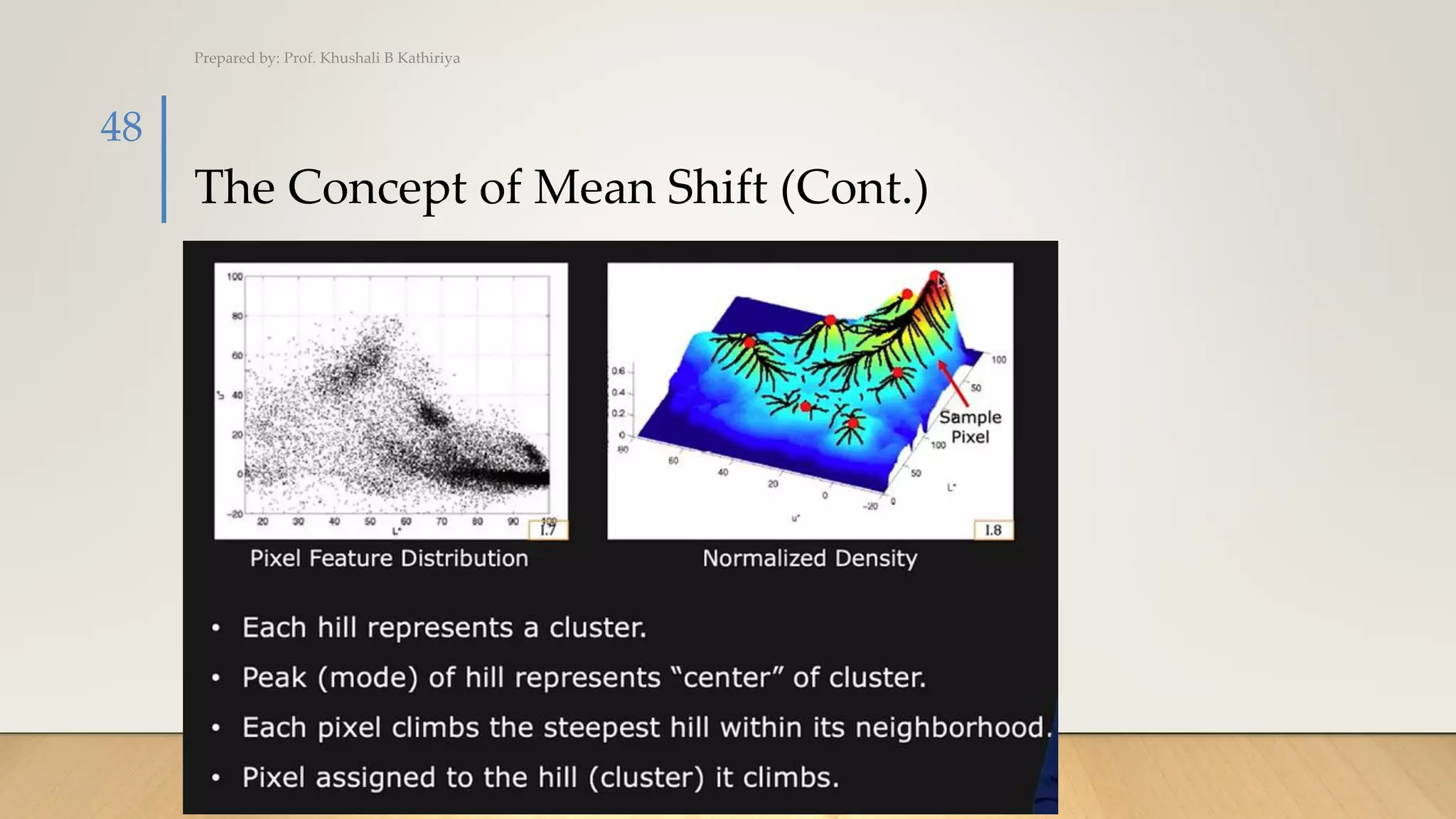
The Concept of Mean Shift (Cont.)
Prepared by: Prof. Khushali B Kathiriya
48
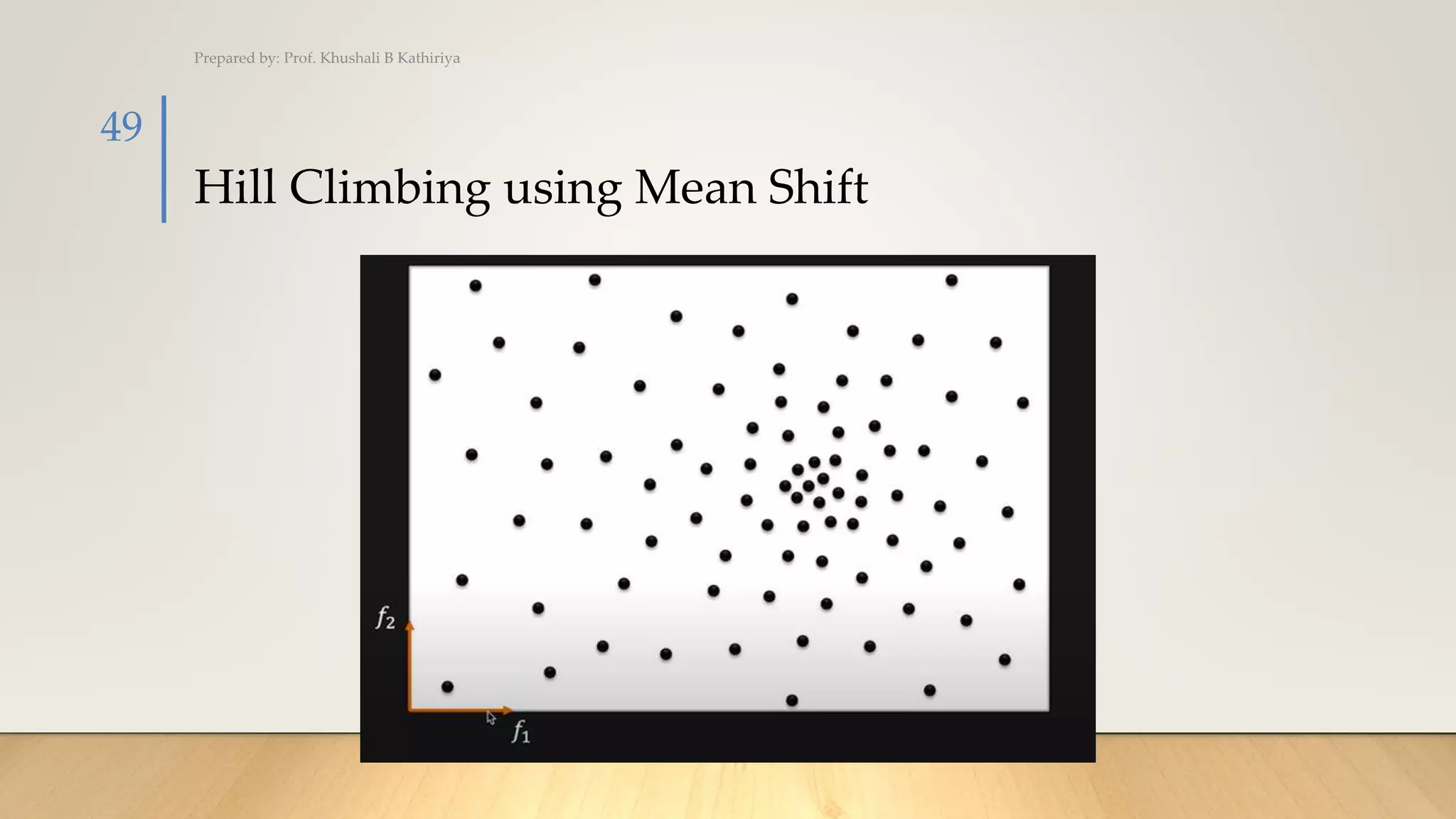
Hill Climbing using Mean Shift
Prepared by: Prof. Khushali B Kathiriya
49
Hill Climbing using Mean Shift (Cont.)
Prepared by: Prof. Khushali B Kathiriya
50
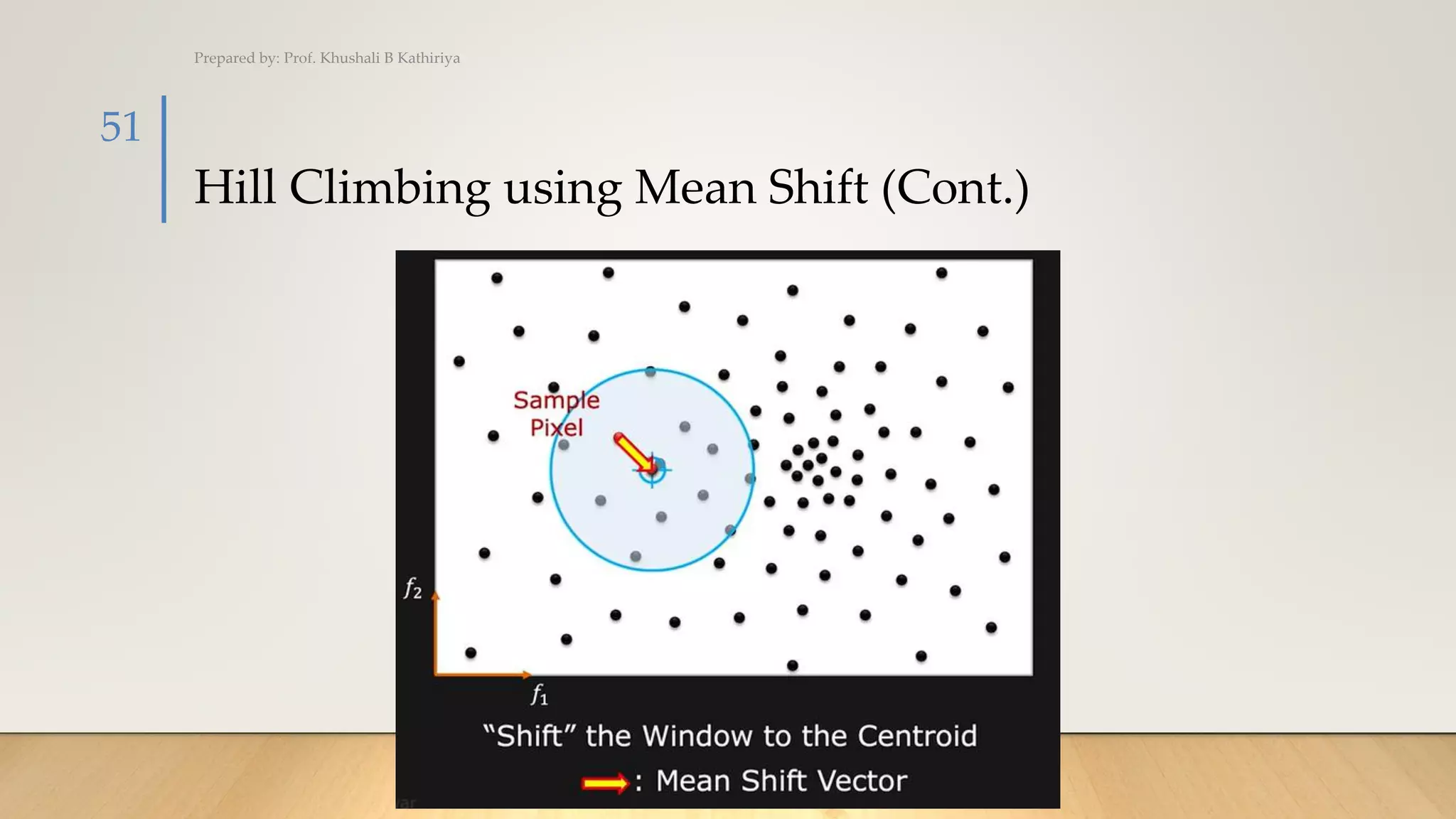
Hill Climbing using Mean Shift (Cont.)
Prepared by: Prof. Khushali B Kathiriya
51
Hill Climbing using Mean Shift (Cont.)
Prepared by: Prof. Khushali B Kathiriya
52
Hill Climbing using Mean Shift (Cont.)
Prepared by: Prof. Khushali B Kathiriya
53
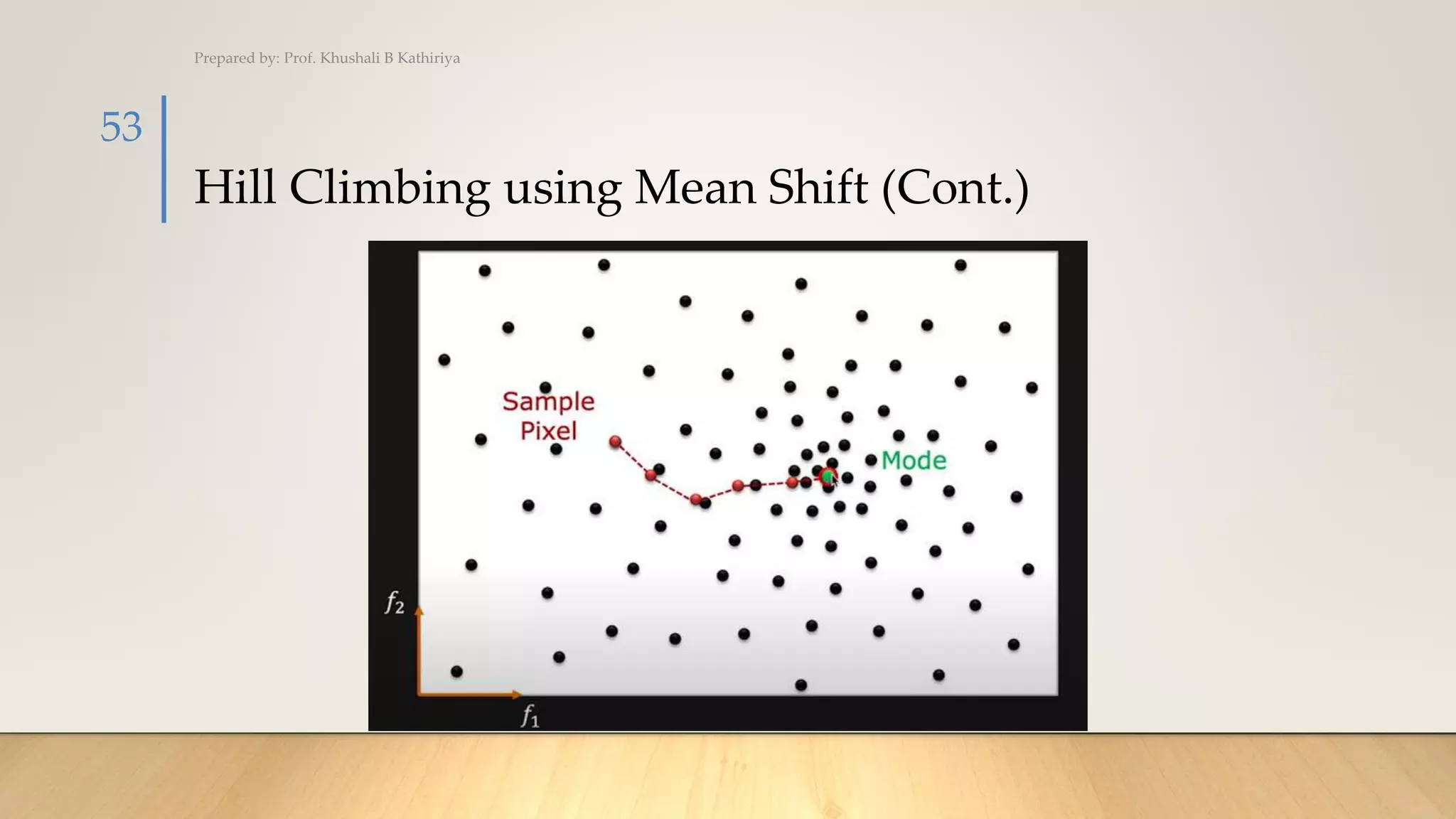
Hill Climbing using Mean Shift (Cont.)
Prepared by: Prof. Khushali B Kathiriya
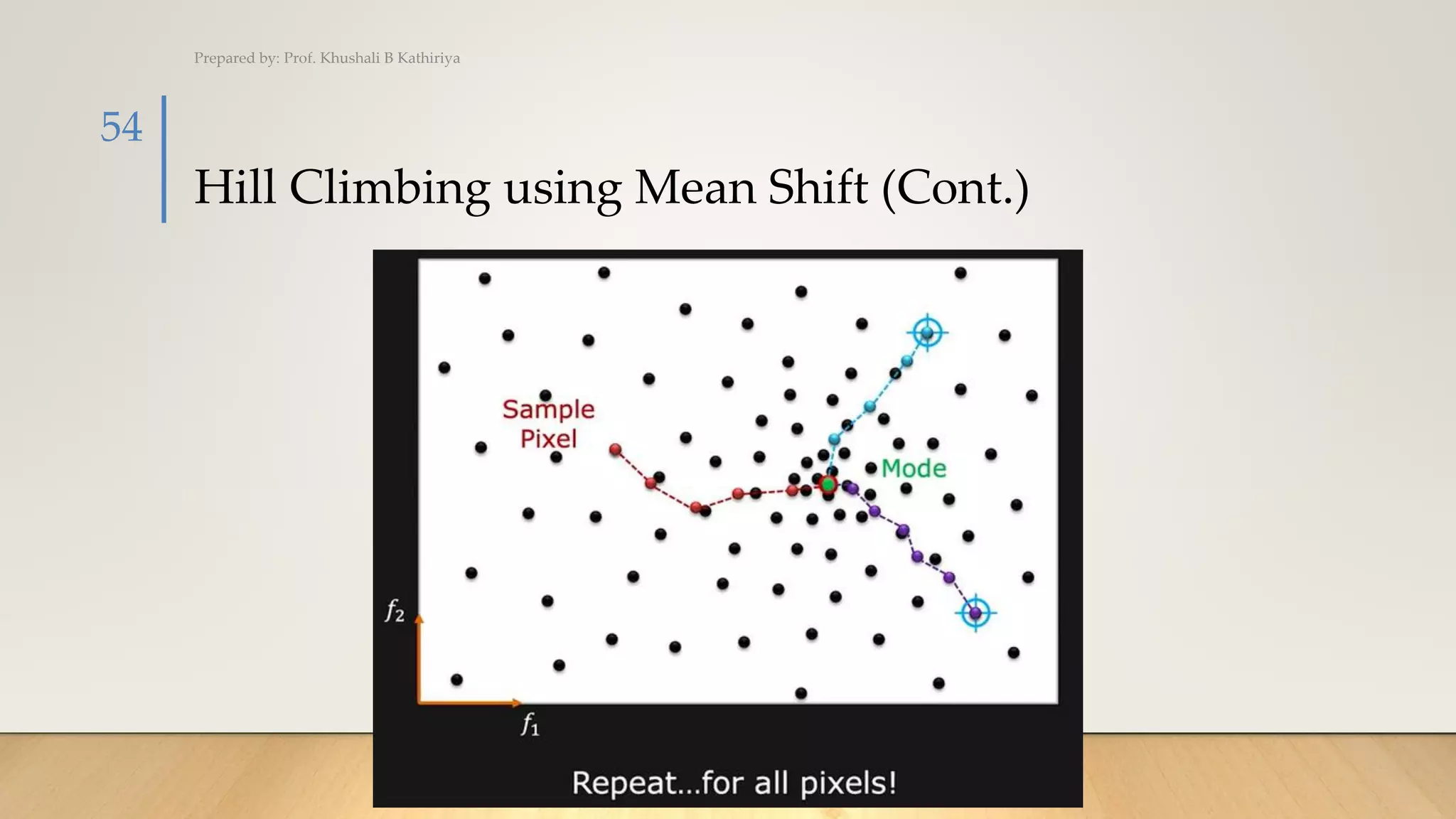
54
Mean Shift Algorithm
Prepared by: Prof. Khushali B Kathiriya
55
K-mean Vs. Mean shift
Prepared by: Prof. Khushali B Kathiriya
56
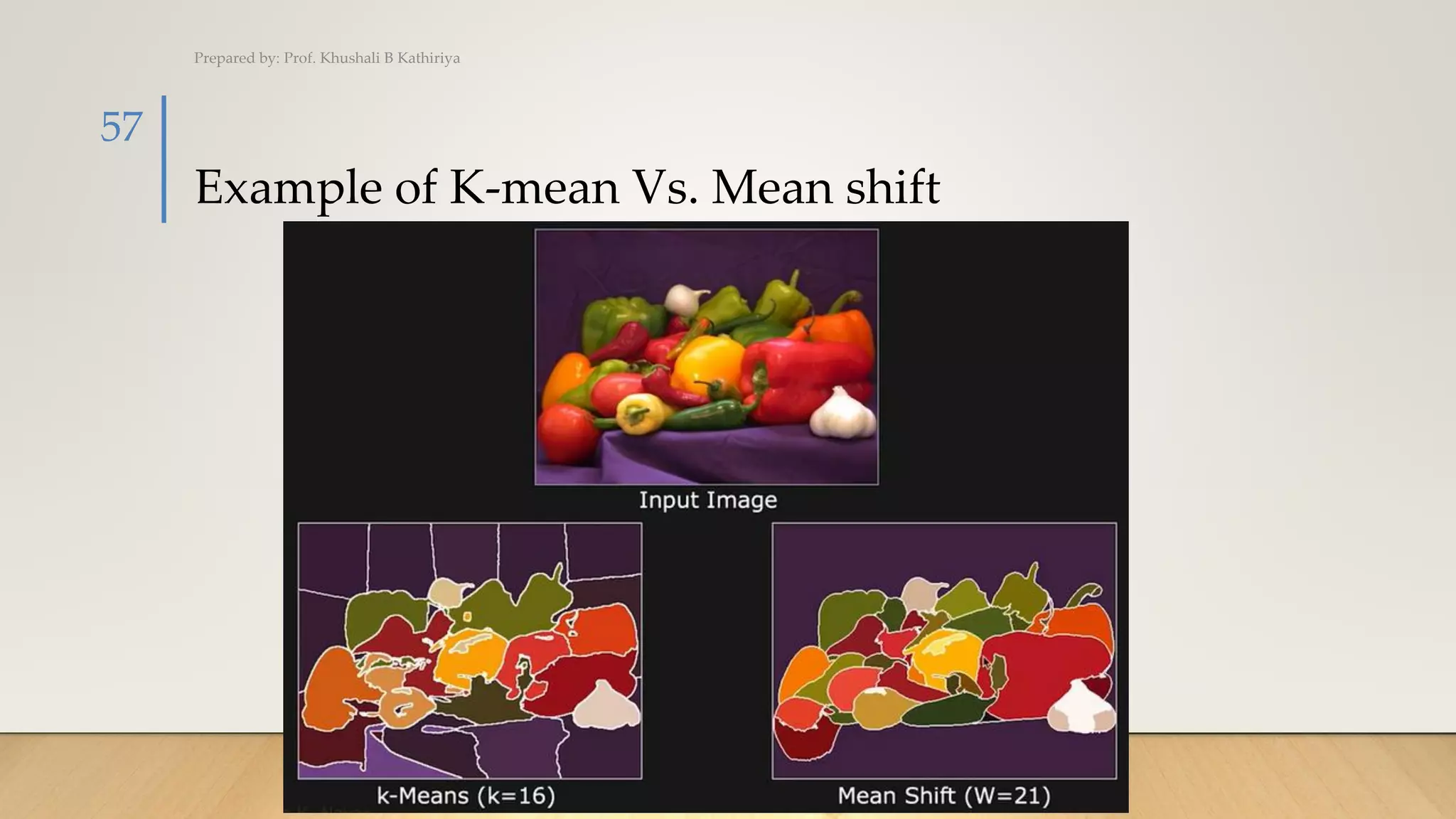
Example of K-mean Vs. Mean shift
Prepared by: Prof. Khushali B Kathiriya
57
Result of Mean Shift Segmentation
Prepared by: Prof. Khushali B Kathiriya
58

Cv_Chap 4 Segmentation

  • 1.
    Computer Vision Chap.4 :Segmentation SUB CODE: 3171614 SEMESTER: 7TH IT PREPARED BY: PROF. KHUSHALI B. KATHIRIYA
  • 2.
    Outline • Active Contours •Split and Merge • Watershed • Region Splitting and Merging • Graph-based Segmentation • Mean shift and Model finding • Normalized Cut Prepared by: Prof. Khushali B Kathiriya 2
  • 3.
  • 4.
    Active Contour (BoundaryDetection) • Segmentation is a section of image processing for the separation or segregation of information from the required target region of the image. There are different techniques used for segmentation of pixels of interest from the image. • Active contour is one of the active models in segmentation techniques, which makes use of the energy constraints and forces in the image for separation of region of interest. Active contour defines a separate boundary or curvature for the regions of target object for segmentation. Prepared by: Prof. Khushali B Kathiriya 4
  • 5.
    Active Contour(Cont.) • Applicationof Active Contour • Medical Imaging • Brain CT images • MRI images • Cardiac images • Motion Tracking • Stereo Tracking Prepared by: Prof. Khushali B Kathiriya 5
  • 6.
    What is ActiveContour? Prepared by: Prof. Khushali B Kathiriya 6
  • 7.
    What is ActiveContour? Prepared by: Prof. Khushali B Kathiriya 7
  • 8.
    Example of ActiveContour Prepared by: Prof. Khushali B Kathiriya 8
  • 9.
    Example of ActiveContour (Cont.) Prepared by: Prof. Khushali B Kathiriya 9 Medical Imaging
  • 10.
    Example of ActiveContour (Cont.) Prepared by: Prof. Khushali B Kathiriya 10 Motion Tracking
  • 11.
    Split and Merge PREPAREDBY: PROF. KHUSHALI B. KATHIRIYA
  • 12.
    Split and Merge •Split and merge segmentation is an image processing technique used to segment an image. The image is successively split into quadrants based on a homogeneity criterion and similar regions are merged to create the segmented result. The technique incorporates a quadtree data structure, meaning that there is a parent-child node relationship. The total region is a parent, and each of the four splits is a child. Prepared by: Prof. Khushali B Kathiriya 12
  • 13.
    Split and Merge Preparedby: Prof. Khushali B Kathiriya 13
  • 14.
    Split and MergeExample • The following example shows the segmentation of a gray scale image using matlab. The homogeneity criterion is thresholding, max(region)-min(region) < 10 for a region to be homogeneous. Prepared by: Prof. Khushali B Kathiriya 14
  • 15.
    Split and MergeExample • The blocks created during splitting are shown in the following picture: Prepared by: Prof. Khushali B Kathiriya 15
  • 16.
    Split and MergeExample • And the segmented image is below. Prepared by: Prof. Khushali B Kathiriya 16
  • 17.
    Region Split andMerge PREPARED BY: PROF. KHUSHALI B. KATHIRIYA
  • 18.
    Region Split andMerge Example (Cont.) • Apply Region Split on following image. Assume that threshold value be <=3. Prepared by: Prof. Khushali B Kathiriya 18 5 6 6 6 7 7 6 6 6 7 6 7 5 5 4 7 6 6 4 4 3 2 5 6 5 4 5 4 2 3 4 6 0 3 2 3 3 2 4 7 0 0 0 0 2 2 5 6 1 1 0 1 0 3 4 4 1 0 1 0 2 3 5 4
  • 19.
    Region Split andMerge Example (Cont.) • Step 1: Identify Max and Min pixel value from the whole image • Max = 7 • Min = 0 • Max-Min= 7 • 7 <= 3 (Condition false) • Split image Prepared by: Prof. Khushali B Kathiriya 19 5 6 6 6 7 7 6 6 6 7 6 7 5 5 4 7 6 6 4 4 3 2 5 6 5 4 5 4 2 3 4 6 0 3 2 3 3 2 4 7 0 0 0 0 2 2 5 6 1 1 0 1 0 3 4 4 1 0 1 0 2 3 5 4
  • 20.
    Region Split andMerge Example (Cont.) • Step 1: Identify Max and Min pixel value from the whole image • Max = 7 • Min = 0 • Max-Min= 7 • 7 <= 3 (Condition false) • Split R image into R1a,R2b,cR3,R4d Prepared by: Prof. Khushali B Kathiriya 20 5 6 6 6 7 7 6 6 6 7 6 7 5 5 4 7 6 6 4 4 3 2 5 6 5 4 5 4 2 3 4 6 0 3 2 3 3 2 4 7 0 0 0 0 2 2 5 6 1 1 0 1 0 3 4 4 1 0 1 0 2 3 5 4 R1a R2b R3c R4d
  • 21.
    Region Split andMerge Example (Cont.) • Step 2: Compute for R1a region. Min and Max • Max=7 • Min=4 • Max-Min=7-4=3 • 3 <= 3 (Condition true) • No need to split R1a Prepared by: Prof. Khushali B Kathiriya 21 5 6 6 6 7 7 6 6 6 7 6 7 5 5 4 7 6 6 4 4 3 2 5 6 5 4 5 4 2 3 4 6 0 3 2 3 3 2 4 7 0 0 0 0 2 2 5 6 1 1 0 1 0 3 4 4 1 0 1 0 2 3 5 4 R1a R2b R3c R4d
  • 22.
    Region Split andMerge Example (Cont.) • Step 3: compute for R3c region. Min and Max • Max=3 • Min=0 • Max-Min=3-0=3 • 3 <= 3 (Condition true) • No need to split R3c Prepared by: Prof. Khushali B Kathiriya 22 5 6 6 6 7 7 6 6 6 7 6 7 5 5 4 7 6 6 4 4 3 2 5 6 5 4 5 4 2 3 4 6 0 3 2 3 3 2 4 7 0 0 0 0 2 2 5 6 1 1 0 1 0 3 4 4 1 0 1 0 2 3 5 4 R1a R2b R3c R4d
  • 23.
    Region Split andMerge Example (Cont.) • Step 4: Compute for R2b region. Min and Max • Max=7 • Min=2 • Max-Min=7-2=5 Prepared by: Prof. Khushali B Kathiriya 23 5 6 6 6 7 7 6 6 6 7 6 7 5 5 4 7 6 6 4 4 3 2 5 6 5 4 5 4 2 3 4 6 0 3 2 3 3 2 4 7 0 0 0 0 2 2 5 6 1 1 0 1 0 3 4 4 1 0 1 0 2 3 5 4 R1a R2b R3c R4d
  • 24.
    Region Split andMerge Example (Cont.) • Step 4: Compute for R2b region. Min and Max • Max=7 • Min=2 • Max-Min=7-2=5 • 5 <= 3 (Condition false) • Split R2b into R2b1,R2b2,R2b3,R2b4. Prepared by: Prof. Khushali B Kathiriya 24 5 6 6 6 7 7 6 6 6 7 6 7 5 5 4 7 6 6 4 4 3 2 5 6 5 4 5 4 2 3 4 6 0 3 2 3 3 2 4 7 0 0 0 0 2 2 5 6 1 1 0 1 0 3 4 4 1 0 1 0 2 3 5 4 R1a R2b R3c R4d
  • 25.
    Region Split andMerge Example (Cont.) • Step 5: Compute for R2b1,R2b2,R2b3,R2b4 region. Min and Max • For all R2b1,R2b2,R2b3,R2b4 Condition have satisfied so no need to splitting. Prepared by: Prof. Khushali B Kathiriya 25 5 6 6 6 7 7 6 6 6 7 6 7 5 5 4 7 6 6 4 4 3 2 5 6 5 4 5 4 2 3 4 6 0 3 2 3 3 2 4 7 0 0 0 0 2 2 5 6 1 1 0 1 0 3 4 4 1 0 1 0 2 3 5 4 R1a R2b R3c R4d
  • 26.
    Region Split andMerge Example (Cont.) • Step 6: Compute for R4d region. Min and Max • Max=7 • Min=0 • Max-Min=7-0=7 Prepared by: Prof. Khushali B Kathiriya 26 5 6 6 6 7 7 6 6 6 7 6 7 5 5 4 7 6 6 4 4 3 2 5 6 5 4 5 4 2 3 4 6 0 3 2 3 3 2 4 7 0 0 0 0 2 2 5 6 1 1 0 1 0 3 4 4 1 0 1 0 2 3 5 4 R1a R2b R3c R4d
  • 27.
    Region Split andMerge Example (Cont.) • Step 6: Compute for R4d region. Min and Max • Max=7 • Min=0 • Max-Min=7-0=7 • 7 <= 3 (Condition false) • Split R4d into R4d1,R4d2,R4d3,R4d4. Prepared by: Prof. Khushali B Kathiriya 27 5 6 6 6 7 7 6 6 6 7 6 7 5 5 4 7 6 6 4 4 3 2 5 6 5 4 5 4 2 3 4 6 0 3 2 3 3 2 4 7 0 0 0 0 2 2 5 6 1 1 0 1 0 3 4 4 1 0 1 0 2 3 5 4 R1a R2b R3c R4d
  • 28.
    Region Split andMerge Example (Cont.) • Step 7: Compute for R4d1,R4d2,R4d3,R4d4 region. Min and Max • For all R4d1,R4d2,R4d3,R4d4 Condition have satisfied so no need to splitting. Prepared by: Prof. Khushali B Kathiriya 28 5 6 6 6 7 7 6 6 6 7 6 7 5 5 4 7 6 6 4 4 3 2 5 6 5 4 5 4 2 3 4 6 0 3 2 3 3 2 4 7 0 0 0 0 2 2 5 6 1 1 0 1 0 3 4 4 1 0 1 0 2 3 5 4 R1a R2b R3c R4d
  • 29.
  • 30.
    Watershed Segmentation • Thewatershed algorithm is a classic algorithm used for segmentation and is especially useful when extracting touching or overlapping objects in images, such as the coins in the figure above. • Using traditional image processing methods such as thresholding and contour detection, we would be unable to extract each individual coin from the image — but by leveraging the watershed algorithm, we are able to detect and extract each coin without a problem. • When utilizing the watershed algorithm we must start with user-defined markers. These markers can be either manually defined via point-and-click, or we can automatically or heuristically define them using methods such as thresholding and/or morphological operations. Prepared by: Prof. Khushali B Kathiriya 30
  • 31.
    Watershed Segmentation (Cont.) Preparedby: Prof. Khushali B Kathiriya 31
  • 32.
    Watershed Segmentation (Cont.) Preparedby: Prof. Khushali B Kathiriya 32
  • 33.
    The problem withbasic thresholding and contour extraction Prepared by: Prof. Khushali B Kathiriya 33
  • 34.
    Using the watershedalgorithm for segmentation Prepared by: Prof. Khushali B Kathiriya 34
  • 35.
    Graph based Segmentation PREPAREDBY: PROF. KHUSHALI B. KATHIRIYA
  • 36.
    Graph based Segmentation Preparedby: Prof. Khushali B Kathiriya 36
  • 37.
    Measuring Affinity Prepared by:Prof. Khushali B Kathiriya 37
  • 38.
    Graph Cut Segmentation Preparedby: Prof. Khushali B Kathiriya 38
  • 39.
    Graph Cut Segmentation(Cont.) Prepared by: Prof. Khushali B Kathiriya 39
  • 40.
    Graph Cut Segmentation(Cont.) Prepared by: Prof. Khushali B Kathiriya 40
  • 41.
    Problem with Min-Cut Preparedby: Prof. Khushali B Kathiriya 41
  • 42.
    Measure of SubgraphSize Prepared by: Prof. Khushali B Kathiriya 42
  • 43.
    Normalized Cut (Ncut) PREPAREDBY: PROF. KHUSHALI B. KATHIRIYA
  • 44.
    Normalized Cut(Ncut) Prepared by:Prof. Khushali B Kathiriya 44
  • 45.
    Ncut Segmentation Results Preparedby: Prof. Khushali B Kathiriya 45
  • 46.
    The Concept ofMean Shift PREPARED BY: PROF. KHUSHALI B. KATHIRIYA
  • 47.
    The Concept ofMean Shift Prepared by: Prof. Khushali B Kathiriya 47
  • 48.
    The Concept ofMean Shift (Cont.) Prepared by: Prof. Khushali B Kathiriya 48
  • 49.
    Hill Climbing usingMean Shift Prepared by: Prof. Khushali B Kathiriya 49
  • 50.
    Hill Climbing usingMean Shift (Cont.) Prepared by: Prof. Khushali B Kathiriya 50
  • 51.
    Hill Climbing usingMean Shift (Cont.) Prepared by: Prof. Khushali B Kathiriya 51
  • 52.
    Hill Climbing usingMean Shift (Cont.) Prepared by: Prof. Khushali B Kathiriya 52
  • 53.
    Hill Climbing usingMean Shift (Cont.) Prepared by: Prof. Khushali B Kathiriya 53
  • 54.
    Hill Climbing usingMean Shift (Cont.) Prepared by: Prof. Khushali B Kathiriya 54
  • 55.
    Mean Shift Algorithm Preparedby: Prof. Khushali B Kathiriya 55
  • 56.
    K-mean Vs. Meanshift Prepared by: Prof. Khushali B Kathiriya 56
  • 57.
    Example of K-meanVs. Mean shift Prepared by: Prof. Khushali B Kathiriya 57
  • 58.
    Result of MeanShift Segmentation Prepared by: Prof. Khushali B Kathiriya 58