

CSS
Cascading Style sheets (CSS)
• Style Sheet
– A set of statements that specify presentation of a document.
– A powerful mechanism for adding styles.
– Styles can be assigned by the <STYLE> </STYLE> tag.
2
Cascading Style sheets (CSS)
• Features
– Separates the presentation and contents of the HTML document.
– Provide numerous attributes to create dynamic effects.
– Simple.
– Reusable.
3
Advantages
• Good control over the presentation.
• Consistency : A Standard flow, look & feel can be maintained for all pages
of a Web Site
• Ability to make global changes to all the documents from a single location.
• Reduces the time spent on maintaining HTML Document
• Less Cluttered
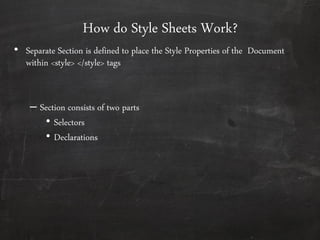
How do Style Sheets Work?
• Separate Section is defined to place the Style Properties of the Document
within <style> </style> tags
– Section consists of two parts
• Selectors
• Declarations
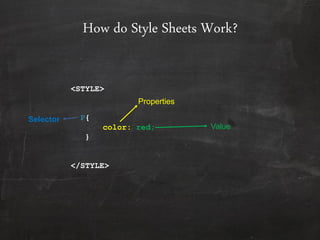
How do Style Sheets Work?
<STYLE>
P{
color: red;
}
</STYLE>
Properties
Value
Selector
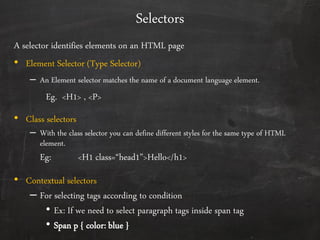
Selectors
A selector identifies elements on an HTML page
• Element Selector (Type Selector)
– An Element selector matches the name of a document language element.
Eg. <H1> , <P>
• Class selectors
– With the class selector you can define different styles for the same type of HTML
element.
Eg: <H1 class=“head1”>Hello</h1>
• Contextual selectors
– For selecting tags according to condition
• Ex: If we need to select paragraph tags inside span tag
• Span p { color: blue }
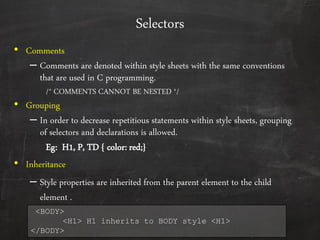
Selectors
• Comments
– Comments are denoted within style sheets with the same conventions
that are used in C programming.
/* COMMENTS CANNOT BE NESTED */
• Grouping
– In order to decrease repetitious statements within style sheets, grouping
of selectors and declarations is allowed.
Eg: H1, P, TD { color: red;}
• Inheritance
– Style properties are inherited from the parent element to the child
element .
<BODY>
<H1> H1 inherits to BODY style <H1>
</BODY>
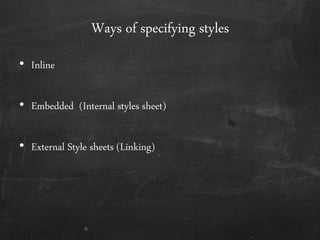
Ways of specifying styles
• Inline
• Embedded (Internal styles sheet)
• External Style sheets (Linking)
9
Ways of specifying styles
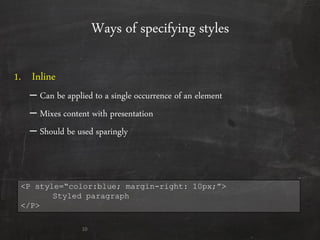
1. Inline
– Can be applied to a single occurrence of an element
– Mixes content with presentation
– Should be used sparingly
10
<P style=“color:blue; margin-right: 10px;”>
Styled paragraph
</P>
Ways of specifying styles
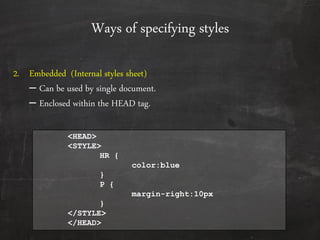
2. Embedded (Internal styles sheet)
– Can be used by single document.
– Enclosed within the HEAD tag.
<HEAD>
<STYLE>
HR {
color:blue
}
P {
margin-right:10px
}
</STYLE>
</HEAD>
Ways of specifying styles
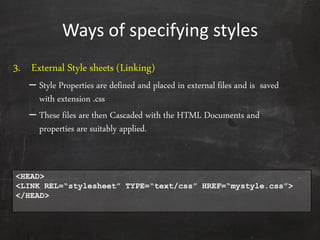
3. External Style sheets (Linking)
– Style Properties are defined and placed in external files and is saved
with extension .css
– These files are then Cascaded with the HTML Documents and
properties are suitably applied.
<HEAD>
<LINK REL=“stylesheet” TYPE=“text/css” HREF=“mystyle.css”>
</HEAD>
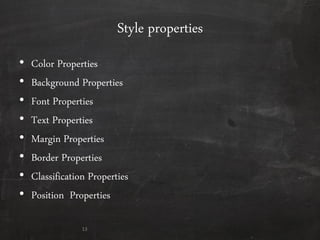
Style properties
• Color Properties
• Background Properties
• Font Properties
• Text Properties
• Margin Properties
• Border Properties
• Classification Properties
• Position Properties
13
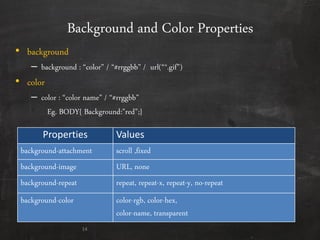
Background and Color Properties
Properties Values
background-attachment scroll ,fixed
background-image URL, none
background-repeat repeat, repeat-x, repeat-y, no-repeat
background-color color-rgb, color-hex,
color-name, transparent
14
• background
– background : “color” / “#rrggbb” / url(“*.gif”)
• color
– color : “color name” / “#rrggbb”
Eg. BODY{ Background:”red”;}
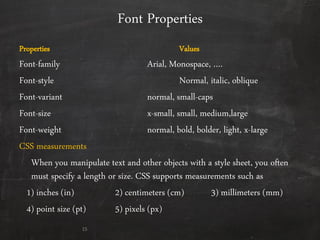
Font Properties
Properties Values
Font-family Arial, Monospace, ….
Font-style Normal, italic, oblique
Font-variant normal, small-caps
Font-size x-small, small, medium,large
Font-weight normal, bold, bolder, light, x-large
CSS measurements
When you manipulate text and other objects with a style sheet, you often
must specify a length or size. CSS supports measurements such as
1) inches (in) 2) centimeters (cm) 3) millimeters (mm)
4) point size (pt) 5) pixels (px)
15
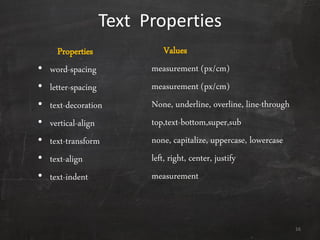
Text Properties
Properties
• word-spacing
• letter-spacing
• text-decoration
• vertical-align
• text-transform
• text-align
• text-indent
Values
measurement (px/cm)
measurement (px/cm)
None, underline, overline, line-through
top,text-bottom,super,sub
none, capitalize, uppercase, lowercase
left, right, center, justify
measurement
16
End of day

Css

  • 1.
  • 2.
    Cascading Style sheets(CSS) • Style Sheet – A set of statements that specify presentation of a document. – A powerful mechanism for adding styles. – Styles can be assigned by the <STYLE> </STYLE> tag. 2
  • 3.
    Cascading Style sheets(CSS) • Features – Separates the presentation and contents of the HTML document. – Provide numerous attributes to create dynamic effects. – Simple. – Reusable. 3
  • 4.
    Advantages • Good controlover the presentation. • Consistency : A Standard flow, look & feel can be maintained for all pages of a Web Site • Ability to make global changes to all the documents from a single location. • Reduces the time spent on maintaining HTML Document • Less Cluttered
  • 5.
    How do StyleSheets Work? • Separate Section is defined to place the Style Properties of the Document within <style> </style> tags – Section consists of two parts • Selectors • Declarations
  • 6.
    How do StyleSheets Work? <STYLE> P{ color: red; } </STYLE> Properties Value Selector
  • 7.
    Selectors A selector identifieselements on an HTML page • Element Selector (Type Selector) – An Element selector matches the name of a document language element. Eg. <H1> , <P> • Class selectors – With the class selector you can define different styles for the same type of HTML element. Eg: <H1 class=“head1”>Hello</h1> • Contextual selectors – For selecting tags according to condition • Ex: If we need to select paragraph tags inside span tag • Span p { color: blue }
  • 8.
    Selectors • Comments – Commentsare denoted within style sheets with the same conventions that are used in C programming. /* COMMENTS CANNOT BE NESTED */ • Grouping – In order to decrease repetitious statements within style sheets, grouping of selectors and declarations is allowed. Eg: H1, P, TD { color: red;} • Inheritance – Style properties are inherited from the parent element to the child element . <BODY> <H1> H1 inherits to BODY style <H1> </BODY>
  • 9.
    Ways of specifyingstyles • Inline • Embedded (Internal styles sheet) • External Style sheets (Linking) 9
  • 10.
    Ways of specifyingstyles 1. Inline – Can be applied to a single occurrence of an element – Mixes content with presentation – Should be used sparingly 10 <P style=“color:blue; margin-right: 10px;”> Styled paragraph </P>
  • 11.
    Ways of specifyingstyles 2. Embedded (Internal styles sheet) – Can be used by single document. – Enclosed within the HEAD tag. <HEAD> <STYLE> HR { color:blue } P { margin-right:10px } </STYLE> </HEAD>
  • 12.
    Ways of specifyingstyles 3. External Style sheets (Linking) – Style Properties are defined and placed in external files and is saved with extension .css – These files are then Cascaded with the HTML Documents and properties are suitably applied. <HEAD> <LINK REL=“stylesheet” TYPE=“text/css” HREF=“mystyle.css”> </HEAD>
  • 13.
    Style properties • ColorProperties • Background Properties • Font Properties • Text Properties • Margin Properties • Border Properties • Classification Properties • Position Properties 13
  • 14.
    Background and ColorProperties Properties Values background-attachment scroll ,fixed background-image URL, none background-repeat repeat, repeat-x, repeat-y, no-repeat background-color color-rgb, color-hex, color-name, transparent 14 • background – background : “color” / “#rrggbb” / url(“*.gif”) • color – color : “color name” / “#rrggbb” Eg. BODY{ Background:”red”;}
  • 15.
    Font Properties Properties Values Font-familyArial, Monospace, …. Font-style Normal, italic, oblique Font-variant normal, small-caps Font-size x-small, small, medium,large Font-weight normal, bold, bolder, light, x-large CSS measurements When you manipulate text and other objects with a style sheet, you often must specify a length or size. CSS supports measurements such as 1) inches (in) 2) centimeters (cm) 3) millimeters (mm) 4) point size (pt) 5) pixels (px) 15
  • 16.
    Text Properties Properties • word-spacing •letter-spacing • text-decoration • vertical-align • text-transform • text-align • text-indent Values measurement (px/cm) measurement (px/cm) None, underline, overline, line-through top,text-bottom,super,sub none, capitalize, uppercase, lowercase left, right, center, justify measurement 16
  • 17.