[Cascading Style Sheet
(CSS)]
[By Dipal Patel]
What is CSS?
• CSS stands for Cascading Style Sheets
• Styles define how to display HTML elements
• Styles were added to HTML 4.0 to solve a problem of better
outlook of elements.
• External Style Sheets can save a lot of work
• External Style Sheets are stored in CSS files
Why CSS?
• CSS Saves Your Time
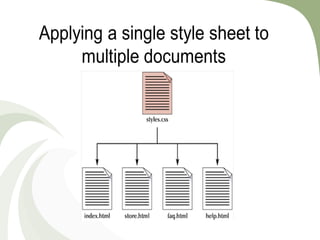
Styles are normally saved in external .css files. External style sheets enable
you to change the appearance and layout of all the pages in a Web site, just by
editing one single file!
• CSS Gives You Design Flexibility
If you'd like certain types of web pages to have unique stylistic elements,
you can create a separate CSS file for each type of page
• Pages load faster
Less code means faster download times.
• CSS Saves Your Visitors Time
• Easy maintenance
To change the style of an element, you only have to make an edit in one
place (i.e. in .css file)
• Superior styles to HTML
CSS has a much wider array of attributes than HTML.(Please refer w3shool
for tags)
Syntax and Basic Example:
Three Ways to Insert CSS
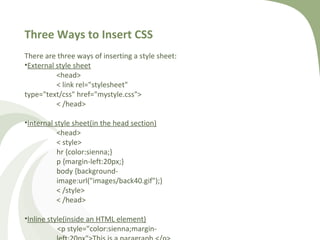
There are three ways of inserting a style sheet:
•External style sheet
<head>
< link rel="stylesheet"
type="text/css" href="mystyle.css">
< /head>
•Internal style sheet(in the head section)
<head>
< style>
hr {color:sienna;}
p {margin-left:20px;}
body {background-
image:url("images/back40.gif");}
< /style>
< /head>
•Inline style(inside an HTML element)
<p style="color:sienna;margin-
CSS Tags Categories
CSS Styling CSS Box Model CSS Advanced
Styling Backgrounds
Styling Text
Styling Fonts
Styling Links
Styling Lists
Styling Tables
CSS Box Model
CSS Border
CSS Outline
CSS Margin
CSS Padding
CSS Display
CSS Positioning
CSS Floating
CSS Align
Paragraph tag in CSS:
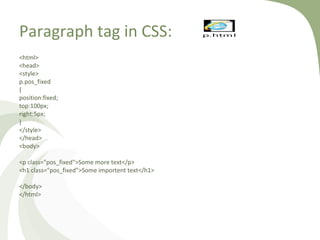
<html>
<head>
<style>
p.pos_fixed
{
position:fixed;
top:100px;
right:5px;
}
</style>
</head>
<body>
<p class="pos_fixed">Some more text</p>
<h1 class="pos_fixed">Some importent text</h1>
</body>
</html>
p.html
<html>
<head>
<style>
input[type="text"]
{
width:150px;
display:block;
margin-bottom:10px;
background-color:red;
}
input[type="button"]
{
width:120px;
margin-left:35px;
display:block;
}
</style>
</head>
<body>
<form name="input" action="" method="get">
Firstname:<input type="text" name="Name" value="Peter" size="20">
Lastname:<input type="text" name="Name" value="Griffin" size="20">
<input type="button" value="Example Button">
</form>
</body>
</html>
cssexample2.htmlInput tag in CSS:
Table Tag in CSS<!DOCTYPE html>
<html>
<head>
<style>
table,th,td
{
border:1px solid black;
}
</style>
</head>
<body>
<table>
<tr>
<th>Firstname</th>
<th>Lastname</th>
</tr>
<tr>
<td>Peter</td>
<td>Griffin</td>
</tr>
<tr>
<td>Lois</td>
<td>Griffin</td>
</tr>
</table>
</body>
</html>
table.html
Grouping in CSS
<!DOCTYPE html>
<html>
<head>
<style>
h1,h2,p
{
color:green;
}
</style>
</head>
<body>
<h1>Hello World!</h1>
<h2>Smaller heading!</h2>
<p>This is a paragraph.</p>
</body>
</html>
grouping.html
Nesting in CSS
<!DOCTYPE html>
<html>
<head>
<style>
p
{
color:blue;
text-align:center;
}
.marked
{
background-color:red;
}
.marked p
{
color:white;
}
</style>
</head>
<body>
<p>This paragraph has blue text, and is center aligned.</p>
<div class="marked">
<p>This paragraph has not blue text.</p>
</div>
<p>p elements inside a "marked" classed element keeps the alignment style, but has a different text color.</p>
</body>
</html>
nesting.html
Cascading style sheet (css)]

Cascading style sheet (css)]

  • 1.
  • 2.
    What is CSS? •CSS stands for Cascading Style Sheets • Styles define how to display HTML elements • Styles were added to HTML 4.0 to solve a problem of better outlook of elements. • External Style Sheets can save a lot of work • External Style Sheets are stored in CSS files
  • 4.
    Why CSS? • CSSSaves Your Time Styles are normally saved in external .css files. External style sheets enable you to change the appearance and layout of all the pages in a Web site, just by editing one single file! • CSS Gives You Design Flexibility If you'd like certain types of web pages to have unique stylistic elements, you can create a separate CSS file for each type of page • Pages load faster Less code means faster download times. • CSS Saves Your Visitors Time • Easy maintenance To change the style of an element, you only have to make an edit in one place (i.e. in .css file) • Superior styles to HTML CSS has a much wider array of attributes than HTML.(Please refer w3shool for tags)
  • 5.
  • 6.
    Three Ways toInsert CSS There are three ways of inserting a style sheet: •External style sheet <head> < link rel="stylesheet" type="text/css" href="mystyle.css"> < /head> •Internal style sheet(in the head section) <head> < style> hr {color:sienna;} p {margin-left:20px;} body {background- image:url("images/back40.gif");} < /style> < /head> •Inline style(inside an HTML element) <p style="color:sienna;margin-
  • 7.
    CSS Tags Categories CSSStyling CSS Box Model CSS Advanced Styling Backgrounds Styling Text Styling Fonts Styling Links Styling Lists Styling Tables CSS Box Model CSS Border CSS Outline CSS Margin CSS Padding CSS Display CSS Positioning CSS Floating CSS Align
  • 8.
    Paragraph tag inCSS: <html> <head> <style> p.pos_fixed { position:fixed; top:100px; right:5px; } </style> </head> <body> <p class="pos_fixed">Some more text</p> <h1 class="pos_fixed">Some importent text</h1> </body> </html> p.html
  • 9.
    <html> <head> <style> input[type="text"] { width:150px; display:block; margin-bottom:10px; background-color:red; } input[type="button"] { width:120px; margin-left:35px; display:block; } </style> </head> <body> <form name="input" action=""method="get"> Firstname:<input type="text" name="Name" value="Peter" size="20"> Lastname:<input type="text" name="Name" value="Griffin" size="20"> <input type="button" value="Example Button"> </form> </body> </html> cssexample2.htmlInput tag in CSS:
  • 10.
    Table Tag inCSS<!DOCTYPE html> <html> <head> <style> table,th,td { border:1px solid black; } </style> </head> <body> <table> <tr> <th>Firstname</th> <th>Lastname</th> </tr> <tr> <td>Peter</td> <td>Griffin</td> </tr> <tr> <td>Lois</td> <td>Griffin</td> </tr> </table> </body> </html> table.html
  • 11.
    Grouping in CSS <!DOCTYPEhtml> <html> <head> <style> h1,h2,p { color:green; } </style> </head> <body> <h1>Hello World!</h1> <h2>Smaller heading!</h2> <p>This is a paragraph.</p> </body> </html> grouping.html
  • 12.
    Nesting in CSS <!DOCTYPEhtml> <html> <head> <style> p { color:blue; text-align:center; } .marked { background-color:red; } .marked p { color:white; } </style> </head> <body> <p>This paragraph has blue text, and is center aligned.</p> <div class="marked"> <p>This paragraph has not blue text.</p> </div> <p>p elements inside a "marked" classed element keeps the alignment style, but has a different text color.</p> </body> </html> nesting.html