WELCOME
INTRODUCTION TO PHP
SESSIONS AND COOKIES
What you Benefit ???
By the end of this session you will learn
● How to use Sessions and Cookies to maintain the state among
multiple requests.
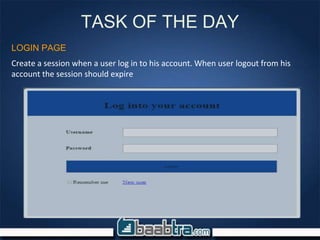
TASK OF THE DAY
Create a session when a user log in to his account. When user logout from his
account the session should expire
LOGIN PAGE
INTRODUCTION TO PHP SESSIONS AND
COOKIES
Introduction To PHP Sessions And
Cookies
We had already tried passing data to a server .
But..how the server knows the user from which the requests are
received…?
COOKIES
Cookies
•HTTP is a stateless protocol; this means that the web server does not
know (or care) whether two requests comes from the same user or
not; it just handles each request without regard to the context in
which it happens.
•Cookies are used to maintain the state in between requests—even
when they occur at large time intervals from each other.
•Cookies allow your applications to store a small amount of textual
data (typically,4-6kB) on a Web client browser.
•There are a number of possible uses for cookies, although their most
common one is maintaining state of a user
Creating A Cookie
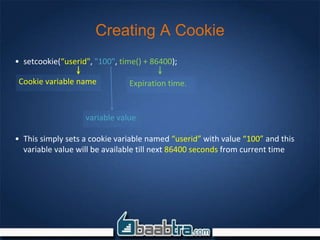
• setcookie(“userid", "100", time() + 86400);
• This simply sets a cookie variable named “userid” with value “100” and this
variable value will be available till next 86400 seconds from current time
Cookie variable name
variable value
Expiration time.
Accessing a Cookie
• echo $_COOKIE[’userid’]; // prints 100
• Cookie as array
– setcookie("test_cookie[0]", "foo");
– setcookie("test_cookie[1]", "bar");
– setcookie("test_cookie[2]", "bar");
– var_dump($_COOKIE[‘test_cookie’]);
Destroying A Cookie
•There is no special methods to destroy a cookie, We achieve it by
setting the cookie time into a past time so that it destroys it
– Eg : setcookie(‘userid’,100,time()-100);
SESSIONS
Sessions
•Session serve the same purpose of cookies that is sessions are used to
maintain the state in between requests
•Session can be started in two ways in PHP
– By changing the session.auto_start configuration setting in php.ini
– Calling session_start() on the beginning of each pages wherever you
use session(Most common way)
Note: session_start() must be called before any output is sent to the
browser
Creating and accessing session
• Once session is started you can create and access
session variables like any other arrays in PHP
– $_SESSION[‘userid’] = 100;
– echo $_SESSION[‘userid’]; //prints 100
Session variable name
variable value
Destroying A Session
•There are two methods to destroy a session variable
1. Using unset() function
• Eg unset($_SESSION[‘userid’])
1. Calling session_destroy() method. This will effectively destroy all the
session variables. So for deleting only one variable you should go for
the previous method
• Session_destroy()
Let’s try implementing with our task
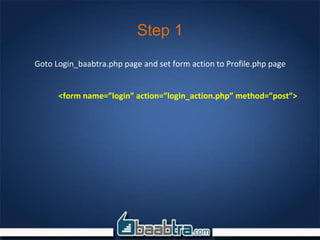
Step 1
Goto Login_baabtra.php page and set form action to Profile.php page
<form name=”login” action=”login_action.php” method=”post”>
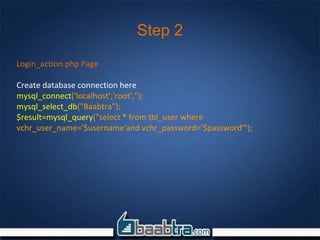
Step 2
Login_action.php Page
Create database connection here
mysql_connect('localhost','root','');
mysql_select_db("Baabtra");
$result=mysql_query("select * from tbl_user where
vchr_user_name='$username'and vchr_password='$password'");
Step 3
Login_action.php Page
Check whether id is valid or not.if valid user then create session
if(mysql_num_rows($result)){
while($row=mysql_fetch_array($result)){
session_start();
$_SESSION['user_id']=$row['pk_int_user_id'];
header(‘Location: profile.php’);
}
}
checks whether there is any
resultant
Step 3
Login_action.php Page
Check whether id is valid or not.if valid user then create session
if(mysql_num_rows($result)){
while($row=mysql_fetch_array($result)){
session_start();
$_SESSION['user_id']=$row['pk_int_user_id'];
header(‘Location: profile.php’);
}
}
starts a session
Step 3
Login_action.php Page
Check whether id is valid or not.if valid user then create session
if(mysql_num_rows($result)){
while($row=mysql_fetch_array($result)){
session_start();
$_SESSION['user_id']=$row['pk_int_user_id'];
header(‘Location: profile.php’);
}
} sets a session variable
userid
with value of pk_int_user_id
field of the resultant set
Step 3
Login_action.php Page
Check whether id is valid or not.if valid user then create session
if(mysql_num_rows($result)){
while($row=mysql_fetch_array($result)){
session_start();
$_SESSION['user_id']=$row['pk_int_user_id'];
header(‘Location: profile.php’);
}
} sets a session variable
userid
with value of pk_int_user_id
field of the resultant set
Step 3
Login_action.php Page
Check whether id is valid or not.if valid user then create session
if(mysql_num_rows($result)){
while($row=mysql_fetch_array($result)){
session_start();
$_SESSION['user_id']=$row['pk_int_user_id'];
header(‘Location: profile.php’);
}
}
sets a session variable
userid
with value of pk_int_user_id
field of the resultant set
Step 3
Login_action.php Page
Check whether id is valid or not.if valid user then create session
if(mysql_num_rows($result)){
while($row=mysql_fetch_array($result)){
session_start();
$_SESSION['user_id']=$row['pk_int_user_id'];
header(‘Location: profile.php’);
}
}
header function is used for
page redirection
Step 4
Design a profile Page and Create a link for Logout
Step 5
Go to profile page and display Qualification details of that particular user
using session variable.
Step 5
Profile.php
session_start();
$user_id=$_SESSION['user_id'];
mysql_connect('localhost','root','');
mysql_select_db("Baabtra");
$result=mysql_query("select * from tbl_academic_qualificaion where
fk_int_user_id='$user_id'");
echo “ qualification name-----college--------percentage--------passout”;
while($data=mysql_fetch_assoc($result)){
echo $data['vchr_qualification_name'];
echo $data['int_percentage'];
echo $data['dat_passout_date'];
}
Step 5
Profile.php
session_start();
$user_id=$_SESSION['user_id'];
mysql_connect('localhost','root','');
mysql_select_db("Baabtra");
$result=mysql_query("select * from tbl_academic_qualificaion where
fk_int_user_id='$user_id'");
echo “ qualification name-----college--------percentage--------passout”;
while($data=mysql_fetch_assoc($result)){
echo $data['vchr_qualification_name'];
echo $data['int_percentage'];
echo $data['dat_passout_date'];
}
fetches the session variable
user_id and stores to
variable $userid
Step 5
Profile.php
session_start();
$user_id=$_SESSION['user_id'];
mysql_connect('localhost','root','');
mysql_select_db("Baabtra");
$result=mysql_query("select * from tbl_academic_qualificaion where
fk_int_user_id='$user_id'");
echo “ qualification name-----college--------percentage--------passout”;
while($data=mysql_fetch_assoc($result)){
echo $data['vchr_qualification_name'];
echo $data['int_percentage'];
echo $data['dat_passout_date'];
}
selects the qualification
details of the user that
matches with session value
Step 6
Destroy session on Logout
Step 6
Logout.php
unset($_SESSION[‘user_id’]);
header(‘Location: Login_baabtra.php’);
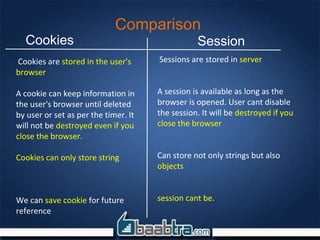
Comparison
Cookies are stored in the user's
browser
A cookie can keep information in
the user's browser until deleted
by user or set as per the timer. It
will not be destroyed even if you
close the browser.
Cookies can only store string
We can save cookie for future
reference
Sessions are stored in server
A session is available as long as the
browser is opened. User cant disable
the session. It will be destroyed if you
close the browser
Can store not only strings but also
objects
session cant be.
Cookies Session
END OF THE SESSION

Php sessions & cookies

  • 1.
  • 2.
  • 3.
    What you Benefit??? By the end of this session you will learn ● How to use Sessions and Cookies to maintain the state among multiple requests.
  • 4.
    TASK OF THEDAY Create a session when a user log in to his account. When user logout from his account the session should expire LOGIN PAGE
  • 5.
    INTRODUCTION TO PHPSESSIONS AND COOKIES
  • 6.
    Introduction To PHPSessions And Cookies We had already tried passing data to a server . But..how the server knows the user from which the requests are received…?
  • 7.
  • 8.
    Cookies •HTTP is astateless protocol; this means that the web server does not know (or care) whether two requests comes from the same user or not; it just handles each request without regard to the context in which it happens. •Cookies are used to maintain the state in between requests—even when they occur at large time intervals from each other. •Cookies allow your applications to store a small amount of textual data (typically,4-6kB) on a Web client browser. •There are a number of possible uses for cookies, although their most common one is maintaining state of a user
  • 9.
    Creating A Cookie •setcookie(“userid", "100", time() + 86400); • This simply sets a cookie variable named “userid” with value “100” and this variable value will be available till next 86400 seconds from current time Cookie variable name variable value Expiration time.
  • 10.
    Accessing a Cookie •echo $_COOKIE[’userid’]; // prints 100 • Cookie as array – setcookie("test_cookie[0]", "foo"); – setcookie("test_cookie[1]", "bar"); – setcookie("test_cookie[2]", "bar"); – var_dump($_COOKIE[‘test_cookie’]);
  • 11.
    Destroying A Cookie •Thereis no special methods to destroy a cookie, We achieve it by setting the cookie time into a past time so that it destroys it – Eg : setcookie(‘userid’,100,time()-100);
  • 12.
  • 13.
    Sessions •Session serve thesame purpose of cookies that is sessions are used to maintain the state in between requests •Session can be started in two ways in PHP – By changing the session.auto_start configuration setting in php.ini – Calling session_start() on the beginning of each pages wherever you use session(Most common way) Note: session_start() must be called before any output is sent to the browser
  • 14.
    Creating and accessingsession • Once session is started you can create and access session variables like any other arrays in PHP – $_SESSION[‘userid’] = 100; – echo $_SESSION[‘userid’]; //prints 100 Session variable name variable value
  • 15.
    Destroying A Session •Thereare two methods to destroy a session variable 1. Using unset() function • Eg unset($_SESSION[‘userid’]) 1. Calling session_destroy() method. This will effectively destroy all the session variables. So for deleting only one variable you should go for the previous method • Session_destroy()
  • 16.
  • 17.
    Step 1 Goto Login_baabtra.phppage and set form action to Profile.php page <form name=”login” action=”login_action.php” method=”post”>
  • 18.
    Step 2 Login_action.php Page Createdatabase connection here mysql_connect('localhost','root',''); mysql_select_db("Baabtra"); $result=mysql_query("select * from tbl_user where vchr_user_name='$username'and vchr_password='$password'");
  • 19.
    Step 3 Login_action.php Page Checkwhether id is valid or not.if valid user then create session if(mysql_num_rows($result)){ while($row=mysql_fetch_array($result)){ session_start(); $_SESSION['user_id']=$row['pk_int_user_id']; header(‘Location: profile.php’); } } checks whether there is any resultant
  • 20.
    Step 3 Login_action.php Page Checkwhether id is valid or not.if valid user then create session if(mysql_num_rows($result)){ while($row=mysql_fetch_array($result)){ session_start(); $_SESSION['user_id']=$row['pk_int_user_id']; header(‘Location: profile.php’); } } starts a session
  • 21.
    Step 3 Login_action.php Page Checkwhether id is valid or not.if valid user then create session if(mysql_num_rows($result)){ while($row=mysql_fetch_array($result)){ session_start(); $_SESSION['user_id']=$row['pk_int_user_id']; header(‘Location: profile.php’); } } sets a session variable userid with value of pk_int_user_id field of the resultant set
  • 22.
    Step 3 Login_action.php Page Checkwhether id is valid or not.if valid user then create session if(mysql_num_rows($result)){ while($row=mysql_fetch_array($result)){ session_start(); $_SESSION['user_id']=$row['pk_int_user_id']; header(‘Location: profile.php’); } } sets a session variable userid with value of pk_int_user_id field of the resultant set
  • 23.
    Step 3 Login_action.php Page Checkwhether id is valid or not.if valid user then create session if(mysql_num_rows($result)){ while($row=mysql_fetch_array($result)){ session_start(); $_SESSION['user_id']=$row['pk_int_user_id']; header(‘Location: profile.php’); } } sets a session variable userid with value of pk_int_user_id field of the resultant set
  • 24.
    Step 3 Login_action.php Page Checkwhether id is valid or not.if valid user then create session if(mysql_num_rows($result)){ while($row=mysql_fetch_array($result)){ session_start(); $_SESSION['user_id']=$row['pk_int_user_id']; header(‘Location: profile.php’); } } header function is used for page redirection
  • 25.
    Step 4 Design aprofile Page and Create a link for Logout
  • 26.
    Step 5 Go toprofile page and display Qualification details of that particular user using session variable.
  • 27.
    Step 5 Profile.php session_start(); $user_id=$_SESSION['user_id']; mysql_connect('localhost','root',''); mysql_select_db("Baabtra"); $result=mysql_query("select *from tbl_academic_qualificaion where fk_int_user_id='$user_id'"); echo “ qualification name-----college--------percentage--------passout”; while($data=mysql_fetch_assoc($result)){ echo $data['vchr_qualification_name']; echo $data['vchr_qualification_name']; echo $data['int_percentage']; echo $data['dat_passout_date']; }
  • 28.
    Step 5 Profile.php session_start(); $user_id=$_SESSION['user_id']; mysql_connect('localhost','root',''); mysql_select_db("Baabtra"); $result=mysql_query("select *from tbl_academic_qualificaion where fk_int_user_id='$user_id'"); echo “ qualification name-----college--------percentage--------passout”; while($data=mysql_fetch_assoc($result)){ echo $data['vchr_qualification_name']; echo $data['vchr_qualification_name']; echo $data['int_percentage']; echo $data['dat_passout_date']; } fetches the session variable user_id and stores to variable $userid
  • 29.
    Step 5 Profile.php session_start(); $user_id=$_SESSION['user_id']; mysql_connect('localhost','root',''); mysql_select_db("Baabtra"); $result=mysql_query("select *from tbl_academic_qualificaion where fk_int_user_id='$user_id'"); echo “ qualification name-----college--------percentage--------passout”; while($data=mysql_fetch_assoc($result)){ echo $data['vchr_qualification_name']; echo $data['vchr_qualification_name']; echo $data['int_percentage']; echo $data['dat_passout_date']; } selects the qualification details of the user that matches with session value
  • 30.
  • 31.
  • 32.
    Comparison Cookies are storedin the user's browser A cookie can keep information in the user's browser until deleted by user or set as per the timer. It will not be destroyed even if you close the browser. Cookies can only store string We can save cookie for future reference Sessions are stored in server A session is available as long as the browser is opened. User cant disable the session. It will be destroyed if you close the browser Can store not only strings but also objects session cant be. Cookies Session
  • 33.
    END OF THESESSION