CREATION OF
DOUBLE PAGE
SPREAD
ADDING OFTHETITLE
For the adding of our
title, we took this from
our documentary.We
simply copied and
pasted the title and
used the ctrl/shift and
cmd keys to crop and
move the title.
ADDING INTHE ARTICLEAND IMAGE
To add in the image we dragged it
from our documents. And again
ensured we used ctrl/shift/cmd to
edit our image.We did not use
Photoshop, however, when taking
the picture we used lights to help
enhance the quality.
For the article we simply again
copied it from word. However, we
needed to add columns to follow
codes and conventions of double
page spread.We did this through
paragraph format controls.–
ADDING INTEXT BOX
ADDING GRAB QUOTES, INTERVIEW
PICTURESAND CAPTIONS
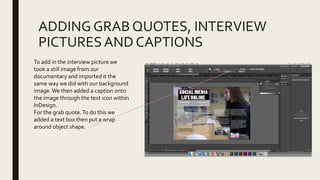
To add in the interview picture we
took a still image from our
documentary and imported it the
same way we did with our background
image.We then added a caption onto
the image through the text icon within
InDesign.
For the grab quote.To do this we
added a text box then put a wrap
around object shape.
At this point of the production of our double
page spread, we decided to have a group
discussion on what we thought looked good
and where we needed to make
improvements.We all agreed we needed a
colour scheme which gave more relation to
social media, while needing a snappier
headline.The next slides show this
transition.
CHANGE OF HEADLINE, INSERTION OF BY
LINE, DROP CAP, PAGE NUMBERS AND
PHOTO CREDITS, INSERTION OF DATE.
The change of headline was
simple as we simply changed
the text in the text box.This
was similar to the by line as
again it was just an insertion of
a text box, similarly to the
page numbers, photo credits
and insertion of the date.
The drop cap was done to
follow codes and conventions
and used through ‘drop caps,
numbers and lines’.
INSERTON OF SUB-HEADING. REVEALING
THETITLE OF OUR DOCUMENTARY.
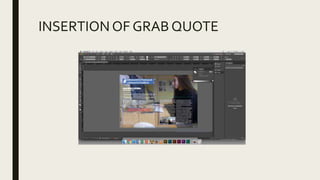
INSERTIONOF GRAB QUOTE
CHANGE OF COLOURTO SUIT HOUSE
STYLE IN GRAB QUOTE
The change of colour was
important for our house
style.We did this through
techniques we had used
in previous years.This
was the colour tile which
allowed us to modify
colours and add in
swatches.

Creation of dps

  • 1.
  • 2.
    ADDING OFTHETITLE For theadding of our title, we took this from our documentary.We simply copied and pasted the title and used the ctrl/shift and cmd keys to crop and move the title.
  • 3.
    ADDING INTHE ARTICLEANDIMAGE To add in the image we dragged it from our documents. And again ensured we used ctrl/shift/cmd to edit our image.We did not use Photoshop, however, when taking the picture we used lights to help enhance the quality. For the article we simply again copied it from word. However, we needed to add columns to follow codes and conventions of double page spread.We did this through paragraph format controls.–
  • 4.
  • 5.
    ADDING GRAB QUOTES,INTERVIEW PICTURESAND CAPTIONS To add in the interview picture we took a still image from our documentary and imported it the same way we did with our background image.We then added a caption onto the image through the text icon within InDesign. For the grab quote.To do this we added a text box then put a wrap around object shape.
  • 6.
    At this pointof the production of our double page spread, we decided to have a group discussion on what we thought looked good and where we needed to make improvements.We all agreed we needed a colour scheme which gave more relation to social media, while needing a snappier headline.The next slides show this transition.
  • 7.
    CHANGE OF HEADLINE,INSERTION OF BY LINE, DROP CAP, PAGE NUMBERS AND PHOTO CREDITS, INSERTION OF DATE. The change of headline was simple as we simply changed the text in the text box.This was similar to the by line as again it was just an insertion of a text box, similarly to the page numbers, photo credits and insertion of the date. The drop cap was done to follow codes and conventions and used through ‘drop caps, numbers and lines’.
  • 8.
    INSERTON OF SUB-HEADING.REVEALING THETITLE OF OUR DOCUMENTARY.
  • 9.
  • 10.
    CHANGE OF COLOURTOSUIT HOUSE STYLE IN GRAB QUOTE The change of colour was important for our house style.We did this through techniques we had used in previous years.This was the colour tile which allowed us to modify colours and add in swatches.