WEB
TECHNOLOGY
FUNDAMENTALS
A Programme Under the Compumitra Education Series
OUTLINE
• Definition of Internet?
• How it Works
• Common Terms
• Concept of HyperText and HTTP.
• Web Protocol Layers.
• Website Languages.
• HTML.
• ASP
• ASP.NET
• ASP.NET Vs PHP
• ASP.NET Vs JAVA
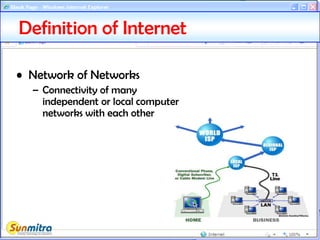
• Network of Networks
– Connectivity of many
independent or local computer
networks with each other
Definition of Internet
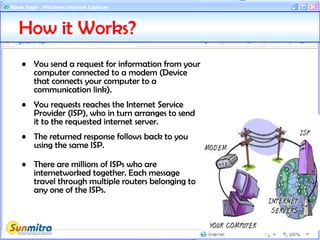
• You send a request for information from your
computer connected to a modem (Device
that connects your computer to a
communication link).
• You requests reaches the Internet Service
Provider (ISP), who in turn arranges to send
it to the requested internet server.
• The returned response follows back to you
using the same ISP.
• There are millions of ISPs who are
internetworked together. Each message
travel through multiple routers belonging to
any one of the ISPs.
How it Works?
• Client-Server: An information-passing scheme that works as
follows: a client program, such as Netscape, sends a request to a
server. The server takes the request, disconnects from the client
and processes the request.
• Protocol: a protocol is a set of rules which is used by computers to
communicate with each other across a network
• TCP/IP: Stands for Transmission Control Protocol/Internet Protocol. These
two are end to end protocols: TCP works at host level to control assembly of
packets and IP works at internet router level to control the direction of
traffic.
• URL: Uniform Resource Locator: an address of a web page, ftp site, audio
stream or other Internet resource, for example, “http://en.wiktionary.org/”
• IP address: A numeric unique value usually defined in four octets (32Bits)
like 168.34.123.255 . A new scheme of 128 (Called IPv6) is also available now.
One with 32 bits is called IPv4.
• Domain Name: A domain name is an identification label to define realms
of administrative autonomy, authority, or control in the Internet, based on
the Domain
Commonly Used Terms - 1
• World Wide Web (WWW): is a system of interlinked
hypertext documents accessed via the Internet.
• Homepage: the opening page of a web site
• Web-Portals, Websites: Links to web pages that
maintain lists of district or county web sites.
• Search Engines: are tools that help you to find things
on the Internet. One example of a popular search
engine is Google.
• HTML: a set of tags and rules (conforming to SGML)
for using them in developing hypertext documents
Commonly Used Terms - 2
• Terms was first coined by Ted Nelson in 1965.
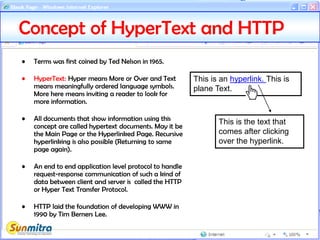
• HyperText: Hyper means More or Over and Text
means meaningfully ordered language symbols.
More here means inviting a reader to look for
more information.
• All documents that show information using this
concept are called hypertext documents. May it be
the Main Page or the Hyperlinked Page. Recursive
hyperlinking is also possible (Returning to same
page again).
• An end to end application level protocol to handle
request-response communication of such a kind of
data between client and server is called the HTTP
or Hyper Text Transfer Protocol.
• HTTP laid the foundation of developing WWW in
1990 by Tim Berners Lee.
Concept of HyperText and HTTP
This is an hyperlink. This is
plane Text.
This is the text that
comes after clicking
over the hyperlink.
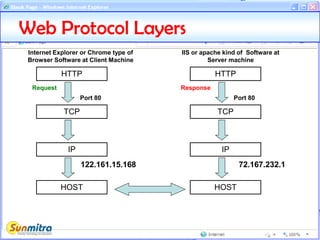
Web Protocol Layers
HTTP
TCP
Port 80
Request
IP
HOST
HTTP
TCP
Port 80
Response
IP
HOST
122.161.15.168 72.167.232.1
Internet Explorer or Chrome type of
Browser Software at Client Machine
IIS or apache kind of Software at
Server machine
IIS – A Webserver Program
• IIS or Internet Information Server is a webserver program
from Microsoft.
• It comes along with many version of Windows. It may
however need to be installed as an add-on component.
• On Windows XP it acts like a personal web server where
mutiple sites can be published within the single web
service port as directory level webshares. This is the most
convenient way to test websites on a local server often
called the “Localhost”. The IP address that represents a
local host is 127.0.0.1. You may be required to set
permissions to run sites on an IIS server.
• It is the best program to run ASP or ASP.NET pages.
• Its primary job is to interpret an HTTP request and
prepare a suitable response.
• It also provides an application platform level support to
processes created by Active Server Pages and the ASP.NET
framework.
Languages used to create a website
• HTML: a set of tags and rules (conforming to
SGML) for using them in developing hypertext
documents.
• DHTML: Enhancements to HTML that creates
dynamic effects (interaction and animation), This
includes mouseover kind of actions, javascript,
Style Sheets and client side object orientation
model called Document Object Model (DOM).
• ASP/ASP.NET: Two variations of active server
technologies where interaction is achieved by using
language interpretation at the server end.
• JAVA/JSP: Java based interaction technology.
• PHP: PHP hypertext processor, a relatively simple
powerful scripting technology with server side
processing.
Introduction to HTML
• Primarily meant to render text on
the client side.
• Extensively uses markups. For e.g.
<B>Bold Text</B>
• Simple Text based format editable
in basic notepad kind of programs.
• File Extension .htm or .html .
• Basic HTML is static. (one Time
page display rendering)
• Inteactive and programming
features come with the use of
DHTML.
Creating a HTML File
• Use a simple text editor like Notepad or WordPad.
• First tag: <html>
– Indicates that you are starting an HTML document
• Last tag: </html>
– Indicates that you are ending an HTML document
• Save file as index.html.
• This is a typical filename often used for home pages.
• More HTML and DHTML editing features can be found
in tools like Frontpage, Expressionweb or Dreamweaver
etc.
My First HTML Page
Markup Tags
Display rendering as heading
style 1 which means a predefined
font size by the browser.
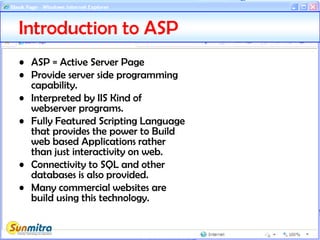
Introduction to ASP
• ASP = Active Server Page
• Provide server side programming
capability.
• Interpreted by IIS Kind of
webserver programs.
• Fully Featured Scripting Language
that provides the power to Build
web based Applications rather
than just interactivity on web.
• Connectivity to SQL and other
databases is also provided.
• Many commercial websites are
build using this technology.
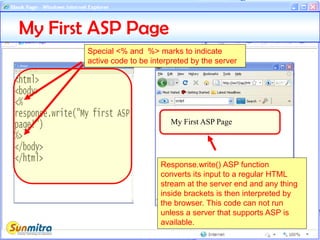
My First ASP Page
My First ASP Page
Special <% and %> marks to indicate
active code to be interpreted by the server
Response.write() ASP function
converts its input to a regular HTML
stream at the server end and any thing
inside brackets is then interpreted by
the browser. This code can not run
unless a server that supports ASP is
available.
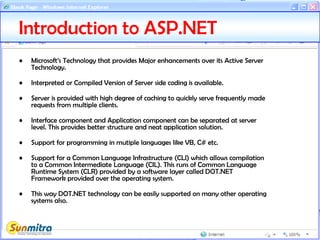
Introduction to ASP.NET
• Microsoft’s Technology that provides Major enhancements over its Active Server
Technology.
• Interpreted or Compiled Version of Server side coding is available.
• Server is provided with high degree of caching to quickly serve frequently made
requests from multiple clients.
• Interface component and Application component can be separated at server
level. This provides better structure and neat application solution.
• Support for programming in mutiple languages like VB, C# etc.
• Support for a Common Language Infrastructure (CLI) which allows compilation
to a Common Intermediate Language (CIL). This runs of Common Language
Runtime System (CLR) provided by a software layer called DOT.NET
Framework provided over the operating system.
• This way DOT.NET technology can be easily supported on many other operating
systems also.
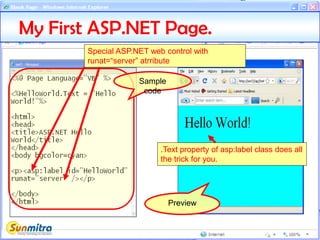
My First ASP.NET Page.
Sample
code
Preview
Special ASP.NET web control with
runat=“server” atrribute
.Text property of asp:label class does all
the trick for you.
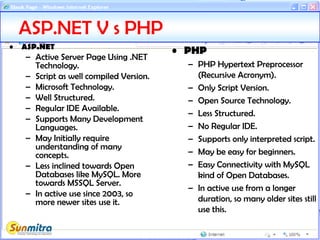
ASP.NET V s PHP
• ASP.NET
– Active Server Page Using .NET
Technology.
– Script as well compiled Version.
– Microsoft Technology.
– Well Structured.
– Regular IDE Available.
– Supports Many Development
Languages.
– May Initially require
understanding of many
concepts.
– Less inclined towards Open
Databases like MySQL. More
towards MSSQL Server.
– In active use since 2003, so
more newer sites use it.
• PHP
– PHP Hypertext Preprocessor
(Recursive Acronym).
– Only Script Version.
– Open Source Technology.
– Less Structured.
– No Regular IDE.
– Supports only interpreted script.
– May be easy for beginners.
– Easy Connectivity with MySQL
kind of Open Databases.
– In active use from a longer
duration, so many older sites still
use this.
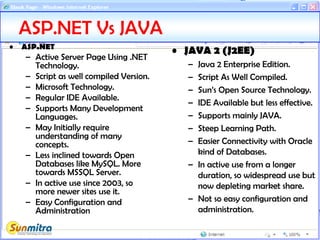
ASP.NET Vs JAVA
• ASP.NET
– Active Server Page Using .NET
Technology.
– Script as well compiled Version.
– Microsoft Technology.
– Regular IDE Available.
– Supports Many Development
Languages.
– May Initially require
understanding of many
concepts.
– Less inclined towards Open
Databases like MySQL. More
towards MSSQL Server.
– In active use since 2003, so
more newer sites use it.
– Easy Configuration and
Administration
• JAVA 2 (J2EE)
– Java 2 Enterprise Edition.
– Script As Well Compiled.
– Sun’s Open Source Technology.
– IDE Available but less effective.
– Supports mainly JAVA.
– Steep Learning Path.
– Easier Connectivity with Oracle
kind of Databases.
– In active use from a longer
duration, so widespread use but
now depleting market share.
– Not so easy configuration and
administration.
• Ask and guide me at
sunmitraeducation@gmail.com
• Share this information with as
many people as possible.
• Keep visiting www.sunmitra.com
for programme updates.

Web Technology Fundamentals

  • 1.
    WEB TECHNOLOGY FUNDAMENTALS A Programme Underthe Compumitra Education Series
  • 2.
    OUTLINE • Definition ofInternet? • How it Works • Common Terms • Concept of HyperText and HTTP. • Web Protocol Layers. • Website Languages. • HTML. • ASP • ASP.NET • ASP.NET Vs PHP • ASP.NET Vs JAVA
  • 3.
    • Network ofNetworks – Connectivity of many independent or local computer networks with each other Definition of Internet
  • 4.
    • You senda request for information from your computer connected to a modem (Device that connects your computer to a communication link). • You requests reaches the Internet Service Provider (ISP), who in turn arranges to send it to the requested internet server. • The returned response follows back to you using the same ISP. • There are millions of ISPs who are internetworked together. Each message travel through multiple routers belonging to any one of the ISPs. How it Works?
  • 5.
    • Client-Server: Aninformation-passing scheme that works as follows: a client program, such as Netscape, sends a request to a server. The server takes the request, disconnects from the client and processes the request. • Protocol: a protocol is a set of rules which is used by computers to communicate with each other across a network • TCP/IP: Stands for Transmission Control Protocol/Internet Protocol. These two are end to end protocols: TCP works at host level to control assembly of packets and IP works at internet router level to control the direction of traffic. • URL: Uniform Resource Locator: an address of a web page, ftp site, audio stream or other Internet resource, for example, “http://en.wiktionary.org/” • IP address: A numeric unique value usually defined in four octets (32Bits) like 168.34.123.255 . A new scheme of 128 (Called IPv6) is also available now. One with 32 bits is called IPv4. • Domain Name: A domain name is an identification label to define realms of administrative autonomy, authority, or control in the Internet, based on the Domain Commonly Used Terms - 1
  • 6.
    • World WideWeb (WWW): is a system of interlinked hypertext documents accessed via the Internet. • Homepage: the opening page of a web site • Web-Portals, Websites: Links to web pages that maintain lists of district or county web sites. • Search Engines: are tools that help you to find things on the Internet. One example of a popular search engine is Google. • HTML: a set of tags and rules (conforming to SGML) for using them in developing hypertext documents Commonly Used Terms - 2
  • 7.
    • Terms wasfirst coined by Ted Nelson in 1965. • HyperText: Hyper means More or Over and Text means meaningfully ordered language symbols. More here means inviting a reader to look for more information. • All documents that show information using this concept are called hypertext documents. May it be the Main Page or the Hyperlinked Page. Recursive hyperlinking is also possible (Returning to same page again). • An end to end application level protocol to handle request-response communication of such a kind of data between client and server is called the HTTP or Hyper Text Transfer Protocol. • HTTP laid the foundation of developing WWW in 1990 by Tim Berners Lee. Concept of HyperText and HTTP This is an hyperlink. This is plane Text. This is the text that comes after clicking over the hyperlink.
  • 8.
    Web Protocol Layers HTTP TCP Port80 Request IP HOST HTTP TCP Port 80 Response IP HOST 122.161.15.168 72.167.232.1 Internet Explorer or Chrome type of Browser Software at Client Machine IIS or apache kind of Software at Server machine
  • 9.
    IIS – AWebserver Program • IIS or Internet Information Server is a webserver program from Microsoft. • It comes along with many version of Windows. It may however need to be installed as an add-on component. • On Windows XP it acts like a personal web server where mutiple sites can be published within the single web service port as directory level webshares. This is the most convenient way to test websites on a local server often called the “Localhost”. The IP address that represents a local host is 127.0.0.1. You may be required to set permissions to run sites on an IIS server. • It is the best program to run ASP or ASP.NET pages. • Its primary job is to interpret an HTTP request and prepare a suitable response. • It also provides an application platform level support to processes created by Active Server Pages and the ASP.NET framework.
  • 10.
    Languages used tocreate a website • HTML: a set of tags and rules (conforming to SGML) for using them in developing hypertext documents. • DHTML: Enhancements to HTML that creates dynamic effects (interaction and animation), This includes mouseover kind of actions, javascript, Style Sheets and client side object orientation model called Document Object Model (DOM). • ASP/ASP.NET: Two variations of active server technologies where interaction is achieved by using language interpretation at the server end. • JAVA/JSP: Java based interaction technology. • PHP: PHP hypertext processor, a relatively simple powerful scripting technology with server side processing.
  • 11.
    Introduction to HTML •Primarily meant to render text on the client side. • Extensively uses markups. For e.g. <B>Bold Text</B> • Simple Text based format editable in basic notepad kind of programs. • File Extension .htm or .html . • Basic HTML is static. (one Time page display rendering) • Inteactive and programming features come with the use of DHTML.
  • 12.
    Creating a HTMLFile • Use a simple text editor like Notepad or WordPad. • First tag: <html> – Indicates that you are starting an HTML document • Last tag: </html> – Indicates that you are ending an HTML document • Save file as index.html. • This is a typical filename often used for home pages. • More HTML and DHTML editing features can be found in tools like Frontpage, Expressionweb or Dreamweaver etc.
  • 13.
    My First HTMLPage Markup Tags Display rendering as heading style 1 which means a predefined font size by the browser.
  • 14.
    Introduction to ASP •ASP = Active Server Page • Provide server side programming capability. • Interpreted by IIS Kind of webserver programs. • Fully Featured Scripting Language that provides the power to Build web based Applications rather than just interactivity on web. • Connectivity to SQL and other databases is also provided. • Many commercial websites are build using this technology.
  • 15.
    My First ASPPage My First ASP Page Special <% and %> marks to indicate active code to be interpreted by the server Response.write() ASP function converts its input to a regular HTML stream at the server end and any thing inside brackets is then interpreted by the browser. This code can not run unless a server that supports ASP is available.
  • 16.
    Introduction to ASP.NET •Microsoft’s Technology that provides Major enhancements over its Active Server Technology. • Interpreted or Compiled Version of Server side coding is available. • Server is provided with high degree of caching to quickly serve frequently made requests from multiple clients. • Interface component and Application component can be separated at server level. This provides better structure and neat application solution. • Support for programming in mutiple languages like VB, C# etc. • Support for a Common Language Infrastructure (CLI) which allows compilation to a Common Intermediate Language (CIL). This runs of Common Language Runtime System (CLR) provided by a software layer called DOT.NET Framework provided over the operating system. • This way DOT.NET technology can be easily supported on many other operating systems also.
  • 17.
    My First ASP.NETPage. Sample code Preview Special ASP.NET web control with runat=“server” atrribute .Text property of asp:label class does all the trick for you.
  • 18.
    ASP.NET V sPHP • ASP.NET – Active Server Page Using .NET Technology. – Script as well compiled Version. – Microsoft Technology. – Well Structured. – Regular IDE Available. – Supports Many Development Languages. – May Initially require understanding of many concepts. – Less inclined towards Open Databases like MySQL. More towards MSSQL Server. – In active use since 2003, so more newer sites use it. • PHP – PHP Hypertext Preprocessor (Recursive Acronym). – Only Script Version. – Open Source Technology. – Less Structured. – No Regular IDE. – Supports only interpreted script. – May be easy for beginners. – Easy Connectivity with MySQL kind of Open Databases. – In active use from a longer duration, so many older sites still use this.
  • 19.
    ASP.NET Vs JAVA •ASP.NET – Active Server Page Using .NET Technology. – Script as well compiled Version. – Microsoft Technology. – Regular IDE Available. – Supports Many Development Languages. – May Initially require understanding of many concepts. – Less inclined towards Open Databases like MySQL. More towards MSSQL Server. – In active use since 2003, so more newer sites use it. – Easy Configuration and Administration • JAVA 2 (J2EE) – Java 2 Enterprise Edition. – Script As Well Compiled. – Sun’s Open Source Technology. – IDE Available but less effective. – Supports mainly JAVA. – Steep Learning Path. – Easier Connectivity with Oracle kind of Databases. – In active use from a longer duration, so widespread use but now depleting market share. – Not so easy configuration and administration.
  • 20.
    • Ask andguide me at sunmitraeducation@gmail.com • Share this information with as many people as possible. • Keep visiting www.sunmitra.com for programme updates.