More Advanced PL/SQL
Programming
Lesson B Objectives
After completing this lesson, you should be able
to:
• Create PL/SQL decision control structures
• Use SQL queries in PL/SQL programs
• Create loops in PL/SQL programs
• Create PL/SQL tables and tables of records
• Use cursors to retrieve database data into
PL/SQL programs
• Use the exception section to handle errors in
PL/SQL programs

2
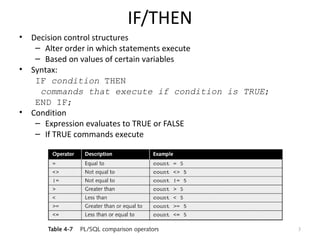
IF/THEN
•

•

•

Decision control structures
– Alter order in which statements execute
– Based on values of certain variables
Syntax:
IF condition THEN
commands that execute if condition is TRUE;
END IF;
Condition
– Expression evaluates to TRUE or FALSE
– If TRUE commands execute

3
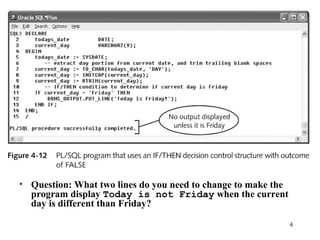
• Question: What two lines do you need to change to make the
program display Today is not Friday when the current
day is different than Friday?
4
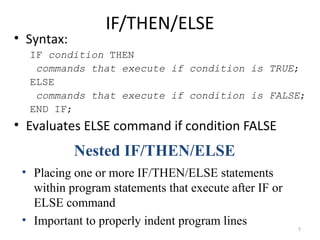
• Syntax:

IF/THEN/ELSE

IF condition THEN
commands that execute if condition is TRUE;
ELSE
commands that execute if condition is FALSE;
END IF;

• Evaluates ELSE command if condition FALSE

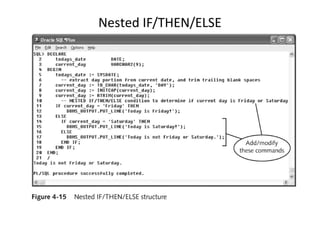
Nested IF/THEN/ELSE
• Placing one or more IF/THEN/ELSE statements
within program statements that execute after IF or
ELSE command
• Important to properly indent program lines

5
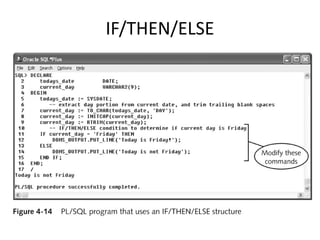
IF/THEN/ELSE
Nested IF/THEN/ELSE
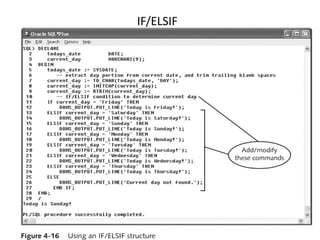
IF/ELSIF

8
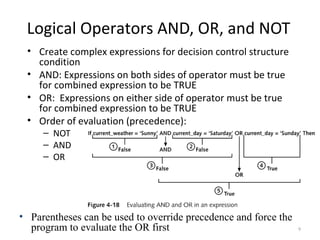
Logical Operators AND, OR, and NOT
• Create complex expressions for decision control structure
condition
• AND: Expressions on both sides of operator must be true
for combined expression to be TRUE
• OR: Expressions on either side of operator must be true
for combined expression to be TRUE
• Order of evaluation (precedence):
– NOT
– AND
– OR

• Parentheses can be used to override precedence and force the
program to evaluate the OR first

9
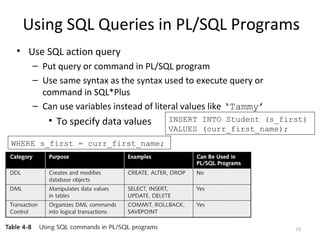
Using SQL Queries in PL/SQL Programs
• Use SQL action query
– Put query or command in PL/SQL program
– Use same syntax as the syntax used to execute query or
command in SQL*Plus
– Can use variables instead of literal values like ‘Tammy’

• To specify data values

INSERT INTO Student (s_first)
VALUES (curr_first_name);

WHERE s_first = curr_first_name;

10
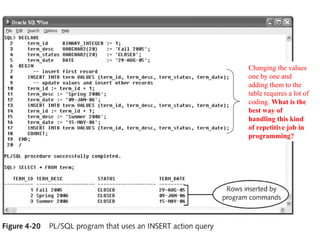
Changing the values
one by one and
adding them to the
table requires a lot of
coding. What is the
best way of
handling this kind
of repetitive job in
programming?
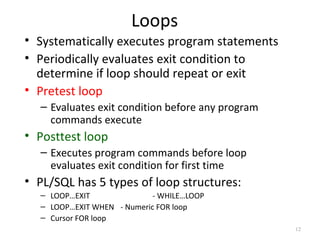
Loops
• Systematically executes program statements
• Periodically evaluates exit condition to
determine if loop should repeat or exit
• Pretest loop
– Evaluates exit condition before any program
commands execute

• Posttest loop
– Executes program commands before loop
evaluates exit condition for first time

• PL/SQL has 5 types of loop structures:
– LOOP…EXIT
- WHILE…LOOP
– LOOP…EXIT WHEN - Numeric FOR loop
– Cursor FOR loop
12
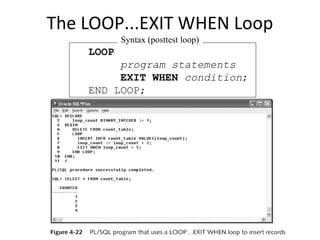
The LOOP...EXIT Loop
SQL statement
CREATE TABLE count_table
(counter NUMBER(2));

• Pretest or posttest
• Syntax:

Syntax

LOOP
[program statements]
IF condition THEN
EXIT;
END IF;
[additional program
statements]
END LOOP;
The LOOP...EXIT WHEN Loop
Syntax (posttest loop)

LOOP
program statements
EXIT WHEN condition;
END LOOP;
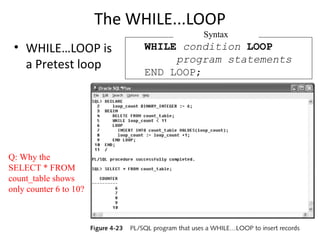
The WHILE...LOOP
Syntax

• WHILE…LOOP is
a Pretest loop

Q: Why the
SELECT * FROM
count_table shows
only counter 6 to 10?

WHILE condition LOOP
program statements
END LOOP;
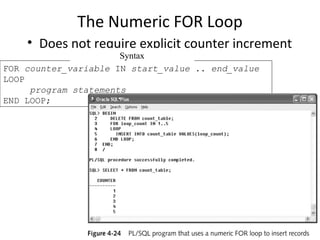
The Numeric FOR Loop
• Does not require explicit counter increment

Syntax
FOR counter_variable IN start_value .. end_value
LOOP
program statements
END LOOP;
Cursor
• A pointer to memory location on database
server
• Used to:
– Retrieve and manipulate database data in
PL/SQL programs

• Types:
– Implicit cursor
– Explicit cursor
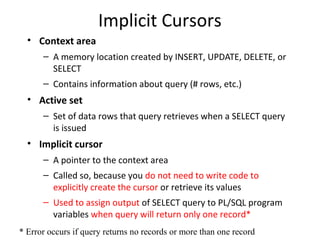
Implicit Cursors
• Context area
– A memory location created by INSERT, UPDATE, DELETE, or
SELECT
– Contains information about query (# rows, etc.)

• Active set
– Set of data rows that query retrieves when a SELECT query
is issued

• Implicit cursor
– A pointer to the context area
– Called so, because you do not need to write code to
explicitly create the cursor or retrieve its values
– Used to assign output of SELECT query to PL/SQL program
variables when query will return only one record*
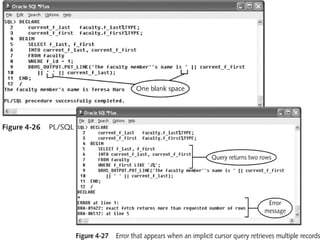
* Error occurs if query returns no records or more than one record
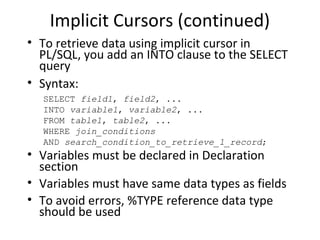
Implicit Cursors (continued)
• To retrieve data using implicit cursor in
PL/SQL, you add an INTO clause to the SELECT
query
• Syntax:
SELECT field1, field2, ...
INTO variable1, variable2, ...
FROM table1, table2, ...
WHERE join_conditions
AND search_condition_to_retrieve_1_record;

• Variables must be declared in Declaration
section
• Variables must have same data types as fields
• To avoid errors, %TYPE reference data type
should be used
Implicit Cursors (continued)
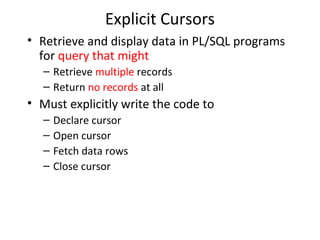
Explicit Cursors
• Retrieve and display data in PL/SQL programs
for query that might
– Retrieve multiple records
– Return no records at all

• Must explicitly write the code to
–
–
–
–

Declare cursor
Open cursor
Fetch data rows
Close cursor
Explicit Cursors (continued)
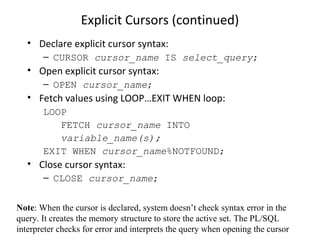
• Declare explicit cursor syntax:
– CURSOR cursor_name IS select_query;

• Open explicit cursor syntax:
– OPEN cursor_name;

• Fetch values using LOOP…EXIT WHEN loop:
LOOP
FETCH cursor_name INTO
variable_name(s);
EXIT WHEN cursor_name%NOTFOUND;

• Close cursor syntax:
– CLOSE cursor_name;
Note: When the cursor is declared, system doesn’t check syntax error in the
query. It creates the memory structure to store the active set. The PL/SQL
interpreter checks for error and interprets the query when opening the cursor
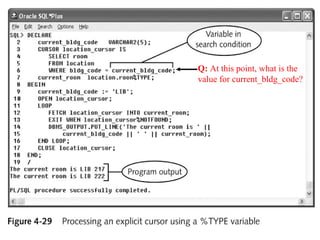
Q: At this point, what is the
value for current_bldg_code?
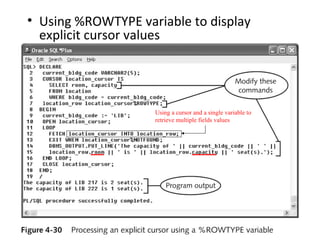
• Using %ROWTYPE variable to display
explicit cursor values

Using a cursor and a single variable to
retrieve multiple fields values
Handling Runtime Errors in PL/SQL
Programs

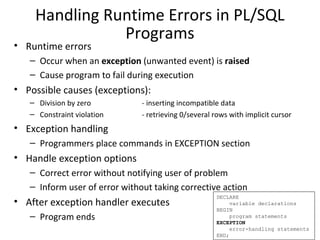
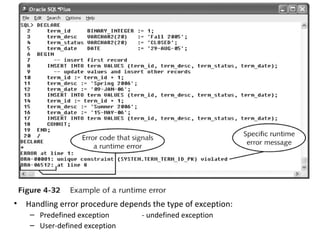
• Runtime errors

– Occur when an exception (unwanted event) is raised
– Cause program to fail during execution

• Possible causes (exceptions):
– Division by zero
– Constraint violation

- inserting incompatible data
- retrieving 0/several rows with implicit cursor

• Exception handling
– Programmers place commands in EXCEPTION section

• Handle exception options
– Correct error without notifying user of problem
– Inform user of error without taking corrective action

• After exception handler executes
– Program ends

DECLARE
variable declarations
BEGIN
program statements
EXCEPTION
error-handling statements
END;
•

Handling error procedure depends the type of exception:
– Predefined exception
– User-defined exception

- undefined exception
Predefined Exceptions
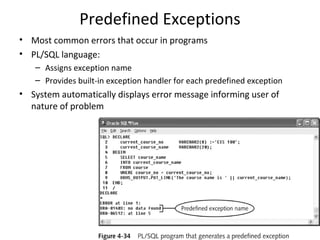
• Most common errors that occur in programs
• PL/SQL language:
– Assigns exception name
– Provides built-in exception handler for each predefined exception

• System automatically displays error message informing user of
nature of problem
Exception Handler Syntax
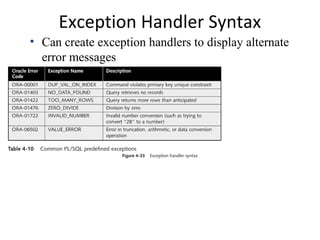
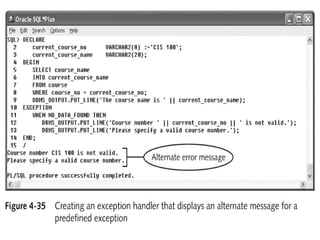
• Can create exception handlers to display alternate
error messages
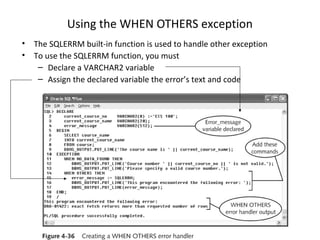
Using the WHEN OTHERS exception
•
•

The SQLERRM built-in function is used to handle other exception
To use the SQLERRM function, you must
– Declare a VARCHAR2 variable
– Assign the declared variable the error’s text and code
Undefined Exceptions
• Less common errors
• Do not have predefined names
• Must explicitly declare exception in program’s
declaration section
• Associate new exception with specific Oracle
error code
• Create exception handler in exception section
– Using same syntax as for predefined exceptions
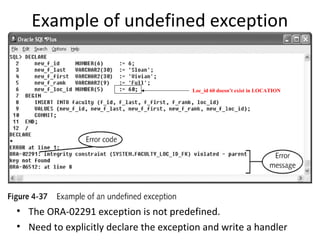
Example of undefined exception

Loc_id 60 doesn’t exist in LOCATION

• The ORA-02291 exception is not predefined.
• Need to explicitly declare the exception and write a handler
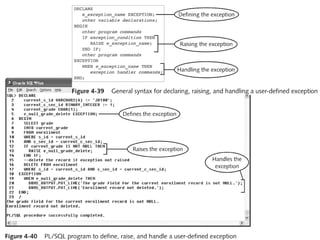
User-defined Exceptions
• Used to handle an exception that
– Does not raise Oracle runtime error
– But requires exception handling to
• Enforce business rules or
• Ensure integrity of database

• Example:
– Internal Northwoods’ rule is “Users can delete
row from the ENROLLMENT table only if s_grade
is NULL”
– Trying to delete a delete an ENROLLMENT row
where the s_grade is not NULL will raise an
exception that needs to be handled
Pl sql

Pl sql

  • 1.
  • 2.
    Lesson B Objectives Aftercompleting this lesson, you should be able to: • Create PL/SQL decision control structures • Use SQL queries in PL/SQL programs • Create loops in PL/SQL programs • Create PL/SQL tables and tables of records • Use cursors to retrieve database data into PL/SQL programs • Use the exception section to handle errors in PL/SQL programs 2
  • 3.
    IF/THEN • • • Decision control structures –Alter order in which statements execute – Based on values of certain variables Syntax: IF condition THEN commands that execute if condition is TRUE; END IF; Condition – Expression evaluates to TRUE or FALSE – If TRUE commands execute 3
  • 4.
    • Question: Whattwo lines do you need to change to make the program display Today is not Friday when the current day is different than Friday? 4
  • 5.
    • Syntax: IF/THEN/ELSE IF conditionTHEN commands that execute if condition is TRUE; ELSE commands that execute if condition is FALSE; END IF; • Evaluates ELSE command if condition FALSE Nested IF/THEN/ELSE • Placing one or more IF/THEN/ELSE statements within program statements that execute after IF or ELSE command • Important to properly indent program lines 5
  • 6.
  • 7.
  • 8.
  • 9.
    Logical Operators AND,OR, and NOT • Create complex expressions for decision control structure condition • AND: Expressions on both sides of operator must be true for combined expression to be TRUE • OR: Expressions on either side of operator must be true for combined expression to be TRUE • Order of evaluation (precedence): – NOT – AND – OR • Parentheses can be used to override precedence and force the program to evaluate the OR first 9
  • 10.
    Using SQL Queriesin PL/SQL Programs • Use SQL action query – Put query or command in PL/SQL program – Use same syntax as the syntax used to execute query or command in SQL*Plus – Can use variables instead of literal values like ‘Tammy’ • To specify data values INSERT INTO Student (s_first) VALUES (curr_first_name); WHERE s_first = curr_first_name; 10
  • 11.
    Changing the values oneby one and adding them to the table requires a lot of coding. What is the best way of handling this kind of repetitive job in programming?
  • 12.
    Loops • Systematically executesprogram statements • Periodically evaluates exit condition to determine if loop should repeat or exit • Pretest loop – Evaluates exit condition before any program commands execute • Posttest loop – Executes program commands before loop evaluates exit condition for first time • PL/SQL has 5 types of loop structures: – LOOP…EXIT - WHILE…LOOP – LOOP…EXIT WHEN - Numeric FOR loop – Cursor FOR loop 12
  • 13.
    The LOOP...EXIT Loop SQLstatement CREATE TABLE count_table (counter NUMBER(2)); • Pretest or posttest • Syntax: Syntax LOOP [program statements] IF condition THEN EXIT; END IF; [additional program statements] END LOOP;
  • 14.
    The LOOP...EXIT WHENLoop Syntax (posttest loop) LOOP program statements EXIT WHEN condition; END LOOP;
  • 15.
    The WHILE...LOOP Syntax • WHILE…LOOPis a Pretest loop Q: Why the SELECT * FROM count_table shows only counter 6 to 10? WHILE condition LOOP program statements END LOOP;
  • 16.
    The Numeric FORLoop • Does not require explicit counter increment Syntax FOR counter_variable IN start_value .. end_value LOOP program statements END LOOP;
  • 17.
    Cursor • A pointerto memory location on database server • Used to: – Retrieve and manipulate database data in PL/SQL programs • Types: – Implicit cursor – Explicit cursor
  • 18.
    Implicit Cursors • Contextarea – A memory location created by INSERT, UPDATE, DELETE, or SELECT – Contains information about query (# rows, etc.) • Active set – Set of data rows that query retrieves when a SELECT query is issued • Implicit cursor – A pointer to the context area – Called so, because you do not need to write code to explicitly create the cursor or retrieve its values – Used to assign output of SELECT query to PL/SQL program variables when query will return only one record* * Error occurs if query returns no records or more than one record
  • 19.
    Implicit Cursors (continued) •To retrieve data using implicit cursor in PL/SQL, you add an INTO clause to the SELECT query • Syntax: SELECT field1, field2, ... INTO variable1, variable2, ... FROM table1, table2, ... WHERE join_conditions AND search_condition_to_retrieve_1_record; • Variables must be declared in Declaration section • Variables must have same data types as fields • To avoid errors, %TYPE reference data type should be used
  • 20.
  • 21.
    Explicit Cursors • Retrieveand display data in PL/SQL programs for query that might – Retrieve multiple records – Return no records at all • Must explicitly write the code to – – – – Declare cursor Open cursor Fetch data rows Close cursor
  • 22.
    Explicit Cursors (continued) •Declare explicit cursor syntax: – CURSOR cursor_name IS select_query; • Open explicit cursor syntax: – OPEN cursor_name; • Fetch values using LOOP…EXIT WHEN loop: LOOP FETCH cursor_name INTO variable_name(s); EXIT WHEN cursor_name%NOTFOUND; • Close cursor syntax: – CLOSE cursor_name; Note: When the cursor is declared, system doesn’t check syntax error in the query. It creates the memory structure to store the active set. The PL/SQL interpreter checks for error and interprets the query when opening the cursor
  • 23.
    Q: At thispoint, what is the value for current_bldg_code?
  • 24.
    • Using %ROWTYPEvariable to display explicit cursor values Using a cursor and a single variable to retrieve multiple fields values
  • 25.
    Handling Runtime Errorsin PL/SQL Programs • Runtime errors – Occur when an exception (unwanted event) is raised – Cause program to fail during execution • Possible causes (exceptions): – Division by zero – Constraint violation - inserting incompatible data - retrieving 0/several rows with implicit cursor • Exception handling – Programmers place commands in EXCEPTION section • Handle exception options – Correct error without notifying user of problem – Inform user of error without taking corrective action • After exception handler executes – Program ends DECLARE variable declarations BEGIN program statements EXCEPTION error-handling statements END;
  • 26.
    • Handling error proceduredepends the type of exception: – Predefined exception – User-defined exception - undefined exception
  • 27.
    Predefined Exceptions • Mostcommon errors that occur in programs • PL/SQL language: – Assigns exception name – Provides built-in exception handler for each predefined exception • System automatically displays error message informing user of nature of problem
  • 28.
    Exception Handler Syntax •Can create exception handlers to display alternate error messages
  • 30.
    Using the WHENOTHERS exception • • The SQLERRM built-in function is used to handle other exception To use the SQLERRM function, you must – Declare a VARCHAR2 variable – Assign the declared variable the error’s text and code
  • 31.
    Undefined Exceptions • Lesscommon errors • Do not have predefined names • Must explicitly declare exception in program’s declaration section • Associate new exception with specific Oracle error code • Create exception handler in exception section – Using same syntax as for predefined exceptions
  • 32.
    Example of undefinedexception Loc_id 60 doesn’t exist in LOCATION • The ORA-02291 exception is not predefined. • Need to explicitly declare the exception and write a handler
  • 33.
    User-defined Exceptions • Usedto handle an exception that – Does not raise Oracle runtime error – But requires exception handling to • Enforce business rules or • Ensure integrity of database • Example: – Internal Northwoods’ rule is “Users can delete row from the ENROLLMENT table only if s_grade is NULL” – Trying to delete a delete an ENROLLMENT row where the s_grade is not NULL will raise an exception that needs to be handled