Log Miner In Oracle
Benifits
• Pin Pointing (xtional errors)
• Auditing
• Determining what actions you would have to
take to perform
• Performance tuning and capacity planning
• Performing postauditing
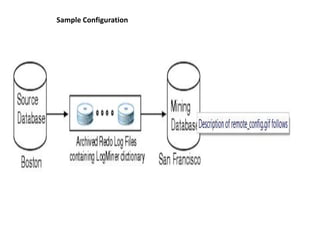
Sample Configuration
Requirements
• Source and mining database
• Both the source database and the mining database
must be running on the same hardware platform.
• The mining database can be the same as, or completely
separate from, the source database.
• The mining database must run the same version or a
later version of the Oracle Database software as the
source database.
• The mining database must use the same character set
(or a superset of the character set) used by the source
database.
• LogMiner dictionary
• All redo log files
Directing LogMiner Operations and
Retrieving Data of Interest
•
•
•
•
•
•
•
•
•
•
•
•

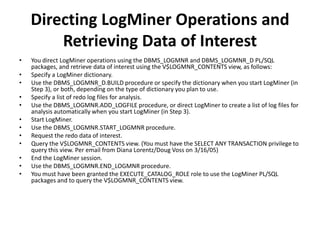
You direct LogMiner operations using the DBMS_LOGMNR and DBMS_LOGMNR_D PL/SQL
packages, and retrieve data of interest using the V$LOGMNR_CONTENTS view, as follows:
Specify a LogMiner dictionary.
Use the DBMS_LOGMNR_D.BUILD procedure or specify the dictionary when you start LogMiner (in
Step 3), or both, depending on the type of dictionary you plan to use.
Specify a list of redo log files for analysis.
Use the DBMS_LOGMNR.ADD_LOGFILE procedure, or direct LogMiner to create a list of log files for
analysis automatically when you start LogMiner (in Step 3).
Start LogMiner.
Use the DBMS_LOGMNR.START_LOGMNR procedure.
Request the redo data of interest.
Query the V$LOGMNR_CONTENTS view. (You must have the SELECT ANY TRANSACTION privilege to
query this view. Per email from Diana Lorentz/Doug Voss on 3/16/05)
End the LogMiner session.
Use the DBMS_LOGMNR.END_LOGMNR procedure.
You must have been granted the EXECUTE_CATALOG_ROLE role to use the LogMiner PL/SQL
packages and to query the V$LOGMNR_CONTENTS view.

Log miner in oracle.ppt

  • 1.
  • 2.
    Benifits • Pin Pointing(xtional errors) • Auditing • Determining what actions you would have to take to perform • Performance tuning and capacity planning • Performing postauditing
  • 3.
  • 4.
    Requirements • Source andmining database • Both the source database and the mining database must be running on the same hardware platform. • The mining database can be the same as, or completely separate from, the source database. • The mining database must run the same version or a later version of the Oracle Database software as the source database. • The mining database must use the same character set (or a superset of the character set) used by the source database.
  • 5.
    • LogMiner dictionary •All redo log files
  • 6.
    Directing LogMiner Operationsand Retrieving Data of Interest • • • • • • • • • • • • You direct LogMiner operations using the DBMS_LOGMNR and DBMS_LOGMNR_D PL/SQL packages, and retrieve data of interest using the V$LOGMNR_CONTENTS view, as follows: Specify a LogMiner dictionary. Use the DBMS_LOGMNR_D.BUILD procedure or specify the dictionary when you start LogMiner (in Step 3), or both, depending on the type of dictionary you plan to use. Specify a list of redo log files for analysis. Use the DBMS_LOGMNR.ADD_LOGFILE procedure, or direct LogMiner to create a list of log files for analysis automatically when you start LogMiner (in Step 3). Start LogMiner. Use the DBMS_LOGMNR.START_LOGMNR procedure. Request the redo data of interest. Query the V$LOGMNR_CONTENTS view. (You must have the SELECT ANY TRANSACTION privilege to query this view. Per email from Diana Lorentz/Doug Voss on 3/16/05) End the LogMiner session. Use the DBMS_LOGMNR.END_LOGMNR procedure. You must have been granted the EXECUTE_CATALOG_ROLE role to use the LogMiner PL/SQL packages and to query the V$LOGMNR_CONTENTS view.