Database aDministration
Database Administration
 Syllabus
 Books
 Attendance
 Grading
 WebCT
http://psuonline.pdx.edu/
Use your PSU Odin account
DATABASE Applications
 Oracle 10G (v10.2)
 Database server: SBALABS
 Use for SQL and PL/SQL programming
assignments
 You will be assigned a user account
 Local database server on lab desktops
 Use for DBA lab assignments
 SQL Developer
 Enterprise Manager
 Net configuration/management
DATABASE
 Remote connection
 Oracle 10g client
 Service

SBALABS
 Host

IP Address (See install/config lab for details)
What you should know
 Basic SQL
 INSERT, UPDATE and DELETE
 SELECT

WHERE

ORDER BY

GROUP BY/HAVING
 Joins (2 or 3 tables)
 Basic DDL
 CREATE, ALTER, DROP TABLE, etc
What you should know
 Referential Integrity
 Primary and Foreign Keys
 NULL
 Know about:
 Views
 Functions, procedures, triggers
 Indexes
 Transactions
WHAT WE WILL LEARN
1. Oracle Database Architecture
2. Administration
• Basic DBA tasks
• Backup and recovery
• Storage management
• Network management
• Security management
1. PL/SQL programming
2. Internet database technology*
*As time allows
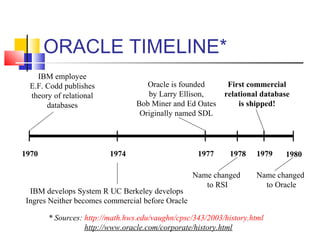
ORACLE TIMELINE*
1970
IBM employee
E.F. Codd publishes
theory of relational
databases
1974 1977 1980
IBM develops System R UC Berkeley develops
Ingres Neither becomes commercial before Oracle
Oracle is founded
by Larry Ellison,
Bob Miner and Ed Oates
Originally named SDL
1978 1979
Name changed
to RSI
First commercial
relational database
is shipped!
Name changed
to Oracle
* Sources: http://math.hws.edu/vaughn/cpsc/343/2003/history.html
http://www.oracle.com/corporate/history.html
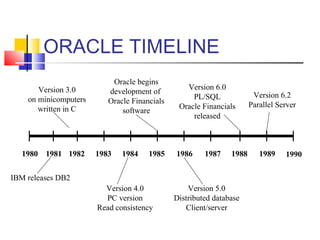
ORACLE TIMELINE
1980
Version 3.0
on minicomputers
written in C
1984 1987 1990
Version 4.0
PC version
Read consistency
Oracle begins
development of
Oracle Financials
software
1988 1989
Version 5.0
Distributed database
Client/server
Version 6.0
PL/SQL
Oracle Financials
released
Version 6.2
Parallel Server
1981 1982 1983
IBM releases DB2
1985 1986
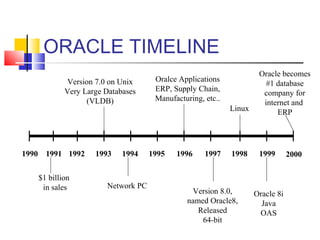
ORACLE TIMELINE
1990
Version 7.0 on Unix
Very Large Databases
(VLDB)
1994 1997 2000
Network PC
1998 1999
Version 8.0,
named Oracle8,
Released
64-bit
Linux
1991 1992 1993
$1 billion
in sales
1995 1996
Oralce Applications
ERP, Supply Chain,
Manufacturing, etc..
Oracle becomes
#1 database
company for
internet and
ERP
Oracle 8i
Java
OAS
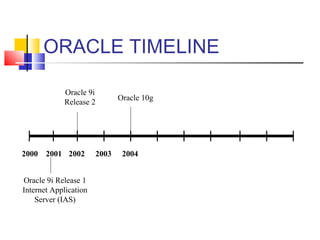
ORACLE TIMELINE
2000
Oracle 9i
Release 2
2004
Oracle 10g
2001 2002 2003
Oracle 9i Release 1
Internet Application
Server (IAS)
Oracle Documentation
 All Oracle documentation is available
online
 http://www.oracle.com/pls/db102/homepage
 Useful documents for this class*
 Oracle Database Concepts
 Database Administrator’s Guide
 SQL Reference
 PL/SQL User Guide an Reference* There are more than 200 Oracle documentation manuals
DATABASE ADMINISTRATOR
 What is a DBA?
 Database Administrator
 Default Blame Accepter?
 What does a DBA do?
DATABASE ADMINISTRATOR
 DBA tasks:
 Database Design and Planning
 Database Installation and Upgrade
 Backup and Recovery
 Storage Management
 Security Management
 Network Administration
 Performance Tuning
 On-call Emergency Crisis Management
DATABASE DESIGN AND
PLANNING
 Capacity planning
 Number and speed of CPU
 Memory
 Disk space
 Size and distribution of data files
 Network
 Firewall
 Concurrancy
 Distributed databases
 Database parameters
 Sizing and resource allocation
 Standby and test databases
DATABASE INSTALLATION
AND UPGRADE
 What products to install
 Configuring the operating system
 memory parameters
 Oracle account
 filesystem
 Installing/configuring database and web
servers
 Installing client software
 Planning and performing upgrades
BACKUP AND RECOVERY
 Develop backup and recovery plan
 Implement backup procedures
 Test recovery plans
 Schedule exports and other special-
needs backups
STORAGE MANAGEMENT
 Ensure enough disk space and data files
for growth
 Monitor growth
 Schedule database reorganizations
SECURITY MANAGEMENT
 Create database user accounts and
roles
 Grant and revoke privileges
 Maintain operating system security
 Network security
 firewall
 Web server security
 Encryption
NETWORK ADMINISTRATION
 Server network configuration
 Client network configuration
 Distributed database configuration
 Managing connection capacity
PERFORMANCE TUNING
 Monitor performance
 response time
 resource contention

CPU

Memory

Disk

Network
 Adjust database parameters
accordingly
 Assist in SQL statement tuning
ON-CALL CRISIS
MANAGEMENT
 Anticipate emergencies and take
preventative measures
 Respond to pager at 3am
 Keep a cool head
 Call Oracle for support
 Minimize damage
 Minimize downtime

Oracle 10g introduction

  • 1.
  • 2.
    Database Administration  Syllabus Books  Attendance  Grading  WebCT http://psuonline.pdx.edu/ Use your PSU Odin account
  • 3.
    DATABASE Applications  Oracle10G (v10.2)  Database server: SBALABS  Use for SQL and PL/SQL programming assignments  You will be assigned a user account  Local database server on lab desktops  Use for DBA lab assignments  SQL Developer  Enterprise Manager  Net configuration/management
  • 4.
    DATABASE  Remote connection Oracle 10g client  Service  SBALABS  Host  IP Address (See install/config lab for details)
  • 5.
    What you shouldknow  Basic SQL  INSERT, UPDATE and DELETE  SELECT  WHERE  ORDER BY  GROUP BY/HAVING  Joins (2 or 3 tables)  Basic DDL  CREATE, ALTER, DROP TABLE, etc
  • 6.
    What you shouldknow  Referential Integrity  Primary and Foreign Keys  NULL  Know about:  Views  Functions, procedures, triggers  Indexes  Transactions
  • 7.
    WHAT WE WILLLEARN 1. Oracle Database Architecture 2. Administration • Basic DBA tasks • Backup and recovery • Storage management • Network management • Security management 1. PL/SQL programming 2. Internet database technology* *As time allows
  • 8.
    ORACLE TIMELINE* 1970 IBM employee E.F.Codd publishes theory of relational databases 1974 1977 1980 IBM develops System R UC Berkeley develops Ingres Neither becomes commercial before Oracle Oracle is founded by Larry Ellison, Bob Miner and Ed Oates Originally named SDL 1978 1979 Name changed to RSI First commercial relational database is shipped! Name changed to Oracle * Sources: http://math.hws.edu/vaughn/cpsc/343/2003/history.html http://www.oracle.com/corporate/history.html
  • 9.
    ORACLE TIMELINE 1980 Version 3.0 onminicomputers written in C 1984 1987 1990 Version 4.0 PC version Read consistency Oracle begins development of Oracle Financials software 1988 1989 Version 5.0 Distributed database Client/server Version 6.0 PL/SQL Oracle Financials released Version 6.2 Parallel Server 1981 1982 1983 IBM releases DB2 1985 1986
  • 10.
    ORACLE TIMELINE 1990 Version 7.0on Unix Very Large Databases (VLDB) 1994 1997 2000 Network PC 1998 1999 Version 8.0, named Oracle8, Released 64-bit Linux 1991 1992 1993 $1 billion in sales 1995 1996 Oralce Applications ERP, Supply Chain, Manufacturing, etc.. Oracle becomes #1 database company for internet and ERP Oracle 8i Java OAS
  • 11.
    ORACLE TIMELINE 2000 Oracle 9i Release2 2004 Oracle 10g 2001 2002 2003 Oracle 9i Release 1 Internet Application Server (IAS)
  • 12.
    Oracle Documentation  AllOracle documentation is available online  http://www.oracle.com/pls/db102/homepage  Useful documents for this class*  Oracle Database Concepts  Database Administrator’s Guide  SQL Reference  PL/SQL User Guide an Reference* There are more than 200 Oracle documentation manuals
  • 13.
    DATABASE ADMINISTRATOR  Whatis a DBA?  Database Administrator  Default Blame Accepter?  What does a DBA do?
  • 14.
    DATABASE ADMINISTRATOR  DBAtasks:  Database Design and Planning  Database Installation and Upgrade  Backup and Recovery  Storage Management  Security Management  Network Administration  Performance Tuning  On-call Emergency Crisis Management
  • 15.
    DATABASE DESIGN AND PLANNING Capacity planning  Number and speed of CPU  Memory  Disk space  Size and distribution of data files  Network  Firewall  Concurrancy  Distributed databases  Database parameters  Sizing and resource allocation  Standby and test databases
  • 16.
    DATABASE INSTALLATION AND UPGRADE What products to install  Configuring the operating system  memory parameters  Oracle account  filesystem  Installing/configuring database and web servers  Installing client software  Planning and performing upgrades
  • 17.
    BACKUP AND RECOVERY Develop backup and recovery plan  Implement backup procedures  Test recovery plans  Schedule exports and other special- needs backups
  • 18.
    STORAGE MANAGEMENT  Ensureenough disk space and data files for growth  Monitor growth  Schedule database reorganizations
  • 19.
    SECURITY MANAGEMENT  Createdatabase user accounts and roles  Grant and revoke privileges  Maintain operating system security  Network security  firewall  Web server security  Encryption
  • 20.
    NETWORK ADMINISTRATION  Servernetwork configuration  Client network configuration  Distributed database configuration  Managing connection capacity
  • 21.
    PERFORMANCE TUNING  Monitorperformance  response time  resource contention  CPU  Memory  Disk  Network  Adjust database parameters accordingly  Assist in SQL statement tuning
  • 22.
    ON-CALL CRISIS MANAGEMENT  Anticipateemergencies and take preventative measures  Respond to pager at 3am  Keep a cool head  Call Oracle for support  Minimize damage  Minimize downtime