Counters & Time Delays
ACTIVE LEARNING
ASSIGNMENT
FOR
THE SUBJECT
“MICROPROCESSOR &
INTERFACING”
PREPARED BY:
HEMANT H. CHETWANI
(130410107010 – TY CE-II)
What are Counters &
Time Delays ?
 COUNTERS ARE USED TO KEEP
TRACK OF EVENTS.
 TIME DELAYS ARE IMPORTANT IN
SETTING UP REASONABLY ACCURATE
TIMING BETWEEN TWO EVENTS.
COUNTERS
A Counter is designed simply
by loading an appropriate
number into one of the
registers and using the INR
(Increment by one) or the
DCR (Decrement by one)
instructions. A loop is
established to update the
count, and each count is
checked to determine whether
it has reached the final
number; if not, the loop is
repeated.
Initialize
Update
Is this
Final
Count?
Display
No
Yes
Flowchart of a Counter
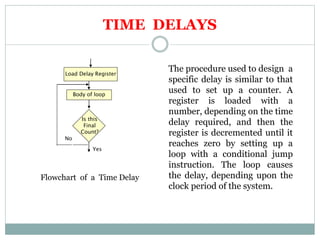
TIME DELAYS
The procedure used to design a
specific delay is similar to that
used to set up a counter. A
register is loaded with a
number, depending on the time
delay required, and then the
register is decremented until it
reaches zero by setting up a
loop with a conditional jump
instruction. The loop causes
the delay, depending upon the
clock period of the system.
Load Delay Register
Is this
Final
Count?
Body of loop
No
Yes
Flowchart of a Time Delay
Calculating Time Delays
Each instruction passes through different
combinations of Opcode Fetch, Memory Read,
and Memory Write cycles.
Knowing the combinations of cycles, one can
calculate how long such an instruction would
require to complete.
 Number of Bytes
 Number of Machine Cycles
 Number of T-State.
Calculating Time Delays
 Knowing how many T-States an instruction requires,
and keeping in mind that a T-State is one clock cycle
long, we can calculate the time delay using the following
formula:
Time Delay = No. of T-States * Clock Period
 For example,
“MVI” instruction uses 7 T-States.
Therefore, if the Microprocessor is running at 2 MHz,
the instruction would require 3.5 mS to complete.
We can design Time Delay
using following three
Techniques:
1. Using One Register.
2. Using a Register Pair.
3. Using a Loop with in a Loop
Using One Register
 A count is loaded in a register, and We can use a loop to produce a
certain amount of time delay in a program.
 The following is an example of a delay using One Register:
MVI C, FFH 7 T-States
LOOP DCR C 4 T-States
JNZ LOOP 10 T-States
 The first instruction initializes the loop counter and is executed only
once requiring only 7 T-States.
 The following two instructions form a loop that requires 14 T-States to
execute and is repeated 255 times until C becomes 0.
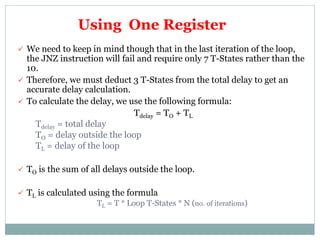
 We need to keep in mind though that in the last iteration of the loop,
the JNZ instruction will fail and require only 7 T-States rather than the
10.
 Therefore, we must deduct 3 T-States from the total delay to get an
accurate delay calculation.
 To calculate the delay, we use the following formula:
Tdelay = TO + TL
Tdelay = total delay
TO = delay outside the loop
TL = delay of the loop
 TO is the sum of all delays outside the loop.
 TL is calculated using the formula
TL = T * Loop T-States * N (no. of iterations)
Using One Register
 Using these formulas, we can calculate the time delay
for the previous example:
 TO = 7 T-States
(Delay of the MVI instruction)
 TL = (14 X 255) - 3 = 3567 T-States
(14 T-States for the 2 instructions repeated 255 times
(FF16 = 25510) reduced by the 3 T-States for the final JNZ.)
 Tdelay = [(TO + TL )/f]
= (7 + 3567)/2MHz
= (3574) X 0.5 mSec
= 1.787 mSec
(Assuming f = 2 MHz)
Using One Register
Using a Register Pair
Using a single register, one can repeat a loop for a
maximum count of 255 times.
It is possible to increase this count by using a
register pair for the loop counter instead of the
single register.
 A minor problem arises in how to test for the final count since
DCX and INX do not modify the flags.
 However, if the loop is looking for when the count becomes
zero, we can use a small trick by ORing the two registers in the
pair and then checking the zero flag.
Using a Register Pair
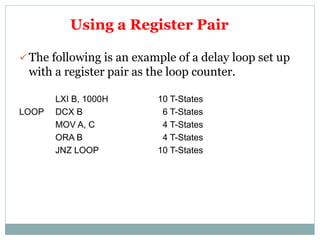
 The following is an example of a delay loop set up
with a register pair as the loop counter.
LXI B, 1000H 10 T-States
LOOP DCX B 6 T-States
MOV A, C 4 T-States
ORA B 4 T-States
JNZ LOOP 10 T-States
Using a Register Pair
 Using the same formula from before, we can
calculate:
 TO = 10 T-States
(The delay for the LXI instruction)
 TL = (24 X 4096) - 3 = 98301 T- States
(24 T-States for the 4 instructions in the loop repeated 4096
times (100016 = 409610) reduced by the 3 T-States for the JNZ in
the last iteration.)
 TDelay = (10 + 98301) X 0.5 mSec = 49.155 mSec
Using a Loop with in a Loop
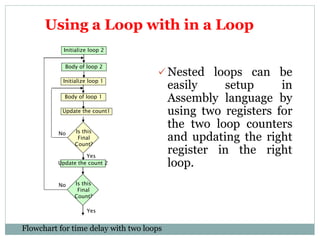
 Nested loops can be
easily setup in
Assembly language by
using two registers for
the two loop counters
and updating the right
register in the right
loop.
Initialize loop 1
Update the count1
Is this
Final
Count?
Body of loop 1
No
Yes
Initialize loop 2
Body of loop 2
Update the count 2
Is this
Final
Count?
No
Yes
Flowchart for time delay with two loops
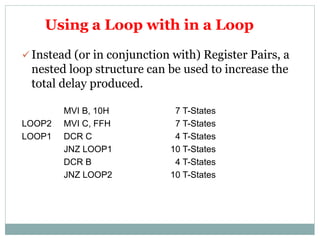
 Instead (or in conjunction with) Register Pairs, a
nested loop structure can be used to increase the
total delay produced.
MVI B, 10H 7 T-States
LOOP2 MVI C, FFH 7 T-States
LOOP1 DCR C 4 T-States
JNZ LOOP1 10 T-States
DCR B 4 T-States
JNZ LOOP2 10 T-States
Using a Loop with in a Loop
 The calculation remains the same except that the formula must be
applied recursively to each loop.
Start with the inner loop, then plug that delay in the calculation of
the outer loop.
 Delay of inner loop,
TO1 = 7 T-States
(MVI C, FFH instruction)
TL1 = (255 X 14) - 3 = 3567 T-States
(14 T-States for the DCR C and JNZ instructions repeated 255
times (FF16 = 25510) minus 3 for the final JNZ.)
TLOOP1 = 7 + 3567 = 3574 T-States
Using a Loop with in a Loop
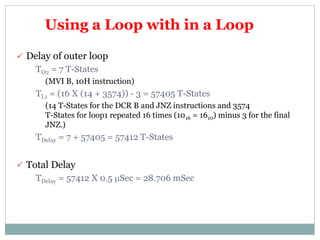
 Delay of outer loop
TO2 = 7 T-States
(MVI B, 10H instruction)
TL1 = (16 X (14 + 3574)) - 3 = 57405 T-States
(14 T-States for the DCR B and JNZ instructions and 3574
T-States for loop1 repeated 16 times (1016 = 1610) minus 3 for the final
JNZ.)
TDelay = 7 + 57405 = 57412 T-States
 Total Delay
TDelay = 57412 X 0.5 mSec = 28.706 mSec
Using a Loop with in a Loop
Increasing the Time Delay
The Delay can be further increased by using
register pairs for each of the loop counters in
the nested loops setup.
It can also be increased by adding dummy
instructions (like NOP) in the body of the
loop.
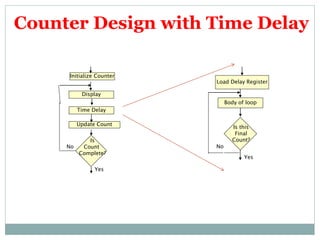
Counter Design with Time Delay
Display
Update Count
Is
Count
Complete?
Time Delay
No
Yes
Initialize Counter
Load Delay Register
Is this
Final
Count?
Body of loop
No
Yes
Initialize Counter
Update Count
Is
Count
Complete?
Display Count
Yes
No
Go back
End
Display
Update Count
Is
Count
Complete?
Time Delay
No
Yes
Initialize Counter
End
Time Delay
Variations Of Counter Flowchart
ILLUSTRATIVE
PROGRAMS
Hexadecimal counter
WRITE A PROGRAM TO COUNT CONTINUOUSLY
IN HEXADECIMAL FROM FFH TO 00H IN A
SYSTEM WITH A 0.5 MICRO SEC CLOCK PERIOD.
USE REGISTER C TO SET UP A ONE
MILLISECOND DELAY BETWEEN EACH COUNT
AND DISPLAY THE NUMBERS AT ONE OF THE
OUTPUT PORTS.
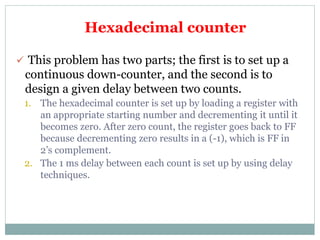
 This problem has two parts; the first is to set up a
continuous down-counter, and the second is to
design a given delay between two counts.
1. The hexadecimal counter is set up by loading a register with
an appropriate starting number and decrementing it until it
becomes zero. After zero count, the register goes back to FF
because decrementing zero results in a (-1), which is FF in
2’s complement.
2. The 1 ms delay between each count is set up by using delay
techniques.
Hexadecimal counter
MVI B,00H
NEXT: DCR B
MVI C,COUNT
DELAY:DCR C
JNZ DELAY
MOV A,B
OUT PORT#
JMP NEXT
Hexadecimal counter
 Delay loop includes two instructions: DCR C and
JNZ with 14 T-states. Therefore the time delay TL in
the loop (without accounting for the fact that JNZ
requires 7 T-States in the last cycle, because count
will remain same even if the calculations take into
account the difference of 3 T-States) is:
TL = 14 T-states X T (Clock period) X Count
= 14 X (0.5 x 10-6) x Count
= (7.0 X 10⁻⁶) X Count
Time Delay Calculation
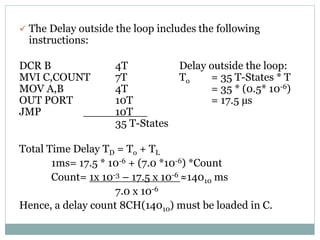
 The Delay outside the loop includes the following
instructions:
DCR B 4T Delay outside the loop:
MVI C,COUNT 7T To = 35 T-States * T
MOV A,B 4T = 35 * (0.5* 10-6)
OUT PORT 10T = 17.5 µs
JMP 10T
35 T-States
Total Time Delay TD = To + TL
1ms= 17.5 * 10-6 + (7.0 *10-6) *Count
Count= 1x 10⁻³ – 17.5 x 10⁻⁶ ≈14010 ms
7.0 x 10⁻⁶
Hence, a delay count 8CH(14010) must be loaded in C.
WRITE A PROGRAM TO COUNT FROM
0-9 WITH A ONE-SECOND DELAY
BETWEEN EACH COUNT. AT COUNT OF
9, THE COUNTER SHOULD RESET
ITSELF TO 0 AND REPEAT THE
SEQUENCE CONTINUOUSLY. USE
REGISTER PAIR HL TO SET UP THE
DELAY, AND DISPLAY EACH COUNT AT
ONE OF THE OUTPUT PORTS. ASSUME
THE CLOCK FREQUENCY OF THE
MICROCOMPUTER IS 1 MHZ.
Modulo TEN counter (0-9)
START: MVI B,00H 7
MOV A,B 4
DISPLAY: OUT PORT# 10
LXI H,16-Bit 10
LOOP: DCX H 6
MOV A,L 4
ORA H 4
JNZ LOOP 10/7
INR B 4
MOV A,B 4
CPI 0AH 7
JNZ DISPLAY 10/7
JZ START 10/7
Modulo TEN counter (0-9)
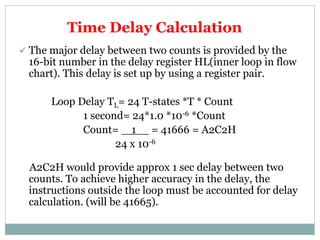
 The major delay between two counts is provided by the
16-bit number in the delay register HL(inner loop in flow
chart). This delay is set up by using a register pair.
Loop Delay TL= 24 T-states *T * Count
1 second= 24*1.0 *10-6 *Count
Count= 1 = 41666 = A2C2H
24 x 10-6
A2C2H would provide approx 1 sec delay between two
counts. To achieve higher accuracy in the delay, the
instructions outside the loop must be accounted for delay
calculation. (will be 41665).
Time Delay Calculation
WRITE A PROGRAM TO GENERATE A
CONTINUOUS SQUARE WAVE WITH
THE PERIOD OF 500MICRO SEC.
ASSUME THE SYSTEM CLOCK PERIOD
IS 325 NS, AND USE BIT D0 TO
OUTPUT THE SQUARE WAVE.
Generating Pulse
waveforms
MVI D,AA 7T
ROTATE: MOV A,D 4T
RLC 4T
MOV D,A 4T
ANI 01H 7T //mask MSB 7 Bits
OUT PORT1 10T
MVI B,COUNT
DELAY: DCR B 4T
JNZ DELAY 10/7 T
JMP ROTATE 10T
A 1 0 1 0 1 0 1 0
After RLC 0 1 0 1 0 1 0 1
A AND 01H 0 0 0 0 0 0 0 1
COUNT= 52.410 = 34H
Generating Pulse Waveforms
1. Errors in counting T-States in a delay loop. Typically, the first
instruction – to load a delay register – is mistakenly included
in the loop.
2. Errors in recognizing how many times a loop is repeated.
3. Failure to convert a delay count from a decimal number into
its hexadecimal equivalent.
4. Conversion error in converting a delay count from decimal to
hexadecimal number or vice versa.
5. Specifying a wrong jump location.
6. Failure to set a flag, especially with 16-bit
decrement/increment instructions.
7. Using a wrong jump instruction.
8. Failure to display either the first or the last count.
9. Failure to provide a delay between the last and the last-but-
one count.
Debugging counter & time- delay
programs
1. Errors in counting T-States in a delay loop. Typically, the first
instruction – to load a delay register – is mistakenly included
in the loop.
2. Errors in recognizing how many times a loop is repeated.
3. Failure to convert a delay count from a decimal number into
its hexadecimal equivalent.
4. Conversion error in converting a delay count from decimal to
hexadecimal number or vice versa.
5. Specifying a wrong jump location.
6. Failure to set a flag, especially with 16-bit
decrement/increment instructions.
7. Using a wrong jump instruction.
8. Failure to display either the first or the last count.
9. Failure to provide a delay between the last and the last-but-
one count.
Debugging counter & time- delay
programs

Counters & time delay

  • 1.
    Counters & TimeDelays ACTIVE LEARNING ASSIGNMENT FOR THE SUBJECT “MICROPROCESSOR & INTERFACING” PREPARED BY: HEMANT H. CHETWANI (130410107010 – TY CE-II)
  • 2.
    What are Counters& Time Delays ?  COUNTERS ARE USED TO KEEP TRACK OF EVENTS.  TIME DELAYS ARE IMPORTANT IN SETTING UP REASONABLY ACCURATE TIMING BETWEEN TWO EVENTS.
  • 3.
    COUNTERS A Counter isdesigned simply by loading an appropriate number into one of the registers and using the INR (Increment by one) or the DCR (Decrement by one) instructions. A loop is established to update the count, and each count is checked to determine whether it has reached the final number; if not, the loop is repeated. Initialize Update Is this Final Count? Display No Yes Flowchart of a Counter
  • 4.
    TIME DELAYS The procedureused to design a specific delay is similar to that used to set up a counter. A register is loaded with a number, depending on the time delay required, and then the register is decremented until it reaches zero by setting up a loop with a conditional jump instruction. The loop causes the delay, depending upon the clock period of the system. Load Delay Register Is this Final Count? Body of loop No Yes Flowchart of a Time Delay
  • 5.
    Calculating Time Delays Eachinstruction passes through different combinations of Opcode Fetch, Memory Read, and Memory Write cycles. Knowing the combinations of cycles, one can calculate how long such an instruction would require to complete.  Number of Bytes  Number of Machine Cycles  Number of T-State.
  • 6.
    Calculating Time Delays Knowing how many T-States an instruction requires, and keeping in mind that a T-State is one clock cycle long, we can calculate the time delay using the following formula: Time Delay = No. of T-States * Clock Period  For example, “MVI” instruction uses 7 T-States. Therefore, if the Microprocessor is running at 2 MHz, the instruction would require 3.5 mS to complete.
  • 7.
    We can designTime Delay using following three Techniques: 1. Using One Register. 2. Using a Register Pair. 3. Using a Loop with in a Loop
  • 8.
    Using One Register A count is loaded in a register, and We can use a loop to produce a certain amount of time delay in a program.  The following is an example of a delay using One Register: MVI C, FFH 7 T-States LOOP DCR C 4 T-States JNZ LOOP 10 T-States  The first instruction initializes the loop counter and is executed only once requiring only 7 T-States.  The following two instructions form a loop that requires 14 T-States to execute and is repeated 255 times until C becomes 0.
  • 9.
     We needto keep in mind though that in the last iteration of the loop, the JNZ instruction will fail and require only 7 T-States rather than the 10.  Therefore, we must deduct 3 T-States from the total delay to get an accurate delay calculation.  To calculate the delay, we use the following formula: Tdelay = TO + TL Tdelay = total delay TO = delay outside the loop TL = delay of the loop  TO is the sum of all delays outside the loop.  TL is calculated using the formula TL = T * Loop T-States * N (no. of iterations) Using One Register
  • 10.
     Using theseformulas, we can calculate the time delay for the previous example:  TO = 7 T-States (Delay of the MVI instruction)  TL = (14 X 255) - 3 = 3567 T-States (14 T-States for the 2 instructions repeated 255 times (FF16 = 25510) reduced by the 3 T-States for the final JNZ.)  Tdelay = [(TO + TL )/f] = (7 + 3567)/2MHz = (3574) X 0.5 mSec = 1.787 mSec (Assuming f = 2 MHz) Using One Register
  • 11.
    Using a RegisterPair Using a single register, one can repeat a loop for a maximum count of 255 times. It is possible to increase this count by using a register pair for the loop counter instead of the single register.  A minor problem arises in how to test for the final count since DCX and INX do not modify the flags.  However, if the loop is looking for when the count becomes zero, we can use a small trick by ORing the two registers in the pair and then checking the zero flag.
  • 12.
    Using a RegisterPair  The following is an example of a delay loop set up with a register pair as the loop counter. LXI B, 1000H 10 T-States LOOP DCX B 6 T-States MOV A, C 4 T-States ORA B 4 T-States JNZ LOOP 10 T-States
  • 13.
    Using a RegisterPair  Using the same formula from before, we can calculate:  TO = 10 T-States (The delay for the LXI instruction)  TL = (24 X 4096) - 3 = 98301 T- States (24 T-States for the 4 instructions in the loop repeated 4096 times (100016 = 409610) reduced by the 3 T-States for the JNZ in the last iteration.)  TDelay = (10 + 98301) X 0.5 mSec = 49.155 mSec
  • 14.
    Using a Loopwith in a Loop  Nested loops can be easily setup in Assembly language by using two registers for the two loop counters and updating the right register in the right loop. Initialize loop 1 Update the count1 Is this Final Count? Body of loop 1 No Yes Initialize loop 2 Body of loop 2 Update the count 2 Is this Final Count? No Yes Flowchart for time delay with two loops
  • 15.
     Instead (orin conjunction with) Register Pairs, a nested loop structure can be used to increase the total delay produced. MVI B, 10H 7 T-States LOOP2 MVI C, FFH 7 T-States LOOP1 DCR C 4 T-States JNZ LOOP1 10 T-States DCR B 4 T-States JNZ LOOP2 10 T-States Using a Loop with in a Loop
  • 16.
     The calculationremains the same except that the formula must be applied recursively to each loop. Start with the inner loop, then plug that delay in the calculation of the outer loop.  Delay of inner loop, TO1 = 7 T-States (MVI C, FFH instruction) TL1 = (255 X 14) - 3 = 3567 T-States (14 T-States for the DCR C and JNZ instructions repeated 255 times (FF16 = 25510) minus 3 for the final JNZ.) TLOOP1 = 7 + 3567 = 3574 T-States Using a Loop with in a Loop
  • 17.
     Delay ofouter loop TO2 = 7 T-States (MVI B, 10H instruction) TL1 = (16 X (14 + 3574)) - 3 = 57405 T-States (14 T-States for the DCR B and JNZ instructions and 3574 T-States for loop1 repeated 16 times (1016 = 1610) minus 3 for the final JNZ.) TDelay = 7 + 57405 = 57412 T-States  Total Delay TDelay = 57412 X 0.5 mSec = 28.706 mSec Using a Loop with in a Loop
  • 18.
    Increasing the TimeDelay The Delay can be further increased by using register pairs for each of the loop counters in the nested loops setup. It can also be increased by adding dummy instructions (like NOP) in the body of the loop.
  • 19.
    Counter Design withTime Delay Display Update Count Is Count Complete? Time Delay No Yes Initialize Counter Load Delay Register Is this Final Count? Body of loop No Yes
  • 20.
    Initialize Counter Update Count Is Count Complete? DisplayCount Yes No Go back End Display Update Count Is Count Complete? Time Delay No Yes Initialize Counter End Time Delay Variations Of Counter Flowchart
  • 21.
  • 22.
    Hexadecimal counter WRITE APROGRAM TO COUNT CONTINUOUSLY IN HEXADECIMAL FROM FFH TO 00H IN A SYSTEM WITH A 0.5 MICRO SEC CLOCK PERIOD. USE REGISTER C TO SET UP A ONE MILLISECOND DELAY BETWEEN EACH COUNT AND DISPLAY THE NUMBERS AT ONE OF THE OUTPUT PORTS.
  • 23.
     This problemhas two parts; the first is to set up a continuous down-counter, and the second is to design a given delay between two counts. 1. The hexadecimal counter is set up by loading a register with an appropriate starting number and decrementing it until it becomes zero. After zero count, the register goes back to FF because decrementing zero results in a (-1), which is FF in 2’s complement. 2. The 1 ms delay between each count is set up by using delay techniques. Hexadecimal counter
  • 24.
    MVI B,00H NEXT: DCRB MVI C,COUNT DELAY:DCR C JNZ DELAY MOV A,B OUT PORT# JMP NEXT Hexadecimal counter
  • 25.
     Delay loopincludes two instructions: DCR C and JNZ with 14 T-states. Therefore the time delay TL in the loop (without accounting for the fact that JNZ requires 7 T-States in the last cycle, because count will remain same even if the calculations take into account the difference of 3 T-States) is: TL = 14 T-states X T (Clock period) X Count = 14 X (0.5 x 10-6) x Count = (7.0 X 10⁻⁶) X Count Time Delay Calculation
  • 26.
     The Delayoutside the loop includes the following instructions: DCR B 4T Delay outside the loop: MVI C,COUNT 7T To = 35 T-States * T MOV A,B 4T = 35 * (0.5* 10-6) OUT PORT 10T = 17.5 µs JMP 10T 35 T-States Total Time Delay TD = To + TL 1ms= 17.5 * 10-6 + (7.0 *10-6) *Count Count= 1x 10⁻³ – 17.5 x 10⁻⁶ ≈14010 ms 7.0 x 10⁻⁶ Hence, a delay count 8CH(14010) must be loaded in C.
  • 27.
    WRITE A PROGRAMTO COUNT FROM 0-9 WITH A ONE-SECOND DELAY BETWEEN EACH COUNT. AT COUNT OF 9, THE COUNTER SHOULD RESET ITSELF TO 0 AND REPEAT THE SEQUENCE CONTINUOUSLY. USE REGISTER PAIR HL TO SET UP THE DELAY, AND DISPLAY EACH COUNT AT ONE OF THE OUTPUT PORTS. ASSUME THE CLOCK FREQUENCY OF THE MICROCOMPUTER IS 1 MHZ. Modulo TEN counter (0-9)
  • 28.
    START: MVI B,00H7 MOV A,B 4 DISPLAY: OUT PORT# 10 LXI H,16-Bit 10 LOOP: DCX H 6 MOV A,L 4 ORA H 4 JNZ LOOP 10/7 INR B 4 MOV A,B 4 CPI 0AH 7 JNZ DISPLAY 10/7 JZ START 10/7 Modulo TEN counter (0-9)
  • 29.
     The majordelay between two counts is provided by the 16-bit number in the delay register HL(inner loop in flow chart). This delay is set up by using a register pair. Loop Delay TL= 24 T-states *T * Count 1 second= 24*1.0 *10-6 *Count Count= 1 = 41666 = A2C2H 24 x 10-6 A2C2H would provide approx 1 sec delay between two counts. To achieve higher accuracy in the delay, the instructions outside the loop must be accounted for delay calculation. (will be 41665). Time Delay Calculation
  • 30.
    WRITE A PROGRAMTO GENERATE A CONTINUOUS SQUARE WAVE WITH THE PERIOD OF 500MICRO SEC. ASSUME THE SYSTEM CLOCK PERIOD IS 325 NS, AND USE BIT D0 TO OUTPUT THE SQUARE WAVE. Generating Pulse waveforms
  • 31.
    MVI D,AA 7T ROTATE:MOV A,D 4T RLC 4T MOV D,A 4T ANI 01H 7T //mask MSB 7 Bits OUT PORT1 10T MVI B,COUNT DELAY: DCR B 4T JNZ DELAY 10/7 T JMP ROTATE 10T A 1 0 1 0 1 0 1 0 After RLC 0 1 0 1 0 1 0 1 A AND 01H 0 0 0 0 0 0 0 1 COUNT= 52.410 = 34H Generating Pulse Waveforms
  • 32.
    1. Errors incounting T-States in a delay loop. Typically, the first instruction – to load a delay register – is mistakenly included in the loop. 2. Errors in recognizing how many times a loop is repeated. 3. Failure to convert a delay count from a decimal number into its hexadecimal equivalent. 4. Conversion error in converting a delay count from decimal to hexadecimal number or vice versa. 5. Specifying a wrong jump location. 6. Failure to set a flag, especially with 16-bit decrement/increment instructions. 7. Using a wrong jump instruction. 8. Failure to display either the first or the last count. 9. Failure to provide a delay between the last and the last-but- one count. Debugging counter & time- delay programs
  • 33.
    1. Errors incounting T-States in a delay loop. Typically, the first instruction – to load a delay register – is mistakenly included in the loop. 2. Errors in recognizing how many times a loop is repeated. 3. Failure to convert a delay count from a decimal number into its hexadecimal equivalent. 4. Conversion error in converting a delay count from decimal to hexadecimal number or vice versa. 5. Specifying a wrong jump location. 6. Failure to set a flag, especially with 16-bit decrement/increment instructions. 7. Using a wrong jump instruction. 8. Failure to display either the first or the last count. 9. Failure to provide a delay between the last and the last-but- one count. Debugging counter & time- delay programs