ACTIVE LEARNING
ASSIGNMENT
FOR
THE SUBJECT
“OBJECT ORIENTED
PROGRAMMING WITH
JAVA” PREPARED BY:
HEMANT H. CHETWANI
(130410107010 – TY CE-II BATCH-A)
SUBMITTED TO:
K. S. SUTHAR
Exception
Handling
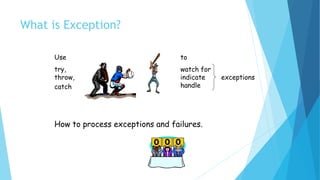
What is Exception?
Use
try,
throw,
catch
to
watch for
indicate exceptions
handle
How to process exceptions and failures.
Exceptions and Errors
 When a problem encounters and unexpected
termination or fault, it is called an exception
 When we try and divide by 0 we terminate
abnormally.
 Exception handling gives us another opportunity to
recover from the abnormality.
 Sometimes we might encounter situations from
which we cannot recover like Outofmemory. These
are considered as errors.
Need
 We seek robust programs.
 When something unexpected occurs
 Ensure program detects the problem
 Then program must do something about it
 Need mechanism to check for problem
where it could occur
 When condition does occur
 Have control passed to code to handle the
problem
Overview
 Exception
 Indication of problem during execution
 Uses of exception handling
 Process exceptions from program components
 Handle exceptions in a uniform manner in large projects
 Remove error-handling code from “main line” of execution
 A method detects an error and throws an exception
 Exception handler processes the error
 Uncaught exceptions yield adverse effects
 Might terminate program execution
Overview
 Code that could generate errors put in try blocks
 Code for error handling enclosed in a catch
clause
 The finally clause always executes
 Termination model of exception handling
 The block in which the exception occurs expires
 throws clause specifies exceptions method throws
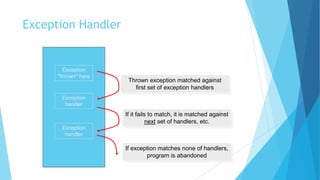
Exception Handler
8
Exception
"thrown" here
Exception
handler
Exception
handler
Thrown exception matched against
first set of exception handlers
If it fails to match, it is matched against
next set of handlers, etc.
If exception matches none of handlers,
program is abandoned
Terminology
Thrown exception – an exception that has occurred
Stack trace
 Name of the exception in a descriptive message that
indicates the problem
 Complete method-call stack
ArithmeticException – can arise from a number of
different problems in arithmetic
 Throw point – initial point at which the exception
occurs, top row of call chain
 Like,InputMismatchException – occurs when Scanner
method nextInt receives a string that does not
represent a valid integer.
Termination Model of Exception
Handling
When an exception occurs:
 try block terminates immediately
 Program control transfers to first matching catch
block
try statement – consists of try block and
corresponding catch and/or finally blocks
Enclosing Code in a try Block
try block – encloses code that might throw
an exception and the code that should not
execute if an exception occurs
Consists of keyword try followed by a block
of code enclosed in curly braces
Using the throws Clause
Appears after method’s parameter list and
before the method’s body
Contains a comma-separated list of
exceptions
Exceptions can be thrown by statements in
method’s body of by methods called in
method’s body
Exceptions can be of types listed in
throws clause or subclasses
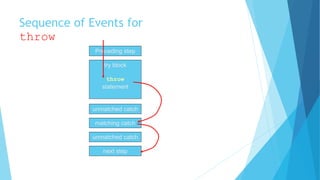
Sequence of Events for
throw
Preceding step
try block
throw
statement
unmatched catch
matching catch
unmatched catch
next step
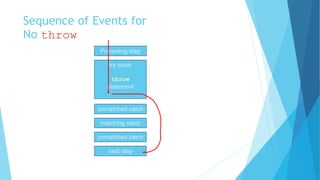
Sequence of Events for
No throw
Preceding step
try block
throw
statement
unmatched catch
matching catch
unmatched catch
next step
When to Use Exception Handling
 Exception handling designed to process synchronous errors
 Synchronous errors – occur when a statement executes
 Asynchronous errors – occur in parallel with and independent of
the program’s flow of control
 Avoid using exception handling as an alternate form of flow of control.
Java Exception Hierarchy
 Superclass Throwable
 Subclass Exception
 Exceptional situations
 Should be caught by program
 Subclass Error
 Typically not caught by program
 Checked exceptions
 Catch or declare
 Unchecked exceptions
Java Exception Hierarchy
All exceptions inherit either directly
or indirectly from class Exception
Exception classes form an
inheritance hierarchy that can be
extended
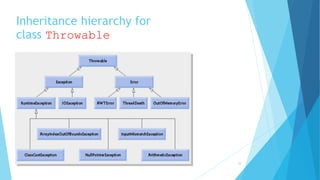
Java Exception Hierarchy
Class Throwable, superclass of Exception
 Only Throwable objects can be used with the
exception-handling mechanism
Has two subclasses:
 Exception and Error
 Class Exception and its subclasses represent exception
situations that can occur in a Java program and that
can be caught by the application
 Class Error and its subclasses represent abnormal
situations that could happen in the JVM – it is usually
not possible for a program to recover from Errors
Inheritance hierarchy for
class Throwable
19
Checked Exceptions
 Inherit from class Exception but not from
RuntimeException
 Compiler enforces catch-or-declare requirement
 Compiler checks each method call and method
declaration
 determines whether method throws checked
exceptions.
 If so, the compiler ensures checked exception caught
or declared in throws clause.
 If not caught or declared, compiler error occurs.
Unchecked Exceptions
 Inherit from class RuntimeException or class
Error
 Compiler does not check code to see if
exception caught or declared
 If an unchecked exception occurs and not
caught
 Program terminates or runs with unexpected results
 Can typically be prevented by proper coding
Java Exception Hierarchy
catch block catches all exceptions of its type and
subclasses of its type
If there are multiple catch blocks that match a
particular exception type, only the first matching
catch block executes
Makes sense to use a catch block of a superclass when
all catch blocks for that class’s subclasses will
perform same functionality
finally Block
Consists of finally keyword
followed by a block of code
enclosed in curly braces
Optional in a try statement
If present, is placed after the last
catch block
finally Block
Executes whether or not an exception is
thrown in the corresponding try block or
any of its corresponding catch blocks
Will not execute if the application exits
early from a try block via method
System.exit
Typically contains resource-release code
Using finally
 Note
 Re-throw of exception
 Code for throw exception
 Blocks using finally
 Suggestion
 Do not use a try block for every individual statement which
may cause a problem
 Enclose groups of statements
 Follow by multiple catch blocks
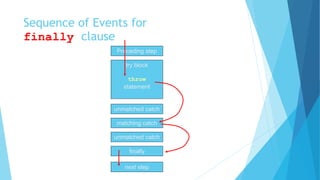
Sequence of Events for
finally clause
Preceding step
try block
throw
statement
unmatched catch
matching catch
unmatched catch
next step
finally
Example
public class myexception{
public static void main(String args[]){
try{
File f = new File(“myfile”);
FileInputStream fis = new FileInputStream(f);
}catch(FileNotFoundException ex){
File f = new File(“Available File”);
FileInputStream fis = new FileInputStream(f);
}
finally{
// the finally block
}
//continue processing here.
}
}
In this example,
 we are trying to open a file and if the file does not exists we can do
further processing in the catch block.
 The try and catch blocks are used to identify possible exception
conditions. We try to execute any statement that might throw an
exception and the catch block is used for any exceptions caused.
 If the try block does not throw any exceptions, then the catch block is not
executed.
 The finally block is always executed irrespective of whether the
exception is thrown or not.
 If you don’t want the exception to be handled in the same function you
can use the throws class to handle the exception in the calling function.
Using throws clause
public class myexception{
public static void main(String args[]){
try{
checkEx();
} catch(FileNotFoundException ex){
}
}
public void checkEx() throws FileNotFoundException{
File f = new File(“myfile”);
FileInputStream fis = new FileInputStream(f);
//continue processing here.
}
}
In this example,
 The main method calls the checkex()
method and the checkex method tries to
open a file, If the file in not available,
then an exception is raised and passed to
the main method, where it is handled.
Catching Multiple exceptions
public class myexception{
public static void main(String args[]){
try{
File f = new File(“myfile”);
FileInputStream fis = new FileInputStream(f);
}
catch(FileNotFoundException ex){
File f = new File(“Available File”);
FileInputStream fis = new FileInputStream(f);
}catch(IOException ex){
//do something here
}
finally{
// the finally block
}
//continue processing here.
} }
In this example,
 We can have multiple catch blocks for a single try statement. The
exception handler looks for a compatible match and then for an exact
match. In other words, in the example, if the exception raised was
myIOCustomException, a subclass of FileNotFoundException, then the
catch block of FileNotFoundExeception is matched and executed.
 If a compatible match is found before an exact match, then the
compatible match is preferred.
 We need to pay special attention on ordering of exceptions in the
catch blocks, as it can lead to mismatching of exception and
unreachable code.
 We need to arrange the exceptions from specific to general.
130410107010 exception handling

130410107010 exception handling

  • 1.
    ACTIVE LEARNING ASSIGNMENT FOR THE SUBJECT “OBJECTORIENTED PROGRAMMING WITH JAVA” PREPARED BY: HEMANT H. CHETWANI (130410107010 – TY CE-II BATCH-A) SUBMITTED TO: K. S. SUTHAR
  • 2.
  • 3.
    What is Exception? Use try, throw, catch to watchfor indicate exceptions handle How to process exceptions and failures.
  • 4.
    Exceptions and Errors When a problem encounters and unexpected termination or fault, it is called an exception  When we try and divide by 0 we terminate abnormally.  Exception handling gives us another opportunity to recover from the abnormality.  Sometimes we might encounter situations from which we cannot recover like Outofmemory. These are considered as errors.
  • 5.
    Need  We seekrobust programs.  When something unexpected occurs  Ensure program detects the problem  Then program must do something about it  Need mechanism to check for problem where it could occur  When condition does occur  Have control passed to code to handle the problem
  • 6.
    Overview  Exception  Indicationof problem during execution  Uses of exception handling  Process exceptions from program components  Handle exceptions in a uniform manner in large projects  Remove error-handling code from “main line” of execution  A method detects an error and throws an exception  Exception handler processes the error  Uncaught exceptions yield adverse effects  Might terminate program execution
  • 7.
    Overview  Code thatcould generate errors put in try blocks  Code for error handling enclosed in a catch clause  The finally clause always executes  Termination model of exception handling  The block in which the exception occurs expires  throws clause specifies exceptions method throws
  • 8.
    Exception Handler 8 Exception "thrown" here Exception handler Exception handler Thrownexception matched against first set of exception handlers If it fails to match, it is matched against next set of handlers, etc. If exception matches none of handlers, program is abandoned
  • 9.
    Terminology Thrown exception –an exception that has occurred Stack trace  Name of the exception in a descriptive message that indicates the problem  Complete method-call stack ArithmeticException – can arise from a number of different problems in arithmetic  Throw point – initial point at which the exception occurs, top row of call chain  Like,InputMismatchException – occurs when Scanner method nextInt receives a string that does not represent a valid integer.
  • 10.
    Termination Model ofException Handling When an exception occurs:  try block terminates immediately  Program control transfers to first matching catch block try statement – consists of try block and corresponding catch and/or finally blocks
  • 11.
    Enclosing Code ina try Block try block – encloses code that might throw an exception and the code that should not execute if an exception occurs Consists of keyword try followed by a block of code enclosed in curly braces
  • 12.
    Using the throwsClause Appears after method’s parameter list and before the method’s body Contains a comma-separated list of exceptions Exceptions can be thrown by statements in method’s body of by methods called in method’s body Exceptions can be of types listed in throws clause or subclasses
  • 13.
    Sequence of Eventsfor throw Preceding step try block throw statement unmatched catch matching catch unmatched catch next step
  • 14.
    Sequence of Eventsfor No throw Preceding step try block throw statement unmatched catch matching catch unmatched catch next step
  • 15.
    When to UseException Handling  Exception handling designed to process synchronous errors  Synchronous errors – occur when a statement executes  Asynchronous errors – occur in parallel with and independent of the program’s flow of control  Avoid using exception handling as an alternate form of flow of control.
  • 16.
    Java Exception Hierarchy Superclass Throwable  Subclass Exception  Exceptional situations  Should be caught by program  Subclass Error  Typically not caught by program  Checked exceptions  Catch or declare  Unchecked exceptions
  • 17.
    Java Exception Hierarchy Allexceptions inherit either directly or indirectly from class Exception Exception classes form an inheritance hierarchy that can be extended
  • 18.
    Java Exception Hierarchy ClassThrowable, superclass of Exception  Only Throwable objects can be used with the exception-handling mechanism Has two subclasses:  Exception and Error  Class Exception and its subclasses represent exception situations that can occur in a Java program and that can be caught by the application  Class Error and its subclasses represent abnormal situations that could happen in the JVM – it is usually not possible for a program to recover from Errors
  • 19.
  • 20.
    Checked Exceptions  Inheritfrom class Exception but not from RuntimeException  Compiler enforces catch-or-declare requirement  Compiler checks each method call and method declaration  determines whether method throws checked exceptions.  If so, the compiler ensures checked exception caught or declared in throws clause.  If not caught or declared, compiler error occurs.
  • 21.
    Unchecked Exceptions  Inheritfrom class RuntimeException or class Error  Compiler does not check code to see if exception caught or declared  If an unchecked exception occurs and not caught  Program terminates or runs with unexpected results  Can typically be prevented by proper coding
  • 22.
    Java Exception Hierarchy catchblock catches all exceptions of its type and subclasses of its type If there are multiple catch blocks that match a particular exception type, only the first matching catch block executes Makes sense to use a catch block of a superclass when all catch blocks for that class’s subclasses will perform same functionality
  • 23.
    finally Block Consists offinally keyword followed by a block of code enclosed in curly braces Optional in a try statement If present, is placed after the last catch block
  • 24.
    finally Block Executes whetheror not an exception is thrown in the corresponding try block or any of its corresponding catch blocks Will not execute if the application exits early from a try block via method System.exit Typically contains resource-release code
  • 25.
    Using finally  Note Re-throw of exception  Code for throw exception  Blocks using finally  Suggestion  Do not use a try block for every individual statement which may cause a problem  Enclose groups of statements  Follow by multiple catch blocks
  • 26.
    Sequence of Eventsfor finally clause Preceding step try block throw statement unmatched catch matching catch unmatched catch next step finally
  • 27.
    Example public class myexception{ publicstatic void main(String args[]){ try{ File f = new File(“myfile”); FileInputStream fis = new FileInputStream(f); }catch(FileNotFoundException ex){ File f = new File(“Available File”); FileInputStream fis = new FileInputStream(f); } finally{ // the finally block } //continue processing here. } }
  • 28.
    In this example, we are trying to open a file and if the file does not exists we can do further processing in the catch block.  The try and catch blocks are used to identify possible exception conditions. We try to execute any statement that might throw an exception and the catch block is used for any exceptions caused.  If the try block does not throw any exceptions, then the catch block is not executed.  The finally block is always executed irrespective of whether the exception is thrown or not.  If you don’t want the exception to be handled in the same function you can use the throws class to handle the exception in the calling function.
  • 29.
    Using throws clause publicclass myexception{ public static void main(String args[]){ try{ checkEx(); } catch(FileNotFoundException ex){ } } public void checkEx() throws FileNotFoundException{ File f = new File(“myfile”); FileInputStream fis = new FileInputStream(f); //continue processing here. } }
  • 30.
    In this example, The main method calls the checkex() method and the checkex method tries to open a file, If the file in not available, then an exception is raised and passed to the main method, where it is handled.
  • 31.
    Catching Multiple exceptions publicclass myexception{ public static void main(String args[]){ try{ File f = new File(“myfile”); FileInputStream fis = new FileInputStream(f); } catch(FileNotFoundException ex){ File f = new File(“Available File”); FileInputStream fis = new FileInputStream(f); }catch(IOException ex){ //do something here } finally{ // the finally block } //continue processing here. } }
  • 32.
    In this example, We can have multiple catch blocks for a single try statement. The exception handler looks for a compatible match and then for an exact match. In other words, in the example, if the exception raised was myIOCustomException, a subclass of FileNotFoundException, then the catch block of FileNotFoundExeception is matched and executed.  If a compatible match is found before an exact match, then the compatible match is preferred.  We need to pay special attention on ordering of exceptions in the catch blocks, as it can lead to mismatching of exception and unreachable code.  We need to arrange the exceptions from specific to general.