Countdown Timer Circuit Diagram
with 7 Segment Display
Hossen,MD. Imran 20-43564-1
Partho Kumar Saha 18-38849-3
Harun-Ar-Rashid 18-39220-3
Ragib Anis Rifat 19-41016-2
SECTION- H
Introduction
01
Components
02
Design of Proposed Circuit
03
Circuit Operation
04
Contents
INTRODUCTION
What is a Countdown Timer?
A countdown timer is a digital or an analogue or a
software timer which counts the time in backwards
to show the amount of time left, a countdown
timer stops counting when the counts reaches
zero.
:
Design of Proposed Circuit
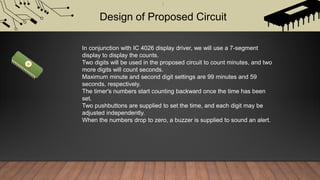
In conjunction with IC 4026 display driver, we will use a 7-segment
display to display the counts.
Two digits will be used in the proposed circuit to count minutes, and two
more digits will count seconds.
Maximum minute and second digit settings are 99 minutes and 59
seconds, respectively.
The timer's numbers start counting backward once the time has been
set.
Two pushbuttons are supplied to set the time, and each digit may be
adjusted independently.
When the numbers drop to zero, a buzzer is supplied to sound an alert.
Components
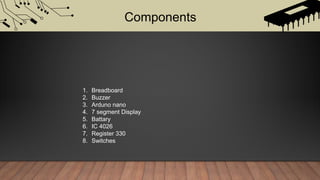
1. Breadboard
2. Buzzer
3. Arduno nano
4. 7 segment Display
5. Battary
6. IC 4026
7. Register 330
8. Switches
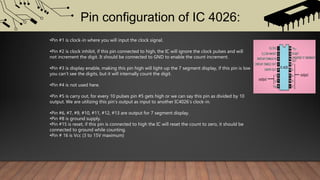
Pin configuration of IC 4026:
•Pin #1 is clock-in where you will input the clock signal.
•Pin #2 is clock inhibit, if this pin connected to high, the IC will ignore the clock pulses and will
not increment the digit. It should be connected to GND to enable the count increment.
•Pin #3 is display enable, making this pin high will light-up the 7 segment display, if this pin is low
you can’t see the digits, but it will internally count the digit.
•Pin #4 is not used here.
•Pin #5 is carry out, for every 10 pulses pin #5 gets high or we can say this pin as divided by 10
output. We are utilizing this pin’s output as input to another IC4026’s clock-in.
•Pin #6, #7, #9, #10, #11, #12, #13 are output for 7 segment display.
•Pin #8 is ground supply.
•Pin #15 is reset, if this pin is connected to high the IC will reset the count to zero, it should be
connected to ground while counting.
•Pin # 16 is Vcc (3 to 15V maximum)
How to
decrement digits on 7 segment display using IC4026:
We know that IC 4026 will always increase the count on the 7-segment display when we apply a clock pulse to
clock pin but, how can we decrement digits using IC 4026?
Arduino controls the rest pin and clock pin of the all four IC 4026s, The Arduino will quickly apply nine pulses
to the clock pin to display the number "9" on a 7-segment display, eight pulses to the IC to display the number
"8," one pulse to the reset pin to reset the count to zero, and seven pulses to the clock pin to display the
number "7," all while simultaneously applying one pulse to the reset pin. When counting backwards from 9 to
0, the reset pin and clock pin get pulses applied so fast that we won't see any number transitions.
Circuit Diagram of Countdown Timer:
Countdown Timer Circuit Diagram
IC 4026 to Common Cathode Display Connection
How to operate the circuit:
•After turning on the circuit, the Arduino will run a display test in which all the four displays will
count from “9” to “0” simultaneously. We should look and verify that all the segments are
connected properly.
•After the display test, right most digit (second’s unit place) will be illuminated and rest of the
digits will be off. Now to increment the seconds press S1 and press S2 for (OK).
•After pressing S2, the tens place of the seconds digit will illuminate and rest will stay off. Now
then press S1 to increment the seconds and press S2 for (OK).
•Now, minute’s unit place will illuminate and press S1 to increment minutes and press S2 for
(OK).
•Now, minute’s tens place will illuminate. Press S1 to increment and press S2 for (OK), now the
timer starts.
•Once the timer counts all the digits zero, buzzer will beep and the display will flash.
THANK YOU

Countdown Timer Circuit Diagram with 7 Segment Display

  • 1.
    Countdown Timer CircuitDiagram with 7 Segment Display
  • 2.
    Hossen,MD. Imran 20-43564-1 ParthoKumar Saha 18-38849-3 Harun-Ar-Rashid 18-39220-3 Ragib Anis Rifat 19-41016-2 SECTION- H
  • 3.
    Introduction 01 Components 02 Design of ProposedCircuit 03 Circuit Operation 04 Contents
  • 4.
    INTRODUCTION What is aCountdown Timer? A countdown timer is a digital or an analogue or a software timer which counts the time in backwards to show the amount of time left, a countdown timer stops counting when the counts reaches zero.
  • 5.
    : Design of ProposedCircuit In conjunction with IC 4026 display driver, we will use a 7-segment display to display the counts. Two digits will be used in the proposed circuit to count minutes, and two more digits will count seconds. Maximum minute and second digit settings are 99 minutes and 59 seconds, respectively. The timer's numbers start counting backward once the time has been set. Two pushbuttons are supplied to set the time, and each digit may be adjusted independently. When the numbers drop to zero, a buzzer is supplied to sound an alert.
  • 6.
    Components 1. Breadboard 2. Buzzer 3.Arduno nano 4. 7 segment Display 5. Battary 6. IC 4026 7. Register 330 8. Switches
  • 7.
    Pin configuration ofIC 4026: •Pin #1 is clock-in where you will input the clock signal. •Pin #2 is clock inhibit, if this pin connected to high, the IC will ignore the clock pulses and will not increment the digit. It should be connected to GND to enable the count increment. •Pin #3 is display enable, making this pin high will light-up the 7 segment display, if this pin is low you can’t see the digits, but it will internally count the digit. •Pin #4 is not used here. •Pin #5 is carry out, for every 10 pulses pin #5 gets high or we can say this pin as divided by 10 output. We are utilizing this pin’s output as input to another IC4026’s clock-in. •Pin #6, #7, #9, #10, #11, #12, #13 are output for 7 segment display. •Pin #8 is ground supply. •Pin #15 is reset, if this pin is connected to high the IC will reset the count to zero, it should be connected to ground while counting. •Pin # 16 is Vcc (3 to 15V maximum)
  • 8.
    How to decrement digitson 7 segment display using IC4026: We know that IC 4026 will always increase the count on the 7-segment display when we apply a clock pulse to clock pin but, how can we decrement digits using IC 4026? Arduino controls the rest pin and clock pin of the all four IC 4026s, The Arduino will quickly apply nine pulses to the clock pin to display the number "9" on a 7-segment display, eight pulses to the IC to display the number "8," one pulse to the reset pin to reset the count to zero, and seven pulses to the clock pin to display the number "7," all while simultaneously applying one pulse to the reset pin. When counting backwards from 9 to 0, the reset pin and clock pin get pulses applied so fast that we won't see any number transitions.
  • 9.
    Circuit Diagram ofCountdown Timer: Countdown Timer Circuit Diagram IC 4026 to Common Cathode Display Connection
  • 10.
    How to operatethe circuit: •After turning on the circuit, the Arduino will run a display test in which all the four displays will count from “9” to “0” simultaneously. We should look and verify that all the segments are connected properly. •After the display test, right most digit (second’s unit place) will be illuminated and rest of the digits will be off. Now to increment the seconds press S1 and press S2 for (OK). •After pressing S2, the tens place of the seconds digit will illuminate and rest will stay off. Now then press S1 to increment the seconds and press S2 for (OK). •Now, minute’s unit place will illuminate and press S1 to increment minutes and press S2 for (OK). •Now, minute’s tens place will illuminate. Press S1 to increment and press S2 for (OK), now the timer starts. •Once the timer counts all the digits zero, buzzer will beep and the display will flash.
  • 11.