Nita Arora (PGT Comp. Sc.) K.H.M.S.
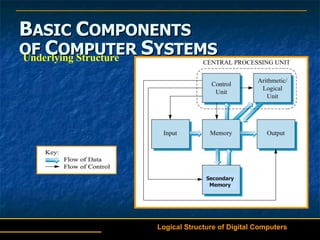
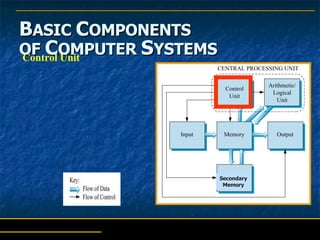
B ASIC  C OMPONENTS   OF  C OMPUTER  S YSTEMS Underlying Structure Logical Structure of Digital Computers Secondary Memory
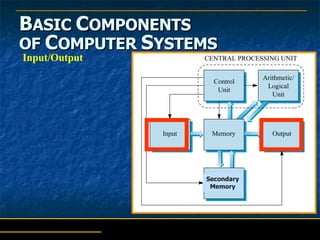
B ASIC  C OMPONENTS   OF  C OMPUTER  S YSTEMS Input/Output Secondary Memory
B ASIC  C OMPONENTS   OF  C OMPUTER  S YSTEMS Terminal Simpler than a PC Designed strictly for input and output Has keyboard and screen Does not have a processor Connected to computer with telecommunication line Allows user to key data directly into computer Input/Output
B ASIC  C OMPONENTS   OF  C OMPUTER  S YSTEMS Terminal Special types: Point-of-sale  (retail) ATMs  (banking) Input/Output
B ASIC  C OMPONENTS   OF  C OMPUTER  S YSTEMS Common input methods: Magnetic ink character recognition (MICR)  – used to process bank checks Optical character recognition (OCR)  – directly scans typed, printed, or handwritten material Imaging  – inputs digital form of documents and photos Bar code labeling  – scans bar codes on packages or products, and reads into computer Input/Output
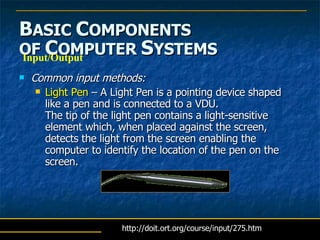
B ASIC  C OMPONENTS   OF  C OMPUTER  S YSTEMS Common input methods: Light Pen  – A Light Pen is a pointing device shaped like a pen and is connected to a VDU.  The tip of the light pen contains a light-sensitive element which, when placed against the screen, detects the light from the screen enabling the computer to identify the location of the pen on the screen.  Input/Output http://doit.ort.org/course/input/275.htm
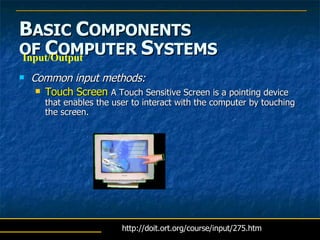
B ASIC  C OMPONENTS   OF  C OMPUTER  S YSTEMS Common input methods: Touch Screen  A Touch Sensitive Screen is a pointing device that enables the user to interact with the computer by touching the screen.  Input/Output http://doit.ort.org/course/input/275.htm
B ASIC  C OMPONENTS   OF  C OMPUTER  S YSTEMS Common output methods: Print  – output to paper using various types of printers Computer output microfilm (COM)  – microfilm generated for archive copies in small space Voice response units  – computer recognizes input, generates verbal response messages Input/Output
B ASIC  C OMPONENTS   OF  C OMPUTER  S YSTEMS Input/Output Multimedia  –  relatively new term for computer input and output in the form of text, graphics, sound, still images, animations, and/or video Of interest …
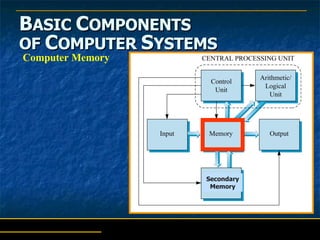
B ASIC  C OMPONENTS   OF  C OMPUTER  S YSTEMS Computer Memory Secondary Memory
B ASIC  C OMPONENTS   OF  C OMPUTER  S YSTEMS Memory All data flows to and from memory Divided into  cells : Each has a unique address Memory cell types: Byte  – stores one character of data Word  – stores two or more characters of data Computer Memory
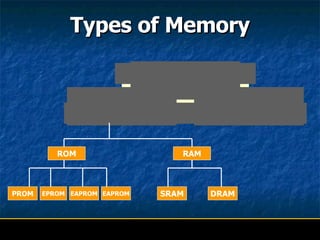
Types of Memory ROM RAM SRAM DRAM PROM EPROM EAPROM EAPROM
Primary Memory It is the main or internal memory .  It can be broadly categorized into two parts RAM  (Random Access Memory) ROM  (Read Only Memory)
RAM It is known as the  Read and Write memory .  This memory is  volatile.  Whatever information you store is  temporary  in nature and when you switch off the computer everything is erased.
Dynamic RAM Dynamic Memory is often referred to as volatile memory.  Data is stored within the capacitance of a transistor. The  capacitor  is unable to prevent the charge from slowly discharging. This would result in the loss of data. A solution to this problem is the introduction of additional circuitry which performs a 'memory refresh' by periodically restoring the charge.  Dynamic memory is  cheaper  than Static memory and is used in larger memory systems.
Static RAM        Static memory is more  expensive  to produce than Dynamic memory, but because of its  lower power consumption  it is often used in small to medium sized systems.  Static memory  retains data  within a cell until the data is overwritten or lost as a result of power being shut down.
ROM It is a memory unit that  performs the Read   operation  only and  does not have a write capability.  The Binary information in the  ROM  is made permanent during the hardware production of the unit and it is not accessible to users to store information.
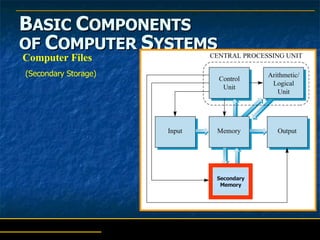
B ASIC  C OMPONENTS   OF  C OMPUTER  S YSTEMS Computer Files Secondary Memory (Secondary Storage)
B ASIC  C OMPONENTS   OF  C OMPUTER  S YSTEMS When power is off, everything stored in memory is lost Computer files are used to store data long term File storage devices: Magnetic tape drives, disk drives, floppy drives Optical CD or DVD drives Computer Files (Secondary Storage)
B ASIC  C OMPONENTS   OF  C OMPUTER  S YSTEMS Sequential access files Usually stored on magnetic tape drives Direct access files Stored on Direct Access Storage Devices ( DASD ) - magnetic disk drives Computer Files
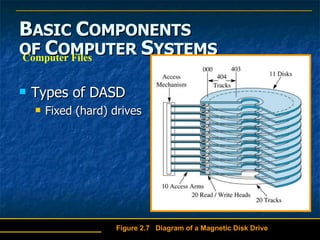
B ASIC  C OMPONENTS   OF  C OMPUTER  S YSTEMS Types of DASD Fixed (hard) drives Computer Files Figure 2.7  Diagram of a Magnetic Disk Drive
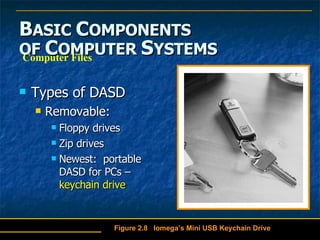
B ASIC  C OMPONENTS   OF  C OMPUTER  S YSTEMS Types of DASD Removable: Floppy drives Zip drives Newest:  portable DASD for PCs –  keychain drive   Computer Files Figure 2.8  Iomega’s Mini USB Keychain Drive
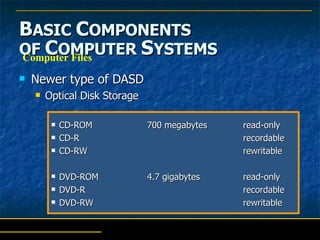
B ASIC  C OMPONENTS   OF  C OMPUTER  S YSTEMS Newer type of DASD Optical Disk Storage CD-ROM 700 megabytes read-only CD-R recordable CD-RW rewritable DVD-ROM 4.7 gigabytes read-only DVD-R recordable DVD-RW  rewritable Computer Files
Secondary Memory It is the   Permanent  memory. The information stored is permanent in nature and it uses external storage devices like  Floppy disk, Magnetic disk, CD-ROM etc.
Secondary Storage Devices This is a floppy disk! We used it to store information and it’s main advantage is that it is transportable because of its size.
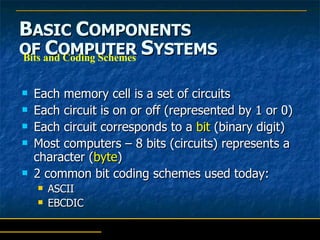
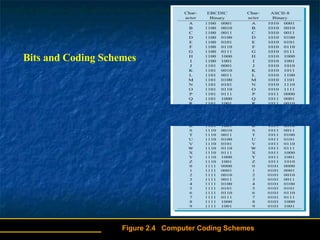
B ASIC  C OMPONENTS   OF  C OMPUTER  S YSTEMS Each memory cell is a set of circuits Each circuit is on or off (represented by 1 or 0) Each circuit corresponds to a  bit  (binary digit) Most computers – 8 bits (circuits) represents a character ( byte ) 2 common bit coding schemes used today: ASCII EBCDIC  Bits and Coding Schemes
Bits and Coding Schemes Figure 2.4  Computer Coding Schemes . . . . . . . . . . . . . . . . . .
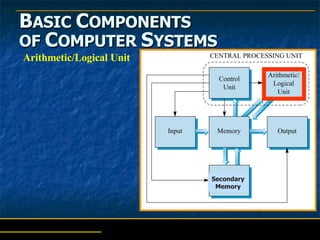
B ASIC  C OMPONENTS   OF  C OMPUTER  S YSTEMS Arithmetic/Logical Unit Secondary Memory
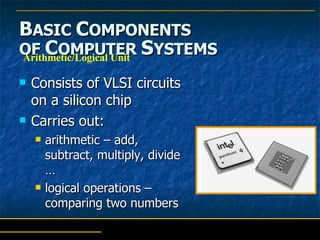
B ASIC  C OMPONENTS   OF  C OMPUTER  S YSTEMS Consists of VLSI circuits on a silicon chip Carries out:  arithmetic – add, subtract, multiply, divide … logical operations – comparing two numbers Arithmetic/Logical Unit
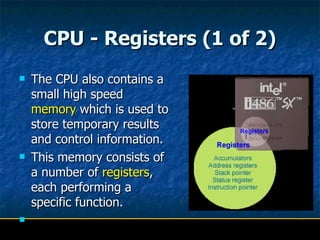
CPU - Registers (1 of 2) The CPU also contains a small high speed  memory  which is used to store temporary results and control information.  This memory consists of a number of  registers , each performing a specific function.
CPU - Registers (2 of 2) Accumulators  - serve the purpose of holding data used in calculations. Address Registers -  are used for storing the memory location of data or instructions to be used by a program. Stack Pointer -  this register is used during sub-routine nesting and stack based arithmetic. Status Register  - this register provides a service to the CPU by maintaining the status of the last operation carried out by the ALU. Instruction Pointer  - sometimes referred to as the program counter, the pointer is responsible for retaining the memory address of the next instruction to be executed.
B ASIC  C OMPONENTS   OF  C OMPUTER  S YSTEMS Control Unit Secondary Memory
B ASIC  C OMPONENTS   OF  C OMPUTER  S YSTEMS Controls computer to take advantage of speed and capacity of other components Directed by list of operations (program) that tells control unit what to do     decoding the instructions within a computer  sequencing the reading and writing of data within the CPU and externally on the data bus controlling the sequence in which instructions are executed  controlling the operations performed by the ALU Control Unit
T HE  S TORED- P ROGRAM  C ONCEPT Program  – list of what computer needs to do for an application Instruction  – each individual step or operation in a program Control unit  – carries out one step or instruction at a time at electronic speed
T HE  S TORED- P ROGRAM  C ONCEPT Note:   One of the primary measures of power of computers is the number of instructions it can execute in a given period MIPS  –  millions of instructions per second executed by the control unit MFLOPS  – millions of floating point operations per second
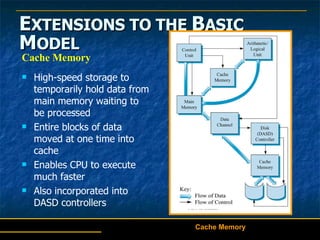
E XTENSIONS TO THE  B ASIC  M ODEL Cache Memory Cache Memory High-speed storage to temporarily hold data from main memory waiting to be processed  Entire blocks of data moved at one time into cache Enables CPU to execute much faster Also incorporated into DASD controllers
Cache memory Cache memory is random access memory ( RAM ) that a computer  microprocessor  can access more quickly than it can access regular RAM. As the microprocessor processes data, it looks first in the  cache  memory and if it finds the data there (from a previous reading of data), it does not have to do the more time-consuming reading of data from larger  memory .  Cache memory is sometimes described in levels of closeness and accessibility to the microprocessor. An  L1  cache is on the same chip as the microprocessor. (For example, the  PowerPC  601 processor has a 32 kilobyte level-1 cache built into its chip.)  L2  is usually a separate static RAM  (SRAM ) chip. The main RAM is usually a dynamic RAM ( DRAM ) chip.  Cache that is built into the CPU is faster than separate cache, running at the speed of the  microprocessor  itself. However, separate cache is still roughly twice as fast as Random Access Memory (RAM). Cache is more expensive than RAM, but it is well worth getting a CPU and motherboard with built-in cache in order to maximize system performance.
Computer Fundamentals

  • 1.
    Nita Arora (PGTComp. Sc.) K.H.M.S.
  • 2.
    B ASIC C OMPONENTS OF C OMPUTER S YSTEMS Underlying Structure Logical Structure of Digital Computers Secondary Memory
  • 3.
    B ASIC C OMPONENTS OF C OMPUTER S YSTEMS Input/Output Secondary Memory
  • 4.
    B ASIC C OMPONENTS OF C OMPUTER S YSTEMS Terminal Simpler than a PC Designed strictly for input and output Has keyboard and screen Does not have a processor Connected to computer with telecommunication line Allows user to key data directly into computer Input/Output
  • 5.
    B ASIC C OMPONENTS OF C OMPUTER S YSTEMS Terminal Special types: Point-of-sale (retail) ATMs (banking) Input/Output
  • 6.
    B ASIC C OMPONENTS OF C OMPUTER S YSTEMS Common input methods: Magnetic ink character recognition (MICR) – used to process bank checks Optical character recognition (OCR) – directly scans typed, printed, or handwritten material Imaging – inputs digital form of documents and photos Bar code labeling – scans bar codes on packages or products, and reads into computer Input/Output
  • 7.
    B ASIC C OMPONENTS OF C OMPUTER S YSTEMS Common input methods: Light Pen – A Light Pen is a pointing device shaped like a pen and is connected to a VDU. The tip of the light pen contains a light-sensitive element which, when placed against the screen, detects the light from the screen enabling the computer to identify the location of the pen on the screen. Input/Output http://doit.ort.org/course/input/275.htm
  • 8.
    B ASIC C OMPONENTS OF C OMPUTER S YSTEMS Common input methods: Touch Screen A Touch Sensitive Screen is a pointing device that enables the user to interact with the computer by touching the screen. Input/Output http://doit.ort.org/course/input/275.htm
  • 9.
    B ASIC C OMPONENTS OF C OMPUTER S YSTEMS Common output methods: Print – output to paper using various types of printers Computer output microfilm (COM) – microfilm generated for archive copies in small space Voice response units – computer recognizes input, generates verbal response messages Input/Output
  • 10.
    B ASIC C OMPONENTS OF C OMPUTER S YSTEMS Input/Output Multimedia – relatively new term for computer input and output in the form of text, graphics, sound, still images, animations, and/or video Of interest …
  • 11.
    B ASIC C OMPONENTS OF C OMPUTER S YSTEMS Computer Memory Secondary Memory
  • 12.
    B ASIC C OMPONENTS OF C OMPUTER S YSTEMS Memory All data flows to and from memory Divided into cells : Each has a unique address Memory cell types: Byte – stores one character of data Word – stores two or more characters of data Computer Memory
  • 13.
    Types of MemoryROM RAM SRAM DRAM PROM EPROM EAPROM EAPROM
  • 14.
    Primary Memory Itis the main or internal memory . It can be broadly categorized into two parts RAM (Random Access Memory) ROM (Read Only Memory)
  • 15.
    RAM It isknown as the Read and Write memory . This memory is volatile. Whatever information you store is temporary in nature and when you switch off the computer everything is erased.
  • 16.
    Dynamic RAM DynamicMemory is often referred to as volatile memory. Data is stored within the capacitance of a transistor. The capacitor is unable to prevent the charge from slowly discharging. This would result in the loss of data. A solution to this problem is the introduction of additional circuitry which performs a 'memory refresh' by periodically restoring the charge. Dynamic memory is cheaper than Static memory and is used in larger memory systems.
  • 17.
    Static RAM Static memory is more expensive to produce than Dynamic memory, but because of its lower power consumption it is often used in small to medium sized systems. Static memory retains data within a cell until the data is overwritten or lost as a result of power being shut down.
  • 18.
    ROM It isa memory unit that performs the Read operation only and does not have a write capability. The Binary information in the ROM is made permanent during the hardware production of the unit and it is not accessible to users to store information.
  • 19.
    B ASIC C OMPONENTS OF C OMPUTER S YSTEMS Computer Files Secondary Memory (Secondary Storage)
  • 20.
    B ASIC C OMPONENTS OF C OMPUTER S YSTEMS When power is off, everything stored in memory is lost Computer files are used to store data long term File storage devices: Magnetic tape drives, disk drives, floppy drives Optical CD or DVD drives Computer Files (Secondary Storage)
  • 21.
    B ASIC C OMPONENTS OF C OMPUTER S YSTEMS Sequential access files Usually stored on magnetic tape drives Direct access files Stored on Direct Access Storage Devices ( DASD ) - magnetic disk drives Computer Files
  • 22.
    B ASIC C OMPONENTS OF C OMPUTER S YSTEMS Types of DASD Fixed (hard) drives Computer Files Figure 2.7 Diagram of a Magnetic Disk Drive
  • 23.
    B ASIC C OMPONENTS OF C OMPUTER S YSTEMS Types of DASD Removable: Floppy drives Zip drives Newest: portable DASD for PCs – keychain drive Computer Files Figure 2.8 Iomega’s Mini USB Keychain Drive
  • 24.
    B ASIC C OMPONENTS OF C OMPUTER S YSTEMS Newer type of DASD Optical Disk Storage CD-ROM 700 megabytes read-only CD-R recordable CD-RW rewritable DVD-ROM 4.7 gigabytes read-only DVD-R recordable DVD-RW rewritable Computer Files
  • 25.
    Secondary Memory Itis the Permanent memory. The information stored is permanent in nature and it uses external storage devices like Floppy disk, Magnetic disk, CD-ROM etc.
  • 26.
    Secondary Storage DevicesThis is a floppy disk! We used it to store information and it’s main advantage is that it is transportable because of its size.
  • 27.
    B ASIC C OMPONENTS OF C OMPUTER S YSTEMS Each memory cell is a set of circuits Each circuit is on or off (represented by 1 or 0) Each circuit corresponds to a bit (binary digit) Most computers – 8 bits (circuits) represents a character ( byte ) 2 common bit coding schemes used today: ASCII EBCDIC Bits and Coding Schemes
  • 28.
    Bits and CodingSchemes Figure 2.4 Computer Coding Schemes . . . . . . . . . . . . . . . . . .
  • 29.
    B ASIC C OMPONENTS OF C OMPUTER S YSTEMS Arithmetic/Logical Unit Secondary Memory
  • 30.
    B ASIC C OMPONENTS OF C OMPUTER S YSTEMS Consists of VLSI circuits on a silicon chip Carries out: arithmetic – add, subtract, multiply, divide … logical operations – comparing two numbers Arithmetic/Logical Unit
  • 31.
    CPU - Registers(1 of 2) The CPU also contains a small high speed memory which is used to store temporary results and control information. This memory consists of a number of registers , each performing a specific function.
  • 32.
    CPU - Registers(2 of 2) Accumulators - serve the purpose of holding data used in calculations. Address Registers - are used for storing the memory location of data or instructions to be used by a program. Stack Pointer - this register is used during sub-routine nesting and stack based arithmetic. Status Register - this register provides a service to the CPU by maintaining the status of the last operation carried out by the ALU. Instruction Pointer - sometimes referred to as the program counter, the pointer is responsible for retaining the memory address of the next instruction to be executed.
  • 33.
    B ASIC C OMPONENTS OF C OMPUTER S YSTEMS Control Unit Secondary Memory
  • 34.
    B ASIC C OMPONENTS OF C OMPUTER S YSTEMS Controls computer to take advantage of speed and capacity of other components Directed by list of operations (program) that tells control unit what to do decoding the instructions within a computer sequencing the reading and writing of data within the CPU and externally on the data bus controlling the sequence in which instructions are executed controlling the operations performed by the ALU Control Unit
  • 35.
    T HE S TORED- P ROGRAM C ONCEPT Program – list of what computer needs to do for an application Instruction – each individual step or operation in a program Control unit – carries out one step or instruction at a time at electronic speed
  • 36.
    T HE S TORED- P ROGRAM C ONCEPT Note: One of the primary measures of power of computers is the number of instructions it can execute in a given period MIPS – millions of instructions per second executed by the control unit MFLOPS – millions of floating point operations per second
  • 37.
    E XTENSIONS TOTHE B ASIC M ODEL Cache Memory Cache Memory High-speed storage to temporarily hold data from main memory waiting to be processed Entire blocks of data moved at one time into cache Enables CPU to execute much faster Also incorporated into DASD controllers
  • 38.
    Cache memory Cachememory is random access memory ( RAM ) that a computer microprocessor can access more quickly than it can access regular RAM. As the microprocessor processes data, it looks first in the cache memory and if it finds the data there (from a previous reading of data), it does not have to do the more time-consuming reading of data from larger memory . Cache memory is sometimes described in levels of closeness and accessibility to the microprocessor. An L1 cache is on the same chip as the microprocessor. (For example, the PowerPC 601 processor has a 32 kilobyte level-1 cache built into its chip.) L2 is usually a separate static RAM (SRAM ) chip. The main RAM is usually a dynamic RAM ( DRAM ) chip. Cache that is built into the CPU is faster than separate cache, running at the speed of the microprocessor itself. However, separate cache is still roughly twice as fast as Random Access Memory (RAM). Cache is more expensive than RAM, but it is well worth getting a CPU and motherboard with built-in cache in order to maximize system performance.