Computer Network
A computer network, often simply referred to as a
network, is a collection of hardware components and
computers interconnected by communication channels
that allow sharing of resources and information.
LAN
 A local area network (LAN) is a network that
connects computers and devices in a limited
geographical area such as home, school, computer
laboratory, office building, or closely positioned
group of buildings.
 Each computer or device on the network is a node.
 LANs can be connected to Wide area network by
using routers.
MAN
 A metropolitan area network (MAN) is a
computer network that usually spans a city
or a large campus.
 A MAN usually interconnects a number of
local area networks (LANs) using a high-
capacity backbone technology, such as
fiber-optical links, and provides up-link
services to wide area networks (or WAN)
and the Internet.
WAN
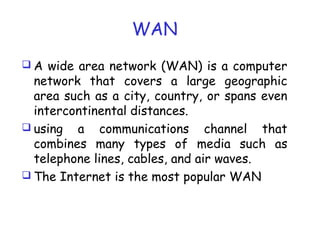
 A wide area network (WAN) is a computer
network that covers a large geographic
area such as a city, country, or spans even
intercontinental distances.
 using a communications channel that
combines many types of media such as
telephone lines, cables, and air waves.
 The Internet is the most popular WAN
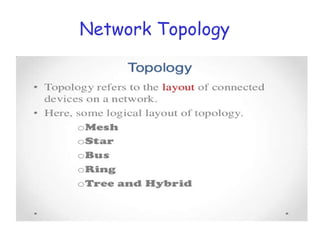
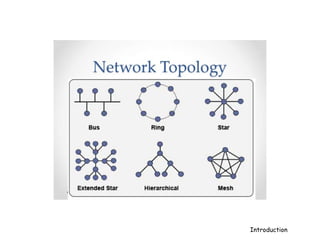
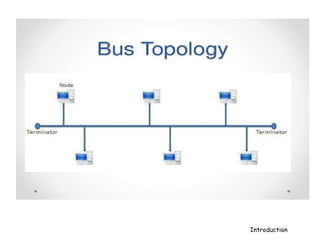
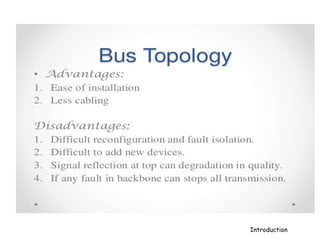
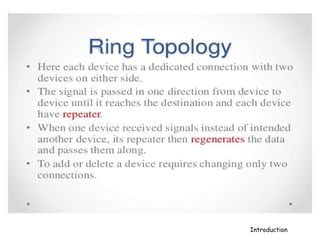
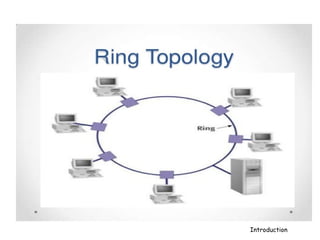
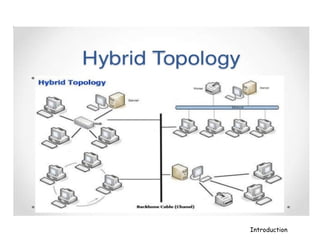
Network Topology
Introduction
Introduction
Introduction
Introduction
Introduction
Introduction
Introduction
Introduction
Introduction
Introduction
Introduction
Introduction
Introduction
Introduction
Introduction
Introduction
Introduction
Introduction
Introduction
Internet
• The Internet is a network of computers
that links many different types of
computers all over the world
• Initially used only by research organizations
and universities to share and exchange
information
Basic Services of the Internet
• Electronic Mail (e-mail): Allows user to send a
mail (message) to another Internet user in any
part of the world in a near-real-time manner
• File Transfer Protocol (FTP): Allows user to
move a file from one computer to another on the
Internet
• Telnet: Allows user to log in to another
computer somewhere on the Internet
• Usenet News: Allows group of users to exchange
their views/ideas/information
Electronic Mail
• E-mail is a rapid and productive
communication tool.
• Faster than paper mail
• Unlike telephone, the persons communicating
with each other need not be available at the
same time
• Unlike fax documents, e-mail documents can
be stored in a computer.
File Transfer Protocol
• Moving a file from a remote computer to
ones own computer is known as downloading.
• Moving a file from ones own computer to a
remote computer is known as uploading.
Telnet
Some common uses of telnet service are:
• Use the computing power of the remote
computer
• Use a software on the remote computer
• Access remote computer’s database or archive
• Logging in to ones own computer from another
computer
Usenet News
• Several usenet news groups exist on the
Internet and are called newsgroups
• In a moderated newsgroup only selected
members have the right to directly post (write)
a message to the virtual notice board. Other
members can only read the posted messages
• In a nonmoderated newsgroup any member can
directly post a message to the virtual notice
board
• Netiquette (network etiquette) deals with rules
of framing messages that will not hurt others
World Wide Web (WWW or W3)
• Hypertext documents on the Internet are known as
web pages
• Web pages are created by using a special language
called HyperText Markup Language (HTML)
• WWW uses the client-server model and an Internet
Protocol called HyperText Transport Protocol
(HTTP) for interaction among the computers on the
Internet
• Any computer on the Internet that uses the HTTP
protocol is called a web server and any computer
that can access that server is called a web client
World Wide Web (WWW or W3)
• It uses the concept of hypertext
for information storage and retrieval on
the Internet
• Hypertext documents enable this by
using a series of links
• Link is a special type of item
in a hypertext document that
connects the document to another
document providing more information
about the linked item
WWW browser
• WWW browser is a special software loaded on
a web client computer that normally provides
following navigation facilities to users:
• Does not require a user to remotely log in to a
web server computer or to log out again when
done
• Allows user to visit the server computer’s web
site and to access information stored on it by
specifying its URL (Uniform Resource Locator)
address
WWW Browsers
• Allows user to create and maintain a
personal hotlist of favorite URL addresses
of server computers that user is likely to
frequently visit in future
• Allows user to download information in
various formats from server computers to
user’s own computer
Uses of the Internet
Some important current strategic uses of the Internet are:
• On-line communication Software sharing
• Exchange of views on topics of common interest
• Posting of information of general interest
• Product promotion Feedback about products
• Customer support service
• On-line journals and magazines
• On-line shopping
• World-wide video conferencing

Computer Network

  • 1.
    Computer Network A computernetwork, often simply referred to as a network, is a collection of hardware components and computers interconnected by communication channels that allow sharing of resources and information.
  • 2.
    LAN  A localarea network (LAN) is a network that connects computers and devices in a limited geographical area such as home, school, computer laboratory, office building, or closely positioned group of buildings.  Each computer or device on the network is a node.  LANs can be connected to Wide area network by using routers.
  • 3.
    MAN  A metropolitanarea network (MAN) is a computer network that usually spans a city or a large campus.  A MAN usually interconnects a number of local area networks (LANs) using a high- capacity backbone technology, such as fiber-optical links, and provides up-link services to wide area networks (or WAN) and the Internet.
  • 4.
    WAN  A widearea network (WAN) is a computer network that covers a large geographic area such as a city, country, or spans even intercontinental distances.  using a communications channel that combines many types of media such as telephone lines, cables, and air waves.  The Internet is the most popular WAN
  • 5.
  • 6.
  • 7.
  • 8.
  • 9.
  • 10.
  • 11.
  • 12.
  • 13.
  • 14.
  • 15.
  • 16.
  • 17.
  • 18.
  • 19.
  • 20.
  • 21.
  • 22.
  • 23.
  • 24.
  • 25.
    Internet • The Internetis a network of computers that links many different types of computers all over the world • Initially used only by research organizations and universities to share and exchange information
  • 26.
    Basic Services ofthe Internet • Electronic Mail (e-mail): Allows user to send a mail (message) to another Internet user in any part of the world in a near-real-time manner • File Transfer Protocol (FTP): Allows user to move a file from one computer to another on the Internet • Telnet: Allows user to log in to another computer somewhere on the Internet • Usenet News: Allows group of users to exchange their views/ideas/information
  • 27.
    Electronic Mail • E-mailis a rapid and productive communication tool. • Faster than paper mail • Unlike telephone, the persons communicating with each other need not be available at the same time • Unlike fax documents, e-mail documents can be stored in a computer.
  • 28.
    File Transfer Protocol •Moving a file from a remote computer to ones own computer is known as downloading. • Moving a file from ones own computer to a remote computer is known as uploading.
  • 29.
    Telnet Some common usesof telnet service are: • Use the computing power of the remote computer • Use a software on the remote computer • Access remote computer’s database or archive • Logging in to ones own computer from another computer
  • 30.
    Usenet News • Severalusenet news groups exist on the Internet and are called newsgroups • In a moderated newsgroup only selected members have the right to directly post (write) a message to the virtual notice board. Other members can only read the posted messages • In a nonmoderated newsgroup any member can directly post a message to the virtual notice board • Netiquette (network etiquette) deals with rules of framing messages that will not hurt others
  • 31.
    World Wide Web(WWW or W3) • Hypertext documents on the Internet are known as web pages • Web pages are created by using a special language called HyperText Markup Language (HTML) • WWW uses the client-server model and an Internet Protocol called HyperText Transport Protocol (HTTP) for interaction among the computers on the Internet • Any computer on the Internet that uses the HTTP protocol is called a web server and any computer that can access that server is called a web client
  • 32.
    World Wide Web(WWW or W3) • It uses the concept of hypertext for information storage and retrieval on the Internet • Hypertext documents enable this by using a series of links • Link is a special type of item in a hypertext document that connects the document to another document providing more information about the linked item
  • 33.
    WWW browser • WWWbrowser is a special software loaded on a web client computer that normally provides following navigation facilities to users: • Does not require a user to remotely log in to a web server computer or to log out again when done • Allows user to visit the server computer’s web site and to access information stored on it by specifying its URL (Uniform Resource Locator) address
  • 34.
    WWW Browsers • Allowsuser to create and maintain a personal hotlist of favorite URL addresses of server computers that user is likely to frequently visit in future • Allows user to download information in various formats from server computers to user’s own computer
  • 35.
    Uses of theInternet Some important current strategic uses of the Internet are: • On-line communication Software sharing • Exchange of views on topics of common interest • Posting of information of general interest • Product promotion Feedback about products • Customer support service • On-line journals and magazines • On-line shopping • World-wide video conferencing