Making the Most of the Web’s Resources
The Internet and How It Works

What is Internet ?
The origin of the Internet
 How the Internet works




Communicating and Collaborating on the Web


What is Social Networking ?
 Web 2.0

Web Entertainment

Conducting Business over the Internet


What is E-Commerce ?

Accessing and Moving Around the Internet




Web Brower
 URL
Hyperlinks

Searching the Web Effectively


Search Engines








The Internet is the largest computer
world, connecting millions of computers.

network

in

the

A world-wide network of computers allows people to share information
electronically.
Government and military officials developed the early Internet as
a reliable way to communicate in the event of war. Eventually, scientists
and educators used the Internet to exchange research.
A network of networks, joining many government, university and private
computers together and providing an infrastructure for the use of Email, bulletin boards, file archives, hypertext documents, databases and
other computational resources.
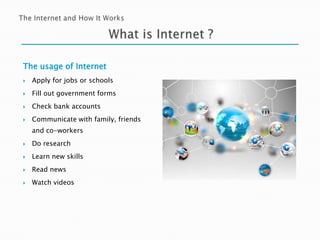
The usage of Internet


Apply for jobs or schools



Fill out government forms



Check bank accounts



Communicate with family, friends
and co-workers



Do research



Learn new skills



Read news



Watch videos








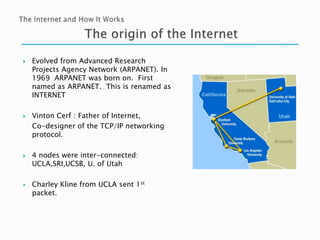
Evolved from Advanced Research
Projects Agency Network (ARPANET). In
1969 ARPANET was born on. First
named as ARPANET. This is renamed as
INTERNET
Vinton Cerf : Father of Internet,
Co-designer of the TCP/IP networking
protocol.
4 nodes were inter-connected:
UCLA,SRI,UCSB, U. of Utah
Charley Kline from UCLA sent 1st
packet.


Data Travel
 A computer (or other device) connected to the Internet acts as
either a client (a computer that asks for information) or a server (a
computer that receives the request and returns the information to the
client).
 Data travels between clients and servers along a system of
communication lines or pathways. The largest and fastest of these
pathways is the Internet backbone.
 To ensure that data is sent to the correct computer along
the pathways, IP addresses (unique ID numbers) are assigned to all
computers connected to the Internet.


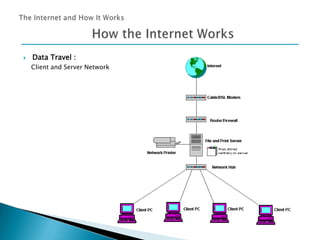
Data Travel :
Client and Server Network


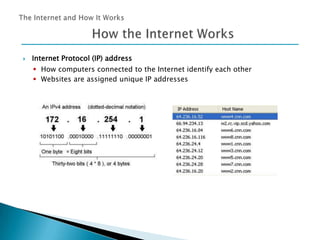
Internet Protocol (IP) address
 How computers connected to the Internet identify each other
 Websites are assigned unique IP addresses


WWW (World Wide Web)






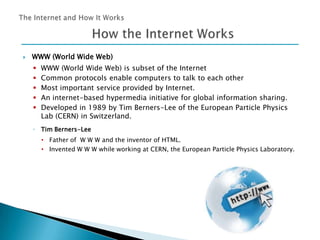
WWW (World Wide Web) is subset of the Internet
Common protocols enable computers to talk to each other
Most important service provided by Internet.
An internet-based hypermedia initiative for global information sharing.
Developed in 1989 by Tim Berners-Lee of the European Particle Physics
Lab (CERN) in Switzerland.

◦ Tim Berners-Lee
• Father of W W W and the inventor of HTML.
• Invented W W W while working at CERN, the European Particle Physics Laboratory.
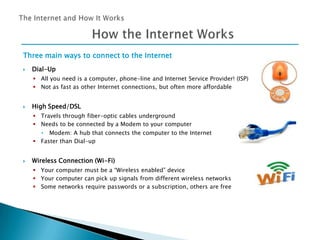
Three main ways to connect to the Internet


Dial-Up
 All you need is a computer, phone-line and Internet Service Provider! (ISP)
 Not as fast as other Internet connections, but often more affordable



High Speed/DSL
 Travels through fiber-optic cables underground
 Needs to be connected by a Modem to your computer
• Modem: A hub that connects the computer to the Internet
 Faster than Dial-up



Wireless Connection (Wi-Fi)
 Your computer must be a “Wireless enabled” device
 Your computer can pick up signals from different wireless networks
 Some networks require passwords or a subscription, others are free






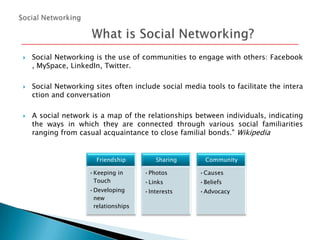
Social Networking is the use of communities to engage with others: Facebook
, MySpace, LinkedIn, Twitter.
Social Networking sites often include social media tools to facilitate the intera
ction and conversation
A social network is a map of the relationships between individuals, indicating
the ways in which they are connected through various social familiarities
ranging from casual acquaintance to close familial bonds." Wikipedia

Friendship

Sharing

Community

•Keeping in
Touch

•Photos

•Causes

•Links

•Beliefs

•Developing
new
relationships

•Interests

•Advocacy







Social networking sites typically let users develop a list of friends.
You can explore your friends' buddy lists and find people with similar
interests.

You can perform a number of online activities: blogging, mediasharing, commenting, testimonials.
You can personalize your 'space' easily using themes and widgets to make it
look different from other people's.
Seven Social Networking Statistics
 77% of Fortune Global 100 Companies Use Twitter
 70% of Local Businesses Use Facebook For Marketing
 One in every nine people on Earth is on Facebook
 People spend 700 billion minutes per month on Facebook


Each Facebook user spends on average 15 hours and 33 minutes a month on the site

 More than 250 million people access Facebook through their mobile devices
 It’s no longer a question about whether you use Social Media , but how well you do it






Web 2.0 can be described as the social web, in which the
user is also a participant. Before Web 2.0 technologies were
in place, we were only able to be passive users of the web.
Web 2.0 is a term often applied to a perceived ongoing transition of the
World Wide Web from a collection of websites to a full-fledged computing
platform serving web applications to end users. Ultimately Web 2.0 services
are expected to replace desktop computing applications for many
purposes.“ Wikipedia
Examples of Web 2.0 technologies include social networking
sites, blogs, wikis, podcasts, and webcasts. Social networking sites enable
you to communicate and share information with friends as well as meet and
connect with others.






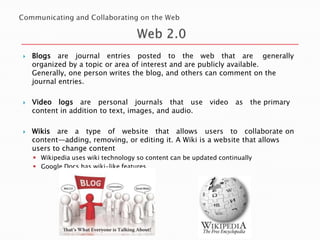
Blogs are journal entries posted to the web that are generally
organized by a topic or area of interest and are publicly available.
Generally, one person writes the blog, and others can comment on the
journal entries.
Video logs are personal journals that use video
content in addition to text, images, and audio.

as

the primary

Wikis are a type of website that allows users to collaborate on
content—adding, removing, or editing it. A Wiki is a website that allows
users to change content
 Wikipedia uses wiki technology so content can be updated continually
 Google Docs has wiki-like features




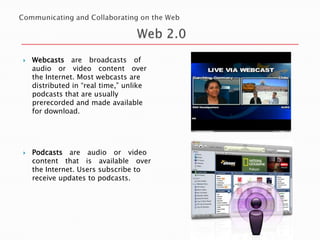
Webcasts are broadcasts of
audio or video content over
the Internet. Most webcasts are
distributed in “real time,” unlike
podcasts that are usually
prerecorded and made available
for download.

Podcasts are audio or video
content that is available over
the Internet. Users subscribe to
receive updates to podcasts.




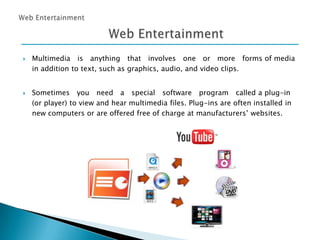
Multimedia is anything that involves one or more forms of media
in addition to text, such as graphics, audio, and video clips.
Sometimes you need a special software program called a plug-in
(or player) to view and hear multimedia files. Plug-ins are often installed in
new computers or are offered free of charge at manufacturers’ websites.




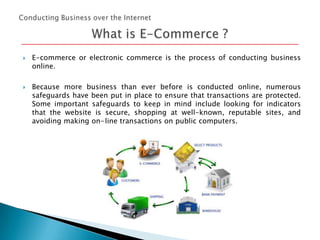
E-commerce or electronic commerce is the process of conducting business
online.

Because more business than ever before is conducted online,
safeguards have been put in place to ensure that transactions are
Some important safeguards to keep in mind include looking for
that the website is secure, shopping at well-known, reputable
avoiding making on- line transactions on public computers.

numerous
protected.
indicators
sites, and
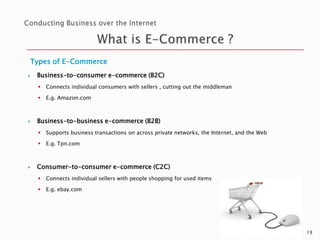
Types of E-Commerce


Business-to-consumer e-commerce (B2C)





Connects individual consumers with sellers , cutting out the middleman
E.g. Amazon.com

Business-to-business e-commerce (B2B)





Supports business transactions on across private networks, the Internet, and the Web
E.g. Tpn.com

Consumer-to-consumer e-commerce (C2C)


Connects individual sellers with people shopping for used items



E.g. ebay.com

19
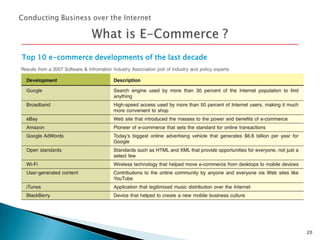
Top 10 e-commerce developments of the last decade

20




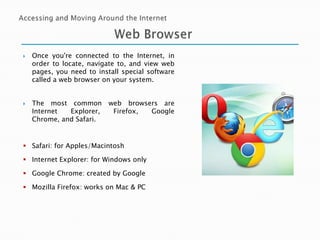
Once you're connected to the Internet, in
order to locate, navigate to, and view web
pages, you need to install special software
called a web browser on your system.
The most common
Internet
Explorer,
Chrome, and Safari.

web browsers are
Firefox,
Google

 Safari: for Apples/Macintosh
 Internet Explorer: for Windows only
 Google Chrome: created by Google
 Mozilla Firefox: works on Mac & PC




You gain access to a website by typing in its address, called a Uniform Resource
Locator (URL).

A URL is composed of several parts, including the protocol, the domain, the top-level
domain, and paths (or subdirectories).

 Sample URL’s (or Internet Addresses)
Internet Address or URL

Global Domains

http://www.angelfire.com

commercial site

http://www.msstate.edu

educational site

http://www.intop.net

network organization

http://www.navy.mil

military

http://www.____.org

not for profit organization

http://www.____.gov

gov. agency,dept.








One unique aspect of the web is that you can jump from place to place by
clicking on specially formatted pieces of text or images called hyperlinks.
You can also use the Back and Forward buttons, History lists, breadcrumb
trails, and Favorites or Bookmarks to navigate the web.
Favorites, live bookmarks, and social bookmarking help you return to
specific web pages without having to type in the URL and help you organize
the web content that is most important to you.
HTTP : Hypertext Transfer Protocol : Hyper Text Markup Language
 A special language or code used to design and publish documents on the Web






A search engine is a set of programs that searches the web using specific
keywords you wish to query and then returns a list of the websites on which
those keywords are found.
Search engines can be used to search for images, podcasts, and videos in
addition to traditional text-based web content.

A subject directory is a structured outline of websites organized by topic and
subtopic. Metasearch engines search other search engines.




Not all websites are equal, and some are better sources for research
than others. To evaluate whether it is appropriate to use a website as are
source, determine whether the author of the site is reputable and
whether the site is intended for your particular needs.
In addition, make sure that the site content is not biased, the
information on the site is current, and all the links on the site are
available and appropriate. If multiple sites offer the same content, this is
another indication that the information is accurate.

Purpose of Search Engines


Helping people find what they’re looking for
 Starts with an “information need”
 Convert to a query
 Gets results

Fa13 7718-ch3-kim

  • 1.
    Making the Mostof the Web’s Resources
  • 2.
    The Internet andHow It Works What is Internet ? The origin of the Internet  How the Internet works   Communicating and Collaborating on the Web  What is Social Networking ?  Web 2.0 Web Entertainment Conducting Business over the Internet  What is E-Commerce ? Accessing and Moving Around the Internet   Web Brower  URL Hyperlinks Searching the Web Effectively  Search Engines
  • 3.
        The Internet isthe largest computer world, connecting millions of computers. network in the A world-wide network of computers allows people to share information electronically. Government and military officials developed the early Internet as a reliable way to communicate in the event of war. Eventually, scientists and educators used the Internet to exchange research. A network of networks, joining many government, university and private computers together and providing an infrastructure for the use of Email, bulletin boards, file archives, hypertext documents, databases and other computational resources.
  • 4.
    The usage ofInternet  Apply for jobs or schools  Fill out government forms  Check bank accounts  Communicate with family, friends and co-workers  Do research  Learn new skills  Read news  Watch videos
  • 5.
        Evolved from AdvancedResearch Projects Agency Network (ARPANET). In 1969 ARPANET was born on. First named as ARPANET. This is renamed as INTERNET Vinton Cerf : Father of Internet, Co-designer of the TCP/IP networking protocol. 4 nodes were inter-connected: UCLA,SRI,UCSB, U. of Utah Charley Kline from UCLA sent 1st packet.
  • 6.
     Data Travel  Acomputer (or other device) connected to the Internet acts as either a client (a computer that asks for information) or a server (a computer that receives the request and returns the information to the client).  Data travels between clients and servers along a system of communication lines or pathways. The largest and fastest of these pathways is the Internet backbone.  To ensure that data is sent to the correct computer along the pathways, IP addresses (unique ID numbers) are assigned to all computers connected to the Internet.
  • 7.
     Data Travel : Clientand Server Network
  • 8.
     Internet Protocol (IP)address  How computers connected to the Internet identify each other  Websites are assigned unique IP addresses
  • 9.
     WWW (World WideWeb)      WWW (World Wide Web) is subset of the Internet Common protocols enable computers to talk to each other Most important service provided by Internet. An internet-based hypermedia initiative for global information sharing. Developed in 1989 by Tim Berners-Lee of the European Particle Physics Lab (CERN) in Switzerland. ◦ Tim Berners-Lee • Father of W W W and the inventor of HTML. • Invented W W W while working at CERN, the European Particle Physics Laboratory.
  • 10.
    Three main waysto connect to the Internet  Dial-Up  All you need is a computer, phone-line and Internet Service Provider! (ISP)  Not as fast as other Internet connections, but often more affordable  High Speed/DSL  Travels through fiber-optic cables underground  Needs to be connected by a Modem to your computer • Modem: A hub that connects the computer to the Internet  Faster than Dial-up  Wireless Connection (Wi-Fi)  Your computer must be a “Wireless enabled” device  Your computer can pick up signals from different wireless networks  Some networks require passwords or a subscription, others are free
  • 11.
       Social Networking isthe use of communities to engage with others: Facebook , MySpace, LinkedIn, Twitter. Social Networking sites often include social media tools to facilitate the intera ction and conversation A social network is a map of the relationships between individuals, indicating the ways in which they are connected through various social familiarities ranging from casual acquaintance to close familial bonds." Wikipedia Friendship Sharing Community •Keeping in Touch •Photos •Causes •Links •Beliefs •Developing new relationships •Interests •Advocacy
  • 12.
        Social networking sitestypically let users develop a list of friends. You can explore your friends' buddy lists and find people with similar interests. You can perform a number of online activities: blogging, mediasharing, commenting, testimonials. You can personalize your 'space' easily using themes and widgets to make it look different from other people's.
  • 13.
    Seven Social NetworkingStatistics  77% of Fortune Global 100 Companies Use Twitter  70% of Local Businesses Use Facebook For Marketing  One in every nine people on Earth is on Facebook  People spend 700 billion minutes per month on Facebook  Each Facebook user spends on average 15 hours and 33 minutes a month on the site  More than 250 million people access Facebook through their mobile devices  It’s no longer a question about whether you use Social Media , but how well you do it
  • 14.
       Web 2.0 canbe described as the social web, in which the user is also a participant. Before Web 2.0 technologies were in place, we were only able to be passive users of the web. Web 2.0 is a term often applied to a perceived ongoing transition of the World Wide Web from a collection of websites to a full-fledged computing platform serving web applications to end users. Ultimately Web 2.0 services are expected to replace desktop computing applications for many purposes.“ Wikipedia Examples of Web 2.0 technologies include social networking sites, blogs, wikis, podcasts, and webcasts. Social networking sites enable you to communicate and share information with friends as well as meet and connect with others.
  • 15.
       Blogs are journalentries posted to the web that are generally organized by a topic or area of interest and are publicly available. Generally, one person writes the blog, and others can comment on the journal entries. Video logs are personal journals that use video content in addition to text, images, and audio. as the primary Wikis are a type of website that allows users to collaborate on content—adding, removing, or editing it. A Wiki is a website that allows users to change content  Wikipedia uses wiki technology so content can be updated continually  Google Docs has wiki-like features
  • 16.
      Webcasts are broadcastsof audio or video content over the Internet. Most webcasts are distributed in “real time,” unlike podcasts that are usually prerecorded and made available for download. Podcasts are audio or video content that is available over the Internet. Users subscribe to receive updates to podcasts.
  • 17.
      Multimedia is anythingthat involves one or more forms of media in addition to text, such as graphics, audio, and video clips. Sometimes you need a special software program called a plug-in (or player) to view and hear multimedia files. Plug-ins are often installed in new computers or are offered free of charge at manufacturers’ websites.
  • 18.
      E-commerce or electroniccommerce is the process of conducting business online. Because more business than ever before is conducted online, safeguards have been put in place to ensure that transactions are Some important safeguards to keep in mind include looking for that the website is secure, shopping at well-known, reputable avoiding making on- line transactions on public computers. numerous protected. indicators sites, and
  • 19.
    Types of E-Commerce  Business-to-consumere-commerce (B2C)    Connects individual consumers with sellers , cutting out the middleman E.g. Amazon.com Business-to-business e-commerce (B2B)    Supports business transactions on across private networks, the Internet, and the Web E.g. Tpn.com Consumer-to-consumer e-commerce (C2C)  Connects individual sellers with people shopping for used items  E.g. ebay.com 19
  • 20.
    Top 10 e-commercedevelopments of the last decade 20
  • 21.
      Once you're connectedto the Internet, in order to locate, navigate to, and view web pages, you need to install special software called a web browser on your system. The most common Internet Explorer, Chrome, and Safari. web browsers are Firefox, Google  Safari: for Apples/Macintosh  Internet Explorer: for Windows only  Google Chrome: created by Google  Mozilla Firefox: works on Mac & PC
  • 22.
      You gain accessto a website by typing in its address, called a Uniform Resource Locator (URL). A URL is composed of several parts, including the protocol, the domain, the top-level domain, and paths (or subdirectories).  Sample URL’s (or Internet Addresses) Internet Address or URL Global Domains http://www.angelfire.com commercial site http://www.msstate.edu educational site http://www.intop.net network organization http://www.navy.mil military http://www.____.org not for profit organization http://www.____.gov gov. agency,dept.
  • 23.
        One unique aspectof the web is that you can jump from place to place by clicking on specially formatted pieces of text or images called hyperlinks. You can also use the Back and Forward buttons, History lists, breadcrumb trails, and Favorites or Bookmarks to navigate the web. Favorites, live bookmarks, and social bookmarking help you return to specific web pages without having to type in the URL and help you organize the web content that is most important to you. HTTP : Hypertext Transfer Protocol : Hyper Text Markup Language  A special language or code used to design and publish documents on the Web
  • 24.
       A search engineis a set of programs that searches the web using specific keywords you wish to query and then returns a list of the websites on which those keywords are found. Search engines can be used to search for images, podcasts, and videos in addition to traditional text-based web content. A subject directory is a structured outline of websites organized by topic and subtopic. Metasearch engines search other search engines.
  • 25.
      Not all websitesare equal, and some are better sources for research than others. To evaluate whether it is appropriate to use a website as are source, determine whether the author of the site is reputable and whether the site is intended for your particular needs. In addition, make sure that the site content is not biased, the information on the site is current, and all the links on the site are available and appropriate. If multiple sites offer the same content, this is another indication that the information is accurate. Purpose of Search Engines  Helping people find what they’re looking for  Starts with an “information need”  Convert to a query  Gets results