Floyd
Digital Fundamentals, 9/e
Copyright ©2006 by Pearson Education, Inc.
Upper Saddle River, New Jersey 07458
All rights reserved.
Slide 1
Digital Fundamentals
CHAPTER 6
Functions of Combinational Logic
Comparators
Floyd
Digital Fundamentals, 9/e
Copyright ©2006 by Pearson Education, Inc.
Upper Saddle River, New Jersey 07458
All rights reserved.
Slide 2
COMPARATORS
• Comparator is a combinational logic circuit that
compares the magnitudes of two binary
quantities(Numbers) to determine which one
number has less, equal or greater magnitude.
• In other word, a comparator determines the
relationship of two binary quantities.
• A exclusiveNOR gate can be used as a basic
comparator.
Floyd
Digital Fundamentals, 9/e
Copyright ©2006 by Pearson Education, Inc.
Upper Saddle River, New Jersey 07458
All rights reserved.
Slide 3
Magnitude Comparator
• Three binary variables are used to indicate
the outcome of the comparison as
A>B, A<B, or A=B.
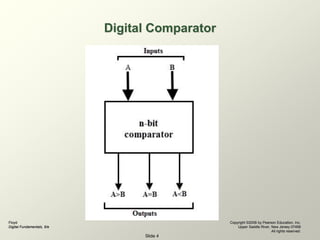
• The below figure shows the block diagram
of a n-bit comparator which compares the
two numbers of n-bit length and generates
their relation between themselves.
Floyd
Digital Fundamentals, 9/e
Copyright ©2006 by Pearson Education, Inc.
Upper Saddle River, New Jersey 07458
All rights reserved.
Slide 4
Digital Comparator
Floyd
Digital Fundamentals, 9/e
Copyright ©2006 by Pearson Education, Inc.
Upper Saddle River, New Jersey 07458
All rights reserved.
Slide 5
Comparators
• 1-Bit Comparator
• 2-Bit Comparator
• 4-Bit Comparator
Floyd
Digital Fundamentals, 9/e
Copyright ©2006 by Pearson Education, Inc.
Upper Saddle River, New Jersey 07458
All rights reserved.
Slide 6
1 bit Magnitude comparator
• A comparator used to compare two numbers each of
single bit is called single bit comparator.
• It consists of two inputs for allowing two single bit
numbers and three outputs to generate less than, equal
and greater than comparison outputs.
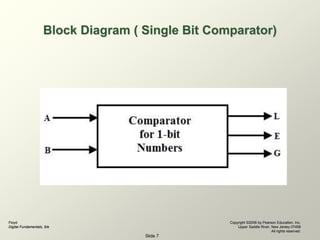
• The figure below shows the block diagram of a single bit
magnitude comparator.
• This comparator compares the two bits and produces
one of the 3 outputs as L (A<B), E (A=B) and G (A>B).
Floyd
Digital Fundamentals, 9/e
Copyright ©2006 by Pearson Education, Inc.
Upper Saddle River, New Jersey 07458
All rights reserved.
Slide 7
Block Diagram ( Single Bit Comparator)
Floyd
Digital Fundamentals, 9/e
Copyright ©2006 by Pearson Education, Inc.
Upper Saddle River, New Jersey 07458
All rights reserved.
Slide 8
Contd...
• There are two different types of output relationship
between the two binary quantities;
• Equality output indicates that the two binary
numbers being compared is equal (A = B) and
• Inequality output that indicates which of the two
binary number being compared is the larger.
• That is, there is an output that indicates when A is
greater than B (A > B) and an output that indicates
when A is less than B (A < B).
Floyd
Digital Fundamentals, 9/e
Copyright ©2006 by Pearson Education, Inc.
Upper Saddle River, New Jersey 07458
All rights reserved.
Slide 9
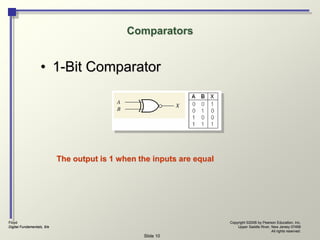
Equality
• From chapter 3:
– XNOR gate can be used as a basic
comparator
• Output is a 0 if the two input bits are not
equal and 1 if the input bits are equal.
Floyd
Digital Fundamentals, 9/e
Copyright ©2006 by Pearson Education, Inc.
Upper Saddle River, New Jersey 07458
All rights reserved.
Slide 10
Comparators
• 1-Bit Comparator
The output is 1 when the inputs are equal
Floyd
Digital Fundamentals, 9/e
Copyright ©2006 by Pearson Education, Inc.
Upper Saddle River, New Jersey 07458
All rights reserved.
Slide 11
2-Bit comparator
• A 2-bit comparator compares two binary
numbers, each of two bits and produces their
relation such as one number is equal or greater
than or less than the other.
• The figure below shows the block diagram of a
two-bit comparator which has four inputs and
three outputs.
Floyd
Digital Fundamentals, 9/e
Copyright ©2006 by Pearson Education, Inc.
Upper Saddle River, New Jersey 07458
All rights reserved.
Slide 12
Floyd
Digital Fundamentals, 9/e
Copyright ©2006 by Pearson Education, Inc.
Upper Saddle River, New Jersey 07458
All rights reserved.
Slide 13
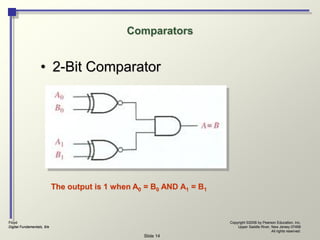
• In order to compare binary numbers containing two bits
each, an additional XNOR gate is necessary
• 2 LSB of two numbers are compared by gate G1
• 2 MSB of two numbers are compared by gate G2
• 1 AND gate can be used
•If 2 numbers are equal, their corresponding bits are
same and the output of each X-NOR gate is 1.
•If the corresponding sets of bits are not equal, a 0
occurs on that exclusive –NOR gate output.
Floyd
Digital Fundamentals, 9/e
Copyright ©2006 by Pearson Education, Inc.
Upper Saddle River, New Jersey 07458
All rights reserved.
Slide 14
Comparators
• 2-Bit Comparator
The output is 1 when A0 = B0 AND A1 = B1
Floyd
Digital Fundamentals, 9/e
Copyright ©2006 by Pearson Education, Inc.
Upper Saddle River, New Jersey 07458
All rights reserved.
Slide 15
Example
• Apply each of the following sets of binary
numbers to the comparator inputs and
determine the output by the following logic
levels through the circuit.
• 10 and10
• 11 and 10
• Repeat the process for binary inputs of 01
and 10.
Floyd
Digital Fundamentals, 9/e
Copyright ©2006 by Pearson Education, Inc.
Upper Saddle River, New Jersey 07458
All rights reserved.
Slide 16
In-Equality
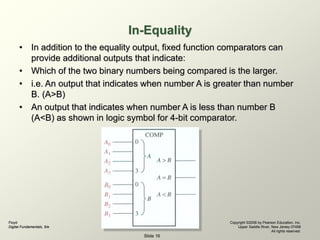
• In addition to the equality output, fixed function comparators can
provide additional outputs that indicate:
• Which of the two binary numbers being compared is the larger.
• i.e. An output that indicates when number A is greater than number
B. (A>B)
• An output that indicates when number A is less than number B
(A<B) as shown in logic symbol for 4-bit comparator.
Floyd
Digital Fundamentals, 9/e
Copyright ©2006 by Pearson Education, Inc.
Upper Saddle River, New Jersey 07458
All rights reserved.
Slide 17
4-Bit Comparator
• It can be used to compare two four-bit words.
• The two 4-bit numbers are A = A3 A2 A1 A0 and
B3 B2 B1 B0 where A3 and B3 are the most
significant bits.
Floyd
Digital Fundamentals, 9/e
Copyright ©2006 by Pearson Education, Inc.
Upper Saddle River, New Jersey 07458
All rights reserved.
Slide 18
18
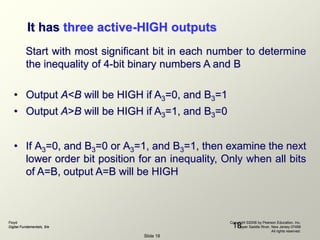
It has three active-HIGH outputs
Start with most significant bit in each number to determine
the inequality of 4-bit binary numbers A and B
• Output A<B will be HIGH if A3=0, and B3=1
• Output A>B will be HIGH if A3=1, and B3=0
• If A3=0, and B3=0 or A3=1, and B3=1, then examine the next
lower order bit position for an inequality, Only when all bits
of A=B, output A=B will be HIGH
Floyd
Digital Fundamentals, 9/e
Copyright ©2006 by Pearson Education, Inc.
Upper Saddle River, New Jersey 07458
All rights reserved.
Slide 19
19
The general procedure used in comparator:
• Start with the highest-order bits (MSB)
• When an inequality is found, the relationship of the 2
numbers is established, and any other inequalities in
lower-order positions must be ignored
• THE HIGHEST ORDER INDICATION MUST TAKE
PRECEDENCE
Floyd
Digital Fundamentals, 9/e
Copyright ©2006 by Pearson Education, Inc.
Upper Saddle River, New Jersey 07458
All rights reserved.
Slide 20
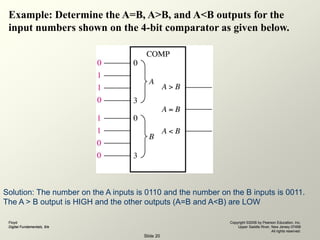
Example: Determine the A=B, A>B, and A<B outputs for the
input numbers shown on the 4-bit comparator as given below.
Solution: The number on the A inputs is 0110 and the number on the B inputs is 0011.
The A > B output is HIGH and the other outputs (A=B and A<B) are LOW
Floyd
Digital Fundamentals, 9/e
Copyright ©2006 by Pearson Education, Inc.
Upper Saddle River, New Jersey 07458
All rights reserved.
Slide 21
21
74LS85 (4bit magnitude comparator)
The 74LS85 compares two unsigned 4-bit binary
numbers , the unsigned numbers are A3, A2, A1, A0 and
B3, B2, B1, B0.
Cascading
Inputs
Outputs
Floyd
Digital Fundamentals, 9/e
Copyright ©2006 by Pearson Education, Inc.
Upper Saddle River, New Jersey 07458
All rights reserved.
Slide 22
22
Comparator Expansion (Cascading Comparator)
• In addition, it also has three cascading inputs:
• These inputs provides a means for expanding the
comparison operation by cascading two or more
4bit comparator.
• To expand the comparator, the A<B, A=B, and A>B
outputs of the lowerorder comparator are
connected to the corresponding cascading inputs of
the next higherorder comparator.
Floyd
Digital Fundamentals, 9/e
Copyright ©2006 by Pearson Education, Inc.
Upper Saddle River, New Jersey 07458
All rights reserved.
Slide 23
23
Contd...
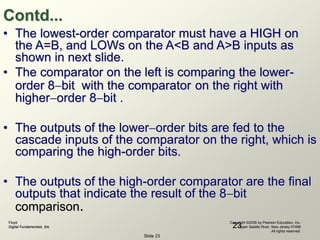
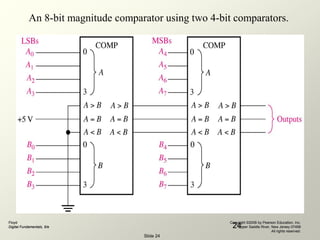
• The lowest-order comparator must have a HIGH on
the A=B, and LOWs on the A<B and A>B inputs as
shown in next slide.
• The comparator on the left is comparing the lower-
order 8bit with the comparator on the right with
higherorder 8bit .
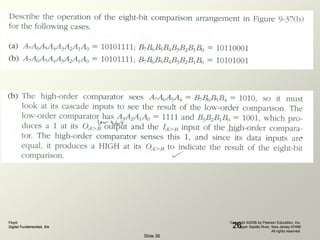
• The outputs of the lowerorder bits are fed to the
cascade inputs of the comparator on the right, which is
comparing the high-order bits.
• The outputs of the high-order comparator are the final
outputs that indicate the result of the 8bit
comparison.
Floyd
Digital Fundamentals, 9/e
Copyright ©2006 by Pearson Education, Inc.
Upper Saddle River, New Jersey 07458
All rights reserved.
Slide 24
24
An 8-bit magnitude comparator using two 4-bit comparators.
Floyd
Digital Fundamentals, 9/e
Copyright ©2006 by Pearson Education, Inc.
Upper Saddle River, New Jersey 07458
All rights reserved.
Slide 25
25
Floyd
Digital Fundamentals, 9/e
Copyright ©2006 by Pearson Education, Inc.
Upper Saddle River, New Jersey 07458
All rights reserved.
Slide 26
26
Floyd
Digital Fundamentals, 9/e
Copyright ©2006 by Pearson Education, Inc.
Upper Saddle River, New Jersey 07458
All rights reserved.
Slide 27
THE END

Comparators in DLD.

  • 1.
    Floyd Digital Fundamentals, 9/e Copyright©2006 by Pearson Education, Inc. Upper Saddle River, New Jersey 07458 All rights reserved. Slide 1 Digital Fundamentals CHAPTER 6 Functions of Combinational Logic Comparators
  • 2.
    Floyd Digital Fundamentals, 9/e Copyright©2006 by Pearson Education, Inc. Upper Saddle River, New Jersey 07458 All rights reserved. Slide 2 COMPARATORS • Comparator is a combinational logic circuit that compares the magnitudes of two binary quantities(Numbers) to determine which one number has less, equal or greater magnitude. • In other word, a comparator determines the relationship of two binary quantities. • A exclusiveNOR gate can be used as a basic comparator.
  • 3.
    Floyd Digital Fundamentals, 9/e Copyright©2006 by Pearson Education, Inc. Upper Saddle River, New Jersey 07458 All rights reserved. Slide 3 Magnitude Comparator • Three binary variables are used to indicate the outcome of the comparison as A>B, A<B, or A=B. • The below figure shows the block diagram of a n-bit comparator which compares the two numbers of n-bit length and generates their relation between themselves.
  • 4.
    Floyd Digital Fundamentals, 9/e Copyright©2006 by Pearson Education, Inc. Upper Saddle River, New Jersey 07458 All rights reserved. Slide 4 Digital Comparator
  • 5.
    Floyd Digital Fundamentals, 9/e Copyright©2006 by Pearson Education, Inc. Upper Saddle River, New Jersey 07458 All rights reserved. Slide 5 Comparators • 1-Bit Comparator • 2-Bit Comparator • 4-Bit Comparator
  • 6.
    Floyd Digital Fundamentals, 9/e Copyright©2006 by Pearson Education, Inc. Upper Saddle River, New Jersey 07458 All rights reserved. Slide 6 1 bit Magnitude comparator • A comparator used to compare two numbers each of single bit is called single bit comparator. • It consists of two inputs for allowing two single bit numbers and three outputs to generate less than, equal and greater than comparison outputs. • The figure below shows the block diagram of a single bit magnitude comparator. • This comparator compares the two bits and produces one of the 3 outputs as L (A<B), E (A=B) and G (A>B).
  • 7.
    Floyd Digital Fundamentals, 9/e Copyright©2006 by Pearson Education, Inc. Upper Saddle River, New Jersey 07458 All rights reserved. Slide 7 Block Diagram ( Single Bit Comparator)
  • 8.
    Floyd Digital Fundamentals, 9/e Copyright©2006 by Pearson Education, Inc. Upper Saddle River, New Jersey 07458 All rights reserved. Slide 8 Contd... • There are two different types of output relationship between the two binary quantities; • Equality output indicates that the two binary numbers being compared is equal (A = B) and • Inequality output that indicates which of the two binary number being compared is the larger. • That is, there is an output that indicates when A is greater than B (A > B) and an output that indicates when A is less than B (A < B).
  • 9.
    Floyd Digital Fundamentals, 9/e Copyright©2006 by Pearson Education, Inc. Upper Saddle River, New Jersey 07458 All rights reserved. Slide 9 Equality • From chapter 3: – XNOR gate can be used as a basic comparator • Output is a 0 if the two input bits are not equal and 1 if the input bits are equal.
  • 10.
    Floyd Digital Fundamentals, 9/e Copyright©2006 by Pearson Education, Inc. Upper Saddle River, New Jersey 07458 All rights reserved. Slide 10 Comparators • 1-Bit Comparator The output is 1 when the inputs are equal
  • 11.
    Floyd Digital Fundamentals, 9/e Copyright©2006 by Pearson Education, Inc. Upper Saddle River, New Jersey 07458 All rights reserved. Slide 11 2-Bit comparator • A 2-bit comparator compares two binary numbers, each of two bits and produces their relation such as one number is equal or greater than or less than the other. • The figure below shows the block diagram of a two-bit comparator which has four inputs and three outputs.
  • 12.
    Floyd Digital Fundamentals, 9/e Copyright©2006 by Pearson Education, Inc. Upper Saddle River, New Jersey 07458 All rights reserved. Slide 12
  • 13.
    Floyd Digital Fundamentals, 9/e Copyright©2006 by Pearson Education, Inc. Upper Saddle River, New Jersey 07458 All rights reserved. Slide 13 • In order to compare binary numbers containing two bits each, an additional XNOR gate is necessary • 2 LSB of two numbers are compared by gate G1 • 2 MSB of two numbers are compared by gate G2 • 1 AND gate can be used •If 2 numbers are equal, their corresponding bits are same and the output of each X-NOR gate is 1. •If the corresponding sets of bits are not equal, a 0 occurs on that exclusive –NOR gate output.
  • 14.
    Floyd Digital Fundamentals, 9/e Copyright©2006 by Pearson Education, Inc. Upper Saddle River, New Jersey 07458 All rights reserved. Slide 14 Comparators • 2-Bit Comparator The output is 1 when A0 = B0 AND A1 = B1
  • 15.
    Floyd Digital Fundamentals, 9/e Copyright©2006 by Pearson Education, Inc. Upper Saddle River, New Jersey 07458 All rights reserved. Slide 15 Example • Apply each of the following sets of binary numbers to the comparator inputs and determine the output by the following logic levels through the circuit. • 10 and10 • 11 and 10 • Repeat the process for binary inputs of 01 and 10.
  • 16.
    Floyd Digital Fundamentals, 9/e Copyright©2006 by Pearson Education, Inc. Upper Saddle River, New Jersey 07458 All rights reserved. Slide 16 In-Equality • In addition to the equality output, fixed function comparators can provide additional outputs that indicate: • Which of the two binary numbers being compared is the larger. • i.e. An output that indicates when number A is greater than number B. (A>B) • An output that indicates when number A is less than number B (A<B) as shown in logic symbol for 4-bit comparator.
  • 17.
    Floyd Digital Fundamentals, 9/e Copyright©2006 by Pearson Education, Inc. Upper Saddle River, New Jersey 07458 All rights reserved. Slide 17 4-Bit Comparator • It can be used to compare two four-bit words. • The two 4-bit numbers are A = A3 A2 A1 A0 and B3 B2 B1 B0 where A3 and B3 are the most significant bits.
  • 18.
    Floyd Digital Fundamentals, 9/e Copyright©2006 by Pearson Education, Inc. Upper Saddle River, New Jersey 07458 All rights reserved. Slide 18 18 It has three active-HIGH outputs Start with most significant bit in each number to determine the inequality of 4-bit binary numbers A and B • Output A<B will be HIGH if A3=0, and B3=1 • Output A>B will be HIGH if A3=1, and B3=0 • If A3=0, and B3=0 or A3=1, and B3=1, then examine the next lower order bit position for an inequality, Only when all bits of A=B, output A=B will be HIGH
  • 19.
    Floyd Digital Fundamentals, 9/e Copyright©2006 by Pearson Education, Inc. Upper Saddle River, New Jersey 07458 All rights reserved. Slide 19 19 The general procedure used in comparator: • Start with the highest-order bits (MSB) • When an inequality is found, the relationship of the 2 numbers is established, and any other inequalities in lower-order positions must be ignored • THE HIGHEST ORDER INDICATION MUST TAKE PRECEDENCE
  • 20.
    Floyd Digital Fundamentals, 9/e Copyright©2006 by Pearson Education, Inc. Upper Saddle River, New Jersey 07458 All rights reserved. Slide 20 Example: Determine the A=B, A>B, and A<B outputs for the input numbers shown on the 4-bit comparator as given below. Solution: The number on the A inputs is 0110 and the number on the B inputs is 0011. The A > B output is HIGH and the other outputs (A=B and A<B) are LOW
  • 21.
    Floyd Digital Fundamentals, 9/e Copyright©2006 by Pearson Education, Inc. Upper Saddle River, New Jersey 07458 All rights reserved. Slide 21 21 74LS85 (4bit magnitude comparator) The 74LS85 compares two unsigned 4-bit binary numbers , the unsigned numbers are A3, A2, A1, A0 and B3, B2, B1, B0. Cascading Inputs Outputs
  • 22.
    Floyd Digital Fundamentals, 9/e Copyright©2006 by Pearson Education, Inc. Upper Saddle River, New Jersey 07458 All rights reserved. Slide 22 22 Comparator Expansion (Cascading Comparator) • In addition, it also has three cascading inputs: • These inputs provides a means for expanding the comparison operation by cascading two or more 4bit comparator. • To expand the comparator, the A<B, A=B, and A>B outputs of the lowerorder comparator are connected to the corresponding cascading inputs of the next higherorder comparator.
  • 23.
    Floyd Digital Fundamentals, 9/e Copyright©2006 by Pearson Education, Inc. Upper Saddle River, New Jersey 07458 All rights reserved. Slide 23 23 Contd... • The lowest-order comparator must have a HIGH on the A=B, and LOWs on the A<B and A>B inputs as shown in next slide. • The comparator on the left is comparing the lower- order 8bit with the comparator on the right with higherorder 8bit . • The outputs of the lowerorder bits are fed to the cascade inputs of the comparator on the right, which is comparing the high-order bits. • The outputs of the high-order comparator are the final outputs that indicate the result of the 8bit comparison.
  • 24.
    Floyd Digital Fundamentals, 9/e Copyright©2006 by Pearson Education, Inc. Upper Saddle River, New Jersey 07458 All rights reserved. Slide 24 24 An 8-bit magnitude comparator using two 4-bit comparators.
  • 25.
    Floyd Digital Fundamentals, 9/e Copyright©2006 by Pearson Education, Inc. Upper Saddle River, New Jersey 07458 All rights reserved. Slide 25 25
  • 26.
    Floyd Digital Fundamentals, 9/e Copyright©2006 by Pearson Education, Inc. Upper Saddle River, New Jersey 07458 All rights reserved. Slide 26 26
  • 27.
    Floyd Digital Fundamentals, 9/e Copyright©2006 by Pearson Education, Inc. Upper Saddle River, New Jersey 07458 All rights reserved. Slide 27 THE END