1
DEPARTMENT OF INFORMATION TECHNOLOGY &
ELECTRONICS ENGINEERING
“DIGITAL ELECTRONICS AND
FUNDAMENTAL OF MICROPROCESSOR - I”
(COPYRIGHT REGISTRATION NO. L-71129/2017)
DATTA MEGHE INSTITUTE OF MEDICAL SCIENCE’S
DATTA MEGHE INSTITUTE OF ENGINEERING, TECHNOLOGY & RESEARCH,
SAWANGI(MEGHE), WARDHA. 442001(MS)
AUTHOR
MR. PRAVIN W. JARONDE
Presentation of Notes on
2
Copyright Certificate
PREFACE
As educators, we all have the same common goal “to guide our students” so that they
gain the maximum possible in a positive environment that promotes their success
and inculcates in them desire to learn. One of the best tools available to us in this
pursuit is PPT instruction that is systematic and self Learning. The goal of this PPT
is to help teachers in the use of eLearning that it is both
effective and efficient method for teaching our students. It has been developed for
purely academic and non-commercial purpose.
My desire in preparing this PPT is to support the teachers, who have the very
demanding task of Teaching-Plan to deliver instruction on a lecture/period basis.
The PPT is therefore prepared lecture wise. Further at the end of each chapter
summary and also questions for practice has been provided on the same chapter.
We begin in Chapter 1 with basic elements like number system, logic gates and its truth
table. In Chapters 2 we learn in details the form of function and K-map. Chapter 3 we
learn details of combinational circuits and arithmetic circuits. Chapter 4 we focus on
types of Flip flops and its application as counters and registers.
With deep regards and humility, I thank my Management of MGI for motivating and our
CEO for strong follow-ups to prepare PPTs under DTEL also Dr. Ashwin Kothari,
Associate Professor, VNIT, Nagpur for his valuable suggestions. I dedicate this PPT to
my dear students and my shared profession.
3Pravin Jaronde
CONTENT: DIGITAL CIRCUIT & FUNDAMENTAL OF MICROPROCESSOR
CHAPTER 1:1
CHAPTER 2:2
CHAPTER 3:3
CHAPTER 4:4
4
Basic of Digital Circuits
Logical Expression, Minimization
& Implementation
Combinational Circuit
Flip-flops
Slide No:05
Slide No:73
Slide No:108
Slide No:149
GENERAL OBJECTIVE
1
2
5
The student will be able to:
Distinguish form of expression and also simplify
functions using K-map.
Understand Number system, Gates and its truth table.
3 Design combinational and arithmetic circuit.
4
List different types of Flip-flops and Understand its
application as a Counter.
6
“DIGITAL ELECTRONICS AND
FUNDAMENTAL OF MICROPROCESSOR”
CHAPTER – 1
“BASIC OF DIGITAL CIRCUITS”
CHAPTER - 1 Basic of Digital Circuits
Number system.1
Conversion of Number systems.
2
Logic Gates and Truth Table.4
7
Function Realization using Gates.5
Boolean Algebra.
3
Topic 1:
Topic 2:
Topic 3:
Topic 4:
Topic 5:
CHAPTER-1 SPECIFIC OBJECTIVE / COURSE OUTCOME
Learn number systems and can convert amongst themselves.1
Understand Boolean algebra.2
8
The student will be able to:
Know Logic Gate, Their types with Truth table3
Design function using Logic gates4
LECTURE 1:- NUMBER SYSTEM Number Systems
The number that we use in our day to day life is a decimal
number system. i.e. a number system having 10 different
digits 0 to 9.
A number comprises of 10 different digits are known as
decimal number.
Which further can be defined by its base(radix).
Base(radix) :- It is the number of unique digits, including
zero, used to represent numbers in a positional numeral
system.
Exa. (254)10 :- Is decimal number having base 10.
9
9
Introduction to Number Systems
LECTURE 1:- NUMBER SYSTEM Number Systems
(254)10 :- Is decimal number having base 10.
Each digit can be multiplied with 10 to the power depending
on the position of the digit in that number with power as
a ‘0’ for unit place and increasing towards left side along
that number then add it to get equivalent decimal
number.
It can be elaborate as-
In above number 4 is unit place, 5 is 10th place and 4 is
100th place.
Therefore
(254)10 = 2x 10² + 5x 101 + 4x 100
= 2x100 + 5x10 + 4x1 = 200 + 50 + 4 = 254. 10
10
Introduction to Number Systems
LECTURE 1:- NUMBER SYSTEM Number Systems
In general if the number is (ABCD)R where “ABCD” is a 4
digit number with base ‘R’ and the same wants to be
represent in decimal format then each digit is multiplied
with base ‘R’ to the power depending on its position in
that number, with power of unit place is ‘0’ and add it.
It will be as follows-
AxR3 + BxR2 + CxR1 + DxR0
If it is (ABCD.EF)R
Then
AxR3 + BxR2 + CxR1 + DxR0 + ExR-1 + FxR-2
11
11
Introduction to Number Systems
LECTURE 1:- NUMBER SYSTEM Various Number Systems
In general there are various types of Number systems
out of we are focusing on following types-
 Decimal Number system
 Binary Number system
 Octal Number system
 Hexadecimal Number system
Note :- Number can be identified by its radix(base)
12
12
Introduction to Number Systems
LECTURE 1:- NUMBER SYSTEM Various Number Systems
Decimal Number system
Definition - It is a Number system having 10 different
digits i.e. from 0 to 9. And the Radix (Base) of the
number is 10.
Examples :-
1) (514)10
2) (8936)10
3) (912.34)10
Advantages :- User friendly, Easy to recognize, etc.
Disadvantage :- For machine it is tedious, If we consider a
switch then 10 different states are required, Difficult to
implement. 13
13
LECTURE 1:- NUMBER SYSTEM Various Number Systems
Binary Number system
Definition - It is a Number system having two different
digits i.e. 0 & 1. And the Radix (Base) of the number is 2.
Examples :-
1) (1011)2
2) (111000)2
3) (101.11)2
Advantages :- As only two possibilities, Machine
understandable, fast working.
Disadvantage :- To represent big number large width of bit
stream is used.
14
14
LECTURE 1:- NUMBER SYSTEM Various Number Systems
Octal Number system
Definition - It is a Number system having 8 different digits
i.e. 0 to 7. And the Radix (Base) of the number is 8.
Examples :-
1) (571)8
2) (1205)8
3) (543.23)8
Advantages :- To represent single digit in octal three bits of
binary is required.
Disadvantage :- It is not commonly used.
15
15
LECTURE 1:- NUMBER SYSTEM Various Number Systems
Hexadecimal Number system
Definition - It is a Number system having 16 different
digits i.e. 0 to 9 and A to F. And the Radix (Base) of the
number is 16.
Examples :-
1) (203)16
2) (56AB)16
3) (DCE.4A)16
Advantages :- To represent single digit in
Hex, 4 binary bits are required.
Mostly used for memory addressing.
16
16
For
Dec
Write
Hex as
10 A
11 B
12 C
13 D
14 E
15 F
Table 1.1 Dec to Hex
LECTURE 1:- NUMBER SYSTEM Various Number Systems
Signed Number
In all kind of mathematical operation both positive and
negative number are used.
For example, even when dealing with positive arguments,
mathematical operations may produce a negative result:
Example: 125 – 236 = –111.
• Thus needs to be a consistent method of representing
negative numbers in binary computer arithmetic operations.
• There are various approaches, but they all involve using
one of the digits of the binary number to represent the sign
of the number.
• Two methods are the sign/magnitude representation and
the one’s complement method of representation. 17
17
Reference :- https://www.utdallas.edu/~dodge/EE2310/lec3.pdf
LECTURE 1:- NUMBER SYSTEM Various Number Systems
Binary Sign Representation
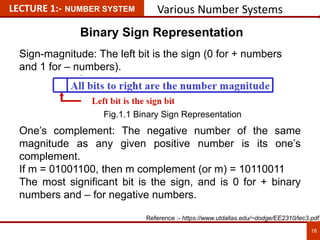
Sign-magnitude: The left bit is the sign (0 for + numbers
and 1 for – numbers).
One’s complement: The negative number of the same
magnitude as any given positive number is its one’s
complement.
If m = 01001100, then m complement (or m) = 10110011
The most significant bit is the sign, and is 0 for + binary
numbers and – for negative numbers.
18
18
Reference :- https://www.utdallas.edu/~dodge/EE2310/lec3.pdf
Fig.1.1 Binary Sign Representation
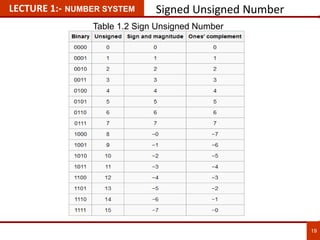
LECTURE 1:- NUMBER SYSTEM Signed Unsigned Number
19
19
Table 1.2 Sign Unsigned Number
LECTURE 1:- NUMBER SYSTEM Various Number Systems
2’s Complement Negative Binary Number
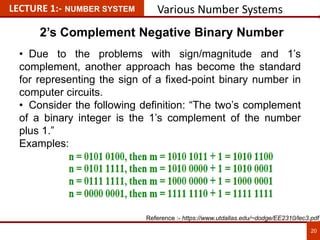
• Due to the problems with sign/magnitude and 1’s
complement, another approach has become the standard
for representing the sign of a fixed-point binary number in
computer circuits.
• Consider the following definition: “The two’s complement
of a binary integer is the 1’s complement of the number
plus 1.”
Examples:
20
20
Reference :- https://www.utdallas.edu/~dodge/EE2310/lec3.pdf
LECTURE 1:- NUMBER SYSTEM Various Number Systems
2’s Complement Negative Binary Number
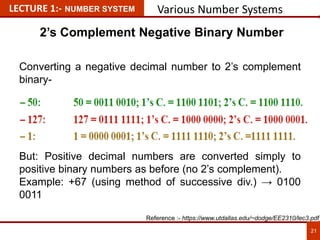
Converting a negative decimal number to 2’s complement
binary-
But: Positive decimal numbers are converted simply to
positive binary numbers as before (no 2’s complement).
Example: +67 (using method of successive div.) → 0100
0011
21
21
Reference :- https://www.utdallas.edu/~dodge/EE2310/lec3.pdf
LECTURE 1:- NUMBER SYSTEM Various Number Systems
2’s Complement Binary to Decimal
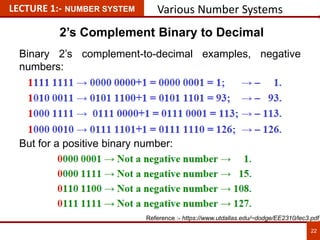
Binary 2’s complement-to-decimal examples, negative
numbers:
But for a positive binary number:
22
22
Reference :- https://www.utdallas.edu/~dodge/EE2310/lec3.pdf
LECTURE 1:- NUMBER SYSTEM Table for Various Number Systems
23
23
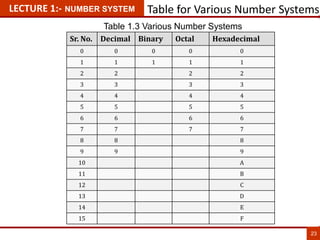
Sr. No. Decimal Binary Octal Hexadecimal
0 0 0 0 0
1 1 1 1 1
2 2 2 2
3 3 3 3
4 4 4 4
5 5 5 5
6 6 6 6
7 7 7 7
8 8 8
9 9 9
10 A
11 B
12 C
13 D
14 E
15 F
Table 1.3 Various Number Systems
LECTURE 1:- NUMBER SYSTEM Conversion Among Bases
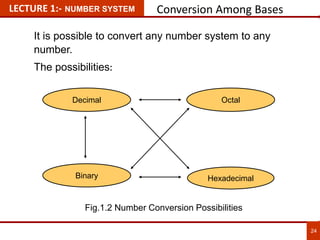
It is possible to convert any number system to any
number.
The possibilities:
Hexadecimal
Decimal Octal
Binary
24
24
Fig.1.2 Number Conversion Possibilities
25
LECTURE 2:- NUMBER SYSTEM Conversion Among Bases
Decimal to Binary
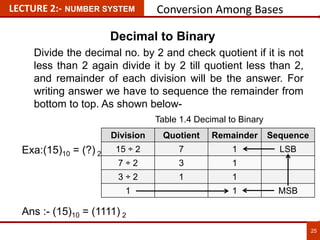
Divide the decimal no. by 2 and check quotient if it is not
less than 2 again divide it by 2 till quotient less than 2,
and remainder of each division will be the answer. For
writing answer we have to sequence the remainder from
bottom to top. As shown below-
Exa:(15)10 = (?) 2
Ans :- (15)10 = (1111) 2
Division Quotient Remainder Sequence
15 ÷ 2 7 1 LSB
7 ÷ 2 3 1
3 ÷ 2 1 1
1 1 MSB
Table 1.4 Decimal to Binary
26
LECTURE 2:- NUMBER SYSTEM Conversion Among Bases
Decimal to Binary
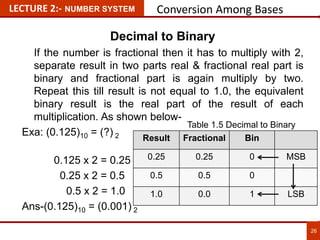
If the number is fractional then it has to multiply with 2,
separate result in two parts real & fractional real part is
binary and fractional part is again multiply by two.
Repeat this till result is not equal to 1.0, the equivalent
binary result is the real part of the result of each
multiplication. As shown below-
Exa: (0.125)10 = (?) 2
0.125 x 2 = 0.25
0.25 x 2 = 0.5
0.5 x 2 = 1.0
Ans-(0.125)10 = (0.001) 2
Result Fractional Bin
0.25 0.25 0 MSB
0.5 0.5 0
1.0 0.0 1 LSB
Table 1.5 Decimal to Binary
27
LECTURE 2:- NUMBER SYSTEM Conversion Among Bases
Decimal to Octal
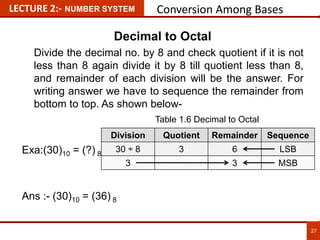
Divide the decimal no. by 8 and check quotient if it is not
less than 8 again divide it by 8 till quotient less than 8,
and remainder of each division will be the answer. For
writing answer we have to sequence the remainder from
bottom to top. As shown below-
Exa:(30)10 = (?) 8
Ans :- (30)10 = (36) 8
Division Quotient Remainder Sequence
30 ÷ 8 3 6 LSB
3 3 MSB
Table 1.6 Decimal to Octal
28
LECTURE 2:- NUMBER SYSTEM Conversion Among Bases
Decimal to Hexadecimal
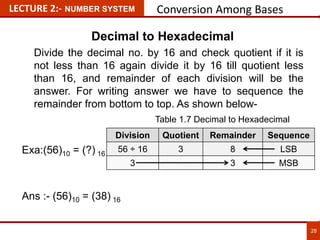
Divide the decimal no. by 16 and check quotient if it is
not less than 16 again divide it by 16 till quotient less
than 16, and remainder of each division will be the
answer. For writing answer we have to sequence the
remainder from bottom to top. As shown below-
Exa:(56)10 = (?) 16
Ans :- (56)10 = (38) 16
Division Quotient Remainder Sequence
56 ÷ 16 3 8 LSB
3 3 MSB
Table 1.7 Decimal to Hexadecimal
29
LECTURE 2:- NUMBER SYSTEM Conversion Among Bases
Binary to Decimal
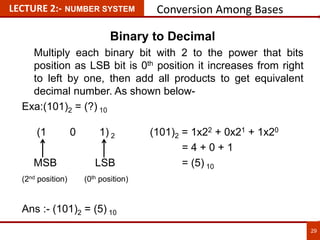
Multiply each binary bit with 2 to the power that bits
position as LSB bit is 0th position it increases from right
to left by one, then add all products to get equivalent
decimal number. As shown below-
Exa:(101)2 = (?) 10
(1 0 1) 2 (101)2 = 1x22 + 0x21 + 1x20
= 4 + 0 + 1
MSB LSB = (5) 10
(2nd position) (0th position)
Ans :- (101)2 = (5) 10
30
LECTURE 2:- NUMBER SYSTEM Conversion Among Bases
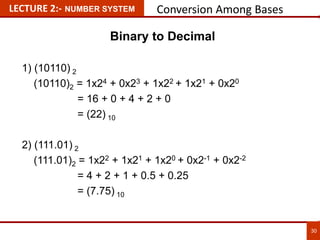
Binary to Decimal
1) (10110) 2
(10110)2 = 1x24 + 0x23 + 1x22 + 1x21 + 0x20
= 16 + 0 + 4 + 2 + 0
= (22) 10
2) (111.01) 2
(111.01)2 = 1x22 + 1x21 + 1x20 + 0x2-1 + 0x2-2
= 4 + 2 + 1 + 0.5 + 0.25
= (7.75) 10
31
LECTURE 2:- NUMBER SYSTEM Conversion Among Bases
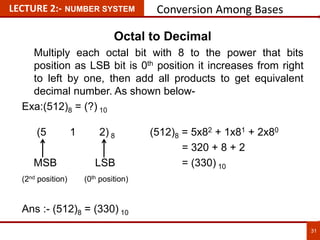
Octal to Decimal
Multiply each octal bit with 8 to the power that bits
position as LSB bit is 0th position it increases from right
to left by one, then add all products to get equivalent
decimal number. As shown below-
Exa:(512)8 = (?) 10
(5 1 2) 8 (512)8 = 5x82 + 1x81 + 2x80
= 320 + 8 + 2
MSB LSB = (330) 10
(2nd position) (0th position)
Ans :- (512)8 = (330) 10
32
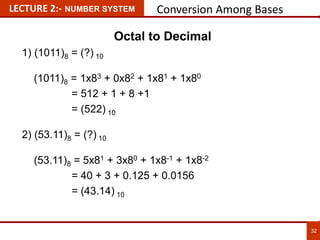
LECTURE 2:- NUMBER SYSTEM Conversion Among Bases
Octal to Decimal
1) (1011)8 = (?) 10
(1011)8 = 1x83 + 0x82 + 1x81 + 1x80
= 512 + 1 + 8 +1
= (522) 10
2) (53.11)8 = (?) 10
(53.11)8 = 5x81 + 3x80 + 1x8-1 + 1x8-2
= 40 + 3 + 0.125 + 0.0156
= (43.14) 10
33
LECTURE 2:- NUMBER SYSTEM Conversion Among Bases
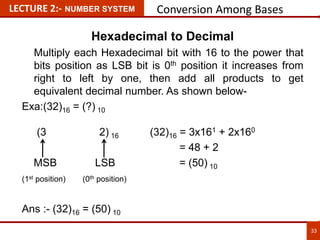
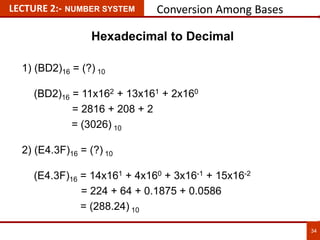
Hexadecimal to Decimal
Multiply each Hexadecimal bit with 16 to the power that
bits position as LSB bit is 0th position it increases from
right to left by one, then add all products to get
equivalent decimal number. As shown below-
Exa:(32)16 = (?) 10
(3 2) 16 (32)16 = 3x161 + 2x160
= 48 + 2
MSB LSB = (50) 10
(1st position) (0th position)
Ans :- (32)16 = (50) 10
34
LECTURE 2:- NUMBER SYSTEM Conversion Among Bases
Hexadecimal to Decimal
1) (BD2)16 = (?) 10
(BD2)16 = 11x162 + 13x161 + 2x160
= 2816 + 208 + 2
= (3026) 10
2) (E4.3F)16 = (?) 10
(E4.3F)16 = 14x161 + 4x160 + 3x16-1 + 15x16-2
= 224 + 64 + 0.1875 + 0.0586
= (288.24) 10
35
LECTURE 2:- NUMBER SYSTEM Conversion Among Bases
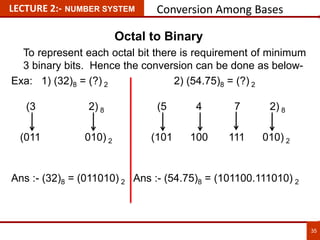
Octal to Binary
To represent each octal bit there is requirement of minimum
3 binary bits. Hence the conversion can be done as below-
Exa: 1) (32)8 = (?) 2 2) (54.75)8 = (?) 2
(3 2) 8 (5 4 7 2) 8
(011 010) 2 (101 100 111 010) 2
Ans :- (32)8 = (011010) 2 Ans :- (54.75)8 = (101100.111010) 2
36
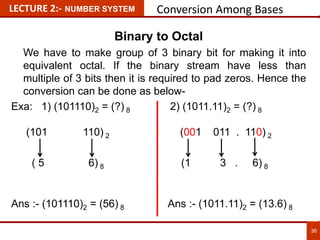
LECTURE 2:- NUMBER SYSTEM Conversion Among Bases
Binary to Octal
We have to make group of 3 binary bit for making it into
equivalent octal. If the binary stream have less than
multiple of 3 bits then it is required to pad zeros. Hence the
conversion can be done as below-
Exa: 1) (101110)2 = (?) 8 2) (1011.11)2 = (?) 8
(101 110) 2 (001 011 . 110) 2
( 5 6) 8 (1 3 . 6) 8
Ans :- (101110)2 = (56) 8 Ans :- (1011.11)2 = (13.6) 8
Binary to Octal :- Octal to Binary :-
1) (10111)2 = (?)8 1) (734)8 = (?)2
= (010 111)8 (734)8 = (111 011 100)2
= (2 7)8
2) (101011101)2 = (?)8 2) (65)8 = (?)2
= (101 011 101)8 (65)8 = (110 101)2
= (5 3 5)8
37
LECTURE 2:- NUMBER SYSTEM Conversion Among Bases
38
LECTURE 3:- NUMBER SYSTEM Conversion Among Bases
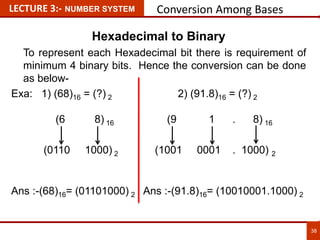
Hexadecimal to Binary
To represent each Hexadecimal bit there is requirement of
minimum 4 binary bits. Hence the conversion can be done
as below-
Exa: 1) (68)16 = (?) 2 2) (91.8)16 = (?) 2
(6 8) 16 (9 1 . 8) 16
(0110 1000) 2 (1001 0001 . 1000) 2
Ans :-(68)16= (01101000) 2 Ans :-(91.8)16= (10010001.1000) 2
39
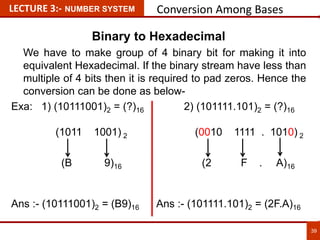
LECTURE 3:- NUMBER SYSTEM Conversion Among Bases
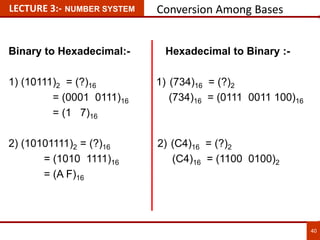
Binary to Hexadecimal
We have to make group of 4 binary bit for making it into
equivalent Hexadecimal. If the binary stream have less than
multiple of 4 bits then it is required to pad zeros. Hence the
conversion can be done as below-
Exa: 1) (10111001)2 = (?)16 2) (101111.101)2 = (?)16
(1011 1001) 2 (0010 1111 . 1010) 2
(B 9)16 (2 F . A)16
Ans :- (10111001)2 = (B9)16 Ans :- (101111.101)2 = (2F.A)16
Binary to Hexadecimal:- Hexadecimal to Binary :-
1) (10111)2 = (?)16 1) (734)16 = (?)2
= (0001 0111)16 (734)16 = (0111 0011 100)16
= (1 7)16
2) (10101111)2 = (?)16 2) (C4)16 = (?)2
= (1010 1111)16 (C4)16 = (1100 0100)2
= (A F)16
40
LECTURE 3:- NUMBER SYSTEM Conversion Among Bases
41
LECTURE 3:- NUMBER SYSTEM Conversion Among Bases
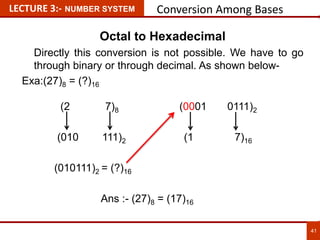
Octal to Hexadecimal
Directly this conversion is not possible. We have to go
through binary or through decimal. As shown below-
Exa:(27)8 = (?)16
(2 7)8 (0001 0111)2
(010 111)2 (1 7)16
(010111)2 = (?)16
Ans :- (27)8 = (17)16
42
LECTURE 3:- NUMBER SYSTEM Conversion Among Bases
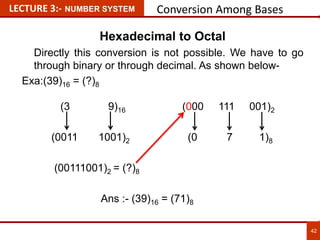
Hexadecimal to Octal
Directly this conversion is not possible. We have to go
through binary or through decimal. As shown below-
Exa:(39)16 = (?)8
(3 9)16 (000 111 001)2
(0011 1001)2 (0 7 1)8
(00111001)2 = (?)8
Ans :- (39)16 = (71)8
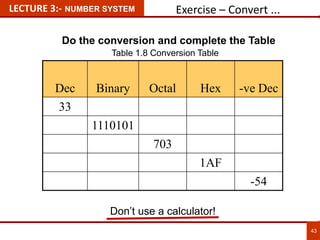
Exercise – Convert ...
Don’t use a calculator!
Dec Binary Octal Hex -ve Dec
33
1110101
703
1AF
-54
43
LECTURE 3:- NUMBER SYSTEM
Do the conversion and complete the Table
Table 1.8 Conversion Table
Various Codes
44
LECTURE 3:- NUMBER SYSTEM
Codes
In the coding, when numbers, letters or words are
represented by a specific group of symbols, it is said that the
number, letter or word is being encoded. The group of
symbols is called as a code. The digital data is represented,
stored and transmitted as group of binary bits. This group is
also called as binary code. The binary code is represented
by the number as well as alphanumeric letter.
The codes are broadly categorized into following four
categories.
• Weighted Codes
• Non-Weighted Codes
• Binary Coded Decimal Code
• Alphanumeric Codes
Reference :- http://www.tutorialspoint.com/computer_logical_organization/binary_codes.htm
Various Codes
45
LECTURE 3:- NUMBER SYSTEM
Advantages of Binary Code
• Binary codes are suitable for the computer applications.
• Binary codes are suitable for the digital communications.
• Binary codes make the analysis and designing of digital
circuits if we use the binary codes.
• Since only 0 & 1 are being used, implementation becomes
easy.
Reference :- http://www.tutorialspoint.com/computer_logical_organization/binary_codes.htm
Various Codes
46
LECTURE 3:- NUMBER SYSTEM
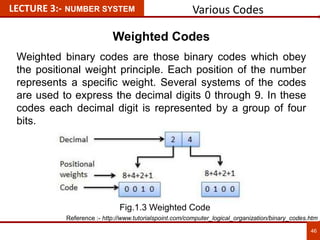
Weighted Codes
Weighted binary codes are those binary codes which obey
the positional weight principle. Each position of the number
represents a specific weight. Several systems of the codes
are used to express the decimal digits 0 through 9. In these
codes each decimal digit is represented by a group of four
bits.
Reference :- http://www.tutorialspoint.com/computer_logical_organization/binary_codes.htm
Fig.1.3 Weighted Code
Various Codes
47
LECTURE 3:- NUMBER SYSTEM
Non-Weighted Codes
In this type of binary codes, the positional weights are not
assigned. The examples of non-weighted codes are Excess-
3 code and Gray code.
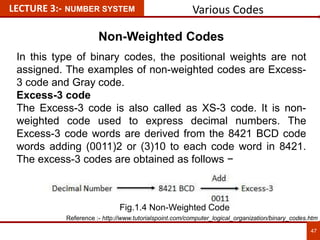
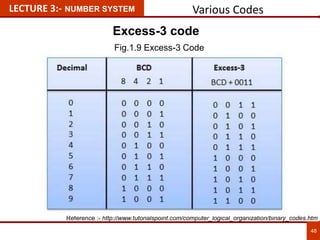
Excess-3 code
The Excess-3 code is also called as XS-3 code. It is non-
weighted code used to express decimal numbers. The
Excess-3 code words are derived from the 8421 BCD code
words adding (0011)2 or (3)10 to each code word in 8421.
The excess-3 codes are obtained as follows −
Reference :- http://www.tutorialspoint.com/computer_logical_organization/binary_codes.htm
Fig.1.4 Non-Weighted Code
Various Codes
48
LECTURE 3:- NUMBER SYSTEM
Excess-3 code
Reference :- http://www.tutorialspoint.com/computer_logical_organization/binary_codes.htm
Fig.1.9 Excess-3 Code
Various Codes
49
LECTURE 3:- NUMBER SYSTEM
Gray Code
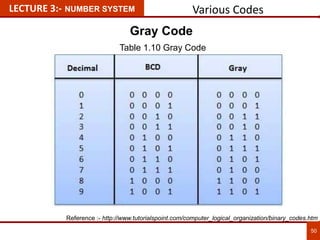
It is the non-weighted code and it is not arithmetic codes.
That means there are no specific weights assigned to the bit
position. It has a very special feature that, only one bit will
change each time the decimal number is incremented as
shown in fig. As only one bit changes at a time, the gray code
is called as a unit distance code. The gray code is a cyclic
code. Gray code cannot be used for arithmetic operation.
Application of Gray code
• Gray code is popularly used in the shaft position encoders.
• A shaft position encoder produces a code word which
represents the angular position of the shaft.
Reference :- http://www.tutorialspoint.com/computer_logical_organization/binary_codes.htm
Various Codes
50
LECTURE 3:- NUMBER SYSTEM
Gray Code
Reference :- http://www.tutorialspoint.com/computer_logical_organization/binary_codes.htm
Table 1.10 Gray Code
Various Codes
51
LECTURE 3:- NUMBER SYSTEM
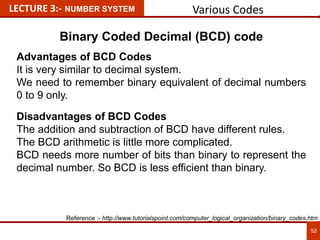
Binary Coded Decimal (BCD) code
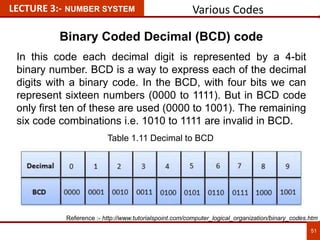
In this code each decimal digit is represented by a 4-bit
binary number. BCD is a way to express each of the decimal
digits with a binary code. In the BCD, with four bits we can
represent sixteen numbers (0000 to 1111). But in BCD code
only first ten of these are used (0000 to 1001). The remaining
six code combinations i.e. 1010 to 1111 are invalid in BCD.
Reference :- http://www.tutorialspoint.com/computer_logical_organization/binary_codes.htm
Table 1.11 Decimal to BCD
Various Codes
52
LECTURE 3:- NUMBER SYSTEM
Binary Coded Decimal (BCD) code
Advantages of BCD Codes
It is very similar to decimal system.
We need to remember binary equivalent of decimal numbers
0 to 9 only.
Disadvantages of BCD Codes
The addition and subtraction of BCD have different rules.
The BCD arithmetic is little more complicated.
BCD needs more number of bits than binary to represent the
decimal number. So BCD is less efficient than binary.
Reference :- http://www.tutorialspoint.com/computer_logical_organization/binary_codes.htm
Various Codes
53
LECTURE 3:- NUMBER SYSTEM
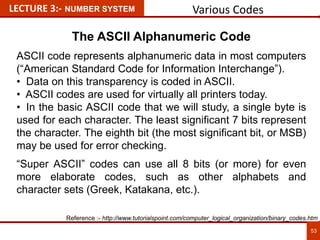
The ASCII Alphanumeric Code
ASCII code represents alphanumeric data in most computers
(“American Standard Code for Information Interchange”).
• Data on this transparency is coded in ASCII.
• ASCII codes are used for virtually all printers today.
• In the basic ASCII code that we will study, a single byte is
used for each character. The least significant 7 bits represent
the character. The eighth bit (the most significant bit, or MSB)
may be used for error checking.
“Super ASCII” codes can use all 8 bits (or more) for even
more elaborate codes, such as other alphabets and
character sets (Greek, Katakana, etc.).
Reference :- http://www.tutorialspoint.com/computer_logical_organization/binary_codes.htm
Various Codes
54
LECTURE 3:- NUMBER SYSTEM
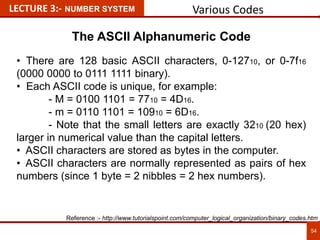
The ASCII Alphanumeric Code
• There are 128 basic ASCII characters, 0-12710, or 0-7f16
(0000 0000 to 0111 1111 binary).
• Each ASCII code is unique, for example:
- M = 0100 1101 = 7710 = 4D16.
- m = 0110 1101 = 10910 = 6D16.
- Note that the small letters are exactly 3210 (20 hex)
larger in numerical value than the capital letters.
• ASCII characters are stored as bytes in the computer.
• ASCII characters are normally represented as pairs of hex
numbers (since 1 byte = 2 nibbles = 2 hex numbers).
Reference :- http://www.tutorialspoint.com/computer_logical_organization/binary_codes.htm
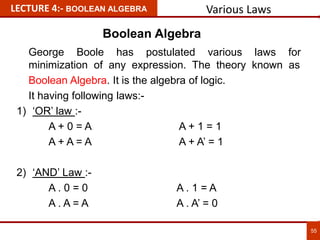
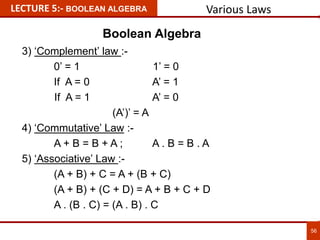
George Boole has postulated various laws for
minimization of any expression. The theory known as
Boolean Algebra. It is the algebra of logic.
It having following laws:-
1) ‘OR’ law :-
A + 0 = A A + 1 = 1
A + A = A A + A’ = 1
2) ‘AND’ Law :-
A . 0 = 0 A . 1 = A
A . A = A A . A’ = 0
LECTURE 4:- BOOLEAN ALGEBRA Various Laws
55
Boolean Algebra
3) ‘Complement’ law :-
0’ = 1 1’ = 0
If A = 0 A’ = 1
If A = 1 A’ = 0
(A’)’ = A
4) ‘Commutative’ Law :-
A + B = B + A ; A . B = B . A
5) ‘Associative’ Law :-
(A + B) + C = A + (B + C)
(A + B) + (C + D) = A + B + C + D
A . (B . C) = (A . B) . C
LECTURE 5:- BOOLEAN ALGEBRA
56
Various Laws
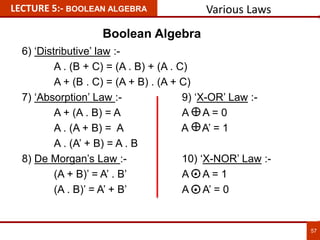
Boolean Algebra
6) ‘Distributive’ law :-
A . (B + C) = (A . B) + (A . C)
A + (B . C) = (A + B) . (A + C)
7) ‘Absorption’ Law :- 9) ‘X-OR’ Law :-
A + (A . B) = A A A = 0
A . (A + B) = A A A’ = 1
A . (A’ + B) = A . B
8) De Morgan’s Law :- 10) ‘X-NOR’ Law :-
(A + B)’ = A’ . B’ A A = 1
(A . B)’ = A’ + B’ A A’ = 0
LECTURE 5:- BOOLEAN ALGEBRA
57
Various Laws
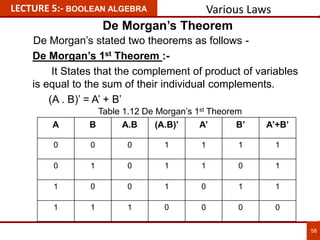
Boolean Algebra
De Morgan’s 1st Theorem :-
It States that the complement of product of variables
is equal to the sum of their individual complements.
(A . B)’ = A’ + B’
LECTURE 5:- BOOLEAN ALGEBRA
58
A B A.B (A.B)’ A’ B’ A’+B’
0 0 0 1 1 1 1
0 1 0 1 1 0 1
1 0 0 1 0 1 1
1 1 1 0 0 0 0
Various Laws
De Morgan’s Theorem
De Morgan’s stated two theorems as follows -
Table 1.12 De Morgan’s 1st Theorem
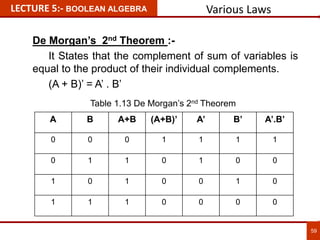
De Morgan’s 2nd Theorem :-
It States that the complement of sum of variables is
equal to the product of their individual complements.
(A + B)’ = A’ . B’
LECTURE 5:- BOOLEAN ALGEBRA
59
A B A+B (A+B)’ A’ B’ A’.B’
0 0 0 1 1 1 1
0 1 1 0 1 0 0
1 0 1 0 0 1 0
1 1 1 0 0 0 0
Various Laws
Table 1.13 De Morgan’s 2nd Theorem
Logic Gates
Gates can be defined the logic device which can makes
the logic decision. It has one or many inputs and one
output.
The various gates is as below -
• NOT gates (also called inverters),
• AND gates,
• OR gates,
• NAND gates,
• NOR gates,
• XOR gates, and
• XNOR gates.
LECTURE 6:- LOGIC GATES
60
Various Gates
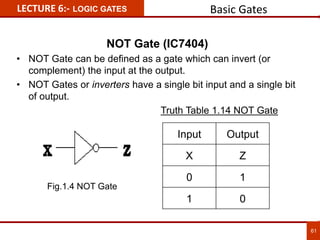
NOT Gate (IC7404)
• NOT Gate can be defined as a gate which can invert (or
complement) the input at the output.
• NOT Gates or inverters have a single bit input and a single bit
of output.
Truth Table 1.14 NOT Gate
Input Output
X Z
0 1
1 0
LECTURE 6:- LOGIC GATES
61
Basic Gates
Fig.1.4 NOT Gate
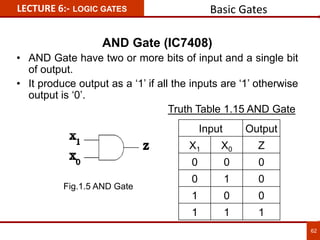
AND Gate (IC7408)
• AND Gate have two or more bits of input and a single bit
of output.
• It produce output as a ‘1’ if all the inputs are ‘1’ otherwise
output is ‘0’.
Truth Table 1.15 AND Gate
Input Output
X1 X0 Z
0 0 0
0 1 0
1 0 0
1 1 1
LECTURE 6:- LOGIC GATES
62
Basic Gates
Fig.1.5 AND Gate
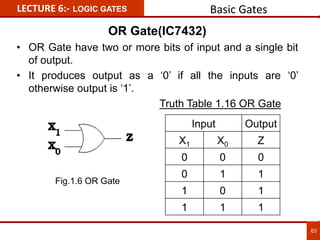
OR Gate(IC7432)
• OR Gate have two or more bits of input and a single bit
of output.
• It produces output as a ‘0’ if all the inputs are ‘0’
otherwise output is ‘1’.
Truth Table 1.16 OR Gate
Input Output
X1 X0 Z
0 0 0
0 1 1
1 0 1
1 1 1
LECTURE 6:- LOGIC GATES
63
Basic Gates
Fig.1.6 OR Gate
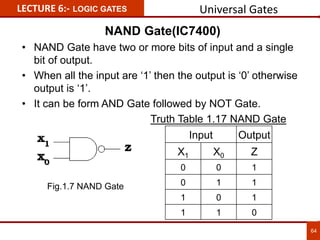
NAND Gate(IC7400)
• NAND Gate have two or more bits of input and a single
bit of output.
• When all the input are ‘1’ then the output is ‘0’ otherwise
output is ‘1’.
• It can be form AND Gate followed by NOT Gate.
Truth Table 1.17 NAND Gate
Input Output
X1 X0 Z
0 0 1
0 1 1
1 0 1
1 1 0
LECTURE 6:- LOGIC GATES
64
Universal Gates
Fig.1.7 NAND Gate
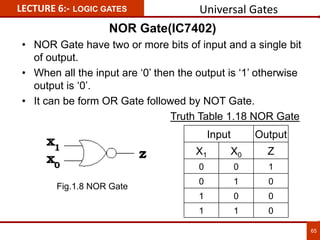
NOR Gate(IC7402)
• NOR Gate have two or more bits of input and a single bit
of output.
• When all the input are ‘0’ then the output is ‘1’ otherwise
output is ‘0’.
• It can be form OR Gate followed by NOT Gate.
Truth Table 1.18 NOR Gate
Input Output
X1 X0 Z
0 0 1
0 1 0
1 0 0
1 1 0
LECTURE 6:- LOGIC GATES
65
Universal Gates
Fig.1.8 NOR Gate
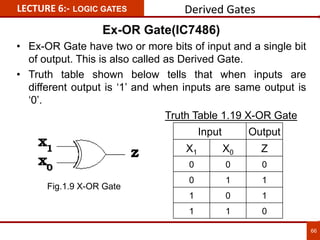
Ex-OR Gate(IC7486)
• Ex-OR Gate have two or more bits of input and a single bit
of output. This is also called as Derived Gate.
• Truth table shown below tells that when inputs are
different output is ‘1’ and when inputs are same output is
‘0’.
Truth Table 1.19 X-OR Gate
Input Output
X1 X0 Z
0 0 0
0 1 1
1 0 1
1 1 0
LECTURE 6:- LOGIC GATES
66
Derived Gates
Fig.1.9 X-OR Gate
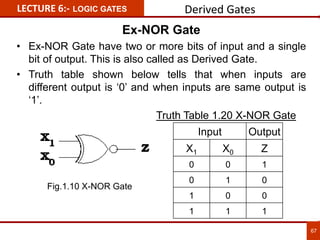
Ex-NOR Gate
• Ex-NOR Gate have two or more bits of input and a single
bit of output. This is also called as Derived Gate.
• Truth table shown below tells that when inputs are
different output is ‘0’ and when inputs are same output is
‘1’.
Truth Table 1.20 X-NOR Gate
Input Output
X1 X0 Z
0 0 1
0 1 0
1 0 0
1 1 1
LECTURE 6:- LOGIC GATES
67
Derived Gates
Fig.1.10 X-NOR Gate
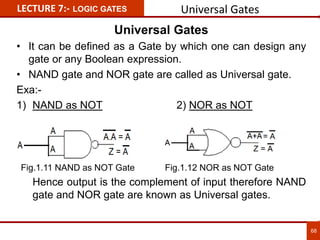
Universal Gates
• It can be defined as a Gate by which one can design any
gate or any Boolean expression.
• NAND gate and NOR gate are called as Universal gate.
Exa:-
1) NAND as NOT 2) NOR as NOT
Hence output is the complement of input therefore NAND
gate and NOR gate are known as Universal gates.
LECTURE 7:- LOGIC GATES
68
Universal Gates
Fig.1.11 NAND as NOT Gate Fig.1.12 NOR as NOT Gate
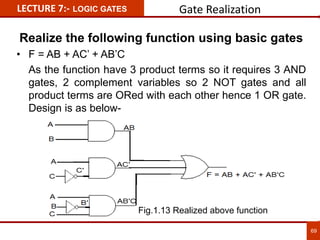
Realize the following function using basic gates
• F = AB + AC’ + AB’C
As the function have 3 product terms so it requires 3 AND
gates, 2 complement variables so 2 NOT gates and all
product terms are ORed with each other hence 1 OR gate.
Design is as below-
LECTURE 7:- LOGIC GATES Gate Realization
69
Fig.1.13 Realized above function
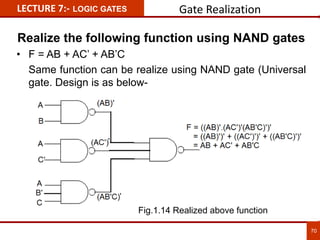
Realize the following function using NAND gates
• F = AB + AC’ + AB’C
Same function can be realize using NAND gate (Universal
gate. Design is as below-
LECTURE 7:- LOGIC GATES Gate Realization
70
Fig.1.14 Realized above function
LECTURE 8:-
71
• Modern digital Electronics- R. P. Jain, McGraw Hill.
• Digital Integrated Electronics- Herbert Taub, McGraw Hill.
• Digital Logic and Computer Design- Morris Mano (PHI).
• Digital Integrated Electronics- Herbert Taub, McGraw Hill.
• Digital Electronics Logic and System – James Bingnell and Robert
Donovan, Cengage Learning
• Digital Circuits & Systems by K.R.Venugopal & K. Shaila
• http://npteldownloads.iitm.ac.in/downloads_mp4/117106086/lec01.mp4
• http://www.digital.iitkgp.ernet.in/dec/index.php
• http://vlab.co.in/ba_nptel_labs.php?id=1
• http://www.tutorialspoint.com/computer_logical_organization/binary_cod
es.htm
• https://www.utdallas.edu/~dodge/EE2310/lec3.pdf
Chapter 1 References
LECTURE 8:-
72
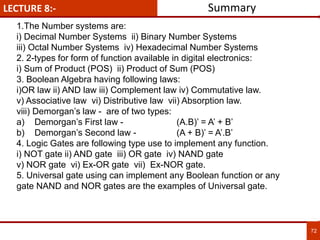
Summary
1.The Number systems are:
i) Decimal Number Systems ii) Binary Number Systems
iii) Octal Number Systems iv) Hexadecimal Number Systems
2. 2-types for form of function available in digital electronics:
i) Sum of Product (POS) ii) Product of Sum (POS)
3. Boolean Algebra having following laws:
i)OR law ii) AND law iii) Complement law iv) Commutative law.
v) Associative law vi) Distributive law vii) Absorption law.
viii) Demorgan’s law - are of two types:
a) Demorgan’s First law - (A.B)’ = A’ + B’
b) Demorgan’s Second law - (A + B)’ = A’.B’
4. Logic Gates are following type use to implement any function.
i) NOT gate ii) AND gate iii) OR gate iv) NAND gate
v) NOR gate vi) Ex-OR gate vii) Ex-NOR gate.
5. Universal gate using can implement any Boolean function or any
gate NAND and NOR gates are the examples of Universal gate.
LECTURE 8:-
73
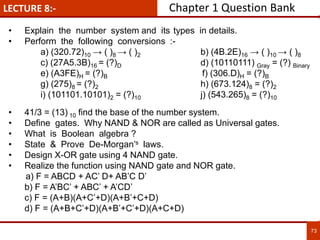
• Explain the number system and its types in details.
• Perform the following conversions :-
a) (320.72)10 → ( )8 → ( )2 b) (4B.2E)16 → ( )10 → ( )8
c) (27A5.3B)16 = (?)D d) (10110111) Gray = (?) Binary
e) (A3FE)H = (?)B f) (306.D)H = (?)B
g) (275)8 = (?)2 h) (673.124)8 = (?)2
i) (101101.10101)2 = (?)10 j) (543.265)8 = (?)10
• 41/3 = (13) 10 find the base of the number system.
• Define gates. Why NAND & NOR are called as Universal gates.
• What is Boolean algebra ?
• State & Prove De-Morgan’s laws.
• Design X-OR gate using 4 NAND gate.
• Realize the function using NAND gate and NOR gate.
a) F = ABCD + AC’ D+ AB’C D’
b) F = A’BC’ + ABC’ + A’CD’
c) F = (A+B)(A+C’+D)(A+B’+C+D)
d) F = (A+B+C’+D)(A+B’+C’+D)(A+C+D)
Chapter 1 Question Bank
74
“DIGITAL ELECTRONICS AND
FUNDAMENTAL OF MICROPROCESSOR”
CHAPTER – 2
“LOGICAL EXPRESSION, MINIMIZATION &
IMPLEMENTATION”
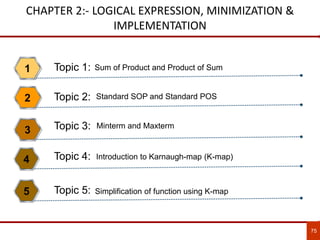
CHAPTER 2:- LOGICAL EXPRESSION, MINIMIZATION &
IMPLEMENTATION
Sum of Product and Product of Sum1
Standard SOP and Standard POS2
Minterm and Maxterm
3
Introduction to Karnaugh-map (K-map)4
75
Simplification of function using K-map5
Topic 1:
Topic 2:
Topic 3:
Topic 4:
Topic 5:
CHAPTER-2 SPECIFIC OBJECTIVE / COURSE OUTCOME
Distinguish various form of function.1
Convert function into standard form2
76
The student will be able to:
Differentiate product term, sum term, minterm and maxterm3
Understand the concept of K-map4
Minimize function using K-map5
77
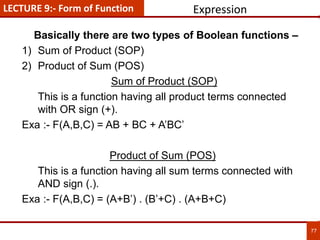
LECTURE 9:- Form of Function Expression
Basically there are two types of Boolean functions –
1) Sum of Product (SOP)
2) Product of Sum (POS)
Sum of Product (SOP)
This is a function having all product terms connected
with OR sign (+).
Exa :- F(A,B,C) = AB + BC + A’BC’
Product of Sum (POS)
This is a function having all sum terms connected with
AND sign (.).
Exa :- F(A,B,C) = (A+B’) . (B’+C) . (A+B+C)
78
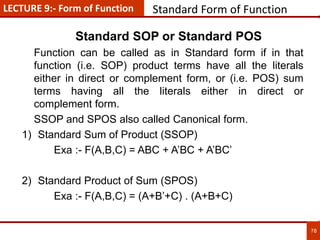
Standard Form of Function
Standard SOP or Standard POS
Function can be called as in Standard form if in that
function (i.e. SOP) product terms have all the literals
either in direct or complement form, or (i.e. POS) sum
terms having all the literals either in direct or
complement form.
SSOP and SPOS also called Canonical form.
1) Standard Sum of Product (SSOP)
Exa :- F(A,B,C) = ABC + A’BC + A’BC’
2) Standard Product of Sum (SPOS)
Exa :- F(A,B,C) = (A+B’+C) . (A+B+C)
LECTURE 9:- Form of Function
79
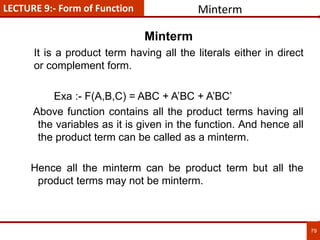
Minterm
Minterm
It is a product term having all the literals either in direct
or complement form.
Exa :- F(A,B,C) = ABC + A’BC + A’BC’
Above function contains all the product terms having all
the variables as it is given in the function. And hence all
the product term can be called as a minterm.
Hence all the minterm can be product term but all the
product terms may not be minterm.
LECTURE 9:- Form of Function
80
MAXTERM
MAXTERM
It is a Sum term having all the literals either in direct or
complement form.
Exa :
Exa :- F(A,B,C) = (A+B’+C) . (A+B+C)
Above function contains all the sum terms having all the
variables as it is given in the function. And hence all the
sum term can be called as a maxterm.
Hence all the maxterm can be sum term but all the sum
terms may not be maxterm.
LECTURE 9:- Form of Function
To minimize Boolean Function it is found difficult by
using Boolean Algebra. Hence the scientist Karnaugh
has invented new technique of boxes to reduce the
function known as K-Map.
If the function is in SOP form ‘1’ should be enter into
the K-map for the given minterm.
If the function is in POS form ‘0’ should be enter into
the K-map for the given MAXTERM.
There are basically following types of K-maps
1. 2 variable K-map.
2. 3 variable K-map.
3. 4 variable K-map.
4. 5 variable K-map.
LECTURE 10:- K-MAP Various K-Map
81
Introduction to K-Map
LECTURE 10:- K-MAP
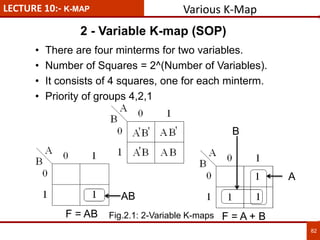
2 - Variable K-map (SOP)
82
• There are four minterms for two variables.
• Number of Squares = 2^(Number of Variables).
• It consists of 4 squares, one for each minterm.
• Priority of groups 4,2,1
AB
B
A
F = AB F = A + B
Various K-Map
Fig.2.1: 2-Variable K-maps
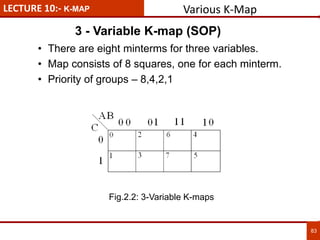
LECTURE 10:- K-MAP
3 - Variable K-map (SOP)
83
• There are eight minterms for three variables.
• Map consists of 8 squares, one for each minterm.
• Priority of groups – 8,4,2,1
Various K-Map
Fig.2.2: 3-Variable K-maps
LECTURE 10:- K-MAP
84
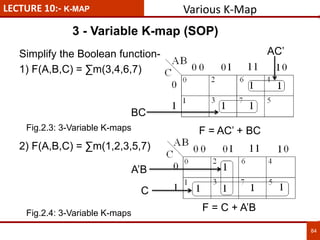
Simplify the Boolean function-
1) F(A,B,C) = ∑m(3,4,6,7)
F = AC’ + BC
2) F(A,B,C) = ∑m(1,2,3,5,7)
F = C + A’B
3 - Variable K-map (SOP)
AC’
BC
A’B
C
Various K-Map
Fig.2.3: 3-Variable K-maps
Fig.2.4: 3-Variable K-maps
LECTURE 10:- K-MAP
85
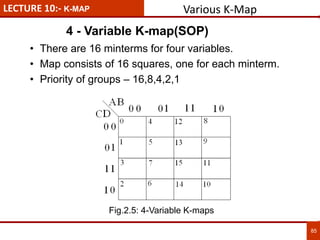
• There are 16 minterms for four variables.
• Map consists of 16 squares, one for each minterm.
• Priority of groups – 16,8,4,2,1
4 - Variable K-map(SOP)
Various K-Map
Fig.2.5: 4-Variable K-maps
LECTURE 10:- K-MAP
86
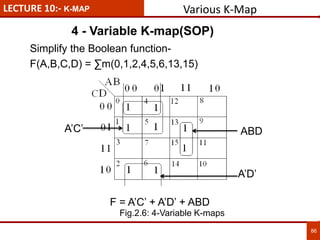
Simplify the Boolean function-
F(A,B,C,D) = ∑m(0,1,2,4,5,6,13,15)
F = A’C’ + A’D’ + ABD
4 - Variable K-map(SOP)
A’C’
A’D’
ABD
Various K-Map
Fig.2.6: 4-Variable K-maps
LECTURE 10:- K-MAP
87
5 - Variable K-map(SOP)
Various K-Map
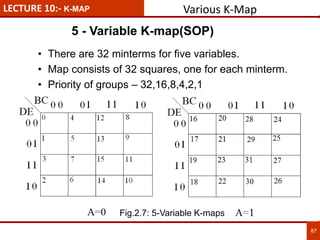
• There are 32 minterms for five variables.
• Map consists of 32 squares, one for each minterm.
• Priority of groups – 32,16,8,4,2,1
Fig.2.7: 5-Variable K-maps
LECTURE 10:- K-MAP
88
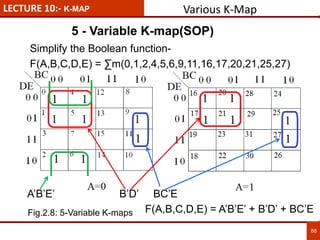
Simplify the Boolean function-
F(A,B,C,D,E) = ∑m(0,1,2,4,5,6,9,11,16,17,20,21,25,27)
5 - Variable K-map(SOP)
Various K-Map
A’B’E’ B’D’ BC’E
F(A,B,C,D,E) = A’B’E’ + B’D’ + BC’EFig.2.8: 5-Variable K-maps
LECTURE 11:- K-MAP
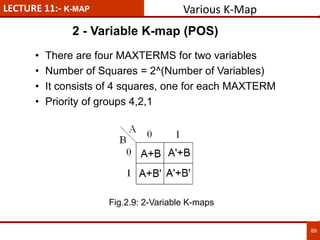
2 - Variable K-map (POS)
89
• There are four MAXTERMS for two variables
• Number of Squares = 2^(Number of Variables)
• It consists of 4 squares, one for each MAXTERM
• Priority of groups 4,2,1
Various K-Map
Fig.2.9: 2-Variable K-maps
LECTURE 11:- K-MAP
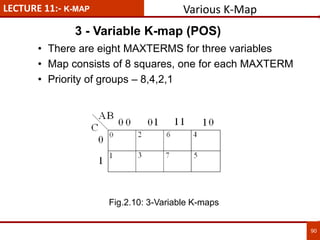
3 - Variable K-map (POS)
90
• There are eight MAXTERMS for three variables
• Map consists of 8 squares, one for each MAXTERM
• Priority of groups – 8,4,2,1
Various K-Map
Fig.2.10: 3-Variable K-maps
LECTURE 11:- K-MAP
91
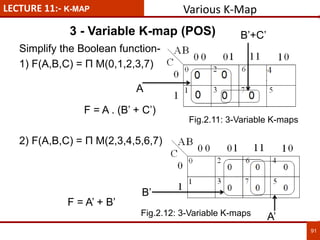
Simplify the Boolean function-
1) F(A,B,C) = П M(0,1,2,3,7)
F = A . (B’ + C’)
2) F(A,B,C) = П M(2,3,4,5,6,7)
F = A’ + B’
3 - Variable K-map (POS) B’+C’
A
A’
B’
Various K-Map
Fig.2.11: 3-Variable K-maps
Fig.2.12: 3-Variable K-maps
LECTURE 11:- K-MAP
92
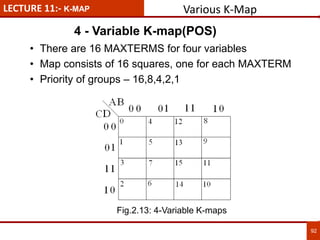
• There are 16 MAXTERMS for four variables
• Map consists of 16 squares, one for each MAXTERM
• Priority of groups – 16,8,4,2,1
4 - Variable K-map(POS)
Various K-Map
Fig.2.13: 4-Variable K-maps
LECTURE 11:- K-MAP
93
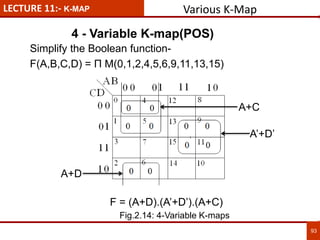
Simplify the Boolean function-
F(A,B,C,D) = П M(0,1,2,4,5,6,9,11,13,15)
F = (A+D).(A’+D’).(A+C)
4 - Variable K-map(POS)
A+D
A’+D’
A+C
Various K-Map
Fig.2.14: 4-Variable K-maps
LECTURE 11:- K-MAP
94
• 6 variable, 7 variable and also more than that K-map
is also available and it is found more tedious to
minimize it.
• So the tabular method which is also known as the
Quine-McCluskey method is particularly useful when
minimising functions having a large number of
variables.
More Than 5-Variable K-map(POS)
Various K-Map
LECTURE 12:- DON’T CARE Don’t Care Condition
95
• In some digital system, certain input conditions never
occurs during normal operation therefore
corresponding output never appears, known as Don’t
Care Condition.
• It is indicated by ‘x’ in the truth table as well as k-map.
• ‘x’ in a k-map, will be considered as ‘0’ or ‘1’ for POS
and SOP respectively.
Introduction
LECTURE 12:- DON’T CARE Don’t Care Condition
96
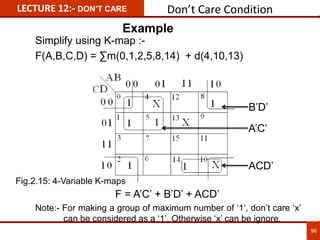
Simplify using K-map :-
F(A,B,C,D) = ∑m(0,1,2,5,8,14) + d(4,10,13)
F = A’C’ + B’D’ + ACD’
Note:- For making a group of maximum number of ‘1’, don’t care ‘x’
can be considered as a ‘1’. Otherwise ‘x’ can be ignore.
B’D’
A’C’
ACD’
Example
Fig.2.15: 4-Variable K-maps
LECTURE 12:- DON’T CARE Don’t care condition
97
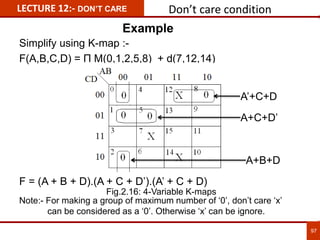
Simplify using K-map :-
F(A,B,C,D) = П M(0,1,2,5,8) + d(7,12,14)
F = (A + B + D).(A + C + D’).(A’ + C + D)
Note:- For making a group of maximum number of ‘0’, don’t care ‘x’
can be considered as a ‘0’. Otherwise ‘x’ can be ignore.
A’+C+D
A+C+D’
A+B+D
Example
Fig.2.16: 4-Variable K-maps
LECTURE 13:- DON’T CARE Conversion SOP to POS
98
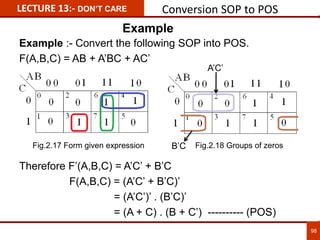
Example :- Convert the following SOP into POS.
F(A,B,C) = AB + A’BC + AC’
Therefore F’(A,B,C) = A’C’ + B’C
F(A,B,C) = (A’C’ + B’C)’
= (A’C’)’ . (B’C)’
= (A + C) . (B + C’) ---------- (POS)
Fig.2.17 Form given expression Fig.2.18 Groups of zeros
A’C’
B’C
Example
LECTURE 13:- CODE CONVERTER
BCD to 7-seg decoder
99
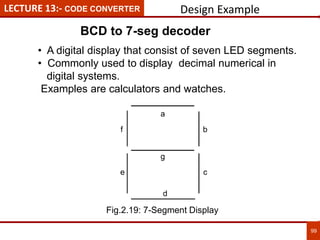
• A digital display that consist of seven LED segments.
• Commonly used to display decimal numerical in
digital systems.
Examples are calculators and watches.
a
b
c
d
e
g
f
Design Example
Fig.2.19: 7-Segment Display
LECTURE 13:- CODE CONVERTER Design Example
10
0
Digital
Display
INPUT OUTPUT
A B C D a b c d e f g
0 0 0 0 0 1 1 1 1 1 1 0
1 0 0 0 1 0 1 1 0 0 0 0
2 0 0 1 0 1 1 0 1 1 0 1
3 0 0 1 1 1 1 1 1 0 0 1
4 0 1 0 0 0 1 1 0 0 1 1
5 0 1 0 1 1 0 1 1 0 1 1
6 0 1 1 0 0 0 1 1 1 1 1
7 0 1 1 1 1 1 1 0 0 0 0
8 1 0 0 0 1 1 1 1 1 1 1
9 1 0 0 1 1 1 1 0 0 1 1
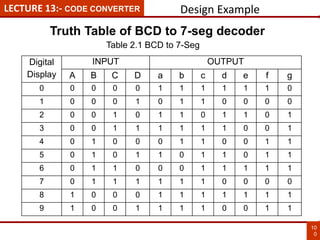
Truth Table of BCD to 7-seg decoder
Table 2.1 BCD to 7-Seg
LECTURE 13:- CODE CONVERTER
10
1
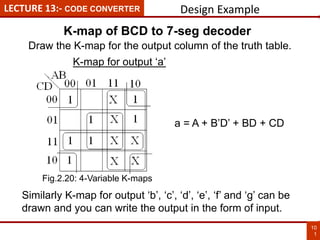
Draw the K-map for the output column of the truth table.
K-map for output ‘a’
a = A + B’D’ + BD + CD
Similarly K-map for output ‘b’, ‘c’, ‘d’, ‘e’, ‘f’ and ‘g’ can be
drawn and you can write the output in the form of input.
K-map of BCD to 7-seg decoder
Design Example
Fig.2.20: 4-Variable K-maps
B’
D’
D
B
C
D
A
a
LECTURE 13:- CODE CONVERTER
10
2
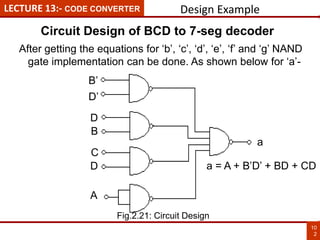
After getting the equations for ‘b’, ‘c’, ‘d’, ‘e’, ‘f’ and ‘g’ NAND
gate implementation can be done. As shown below for ‘a’-
a = A + B’D’ + BD + CD
Design Example
Circuit Design of BCD to 7-seg decoder
Fig.2.21: Circuit Design
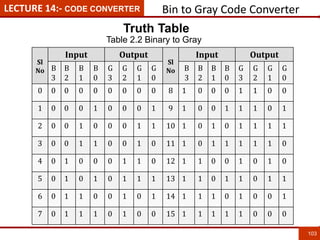
LECTURE 14:- CODE CONVERTER Bin to Gray Code Converter
103
Sl
No
Input Output
Sl
No
Input Output
B
3
B
2
B
1
B
0
G
3
G
2
G
1
G
0
B
3
B
2
B
1
B
0
G
3
G
2
G
1
G
0
0 0 0 0 0 0 0 0 0 8 1 0 0 0 1 1 0 0
1 0 0 0 1 0 0 0 1 9 1 0 0 1 1 1 0 1
2 0 0 1 0 0 0 1 1 10 1 0 1 0 1 1 1 1
3 0 0 1 1 0 0 1 0 11 1 0 1 1 1 1 1 0
4 0 1 0 0 0 1 1 0 12 1 1 0 0 1 0 1 0
5 0 1 0 1 0 1 1 1 13 1 1 0 1 1 0 1 1
6 0 1 1 0 0 1 0 1 14 1 1 1 0 1 0 0 1
7 0 1 1 1 0 1 0 0 15 1 1 1 1 1 0 0 0
Truth Table
Table 2.2 Binary to Gray
LECTURE 14:- CODE CONVERTER Bin to Gray Code Converter
104
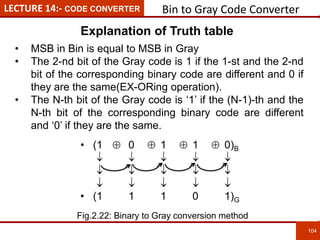
• (1  0  1  1  0)B
    
    
    
• (1 1 1 0 1)G
• MSB in Bin is equal to MSB in Gray
• The 2-nd bit of the Gray code is 1 if the 1-st and the 2-nd
bit of the corresponding binary code are different and 0 if
they are the same(EX-ORing operation).
• The N-th bit of the Gray code is ‘1’ if the (N-1)-th and the
N-th bit of the corresponding binary code are different
and ‘0’ if they are the same.
Explanation of Truth table
Fig.2.22: Binary to Gray conversion method
LECTURE 14:- CODE CONVERTER Bin to Gray Code Circuit
105
B3
B2
B1
B0
G3
G2
G1
G0
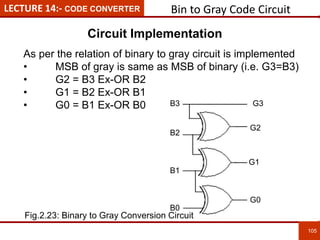
Circuit Implementation
As per the relation of binary to gray circuit is implemented
• MSB of gray is same as MSB of binary (i.e. G3=B3)
• G2 = B3 Ex-OR B2
• G1 = B2 Ex-OR B1
• G0 = B1 Ex-OR B0
Fig.2.23: Binary to Gray Conversion Circuit
LECTURE 15:-
10
6
• Modern digital Electronics- R. P. Jain, McGraw Hill.
• Digital Integrated Electronics- Herbert Taub, McGraw Hill.
• Digital Logic and Computer Design- Morris Mano (PHI).
• Digital Integrated Electronics- Herbert Taub, McGraw Hill.
• Digital Electronics Logic and System – James Bingnell and Robert
Donovan, Cengage Learning
• Digital Circuits & Systems by K.R.Venugopal & K. Shaila
• http://npteldownloads.iitm.ac.in/downloads_mp4/117106086/lec01.mp4
• http://www.digital.iitkgp.ernet.in/dec/index.php
• http://vlab.co.in/ba_nptel_labs.php?id=1
Chapter 2 References
LECTURE 15:-
107
Summary
1. 2-types for form of function available in digital electronics:
i) Sum of Product (POS) ii) Product of Sum (POS)
2. SOP can be converted into SSOP by applying Boolean laws and
make available all the literals either in true or complemented.
3. Minterm is a product term having all the literals.
4. MAXTERM is a sum term having all the literals.
5. Universal gate using can implement any Boolean function or any
gate NAND and NOR gates are the examples of Universal gate.
6. K-map required to minimize any Boolean expression, types are:
i) 2-variable k-map ii) 3-variable k-map iii) 4-variable k-map.
7. K-map is the method to reduce any Boolean expression easily.
LECTURE 15:-
108
• Express the following equation in std. sop & pos form.
F(A,B,C,D) = (A + BC).(B + CD).
• What is the difference between Canonical form & standard form?
• Express Boolean function F = A+BC in a sum of minterm (canonical
form).
• Define minterm and MAXTERM.
• What is sum of product and product of sum.
• Explain binary to gray conversion with ckt. Diagram & example.
• How you convert a gray no. to binary no.?
• Reduce the function using K-map.
a) F(A,B,C,D) = ABC + BC’ + A’CD
b) F(A,B,C,D) = AB + B’C + ABCD
c) F(A,B,C,D) = (A + BCD).(ABC + BC’D).(A’CD + C’D’)
d) F(A,B,C,D) = (A + ABCD’).(ABC’ + CD).
Chapter 2 Question Bank
109
“DIGITAL ELECTRONICS AND
FUNDAMENTAL OF MICROPROCESSOR”
CHAPTER – 3
“COMBINATIONAL CIRCUITS”
CHAPTER 3:- Combinational Circuits
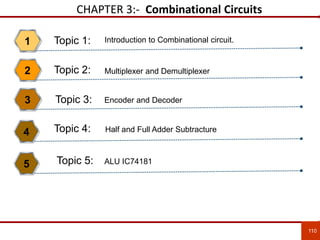
Introduction to Combinational circuit.1
Multiplexer and Demultiplexer2
Encoder and Decoder3
Half and Full Adder Subtracture4
110
ALU IC741815
Topic 1:
Topic 2:
Topic 3:
Topic 4:
Topic 5:
CHAPTER-3 SPECIFIC OBJECTIVE / COURSE OUTCOME
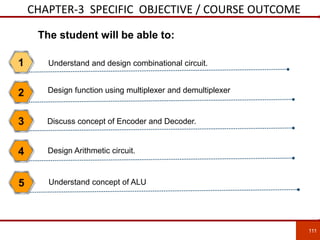
Understand and design combinational circuit.1
Design function using multiplexer and demultiplexer2
111
The student will be able to:
Discuss concept of Encoder and Decoder.3
Design Arithmetic circuit.4
Understand concept of ALU5
LECTURE 16:- Combinational Circuit
112
112
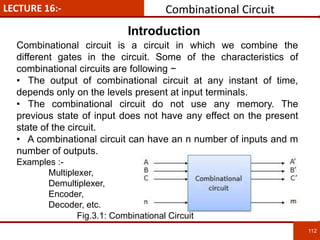
Combinational circuit is a circuit in which we combine the
different gates in the circuit. Some of the characteristics of
combinational circuits are following −
• The output of combinational circuit at any instant of time,
depends only on the levels present at input terminals.
• The combinational circuit do not use any memory. The
previous state of input does not have any effect on the present
state of the circuit.
• A combinational circuit can have an n number of inputs and m
number of outputs.
Examples :-
Multiplexer,
Demultiplexer,
Encoder,
Decoder, etc.
Introduction
Fig.3.1: Combinational Circuit
LECTURE 16:- Combinational Circuit
113
113
• It has many input & 1 output, hence it is also called as
many to one.
• It comes under combinational circuit.
• No. of input lines = 2^(No. of Select lines).
• It is a Selector which can select any one of many input
line to the output line as per combination of the select
line.
• Any kind of Boolean function can be design using mux.
Introduction of Multiplexer
LECTURE 16:-
114
114
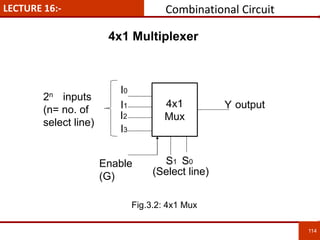
4x1
Mux
I0
I1
I2
I3
S1 S0
Y output
(Select line)
2n inputs
(n= no. of
select line)
Enable
(G)
4x1 Multiplexer
Combinational Circuit
Fig.3.2: 4x1 Mux
LECTURE 16:-
115
115
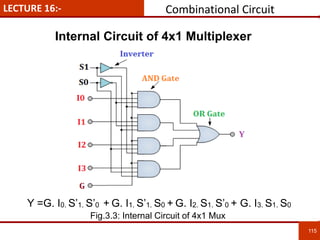
Internal Circuit of 4x1 Multiplexer
Combinational Circuit
Y =G. I0. S’1. S’0 + G. I1. S’1. S0 + G. I2. S1. S’0 + G. I3. S1. S0
Fig.3.3: Internal Circuit of 4x1 Mux
LECTURE 16:-
116
116
Characteristics Table of 4x1Multiplexer
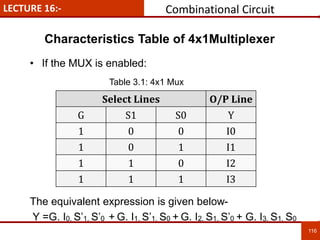
• If the MUX is enabled:
The equivalent expression is given below-
Y =G. I0. S’1. S’0 + G. I1. S’1. S0 + G. I2. S1. S’0 + G. I3. S1. S0
Select Lines O/P Line
G S1 S0 Y
1 0 0 I0
1 0 1 I1
1 1 0 I2
1 1 1 I3
Combinational Circuit
Table 3.1: 4x1 Mux
LECTURE 17:- Examples
117
117
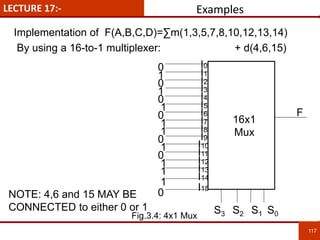
Implementation of F(A,B,C,D)=∑m(1,3,5,7,8,10,12,13,14)
By using a 16-to-1 multiplexer: + d(4,6,15)
16x1
Mux
F
I00
0
1
0
NOTE: 4,6 and 15 MAY BE
CONNECTED to either 0 or 1
I1
I2
I3
I4
I5
I8
I6
I9
I7
I11
I10
I13
I12
I14
I15
0
0
0
0
1
1
1
1
1
1
1
1
S3 S2 S1 S0Fig.3.4: 4x1 Mux
LECTURE 17:- Examples
118
118
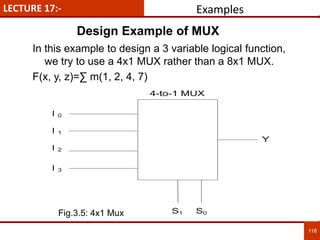
In this example to design a 3 variable logical function,
we try to use a 4x1 MUX rather than a 8x1 MUX.
F(x, y, z)=∑ m(1, 2, 4, 7)
Design Example of MUX
Fig.3.5: 4x1 Mux
LECTURE 17:- Examples
119
119
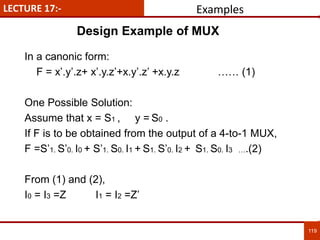
In a canonic form:
F = x’.y’.z+ x’.y.z’+x.y’.z’ +x.y.z …… (1)
One Possible Solution:
Assume that x = S1 , y = S0 .
If F is to be obtained from the output of a 4-to-1 MUX,
F =S’1. S’0. I0 + S’1. S0. I1 + S1. S’0. I2 + S1. S0. I3 ….(2)
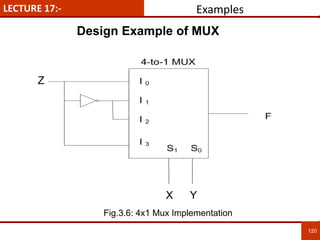
From (1) and (2),
I0 = I3 =Z I1 = I2 =Z’
Design Example of MUX
LECTURE 17:- Examples
120
120
Z
X Y
Design Example of MUX
Fig.3.6: 4x1 Mux Implementation
LECTURE 18:-
Introduction to Demultiplexer
121
121
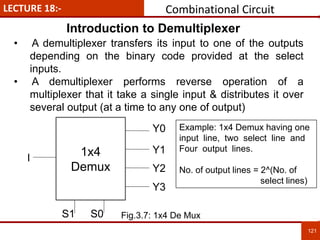
• A demultiplexer transfers its input to one of the outputs
depending on the binary code provided at the select
inputs.
• A demultiplexer performs reverse operation of a
multiplexer that it take a single input & distributes it over
several output (at a time to any one of output)
1x4
Demux
I
S1 S0
Y0
Y1
Y2
Y3
Example: 1x4 Demux having one
input line, two select line and
Four output lines.
No. of output lines = 2^(No. of
select lines)
Combinational Circuit
Fig.3.7: 1x4 De Mux
LECTURE 18:-
122
122
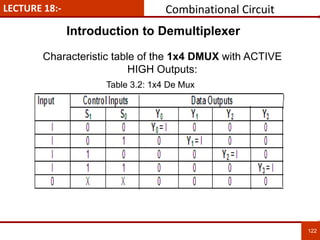
Characteristic table of the 1x4 DMUX with ACTIVE
HIGH Outputs:
Introduction to Demultiplexer
Combinational Circuit
Table 3.2: 1x4 De Mux
LECTURE 18:-
123
123
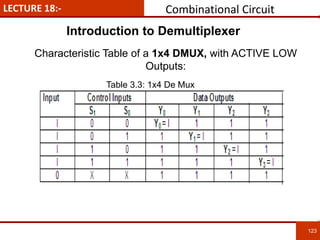
Characteristic Table of a 1x4 DMUX, with ACTIVE LOW
Outputs:
Introduction to Demultiplexer
Combinational Circuit
Table 3.3: 1x4 De Mux
LECTURE 19:-
Introduction to Encoder
124
124
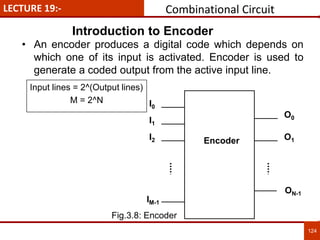
• An encoder produces a digital code which depends on
which one of its input is activated. Encoder is used to
generate a coded output from the active input line.
I0
Encoder
I1
I2
O0
O1
ON-1
IM-1
Input lines = 2^(Output lines)
M = 2^N
Combinational Circuit
Fig.3.8: Encoder
LECTURE 19:-
4x2 Encoder
125
125
A
Encoder
B
C
Y
X
D
Inputs Outputs
A B C D Y X
1 0 0 0 0 0
0 1 0 0 0 1
0 0 1 0 1 0
0 0 0 1 1 1
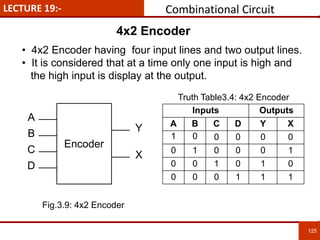
• 4x2 Encoder having four input lines and two output lines.
• It is considered that at a time only one input is high and
the high input is display at the output.
Truth Table3.4: 4x2 Encoder
Combinational Circuit
Fig.3.9: 4x2 Encoder
LECTURE 20:-
Decimal to BCD Encoder
126
126
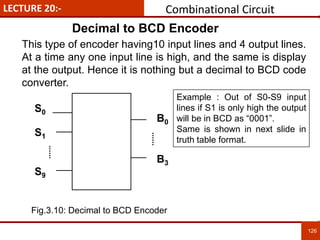
S0
S1
S9
B0
B3
This type of encoder having10 input lines and 4 output lines.
At a time any one input line is high, and the same is display
at the output. Hence it is nothing but a decimal to BCD code
converter.
Example : Out of S0-S9 input
lines if S1 is only high the output
will be in BCD as “0001”.
Same is shown in next slide in
truth table format.
Combinational Circuit
Fig.3.10: Decimal to BCD Encoder
LECTURE 20:-
127
127
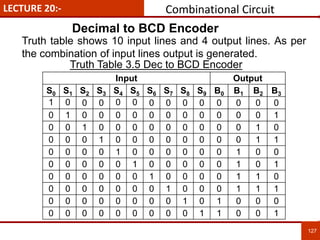
Input Output
S0 S1 S2 S3 S4 S5 S6 S7 S8 S9 B0 B1 B2 B3
1 0 0 0 0 0 0 0 0 0 0 0 0 0
0 1 0 0 0 0 0 0 0 0 0 0 0 1
0 0 1 0 0 0 0 0 0 0 0 0 1 0
0 0 0 1 0 0 0 0 0 0 0 0 1 1
0 0 0 0 1 0 0 0 0 0 0 1 0 0
0 0 0 0 0 1 0 0 0 0 0 1 0 1
0 0 0 0 0 0 1 0 0 0 0 1 1 0
0 0 0 0 0 0 0 1 0 0 0 1 1 1
0 0 0 0 0 0 0 0 1 0 1 0 0 0
0 0 0 0 0 0 0 0 0 1 1 0 0 1
Decimal to BCD Encoder
Truth Table 3.5 Dec to BCD Encoder
Truth table shows 10 input lines and 4 output lines. As per
the combination of input lines output is generated.
Combinational Circuit
LECTURE 20:-
128
128
Priority Encoder
While designing the encoder the disadvantages of standard
digital encoders is that they can generate the wrong output
code when there is more than one input present at logic
level “1”. For example, if we make inputs D1 and D2 HIGH at
logic “1” both at the same time, the resulting output is
neither at “01” or at “10” but will be at “11” which is an
output binary number that is different to the actual input
present. Also, an output code of all logic “0”s can be
generated when all of its inputs are at “0” OR when input D0
is equal to one.
To overcome this drawback it is better to assign the priority.
And in above case if D2 has assign higher priority than D1
then output will be “10” only. This concept is known as a
Priority Encoder.
Combinational Circuit
Reference :- http://www.electronics-tutorials.ws/combination/comb_4.html
LECTURE 20:-
129
129
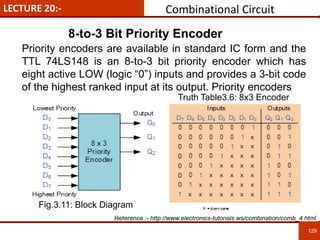
8-to-3 Bit Priority Encoder
Combinational Circuit
Reference :- http://www.electronics-tutorials.ws/combination/comb_4.html
Priority encoders are available in standard IC form and the
TTL 74LS148 is an 8-to-3 bit priority encoder which has
eight active LOW (logic “0”) inputs and provides a 3-bit code
of the highest ranked input at its output. Priority encoders
Fig.3.11: Block Diagram
Truth Table3.6: 8x3 Encoder
LECTURE 20:-
130
130
8-to-3 Bit Priority Encoder
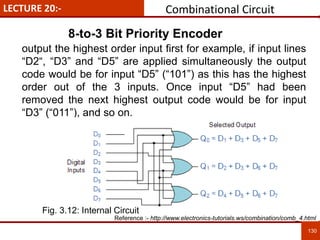
output the highest order input first for example, if input lines
“D2“, “D3” and “D5” are applied simultaneously the output
code would be for input “D5” (“101”) as this has the highest
order out of the 3 inputs. Once input “D5” had been
removed the next highest output code would be for input
“D3” (“011”), and so on.
Combinational Circuit
Reference :- http://www.electronics-tutorials.ws/combination/comb_4.html
Fig. 3.12: Internal Circuit
LECTURE 21:-
131
131
Introduction to Decoder
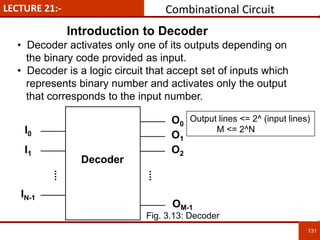
• Decoder activates only one of its outputs depending on
the binary code provided as input.
• Decoder is a logic circuit that accept set of inputs which
represents binary number and activates only the output
that corresponds to the input number.
IN-1
O0
Decoder
O1
O2
OM-1
I0
I1
Output lines <= 2^ (input lines)
M <= 2^N
Combinational Circuit
Fig. 3.13: Decoder
LECTURE 21:-
132
132
2x4 Decoder
A
B
C
X
Y
D
Inputs Outputs
X Y A B C D
0 0 1 0 0 0
0 1 0 1 0 0
1 0 0 0 1 0
1 1 0 0 0 1
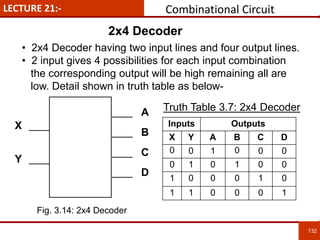
• 2x4 Decoder having two input lines and four output lines.
• 2 input gives 4 possibilities for each input combination
the corresponding output will be high remaining all are
low. Detail shown in truth table as below-
Truth Table 3.7: 2x4 Decoder
Combinational Circuit
Fig. 3.14: 2x4 Decoder
LECTURE 21:-
133
133
BCD to Decimal Decoder
B0
B1
B2
S0
S9
B3
-
-
-
-
-
-
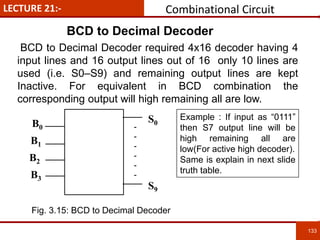
BCD to Decimal Decoder required 4x16 decoder having 4
input lines and 16 output lines out of 16 only 10 lines are
used (i.e. S0–S9) and remaining output lines are kept
Inactive. For equivalent in BCD combination the
corresponding output will high remaining all are low.
Example : If input as “0111”
then S7 output line will be
high remaining all are
low(For active high decoder).
Same is explain in next slide
truth table.
Combinational Circuit
Fig. 3.15: BCD to Decimal Decoder
LECTURE 21:-
134
134
BCD to Decimal Decoder
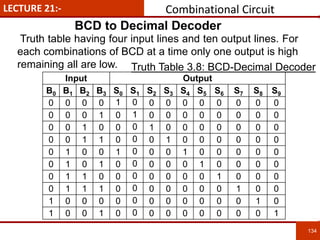
Truth table having four input lines and ten output lines. For
each combinations of BCD at a time only one output is high
remaining all are low.
Input Output
B0 B1 B2 B3 S0 S1 S2 S3 S4 S5 S6 S7 S8 S9
0 0 0 0 1 0 0 0 0 0 0 0 0 0
0 0 0 1 0 1 0 0 0 0 0 0 0 0
0 0 1 0 0 0 1 0 0 0 0 0 0 0
0 0 1 1 0 0 0 1 0 0 0 0 0 0
0 1 0 0 1 0 0 0 1 0 0 0 0 0
0 1 0 1 0 0 0 0 0 1 0 0 0 0
0 1 1 0 0 0 0 0 0 0 1 0 0 0
0 1 1 1 0 0 0 0 0 0 0 1 0 0
1 0 0 0 0 0 0 0 0 0 0 0 1 0
1 0 0 1 0 0 0 0 0 0 0 0 0 1
Truth Table 3.8: BCD-Decimal Decoder
Combinational Circuit
LECTURE 22:- Arithmetic Circuit
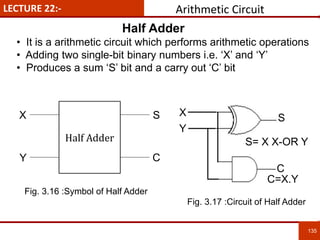
• It is a arithmetic circuit which performs arithmetic operations
• Adding two single-bit binary numbers i.e. ‘X’ and ‘Y’
• Produces a sum ‘S’ bit and a carry out ‘C’ bit
135
135
Half Adder
X
Y
S
C
Fig. 3.16 :Symbol of Half Adder
X
Y
S
C
Fig. 3.17 :Circuit of Half Adder
S= X X-OR Y
C=X.Y
Half Adder
LECTURE 22:-
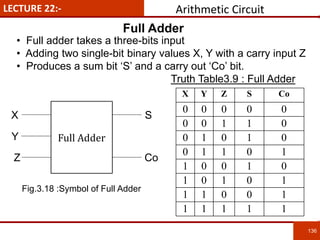
• Full adder takes a three-bits input
• Adding two single-bit binary values X, Y with a carry input Z
• Produces a sum bit ‘S’ and a carry out ‘Co’ bit.
Truth Table3.9 : Full Adder
136
136
X Y Z S Co
0 0 0 0 0
0 0 1 1 0
0 1 0 1 0
0 1 1 0 1
1 0 0 1 0
1 0 1 0 1
1 1 0 0 1
1 1 1 1 1
Full Adder
X
Y
S
Co
Fig.3.18 :Symbol of Full Adder
Z
Full Adder
Arithmetic Circuit
LECTURE 22:-
137
137
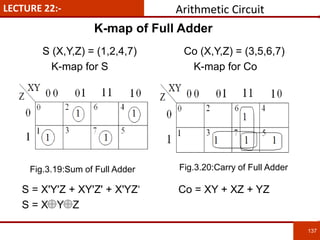
S (X,Y,Z) = (1,2,4,7) Co (X,Y,Z) = (3,5,6,7)
K-map for S K-map for Co
S = X'Y'Z + XY'Z' + X'YZ‘ Co = XY + XZ + YZ
S = X Y Z
K-map of Full Adder
Arithmetic Circuit
Fig.3.19:Sum of Full Adder Fig.3.20:Carry of Full Adder
LECTURE 22:-
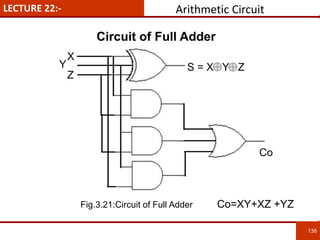
138
138
Co=XY+XZ +YZ
S = X Y Z
X
Y
Z
Co
Circuit of Full Adder
Arithmetic Circuit
Fig.3.21:Circuit of Full Adder
LECTURE 23:-
139
139
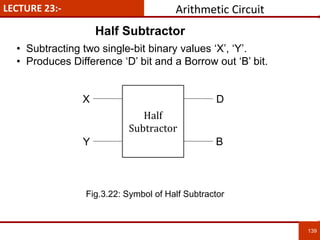
• Subtracting two single-bit binary values ‘X’, ‘Y’.
• Produces Difference ‘D’ bit and a Borrow out ‘B’ bit.
Half
Subtractor
X
Y
D
B
Half Subtractor
Arithmetic Circuit
Fig.3.22: Symbol of Half Subtractor
LECTURE 23:-
140
140
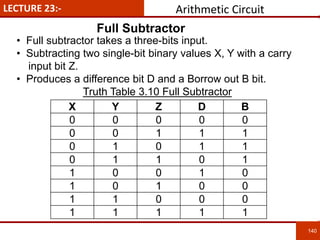
• Full subtractor takes a three-bits input.
• Subtracting two single-bit binary values X, Y with a carry
input bit Z.
• Produces a difference bit D and a Borrow out B bit.
Truth Table 3.10 Full Subtractor
X Y Z D B
0 0 0 0 0
0 0 1 1 1
0 1 0 1 1
0 1 1 0 1
1 0 0 1 0
1 0 1 0 0
1 1 0 0 0
1 1 1 1 1
Full Subtractor
Arithmetic Circuit
LECTURE 23:-
141
141
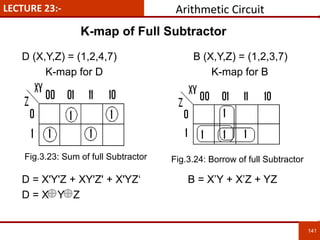
D (X,Y,Z) = (1,2,4,7) B (X,Y,Z) = (1,2,3,7)
K-map for D K-map for B
D = X'Y'Z + XY'Z' + X'YZ‘ B = X’Y + X’Z + YZ
D = X Y Z
K-map of Full Subtractor
Arithmetic Circuit
Fig.3.23: Sum of full Subtractor Fig.3.24: Borrow of full Subtractor
LECTURE 23:-
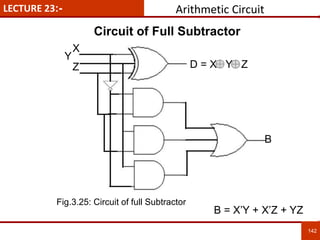
142
142
B = X’Y + X’Z + YZ
D = X Y Z
X
Y
Z
B
Circuit of Full Subtractor
Arithmetic Circuit
Fig.3.25: Circuit of full Subtractor
LECTURE 24:-
143
143
To reduce the computation time, there are faster ways to
add two binary numbers by using carry lookahead
adders. They work by creating two signals P and G
known to be Carry Propagator and Carry Generator. The
carry propagator is propagated to the next level
whereas the carry generator is used to generate the
output carry , regardless of input carry. The block diagram
of a 4-bit Carry Lookahead Adder is shown here in next
slide-
The number of gate levels for the carry propagation can
be found from the circuit of full adder. The signal from
input carry Cin to output carry Cout requires an AND gate
and an OR gate, which constitutes two gate levels.
Carry Look Ahead Adder
Arithmetic Circuit
Reference :- http://iitkgp.vlab.co.in/?sub=38&brch=120&sim=480&cnt=656
LECTURE 24:-
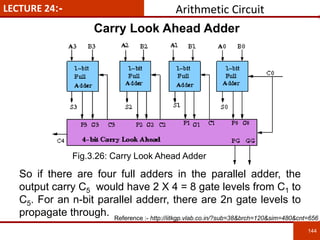
144
144
So if there are four full adders in the parallel adder, the
output carry C5 would have 2 X 4 = 8 gate levels from C1 to
C5. For an n-bit parallel adderr, there are 2n gate levels to
propagate through.
Carry Look Ahead Adder
Arithmetic Circuit
Reference :- http://iitkgp.vlab.co.in/?sub=38&brch=120&sim=480&cnt=656
Fig.3.26: Carry Look Ahead Adder
LECTURE 24:- IC 74181
145
145
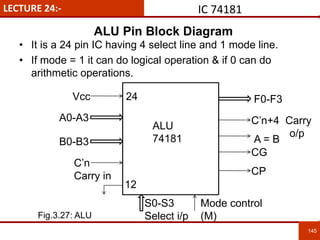
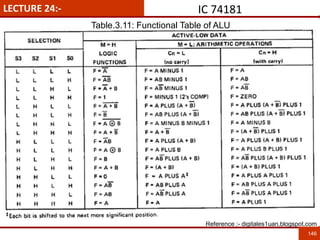
• It is a 24 pin IC having 4 select line and 1 mode line.
• If mode = 1 it can do logical operation & if 0 can do
arithmetic operations.
24
12
Vcc
A0-A3
B0-B3
C’n
Carry in
S0-S3
Select i/p
Mode control
(M)
F0-F3
C’n+4 Carry
o/p
A = B
CG
CP
ALU
74181
ALU Pin Block Diagram
Fig.3.27: ALU
LECTURE 24:- IC 74181
146
Reference :- digitales1uan.blogspot.com
Table.3.11: Functional Table of ALU
LECTURE 25:-
14
7
• Modern digital Electronics- R. P. Jain, McGraw Hill.
• Digital Integrated Electronics- Herbert Taub, McGraw Hill.
• Digital Logic and Computer Design- Morris Mano (PHI).
• Digital Integrated Electronics- Herbert Taub, McGraw Hill.
• Digital Electronics Logic and System – James Bingnell and Robert
Donovan, Cengage Learning
• Digital Circuits & Systems by K.R.Venugopal & K. Shaila
• http://npteldownloads.iitm.ac.in/downloads_mp4/117106086/lec01.mp4
• http://www.digital.iitkgp.ernet.in/dec/index.php
• http://vlab.co.in/ba_nptel_labs.php?id=1
• digitales1uan.blogspot.com
• http://iitkgp.vlab.co.in/?sub=38&brch=120&sim=480&cnt=656
• http://www.electronics-tutorials.ws/combination/comb_4.html
Chapter 3 References
LECTURE 25:-
148
Summary
1. Combinational circuits studied in this chapter are-
a) Multiplexer - Having many input lines and one output line along
with select lines.
b) Demultiplexer - Having one input line and many output lines
along with select lines.
c) Encoder - Having n output lines and 2^n input lines.
d) Decoder - Having n input lines and 2^n output lines.
2. Adders are of two types:
i) Half Adder ii) Full Adder
3. Arithmetic Logic Unit (ALU) is a 24 pin IC 74181 having four select
lines and one mode (Decide types of operations)
 If Mode = ‘1’ : Performs Logical operations
 If Mode = ‘0’ : Performs Arithmetic operations
LECTURE 25:-
149
• What is half – adder? Write it’s truth table & develop it’s logic circuit.
• What is full adder ? How a full adder is built?
• What is full Subtractor ? Design a full Subtractor ckt.
• What is BCD adder? Realize BCD adder using full adder & logic gates.
• Draw the functional layout of arithmetic logic unit (ALU) & explain the
various algebraic & logical function that can be performed.
• What is multiplexer ? Explain 16:1 Mux in details.
• Implement the expression using a multiplexer.
F(A,B,C,D) = ∑ (1,2,4,5,12,14,15)
• Realize the function F(A,B,C,D) = ∑ (1,3,4,5,7,11,13,14,15) by using 8:1
Mux.
• Design 32:1 Mux by using two 16:1 multiplexer & one OR gate.
• Realize the function F1(A,B,C,D) = ∑ (0,1,6,9,11,15) & F2 = ∑ (3,5,13,14)
by using a suitable Demux.
• Implement following function by using suitable decoder.
F1 = ∑ (0,1,2), F2 = ∑ (2,4,9,10) & F3 = ∑ (3,5,12,15).
• Design 8:3 parity encoder with D7 as the highest parity.
Chapter 3 Question Bank
150
“DIGITAL ELECTRONICS AND
FUNDAMENTAL OF MICROPROCESSOR”
CHAPTER – 4
“FLIP-FLOP”
CHAPTER 4:- Flip-Flop
Introduction to SR Latch and Flip-flop1
D, JK, T flip-flops and triggering in flip-flop2
Master slave concept, Asynchronous input3
Conversion of flip flops4
151
Counters and Registers5
Topic 1:
Topic 2:
Topic 3:
Topic 4:
Topic 5:
CHAPTER-4 SPECIFIC OBJECTIVE / COURSE OUTCOME
Know Flip-flop as a one bit memory cell1
Distinguish between latch and flip-flop2
152
The student will be able to:
Understand concept of Preset and Clear (Asynchronous input)3
Explain master slave concept also do the conversion of flip-flop4
Design counters and registers5
LECTURE 26:- FLIP-FLOP Sequential Circuit
153
153
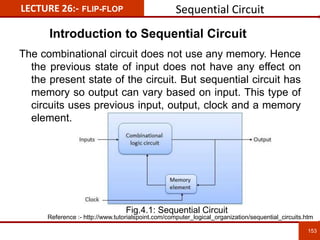
The combinational circuit does not use any memory. Hence
the previous state of input does not have any effect on
the present state of the circuit. But sequential circuit has
memory so output can vary based on input. This type of
circuits uses previous input, output, clock and a memory
element.
Introduction to Sequential Circuit
Reference :- http://www.tutorialspoint.com/computer_logical_organization/sequential_circuits.htm
Fig.4.1: Sequential Circuit
LECTURE 26:- FLIP-FLOP Sequential Circuit
154
154
• Sequential circuit having output which is depends upon
present state input as well as the content of stored element.
• Latch, Flip-flop, registers and Counters are the examples of
Sequential circuit.
• A Latch circuit has two outputs, ‘Q’ and ‘Q’’ both the outputs
are complement of each other if Q = ‘1’ the Q’ = ‘0’ and vice-
versa.
• When the Latch output i.e. Q = ‘0’ then the latch is in Reset
state and when Q = ‘1’ then the latch is in Set state.
Introduction to Latch
LECTURE 26:- FLIP-FLOP Sequential Circuit
155
155
Difference between Latch & Flip-Flop
Flip-flop Latch
A flip-flop samples the inputs
only at a clock event (rising
edge, etc.)
A Latch samples the inputs
continuously whenever it is
enabled, that is, only when the
enable signal is on. (or
otherwise, it would be a wire,
not a latch).
Flip-Flop are edge sensitive. Latches are level sensitive.
Flipflop is sensitive to signal
change and not on level. They
can transfer data only at the
single instant and data cannot
be changed until next signal
change.
Latch is sensitive to duration of
pulse and can send or receive
the data when the switch is on.
Reference :- http://www.techonicals.com/2013/01/difference-between-latch-and-flip-flop.html
LECTURE 26:- FLIP-FLOP Sequential Circuit
156
156
Difference between Latch & Flip-Flop
Flip-flop Latch
A flip-flop continuously checks
its inputs and correspondingly
changes its output only at
times determined by clocking
signal.
Latch is a device which
continuously checks all its
input and correspondingly
changes its output,
independent of the time
determined by clocking signal.
It work’s on the basis of clock
pulses.
It is based on enable function
input
It is a edge trigerred , it mean
that the output and the next
state input changes when
there is a change in clock
pulse whether it may a +ve or -
ve clock pulse.
It is a level trigerred , it mean
that the output of present state
and input of the next state
depends on the level that is
binary input 1 or 0.
Reference :- http://www.techonicals.com/2013/01/difference-between-latch-and-flip-flop.html
157
157
LECTURE 27:- FLIP-FLOP
Triggering
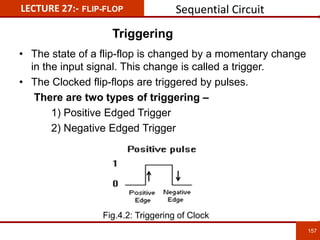
• The state of a flip-flop is changed by a momentary change
in the input signal. This change is called a trigger.
• The Clocked flip-flops are triggered by pulses.
There are two types of triggering –
1) Positive Edged Trigger
2) Negative Edged Trigger
Sequential Circuit
Fig.4.2: Triggering of Clock
LECTURE 27:- FLIP-FLOP
SR Latch
158
158
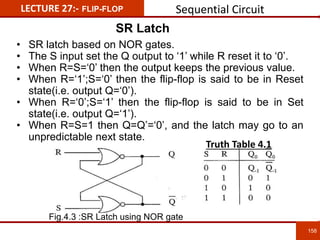
• SR latch based on NOR gates.
• The S input set the Q output to ‘1’ while R reset it to ‘0’.
• When R=S=‘0’ then the output keeps the previous value.
• When R=‘1’;S=‘0’ then the flip-flop is said to be in Reset
state(i.e. output Q=‘0’).
• When R=‘0’;S=‘1’ then the flip-flop is said to be in Set
state(i.e. output Q=‘1’).
• When R=S=1 then Q=Q’=‘0’, and the latch may go to an
unpredictable next state.
Fig.4.3 :SR Latch using NOR gate
Truth Table 4.1
Sequential Circuit
LECTURE 27:- FLIP-FLOP
D Flip-flop
159
159
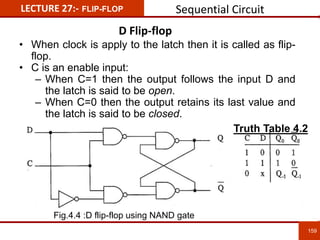
• When clock is apply to the latch then it is called as flip-
flop.
• C is an enable input:
– When C=1 then the output follows the input D and
the latch is said to be open.
– When C=0 then the output retains its last value and
the latch is said to be closed.
Fig.4.4 :D flip-flop using NAND gate
Truth Table 4.2
Sequential Circuit
160
160
LECTURE 28:- FLIP-FLOP
T Flip-flop
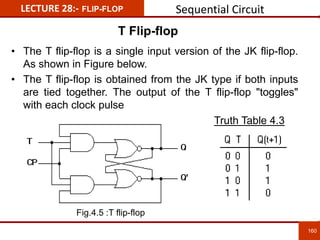
• The T flip-flop is a single input version of the JK flip-flop.
As shown in Figure below.
• The T flip-flop is obtained from the JK type if both inputs
are tied together. The output of the T flip-flop "toggles"
with each clock pulse
Fig.4.5 :T flip-flop
Truth Table 4.3
Sequential Circuit
161
161
LECTURE 28:- FLIP-FLOP
JK Flip-flop
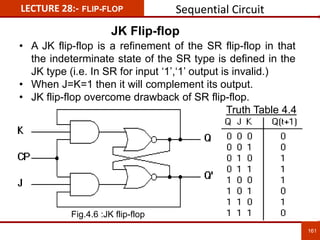
• A JK flip-flop is a refinement of the SR flip-flop in that
the indeterminate state of the SR type is defined in the
JK type (i.e. In SR for input ‘1’,‘1’ output is invalid.)
• When J=K=1 then it will complement its output.
• JK flip-flop overcome drawback of SR flip-flop.
Fig.4.6 :JK flip-flop
Truth Table 4.4
Sequential Circuit
162
162
LECTURE 28:- FLIP-FLOP
JK Flip-flop
• JK flip-flop overcome drawback of SR flip-flop that the
forbidden state in SR flip-flop for both input “11” will give
as a toggle in JK flip-flop.
• As there is the feedback from output to input and also
because of the propagation delay of the gates which is
more than the clock pulse applied to the flip-flop. Hence
the output is not stable for the same clock as there is
feedback. Therefore during the clock the output is
toggling which is known as the race around condition.
• Race around condition in JK flip-flop is overcome by
using Master Slave concept.
Sequential Circuit
163
163
LECTURE 28:- FLIP-FLOP
Master Slave Flip-flop
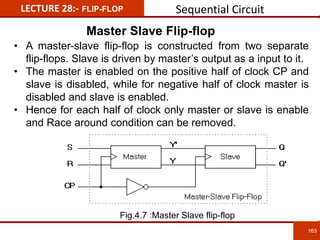
• A master-slave flip-flop is constructed from two separate
flip-flops. Slave is driven by master’s output as a input to it.
• The master is enabled on the positive half of clock CP and
slave is disabled, while for negative half of clock master is
disabled and slave is enabled.
• Hence for each half of clock only master or slave is enable
and Race around condition can be removed.
Sequential Circuit
Fig.4.7 :Master Slave flip-flop
164
164
LECTURE 28:- FLIP-FLOP
Master Slave JK Flip-flop
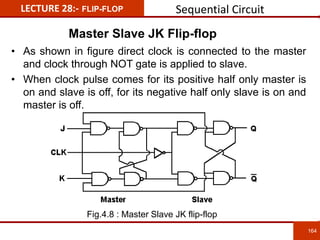
• As shown in figure direct clock is connected to the master
and clock through NOT gate is applied to slave.
• When clock pulse comes for its positive half only master is
on and slave is off, for its negative half only slave is on and
master is off.
Sequential Circuit
Fig.4.8 : Master Slave JK flip-flop
165
165
LECTURE 29:- FLIP-FLOP Asynchronous Input
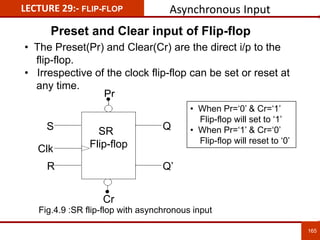
• The Preset(Pr) and Clear(Cr) are the direct i/p to the
flip-flop.
• Irrespective of the clock flip-flop can be set or reset at
any time.
• When Pr=‘0’ & Cr=‘1’
Flip-flop will set to ‘1’
• When Pr=‘1’ & Cr=‘0’
Flip-flop will reset to ‘0’
Pr
Cr
S
R
Q
Q’
SR
Flip-flopClk
Fig.4.9 :SR flip-flop with asynchronous input
Preset and Clear input of Flip-flop
166
166
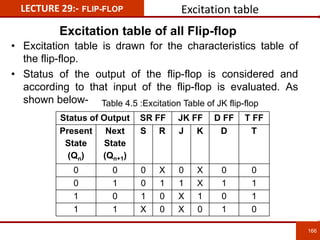
LECTURE 29:- FLIP-FLOP Excitation table
Status of Output SR FF JK FF D FF T FF
Present
State
(Qn)
Next
State
(Qn+1)
S R J K D T
0 0 0 X 0 X 0 0
0 1 0 1 1 X 1 1
1 0 1 0 X 1 0 1
1 1 X 0 X 0 1 0
• Excitation table is drawn for the characteristics table of
the flip-flop.
• Status of the output of the flip-flop is considered and
according to that input of the flip-flop is evaluated. As
shown below-
Excitation table of all Flip-flop
Table 4.5 :Excitation Table of JK flip-flop
167
167
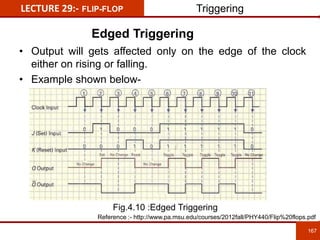
LECTURE 29:- FLIP-FLOP
Edged Triggering
• Output will gets affected only on the edge of the clock
either on rising or falling.
• Example shown below-
Triggering
Reference :- http://www.pa.msu.edu/courses/2012fall/PHY440/Flip%20flops.pdf
Fig.4.10 :Edged Triggering
168
168
LECTURE 29:- FLIP-FLOP
Level Triggering
• Output will gets affected when the clock is high.
• Example shown below-
Triggering
Reference :- http://www.pa.msu.edu/courses/2012fall/PHY440/Flip%20flops.pdf
Fig.4.11 :Level Triggering
169
169
LECTURE 30:- FLIP-FLOP Conversion
• For converting one type of flip-flop into another, excitation
table plays an important role.
• Excitation table can be defined as a table which gives the
status of input to the flip-flop from the condition of the
output ( i.e. present and next state).
• Generalize block of flip-flop conversion is as follow-
Conversion of SR-JK Flip-flop
Given
Flip-flop
LogicClock
Input1
Input2
Q
Q’
Fig.4.12 :Required flip-flop
170
170
LECTURE 30:- FLIP-FLOP Conversion
For JK FF For SR FF
Present
State Qn
Next
State
Qn+1
J K Present
State Qn
Next
State
Qn+1
S R
0 0 0 X 0 0 0 X
0 1 1 X 0 1 1 0
1 0 X 1 1 0 0 1
1 1 X 0 1 1 X 0
• Draw excitation table for JK then SR flip-flop as shown
below-
• Consider column no. 3,4,5 as the input column and 7,8 as
the output column for the next slide table.
Column no. 1 2 3 4 5 6 7 8
Table 4.6 :Excitation table
Conversion of SR-JK Flip-flop
171
171
LECTURE 30:- FLIP-FLOP
Input Output
In
Dec
J K Present
State Qn
S R
0,2 0 X 0 0 X
4,6 1 X 0 1 0
3,7 X 1 1 0 1
1,5 X 0 1 X 0
In table below input column have don’t care which
must be replaced with ‘0’ and ‘1’ (i.e. for row 1- J=‘0’ and
K=‘x’ consider ‘x’ as ‘0’ and ‘1’ as for JK=“0x”- JK=“00”
and JK=“01”. Similarly as shown in table below-
Row
1
2
3
4
Conversion
Conversion of SR-JK Flip-flop
Table 4.7
172
172
LECTURE 30:- FLIP-FLOP
Now draw the K-map for representing the output in the form
of input.
K-map for S K-map for R
S = JQ’ R = KQ
Conversion
Conversion of SR-JK Flip-flop
Fig.4.13 :K-map for S Fig.4.14 :K-map for R
173
173
LECTURE 30:- FLIP-FLOP Conversion
Conversion of SR-JK Flip-flop
Fig.4.15 :Circuit Implementation
LECTURE 31:-
174
174
• Counter can be defined as a resister that goes through
the prescribed sequence of states upon the application
of input pulse.
• Counter can be classified into two broad categories
according to the way they are clocked:
 Asynchronous (Ripple) Counter - The first flip-flop is
clocked by the external clock pulse, and then each
successive flip-flop is clocked by the Q or Q' output of
the previous flip-flop.
 Synchronous Counter - All memory elements (Flip-flops)
are simultaneously triggered by the same clock.
Counter
Introduction
LECTURE 31:- Ripple Counter
175
175
Asynchronous (Ripple) Counter
• Circuit shows two flip flops first flip flop having input
external clock and the second flip flop having the clock
as a output of the first flip flop.
• Both JK flip flops are used in complemented mode (i.e.
JK input are short circuited and connected to logic ‘1’.)
• Below circuit is of 2-bit up counter as shown in wave
diagram for 1st clock input output is “00”, for 2nd it is “01”
for 3rd it is “10” and for 4th it is “11”.
Fig. 4.16 :Ripple Counter Fig. 4.17 :Wave Diagram
LECTURE 32:-
176
176
• As per the definition of synchronous counter the ckt.
shown below – Synchronous Up-Counter with T-FF.
• In this all the flip flops in counter are having simultaneous
clock input.
• Modulus of Counter (MOD) :- Modulus means the total
number of counts.
Synchronous Counter
Example of Synchronous Counter
Fig. 4.18 :Synchronous Counter
LECTURE 32:-
177
177
• The counter which goes through 10 different states upon
the application of input clock pulse is Decade Counter.
• This type of counter will count from 0(0000) to 9(1001)
and when 10 (1010) arrives the counter will reset and
again it will count from 0(0000).
• A common modulus for counters with truncated
sequences is ten. A counter with ten states in its
sequence is called a decade counter.
• Since the maximum no. of bits required to represent the
binary no. from 0 (0000) to 9 (1001) is four. So there
must be minimum four no. of flip-flops will required to
design the decade counter.
Decade Counter
Decade or MOD-10 Counter
178
LECTURE 32:-
Hence the circuit diagram for the Decade Counter is
shown below-
Here Q3 is MSB and Q0 is LSB. When both (i.e.
Q3 and Q0 are ‘1’) o/p of the NAND gate is ‘0’ which will
clear the counter.
Decade Counter
Fig. 4.19 :Decade/MOD 10 Counter
Design of Decade or MOD-10 Counter
LECTURE 32:-
179
179
The sequence of the decade counter is shown in the
table below:
Decade Counter
Truth Table of Decade or MOD-10 Counter
Table 4.8 Decade Counter
180
LECTURE 33:- Ring Counter
• It is a cascade connection of flip flops in which output of
1st flip flop is connected input to the 2nd and so on, output
of last flip flop is connected input to the 1st in a ring
manner hence named Ring Counter.
• Simultaneous clock is attached by clear input FF0 is set
and FF1,FF2 & FF3 reset, after each clock pulse ‘1’ is
shifted through each flip flop in the counter.
Fig.4.20 :4 - Bit Ring Counter
4-Bit Ring Counter
181
LECTURE 33:- Ring Counter
• Truth table shows for 1st clock FF0 is set (i.e. Q0=‘1’)
while remaining all flip flops are reset (i.e. Q1=‘0’,Q2=‘0’,
Q3=‘0’) all output are Q0Q1Q2Q3=“1000”.
• For 2nd clock output is “0100”, for 3rd it is “0010” and so
on. Hence ‘1’ is shifted diagonally.
Clock
Output
Q0 Q1 Q2 Q3
1 1 0 0 0
2 0 1 0 0
3 0 0 1 0
4 0 0 0 1
5 1 0 0 0
Truth Table 4.9
Operation of 4-Bit Ring Counter
182
LECTURE 33:- Johnson Counter
• Circuit diagram is similar to Ring Counter only difference
is the complemented output of last flip flop is connected
input to the 1st.
• Before applying clock counter is reset by clear input.
When 1st positive clock arrives output of the counter is
“1000” for 2nd clock it is “1100” for third it is “1110” and so
on. After clock 7th the output pattern gets repeated.
Fig.4.21 :4 – Bit Johnson Counter
4 – Bit Johnson/Twisted Counter
183
LECTURE 33:-
State Diagram & Truth Table
Johnson Counter
• It shows that how the counter passes through different
states (i.e. through 8 states).
• After 8th state the pattern gets repeated.
• State diagrams are used to give an abstract description of
the behavior of a system.
Clock Q3 Q2 Q1 Q0
0 0 0 0 0
1 1 0 0 0
2 1 1 0 0
3 1 1 1 0
4 1 1 1 1
5 0 1 1 1
6 0 0 1 1
7 0 0 0 1Fig.4.22 :State Diagram
Truth Table 4.10
184
LECTURE 34:-
• Design a MOD-6 (It go through 6 states) counter.
• It must required minimum no. of three flip-flops (No. of
states 2^n where n is the no. of flip-flops, Let’s use T flip
flop).
• Truth Table for output and input to flip-flop is as below-
Present state Next State Flip-flop input
Q2 Q1 Q0 Q2 Q1 Q0 T2 T1 T0
0 0 0 0 0 1 0 0 1
0 0 1 0 1 0 0 1 1
0 1 0 0 1 1 0 0 1
0 1 1 1 0 0 1 1 1
1 0 0 1 0 1 0 0 1
1 0 1 0 0 0 1 0 1
0 0 0 --- --- --- --- --- ---
Design of Counter
Design of MOD-6 Counter
Truth Table 4.11
K-map for T1
K-map for T0
T1 = Q2’Q0
T0 = 1K-map for T2
T2 = Q1Q0 + Q2Q0
185
LECTURE 34:-
K-map for expressing output in the form of input from the
truth table
Design of Counter
Design of MOD-6 Counter
Fig.4.23 :K-map for T1
Fig.4.24 :K-map for T0
Fig.4.25 :K-map for T2
186
LECTURE 34:-
T2 T1 T0
Q2’ Q1’ Q0’
CLK
Q2 Q1 Q0
• As per the relation get from the K-map circuit realization
is done as below-
• Common clock is applied to each flip flop in the counter.
• 3 T- flip flop , 3 AND gates and 1 OR gate is required.
Design of Counter
Design of MOD-6 Counter
Fig.4.26 :MOD-6 Counter
LECTURE 35:- Register
187
187
Introduction
• Type of sequential logic circuit for storage of digital data.
• Group of flip-flops connected in a chain so that the
output from one flip-flop becomes the input of the next
flip-flop.
• Most of the registers possess no characteristic internal
sequence of states.
• All the flip-flops are driven by a common clock & all are
set or reset simultaneously.
• Basic types of Shift Registers such as Serial In - Serial
Out, Serial In - Parallel Out, Parallel In - Serial Out,
Parallel In - Parallel Out, and Bidirectional shift
registers.
LECTURE 35:-
188
188
Serial In - Serial Out Shift Register
A basic four-bit shift register can be constructed using four
D flip-flops, having synchronous clock input, output of first
flip flop (FF0) is input to second (FF1) and so on as shown
below .
Various Register
Fig.4.27 :Serial In - Serial Out Shift Register
LECTURE 35:-
189
189
• The register is first cleared, forcing all four outputs to
zero.
• The input data is then applied sequentially to the D input
of the first flip-flop on the left (FF0).
• During each clock pulse, one bit is transmitted from left
to right.
• Assume a data word to be 1001. The least significant
bit of the data has to be shifted through the register from
FF0 to FF3.
Operation of SISO
Various Register
190
LECTURE 36:-
Serial In - Parallel Out Shift Register
Various Register
A basic four-bit shift register can be constructed using four
D flip-flops, having synchronous clock input, output of first
flip flop (FF0) is input to second (FF1) as well as output as
‘Q0’ and so on Clear input is for resetting the register.
Output can be check after each clock.
Fig.4.28 :Serial In - Parallel Out Shift Register
191
LECTURE 36:-
• For this kind of register, data bits are entered serially in.
• The difference is the way in which the data bits are taken
out of the register.
• Once the data are stored, each bit appears on its
respective output line, and all bits are available
simultaneously.
• A construction of a four-bit serial in - parallel out register
is shown in previous slide.
Operation of SIPO
Various Register
LECTURE 37:-
192
192
• A four-bit Parallel In-Serial Out shift register is shown
below. The circuit uses D flip-flops and NAND gates for
entering data (i.e. writing) to the register.
Parallel In - Serial Out Shift Register
Various Register
Fig.4.29 :Parallel In - Serial Out Shift Register
193
LECTURE 37:-
193
193
• D0, D1, D2 and D3 are the parallel inputs, where D0 is
the most significant bit and D3 is the least significant bit.
• To write data in, the mode control line is taken to LOW
and the data is clocked in. The data can be shifted when
the mode control line is HIGH as SHIFT is active high.
• The register performs right shift operation on the
application of a clock pulse
Operation of PISO
Various Register
LECTURE 37:-
194
194
• For Parallel In-Parallel Out shift registers, all data bits
appear on the parallel outputs immediately following the
simultaneous entry of the data bits.
• The following circuit is a four-bit parallel in - parallel out
shift register constructed by D flip-flops.
Parallel In - Parallel Out Shift Register
Various Register
Fig.4.30 :Parallel In - Parallel Out Shift Register
LECTURE 37:-
195
195
• The D's are the parallel inputs and the Q's are the
parallel outputs.
• Once the register is clocked, all the data at the D inputs
appear at the corresponding Q outputs simultaneously.
Operation of PIPO
Various Register
LECTURE 37:-
19
6
• Modern digital Electronics- R. P. Jain, McGraw Hill.
• Digital Integrated Electronics- Herbert Taub, McGraw Hill.
• Digital Logic and Computer Design- Morris Mano (PHI).
• Digital Integrated Electronics- Herbert Taub, McGraw Hill.
• Digital Electronics Logic and System – James Bingnell and Robert
Donovan, Cengage Learning
• Digital Circuits & Systems by K.R.Venugopal & K. Shaila
• http://npteldownloads.iitm.ac.in/downloads_mp4/117106086/lec01.mp4
• http://www.digital.iitkgp.ernet.in/dec/index.php
• http://vlab.co.in/ba_nptel_labs.php?id=1
• http://www.pa.msu.edu/courses/2012fall/PHY440/Flip%20flops.pdf
• http://www.techonicals.com/2013/01/difference-between-latch-and-flip-
flop.html
Chapter 4 References
LECTURE 37:-
197
Summary
1. Latch is a one bit memory element.
2. Clocked latch is also known as Flip-flop.
3. Flip-flops types are – a) D, b) SR, c) JK and d) T.
4. Preset and Clear are the two asynchronous input to flip-flop.
5. Using excitation table flip-flops can be converted into one another.
6. Counter is the sequential circuit which goes through the prescribed
sequence of states upon the application of input clock pulse.
There are basically two types of counter based on clocking-
a) Synchronous Counter b) Asynchronous (Ripple) Counter.
7. Modulus of counter are the number of states through which counter
progresses.
8. Johnson Counter in which complemented output of last flip flop is
connected input to the 1st flip flop.
9. Register can be defined as the set of the flip flop required to stored
the data in binary format. Types of register are as below-
a) SISO b) SIPO c) PISO d) PIPO e) Bidirectional shift register
f) Universal shift register.
LECTURE 37:-
198
• Differentiate between latch & flip-flop.
• Explain the triggering method used for flip-flop.
• What is preset & clear input of flip-flop?
• Draw logic diagram of JK flip-flop using NAND gate & explain it’s
working?
• What is Race around condition in JK flip-flop?
• What is Master slave JK flip-flop? Give logic dig. of JK master slave flip-
flop using NAND gate. Explain it’s working.
• Convert T flip-flop to JK flip-flop, convert JK flip-flop to D flip-flop.
• Define Register and Explain different types of shift registers .
• What is counter ? what are it’s type ?
• Design mod - 5 counter using JK flip-flop.
• What are the merits & demerits of Synchronous counter over the
asynchronous counter ?
• Design & explain 3 bit up-down ripple counter.
• Explain the working of a Ring counter with a neat dig. & waveforms.
• Explain 4-bit Johnson counter with truth table & waveform.
Chapter 4 Question Bank
References Books:
199
• Modern digital Electronics- R. P. Jain, McGraw Hill.
• Digital Integrated Electronics- Herbert Taub, McGraw Hill.
• Digital Logic and Computer Design- Morris Mano (PHI).
• Digital Integrated Electronics- Herbert Taub, McGraw Hill.
• Digital Electronics Logic and System – James Bingnell and Robert
Donovan, Cengage Learning
• Digital Circuits & Systems by K.R.Venugopal & K. Shaila
• 8 bit Microprocessor by Ramesh Gaonkar.
• 8 bit microprocessor & controller by V. J. Vibhute, Techmak
Publication.
• 8085 Microprocessor & its Applications by A. Nagoor Kani, Mc Graw
Hill.
Reference
Some slides are copied from my previous work i.e. PPT on
“Digital Circuit and Fundamental of Microprocessor” for which I
received copyright on 07/06/2017.
Web Links:
200
• http://www.eazynotes.com/notes/microprocessor/Slides/instruction-set-of-
8085.pdf
• fac-web.spsu.edu/ecet/apreethy/2210_resources/8085.ppt
• pandeesvelu.weebly.com/uploads/1/0/7/4/10745695/interrupts.ppt
• http://www.daenotes.com/electronics/digital-electronics/decoder-encoder
• http://www.electronics-tutorials.ws/combination/comb_4.html
• http://www.slideshare.net/balajikulkarni/digital-electronics-by-anilkmaini?qid
=e0da9535-5fb5-4ca4-add3-a80361b9aa94&v=default&b=&from_search=3
• http://www.slideshare.net/shashank03/assembly-language-programming-
of-8085
• www.eeng.dcu.ie/~ee201/programmable_logic_Devices.ppt
• http://www.cpu-world.com/Arch/8085.html
• http://www.ehow.com/way_5230222_8085-microprocessor-tutorial.html
• http://microprocessorforyou.blogspot.in/2011/12/interrupts-in-8085-
microprocessor.html
• http://www.slideshare.net/saquib208/8085-microprocessor-ramesh-gaonkar
• klabs.org/richcontent/Tutorial/MiniCourses/reliable.../E_Hazards.ppt

Digital Electronics & Fundamental of Microprocessor-I

  • 1.
    1 DEPARTMENT OF INFORMATIONTECHNOLOGY & ELECTRONICS ENGINEERING “DIGITAL ELECTRONICS AND FUNDAMENTAL OF MICROPROCESSOR - I” (COPYRIGHT REGISTRATION NO. L-71129/2017) DATTA MEGHE INSTITUTE OF MEDICAL SCIENCE’S DATTA MEGHE INSTITUTE OF ENGINEERING, TECHNOLOGY & RESEARCH, SAWANGI(MEGHE), WARDHA. 442001(MS) AUTHOR MR. PRAVIN W. JARONDE Presentation of Notes on
  • 2.
  • 3.
    PREFACE As educators, weall have the same common goal “to guide our students” so that they gain the maximum possible in a positive environment that promotes their success and inculcates in them desire to learn. One of the best tools available to us in this pursuit is PPT instruction that is systematic and self Learning. The goal of this PPT is to help teachers in the use of eLearning that it is both effective and efficient method for teaching our students. It has been developed for purely academic and non-commercial purpose. My desire in preparing this PPT is to support the teachers, who have the very demanding task of Teaching-Plan to deliver instruction on a lecture/period basis. The PPT is therefore prepared lecture wise. Further at the end of each chapter summary and also questions for practice has been provided on the same chapter. We begin in Chapter 1 with basic elements like number system, logic gates and its truth table. In Chapters 2 we learn in details the form of function and K-map. Chapter 3 we learn details of combinational circuits and arithmetic circuits. Chapter 4 we focus on types of Flip flops and its application as counters and registers. With deep regards and humility, I thank my Management of MGI for motivating and our CEO for strong follow-ups to prepare PPTs under DTEL also Dr. Ashwin Kothari, Associate Professor, VNIT, Nagpur for his valuable suggestions. I dedicate this PPT to my dear students and my shared profession. 3Pravin Jaronde
  • 4.
    CONTENT: DIGITAL CIRCUIT& FUNDAMENTAL OF MICROPROCESSOR CHAPTER 1:1 CHAPTER 2:2 CHAPTER 3:3 CHAPTER 4:4 4 Basic of Digital Circuits Logical Expression, Minimization & Implementation Combinational Circuit Flip-flops Slide No:05 Slide No:73 Slide No:108 Slide No:149
  • 5.
    GENERAL OBJECTIVE 1 2 5 The studentwill be able to: Distinguish form of expression and also simplify functions using K-map. Understand Number system, Gates and its truth table. 3 Design combinational and arithmetic circuit. 4 List different types of Flip-flops and Understand its application as a Counter.
  • 6.
    6 “DIGITAL ELECTRONICS AND FUNDAMENTALOF MICROPROCESSOR” CHAPTER – 1 “BASIC OF DIGITAL CIRCUITS”
  • 7.
    CHAPTER - 1Basic of Digital Circuits Number system.1 Conversion of Number systems. 2 Logic Gates and Truth Table.4 7 Function Realization using Gates.5 Boolean Algebra. 3 Topic 1: Topic 2: Topic 3: Topic 4: Topic 5:
  • 8.
    CHAPTER-1 SPECIFIC OBJECTIVE/ COURSE OUTCOME Learn number systems and can convert amongst themselves.1 Understand Boolean algebra.2 8 The student will be able to: Know Logic Gate, Their types with Truth table3 Design function using Logic gates4
  • 9.
    LECTURE 1:- NUMBERSYSTEM Number Systems The number that we use in our day to day life is a decimal number system. i.e. a number system having 10 different digits 0 to 9. A number comprises of 10 different digits are known as decimal number. Which further can be defined by its base(radix). Base(radix) :- It is the number of unique digits, including zero, used to represent numbers in a positional numeral system. Exa. (254)10 :- Is decimal number having base 10. 9 9 Introduction to Number Systems
  • 10.
    LECTURE 1:- NUMBERSYSTEM Number Systems (254)10 :- Is decimal number having base 10. Each digit can be multiplied with 10 to the power depending on the position of the digit in that number with power as a ‘0’ for unit place and increasing towards left side along that number then add it to get equivalent decimal number. It can be elaborate as- In above number 4 is unit place, 5 is 10th place and 4 is 100th place. Therefore (254)10 = 2x 10² + 5x 101 + 4x 100 = 2x100 + 5x10 + 4x1 = 200 + 50 + 4 = 254. 10 10 Introduction to Number Systems
  • 11.
    LECTURE 1:- NUMBERSYSTEM Number Systems In general if the number is (ABCD)R where “ABCD” is a 4 digit number with base ‘R’ and the same wants to be represent in decimal format then each digit is multiplied with base ‘R’ to the power depending on its position in that number, with power of unit place is ‘0’ and add it. It will be as follows- AxR3 + BxR2 + CxR1 + DxR0 If it is (ABCD.EF)R Then AxR3 + BxR2 + CxR1 + DxR0 + ExR-1 + FxR-2 11 11 Introduction to Number Systems
  • 12.
    LECTURE 1:- NUMBERSYSTEM Various Number Systems In general there are various types of Number systems out of we are focusing on following types-  Decimal Number system  Binary Number system  Octal Number system  Hexadecimal Number system Note :- Number can be identified by its radix(base) 12 12 Introduction to Number Systems
  • 13.
    LECTURE 1:- NUMBERSYSTEM Various Number Systems Decimal Number system Definition - It is a Number system having 10 different digits i.e. from 0 to 9. And the Radix (Base) of the number is 10. Examples :- 1) (514)10 2) (8936)10 3) (912.34)10 Advantages :- User friendly, Easy to recognize, etc. Disadvantage :- For machine it is tedious, If we consider a switch then 10 different states are required, Difficult to implement. 13 13
  • 14.
    LECTURE 1:- NUMBERSYSTEM Various Number Systems Binary Number system Definition - It is a Number system having two different digits i.e. 0 & 1. And the Radix (Base) of the number is 2. Examples :- 1) (1011)2 2) (111000)2 3) (101.11)2 Advantages :- As only two possibilities, Machine understandable, fast working. Disadvantage :- To represent big number large width of bit stream is used. 14 14
  • 15.
    LECTURE 1:- NUMBERSYSTEM Various Number Systems Octal Number system Definition - It is a Number system having 8 different digits i.e. 0 to 7. And the Radix (Base) of the number is 8. Examples :- 1) (571)8 2) (1205)8 3) (543.23)8 Advantages :- To represent single digit in octal three bits of binary is required. Disadvantage :- It is not commonly used. 15 15
  • 16.
    LECTURE 1:- NUMBERSYSTEM Various Number Systems Hexadecimal Number system Definition - It is a Number system having 16 different digits i.e. 0 to 9 and A to F. And the Radix (Base) of the number is 16. Examples :- 1) (203)16 2) (56AB)16 3) (DCE.4A)16 Advantages :- To represent single digit in Hex, 4 binary bits are required. Mostly used for memory addressing. 16 16 For Dec Write Hex as 10 A 11 B 12 C 13 D 14 E 15 F Table 1.1 Dec to Hex
  • 17.
    LECTURE 1:- NUMBERSYSTEM Various Number Systems Signed Number In all kind of mathematical operation both positive and negative number are used. For example, even when dealing with positive arguments, mathematical operations may produce a negative result: Example: 125 – 236 = –111. • Thus needs to be a consistent method of representing negative numbers in binary computer arithmetic operations. • There are various approaches, but they all involve using one of the digits of the binary number to represent the sign of the number. • Two methods are the sign/magnitude representation and the one’s complement method of representation. 17 17 Reference :- https://www.utdallas.edu/~dodge/EE2310/lec3.pdf
  • 18.
    LECTURE 1:- NUMBERSYSTEM Various Number Systems Binary Sign Representation Sign-magnitude: The left bit is the sign (0 for + numbers and 1 for – numbers). One’s complement: The negative number of the same magnitude as any given positive number is its one’s complement. If m = 01001100, then m complement (or m) = 10110011 The most significant bit is the sign, and is 0 for + binary numbers and – for negative numbers. 18 18 Reference :- https://www.utdallas.edu/~dodge/EE2310/lec3.pdf Fig.1.1 Binary Sign Representation
  • 19.
    LECTURE 1:- NUMBERSYSTEM Signed Unsigned Number 19 19 Table 1.2 Sign Unsigned Number
  • 20.
    LECTURE 1:- NUMBERSYSTEM Various Number Systems 2’s Complement Negative Binary Number • Due to the problems with sign/magnitude and 1’s complement, another approach has become the standard for representing the sign of a fixed-point binary number in computer circuits. • Consider the following definition: “The two’s complement of a binary integer is the 1’s complement of the number plus 1.” Examples: 20 20 Reference :- https://www.utdallas.edu/~dodge/EE2310/lec3.pdf
  • 21.
    LECTURE 1:- NUMBERSYSTEM Various Number Systems 2’s Complement Negative Binary Number Converting a negative decimal number to 2’s complement binary- But: Positive decimal numbers are converted simply to positive binary numbers as before (no 2’s complement). Example: +67 (using method of successive div.) → 0100 0011 21 21 Reference :- https://www.utdallas.edu/~dodge/EE2310/lec3.pdf
  • 22.
    LECTURE 1:- NUMBERSYSTEM Various Number Systems 2’s Complement Binary to Decimal Binary 2’s complement-to-decimal examples, negative numbers: But for a positive binary number: 22 22 Reference :- https://www.utdallas.edu/~dodge/EE2310/lec3.pdf
  • 23.
    LECTURE 1:- NUMBERSYSTEM Table for Various Number Systems 23 23 Sr. No. Decimal Binary Octal Hexadecimal 0 0 0 0 0 1 1 1 1 1 2 2 2 2 3 3 3 3 4 4 4 4 5 5 5 5 6 6 6 6 7 7 7 7 8 8 8 9 9 9 10 A 11 B 12 C 13 D 14 E 15 F Table 1.3 Various Number Systems
  • 24.
    LECTURE 1:- NUMBERSYSTEM Conversion Among Bases It is possible to convert any number system to any number. The possibilities: Hexadecimal Decimal Octal Binary 24 24 Fig.1.2 Number Conversion Possibilities
  • 25.
    25 LECTURE 2:- NUMBERSYSTEM Conversion Among Bases Decimal to Binary Divide the decimal no. by 2 and check quotient if it is not less than 2 again divide it by 2 till quotient less than 2, and remainder of each division will be the answer. For writing answer we have to sequence the remainder from bottom to top. As shown below- Exa:(15)10 = (?) 2 Ans :- (15)10 = (1111) 2 Division Quotient Remainder Sequence 15 ÷ 2 7 1 LSB 7 ÷ 2 3 1 3 ÷ 2 1 1 1 1 MSB Table 1.4 Decimal to Binary
  • 26.
    26 LECTURE 2:- NUMBERSYSTEM Conversion Among Bases Decimal to Binary If the number is fractional then it has to multiply with 2, separate result in two parts real & fractional real part is binary and fractional part is again multiply by two. Repeat this till result is not equal to 1.0, the equivalent binary result is the real part of the result of each multiplication. As shown below- Exa: (0.125)10 = (?) 2 0.125 x 2 = 0.25 0.25 x 2 = 0.5 0.5 x 2 = 1.0 Ans-(0.125)10 = (0.001) 2 Result Fractional Bin 0.25 0.25 0 MSB 0.5 0.5 0 1.0 0.0 1 LSB Table 1.5 Decimal to Binary
  • 27.
    27 LECTURE 2:- NUMBERSYSTEM Conversion Among Bases Decimal to Octal Divide the decimal no. by 8 and check quotient if it is not less than 8 again divide it by 8 till quotient less than 8, and remainder of each division will be the answer. For writing answer we have to sequence the remainder from bottom to top. As shown below- Exa:(30)10 = (?) 8 Ans :- (30)10 = (36) 8 Division Quotient Remainder Sequence 30 ÷ 8 3 6 LSB 3 3 MSB Table 1.6 Decimal to Octal
  • 28.
    28 LECTURE 2:- NUMBERSYSTEM Conversion Among Bases Decimal to Hexadecimal Divide the decimal no. by 16 and check quotient if it is not less than 16 again divide it by 16 till quotient less than 16, and remainder of each division will be the answer. For writing answer we have to sequence the remainder from bottom to top. As shown below- Exa:(56)10 = (?) 16 Ans :- (56)10 = (38) 16 Division Quotient Remainder Sequence 56 ÷ 16 3 8 LSB 3 3 MSB Table 1.7 Decimal to Hexadecimal
  • 29.
    29 LECTURE 2:- NUMBERSYSTEM Conversion Among Bases Binary to Decimal Multiply each binary bit with 2 to the power that bits position as LSB bit is 0th position it increases from right to left by one, then add all products to get equivalent decimal number. As shown below- Exa:(101)2 = (?) 10 (1 0 1) 2 (101)2 = 1x22 + 0x21 + 1x20 = 4 + 0 + 1 MSB LSB = (5) 10 (2nd position) (0th position) Ans :- (101)2 = (5) 10
  • 30.
    30 LECTURE 2:- NUMBERSYSTEM Conversion Among Bases Binary to Decimal 1) (10110) 2 (10110)2 = 1x24 + 0x23 + 1x22 + 1x21 + 0x20 = 16 + 0 + 4 + 2 + 0 = (22) 10 2) (111.01) 2 (111.01)2 = 1x22 + 1x21 + 1x20 + 0x2-1 + 0x2-2 = 4 + 2 + 1 + 0.5 + 0.25 = (7.75) 10
  • 31.
    31 LECTURE 2:- NUMBERSYSTEM Conversion Among Bases Octal to Decimal Multiply each octal bit with 8 to the power that bits position as LSB bit is 0th position it increases from right to left by one, then add all products to get equivalent decimal number. As shown below- Exa:(512)8 = (?) 10 (5 1 2) 8 (512)8 = 5x82 + 1x81 + 2x80 = 320 + 8 + 2 MSB LSB = (330) 10 (2nd position) (0th position) Ans :- (512)8 = (330) 10
  • 32.
    32 LECTURE 2:- NUMBERSYSTEM Conversion Among Bases Octal to Decimal 1) (1011)8 = (?) 10 (1011)8 = 1x83 + 0x82 + 1x81 + 1x80 = 512 + 1 + 8 +1 = (522) 10 2) (53.11)8 = (?) 10 (53.11)8 = 5x81 + 3x80 + 1x8-1 + 1x8-2 = 40 + 3 + 0.125 + 0.0156 = (43.14) 10
  • 33.
    33 LECTURE 2:- NUMBERSYSTEM Conversion Among Bases Hexadecimal to Decimal Multiply each Hexadecimal bit with 16 to the power that bits position as LSB bit is 0th position it increases from right to left by one, then add all products to get equivalent decimal number. As shown below- Exa:(32)16 = (?) 10 (3 2) 16 (32)16 = 3x161 + 2x160 = 48 + 2 MSB LSB = (50) 10 (1st position) (0th position) Ans :- (32)16 = (50) 10
  • 34.
    34 LECTURE 2:- NUMBERSYSTEM Conversion Among Bases Hexadecimal to Decimal 1) (BD2)16 = (?) 10 (BD2)16 = 11x162 + 13x161 + 2x160 = 2816 + 208 + 2 = (3026) 10 2) (E4.3F)16 = (?) 10 (E4.3F)16 = 14x161 + 4x160 + 3x16-1 + 15x16-2 = 224 + 64 + 0.1875 + 0.0586 = (288.24) 10
  • 35.
    35 LECTURE 2:- NUMBERSYSTEM Conversion Among Bases Octal to Binary To represent each octal bit there is requirement of minimum 3 binary bits. Hence the conversion can be done as below- Exa: 1) (32)8 = (?) 2 2) (54.75)8 = (?) 2 (3 2) 8 (5 4 7 2) 8 (011 010) 2 (101 100 111 010) 2 Ans :- (32)8 = (011010) 2 Ans :- (54.75)8 = (101100.111010) 2
  • 36.
    36 LECTURE 2:- NUMBERSYSTEM Conversion Among Bases Binary to Octal We have to make group of 3 binary bit for making it into equivalent octal. If the binary stream have less than multiple of 3 bits then it is required to pad zeros. Hence the conversion can be done as below- Exa: 1) (101110)2 = (?) 8 2) (1011.11)2 = (?) 8 (101 110) 2 (001 011 . 110) 2 ( 5 6) 8 (1 3 . 6) 8 Ans :- (101110)2 = (56) 8 Ans :- (1011.11)2 = (13.6) 8
  • 37.
    Binary to Octal:- Octal to Binary :- 1) (10111)2 = (?)8 1) (734)8 = (?)2 = (010 111)8 (734)8 = (111 011 100)2 = (2 7)8 2) (101011101)2 = (?)8 2) (65)8 = (?)2 = (101 011 101)8 (65)8 = (110 101)2 = (5 3 5)8 37 LECTURE 2:- NUMBER SYSTEM Conversion Among Bases
  • 38.
    38 LECTURE 3:- NUMBERSYSTEM Conversion Among Bases Hexadecimal to Binary To represent each Hexadecimal bit there is requirement of minimum 4 binary bits. Hence the conversion can be done as below- Exa: 1) (68)16 = (?) 2 2) (91.8)16 = (?) 2 (6 8) 16 (9 1 . 8) 16 (0110 1000) 2 (1001 0001 . 1000) 2 Ans :-(68)16= (01101000) 2 Ans :-(91.8)16= (10010001.1000) 2
  • 39.
    39 LECTURE 3:- NUMBERSYSTEM Conversion Among Bases Binary to Hexadecimal We have to make group of 4 binary bit for making it into equivalent Hexadecimal. If the binary stream have less than multiple of 4 bits then it is required to pad zeros. Hence the conversion can be done as below- Exa: 1) (10111001)2 = (?)16 2) (101111.101)2 = (?)16 (1011 1001) 2 (0010 1111 . 1010) 2 (B 9)16 (2 F . A)16 Ans :- (10111001)2 = (B9)16 Ans :- (101111.101)2 = (2F.A)16
  • 40.
    Binary to Hexadecimal:-Hexadecimal to Binary :- 1) (10111)2 = (?)16 1) (734)16 = (?)2 = (0001 0111)16 (734)16 = (0111 0011 100)16 = (1 7)16 2) (10101111)2 = (?)16 2) (C4)16 = (?)2 = (1010 1111)16 (C4)16 = (1100 0100)2 = (A F)16 40 LECTURE 3:- NUMBER SYSTEM Conversion Among Bases
  • 41.
    41 LECTURE 3:- NUMBERSYSTEM Conversion Among Bases Octal to Hexadecimal Directly this conversion is not possible. We have to go through binary or through decimal. As shown below- Exa:(27)8 = (?)16 (2 7)8 (0001 0111)2 (010 111)2 (1 7)16 (010111)2 = (?)16 Ans :- (27)8 = (17)16
  • 42.
    42 LECTURE 3:- NUMBERSYSTEM Conversion Among Bases Hexadecimal to Octal Directly this conversion is not possible. We have to go through binary or through decimal. As shown below- Exa:(39)16 = (?)8 (3 9)16 (000 111 001)2 (0011 1001)2 (0 7 1)8 (00111001)2 = (?)8 Ans :- (39)16 = (71)8
  • 43.
    Exercise – Convert... Don’t use a calculator! Dec Binary Octal Hex -ve Dec 33 1110101 703 1AF -54 43 LECTURE 3:- NUMBER SYSTEM Do the conversion and complete the Table Table 1.8 Conversion Table
  • 44.
    Various Codes 44 LECTURE 3:-NUMBER SYSTEM Codes In the coding, when numbers, letters or words are represented by a specific group of symbols, it is said that the number, letter or word is being encoded. The group of symbols is called as a code. The digital data is represented, stored and transmitted as group of binary bits. This group is also called as binary code. The binary code is represented by the number as well as alphanumeric letter. The codes are broadly categorized into following four categories. • Weighted Codes • Non-Weighted Codes • Binary Coded Decimal Code • Alphanumeric Codes Reference :- http://www.tutorialspoint.com/computer_logical_organization/binary_codes.htm
  • 45.
    Various Codes 45 LECTURE 3:-NUMBER SYSTEM Advantages of Binary Code • Binary codes are suitable for the computer applications. • Binary codes are suitable for the digital communications. • Binary codes make the analysis and designing of digital circuits if we use the binary codes. • Since only 0 & 1 are being used, implementation becomes easy. Reference :- http://www.tutorialspoint.com/computer_logical_organization/binary_codes.htm
  • 46.
    Various Codes 46 LECTURE 3:-NUMBER SYSTEM Weighted Codes Weighted binary codes are those binary codes which obey the positional weight principle. Each position of the number represents a specific weight. Several systems of the codes are used to express the decimal digits 0 through 9. In these codes each decimal digit is represented by a group of four bits. Reference :- http://www.tutorialspoint.com/computer_logical_organization/binary_codes.htm Fig.1.3 Weighted Code
  • 47.
    Various Codes 47 LECTURE 3:-NUMBER SYSTEM Non-Weighted Codes In this type of binary codes, the positional weights are not assigned. The examples of non-weighted codes are Excess- 3 code and Gray code. Excess-3 code The Excess-3 code is also called as XS-3 code. It is non- weighted code used to express decimal numbers. The Excess-3 code words are derived from the 8421 BCD code words adding (0011)2 or (3)10 to each code word in 8421. The excess-3 codes are obtained as follows − Reference :- http://www.tutorialspoint.com/computer_logical_organization/binary_codes.htm Fig.1.4 Non-Weighted Code
  • 48.
    Various Codes 48 LECTURE 3:-NUMBER SYSTEM Excess-3 code Reference :- http://www.tutorialspoint.com/computer_logical_organization/binary_codes.htm Fig.1.9 Excess-3 Code
  • 49.
    Various Codes 49 LECTURE 3:-NUMBER SYSTEM Gray Code It is the non-weighted code and it is not arithmetic codes. That means there are no specific weights assigned to the bit position. It has a very special feature that, only one bit will change each time the decimal number is incremented as shown in fig. As only one bit changes at a time, the gray code is called as a unit distance code. The gray code is a cyclic code. Gray code cannot be used for arithmetic operation. Application of Gray code • Gray code is popularly used in the shaft position encoders. • A shaft position encoder produces a code word which represents the angular position of the shaft. Reference :- http://www.tutorialspoint.com/computer_logical_organization/binary_codes.htm
  • 50.
    Various Codes 50 LECTURE 3:-NUMBER SYSTEM Gray Code Reference :- http://www.tutorialspoint.com/computer_logical_organization/binary_codes.htm Table 1.10 Gray Code
  • 51.
    Various Codes 51 LECTURE 3:-NUMBER SYSTEM Binary Coded Decimal (BCD) code In this code each decimal digit is represented by a 4-bit binary number. BCD is a way to express each of the decimal digits with a binary code. In the BCD, with four bits we can represent sixteen numbers (0000 to 1111). But in BCD code only first ten of these are used (0000 to 1001). The remaining six code combinations i.e. 1010 to 1111 are invalid in BCD. Reference :- http://www.tutorialspoint.com/computer_logical_organization/binary_codes.htm Table 1.11 Decimal to BCD
  • 52.
    Various Codes 52 LECTURE 3:-NUMBER SYSTEM Binary Coded Decimal (BCD) code Advantages of BCD Codes It is very similar to decimal system. We need to remember binary equivalent of decimal numbers 0 to 9 only. Disadvantages of BCD Codes The addition and subtraction of BCD have different rules. The BCD arithmetic is little more complicated. BCD needs more number of bits than binary to represent the decimal number. So BCD is less efficient than binary. Reference :- http://www.tutorialspoint.com/computer_logical_organization/binary_codes.htm
  • 53.
    Various Codes 53 LECTURE 3:-NUMBER SYSTEM The ASCII Alphanumeric Code ASCII code represents alphanumeric data in most computers (“American Standard Code for Information Interchange”). • Data on this transparency is coded in ASCII. • ASCII codes are used for virtually all printers today. • In the basic ASCII code that we will study, a single byte is used for each character. The least significant 7 bits represent the character. The eighth bit (the most significant bit, or MSB) may be used for error checking. “Super ASCII” codes can use all 8 bits (or more) for even more elaborate codes, such as other alphabets and character sets (Greek, Katakana, etc.). Reference :- http://www.tutorialspoint.com/computer_logical_organization/binary_codes.htm
  • 54.
    Various Codes 54 LECTURE 3:-NUMBER SYSTEM The ASCII Alphanumeric Code • There are 128 basic ASCII characters, 0-12710, or 0-7f16 (0000 0000 to 0111 1111 binary). • Each ASCII code is unique, for example: - M = 0100 1101 = 7710 = 4D16. - m = 0110 1101 = 10910 = 6D16. - Note that the small letters are exactly 3210 (20 hex) larger in numerical value than the capital letters. • ASCII characters are stored as bytes in the computer. • ASCII characters are normally represented as pairs of hex numbers (since 1 byte = 2 nibbles = 2 hex numbers). Reference :- http://www.tutorialspoint.com/computer_logical_organization/binary_codes.htm
  • 55.
    George Boole haspostulated various laws for minimization of any expression. The theory known as Boolean Algebra. It is the algebra of logic. It having following laws:- 1) ‘OR’ law :- A + 0 = A A + 1 = 1 A + A = A A + A’ = 1 2) ‘AND’ Law :- A . 0 = 0 A . 1 = A A . A = A A . A’ = 0 LECTURE 4:- BOOLEAN ALGEBRA Various Laws 55 Boolean Algebra
  • 56.
    3) ‘Complement’ law:- 0’ = 1 1’ = 0 If A = 0 A’ = 1 If A = 1 A’ = 0 (A’)’ = A 4) ‘Commutative’ Law :- A + B = B + A ; A . B = B . A 5) ‘Associative’ Law :- (A + B) + C = A + (B + C) (A + B) + (C + D) = A + B + C + D A . (B . C) = (A . B) . C LECTURE 5:- BOOLEAN ALGEBRA 56 Various Laws Boolean Algebra
  • 57.
    6) ‘Distributive’ law:- A . (B + C) = (A . B) + (A . C) A + (B . C) = (A + B) . (A + C) 7) ‘Absorption’ Law :- 9) ‘X-OR’ Law :- A + (A . B) = A A A = 0 A . (A + B) = A A A’ = 1 A . (A’ + B) = A . B 8) De Morgan’s Law :- 10) ‘X-NOR’ Law :- (A + B)’ = A’ . B’ A A = 1 (A . B)’ = A’ + B’ A A’ = 0 LECTURE 5:- BOOLEAN ALGEBRA 57 Various Laws Boolean Algebra
  • 58.
    De Morgan’s 1stTheorem :- It States that the complement of product of variables is equal to the sum of their individual complements. (A . B)’ = A’ + B’ LECTURE 5:- BOOLEAN ALGEBRA 58 A B A.B (A.B)’ A’ B’ A’+B’ 0 0 0 1 1 1 1 0 1 0 1 1 0 1 1 0 0 1 0 1 1 1 1 1 0 0 0 0 Various Laws De Morgan’s Theorem De Morgan’s stated two theorems as follows - Table 1.12 De Morgan’s 1st Theorem
  • 59.
    De Morgan’s 2ndTheorem :- It States that the complement of sum of variables is equal to the product of their individual complements. (A + B)’ = A’ . B’ LECTURE 5:- BOOLEAN ALGEBRA 59 A B A+B (A+B)’ A’ B’ A’.B’ 0 0 0 1 1 1 1 0 1 1 0 1 0 0 1 0 1 0 0 1 0 1 1 1 0 0 0 0 Various Laws Table 1.13 De Morgan’s 2nd Theorem
  • 60.
    Logic Gates Gates canbe defined the logic device which can makes the logic decision. It has one or many inputs and one output. The various gates is as below - • NOT gates (also called inverters), • AND gates, • OR gates, • NAND gates, • NOR gates, • XOR gates, and • XNOR gates. LECTURE 6:- LOGIC GATES 60 Various Gates
  • 61.
    NOT Gate (IC7404) •NOT Gate can be defined as a gate which can invert (or complement) the input at the output. • NOT Gates or inverters have a single bit input and a single bit of output. Truth Table 1.14 NOT Gate Input Output X Z 0 1 1 0 LECTURE 6:- LOGIC GATES 61 Basic Gates Fig.1.4 NOT Gate
  • 62.
    AND Gate (IC7408) •AND Gate have two or more bits of input and a single bit of output. • It produce output as a ‘1’ if all the inputs are ‘1’ otherwise output is ‘0’. Truth Table 1.15 AND Gate Input Output X1 X0 Z 0 0 0 0 1 0 1 0 0 1 1 1 LECTURE 6:- LOGIC GATES 62 Basic Gates Fig.1.5 AND Gate
  • 63.
    OR Gate(IC7432) • ORGate have two or more bits of input and a single bit of output. • It produces output as a ‘0’ if all the inputs are ‘0’ otherwise output is ‘1’. Truth Table 1.16 OR Gate Input Output X1 X0 Z 0 0 0 0 1 1 1 0 1 1 1 1 LECTURE 6:- LOGIC GATES 63 Basic Gates Fig.1.6 OR Gate
  • 64.
    NAND Gate(IC7400) • NANDGate have two or more bits of input and a single bit of output. • When all the input are ‘1’ then the output is ‘0’ otherwise output is ‘1’. • It can be form AND Gate followed by NOT Gate. Truth Table 1.17 NAND Gate Input Output X1 X0 Z 0 0 1 0 1 1 1 0 1 1 1 0 LECTURE 6:- LOGIC GATES 64 Universal Gates Fig.1.7 NAND Gate
  • 65.
    NOR Gate(IC7402) • NORGate have two or more bits of input and a single bit of output. • When all the input are ‘0’ then the output is ‘1’ otherwise output is ‘0’. • It can be form OR Gate followed by NOT Gate. Truth Table 1.18 NOR Gate Input Output X1 X0 Z 0 0 1 0 1 0 1 0 0 1 1 0 LECTURE 6:- LOGIC GATES 65 Universal Gates Fig.1.8 NOR Gate
  • 66.
    Ex-OR Gate(IC7486) • Ex-ORGate have two or more bits of input and a single bit of output. This is also called as Derived Gate. • Truth table shown below tells that when inputs are different output is ‘1’ and when inputs are same output is ‘0’. Truth Table 1.19 X-OR Gate Input Output X1 X0 Z 0 0 0 0 1 1 1 0 1 1 1 0 LECTURE 6:- LOGIC GATES 66 Derived Gates Fig.1.9 X-OR Gate
  • 67.
    Ex-NOR Gate • Ex-NORGate have two or more bits of input and a single bit of output. This is also called as Derived Gate. • Truth table shown below tells that when inputs are different output is ‘0’ and when inputs are same output is ‘1’. Truth Table 1.20 X-NOR Gate Input Output X1 X0 Z 0 0 1 0 1 0 1 0 0 1 1 1 LECTURE 6:- LOGIC GATES 67 Derived Gates Fig.1.10 X-NOR Gate
  • 68.
    Universal Gates • Itcan be defined as a Gate by which one can design any gate or any Boolean expression. • NAND gate and NOR gate are called as Universal gate. Exa:- 1) NAND as NOT 2) NOR as NOT Hence output is the complement of input therefore NAND gate and NOR gate are known as Universal gates. LECTURE 7:- LOGIC GATES 68 Universal Gates Fig.1.11 NAND as NOT Gate Fig.1.12 NOR as NOT Gate
  • 69.
    Realize the followingfunction using basic gates • F = AB + AC’ + AB’C As the function have 3 product terms so it requires 3 AND gates, 2 complement variables so 2 NOT gates and all product terms are ORed with each other hence 1 OR gate. Design is as below- LECTURE 7:- LOGIC GATES Gate Realization 69 Fig.1.13 Realized above function
  • 70.
    Realize the followingfunction using NAND gates • F = AB + AC’ + AB’C Same function can be realize using NAND gate (Universal gate. Design is as below- LECTURE 7:- LOGIC GATES Gate Realization 70 Fig.1.14 Realized above function
  • 71.
    LECTURE 8:- 71 • Moderndigital Electronics- R. P. Jain, McGraw Hill. • Digital Integrated Electronics- Herbert Taub, McGraw Hill. • Digital Logic and Computer Design- Morris Mano (PHI). • Digital Integrated Electronics- Herbert Taub, McGraw Hill. • Digital Electronics Logic and System – James Bingnell and Robert Donovan, Cengage Learning • Digital Circuits & Systems by K.R.Venugopal & K. Shaila • http://npteldownloads.iitm.ac.in/downloads_mp4/117106086/lec01.mp4 • http://www.digital.iitkgp.ernet.in/dec/index.php • http://vlab.co.in/ba_nptel_labs.php?id=1 • http://www.tutorialspoint.com/computer_logical_organization/binary_cod es.htm • https://www.utdallas.edu/~dodge/EE2310/lec3.pdf Chapter 1 References
  • 72.
    LECTURE 8:- 72 Summary 1.The Numbersystems are: i) Decimal Number Systems ii) Binary Number Systems iii) Octal Number Systems iv) Hexadecimal Number Systems 2. 2-types for form of function available in digital electronics: i) Sum of Product (POS) ii) Product of Sum (POS) 3. Boolean Algebra having following laws: i)OR law ii) AND law iii) Complement law iv) Commutative law. v) Associative law vi) Distributive law vii) Absorption law. viii) Demorgan’s law - are of two types: a) Demorgan’s First law - (A.B)’ = A’ + B’ b) Demorgan’s Second law - (A + B)’ = A’.B’ 4. Logic Gates are following type use to implement any function. i) NOT gate ii) AND gate iii) OR gate iv) NAND gate v) NOR gate vi) Ex-OR gate vii) Ex-NOR gate. 5. Universal gate using can implement any Boolean function or any gate NAND and NOR gates are the examples of Universal gate.
  • 73.
    LECTURE 8:- 73 • Explainthe number system and its types in details. • Perform the following conversions :- a) (320.72)10 → ( )8 → ( )2 b) (4B.2E)16 → ( )10 → ( )8 c) (27A5.3B)16 = (?)D d) (10110111) Gray = (?) Binary e) (A3FE)H = (?)B f) (306.D)H = (?)B g) (275)8 = (?)2 h) (673.124)8 = (?)2 i) (101101.10101)2 = (?)10 j) (543.265)8 = (?)10 • 41/3 = (13) 10 find the base of the number system. • Define gates. Why NAND & NOR are called as Universal gates. • What is Boolean algebra ? • State & Prove De-Morgan’s laws. • Design X-OR gate using 4 NAND gate. • Realize the function using NAND gate and NOR gate. a) F = ABCD + AC’ D+ AB’C D’ b) F = A’BC’ + ABC’ + A’CD’ c) F = (A+B)(A+C’+D)(A+B’+C+D) d) F = (A+B+C’+D)(A+B’+C’+D)(A+C+D) Chapter 1 Question Bank
  • 74.
    74 “DIGITAL ELECTRONICS AND FUNDAMENTALOF MICROPROCESSOR” CHAPTER – 2 “LOGICAL EXPRESSION, MINIMIZATION & IMPLEMENTATION”
  • 75.
    CHAPTER 2:- LOGICALEXPRESSION, MINIMIZATION & IMPLEMENTATION Sum of Product and Product of Sum1 Standard SOP and Standard POS2 Minterm and Maxterm 3 Introduction to Karnaugh-map (K-map)4 75 Simplification of function using K-map5 Topic 1: Topic 2: Topic 3: Topic 4: Topic 5:
  • 76.
    CHAPTER-2 SPECIFIC OBJECTIVE/ COURSE OUTCOME Distinguish various form of function.1 Convert function into standard form2 76 The student will be able to: Differentiate product term, sum term, minterm and maxterm3 Understand the concept of K-map4 Minimize function using K-map5
  • 77.
    77 LECTURE 9:- Formof Function Expression Basically there are two types of Boolean functions – 1) Sum of Product (SOP) 2) Product of Sum (POS) Sum of Product (SOP) This is a function having all product terms connected with OR sign (+). Exa :- F(A,B,C) = AB + BC + A’BC’ Product of Sum (POS) This is a function having all sum terms connected with AND sign (.). Exa :- F(A,B,C) = (A+B’) . (B’+C) . (A+B+C)
  • 78.
    78 Standard Form ofFunction Standard SOP or Standard POS Function can be called as in Standard form if in that function (i.e. SOP) product terms have all the literals either in direct or complement form, or (i.e. POS) sum terms having all the literals either in direct or complement form. SSOP and SPOS also called Canonical form. 1) Standard Sum of Product (SSOP) Exa :- F(A,B,C) = ABC + A’BC + A’BC’ 2) Standard Product of Sum (SPOS) Exa :- F(A,B,C) = (A+B’+C) . (A+B+C) LECTURE 9:- Form of Function
  • 79.
    79 Minterm Minterm It is aproduct term having all the literals either in direct or complement form. Exa :- F(A,B,C) = ABC + A’BC + A’BC’ Above function contains all the product terms having all the variables as it is given in the function. And hence all the product term can be called as a minterm. Hence all the minterm can be product term but all the product terms may not be minterm. LECTURE 9:- Form of Function
  • 80.
    80 MAXTERM MAXTERM It is aSum term having all the literals either in direct or complement form. Exa : Exa :- F(A,B,C) = (A+B’+C) . (A+B+C) Above function contains all the sum terms having all the variables as it is given in the function. And hence all the sum term can be called as a maxterm. Hence all the maxterm can be sum term but all the sum terms may not be maxterm. LECTURE 9:- Form of Function
  • 81.
    To minimize BooleanFunction it is found difficult by using Boolean Algebra. Hence the scientist Karnaugh has invented new technique of boxes to reduce the function known as K-Map. If the function is in SOP form ‘1’ should be enter into the K-map for the given minterm. If the function is in POS form ‘0’ should be enter into the K-map for the given MAXTERM. There are basically following types of K-maps 1. 2 variable K-map. 2. 3 variable K-map. 3. 4 variable K-map. 4. 5 variable K-map. LECTURE 10:- K-MAP Various K-Map 81 Introduction to K-Map
  • 82.
    LECTURE 10:- K-MAP 2- Variable K-map (SOP) 82 • There are four minterms for two variables. • Number of Squares = 2^(Number of Variables). • It consists of 4 squares, one for each minterm. • Priority of groups 4,2,1 AB B A F = AB F = A + B Various K-Map Fig.2.1: 2-Variable K-maps
  • 83.
    LECTURE 10:- K-MAP 3- Variable K-map (SOP) 83 • There are eight minterms for three variables. • Map consists of 8 squares, one for each minterm. • Priority of groups – 8,4,2,1 Various K-Map Fig.2.2: 3-Variable K-maps
  • 84.
    LECTURE 10:- K-MAP 84 Simplifythe Boolean function- 1) F(A,B,C) = ∑m(3,4,6,7) F = AC’ + BC 2) F(A,B,C) = ∑m(1,2,3,5,7) F = C + A’B 3 - Variable K-map (SOP) AC’ BC A’B C Various K-Map Fig.2.3: 3-Variable K-maps Fig.2.4: 3-Variable K-maps
  • 85.
    LECTURE 10:- K-MAP 85 •There are 16 minterms for four variables. • Map consists of 16 squares, one for each minterm. • Priority of groups – 16,8,4,2,1 4 - Variable K-map(SOP) Various K-Map Fig.2.5: 4-Variable K-maps
  • 86.
    LECTURE 10:- K-MAP 86 Simplifythe Boolean function- F(A,B,C,D) = ∑m(0,1,2,4,5,6,13,15) F = A’C’ + A’D’ + ABD 4 - Variable K-map(SOP) A’C’ A’D’ ABD Various K-Map Fig.2.6: 4-Variable K-maps
  • 87.
    LECTURE 10:- K-MAP 87 5- Variable K-map(SOP) Various K-Map • There are 32 minterms for five variables. • Map consists of 32 squares, one for each minterm. • Priority of groups – 32,16,8,4,2,1 Fig.2.7: 5-Variable K-maps
  • 88.
    LECTURE 10:- K-MAP 88 Simplifythe Boolean function- F(A,B,C,D,E) = ∑m(0,1,2,4,5,6,9,11,16,17,20,21,25,27) 5 - Variable K-map(SOP) Various K-Map A’B’E’ B’D’ BC’E F(A,B,C,D,E) = A’B’E’ + B’D’ + BC’EFig.2.8: 5-Variable K-maps
  • 89.
    LECTURE 11:- K-MAP 2- Variable K-map (POS) 89 • There are four MAXTERMS for two variables • Number of Squares = 2^(Number of Variables) • It consists of 4 squares, one for each MAXTERM • Priority of groups 4,2,1 Various K-Map Fig.2.9: 2-Variable K-maps
  • 90.
    LECTURE 11:- K-MAP 3- Variable K-map (POS) 90 • There are eight MAXTERMS for three variables • Map consists of 8 squares, one for each MAXTERM • Priority of groups – 8,4,2,1 Various K-Map Fig.2.10: 3-Variable K-maps
  • 91.
    LECTURE 11:- K-MAP 91 Simplifythe Boolean function- 1) F(A,B,C) = П M(0,1,2,3,7) F = A . (B’ + C’) 2) F(A,B,C) = П M(2,3,4,5,6,7) F = A’ + B’ 3 - Variable K-map (POS) B’+C’ A A’ B’ Various K-Map Fig.2.11: 3-Variable K-maps Fig.2.12: 3-Variable K-maps
  • 92.
    LECTURE 11:- K-MAP 92 •There are 16 MAXTERMS for four variables • Map consists of 16 squares, one for each MAXTERM • Priority of groups – 16,8,4,2,1 4 - Variable K-map(POS) Various K-Map Fig.2.13: 4-Variable K-maps
  • 93.
    LECTURE 11:- K-MAP 93 Simplifythe Boolean function- F(A,B,C,D) = П M(0,1,2,4,5,6,9,11,13,15) F = (A+D).(A’+D’).(A+C) 4 - Variable K-map(POS) A+D A’+D’ A+C Various K-Map Fig.2.14: 4-Variable K-maps
  • 94.
    LECTURE 11:- K-MAP 94 •6 variable, 7 variable and also more than that K-map is also available and it is found more tedious to minimize it. • So the tabular method which is also known as the Quine-McCluskey method is particularly useful when minimising functions having a large number of variables. More Than 5-Variable K-map(POS) Various K-Map
  • 95.
    LECTURE 12:- DON’TCARE Don’t Care Condition 95 • In some digital system, certain input conditions never occurs during normal operation therefore corresponding output never appears, known as Don’t Care Condition. • It is indicated by ‘x’ in the truth table as well as k-map. • ‘x’ in a k-map, will be considered as ‘0’ or ‘1’ for POS and SOP respectively. Introduction
  • 96.
    LECTURE 12:- DON’TCARE Don’t Care Condition 96 Simplify using K-map :- F(A,B,C,D) = ∑m(0,1,2,5,8,14) + d(4,10,13) F = A’C’ + B’D’ + ACD’ Note:- For making a group of maximum number of ‘1’, don’t care ‘x’ can be considered as a ‘1’. Otherwise ‘x’ can be ignore. B’D’ A’C’ ACD’ Example Fig.2.15: 4-Variable K-maps
  • 97.
    LECTURE 12:- DON’TCARE Don’t care condition 97 Simplify using K-map :- F(A,B,C,D) = П M(0,1,2,5,8) + d(7,12,14) F = (A + B + D).(A + C + D’).(A’ + C + D) Note:- For making a group of maximum number of ‘0’, don’t care ‘x’ can be considered as a ‘0’. Otherwise ‘x’ can be ignore. A’+C+D A+C+D’ A+B+D Example Fig.2.16: 4-Variable K-maps
  • 98.
    LECTURE 13:- DON’TCARE Conversion SOP to POS 98 Example :- Convert the following SOP into POS. F(A,B,C) = AB + A’BC + AC’ Therefore F’(A,B,C) = A’C’ + B’C F(A,B,C) = (A’C’ + B’C)’ = (A’C’)’ . (B’C)’ = (A + C) . (B + C’) ---------- (POS) Fig.2.17 Form given expression Fig.2.18 Groups of zeros A’C’ B’C Example
  • 99.
    LECTURE 13:- CODECONVERTER BCD to 7-seg decoder 99 • A digital display that consist of seven LED segments. • Commonly used to display decimal numerical in digital systems. Examples are calculators and watches. a b c d e g f Design Example Fig.2.19: 7-Segment Display
  • 100.
    LECTURE 13:- CODECONVERTER Design Example 10 0 Digital Display INPUT OUTPUT A B C D a b c d e f g 0 0 0 0 0 1 1 1 1 1 1 0 1 0 0 0 1 0 1 1 0 0 0 0 2 0 0 1 0 1 1 0 1 1 0 1 3 0 0 1 1 1 1 1 1 0 0 1 4 0 1 0 0 0 1 1 0 0 1 1 5 0 1 0 1 1 0 1 1 0 1 1 6 0 1 1 0 0 0 1 1 1 1 1 7 0 1 1 1 1 1 1 0 0 0 0 8 1 0 0 0 1 1 1 1 1 1 1 9 1 0 0 1 1 1 1 0 0 1 1 Truth Table of BCD to 7-seg decoder Table 2.1 BCD to 7-Seg
  • 101.
    LECTURE 13:- CODECONVERTER 10 1 Draw the K-map for the output column of the truth table. K-map for output ‘a’ a = A + B’D’ + BD + CD Similarly K-map for output ‘b’, ‘c’, ‘d’, ‘e’, ‘f’ and ‘g’ can be drawn and you can write the output in the form of input. K-map of BCD to 7-seg decoder Design Example Fig.2.20: 4-Variable K-maps
  • 102.
    B’ D’ D B C D A a LECTURE 13:- CODECONVERTER 10 2 After getting the equations for ‘b’, ‘c’, ‘d’, ‘e’, ‘f’ and ‘g’ NAND gate implementation can be done. As shown below for ‘a’- a = A + B’D’ + BD + CD Design Example Circuit Design of BCD to 7-seg decoder Fig.2.21: Circuit Design
  • 103.
    LECTURE 14:- CODECONVERTER Bin to Gray Code Converter 103 Sl No Input Output Sl No Input Output B 3 B 2 B 1 B 0 G 3 G 2 G 1 G 0 B 3 B 2 B 1 B 0 G 3 G 2 G 1 G 0 0 0 0 0 0 0 0 0 0 8 1 0 0 0 1 1 0 0 1 0 0 0 1 0 0 0 1 9 1 0 0 1 1 1 0 1 2 0 0 1 0 0 0 1 1 10 1 0 1 0 1 1 1 1 3 0 0 1 1 0 0 1 0 11 1 0 1 1 1 1 1 0 4 0 1 0 0 0 1 1 0 12 1 1 0 0 1 0 1 0 5 0 1 0 1 0 1 1 1 13 1 1 0 1 1 0 1 1 6 0 1 1 0 0 1 0 1 14 1 1 1 0 1 0 0 1 7 0 1 1 1 0 1 0 0 15 1 1 1 1 1 0 0 0 Truth Table Table 2.2 Binary to Gray
  • 104.
    LECTURE 14:- CODECONVERTER Bin to Gray Code Converter 104 • (1  0  1  1  0)B                • (1 1 1 0 1)G • MSB in Bin is equal to MSB in Gray • The 2-nd bit of the Gray code is 1 if the 1-st and the 2-nd bit of the corresponding binary code are different and 0 if they are the same(EX-ORing operation). • The N-th bit of the Gray code is ‘1’ if the (N-1)-th and the N-th bit of the corresponding binary code are different and ‘0’ if they are the same. Explanation of Truth table Fig.2.22: Binary to Gray conversion method
  • 105.
    LECTURE 14:- CODECONVERTER Bin to Gray Code Circuit 105 B3 B2 B1 B0 G3 G2 G1 G0 Circuit Implementation As per the relation of binary to gray circuit is implemented • MSB of gray is same as MSB of binary (i.e. G3=B3) • G2 = B3 Ex-OR B2 • G1 = B2 Ex-OR B1 • G0 = B1 Ex-OR B0 Fig.2.23: Binary to Gray Conversion Circuit
  • 106.
    LECTURE 15:- 10 6 • Moderndigital Electronics- R. P. Jain, McGraw Hill. • Digital Integrated Electronics- Herbert Taub, McGraw Hill. • Digital Logic and Computer Design- Morris Mano (PHI). • Digital Integrated Electronics- Herbert Taub, McGraw Hill. • Digital Electronics Logic and System – James Bingnell and Robert Donovan, Cengage Learning • Digital Circuits & Systems by K.R.Venugopal & K. Shaila • http://npteldownloads.iitm.ac.in/downloads_mp4/117106086/lec01.mp4 • http://www.digital.iitkgp.ernet.in/dec/index.php • http://vlab.co.in/ba_nptel_labs.php?id=1 Chapter 2 References
  • 107.
    LECTURE 15:- 107 Summary 1. 2-typesfor form of function available in digital electronics: i) Sum of Product (POS) ii) Product of Sum (POS) 2. SOP can be converted into SSOP by applying Boolean laws and make available all the literals either in true or complemented. 3. Minterm is a product term having all the literals. 4. MAXTERM is a sum term having all the literals. 5. Universal gate using can implement any Boolean function or any gate NAND and NOR gates are the examples of Universal gate. 6. K-map required to minimize any Boolean expression, types are: i) 2-variable k-map ii) 3-variable k-map iii) 4-variable k-map. 7. K-map is the method to reduce any Boolean expression easily.
  • 108.
    LECTURE 15:- 108 • Expressthe following equation in std. sop & pos form. F(A,B,C,D) = (A + BC).(B + CD). • What is the difference between Canonical form & standard form? • Express Boolean function F = A+BC in a sum of minterm (canonical form). • Define minterm and MAXTERM. • What is sum of product and product of sum. • Explain binary to gray conversion with ckt. Diagram & example. • How you convert a gray no. to binary no.? • Reduce the function using K-map. a) F(A,B,C,D) = ABC + BC’ + A’CD b) F(A,B,C,D) = AB + B’C + ABCD c) F(A,B,C,D) = (A + BCD).(ABC + BC’D).(A’CD + C’D’) d) F(A,B,C,D) = (A + ABCD’).(ABC’ + CD). Chapter 2 Question Bank
  • 109.
    109 “DIGITAL ELECTRONICS AND FUNDAMENTALOF MICROPROCESSOR” CHAPTER – 3 “COMBINATIONAL CIRCUITS”
  • 110.
    CHAPTER 3:- CombinationalCircuits Introduction to Combinational circuit.1 Multiplexer and Demultiplexer2 Encoder and Decoder3 Half and Full Adder Subtracture4 110 ALU IC741815 Topic 1: Topic 2: Topic 3: Topic 4: Topic 5:
  • 111.
    CHAPTER-3 SPECIFIC OBJECTIVE/ COURSE OUTCOME Understand and design combinational circuit.1 Design function using multiplexer and demultiplexer2 111 The student will be able to: Discuss concept of Encoder and Decoder.3 Design Arithmetic circuit.4 Understand concept of ALU5
  • 112.
    LECTURE 16:- CombinationalCircuit 112 112 Combinational circuit is a circuit in which we combine the different gates in the circuit. Some of the characteristics of combinational circuits are following − • The output of combinational circuit at any instant of time, depends only on the levels present at input terminals. • The combinational circuit do not use any memory. The previous state of input does not have any effect on the present state of the circuit. • A combinational circuit can have an n number of inputs and m number of outputs. Examples :- Multiplexer, Demultiplexer, Encoder, Decoder, etc. Introduction Fig.3.1: Combinational Circuit
  • 113.
    LECTURE 16:- CombinationalCircuit 113 113 • It has many input & 1 output, hence it is also called as many to one. • It comes under combinational circuit. • No. of input lines = 2^(No. of Select lines). • It is a Selector which can select any one of many input line to the output line as per combination of the select line. • Any kind of Boolean function can be design using mux. Introduction of Multiplexer
  • 114.
    LECTURE 16:- 114 114 4x1 Mux I0 I1 I2 I3 S1 S0 Youtput (Select line) 2n inputs (n= no. of select line) Enable (G) 4x1 Multiplexer Combinational Circuit Fig.3.2: 4x1 Mux
  • 115.
    LECTURE 16:- 115 115 Internal Circuitof 4x1 Multiplexer Combinational Circuit Y =G. I0. S’1. S’0 + G. I1. S’1. S0 + G. I2. S1. S’0 + G. I3. S1. S0 Fig.3.3: Internal Circuit of 4x1 Mux
  • 116.
    LECTURE 16:- 116 116 Characteristics Tableof 4x1Multiplexer • If the MUX is enabled: The equivalent expression is given below- Y =G. I0. S’1. S’0 + G. I1. S’1. S0 + G. I2. S1. S’0 + G. I3. S1. S0 Select Lines O/P Line G S1 S0 Y 1 0 0 I0 1 0 1 I1 1 1 0 I2 1 1 1 I3 Combinational Circuit Table 3.1: 4x1 Mux
  • 117.
    LECTURE 17:- Examples 117 117 Implementationof F(A,B,C,D)=∑m(1,3,5,7,8,10,12,13,14) By using a 16-to-1 multiplexer: + d(4,6,15) 16x1 Mux F I00 0 1 0 NOTE: 4,6 and 15 MAY BE CONNECTED to either 0 or 1 I1 I2 I3 I4 I5 I8 I6 I9 I7 I11 I10 I13 I12 I14 I15 0 0 0 0 1 1 1 1 1 1 1 1 S3 S2 S1 S0Fig.3.4: 4x1 Mux
  • 118.
    LECTURE 17:- Examples 118 118 Inthis example to design a 3 variable logical function, we try to use a 4x1 MUX rather than a 8x1 MUX. F(x, y, z)=∑ m(1, 2, 4, 7) Design Example of MUX Fig.3.5: 4x1 Mux
  • 119.
    LECTURE 17:- Examples 119 119 Ina canonic form: F = x’.y’.z+ x’.y.z’+x.y’.z’ +x.y.z …… (1) One Possible Solution: Assume that x = S1 , y = S0 . If F is to be obtained from the output of a 4-to-1 MUX, F =S’1. S’0. I0 + S’1. S0. I1 + S1. S’0. I2 + S1. S0. I3 ….(2) From (1) and (2), I0 = I3 =Z I1 = I2 =Z’ Design Example of MUX
  • 120.
    LECTURE 17:- Examples 120 120 Z XY Design Example of MUX Fig.3.6: 4x1 Mux Implementation
  • 121.
    LECTURE 18:- Introduction toDemultiplexer 121 121 • A demultiplexer transfers its input to one of the outputs depending on the binary code provided at the select inputs. • A demultiplexer performs reverse operation of a multiplexer that it take a single input & distributes it over several output (at a time to any one of output) 1x4 Demux I S1 S0 Y0 Y1 Y2 Y3 Example: 1x4 Demux having one input line, two select line and Four output lines. No. of output lines = 2^(No. of select lines) Combinational Circuit Fig.3.7: 1x4 De Mux
  • 122.
    LECTURE 18:- 122 122 Characteristic tableof the 1x4 DMUX with ACTIVE HIGH Outputs: Introduction to Demultiplexer Combinational Circuit Table 3.2: 1x4 De Mux
  • 123.
    LECTURE 18:- 123 123 Characteristic Tableof a 1x4 DMUX, with ACTIVE LOW Outputs: Introduction to Demultiplexer Combinational Circuit Table 3.3: 1x4 De Mux
  • 124.
    LECTURE 19:- Introduction toEncoder 124 124 • An encoder produces a digital code which depends on which one of its input is activated. Encoder is used to generate a coded output from the active input line. I0 Encoder I1 I2 O0 O1 ON-1 IM-1 Input lines = 2^(Output lines) M = 2^N Combinational Circuit Fig.3.8: Encoder
  • 125.
    LECTURE 19:- 4x2 Encoder 125 125 A Encoder B C Y X D InputsOutputs A B C D Y X 1 0 0 0 0 0 0 1 0 0 0 1 0 0 1 0 1 0 0 0 0 1 1 1 • 4x2 Encoder having four input lines and two output lines. • It is considered that at a time only one input is high and the high input is display at the output. Truth Table3.4: 4x2 Encoder Combinational Circuit Fig.3.9: 4x2 Encoder
  • 126.
    LECTURE 20:- Decimal toBCD Encoder 126 126 S0 S1 S9 B0 B3 This type of encoder having10 input lines and 4 output lines. At a time any one input line is high, and the same is display at the output. Hence it is nothing but a decimal to BCD code converter. Example : Out of S0-S9 input lines if S1 is only high the output will be in BCD as “0001”. Same is shown in next slide in truth table format. Combinational Circuit Fig.3.10: Decimal to BCD Encoder
  • 127.
    LECTURE 20:- 127 127 Input Output S0S1 S2 S3 S4 S5 S6 S7 S8 S9 B0 B1 B2 B3 1 0 0 0 0 0 0 0 0 0 0 0 0 0 0 1 0 0 0 0 0 0 0 0 0 0 0 1 0 0 1 0 0 0 0 0 0 0 0 0 1 0 0 0 0 1 0 0 0 0 0 0 0 0 1 1 0 0 0 0 1 0 0 0 0 0 0 1 0 0 0 0 0 0 0 1 0 0 0 0 0 1 0 1 0 0 0 0 0 0 1 0 0 0 0 1 1 0 0 0 0 0 0 0 0 1 0 0 0 1 1 1 0 0 0 0 0 0 0 0 1 0 1 0 0 0 0 0 0 0 0 0 0 0 0 1 1 0 0 1 Decimal to BCD Encoder Truth Table 3.5 Dec to BCD Encoder Truth table shows 10 input lines and 4 output lines. As per the combination of input lines output is generated. Combinational Circuit
  • 128.
    LECTURE 20:- 128 128 Priority Encoder Whiledesigning the encoder the disadvantages of standard digital encoders is that they can generate the wrong output code when there is more than one input present at logic level “1”. For example, if we make inputs D1 and D2 HIGH at logic “1” both at the same time, the resulting output is neither at “01” or at “10” but will be at “11” which is an output binary number that is different to the actual input present. Also, an output code of all logic “0”s can be generated when all of its inputs are at “0” OR when input D0 is equal to one. To overcome this drawback it is better to assign the priority. And in above case if D2 has assign higher priority than D1 then output will be “10” only. This concept is known as a Priority Encoder. Combinational Circuit Reference :- http://www.electronics-tutorials.ws/combination/comb_4.html
  • 129.
    LECTURE 20:- 129 129 8-to-3 BitPriority Encoder Combinational Circuit Reference :- http://www.electronics-tutorials.ws/combination/comb_4.html Priority encoders are available in standard IC form and the TTL 74LS148 is an 8-to-3 bit priority encoder which has eight active LOW (logic “0”) inputs and provides a 3-bit code of the highest ranked input at its output. Priority encoders Fig.3.11: Block Diagram Truth Table3.6: 8x3 Encoder
  • 130.
    LECTURE 20:- 130 130 8-to-3 BitPriority Encoder output the highest order input first for example, if input lines “D2“, “D3” and “D5” are applied simultaneously the output code would be for input “D5” (“101”) as this has the highest order out of the 3 inputs. Once input “D5” had been removed the next highest output code would be for input “D3” (“011”), and so on. Combinational Circuit Reference :- http://www.electronics-tutorials.ws/combination/comb_4.html Fig. 3.12: Internal Circuit
  • 131.
    LECTURE 21:- 131 131 Introduction toDecoder • Decoder activates only one of its outputs depending on the binary code provided as input. • Decoder is a logic circuit that accept set of inputs which represents binary number and activates only the output that corresponds to the input number. IN-1 O0 Decoder O1 O2 OM-1 I0 I1 Output lines <= 2^ (input lines) M <= 2^N Combinational Circuit Fig. 3.13: Decoder
  • 132.
    LECTURE 21:- 132 132 2x4 Decoder A B C X Y D InputsOutputs X Y A B C D 0 0 1 0 0 0 0 1 0 1 0 0 1 0 0 0 1 0 1 1 0 0 0 1 • 2x4 Decoder having two input lines and four output lines. • 2 input gives 4 possibilities for each input combination the corresponding output will be high remaining all are low. Detail shown in truth table as below- Truth Table 3.7: 2x4 Decoder Combinational Circuit Fig. 3.14: 2x4 Decoder
  • 133.
    LECTURE 21:- 133 133 BCD toDecimal Decoder B0 B1 B2 S0 S9 B3 - - - - - - BCD to Decimal Decoder required 4x16 decoder having 4 input lines and 16 output lines out of 16 only 10 lines are used (i.e. S0–S9) and remaining output lines are kept Inactive. For equivalent in BCD combination the corresponding output will high remaining all are low. Example : If input as “0111” then S7 output line will be high remaining all are low(For active high decoder). Same is explain in next slide truth table. Combinational Circuit Fig. 3.15: BCD to Decimal Decoder
  • 134.
    LECTURE 21:- 134 134 BCD toDecimal Decoder Truth table having four input lines and ten output lines. For each combinations of BCD at a time only one output is high remaining all are low. Input Output B0 B1 B2 B3 S0 S1 S2 S3 S4 S5 S6 S7 S8 S9 0 0 0 0 1 0 0 0 0 0 0 0 0 0 0 0 0 1 0 1 0 0 0 0 0 0 0 0 0 0 1 0 0 0 1 0 0 0 0 0 0 0 0 0 1 1 0 0 0 1 0 0 0 0 0 0 0 1 0 0 1 0 0 0 1 0 0 0 0 0 0 1 0 1 0 0 0 0 0 1 0 0 0 0 0 1 1 0 0 0 0 0 0 0 1 0 0 0 0 1 1 1 0 0 0 0 0 0 0 1 0 0 1 0 0 0 0 0 0 0 0 0 0 0 1 0 1 0 0 1 0 0 0 0 0 0 0 0 0 1 Truth Table 3.8: BCD-Decimal Decoder Combinational Circuit
  • 135.
    LECTURE 22:- ArithmeticCircuit • It is a arithmetic circuit which performs arithmetic operations • Adding two single-bit binary numbers i.e. ‘X’ and ‘Y’ • Produces a sum ‘S’ bit and a carry out ‘C’ bit 135 135 Half Adder X Y S C Fig. 3.16 :Symbol of Half Adder X Y S C Fig. 3.17 :Circuit of Half Adder S= X X-OR Y C=X.Y Half Adder
  • 136.
    LECTURE 22:- • Fulladder takes a three-bits input • Adding two single-bit binary values X, Y with a carry input Z • Produces a sum bit ‘S’ and a carry out ‘Co’ bit. Truth Table3.9 : Full Adder 136 136 X Y Z S Co 0 0 0 0 0 0 0 1 1 0 0 1 0 1 0 0 1 1 0 1 1 0 0 1 0 1 0 1 0 1 1 1 0 0 1 1 1 1 1 1 Full Adder X Y S Co Fig.3.18 :Symbol of Full Adder Z Full Adder Arithmetic Circuit
  • 137.
    LECTURE 22:- 137 137 S (X,Y,Z)= (1,2,4,7) Co (X,Y,Z) = (3,5,6,7) K-map for S K-map for Co S = X'Y'Z + XY'Z' + X'YZ‘ Co = XY + XZ + YZ S = X Y Z K-map of Full Adder Arithmetic Circuit Fig.3.19:Sum of Full Adder Fig.3.20:Carry of Full Adder
  • 138.
    LECTURE 22:- 138 138 Co=XY+XZ +YZ S= X Y Z X Y Z Co Circuit of Full Adder Arithmetic Circuit Fig.3.21:Circuit of Full Adder
  • 139.
    LECTURE 23:- 139 139 • Subtractingtwo single-bit binary values ‘X’, ‘Y’. • Produces Difference ‘D’ bit and a Borrow out ‘B’ bit. Half Subtractor X Y D B Half Subtractor Arithmetic Circuit Fig.3.22: Symbol of Half Subtractor
  • 140.
    LECTURE 23:- 140 140 • Fullsubtractor takes a three-bits input. • Subtracting two single-bit binary values X, Y with a carry input bit Z. • Produces a difference bit D and a Borrow out B bit. Truth Table 3.10 Full Subtractor X Y Z D B 0 0 0 0 0 0 0 1 1 1 0 1 0 1 1 0 1 1 0 1 1 0 0 1 0 1 0 1 0 0 1 1 0 0 0 1 1 1 1 1 Full Subtractor Arithmetic Circuit
  • 141.
    LECTURE 23:- 141 141 D (X,Y,Z)= (1,2,4,7) B (X,Y,Z) = (1,2,3,7) K-map for D K-map for B D = X'Y'Z + XY'Z' + X'YZ‘ B = X’Y + X’Z + YZ D = X Y Z K-map of Full Subtractor Arithmetic Circuit Fig.3.23: Sum of full Subtractor Fig.3.24: Borrow of full Subtractor
  • 142.
    LECTURE 23:- 142 142 B =X’Y + X’Z + YZ D = X Y Z X Y Z B Circuit of Full Subtractor Arithmetic Circuit Fig.3.25: Circuit of full Subtractor
  • 143.
    LECTURE 24:- 143 143 To reducethe computation time, there are faster ways to add two binary numbers by using carry lookahead adders. They work by creating two signals P and G known to be Carry Propagator and Carry Generator. The carry propagator is propagated to the next level whereas the carry generator is used to generate the output carry , regardless of input carry. The block diagram of a 4-bit Carry Lookahead Adder is shown here in next slide- The number of gate levels for the carry propagation can be found from the circuit of full adder. The signal from input carry Cin to output carry Cout requires an AND gate and an OR gate, which constitutes two gate levels. Carry Look Ahead Adder Arithmetic Circuit Reference :- http://iitkgp.vlab.co.in/?sub=38&brch=120&sim=480&cnt=656
  • 144.
    LECTURE 24:- 144 144 So ifthere are four full adders in the parallel adder, the output carry C5 would have 2 X 4 = 8 gate levels from C1 to C5. For an n-bit parallel adderr, there are 2n gate levels to propagate through. Carry Look Ahead Adder Arithmetic Circuit Reference :- http://iitkgp.vlab.co.in/?sub=38&brch=120&sim=480&cnt=656 Fig.3.26: Carry Look Ahead Adder
  • 145.
    LECTURE 24:- IC74181 145 145 • It is a 24 pin IC having 4 select line and 1 mode line. • If mode = 1 it can do logical operation & if 0 can do arithmetic operations. 24 12 Vcc A0-A3 B0-B3 C’n Carry in S0-S3 Select i/p Mode control (M) F0-F3 C’n+4 Carry o/p A = B CG CP ALU 74181 ALU Pin Block Diagram Fig.3.27: ALU
  • 146.
    LECTURE 24:- IC74181 146 Reference :- digitales1uan.blogspot.com Table.3.11: Functional Table of ALU
  • 147.
    LECTURE 25:- 14 7 • Moderndigital Electronics- R. P. Jain, McGraw Hill. • Digital Integrated Electronics- Herbert Taub, McGraw Hill. • Digital Logic and Computer Design- Morris Mano (PHI). • Digital Integrated Electronics- Herbert Taub, McGraw Hill. • Digital Electronics Logic and System – James Bingnell and Robert Donovan, Cengage Learning • Digital Circuits & Systems by K.R.Venugopal & K. Shaila • http://npteldownloads.iitm.ac.in/downloads_mp4/117106086/lec01.mp4 • http://www.digital.iitkgp.ernet.in/dec/index.php • http://vlab.co.in/ba_nptel_labs.php?id=1 • digitales1uan.blogspot.com • http://iitkgp.vlab.co.in/?sub=38&brch=120&sim=480&cnt=656 • http://www.electronics-tutorials.ws/combination/comb_4.html Chapter 3 References
  • 148.
    LECTURE 25:- 148 Summary 1. Combinationalcircuits studied in this chapter are- a) Multiplexer - Having many input lines and one output line along with select lines. b) Demultiplexer - Having one input line and many output lines along with select lines. c) Encoder - Having n output lines and 2^n input lines. d) Decoder - Having n input lines and 2^n output lines. 2. Adders are of two types: i) Half Adder ii) Full Adder 3. Arithmetic Logic Unit (ALU) is a 24 pin IC 74181 having four select lines and one mode (Decide types of operations)  If Mode = ‘1’ : Performs Logical operations  If Mode = ‘0’ : Performs Arithmetic operations
  • 149.
    LECTURE 25:- 149 • Whatis half – adder? Write it’s truth table & develop it’s logic circuit. • What is full adder ? How a full adder is built? • What is full Subtractor ? Design a full Subtractor ckt. • What is BCD adder? Realize BCD adder using full adder & logic gates. • Draw the functional layout of arithmetic logic unit (ALU) & explain the various algebraic & logical function that can be performed. • What is multiplexer ? Explain 16:1 Mux in details. • Implement the expression using a multiplexer. F(A,B,C,D) = ∑ (1,2,4,5,12,14,15) • Realize the function F(A,B,C,D) = ∑ (1,3,4,5,7,11,13,14,15) by using 8:1 Mux. • Design 32:1 Mux by using two 16:1 multiplexer & one OR gate. • Realize the function F1(A,B,C,D) = ∑ (0,1,6,9,11,15) & F2 = ∑ (3,5,13,14) by using a suitable Demux. • Implement following function by using suitable decoder. F1 = ∑ (0,1,2), F2 = ∑ (2,4,9,10) & F3 = ∑ (3,5,12,15). • Design 8:3 parity encoder with D7 as the highest parity. Chapter 3 Question Bank
  • 150.
    150 “DIGITAL ELECTRONICS AND FUNDAMENTALOF MICROPROCESSOR” CHAPTER – 4 “FLIP-FLOP”
  • 151.
    CHAPTER 4:- Flip-Flop Introductionto SR Latch and Flip-flop1 D, JK, T flip-flops and triggering in flip-flop2 Master slave concept, Asynchronous input3 Conversion of flip flops4 151 Counters and Registers5 Topic 1: Topic 2: Topic 3: Topic 4: Topic 5:
  • 152.
    CHAPTER-4 SPECIFIC OBJECTIVE/ COURSE OUTCOME Know Flip-flop as a one bit memory cell1 Distinguish between latch and flip-flop2 152 The student will be able to: Understand concept of Preset and Clear (Asynchronous input)3 Explain master slave concept also do the conversion of flip-flop4 Design counters and registers5
  • 153.
    LECTURE 26:- FLIP-FLOPSequential Circuit 153 153 The combinational circuit does not use any memory. Hence the previous state of input does not have any effect on the present state of the circuit. But sequential circuit has memory so output can vary based on input. This type of circuits uses previous input, output, clock and a memory element. Introduction to Sequential Circuit Reference :- http://www.tutorialspoint.com/computer_logical_organization/sequential_circuits.htm Fig.4.1: Sequential Circuit
  • 154.
    LECTURE 26:- FLIP-FLOPSequential Circuit 154 154 • Sequential circuit having output which is depends upon present state input as well as the content of stored element. • Latch, Flip-flop, registers and Counters are the examples of Sequential circuit. • A Latch circuit has two outputs, ‘Q’ and ‘Q’’ both the outputs are complement of each other if Q = ‘1’ the Q’ = ‘0’ and vice- versa. • When the Latch output i.e. Q = ‘0’ then the latch is in Reset state and when Q = ‘1’ then the latch is in Set state. Introduction to Latch
  • 155.
    LECTURE 26:- FLIP-FLOPSequential Circuit 155 155 Difference between Latch & Flip-Flop Flip-flop Latch A flip-flop samples the inputs only at a clock event (rising edge, etc.) A Latch samples the inputs continuously whenever it is enabled, that is, only when the enable signal is on. (or otherwise, it would be a wire, not a latch). Flip-Flop are edge sensitive. Latches are level sensitive. Flipflop is sensitive to signal change and not on level. They can transfer data only at the single instant and data cannot be changed until next signal change. Latch is sensitive to duration of pulse and can send or receive the data when the switch is on. Reference :- http://www.techonicals.com/2013/01/difference-between-latch-and-flip-flop.html
  • 156.
    LECTURE 26:- FLIP-FLOPSequential Circuit 156 156 Difference between Latch & Flip-Flop Flip-flop Latch A flip-flop continuously checks its inputs and correspondingly changes its output only at times determined by clocking signal. Latch is a device which continuously checks all its input and correspondingly changes its output, independent of the time determined by clocking signal. It work’s on the basis of clock pulses. It is based on enable function input It is a edge trigerred , it mean that the output and the next state input changes when there is a change in clock pulse whether it may a +ve or - ve clock pulse. It is a level trigerred , it mean that the output of present state and input of the next state depends on the level that is binary input 1 or 0. Reference :- http://www.techonicals.com/2013/01/difference-between-latch-and-flip-flop.html
  • 157.
    157 157 LECTURE 27:- FLIP-FLOP Triggering •The state of a flip-flop is changed by a momentary change in the input signal. This change is called a trigger. • The Clocked flip-flops are triggered by pulses. There are two types of triggering – 1) Positive Edged Trigger 2) Negative Edged Trigger Sequential Circuit Fig.4.2: Triggering of Clock
  • 158.
    LECTURE 27:- FLIP-FLOP SRLatch 158 158 • SR latch based on NOR gates. • The S input set the Q output to ‘1’ while R reset it to ‘0’. • When R=S=‘0’ then the output keeps the previous value. • When R=‘1’;S=‘0’ then the flip-flop is said to be in Reset state(i.e. output Q=‘0’). • When R=‘0’;S=‘1’ then the flip-flop is said to be in Set state(i.e. output Q=‘1’). • When R=S=1 then Q=Q’=‘0’, and the latch may go to an unpredictable next state. Fig.4.3 :SR Latch using NOR gate Truth Table 4.1 Sequential Circuit
  • 159.
    LECTURE 27:- FLIP-FLOP DFlip-flop 159 159 • When clock is apply to the latch then it is called as flip- flop. • C is an enable input: – When C=1 then the output follows the input D and the latch is said to be open. – When C=0 then the output retains its last value and the latch is said to be closed. Fig.4.4 :D flip-flop using NAND gate Truth Table 4.2 Sequential Circuit
  • 160.
    160 160 LECTURE 28:- FLIP-FLOP TFlip-flop • The T flip-flop is a single input version of the JK flip-flop. As shown in Figure below. • The T flip-flop is obtained from the JK type if both inputs are tied together. The output of the T flip-flop "toggles" with each clock pulse Fig.4.5 :T flip-flop Truth Table 4.3 Sequential Circuit
  • 161.
    161 161 LECTURE 28:- FLIP-FLOP JKFlip-flop • A JK flip-flop is a refinement of the SR flip-flop in that the indeterminate state of the SR type is defined in the JK type (i.e. In SR for input ‘1’,‘1’ output is invalid.) • When J=K=1 then it will complement its output. • JK flip-flop overcome drawback of SR flip-flop. Fig.4.6 :JK flip-flop Truth Table 4.4 Sequential Circuit
  • 162.
    162 162 LECTURE 28:- FLIP-FLOP JKFlip-flop • JK flip-flop overcome drawback of SR flip-flop that the forbidden state in SR flip-flop for both input “11” will give as a toggle in JK flip-flop. • As there is the feedback from output to input and also because of the propagation delay of the gates which is more than the clock pulse applied to the flip-flop. Hence the output is not stable for the same clock as there is feedback. Therefore during the clock the output is toggling which is known as the race around condition. • Race around condition in JK flip-flop is overcome by using Master Slave concept. Sequential Circuit
  • 163.
    163 163 LECTURE 28:- FLIP-FLOP MasterSlave Flip-flop • A master-slave flip-flop is constructed from two separate flip-flops. Slave is driven by master’s output as a input to it. • The master is enabled on the positive half of clock CP and slave is disabled, while for negative half of clock master is disabled and slave is enabled. • Hence for each half of clock only master or slave is enable and Race around condition can be removed. Sequential Circuit Fig.4.7 :Master Slave flip-flop
  • 164.
    164 164 LECTURE 28:- FLIP-FLOP MasterSlave JK Flip-flop • As shown in figure direct clock is connected to the master and clock through NOT gate is applied to slave. • When clock pulse comes for its positive half only master is on and slave is off, for its negative half only slave is on and master is off. Sequential Circuit Fig.4.8 : Master Slave JK flip-flop
  • 165.
    165 165 LECTURE 29:- FLIP-FLOPAsynchronous Input • The Preset(Pr) and Clear(Cr) are the direct i/p to the flip-flop. • Irrespective of the clock flip-flop can be set or reset at any time. • When Pr=‘0’ & Cr=‘1’ Flip-flop will set to ‘1’ • When Pr=‘1’ & Cr=‘0’ Flip-flop will reset to ‘0’ Pr Cr S R Q Q’ SR Flip-flopClk Fig.4.9 :SR flip-flop with asynchronous input Preset and Clear input of Flip-flop
  • 166.
    166 166 LECTURE 29:- FLIP-FLOPExcitation table Status of Output SR FF JK FF D FF T FF Present State (Qn) Next State (Qn+1) S R J K D T 0 0 0 X 0 X 0 0 0 1 0 1 1 X 1 1 1 0 1 0 X 1 0 1 1 1 X 0 X 0 1 0 • Excitation table is drawn for the characteristics table of the flip-flop. • Status of the output of the flip-flop is considered and according to that input of the flip-flop is evaluated. As shown below- Excitation table of all Flip-flop Table 4.5 :Excitation Table of JK flip-flop
  • 167.
    167 167 LECTURE 29:- FLIP-FLOP EdgedTriggering • Output will gets affected only on the edge of the clock either on rising or falling. • Example shown below- Triggering Reference :- http://www.pa.msu.edu/courses/2012fall/PHY440/Flip%20flops.pdf Fig.4.10 :Edged Triggering
  • 168.
    168 168 LECTURE 29:- FLIP-FLOP LevelTriggering • Output will gets affected when the clock is high. • Example shown below- Triggering Reference :- http://www.pa.msu.edu/courses/2012fall/PHY440/Flip%20flops.pdf Fig.4.11 :Level Triggering
  • 169.
    169 169 LECTURE 30:- FLIP-FLOPConversion • For converting one type of flip-flop into another, excitation table plays an important role. • Excitation table can be defined as a table which gives the status of input to the flip-flop from the condition of the output ( i.e. present and next state). • Generalize block of flip-flop conversion is as follow- Conversion of SR-JK Flip-flop Given Flip-flop LogicClock Input1 Input2 Q Q’ Fig.4.12 :Required flip-flop
  • 170.
    170 170 LECTURE 30:- FLIP-FLOPConversion For JK FF For SR FF Present State Qn Next State Qn+1 J K Present State Qn Next State Qn+1 S R 0 0 0 X 0 0 0 X 0 1 1 X 0 1 1 0 1 0 X 1 1 0 0 1 1 1 X 0 1 1 X 0 • Draw excitation table for JK then SR flip-flop as shown below- • Consider column no. 3,4,5 as the input column and 7,8 as the output column for the next slide table. Column no. 1 2 3 4 5 6 7 8 Table 4.6 :Excitation table Conversion of SR-JK Flip-flop
  • 171.
    171 171 LECTURE 30:- FLIP-FLOP InputOutput In Dec J K Present State Qn S R 0,2 0 X 0 0 X 4,6 1 X 0 1 0 3,7 X 1 1 0 1 1,5 X 0 1 X 0 In table below input column have don’t care which must be replaced with ‘0’ and ‘1’ (i.e. for row 1- J=‘0’ and K=‘x’ consider ‘x’ as ‘0’ and ‘1’ as for JK=“0x”- JK=“00” and JK=“01”. Similarly as shown in table below- Row 1 2 3 4 Conversion Conversion of SR-JK Flip-flop Table 4.7
  • 172.
    172 172 LECTURE 30:- FLIP-FLOP Nowdraw the K-map for representing the output in the form of input. K-map for S K-map for R S = JQ’ R = KQ Conversion Conversion of SR-JK Flip-flop Fig.4.13 :K-map for S Fig.4.14 :K-map for R
  • 173.
    173 173 LECTURE 30:- FLIP-FLOPConversion Conversion of SR-JK Flip-flop Fig.4.15 :Circuit Implementation
  • 174.
    LECTURE 31:- 174 174 • Countercan be defined as a resister that goes through the prescribed sequence of states upon the application of input pulse. • Counter can be classified into two broad categories according to the way they are clocked:  Asynchronous (Ripple) Counter - The first flip-flop is clocked by the external clock pulse, and then each successive flip-flop is clocked by the Q or Q' output of the previous flip-flop.  Synchronous Counter - All memory elements (Flip-flops) are simultaneously triggered by the same clock. Counter Introduction
  • 175.
    LECTURE 31:- RippleCounter 175 175 Asynchronous (Ripple) Counter • Circuit shows two flip flops first flip flop having input external clock and the second flip flop having the clock as a output of the first flip flop. • Both JK flip flops are used in complemented mode (i.e. JK input are short circuited and connected to logic ‘1’.) • Below circuit is of 2-bit up counter as shown in wave diagram for 1st clock input output is “00”, for 2nd it is “01” for 3rd it is “10” and for 4th it is “11”. Fig. 4.16 :Ripple Counter Fig. 4.17 :Wave Diagram
  • 176.
    LECTURE 32:- 176 176 • Asper the definition of synchronous counter the ckt. shown below – Synchronous Up-Counter with T-FF. • In this all the flip flops in counter are having simultaneous clock input. • Modulus of Counter (MOD) :- Modulus means the total number of counts. Synchronous Counter Example of Synchronous Counter Fig. 4.18 :Synchronous Counter
  • 177.
    LECTURE 32:- 177 177 • Thecounter which goes through 10 different states upon the application of input clock pulse is Decade Counter. • This type of counter will count from 0(0000) to 9(1001) and when 10 (1010) arrives the counter will reset and again it will count from 0(0000). • A common modulus for counters with truncated sequences is ten. A counter with ten states in its sequence is called a decade counter. • Since the maximum no. of bits required to represent the binary no. from 0 (0000) to 9 (1001) is four. So there must be minimum four no. of flip-flops will required to design the decade counter. Decade Counter Decade or MOD-10 Counter
  • 178.
    178 LECTURE 32:- Hence thecircuit diagram for the Decade Counter is shown below- Here Q3 is MSB and Q0 is LSB. When both (i.e. Q3 and Q0 are ‘1’) o/p of the NAND gate is ‘0’ which will clear the counter. Decade Counter Fig. 4.19 :Decade/MOD 10 Counter Design of Decade or MOD-10 Counter
  • 179.
    LECTURE 32:- 179 179 The sequenceof the decade counter is shown in the table below: Decade Counter Truth Table of Decade or MOD-10 Counter Table 4.8 Decade Counter
  • 180.
    180 LECTURE 33:- RingCounter • It is a cascade connection of flip flops in which output of 1st flip flop is connected input to the 2nd and so on, output of last flip flop is connected input to the 1st in a ring manner hence named Ring Counter. • Simultaneous clock is attached by clear input FF0 is set and FF1,FF2 & FF3 reset, after each clock pulse ‘1’ is shifted through each flip flop in the counter. Fig.4.20 :4 - Bit Ring Counter 4-Bit Ring Counter
  • 181.
    181 LECTURE 33:- RingCounter • Truth table shows for 1st clock FF0 is set (i.e. Q0=‘1’) while remaining all flip flops are reset (i.e. Q1=‘0’,Q2=‘0’, Q3=‘0’) all output are Q0Q1Q2Q3=“1000”. • For 2nd clock output is “0100”, for 3rd it is “0010” and so on. Hence ‘1’ is shifted diagonally. Clock Output Q0 Q1 Q2 Q3 1 1 0 0 0 2 0 1 0 0 3 0 0 1 0 4 0 0 0 1 5 1 0 0 0 Truth Table 4.9 Operation of 4-Bit Ring Counter
  • 182.
    182 LECTURE 33:- JohnsonCounter • Circuit diagram is similar to Ring Counter only difference is the complemented output of last flip flop is connected input to the 1st. • Before applying clock counter is reset by clear input. When 1st positive clock arrives output of the counter is “1000” for 2nd clock it is “1100” for third it is “1110” and so on. After clock 7th the output pattern gets repeated. Fig.4.21 :4 – Bit Johnson Counter 4 – Bit Johnson/Twisted Counter
  • 183.
    183 LECTURE 33:- State Diagram& Truth Table Johnson Counter • It shows that how the counter passes through different states (i.e. through 8 states). • After 8th state the pattern gets repeated. • State diagrams are used to give an abstract description of the behavior of a system. Clock Q3 Q2 Q1 Q0 0 0 0 0 0 1 1 0 0 0 2 1 1 0 0 3 1 1 1 0 4 1 1 1 1 5 0 1 1 1 6 0 0 1 1 7 0 0 0 1Fig.4.22 :State Diagram Truth Table 4.10
  • 184.
    184 LECTURE 34:- • Designa MOD-6 (It go through 6 states) counter. • It must required minimum no. of three flip-flops (No. of states 2^n where n is the no. of flip-flops, Let’s use T flip flop). • Truth Table for output and input to flip-flop is as below- Present state Next State Flip-flop input Q2 Q1 Q0 Q2 Q1 Q0 T2 T1 T0 0 0 0 0 0 1 0 0 1 0 0 1 0 1 0 0 1 1 0 1 0 0 1 1 0 0 1 0 1 1 1 0 0 1 1 1 1 0 0 1 0 1 0 0 1 1 0 1 0 0 0 1 0 1 0 0 0 --- --- --- --- --- --- Design of Counter Design of MOD-6 Counter Truth Table 4.11
  • 185.
    K-map for T1 K-mapfor T0 T1 = Q2’Q0 T0 = 1K-map for T2 T2 = Q1Q0 + Q2Q0 185 LECTURE 34:- K-map for expressing output in the form of input from the truth table Design of Counter Design of MOD-6 Counter Fig.4.23 :K-map for T1 Fig.4.24 :K-map for T0 Fig.4.25 :K-map for T2
  • 186.
    186 LECTURE 34:- T2 T1T0 Q2’ Q1’ Q0’ CLK Q2 Q1 Q0 • As per the relation get from the K-map circuit realization is done as below- • Common clock is applied to each flip flop in the counter. • 3 T- flip flop , 3 AND gates and 1 OR gate is required. Design of Counter Design of MOD-6 Counter Fig.4.26 :MOD-6 Counter
  • 187.
    LECTURE 35:- Register 187 187 Introduction •Type of sequential logic circuit for storage of digital data. • Group of flip-flops connected in a chain so that the output from one flip-flop becomes the input of the next flip-flop. • Most of the registers possess no characteristic internal sequence of states. • All the flip-flops are driven by a common clock & all are set or reset simultaneously. • Basic types of Shift Registers such as Serial In - Serial Out, Serial In - Parallel Out, Parallel In - Serial Out, Parallel In - Parallel Out, and Bidirectional shift registers.
  • 188.
    LECTURE 35:- 188 188 Serial In- Serial Out Shift Register A basic four-bit shift register can be constructed using four D flip-flops, having synchronous clock input, output of first flip flop (FF0) is input to second (FF1) and so on as shown below . Various Register Fig.4.27 :Serial In - Serial Out Shift Register
  • 189.
    LECTURE 35:- 189 189 • Theregister is first cleared, forcing all four outputs to zero. • The input data is then applied sequentially to the D input of the first flip-flop on the left (FF0). • During each clock pulse, one bit is transmitted from left to right. • Assume a data word to be 1001. The least significant bit of the data has to be shifted through the register from FF0 to FF3. Operation of SISO Various Register
  • 190.
    190 LECTURE 36:- Serial In- Parallel Out Shift Register Various Register A basic four-bit shift register can be constructed using four D flip-flops, having synchronous clock input, output of first flip flop (FF0) is input to second (FF1) as well as output as ‘Q0’ and so on Clear input is for resetting the register. Output can be check after each clock. Fig.4.28 :Serial In - Parallel Out Shift Register
  • 191.
    191 LECTURE 36:- • Forthis kind of register, data bits are entered serially in. • The difference is the way in which the data bits are taken out of the register. • Once the data are stored, each bit appears on its respective output line, and all bits are available simultaneously. • A construction of a four-bit serial in - parallel out register is shown in previous slide. Operation of SIPO Various Register
  • 192.
    LECTURE 37:- 192 192 • Afour-bit Parallel In-Serial Out shift register is shown below. The circuit uses D flip-flops and NAND gates for entering data (i.e. writing) to the register. Parallel In - Serial Out Shift Register Various Register Fig.4.29 :Parallel In - Serial Out Shift Register
  • 193.
    193 LECTURE 37:- 193 193 • D0,D1, D2 and D3 are the parallel inputs, where D0 is the most significant bit and D3 is the least significant bit. • To write data in, the mode control line is taken to LOW and the data is clocked in. The data can be shifted when the mode control line is HIGH as SHIFT is active high. • The register performs right shift operation on the application of a clock pulse Operation of PISO Various Register
  • 194.
    LECTURE 37:- 194 194 • ForParallel In-Parallel Out shift registers, all data bits appear on the parallel outputs immediately following the simultaneous entry of the data bits. • The following circuit is a four-bit parallel in - parallel out shift register constructed by D flip-flops. Parallel In - Parallel Out Shift Register Various Register Fig.4.30 :Parallel In - Parallel Out Shift Register
  • 195.
    LECTURE 37:- 195 195 • TheD's are the parallel inputs and the Q's are the parallel outputs. • Once the register is clocked, all the data at the D inputs appear at the corresponding Q outputs simultaneously. Operation of PIPO Various Register
  • 196.
    LECTURE 37:- 19 6 • Moderndigital Electronics- R. P. Jain, McGraw Hill. • Digital Integrated Electronics- Herbert Taub, McGraw Hill. • Digital Logic and Computer Design- Morris Mano (PHI). • Digital Integrated Electronics- Herbert Taub, McGraw Hill. • Digital Electronics Logic and System – James Bingnell and Robert Donovan, Cengage Learning • Digital Circuits & Systems by K.R.Venugopal & K. Shaila • http://npteldownloads.iitm.ac.in/downloads_mp4/117106086/lec01.mp4 • http://www.digital.iitkgp.ernet.in/dec/index.php • http://vlab.co.in/ba_nptel_labs.php?id=1 • http://www.pa.msu.edu/courses/2012fall/PHY440/Flip%20flops.pdf • http://www.techonicals.com/2013/01/difference-between-latch-and-flip- flop.html Chapter 4 References
  • 197.
    LECTURE 37:- 197 Summary 1. Latchis a one bit memory element. 2. Clocked latch is also known as Flip-flop. 3. Flip-flops types are – a) D, b) SR, c) JK and d) T. 4. Preset and Clear are the two asynchronous input to flip-flop. 5. Using excitation table flip-flops can be converted into one another. 6. Counter is the sequential circuit which goes through the prescribed sequence of states upon the application of input clock pulse. There are basically two types of counter based on clocking- a) Synchronous Counter b) Asynchronous (Ripple) Counter. 7. Modulus of counter are the number of states through which counter progresses. 8. Johnson Counter in which complemented output of last flip flop is connected input to the 1st flip flop. 9. Register can be defined as the set of the flip flop required to stored the data in binary format. Types of register are as below- a) SISO b) SIPO c) PISO d) PIPO e) Bidirectional shift register f) Universal shift register.
  • 198.
    LECTURE 37:- 198 • Differentiatebetween latch & flip-flop. • Explain the triggering method used for flip-flop. • What is preset & clear input of flip-flop? • Draw logic diagram of JK flip-flop using NAND gate & explain it’s working? • What is Race around condition in JK flip-flop? • What is Master slave JK flip-flop? Give logic dig. of JK master slave flip- flop using NAND gate. Explain it’s working. • Convert T flip-flop to JK flip-flop, convert JK flip-flop to D flip-flop. • Define Register and Explain different types of shift registers . • What is counter ? what are it’s type ? • Design mod - 5 counter using JK flip-flop. • What are the merits & demerits of Synchronous counter over the asynchronous counter ? • Design & explain 3 bit up-down ripple counter. • Explain the working of a Ring counter with a neat dig. & waveforms. • Explain 4-bit Johnson counter with truth table & waveform. Chapter 4 Question Bank
  • 199.
    References Books: 199 • Moderndigital Electronics- R. P. Jain, McGraw Hill. • Digital Integrated Electronics- Herbert Taub, McGraw Hill. • Digital Logic and Computer Design- Morris Mano (PHI). • Digital Integrated Electronics- Herbert Taub, McGraw Hill. • Digital Electronics Logic and System – James Bingnell and Robert Donovan, Cengage Learning • Digital Circuits & Systems by K.R.Venugopal & K. Shaila • 8 bit Microprocessor by Ramesh Gaonkar. • 8 bit microprocessor & controller by V. J. Vibhute, Techmak Publication. • 8085 Microprocessor & its Applications by A. Nagoor Kani, Mc Graw Hill. Reference Some slides are copied from my previous work i.e. PPT on “Digital Circuit and Fundamental of Microprocessor” for which I received copyright on 07/06/2017.
  • 200.
    Web Links: 200 • http://www.eazynotes.com/notes/microprocessor/Slides/instruction-set-of- 8085.pdf •fac-web.spsu.edu/ecet/apreethy/2210_resources/8085.ppt • pandeesvelu.weebly.com/uploads/1/0/7/4/10745695/interrupts.ppt • http://www.daenotes.com/electronics/digital-electronics/decoder-encoder • http://www.electronics-tutorials.ws/combination/comb_4.html • http://www.slideshare.net/balajikulkarni/digital-electronics-by-anilkmaini?qid =e0da9535-5fb5-4ca4-add3-a80361b9aa94&v=default&b=&from_search=3 • http://www.slideshare.net/shashank03/assembly-language-programming- of-8085 • www.eeng.dcu.ie/~ee201/programmable_logic_Devices.ppt • http://www.cpu-world.com/Arch/8085.html • http://www.ehow.com/way_5230222_8085-microprocessor-tutorial.html • http://microprocessorforyou.blogspot.in/2011/12/interrupts-in-8085- microprocessor.html • http://www.slideshare.net/saquib208/8085-microprocessor-ramesh-gaonkar • klabs.org/richcontent/Tutorial/MiniCourses/reliable.../E_Hazards.ppt