Foundations in
Collaborative Tools
    Victoria Lovejoy, Ed.D.
      Director of Online Learning PODetc
Foundations in
    Collaborative Tools
•   This presentation is an excerpt from an online course offered through
    PODetc, Professional Online Development from the Educational
    Technology Community.
•   Learning Objectives: The four week course focuses on ISTE’s 2008 NET Teacher Standard:
    Facilitate and Inspire Student Learning and Creativity, Model Digital Age Work and Learning,
    Engage in Professional Growth and Leadership and ISTE NET Student Standards, Creativity
    and Innovation, Communication and Collaboration, Critical Thinking, Problem Solving, and
    Decision Making, Digital Citizenship, and Technology Operations and Concepts. The four
    weeks of instruction are organized as follows:

    •Week 1: Defining Your Collaborative ToolBox in the Cloud.
    •Week 2: Sharing Online.
    •Week 3: Collaborate with Data
    • Week 4: Reflections on the Nature of Collaboration and Final Project
What’s in your
collaborative toolbox?
•   Start by watching this Youtube clip to explain "Cloud Computing."
    While we won't be concentrating solely on the term "cloud
    computing," when we use the Internet to create and share
    documents, we are using the "cloud." More and more applications are
    available on the cloud and schools can leverage educational
    packaging and many open source (i.e. free) applications that can
    become valuable learning tools.

•   Now read this article on “cloud computing” and decide if you are
    using the “cloud.”

•   What online digital tools do you count as part of your collaborative
    tool box?
Players in the cloud...
•   As you start to explore the cloud, you will see a lot of familiar names including
    Yahoo, Amazon, Microsoft, Apple, and Google. There are many aspects to making
    services and applications available through the internet, and there are many
    stakeholders invested in a big financial way. There is a long, but interesting video
    recording of a major round table discussion among the big players in the cloud -
    you can access it at the following link:
    http://www.ustream.tv/flash/video/1194900

•   The discussion is entitled: “Whose Cloud is it Anyhow.” This forum discusses many
    issues including platform “wars” between different operating systems. What you
    should focus on is the discussion of social sites and applications that not only
    foster but thrive on interaction among their subscribers. Consider your thoughts on
    the concept of a “cloud.” How could this idea of an information and application
    “cloud” serve education and businesses? What questions does it raise?
Your Collaborative
       Vocabulary
•   To continue to build your understanding and vocabulary, read the
    following three articles:

    •   What is Cloud Computing? Wikipedia. Retrieved April 10, 2009.
        http://en.wikipedia.org/wiki/Cloud_computing

    •   Knorr, E. and G. Gruman, ( 2008), What Cloud Computing Really
        Means, InfoWorld. Retrieved April 10, 2009.
        http://www.infoworld.com/article/08/04/07/15FE-cloud-
        computing-reality_1.html

    •   Albaneseus, C. (2009) Google Gives Advice on Cloud Computing.
        PC Magazine. Retrieved April 10, 2009.
        http://tech.yahoo.com/news/zd/20090320/tc_zd/238345
Inventory your “Tool-
        box”
•   Now take a moment to think about your online collaborative tools. Which of the
    following do you make use of?

    •   Online chat (example: Yahoo messenger)

    •   VOIP (example: Skype)

    •   Internet hosted eMail (example: gmail, Yahoo mail)

    •   Online surveys: (example: Survey Monkey)

    •   Meeting coordination programs (example: Meeting Wizard)

    •   Teleconferencing or web-conferencing (example: GoTo Meeting)

    •   Collaborative documents (Google docs)
Build Your Glossary
•   Here are some terms and definitions teachers from past courses have developed reflecting
    concerns, implications, skills, and more:

    •    Sustainability - As with all technology it is constantly changing. What is next after cloud
         technology? How long will this technology be around?

    •    Cost-Nothing is free and if businesses are working in the cloud in an effort to save money
         that means someone else who they worked with in the past is losing money. It would be
         hard for me to believe that if the demand increases in this area that the cost does not
         increase.

    •    SaaS - SaaS is an abbreviation for software as a service. SaaS is when you deliver a software
         application through an Interent Browser and it can run on any platform.

    •    Equity - How do we define equity in group projects with students? We need to create a
         working definition that matches the ability of each individual student and help individuals in
         the group understand the nature of equity.

•   What does the concept of working in the “cloud” do to your definitions of
    work, collaboration, ownership, authorship...?
Google Apps, for
         example
•   Sometimes it helps to see examples of a tool in use. Google has
    collected a variety of case studies from a range of educational
    applications. You can access the case studies at the following link:
    http://www.google.com/a/help/intl/en/edu/customers.html

•   Each of the studies include a short video clip of an interview as well
    as a brief write-up. Select and study a minimum of three of the case
    studies that seem most applicable to you. Reflect on a few of these
    case studies with your professional peers. What elements do you
    think might be applicable to your environment? What potential
    issues do you see that might arise?
iGoogle
iGoogle
•   Whether you want to have a public site or simply a private site which you can set
    as your homepage and personalize for things that you do or have an interest in,
    iGoogle is a versatile place to start.

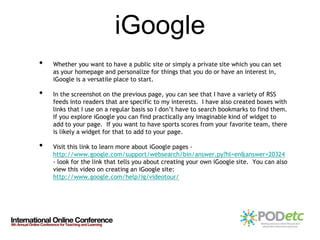
•   In the screenshot on the previous page, you can see that I have a variety of RSS
    feeds into readers that are specific to my interests. I have also created boxes with
    links that I use on a regular basis so I don’t have to search bookmarks to find them.
    If you explore iGoogle you can find practically any imaginable kind of widget to
    add to your page. If you want to have sports scores from your favorite team, there
    is likely a widget for that to add to your page.

•   Visit this link to learn more about iGoogle pages -
    http://www.google.com/support/websearch/bin/answer.py?hl=en&answer=20324
    - look for the link that tells you about creating your own iGoogle site. You can also
    view this video on creating an iGoogle site:
    http://www.google.com/help/ig/videotour/
Google Docs
•   Google is a familiar name and is wrapped around more services than you might
    expect. In addition to being a major search engine, Google offers services
    available to educators, businesses, and industries of all types.

•   Google is one of the options to create and share online documents, surveys, and
    presentations. There are other options available and the foundations of
    collaboration will hold true for all types. For the purposes of this presentation, we
    will use examples from Google.

•   Also notice on my iGoogle page, that I have a section that lists my various Google
    Docs - these include documents that I have made and shared as well as any that
    I’ve been asked to share in or have downloaded from a public site.

•   You don’t have to have an iGoogle site to enjoy the opportunity to collaborate on
    documents but if it is something that looks appealing it might just fit a need for
    you!!!
The Art of
               Collaboration
•   Before embarking on a collaborative assignment, it is critical to redefine
    ownership of a project. When you are collaborating with others, the end-product
    falls under a category of shared ownership. Now think about this from the
    perspective of your students or colleagues and imagine how to some, collaboration
    is more emotionally challenging than to others.

•   Whether you are collaborating for your own purposes or directing a group in
    collaboration, it is important to think about the process as much as the product.
    Collaboration is an art and it is certainly a skill we need to foster in our peers and
    students for their success in the future.

•   Having defined your goals and rubrics for a collaborative project it is time to
    consider the tools:

•   Click here for a “Plain English” explanation of Google Docs for Collaboration -
Playing in the Sand!
•   Hopefully this has given you a peek into the power of collaborative tools and we
    are only just beginning to look!

•   As a way to get you started, follow this link to a shared document that you can add
    to or edit. Remember all conference participants will have access to this
    document so be respectful but if you have never used Google Docs or similar online
    collaborative applications here is a chance to experiment!!

•   https://docs.google.com/Doc?docid=0AWddiGSzZaR_ZDlubjI5cF8xN2dzc2pqbmZu&
    hl=en
PODetc - Professional Online Development from
   the Educational Technology Community


•   PODetc provides teaching professionals:

•   Online learning options
•   Courses on integration strategies of 21st century technology skills
•   Collaborative online classroom environment
•   Increase knowledge of the latest technology tools
•   Convenient asynchronous format 24 hours a day, 7 days a week.

Collaborativet Tools

  • 1.
    Foundations in Collaborative Tools Victoria Lovejoy, Ed.D. Director of Online Learning PODetc
  • 2.
    Foundations in Collaborative Tools • This presentation is an excerpt from an online course offered through PODetc, Professional Online Development from the Educational Technology Community. • Learning Objectives: The four week course focuses on ISTE’s 2008 NET Teacher Standard: Facilitate and Inspire Student Learning and Creativity, Model Digital Age Work and Learning, Engage in Professional Growth and Leadership and ISTE NET Student Standards, Creativity and Innovation, Communication and Collaboration, Critical Thinking, Problem Solving, and Decision Making, Digital Citizenship, and Technology Operations and Concepts. The four weeks of instruction are organized as follows: •Week 1: Defining Your Collaborative ToolBox in the Cloud. •Week 2: Sharing Online. •Week 3: Collaborate with Data • Week 4: Reflections on the Nature of Collaboration and Final Project
  • 3.
    What’s in your collaborativetoolbox? • Start by watching this Youtube clip to explain "Cloud Computing." While we won't be concentrating solely on the term "cloud computing," when we use the Internet to create and share documents, we are using the "cloud." More and more applications are available on the cloud and schools can leverage educational packaging and many open source (i.e. free) applications that can become valuable learning tools. • Now read this article on “cloud computing” and decide if you are using the “cloud.” • What online digital tools do you count as part of your collaborative tool box?
  • 4.
    Players in thecloud... • As you start to explore the cloud, you will see a lot of familiar names including Yahoo, Amazon, Microsoft, Apple, and Google. There are many aspects to making services and applications available through the internet, and there are many stakeholders invested in a big financial way. There is a long, but interesting video recording of a major round table discussion among the big players in the cloud - you can access it at the following link: http://www.ustream.tv/flash/video/1194900 • The discussion is entitled: “Whose Cloud is it Anyhow.” This forum discusses many issues including platform “wars” between different operating systems. What you should focus on is the discussion of social sites and applications that not only foster but thrive on interaction among their subscribers. Consider your thoughts on the concept of a “cloud.” How could this idea of an information and application “cloud” serve education and businesses? What questions does it raise?
  • 5.
    Your Collaborative Vocabulary • To continue to build your understanding and vocabulary, read the following three articles: • What is Cloud Computing? Wikipedia. Retrieved April 10, 2009. http://en.wikipedia.org/wiki/Cloud_computing • Knorr, E. and G. Gruman, ( 2008), What Cloud Computing Really Means, InfoWorld. Retrieved April 10, 2009. http://www.infoworld.com/article/08/04/07/15FE-cloud- computing-reality_1.html • Albaneseus, C. (2009) Google Gives Advice on Cloud Computing. PC Magazine. Retrieved April 10, 2009. http://tech.yahoo.com/news/zd/20090320/tc_zd/238345
  • 6.
    Inventory your “Tool- box” • Now take a moment to think about your online collaborative tools. Which of the following do you make use of? • Online chat (example: Yahoo messenger) • VOIP (example: Skype) • Internet hosted eMail (example: gmail, Yahoo mail) • Online surveys: (example: Survey Monkey) • Meeting coordination programs (example: Meeting Wizard) • Teleconferencing or web-conferencing (example: GoTo Meeting) • Collaborative documents (Google docs)
  • 7.
    Build Your Glossary • Here are some terms and definitions teachers from past courses have developed reflecting concerns, implications, skills, and more: • Sustainability - As with all technology it is constantly changing. What is next after cloud technology? How long will this technology be around? • Cost-Nothing is free and if businesses are working in the cloud in an effort to save money that means someone else who they worked with in the past is losing money. It would be hard for me to believe that if the demand increases in this area that the cost does not increase. • SaaS - SaaS is an abbreviation for software as a service. SaaS is when you deliver a software application through an Interent Browser and it can run on any platform. • Equity - How do we define equity in group projects with students? We need to create a working definition that matches the ability of each individual student and help individuals in the group understand the nature of equity. • What does the concept of working in the “cloud” do to your definitions of work, collaboration, ownership, authorship...?
  • 8.
    Google Apps, for example • Sometimes it helps to see examples of a tool in use. Google has collected a variety of case studies from a range of educational applications. You can access the case studies at the following link: http://www.google.com/a/help/intl/en/edu/customers.html • Each of the studies include a short video clip of an interview as well as a brief write-up. Select and study a minimum of three of the case studies that seem most applicable to you. Reflect on a few of these case studies with your professional peers. What elements do you think might be applicable to your environment? What potential issues do you see that might arise?
  • 9.
  • 10.
    iGoogle • Whether you want to have a public site or simply a private site which you can set as your homepage and personalize for things that you do or have an interest in, iGoogle is a versatile place to start. • In the screenshot on the previous page, you can see that I have a variety of RSS feeds into readers that are specific to my interests. I have also created boxes with links that I use on a regular basis so I don’t have to search bookmarks to find them. If you explore iGoogle you can find practically any imaginable kind of widget to add to your page. If you want to have sports scores from your favorite team, there is likely a widget for that to add to your page. • Visit this link to learn more about iGoogle pages - http://www.google.com/support/websearch/bin/answer.py?hl=en&answer=20324 - look for the link that tells you about creating your own iGoogle site. You can also view this video on creating an iGoogle site: http://www.google.com/help/ig/videotour/
  • 11.
    Google Docs • Google is a familiar name and is wrapped around more services than you might expect. In addition to being a major search engine, Google offers services available to educators, businesses, and industries of all types. • Google is one of the options to create and share online documents, surveys, and presentations. There are other options available and the foundations of collaboration will hold true for all types. For the purposes of this presentation, we will use examples from Google. • Also notice on my iGoogle page, that I have a section that lists my various Google Docs - these include documents that I have made and shared as well as any that I’ve been asked to share in or have downloaded from a public site. • You don’t have to have an iGoogle site to enjoy the opportunity to collaborate on documents but if it is something that looks appealing it might just fit a need for you!!!
  • 12.
    The Art of Collaboration • Before embarking on a collaborative assignment, it is critical to redefine ownership of a project. When you are collaborating with others, the end-product falls under a category of shared ownership. Now think about this from the perspective of your students or colleagues and imagine how to some, collaboration is more emotionally challenging than to others. • Whether you are collaborating for your own purposes or directing a group in collaboration, it is important to think about the process as much as the product. Collaboration is an art and it is certainly a skill we need to foster in our peers and students for their success in the future. • Having defined your goals and rubrics for a collaborative project it is time to consider the tools: • Click here for a “Plain English” explanation of Google Docs for Collaboration -
  • 13.
    Playing in theSand! • Hopefully this has given you a peek into the power of collaborative tools and we are only just beginning to look! • As a way to get you started, follow this link to a shared document that you can add to or edit. Remember all conference participants will have access to this document so be respectful but if you have never used Google Docs or similar online collaborative applications here is a chance to experiment!! • https://docs.google.com/Doc?docid=0AWddiGSzZaR_ZDlubjI5cF8xN2dzc2pqbmZu& hl=en
  • 14.
    PODetc - ProfessionalOnline Development from the Educational Technology Community • PODetc provides teaching professionals: • Online learning options • Courses on integration strategies of 21st century technology skills • Collaborative online classroom environment • Increase knowledge of the latest technology tools • Convenient asynchronous format 24 hours a day, 7 days a week.