FOSS Tools for Collaboration
               in Education
                            Prakash B. Pimpale
                              Staff Scientist
                           KBCS, CDAC Mumbai


            National Workshop on FOSS Adoption in Education
                          CDAC, Navi Mumbai
1 | Internal use only
GOALS
         Understand
    ➢
         Collaboration tools
                What are these tools?
                How do they work?
    ➢
         Use of Collaboration Tools
                Where and How these can be used in Education ?


2 | Internal use only
WAY AHEAD

    ➢
         Background & Overview
    ➢
         Tools
    ➢
         Demo


3 | Internal use only
BACKGROUND & OVERVIEW

      ➢
          What is collaboration?
                 The action of working with someone to
                 Produce
                 Create
                 Learn


4 | Internal use only
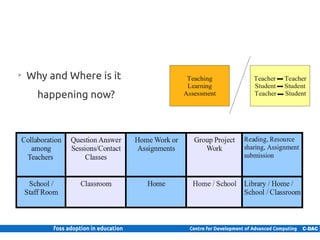
➢
          Why and Where is it
               happening now?


5 | Internal use only
➢
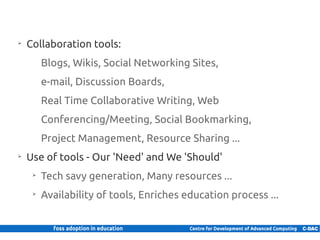
          Collaboration tools:
                 Blogs, Wikis, Social Networking Sites,
                 e-mail, Discussion Boards,
                 Real Time Collaborative Writing, Web
                 Conferencing/Meeting, Social Bookmarking,
                 Project Management, Resource Sharing ...
     ➢
          Use of tools - Our 'Need' and We 'Should'
            ➢
                 Tech savy generation, Many resources ...
            ➢
                 Availability of tools, Enriches education process ...


6 | Internal use only
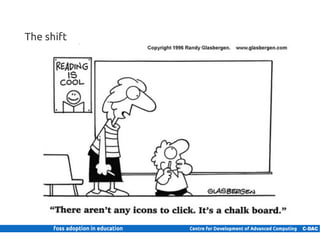
The shift


7 | Internal use only
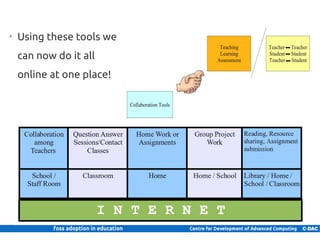
➢
     Using these tools we
     can now do it all
     online at one place!


8 | Internal use only
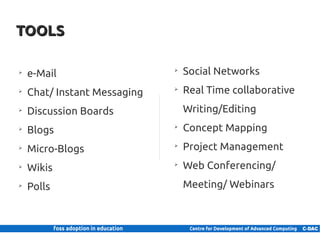
TOOLS

      ➢
          e-Mail                    ➢
                                        Social Networks
      ➢
          Chat/ Instant Messaging   ➢
                                        Real Time collaborative
      ➢
          Discussion Boards             Writing/Editing
      ➢
          Blogs                     ➢
                                        Concept Mapping
      ➢
          Micro-Blogs               ➢
                                        Project Management
      ➢
          Wikis                     ➢
                                        Web Conferencing/
      ➢
          Polls                         Meeting/ Webinars


9 | Internal use only
e-Mail

     ➢
         Electronic mail
     ➢
         Simplest way of communication
     ➢
         Basic way for collaboration
     ➢
         Can be used for
            ➢
                Information sharing
            ➢
                Assignment submission
            ➢
                Threaded discussions/brainstorming on idea
            ➢
                Administration and Communication


10 | Internal use only
Chat/ Instant Messaging

      ➢
          Real-time/instant direct communication
      ➢
          Two or more participants
      ➢
          Brainstorming and discussions
                 Questions paper setting, Decision Making


11 | Internal use only
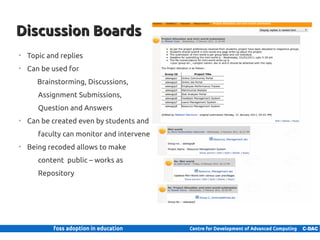
Discussion Boards
      ➢
          Topic and replies
      ➢
          Can be used for
               Brainstorming, Discussions,
               Assignment Submissions,
               Question and Answers
      ➢
          Can be created even by students and
               faculty can monitor and intervene
      ➢
          Being recoded allows to make
               content public – works as
               Repository


12 | Internal use only
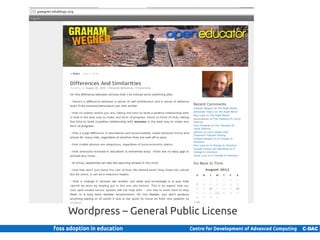
Blogs
    ➢
         A Web site on which an individual or group of users share
               opinions, information, etc. on a regular basis
    ➢
         Can be used for
           ➢
                Class website – teachers only permission
           ➢
                Share best practices, experiences, course material apart
                    from text books
           ➢
                Discussions and questions/answers
    ➢
         Your good blog post (interpretation of certain concept) may
               help other class/school students also


13 | Internal use only
Wordpress – General Public License
14 | Internal use only
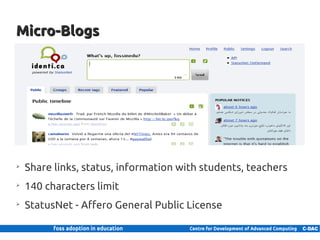
Micro-Blogs


    ➢
         Share links, status, information with students, teachers
    ➢
         140 characters limit
    ➢
         StatusNet - Affero General Public License

15 | Internal use only
Wikis
     ➢
         A website allowing creation and editing of any number of
                interlinked web pages via a web browser
     ➢
         Simplified mark-up language or WYSIWYG editor
     ➢
         History of edits is maintained
     ➢
         Can be used for
            ➢
                Collaborative content creation and sharing
            ➢
                Summary of classroom activities by teacher with the help
                    from students
     ➢
         For start – Information of plants in school campus
     ➢
         MediaWiki – General Public License
16 | Internal use only
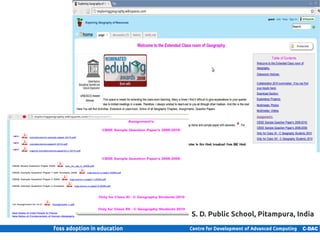
S. D. Public School, Pitampura, India

17 | Internal use only
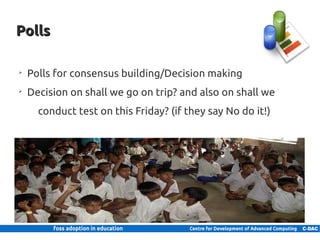
Polls

      ➢
          Polls for consensus building/Decision making
      ➢
          Decision on shall we go on trip? and also on shall we
               conduct test on this Friday? (if they say No do it!)


18 | Internal use only
Social Networks
    ➢
        Web-based services that allow users to
               Create profile, connect other users and
               Share text, images, videos
    ➢
        Enables interactions
    ➢
        Features like blogs, groups, forums
    ➢
        Can be used to
           ➢
               Share resources
           ➢
               Connect students and teachers
           ➢
               Create groups for subjects
           ➢
               Powerful than just blogs or discussion forums
    ➢
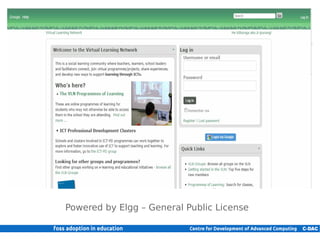
        Elgg and BuddyPress – General Public License
19 | Internal use only
Powered by Elgg – General Public License

20 | Internal use only
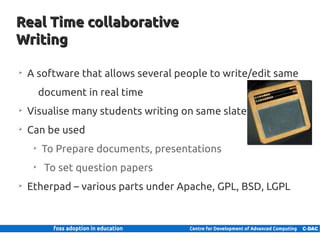
Real Time collaborative
    Writing

      ➢
          A software that allows several people to write/edit same
                 document in real time
      ➢
          Visualise many students writing on same slate
      ➢
          Can be used
             ➢
                 To Prepare documents, presentations
             ➢
                  To set question papers
      ➢
          Etherpad – various parts under Apache, GPL, BSD, LGPL


21 | Internal use only
Concept Mapping

     ➢
         A concept map is a diagram showing the relationships
                among concepts
     ➢
         Collaborative creation of concept maps
     ➢
         Can be used
            ➢
                For assessing students in concepts
            ➢
                Creating content collaboratively
     ➢
         XMind – Lesser General Public License and Eclipse Public
                License


22 | Internal use only
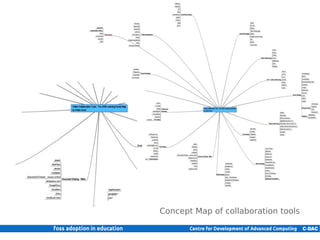
Concept Map of collaboration tools

23 | Internal use only
Project Management
     ➢
         Software to manage group projects
     ➢
         Allows
            ➢
                Resource management
            ➢
                Task management
            ➢
                Milestones and calendering
            ➢
                Time tracking
            ➢
                Document management
     ➢
         Can used
            ➢
                For group projects
            ➢
                For assessment
     ➢
         Collabtive and Project.Net - General Public License

24 | Internal use only
Web Conferencing
    ➢
         A web based application for conferencing/Meeting
    ➢
         Allows
           ➢
                Video Conferencing
           ➢
                Chat
           ➢
                Whiteboard writing/drawing
    ➢
         Can be used
           ➢
                For remote assistance to students
           ➢
                For Conducting Meetings
    ➢
         OpenMeeting - Eclipse Public License


25 | Internal use only
References
     ➢
         Teaching with Technology : Collaboration Tools, Technology for Education, Carnegie Mellon
     ➢
         Social Networking in Higher Education by Bryan Alexander
     ➢
         Collaboration Tools by Cyprien Lomas, Michael Burke, and Carie L. Page
     ➢
         New student collaboration tools EDUCAUSE Evolving Technologies Committee Pablo G.
               Molina, Georgetown University
     ➢
         Collaboration and Technology for Teaching and Learning Albert L. Ingram, Ph. D. Robyn E,
               Parker, Ph. D. and the Collaborative Technologies Learning Community Kent State
               University


                                       This work by CDAC is licensed under a Creative Commons Attribution 3.0 Unported License


26 | Internal use only
Thank you!


                                  Prakash B. Pimpale
                         prakash@cdac.in, pbpimpale@gmail.com
                                  CDAC, Navi Mumbai
                                     www.cdac.in


27 | Internal use only
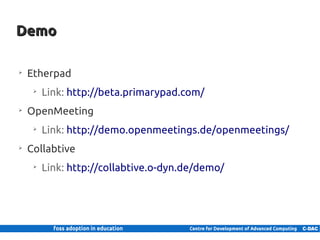
Demo

      ➢
          Etherpad
             ➢
                 Link: http://beta.primarypad.com/
      ➢
          OpenMeeting
             ➢
                 Link: http://demo.openmeetings.de/openmeetings/
      ➢
          Collabtive
             ➢
                 Link: http://collabtive.o-dyn.de/demo/


28 | Internal use only

Collaboration tools in education

  • 1.
    FOSS Tools forCollaboration in Education Prakash B. Pimpale Staff Scientist KBCS, CDAC Mumbai National Workshop on FOSS Adoption in Education CDAC, Navi Mumbai 1 | Internal use only
  • 2.
    GOALS Understand ➢ Collaboration tools What are these tools? How do they work? ➢ Use of Collaboration Tools Where and How these can be used in Education ? 2 | Internal use only
  • 3.
    WAY AHEAD ➢ Background & Overview ➢ Tools ➢ Demo 3 | Internal use only
  • 4.
    BACKGROUND & OVERVIEW ➢ What is collaboration? The action of working with someone to Produce Create Learn 4 | Internal use only
  • 5.
    Why and Where is it happening now? 5 | Internal use only
  • 6.
    Collaboration tools: Blogs, Wikis, Social Networking Sites, e-mail, Discussion Boards, Real Time Collaborative Writing, Web Conferencing/Meeting, Social Bookmarking, Project Management, Resource Sharing ... ➢ Use of tools - Our 'Need' and We 'Should' ➢ Tech savy generation, Many resources ... ➢ Availability of tools, Enriches education process ... 6 | Internal use only
  • 7.
    The shift 7 |Internal use only
  • 8.
    Using these tools we can now do it all online at one place! 8 | Internal use only
  • 9.
    TOOLS ➢ e-Mail ➢ Social Networks ➢ Chat/ Instant Messaging ➢ Real Time collaborative ➢ Discussion Boards Writing/Editing ➢ Blogs ➢ Concept Mapping ➢ Micro-Blogs ➢ Project Management ➢ Wikis ➢ Web Conferencing/ ➢ Polls Meeting/ Webinars 9 | Internal use only
  • 10.
    e-Mail ➢ Electronic mail ➢ Simplest way of communication ➢ Basic way for collaboration ➢ Can be used for ➢ Information sharing ➢ Assignment submission ➢ Threaded discussions/brainstorming on idea ➢ Administration and Communication 10 | Internal use only
  • 11.
    Chat/ Instant Messaging ➢ Real-time/instant direct communication ➢ Two or more participants ➢ Brainstorming and discussions Questions paper setting, Decision Making 11 | Internal use only
  • 12.
    Discussion Boards ➢ Topic and replies ➢ Can be used for Brainstorming, Discussions, Assignment Submissions, Question and Answers ➢ Can be created even by students and faculty can monitor and intervene ➢ Being recoded allows to make content public – works as Repository 12 | Internal use only
  • 13.
    Blogs ➢ A Web site on which an individual or group of users share opinions, information, etc. on a regular basis ➢ Can be used for ➢ Class website – teachers only permission ➢ Share best practices, experiences, course material apart from text books ➢ Discussions and questions/answers ➢ Your good blog post (interpretation of certain concept) may help other class/school students also 13 | Internal use only
  • 14.
    Wordpress – GeneralPublic License 14 | Internal use only
  • 15.
    Micro-Blogs ➢ Share links, status, information with students, teachers ➢ 140 characters limit ➢ StatusNet - Affero General Public License 15 | Internal use only
  • 16.
    Wikis ➢ A website allowing creation and editing of any number of interlinked web pages via a web browser ➢ Simplified mark-up language or WYSIWYG editor ➢ History of edits is maintained ➢ Can be used for ➢ Collaborative content creation and sharing ➢ Summary of classroom activities by teacher with the help from students ➢ For start – Information of plants in school campus ➢ MediaWiki – General Public License 16 | Internal use only
  • 17.
    S. D. PublicSchool, Pitampura, India 17 | Internal use only
  • 18.
    Polls ➢ Polls for consensus building/Decision making ➢ Decision on shall we go on trip? and also on shall we conduct test on this Friday? (if they say No do it!) 18 | Internal use only
  • 19.
    Social Networks ➢ Web-based services that allow users to Create profile, connect other users and Share text, images, videos ➢ Enables interactions ➢ Features like blogs, groups, forums ➢ Can be used to ➢ Share resources ➢ Connect students and teachers ➢ Create groups for subjects ➢ Powerful than just blogs or discussion forums ➢ Elgg and BuddyPress – General Public License 19 | Internal use only
  • 20.
    Powered by Elgg– General Public License 20 | Internal use only
  • 21.
    Real Time collaborative Writing ➢ A software that allows several people to write/edit same document in real time ➢ Visualise many students writing on same slate ➢ Can be used ➢ To Prepare documents, presentations ➢ To set question papers ➢ Etherpad – various parts under Apache, GPL, BSD, LGPL 21 | Internal use only
  • 22.
    Concept Mapping ➢ A concept map is a diagram showing the relationships among concepts ➢ Collaborative creation of concept maps ➢ Can be used ➢ For assessing students in concepts ➢ Creating content collaboratively ➢ XMind – Lesser General Public License and Eclipse Public License 22 | Internal use only
  • 23.
    Concept Map ofcollaboration tools 23 | Internal use only
  • 24.
    Project Management ➢ Software to manage group projects ➢ Allows ➢ Resource management ➢ Task management ➢ Milestones and calendering ➢ Time tracking ➢ Document management ➢ Can used ➢ For group projects ➢ For assessment ➢ Collabtive and Project.Net - General Public License 24 | Internal use only
  • 25.
    Web Conferencing ➢ A web based application for conferencing/Meeting ➢ Allows ➢ Video Conferencing ➢ Chat ➢ Whiteboard writing/drawing ➢ Can be used ➢ For remote assistance to students ➢ For Conducting Meetings ➢ OpenMeeting - Eclipse Public License 25 | Internal use only
  • 26.
    References ➢ Teaching with Technology : Collaboration Tools, Technology for Education, Carnegie Mellon ➢ Social Networking in Higher Education by Bryan Alexander ➢ Collaboration Tools by Cyprien Lomas, Michael Burke, and Carie L. Page ➢ New student collaboration tools EDUCAUSE Evolving Technologies Committee Pablo G. Molina, Georgetown University ➢ Collaboration and Technology for Teaching and Learning Albert L. Ingram, Ph. D. Robyn E, Parker, Ph. D. and the Collaborative Technologies Learning Community Kent State University This work by CDAC is licensed under a Creative Commons Attribution 3.0 Unported License 26 | Internal use only
  • 27.
    Thank you! Prakash B. Pimpale prakash@cdac.in, pbpimpale@gmail.com CDAC, Navi Mumbai www.cdac.in 27 | Internal use only
  • 28.
    Demo ➢ Etherpad ➢ Link: http://beta.primarypad.com/ ➢ OpenMeeting ➢ Link: http://demo.openmeetings.de/openmeetings/ ➢ Collabtive ➢ Link: http://collabtive.o-dyn.de/demo/ 28 | Internal use only