Copyright © 2004 ProsoftTraining, All Rights Reserved.
Internetworking Servers
Objectives
• Identify and describe the functions and features
of various internetworking servers
• Describe how each type of internetworking
server use TCP/IP suite protocols
• Describe access-security features of an HTTP
server
• Define MIME, and explain how MIME types are
used by HTTP and mail servers
• Describe the functions of DNS
• Define “daemon” and identify the functions of
the Internet-related daemons
File and Print Servers
• File servers — network servers that store data
files and programs that can be shared by
network users
• Print servers — network servers that allow
multiple users to send print jobs to the same
physical printer
• Line Printer/Line Printer Daemon (LPR/LPD) —
printing protocol in UNIX that allows users to
submit print jobs to network printers
HTTP Server Essentials
• The Web — a collection of computer systems
running the HTTP service
• Web server — has access to HTML documents
that are returned to a client in response to a
request
• Web gateway — a program on a server that is
activated based on a client request:
– Server passes the request to the program
– Program processes the request
– Server returns the program output to the client
HTTP Server Essentials (cont’d)
• HTTP Servers and MIME
– Multipurpose Internet Mail Extensions (MIME) —
allow HTTP and e-mail attachments to identify the
files they must use
– MIME types — identify the contents of a file so
browsers can display the contents properly
HTTP Server Essentials (cont’d)
• Additional HTTP server considerations:
– HTTP servers work with a variety of operating
systems
– Permissions — restrict or allow access to system
resources
• Operating system permissions usually override HTTP
server permissions
– Access control — specifies who has access to
system resources
HTTP Server Essentials (cont’d)
• Additional HTTP server considerations:
– Aliases (or virtual directories)
• Flexible mapping of URL path names to file names
– Logging — a log of requests handled by the server
• Access data
• Referrer data
• Error data
HTTP Server Essentials (cont’d)
• Additional HTTP server considerations:
– Monitor server and network bandwidth use
• Helps maintain consistent performance
• Helps to identify bottlenecks
• Helps to create a baseline against which future network
activity can be compared
Database Server
• Database — a file that stores information in a
series of tables and columns
• Relational database — a database consisting of
two or more tables related by a common field
• Database server — a server that presents
relational databases and makes it possible for
remote individuals to access the data
• All database servers use SQL to create, maintain
and query databases
Proxy Server
• Proxy server — an intermediary between a
network host and other hosts outside the
network
• Proxy servers:
– Provide enhanced security
– Manage TCP/IP addresses
– Speed Internet access by caching Web documents
– Replace network IP address with another,
contingent address
Mail Server
• Mail servers store/forward e-mail messages
using several protocols:
– SMTP — used to send messages
– POP3 — used to store and forward messages
(forces a user to download messages before
managing them)
– IMAP — used to store and forward messages
(allows a user to browse and manage messages
remotely)
• MIME is used to transmit files with e-mail
Instant Messaging (IM)
• Instant messaging runs on a mail server
• Use instant messaging to:
– Type and view messages sent to one or more
recipients
– View the responses immediately
• Instant messages can be sent only to contacts
who are currently online
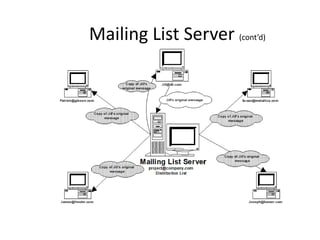
Mailing List Server
• Forwards an e-mail message to every member
on a distribution list
• Mailing List Manager (MLM) — the interface
that allows you to configure a mailing list
server
• Public versus private mailing lists
• Examples of public mailing lists:
– LISTSERV
– Majordomo
Mailing List Server (cont’d)
Media Server
• Provides streaming audio and video over a
network
• Uses UDP ports and buffers to achieve the
effect of a real-time connection
– UDP is a connectionless protocol
– Buffer — cache of memory that stores frequently-
used data to allow for faster access times
DNS Server
• DNS — mechanism used on the Internet to
translate host computer names into IP
addresses
– www.ciw-certified.com = http://64.128.206.9
• Hosts file — file referenced locally by
applications and commands for name-to-
address resolution
DNS Server (cont’d)
• DNS hierarchy:
– Root-level domain — the top of the hierarchy that
contains entries for each top-level domain
– Top-level domain — consists of categories found
at the end of domain names
– Second-level domain — includes the businesses
and institutions that register their domain names
with the top-level domains
DNS Server (cont’d)
• DNS components:
– Name server — server that supports name-to-
address translation and runs the DNS service
– Name resolver — software that uses the services
of one or more DNS servers to resolve an
unknown request
• DSN server types: root, primary, secondary,
caching-only, forwarding
• DNS records — entries in DNS database that
provide additional routing and resolution
information
DNS Server (cont’d)
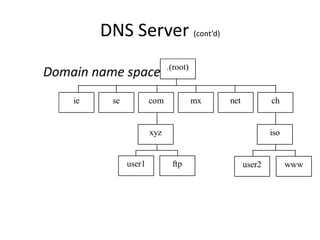
Domain name space .(root)
se com mx
user1
xyz
net ch
ie
ftp
iso
user2 www
DNS Server (cont’d)
• nslookup
– Used to query Internet domain name servers to
learn name-to-IP-address mappings
– Example of nslookup one-time command:
• nslookup www.ciw-certified.com
– Used interactively by typing:
• nslookup
FTP Server
• Allows the transfer of large files between file
servers in real time
• Files of 2 MB or greater should be transferred
by means of FTP
• Sending files by means of FTP is faster than
with e-mail and HTTP
News Server
• Uses NNTP
• Written text output
• Multiperson input
• Allows users to post information any time
• Can be used to create secure newsgroups by
enabling user-specific password protection or
through an SSL session
Certificate Server
• Validates, or certifies, encryption keys
– Keys — strings of text generated from encryption
algorithms that allow you to secure
communications for a company or group of users
Directory Server
• Identifies all resources on a network, then makes them available to
authenticated users
• Enables a company to reuse information in its directory
• Avoids re-entry of user information for applications that require it
• Helps administrators manage applications and users
• Helps users locate other users or e-mail addresses
• Locates and manages all company accounts
• Allows users inside and outside the network to use the service
• Maintains a single database of e-mail contacts
Directory Server (cont’d)
• Directory server protocols:
– X.500 — used to manage user and resource
directories
– X.500 offers:
• Scalability
• Synchronization
• Replication
– LDAP — TCP/IP protocol that allows communication
on both intranets and the Internet
Catalog, Fax and
Transaction Servers
• Catalog servers:
– Index databases, files and information and allow
keyword, Boolean and other searches
– Use robots to automate indexing process
• Fax servers:
– Provide a centrally located fax system
– Consist of a bank of fax/modems
• Transaction servers:
– Guarantee that all required databases are updated
when a transaction takes place
The Internet Daemon:
inetd and xinetd
• Daemon — UNIX program initiated at startup;
runs in the background until required
• inetd — daemon that listens on specified TCP
and UDP ports (0 to 1023) and launches services
to support requests it receives
• xinetd — modified form of inetd that is more
secure; provides more control over how
daemons are run and which remote systems can
use a particular daemon
• inetd and xinetd can create security problems
because they have root permission; they can
also deplete system resources because they
spawn new processes each time they are used
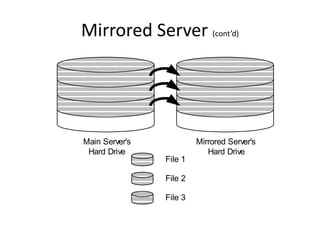
Mirrored Server
• Provides data redundancy by writing to two
physical hard drives each time a write
operation occurs
• When a write request is issued:
– Data is written to the primary drive
– Data is copied to the mirrored drive
• If one drive fails, all data is protected from loss
Mirrored Server (cont’d)
Main Server's
Hard Drive
Mirrored Server's
Hard Drive
File 1
File 2
File 3
Choosing Web Server Products
• Apache Web server
– Used by more than half of all Web sites
– Supports UNIX and Windows XP
– Available free of charge
• Microsoft IIS
– Includes HTTP, FTP, NNTP, SMTP, certificate, ASP,
index (catalog) and transaction services
– Allows you to use a remote server to store and
retrieve files
Choosing Web Server Products (cont’d)
• Sun ONE servers
– Support many platforms, including OS/2,
Windows NT and 2000, Solaris, AIX, HP-UX,
AS/400 and S/390
– Include servers with Server-Side JavaScript
interpreters
– Can use JavaScript to connect to databases
– Can implement other server-side scripting
applications
Choosing Web Server Products (cont’d)
• Java software and Web servers:
– Java servlet — Java code that is compiled
and runs solely on Web servers
– Servlets allow:
• Chaining
• Connections to databases
• Near-universal support on systems

Presentation1.pptx

  • 2.
    Copyright © 2004ProsoftTraining, All Rights Reserved. Internetworking Servers
  • 3.
    Objectives • Identify anddescribe the functions and features of various internetworking servers • Describe how each type of internetworking server use TCP/IP suite protocols • Describe access-security features of an HTTP server • Define MIME, and explain how MIME types are used by HTTP and mail servers • Describe the functions of DNS • Define “daemon” and identify the functions of the Internet-related daemons
  • 4.
    File and PrintServers • File servers — network servers that store data files and programs that can be shared by network users • Print servers — network servers that allow multiple users to send print jobs to the same physical printer • Line Printer/Line Printer Daemon (LPR/LPD) — printing protocol in UNIX that allows users to submit print jobs to network printers
  • 5.
    HTTP Server Essentials •The Web — a collection of computer systems running the HTTP service • Web server — has access to HTML documents that are returned to a client in response to a request • Web gateway — a program on a server that is activated based on a client request: – Server passes the request to the program – Program processes the request – Server returns the program output to the client
  • 6.
    HTTP Server Essentials(cont’d) • HTTP Servers and MIME – Multipurpose Internet Mail Extensions (MIME) — allow HTTP and e-mail attachments to identify the files they must use – MIME types — identify the contents of a file so browsers can display the contents properly
  • 7.
    HTTP Server Essentials(cont’d) • Additional HTTP server considerations: – HTTP servers work with a variety of operating systems – Permissions — restrict or allow access to system resources • Operating system permissions usually override HTTP server permissions – Access control — specifies who has access to system resources
  • 8.
    HTTP Server Essentials(cont’d) • Additional HTTP server considerations: – Aliases (or virtual directories) • Flexible mapping of URL path names to file names – Logging — a log of requests handled by the server • Access data • Referrer data • Error data
  • 9.
    HTTP Server Essentials(cont’d) • Additional HTTP server considerations: – Monitor server and network bandwidth use • Helps maintain consistent performance • Helps to identify bottlenecks • Helps to create a baseline against which future network activity can be compared
  • 10.
    Database Server • Database— a file that stores information in a series of tables and columns • Relational database — a database consisting of two or more tables related by a common field • Database server — a server that presents relational databases and makes it possible for remote individuals to access the data • All database servers use SQL to create, maintain and query databases
  • 11.
    Proxy Server • Proxyserver — an intermediary between a network host and other hosts outside the network • Proxy servers: – Provide enhanced security – Manage TCP/IP addresses – Speed Internet access by caching Web documents – Replace network IP address with another, contingent address
  • 12.
    Mail Server • Mailservers store/forward e-mail messages using several protocols: – SMTP — used to send messages – POP3 — used to store and forward messages (forces a user to download messages before managing them) – IMAP — used to store and forward messages (allows a user to browse and manage messages remotely) • MIME is used to transmit files with e-mail
  • 13.
    Instant Messaging (IM) •Instant messaging runs on a mail server • Use instant messaging to: – Type and view messages sent to one or more recipients – View the responses immediately • Instant messages can be sent only to contacts who are currently online
  • 14.
    Mailing List Server •Forwards an e-mail message to every member on a distribution list • Mailing List Manager (MLM) — the interface that allows you to configure a mailing list server • Public versus private mailing lists • Examples of public mailing lists: – LISTSERV – Majordomo
  • 15.
  • 16.
    Media Server • Providesstreaming audio and video over a network • Uses UDP ports and buffers to achieve the effect of a real-time connection – UDP is a connectionless protocol – Buffer — cache of memory that stores frequently- used data to allow for faster access times
  • 17.
    DNS Server • DNS— mechanism used on the Internet to translate host computer names into IP addresses – www.ciw-certified.com = http://64.128.206.9 • Hosts file — file referenced locally by applications and commands for name-to- address resolution
  • 18.
    DNS Server (cont’d) •DNS hierarchy: – Root-level domain — the top of the hierarchy that contains entries for each top-level domain – Top-level domain — consists of categories found at the end of domain names – Second-level domain — includes the businesses and institutions that register their domain names with the top-level domains
  • 19.
    DNS Server (cont’d) •DNS components: – Name server — server that supports name-to- address translation and runs the DNS service – Name resolver — software that uses the services of one or more DNS servers to resolve an unknown request • DSN server types: root, primary, secondary, caching-only, forwarding • DNS records — entries in DNS database that provide additional routing and resolution information
  • 20.
    DNS Server (cont’d) Domainname space .(root) se com mx user1 xyz net ch ie ftp iso user2 www
  • 21.
    DNS Server (cont’d) •nslookup – Used to query Internet domain name servers to learn name-to-IP-address mappings – Example of nslookup one-time command: • nslookup www.ciw-certified.com – Used interactively by typing: • nslookup
  • 22.
    FTP Server • Allowsthe transfer of large files between file servers in real time • Files of 2 MB or greater should be transferred by means of FTP • Sending files by means of FTP is faster than with e-mail and HTTP
  • 23.
    News Server • UsesNNTP • Written text output • Multiperson input • Allows users to post information any time • Can be used to create secure newsgroups by enabling user-specific password protection or through an SSL session
  • 24.
    Certificate Server • Validates,or certifies, encryption keys – Keys — strings of text generated from encryption algorithms that allow you to secure communications for a company or group of users
  • 25.
    Directory Server • Identifiesall resources on a network, then makes them available to authenticated users • Enables a company to reuse information in its directory • Avoids re-entry of user information for applications that require it • Helps administrators manage applications and users • Helps users locate other users or e-mail addresses • Locates and manages all company accounts • Allows users inside and outside the network to use the service • Maintains a single database of e-mail contacts
  • 26.
    Directory Server (cont’d) •Directory server protocols: – X.500 — used to manage user and resource directories – X.500 offers: • Scalability • Synchronization • Replication – LDAP — TCP/IP protocol that allows communication on both intranets and the Internet
  • 27.
    Catalog, Fax and TransactionServers • Catalog servers: – Index databases, files and information and allow keyword, Boolean and other searches – Use robots to automate indexing process • Fax servers: – Provide a centrally located fax system – Consist of a bank of fax/modems • Transaction servers: – Guarantee that all required databases are updated when a transaction takes place
  • 28.
    The Internet Daemon: inetdand xinetd • Daemon — UNIX program initiated at startup; runs in the background until required • inetd — daemon that listens on specified TCP and UDP ports (0 to 1023) and launches services to support requests it receives • xinetd — modified form of inetd that is more secure; provides more control over how daemons are run and which remote systems can use a particular daemon • inetd and xinetd can create security problems because they have root permission; they can also deplete system resources because they spawn new processes each time they are used
  • 29.
    Mirrored Server • Providesdata redundancy by writing to two physical hard drives each time a write operation occurs • When a write request is issued: – Data is written to the primary drive – Data is copied to the mirrored drive • If one drive fails, all data is protected from loss
  • 30.
    Mirrored Server (cont’d) MainServer's Hard Drive Mirrored Server's Hard Drive File 1 File 2 File 3
  • 31.
    Choosing Web ServerProducts • Apache Web server – Used by more than half of all Web sites – Supports UNIX and Windows XP – Available free of charge • Microsoft IIS – Includes HTTP, FTP, NNTP, SMTP, certificate, ASP, index (catalog) and transaction services – Allows you to use a remote server to store and retrieve files
  • 32.
    Choosing Web ServerProducts (cont’d) • Sun ONE servers – Support many platforms, including OS/2, Windows NT and 2000, Solaris, AIX, HP-UX, AS/400 and S/390 – Include servers with Server-Side JavaScript interpreters – Can use JavaScript to connect to databases – Can implement other server-side scripting applications
  • 33.
    Choosing Web ServerProducts (cont’d) • Java software and Web servers: – Java servlet — Java code that is compiled and runs solely on Web servers – Servlets allow: • Chaining • Connections to databases • Near-universal support on systems