OpenStack Cinder
Deep Dive
Havana Release
Presented by: Avishay Traeger
Avishay Traeger
IBM Research - Haifa
Cinder Core Team
.
Cinder Overview
●

Project exists since Folsom release, spun off Nova-volume

●

Cinder manages block storage
●

●

Not file-level storage (Manila)

●

Volumes attach to VM instances

●

●

Not object storage (Swift)

Boot from volume

Volumes have a life-cycle independent of VM instances
Architectural Overview
cinder client
REST

SQL DB

cinder-api
AMQP

AMQP
AMQP

cinder-volume
driver

cinder-scheduler
AMQP

Storage

cinder-backup
Cinder API
●

Volume create/delete/list/show
●

Create from image, snapshot, volume

●

Snapshot create/delete/list/show

●

Backup create/restore/delete/list/show

●

Volume attach/detach (called by Nova)

●

Volume types

●

Quotas
Volume Types
●

Admins can create tiers of storage
●

●

Specify requirements from storage

Users can specify a tier when creating a
volume
Cinder Scheduler
●

Chooses back-end to place a new volume on

●

Configurable plugins for scheduler
●

●

Chance

●

●

Simple
Filter

Most common is the filter scheduler
●

Has plug-able filters & weights
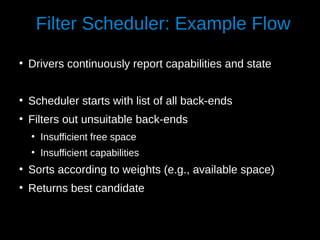
Filter Scheduler: Example Flow
●

Drivers continuously report capabilities and state

●

Scheduler starts with list of all back-ends

●

Filters out unsuitable back-ends
●

Insufficient free space

●

Insufficient capabilities

●

Sorts according to weights (e.g., available space)

●

Returns best candidate
Cinder Volume
●

Manager contains generic code
●

●

e.g., High-level flow, DB & quota updates

Drivers contain back-end specific code
●

●

Storage controllers from various vendors

●

●

Linux LVM
Distributed file systems

Admin can run multiple cinder-volume instances
●

Each able to manage multiple back-ends

●

Each back-end is generally configured to interact with one storage pool

●

Multi-threading
Cinder Backup
●

Cinder can back up volumes

●

Backups should allow recovery from
●

●

Storage failure

●

●

Volume data corruption
Site failure (provided that backups are safe)

Plug-able driver architecture
●

OpenStack Swift

●

IBM Tivoli Storage Manager

●

Ceph
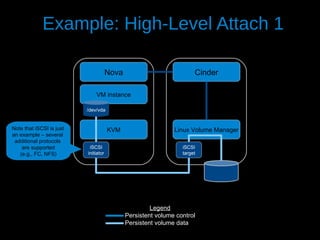
Example: High-Level Attach 1
Nova

Cinder

VM instance
/dev/vda

Note that iSCSI is just
an example – several
additional protocols
are supported
(e.g., FC, NFS)

KVM
iSCSI
initiator

Linux Volume Manager
iSCSI
target

Legend
Persistent volume control
Persistent volume data
Example: High-Level Attach 2
Nova

Cinder

VM instance
/dev/vda

Note that iSCSI is just
an example – several
additional protocols
are supported
(e.g., FC, NFS)

KVM
iSCSI
initiator

Storage Controller
iSCSI
target

Legend
Persistent volume control
Persistent volume data
Example Flow: Attach Volume
●

Nova calls Cinder via its API, passing connection information
●

e.g., host name, iSCSI initiator name, FC WWPNs

●

cinder-api passes message to cinder-volume

●

Manager does initial error checking and calls volume driver

●

Volume driver does any necessary preparation to allow the connection
●

●

e.g., give the nova host permissions to access the volume

Volume driver returns connection information, which is passed to Nova
●

e.g., iSCSI iqn and portal, FC WWPN

●

Nova creates the connection to the storage using the returned information

●

Nova passes the volume device/file to the hypervisor
New Major Features in Havana
●

Disk encryption
●

●

Encryption is done by Nova using dm-crypt, Cinder is made aware of encryption keys

Volume Migration
●

Admin interface: cinder migrate <volume-id> <target>

●

Check if storage can migrate the volume

●

If not, create a new volume

If original volume is detached, Cinder server attaches both and runs 'dd'
– If original volume is attached, Nova performs the copy (KVM-only in Havana)
Volume rate limiting
–

●

●

Allows rate limiting per volume

●

Can be enforced by Nova (KVM-only in Havana) or by storage

●

Extend Volume

●

Transfer volume ownership

●

Scheduler hints
Drivers in Havana
●

Coraid (AoE)

●

Local disk partitions

●

Dell Equalogic (iSCSI)

●

LVM (iSCSI)

●

EMC VMAX/VNX (iSCSI)

●

NetApp (iSCSI/NFS)

●

GlusterFS (GlusterFS)

●

Nexenta (iSCSI)

●

HP 3PAR (iSCSI/FC)

●

NFS (NFS)

●

HP LeftHand (iSCSI)

●

RBD (Ceph)

●

Hitachi HUS (iSCSI)

●

Scality SOFS (scality)

●

Huawei HVS/T-series/Dorado (iSCSI/FC)

●

Sheepdog (sheepdog)

●

IBM DS8000 (FC)

●

Solaris (iSCSI)

●

IBM GPFS (GPFS)

●

SolidFire (iSCSI)

●

IBM Storwize family/SVC (iSCSI/FC)

●

Windows Server 2012 (iSCSI)

●

IBM XIV (iSCSI/FC)

●

Zadara (iSCSI)
Features in the Works for Icehouse
●

Read-only volumes

●

Volume retype

●

Volume replication

●

ACLs for volumes

●

Multi-attach

●

API rate limits

●

Volume import
Thank you!
●

●

Getting started with Cinder:
https://wiki.openstack.org/wiki/Cinder
Source code:
https://github.com/openstack/cinder

Contact: avishay@il.ibm.com
Thanks to Mike Perez for slide flow inspiration!

OpenStack Cinder Overview - Havana Release

  • 1.
    OpenStack Cinder Deep Dive HavanaRelease Presented by: Avishay Traeger
  • 2.
    Avishay Traeger IBM Research- Haifa Cinder Core Team .
  • 3.
    Cinder Overview ● Project existssince Folsom release, spun off Nova-volume ● Cinder manages block storage ● ● Not file-level storage (Manila) ● Volumes attach to VM instances ● ● Not object storage (Swift) Boot from volume Volumes have a life-cycle independent of VM instances
  • 4.
    Architectural Overview cinder client REST SQLDB cinder-api AMQP AMQP AMQP cinder-volume driver cinder-scheduler AMQP Storage cinder-backup
  • 5.
    Cinder API ● Volume create/delete/list/show ● Createfrom image, snapshot, volume ● Snapshot create/delete/list/show ● Backup create/restore/delete/list/show ● Volume attach/detach (called by Nova) ● Volume types ● Quotas
  • 6.
    Volume Types ● Admins cancreate tiers of storage ● ● Specify requirements from storage Users can specify a tier when creating a volume
  • 7.
    Cinder Scheduler ● Chooses back-endto place a new volume on ● Configurable plugins for scheduler ● ● Chance ● ● Simple Filter Most common is the filter scheduler ● Has plug-able filters & weights
  • 8.
    Filter Scheduler: ExampleFlow ● Drivers continuously report capabilities and state ● Scheduler starts with list of all back-ends ● Filters out unsuitable back-ends ● Insufficient free space ● Insufficient capabilities ● Sorts according to weights (e.g., available space) ● Returns best candidate
  • 9.
    Cinder Volume ● Manager containsgeneric code ● ● e.g., High-level flow, DB & quota updates Drivers contain back-end specific code ● ● Storage controllers from various vendors ● ● Linux LVM Distributed file systems Admin can run multiple cinder-volume instances ● Each able to manage multiple back-ends ● Each back-end is generally configured to interact with one storage pool ● Multi-threading
  • 10.
    Cinder Backup ● Cinder canback up volumes ● Backups should allow recovery from ● ● Storage failure ● ● Volume data corruption Site failure (provided that backups are safe) Plug-able driver architecture ● OpenStack Swift ● IBM Tivoli Storage Manager ● Ceph
  • 11.
    Example: High-Level Attach1 Nova Cinder VM instance /dev/vda Note that iSCSI is just an example – several additional protocols are supported (e.g., FC, NFS) KVM iSCSI initiator Linux Volume Manager iSCSI target Legend Persistent volume control Persistent volume data
  • 12.
    Example: High-Level Attach2 Nova Cinder VM instance /dev/vda Note that iSCSI is just an example – several additional protocols are supported (e.g., FC, NFS) KVM iSCSI initiator Storage Controller iSCSI target Legend Persistent volume control Persistent volume data
  • 13.
    Example Flow: AttachVolume ● Nova calls Cinder via its API, passing connection information ● e.g., host name, iSCSI initiator name, FC WWPNs ● cinder-api passes message to cinder-volume ● Manager does initial error checking and calls volume driver ● Volume driver does any necessary preparation to allow the connection ● ● e.g., give the nova host permissions to access the volume Volume driver returns connection information, which is passed to Nova ● e.g., iSCSI iqn and portal, FC WWPN ● Nova creates the connection to the storage using the returned information ● Nova passes the volume device/file to the hypervisor
  • 14.
    New Major Featuresin Havana ● Disk encryption ● ● Encryption is done by Nova using dm-crypt, Cinder is made aware of encryption keys Volume Migration ● Admin interface: cinder migrate <volume-id> <target> ● Check if storage can migrate the volume ● If not, create a new volume If original volume is detached, Cinder server attaches both and runs 'dd' – If original volume is attached, Nova performs the copy (KVM-only in Havana) Volume rate limiting – ● ● Allows rate limiting per volume ● Can be enforced by Nova (KVM-only in Havana) or by storage ● Extend Volume ● Transfer volume ownership ● Scheduler hints
  • 15.
    Drivers in Havana ● Coraid(AoE) ● Local disk partitions ● Dell Equalogic (iSCSI) ● LVM (iSCSI) ● EMC VMAX/VNX (iSCSI) ● NetApp (iSCSI/NFS) ● GlusterFS (GlusterFS) ● Nexenta (iSCSI) ● HP 3PAR (iSCSI/FC) ● NFS (NFS) ● HP LeftHand (iSCSI) ● RBD (Ceph) ● Hitachi HUS (iSCSI) ● Scality SOFS (scality) ● Huawei HVS/T-series/Dorado (iSCSI/FC) ● Sheepdog (sheepdog) ● IBM DS8000 (FC) ● Solaris (iSCSI) ● IBM GPFS (GPFS) ● SolidFire (iSCSI) ● IBM Storwize family/SVC (iSCSI/FC) ● Windows Server 2012 (iSCSI) ● IBM XIV (iSCSI/FC) ● Zadara (iSCSI)
  • 16.
    Features in theWorks for Icehouse ● Read-only volumes ● Volume retype ● Volume replication ● ACLs for volumes ● Multi-attach ● API rate limits ● Volume import
  • 17.
    Thank you! ● ● Getting startedwith Cinder: https://wiki.openstack.org/wiki/Cinder Source code: https://github.com/openstack/cinder Contact: avishay@il.ibm.com Thanks to Mike Perez for slide flow inspiration!