OpenStack
Block Storage Service
Codename: Cinder
Deepti Ramakrishna
Software Engineer, Intel
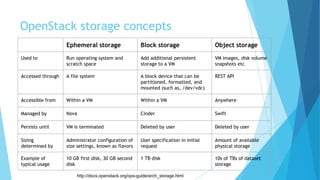
OpenStack storage concepts
Ephemeral storage Block storage Object storage
Used to Run operating system and
scratch space
Add additional persistent
storage to a VM
VM images, disk volume
snapshots etc
Accessed through A file system A block device that can be
partitioned, formatted, and
mounted (such as, /dev/vdc)
REST API
Accessible from Within a VM Within a VM Anywhere
Managed by Nova Cinder Swift
Persists until VM is terminated Deleted by user Deleted by user
Sizing
determined by
Administrator configuration of
size settings, known as flavors
User specification in initial
request
Amount of available
physical storage
Example of
typical usage
10 GB first disk, 30 GB second
disk
1 TB disk 10s of TBs of dataset
storage
http://docs.openstack.org/ops-guide/arch_storage.html
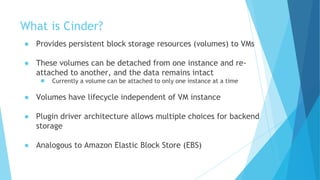
What is Cinder?
● Provides persistent block storage resources (volumes) to VMs
● These volumes can be detached from one instance and re-
attached to another, and the data remains intact
● Currently a volume can be attached to only one instance at a time
● Volumes have lifecycle independent of VM instance
● Plugin driver architecture allows multiple choices for backend
storage
● Analogous to Amazon Elastic Block Store (EBS)
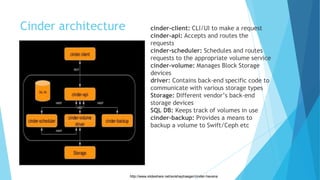
Cinder architecture cinder-client: CLI/UI to make a request
cinder-api: Accepts and routes the
requests
cinder-scheduler: Schedules and routes
requests to the appropriate volume service
cinder-volume: Manages Block Storage
devices
driver: Contains back-end specific code to
communicate with various storage types
Storage: Different vendor’s back-end
storage devices
SQL DB: Keeps track of volumes in use
cinder-backup: Provides a means to
backup a volume to Swift/Ceph etc
http://www.slideshare.net/avishaytraeger/cinder-havana
Volume API
http://developer.openstack.org/api-ref-blockstorage-v2.html
Cinder drivers
● Cinder driver maps Cinder requests to the commands required
on the external storage platform.
● Linux LVM
● Storage controllers from various hardware-specific vendors
● Distributed file systems
● Currently 50+ drivers in github
● https://github.com/openstack/cinder/tree/master/cinder/volume/drivers
● https://wiki.openstack.org/wiki/CinderSupportMatrix
● To set a volume driver, use the volume_driver flag in cinder.conf
Default is:
● volume_driver = cinder.volume.drivers.lvm.LVMISCSIDriver
Default: LVM based implementation
● Logical Volume Management (LVM)
● LVM maps physical block devices onto higher-level virtual block
devices
● Cinder-volumes are created as Logical Volumes by using LVM
● Uses iSCSI protocol to connect volumes to compute nodes
● Not vendor specific
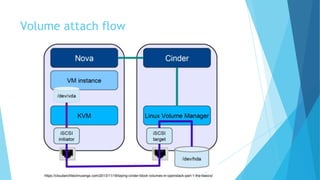
Volume attach flow
https://cloudarchitectmusings.com/2013/11/18/laying-cinder-block-volumes-in-openstack-part-1-the-basics/
Volume status
Status Description
creating The volume is being created
available The volume is ready to attach to an instance
attaching The volume is attaching to an instance
in-use The volume is attached to an instance
deleting The volume is being deleted
error A volume creation error occurred
error_deleting A volume deletion error occurred
backing_up The volume is being backed up
restoring_backup A backup is being restored to the volume
error_restoring A backup restoration error occurred
error_extending An error occurred while attempting to extend a volume
Cinder backup (c-bak)
● A backup is an archived copy of a volume. Backups are stored in an
object store.
● cinder backup-create [--incremental] [--force] <VOLUME-ID>
● incremental is a flag that indicates whether an incremental backup should be
performed
● force is a flag that allows or disallows backup of a volume when the volume is attached
to an instance (in-use)
Volume types
● Volume Type is an abstraction of various properties of a volume
● Only admins can create tiers of storage
● Differentiator based on performance, cost etc
● E.g: two LVM backends - one with SSDs, one with HDDs
● User can then specify a tier they want when creating a volume
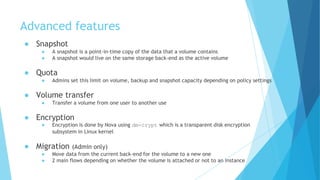
Advanced features
● Snapshot
● A snapshot is a point-in-time copy of the data that a volume contains
● A snapshot would live on the same storage back-end as the active volume
● Quota
● Admins set this limit on volume, backup and snapshot capacity depending on policy settings
● Volume transfer
● Transfer a volume from one user to another use
● Encryption
● Encryption is done by Nova using dm-crypt which is a transparent disk encryption
subsystem in Linux kernel
● Migration (Admin only)
● Move data from the current back-end for the volume to a new one
● 2 main flows depending on whether the volume is attached or not to an instance
Useful Links
● Current v2 API
● http://developer.openstack.org/api-ref-blockstorage-v2.html
● Source code
● https://github.com/openstack/cinder
● Blueprints
● https://blueprints.launchpad.net/cinder
● Bugs
● https://bugs.launchpad.net/cinder/+bugs
● Code Review
● https://review.openstack.org/#/q/project:+openstack/cinder
Lab session
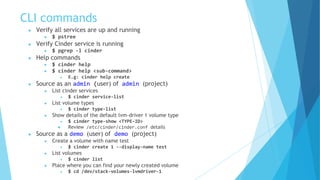
CLI commands
● Verify all services are up and running
● $ pstree
● Verify Cinder service is running
● $ pgrep -l cinder
● Help commands
● $ cinder help
● $ cinder help <sub-command>
● E.g: cinder help create
● Source as an admin (user) of admin (project)
● List cinder services
● $ cinder service-list
● List volume types
● $ cinder type-list
● Show details of the default lvm-driver 1 volume type
● $ cinder type-show <TYPE-ID>
● Review /etc/cinder/cinder.conf details
● Source as a demo (user) of demo (project)
● Create a volume with name test
● $ cinder create 1 --display-name test
● List volumes
● $ cinder list
● Place where you can find your newly created volume
● $ cd /dev/stack-volumes-lvmdriver-1
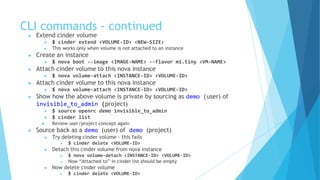
CLI commands - continued
● Extend cinder volume
● $ cinder extend <VOLUME-ID> <NEW-SIZE>
● This works only when volume is not attached to an instance
● Create an instance
● $ nova boot --image <IMAGE-NAME> --flavor m1.tiny <VM-NAME>
● Attach cinder volume to this nova instance
● $ nova volume-attach <INSTANCE-ID> <VOLUME-ID>
● Attach cinder volume to this nova instance
● $ nova volume-attach <INSTANCE-ID> <VOLUME-ID>
● Show how the above volume is private by sourcing as demo (user) of
invisible_to_admin (project)
● $ source openrc demo invisible_to_admin
● $ cinder list
● Review user/project concept again
● Source back as a demo (user) of demo (project)
● Try deleting cinder volume - this fails
● $ cinder delete <VOLUME-ID>
● Detach this cinder volume from nova instance
● $ nova volume-detach <INSTANCE-ID> <VOLUME-ID>
● Now “Attached to” in cinder list should be empty
● Now delete cinder volume
● $ cinder delete <VOLUME-ID>
Advanced CLI
● https://www.youtube.com/watch?v=DvnoCTjLuWY
● Play data security video which shows
● As an admin, create a new volume-type which supports encryption
● As a demo user, create a volume of encrypted volume-type
● Making file system and mounting the newly created volume
● Create a file in that volume with some text and show how it gets encrypted.
Thank You!

OpenStack Cinder

  • 1.
    OpenStack Block Storage Service Codename:Cinder Deepti Ramakrishna Software Engineer, Intel
  • 2.
    OpenStack storage concepts Ephemeralstorage Block storage Object storage Used to Run operating system and scratch space Add additional persistent storage to a VM VM images, disk volume snapshots etc Accessed through A file system A block device that can be partitioned, formatted, and mounted (such as, /dev/vdc) REST API Accessible from Within a VM Within a VM Anywhere Managed by Nova Cinder Swift Persists until VM is terminated Deleted by user Deleted by user Sizing determined by Administrator configuration of size settings, known as flavors User specification in initial request Amount of available physical storage Example of typical usage 10 GB first disk, 30 GB second disk 1 TB disk 10s of TBs of dataset storage http://docs.openstack.org/ops-guide/arch_storage.html
  • 3.
    What is Cinder? ●Provides persistent block storage resources (volumes) to VMs ● These volumes can be detached from one instance and re- attached to another, and the data remains intact ● Currently a volume can be attached to only one instance at a time ● Volumes have lifecycle independent of VM instance ● Plugin driver architecture allows multiple choices for backend storage ● Analogous to Amazon Elastic Block Store (EBS)
  • 4.
    Cinder architecture cinder-client:CLI/UI to make a request cinder-api: Accepts and routes the requests cinder-scheduler: Schedules and routes requests to the appropriate volume service cinder-volume: Manages Block Storage devices driver: Contains back-end specific code to communicate with various storage types Storage: Different vendor’s back-end storage devices SQL DB: Keeps track of volumes in use cinder-backup: Provides a means to backup a volume to Swift/Ceph etc http://www.slideshare.net/avishaytraeger/cinder-havana
  • 5.
  • 6.
    Cinder drivers ● Cinderdriver maps Cinder requests to the commands required on the external storage platform. ● Linux LVM ● Storage controllers from various hardware-specific vendors ● Distributed file systems ● Currently 50+ drivers in github ● https://github.com/openstack/cinder/tree/master/cinder/volume/drivers ● https://wiki.openstack.org/wiki/CinderSupportMatrix ● To set a volume driver, use the volume_driver flag in cinder.conf Default is: ● volume_driver = cinder.volume.drivers.lvm.LVMISCSIDriver
  • 7.
    Default: LVM basedimplementation ● Logical Volume Management (LVM) ● LVM maps physical block devices onto higher-level virtual block devices ● Cinder-volumes are created as Logical Volumes by using LVM ● Uses iSCSI protocol to connect volumes to compute nodes ● Not vendor specific
  • 8.
  • 9.
    Volume status Status Description creatingThe volume is being created available The volume is ready to attach to an instance attaching The volume is attaching to an instance in-use The volume is attached to an instance deleting The volume is being deleted error A volume creation error occurred error_deleting A volume deletion error occurred backing_up The volume is being backed up restoring_backup A backup is being restored to the volume error_restoring A backup restoration error occurred error_extending An error occurred while attempting to extend a volume
  • 10.
    Cinder backup (c-bak) ●A backup is an archived copy of a volume. Backups are stored in an object store. ● cinder backup-create [--incremental] [--force] <VOLUME-ID> ● incremental is a flag that indicates whether an incremental backup should be performed ● force is a flag that allows or disallows backup of a volume when the volume is attached to an instance (in-use)
  • 11.
    Volume types ● VolumeType is an abstraction of various properties of a volume ● Only admins can create tiers of storage ● Differentiator based on performance, cost etc ● E.g: two LVM backends - one with SSDs, one with HDDs ● User can then specify a tier they want when creating a volume
  • 12.
    Advanced features ● Snapshot ●A snapshot is a point-in-time copy of the data that a volume contains ● A snapshot would live on the same storage back-end as the active volume ● Quota ● Admins set this limit on volume, backup and snapshot capacity depending on policy settings ● Volume transfer ● Transfer a volume from one user to another use ● Encryption ● Encryption is done by Nova using dm-crypt which is a transparent disk encryption subsystem in Linux kernel ● Migration (Admin only) ● Move data from the current back-end for the volume to a new one ● 2 main flows depending on whether the volume is attached or not to an instance
  • 13.
    Useful Links ● Currentv2 API ● http://developer.openstack.org/api-ref-blockstorage-v2.html ● Source code ● https://github.com/openstack/cinder ● Blueprints ● https://blueprints.launchpad.net/cinder ● Bugs ● https://bugs.launchpad.net/cinder/+bugs ● Code Review ● https://review.openstack.org/#/q/project:+openstack/cinder
  • 14.
  • 15.
    CLI commands ● Verifyall services are up and running ● $ pstree ● Verify Cinder service is running ● $ pgrep -l cinder ● Help commands ● $ cinder help ● $ cinder help <sub-command> ● E.g: cinder help create ● Source as an admin (user) of admin (project) ● List cinder services ● $ cinder service-list ● List volume types ● $ cinder type-list ● Show details of the default lvm-driver 1 volume type ● $ cinder type-show <TYPE-ID> ● Review /etc/cinder/cinder.conf details ● Source as a demo (user) of demo (project) ● Create a volume with name test ● $ cinder create 1 --display-name test ● List volumes ● $ cinder list ● Place where you can find your newly created volume ● $ cd /dev/stack-volumes-lvmdriver-1
  • 16.
    CLI commands -continued ● Extend cinder volume ● $ cinder extend <VOLUME-ID> <NEW-SIZE> ● This works only when volume is not attached to an instance ● Create an instance ● $ nova boot --image <IMAGE-NAME> --flavor m1.tiny <VM-NAME> ● Attach cinder volume to this nova instance ● $ nova volume-attach <INSTANCE-ID> <VOLUME-ID> ● Attach cinder volume to this nova instance ● $ nova volume-attach <INSTANCE-ID> <VOLUME-ID> ● Show how the above volume is private by sourcing as demo (user) of invisible_to_admin (project) ● $ source openrc demo invisible_to_admin ● $ cinder list ● Review user/project concept again ● Source back as a demo (user) of demo (project) ● Try deleting cinder volume - this fails ● $ cinder delete <VOLUME-ID> ● Detach this cinder volume from nova instance ● $ nova volume-detach <INSTANCE-ID> <VOLUME-ID> ● Now “Attached to” in cinder list should be empty ● Now delete cinder volume ● $ cinder delete <VOLUME-ID>
  • 17.
    Advanced CLI ● https://www.youtube.com/watch?v=DvnoCTjLuWY ●Play data security video which shows ● As an admin, create a new volume-type which supports encryption ● As a demo user, create a volume of encrypted volume-type ● Making file system and mounting the newly created volume ● Create a file in that volume with some text and show how it gets encrypted.
  • 18.