vanguardvisionsconsulting.com.au
Choosing the right learning
management system (LMS) / virtual
learning environment (VLE)
Allison Miller
Director, Vanguard Visions
14th Global Mindset conference on
Blended and Online Learning
Sydney - 25th August 2015
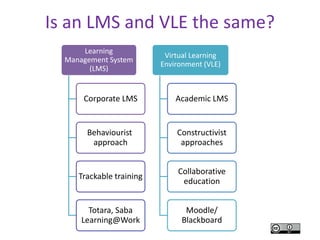
Is an LMS and VLE the same?
Learning
Management System
(LMS)
Corporate LMS
Behaviourist
approach
Trackable training
Totara, Saba
Learning@Work
Virtual Learning
Environment (VLE)
Academic LMS
Constructivist
approaches
Collaborative
education
Moodle/
Blackboard
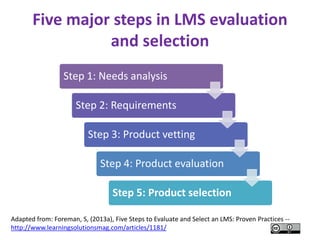
Five major steps in LMS evaluation
and selection
Step 1: Needs analysis
Step 2: Requirements
Step 3: Product vetting
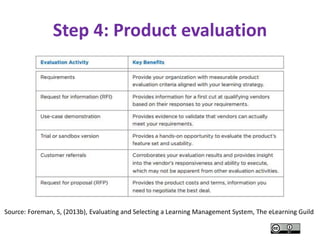
Step 4: Product evaluation
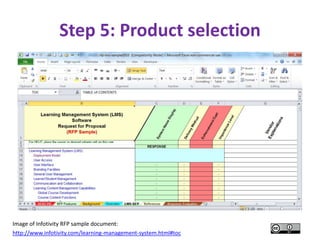
Step 5: Product selection
Adapted from: Foreman, S, (2013a), Five Steps to Evaluate and Select an LMS: Proven Practices --
http://www.learningsolutionsmag.com/articles/1181/
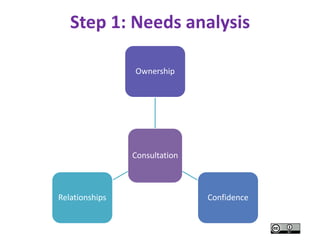
Step 1: Needs analysis
Consultation
Ownership
ConfidenceRelationships
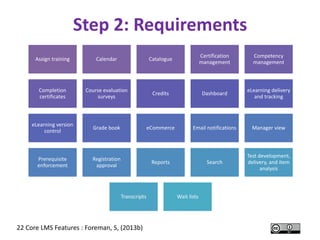
Assign training Calendar Catalogue
Certification
management
Competency
management
Completion
certificates
Course evaluation
surveys
Credits Dashboard
eLearning delivery
and tracking
eLearning version
control
Grade book eCommerce Email notifications Manager view
Prerequisite
enforcement
Registration
approval
Reports Search
Test development,
delivery, and item
analysis
Transcripts Wait lists
22 Core LMS Features : Foreman, S, (2013b)
Step 2: Requirements
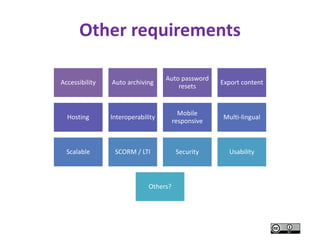
Other requirements
Accessibility Auto archiving
Auto password
resets
Export content
Hosting Interoperability
Mobile
responsive
Multi-lingual
Scalable SCORM / LTI Security Usability
Others?
Step 3: Product vetting
CC-BY Image: Tick button image from Wikimedia - https://commons.wikimedia.org/wiki/File:Tick_button_image.jpg
Step 4: Product evaluation
Source: Foreman, S, (2013b), Evaluating and Selecting a Learning Management System, The eLearning Guild
Step 5: Product selection
Image of Infotivity RFP sample document:
http://www.infotivity.com/learning-management-system.html#toc
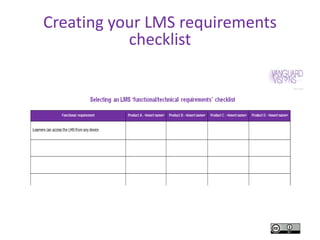
Creating your LMS requirements
checklist
vanguardvisions.com.au
Allison Miller
0400 732 270
allison@vanguardvisions.com.au
vanguardvisions.com.au
linkedin.com/in/theother66
Register for eUpdates: bit.ly/digitalcapability
Connect on:
Twitter - twitter.com/designnlearning
Facebook - facebook.com/designinglearning

Choosing the right learning management system (LMS) / virtual learning environment (VLE)

  • 1.
    vanguardvisionsconsulting.com.au Choosing the rightlearning management system (LMS) / virtual learning environment (VLE) Allison Miller Director, Vanguard Visions 14th Global Mindset conference on Blended and Online Learning Sydney - 25th August 2015
  • 2.
    Is an LMSand VLE the same? Learning Management System (LMS) Corporate LMS Behaviourist approach Trackable training Totara, Saba Learning@Work Virtual Learning Environment (VLE) Academic LMS Constructivist approaches Collaborative education Moodle/ Blackboard
  • 3.
    Five major stepsin LMS evaluation and selection Step 1: Needs analysis Step 2: Requirements Step 3: Product vetting Step 4: Product evaluation Step 5: Product selection Adapted from: Foreman, S, (2013a), Five Steps to Evaluate and Select an LMS: Proven Practices -- http://www.learningsolutionsmag.com/articles/1181/
  • 4.
    Step 1: Needsanalysis Consultation Ownership ConfidenceRelationships
  • 5.
    Assign training CalendarCatalogue Certification management Competency management Completion certificates Course evaluation surveys Credits Dashboard eLearning delivery and tracking eLearning version control Grade book eCommerce Email notifications Manager view Prerequisite enforcement Registration approval Reports Search Test development, delivery, and item analysis Transcripts Wait lists 22 Core LMS Features : Foreman, S, (2013b) Step 2: Requirements
  • 6.
    Other requirements Accessibility Autoarchiving Auto password resets Export content Hosting Interoperability Mobile responsive Multi-lingual Scalable SCORM / LTI Security Usability Others?
  • 7.
    Step 3: Productvetting CC-BY Image: Tick button image from Wikimedia - https://commons.wikimedia.org/wiki/File:Tick_button_image.jpg
  • 8.
    Step 4: Productevaluation Source: Foreman, S, (2013b), Evaluating and Selecting a Learning Management System, The eLearning Guild
  • 9.
    Step 5: Productselection Image of Infotivity RFP sample document: http://www.infotivity.com/learning-management-system.html#toc
  • 10.
    Creating your LMSrequirements checklist
  • 11.
    vanguardvisions.com.au Allison Miller 0400 732270 allison@vanguardvisions.com.au vanguardvisions.com.au linkedin.com/in/theother66 Register for eUpdates: bit.ly/digitalcapability Connect on: Twitter - twitter.com/designnlearning Facebook - facebook.com/designinglearning

Editor's Notes

  • #2 Introduce yourself In education and training for more than 20 years Passion about helping people grow and achieve their goals in an ever changing world E-learning since 2005 Framework / NVELs roles Own business – Helping people succeed online esp through e-learning, e-portfolio and e-business strategies Work with prominent VET / HE organisations such as a number of universities, TAFEs and private RTOs/Colleges across Australia
  • #3 Is an LMS and VLE the same? Yes and no From the user’s perspective no – they both allow users to interact with content and their behaviour is logged From the Procurement person’s perspective yes – LMS is designed to manage compliance and organisational training ie primarily for training and in-house staff development, rather than education (the act of learning), while the VLE is about supporting the learning process and offer more collaborative and personal approach to achieving their educational goals (Pinner, 2014). The Elearning Guide (2013) distinguish these two terms as: Corporate LMS – “A corporate LMS is a system for managing learners, learning program delivery, transcripts, and certifications. In general, corporate LMS products are geared toward organizations that deliver relatively short learning programs and must handle things like compliance and certification. A few widely known examples are Saba Learning@Work, SAP Success Factors Learning, SumTotal TotalLMS, Meridian Global LMS, and Cornerstone SURVEY Evaluating and Selecting a Learning Management System 8 + 1 . 7 0 7 . 5 6 6 . 8 9 9 0 www.eLearningGuild.com OnDemand Learning Cloud” Academic LMS – “An academic LMS is a system for developing, managing, and delivering learning content, generally in the context of an online classroom that replaces or augments a physical classroom. In general, academic LMS products are geared toward institutions that operate on a term or semester basis and must handle things like grade books and transfer credits. A few widely known examples are Blackboard, Canvas, Desire2Learn, eCollege, Moodle, and Sakai” For this session, I will refer to both systems as LMS, and be discussing Academic LMSs However, when considering which system to purchase keep this difference in mind. Sources: Foreman, S (2013), Evaluating and Selecting a Learning Management System, The eLearning Guild, http://www.elearningguild.com/showfile.cfm?id=5033 Pinner, R, (2014) What Is The Difference Between an LMS and a VLE? - http://elearningindustry.com/difference-between-lms-and-vle
  • #4 Foreman (2013b) found “respondents achieved higher levels of product satisfaction through the application of best-practice evaluation activities. These activities help you focus on LMS products that best support your organization’s needs and priorities; progressively narrow your list of product candidates; and ensure that the product you ultimately select will deliver the promised functionality.” pg 18 Source: Foreman, S, (2013b), Evaluating and Selecting a Learning Management System, The eLearning Guild Foreman (2013a) suggests these Five major steps in LMS evaluation and selection We will now investigate these steps. Source: Foreman, S, (2013a), Five Steps to Evaluate and Select an LMS: Proven Practices -- http://www.learningsolutionsmag.com/articles/1181/
  • #5 Step 1: Needs analysis Interview your leadership and conduct focus groups with stakeholders throughout the organization. Too often, organizations make technology decisions without adequate investigation of the strategic, operational, and technology drivers for their product choices. A thorough needs analysis engages stakeholders and sponsors throughout your organization to create a big-picture view of your learning management system needs. Clearly defined and documented requirements capture those needs and form the basis of your product selection criteria. A funnel approach narrows hundreds of products down to the handful that are best matched to your requirements. Use-case demonstrations and sandbox exploration provide evidence of a product’s capabilities that help you either validate or debunk vendor promises before you make a commitment. Getting bids from two or three vendors whose products are equally good candidates for your organization positions you to get the best terms and/or feature set for your money. Although this process may take more time and effort than you may have anticipated, it helps ensure that you make the optimum decision and end up with an LMS that is best suited to your needs. Benefits as well. Stakeholders have more ownership of the resulting decision and become acclimated to the product in advance of implementation. Sponsors have increased confidence in the decision because of the due diligence involved in the process. The learning organization builds relationships with its customers, sponsors, stakeholders, and IT, all of which helps set the stage for implementation. Buying an LMS is not easy; just ask all the people and organizations who’ve tried (some more than once). It requires due diligence and smart, strategic thinking. Whatever your organization’s experience is or has been, you stand a much better chance for success and satisfaction with your product if you follow proven practices in evaluating and selecting an LMS. Source: Foreman, S, (2013a), Five Steps to Evaluate and Select an LMS: Proven Practices -- http://www.learningsolutionsmag.com/articles/1181/
  • #6 Step 2: Requirements (Functional/Technical ) Requirements form the basis of your LMS selection criteria. The clearer and more complete your LMS requirements, the easier it is to evaluate products. Focus on what learners or administrators must be able to do with the LMS. If you end up with somewhere between 30 and 60 requirements, you’re probably at the right level of detail. Functional requirements describe what the system must be able to do from a learning management perspective. Technical requirements describe how the system must fit into the broader IT enterprise infrastructure. 22 Core LMS features (2013b): • Assign training: The ability to require learners to complete specific training by a due date. • Calendar: A calendar view of scheduled course offerings. • Catalogue: A hierarchical menu of learning programs that learners can browse. • Certification management: The ability to award, track, and renew learner certifications. • Competency management: A list of competencies that you can associate with jobs and learning activities. • Completion certificates: A diploma that learners can view or print upon completing a learning program. • Course evaluation surveys: A survey that learners who have completed a learning program can take. • Credits: Tracking of various types of credits for completed learning programs, such as continuing education units. • Dashboard: Graphical, on-screen learning program utilization and results reports. • eLearning delivery and tracking: The ability for learners to launch eLearning courses and track progress and results. • eLearning version control: The ability to replace a course with a new version while keeping track of historical versions. • Grade book: A view of a learner’s progress and test scores for a multi-activity course or curriculum. • eCommerce: Payment for courses via credit card, purchase order, or other methods. • Email notifications: Messages sent to confirm transactions or to alert or remind learners of actions to take. • Manager view: The ability for a manager to view the training records of direct reports. • Prerequisite enforcement: System verification that a learner has achieved prerequisites before allowing registration in a course. • Registration approval: The requirement for manager or administrator approval before allowing registration in a course. • Reports: Results and utilization data for viewing, printing, and distributing. • Search: The ability to enter words or phrases that yield a list of relevant learning programs. • Test development, delivery, and item analysis: The ability to create and deliver online tests and determine test validity based on aggregate results. • Transcripts: A complete record of the learning programs in progress and those completed by a learner. • Wait lists: Automated management of overbooked classes.
  • #7 22 Core LMS features: • Assign training: The ability to require learners to complete specific training by a due date. • Calendar: A calendar view of scheduled course offerings. • Catalogue: A hierarchical menu of learning programs that learners can browse. • Certification management: The ability to award, track, and renew learner certifications. • Competency management: A list of competencies that you can associate with jobs and learning activities. • Completion certificates: A diploma that learners can view or print upon completing a learning program. • Course evaluation surveys: A survey that learners who have completed a learning program can take. • Credits: Tracking of various types of credits for completed learning programs, such as continuing education units. • Dashboard: Graphical, on-screen learning program utilization and results reports. • eLearning delivery and tracking: The ability for learners to launch eLearning courses and track progress and results. • eLearning version control: The ability to replace a course with a new version while keeping track of historical versions. • Grade book: A view of a learner’s progress and test scores for a multi-activity course or curriculum. • eCommerce: Payment for courses via credit card, purchase order, or other methods. • Email notifications: Messages sent to confirm transactions or to alert or remind learners of actions to take. • Manager view: The ability for a manager to view the training records of direct reports. • Prerequisite enforcement: System verification that a learner has achieved prerequisites before allowing registration in a course. • Registration approval: The requirement for manager or administrator approval before allowing registration in a course. • Reports: Results and utilization data for viewing, printing, and distributing. • Search: The ability to enter words or phrases that yield a list of relevant learning programs. • Test development, delivery, and item analysis: The ability to create and deliver online tests and determine test validity based on aggregate results. • Transcripts: A complete record of the learning programs in progress and those completed by a learner. • Wait lists: Automated management of overbooked classes.
  • #8 Step 3: Product vetting There are hundreds of LMS products available in the marketplace. Your first challenge is to narrow your choices to a short list of products. One way to accomplish this is to identify eight-to-ten distinctive requirements that can help you rule out non-qualifying products. For example, not all LMS products support multiple languages. If this is critical for you, this makes the requirement for multi-language support a good vetting criterion. Similarly, not all products comply with specific accessibility and security regulations; also good vetting criteria. Once you have defined a set of vetting criteria, you can research product web sites and/or contact vendors to inquire about their product’s support for each vetting criterion. Select a short list of products, perhaps eight-to-twelve, which meet the most vetting criteria. You will evaluate these products in more detail. Source: Foreman, S, (2013a), Five Steps to Evaluate and Select an LMS: Proven Practices -- http://www.learningsolutionsmag.com/articles/1181/
  • #9 Step 4: Product evaluation The product evaluation process works like a funnel. With each step in the process, you rule out non-qualifying products and continue evaluating those that best meet your requirements. You will achieve the best results by performing all of these suggested evaluation activities.
  • #10 Step 5: Product selection The final step is to settle on a product. If possible, you can place your organization in a strong position to negotiate the best pricing and terms by selecting two or three finalist products, any of which will meet your needs. LMS vendors are eager to gain your business. Send a request for proposal (RFP) to each of your finalists asking for pricing quotes, implementation timeframes, and support options. Be sure to ask for hosting options and pricing if you have elected to purchase a cloud solution. Compare the responses, and don’t be afraid to go back to each vendor to ask them for a better price or more feature options comparable to incentives the other vendor finalists are offering. You can purchase an LMS Request for Proposal (RFP) tool eg http://www.infotivity.com/learning-management-system.html#toc which has over 1300 selection criteria and analysis and compares responses Source: Foreman, S, (2013a), Five Steps to Evaluate and Select an LMS: Proven Practices -- http://www.learningsolutionsmag.com/articles/1181/
  • #11 Handouts copy of slides 6/7 Selecting an LMS ‘functional / technical’ requirements checklist Participants to work in groups of 2-3. Discuss own requirements Populate checklist Feedback to whole group features they would select