Session 802: We Are Ready for a New LMS...
Now What?
Christina Holloway,
American Physical Therapy Association
Suzanne Armstrong, United Educators
Las Vegas, NV
September 30 – October 2, 2015
Polling Questions for today’s session can be accessed:
PollEv.com/suzannearmst507(web enabled devices)
OR
Text answers to: 22333(standard SMS data rates apply)
Introduction
Handouts available:
devlearn15.com/resources
2
• Identify criteria to consider when selecting a new LMS for your organization
• Identify project management techniques and communication strategies for stakeholders,
vendors, and your team
• Develop a transition plan for both internal and external stakeholders
• Recognize common pitfalls to avoid when you are in the trenches of data migration
Learning Objectives
Identify criteria to consider when selecting a new LMS for
your organization
Identify project management techniques and communication
strategies for stakeholders, vendors, and your team
Develop a transition plan for both internal and external
stakeholders
Recognize common pitfalls to avoid when you are in the
trenches of data migration
Handouts available: devlearn15.com/resources3
Select the Vendor
x
5
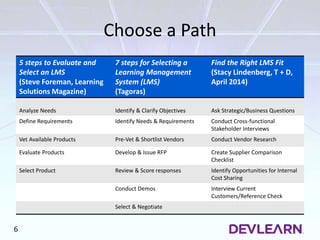
Choose a Path
5 steps to Evaluate and
Select an LMS
(Steve Foreman, Learning
Solutions Magazine)
7 steps for Selecting a
Learning Management
System (LMS)
(Tagoras)
Find the Right LMS Fit
(Stacy Lindenberg, T + D,
April 2014)
Analyze Needs Identify & Clarify Objectives Ask Strategic/Business Questions
Define Requirements Identify Needs & Requirements Conduct Cross-functional
Stakeholder Interviews
Vet Available Products Pre-Vet & Shortlist Vendors Conduct Vendor Research
Evaluate Products Develop & Issue RFP Create Supplier Comparison
Checklist
Select Product Review & Score responses Identify Opportunities for Internal
Cost Sharing
Conduct Demos Interview Current
Customers/Reference Check
Select & Negotiate
6
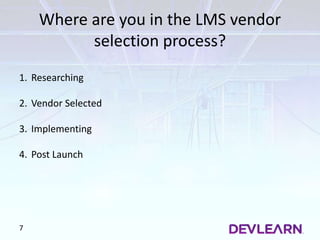
Where are you in the LMS vendor
selection process?
7
1. Researching
2. Vendor Selected
3. Implementing
4. Post Launch
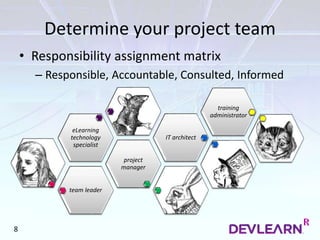
team leader
project
manager
eLearning
technology
specialist
IT architect
training
administrator
Determine your project team
• Responsibility assignment matrix
– Responsible, Accountable, Consulted, Informed
8
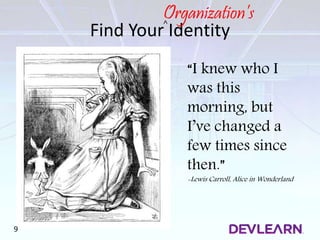
Find Your Identity
“I knew who I
was this
morning, but
I’ve changed a
few times since
then.”
-Lewis Carroll, Alice in Wonderland
9
Organization’s˄
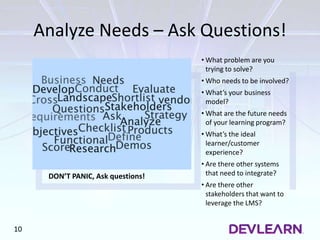
Analyze Needs – Ask Questions!
DON’T PANIC, Ask questions!
• What problem are you
trying to solve?
• Who needs to be involved?
• What’s your business
model?
• What are the future needs
of your learning program?
• What’s the ideal
learner/customer
experience?
• Are there other systems
that need to integrate?
• Are there other
stakeholders that want to
leverage the LMS?
10
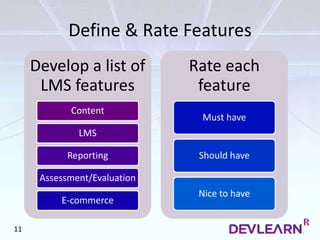
Define & Rate Features
Develop a list of
LMS features
Content
LMS
Reporting
Assessment/Evaluation
E-commerce
Rate each
feature
Must have
Should have
Nice to have
11
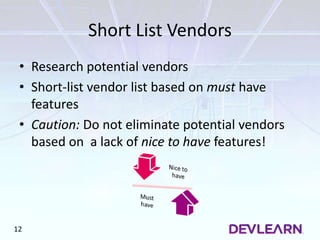
Short List Vendors
• Research potential vendors
• Short-list vendor list based on must have
features
• Caution: Do not eliminate potential vendors
based on a lack of nice to have features!
12
Develop & Send RFP
13
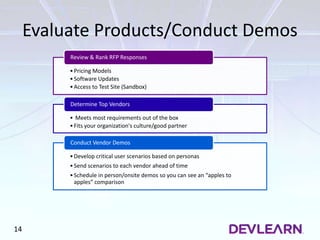
Evaluate Products/Conduct Demos
•Pricing Models
•Software Updates
•Access to Test Site (Sandbox)
Review & Rank RFP Responses
• Meets most requirements out of the box
•Fits your organization's culture/good partner
Determine Top Vendors
•Develop critical user scenarios based on personas
•Send scenarios to each vendor ahead of time
•Schedule in person/onsite demos so you can see an “apples to
apples” comparison
Conduct Vendor Demos
14
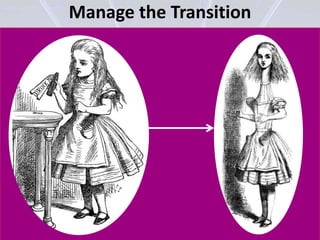
Manage the Transition
16
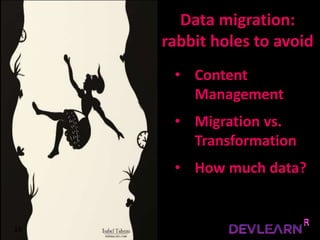
• Content
Management
• Migration vs.
Transformation
• How much data?
Data migration:
rabbit holes to avoid
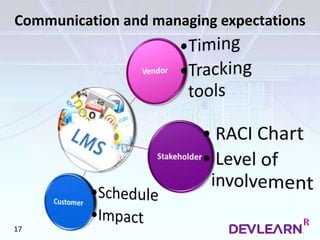
Communication and managing expectations
17
Develop an Adoption Plan
Launch Strategy
Hard Launch
Consumer driven
Immediate feedback
Large budget
Stable & reliable
Soft Launch
Business driven
Ongoing feedback
Flexibility for updates
Determine pricing
19
Spreading Awareness
Branding
Rollout
Stakeholder
Champion
Incentives for
use
• Launch party
• Staff brown bag
• Prize for survey
response
20
Connect with Us
Christina Holloway Suzanne Armstrong
sparmstro3@gmail.com@ cm_holloway
christina.holloway26@gmail.com
21

DL15_802_HollowayArmstrong_postevent

  • 1.
    Session 802: WeAre Ready for a New LMS... Now What? Christina Holloway, American Physical Therapy Association Suzanne Armstrong, United Educators Las Vegas, NV September 30 – October 2, 2015 Polling Questions for today’s session can be accessed: PollEv.com/suzannearmst507(web enabled devices) OR Text answers to: 22333(standard SMS data rates apply)
  • 2.
  • 3.
    • Identify criteriato consider when selecting a new LMS for your organization • Identify project management techniques and communication strategies for stakeholders, vendors, and your team • Develop a transition plan for both internal and external stakeholders • Recognize common pitfalls to avoid when you are in the trenches of data migration Learning Objectives Identify criteria to consider when selecting a new LMS for your organization Identify project management techniques and communication strategies for stakeholders, vendors, and your team Develop a transition plan for both internal and external stakeholders Recognize common pitfalls to avoid when you are in the trenches of data migration Handouts available: devlearn15.com/resources3
  • 5.
  • 6.
    Choose a Path 5steps to Evaluate and Select an LMS (Steve Foreman, Learning Solutions Magazine) 7 steps for Selecting a Learning Management System (LMS) (Tagoras) Find the Right LMS Fit (Stacy Lindenberg, T + D, April 2014) Analyze Needs Identify & Clarify Objectives Ask Strategic/Business Questions Define Requirements Identify Needs & Requirements Conduct Cross-functional Stakeholder Interviews Vet Available Products Pre-Vet & Shortlist Vendors Conduct Vendor Research Evaluate Products Develop & Issue RFP Create Supplier Comparison Checklist Select Product Review & Score responses Identify Opportunities for Internal Cost Sharing Conduct Demos Interview Current Customers/Reference Check Select & Negotiate 6
  • 7.
    Where are youin the LMS vendor selection process? 7 1. Researching 2. Vendor Selected 3. Implementing 4. Post Launch
  • 8.
    team leader project manager eLearning technology specialist IT architect training administrator Determineyour project team • Responsibility assignment matrix – Responsible, Accountable, Consulted, Informed 8
  • 9.
    Find Your Identity “Iknew who I was this morning, but I’ve changed a few times since then.” -Lewis Carroll, Alice in Wonderland 9 Organization’s˄
  • 10.
    Analyze Needs –Ask Questions! DON’T PANIC, Ask questions! • What problem are you trying to solve? • Who needs to be involved? • What’s your business model? • What are the future needs of your learning program? • What’s the ideal learner/customer experience? • Are there other systems that need to integrate? • Are there other stakeholders that want to leverage the LMS? 10
  • 11.
    Define & RateFeatures Develop a list of LMS features Content LMS Reporting Assessment/Evaluation E-commerce Rate each feature Must have Should have Nice to have 11
  • 12.
    Short List Vendors •Research potential vendors • Short-list vendor list based on must have features • Caution: Do not eliminate potential vendors based on a lack of nice to have features! 12
  • 13.
  • 14.
    Evaluate Products/Conduct Demos •PricingModels •Software Updates •Access to Test Site (Sandbox) Review & Rank RFP Responses • Meets most requirements out of the box •Fits your organization's culture/good partner Determine Top Vendors •Develop critical user scenarios based on personas •Send scenarios to each vendor ahead of time •Schedule in person/onsite demos so you can see an “apples to apples” comparison Conduct Vendor Demos 14
  • 15.
  • 16.
    16 • Content Management • Migrationvs. Transformation • How much data? Data migration: rabbit holes to avoid
  • 17.
  • 18.
  • 19.
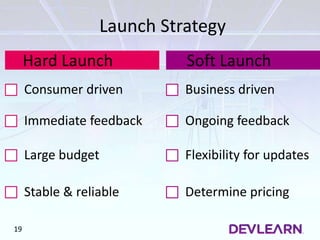
    Launch Strategy Hard Launch Consumerdriven Immediate feedback Large budget Stable & reliable Soft Launch Business driven Ongoing feedback Flexibility for updates Determine pricing 19
  • 20.
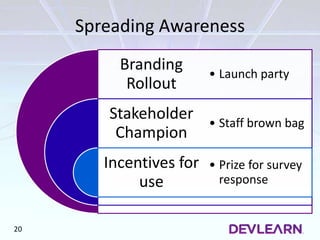
    Spreading Awareness Branding Rollout Stakeholder Champion Incentives for use •Launch party • Staff brown bag • Prize for survey response 20
  • 21.
    Connect with Us ChristinaHolloway Suzanne Armstrong sparmstro3@gmail.com@ cm_holloway christina.holloway26@gmail.com 21

Editor's Notes

  • #2 Let’s go ahead and get started… Welcome to our session today, we’re excited you’re here! We realize it’s the last day of the conference and that you may be suffering from conference fatigue, so we really appreciate you being here. (pause) Let me introduce myself. My name is Suzanne Armstrong, I’m currently the Director of Learning Programs at United Educators, an insurance company that serves the education market. In my current role, I manage a team of 3 e-learning instructional designers and 1 multimedia developer. I previously worked at the Society for Human Resource Management (SHRM) in capacity of eLearning Manager and the American Physical Therapy Association, as a senior specialist responsible for the online learning initiative, which is where I met Christina Holloway. Christina? (CH does her introduction). CH Transitions into Intro slide.
  • #3 “Would you tell me, please, which way I ought to go from here?' 'That depends a good deal on where you want to get to,' said the Cat. 'I don't much care where -' said Alice. 'Then it doesn't matter which way you go,' said the Cat. '- so long as I get SOMEWHERE,' Alice added as an explanation. 'Oh, you're sure to do that,' said the Cat, 'if you only walk long enough.” --Lewis Carroll, Alice in Wonderland Christina: Alice in Wonderland, she was tired of her reality and decided to follow a little white rabbit into a new reality Alice finds herself in many interesting situations where she needs to make many confusing decisions She started dreaming up a new reality that was more interesting but more complex. Today, our story is about how our reality at APTA was that we were tired of our existing LMS and like Alice, we dropped down a rabbit hole and discovered our new reality. Suzanne: I’m here speaking on behalf of my experience at APTA and SHRM in selecting a new LMS vendor. When I took over at SHRM, it was clear the organization was just emerging from the rabbit hole it dropped down during its previous LMS implementation. Once your in a hole, it ‘s difficult to dig yourself out & usually results in extra time, resources and budget. So, let’s dive in. "Alice par John Tenniel 04". Licensed under Public Domain via Wikimedia Commons - https://commons.wikimedia.org/wiki/File:Alice_par_John_Tenniel_04.png#/media/File:Alice_par_John_Tenniel_04.png
  • #4 Tell a story here instead? “Begin at the beginning," the King said, very gravely, "and go on till you come to the end: then stop.”  --Lewis Carroll, Alice in Wonderland (Suzanne) Keep high level Here are our learning objectives for today. We’ve divided our presentation into 4 segments: the reviews the process for selecting a vendor and how to determine/rate criteria for doing so. we’ll review project management techniques and communication strategies for stakeholders. We’ll outline useful techniques for change management And, we’ll take a look at common pitfalls to avoid during data migration. We’ve also provided some templates that we’ve utilized at various stages of the LMS vendor selection/implementation process. They are available online in a zip file (not available in the app).
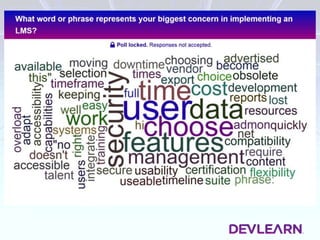
  • #5 Here’s what we were thinking, now tell us what you think. Poll Title: What word or phrase represents your biggest concern in implementing an LMS? https://www.polleverywhere.com/free_text_polls/sWWPoOT8raVnKtZ
  • #6 Suzanne: Like Alice, you have to choose a path to get from your existing state to your future state. Tell story about when I first came into SHRM? To do so requires a process for selecting a new vendor. I always find it helpful to start by looking at processes used within the industry. With that, let’s review & compare 3 different vendor selection strategies and focus in on vendor select process best practices. "Alice par John Tenniel 03". Licensed under Public Domain via Wikimedia Commons - https://commons.wikimedia.org/wiki/File:Alice_par_John_Tenniel_03.png#/media/File:Alice_par_John_Tenniel_03.png
  • #7 Suzanne: We took a look at industry trends related to LMS vendor selection recommendations and have provided a comparison of how three different experts outlined the LMS vendor selection process. You’ll see even though we are looking at three different experts with different backgrounds, there is much overlap in the process. (reference bibliography) As we compare these various recommendations, you’ll see they are all really stating a similar process: First, you’re going to Analyze your needs (click to bring in star) Then, based on those needs you will define your requirements. (click for triangle) Once you have your requirements defined, you can pre-vet or shortlist vendors (RFI) you plan to send your RFP to by doing a cursory analysis of different platforms. You may want to enlist the help of someone from your IT Dept here. Then your going to develop and send your RFP. We’ll get into some examples of items to include in your RFP a little later. The organizations I’ve worked for had a pre-defined process for developing RFPs and at SHRM, we had an employee responsible for all contracts who had to review and sign off on our RFPs before they were distributed to the field. When the RFPs come back, you’ll want your core project team to review and score responses Then, you want to conduct vendor demos. This is where I really gravitate towards the middle option, by Tagoras, here as I like that “vendor demos” is provided as a separate step in the process. Not that the others didn’t mention demos but I think it’s an important process and worthy of it’s own, distinct step in the overall process. Once you select the vendor, you will negotiate the contract and again
  • #8  Poll Title: Where are you in the LMS vendor selection process? https://www.polleverywhere.com/multiple_choice_polls/q5o3XSsIzpDSQtT
  • #9  Christina: Ensure you’ve clearly defined your core project team. E-Learning tech specialist, team lead, project manager, IT architect (security, systems integration), training administrator (hand and hand with e-learning tech specialist), Handout: Good resource, RACI chart-template in the handouts. Develop a matrix of people and where they are on the decision making continuum. "Alice par John Tenniel 04". Licensed under Public Domain via Wikimedia Commons - https://commons.wikimedia.org/wiki/File:Alice_par_John_Tenniel_04.png#/media/File:Alice_par_John_Tenniel_04.png "Alice-white-rabbit" by Sir John Tenniel - “Alice’s Adventures in Wonderland” (1865). Licensed under Public Domain via Wikimedia Commons - https://commons.wikimedia.org/wiki/File:Alice-white-rabbit.jpg#/media/File:Alice-white-rabbit.jpg "Alice par John Tenniel 10" by John Tenniel (1820 – 1914), uploader user:Chti, - scanned. Licensed under Public Domain via Wikimedia Commons - https://commons.wikimedia.org/wiki/File:Alice_par_John_Tenniel_10.png#/media/File:Alice_par_John_Tenniel_10.png "Alice par John Tenniel 25" by John Tenniel - Alice in Wonderland, Illustrator: Tenniell 1st Russian Edition. Licensed under Public Domain via Wikimedia Commons - https://commons.wikimedia.org/wiki/File:Alice_par_John_Tenniel_25.png#/media/File:Alice_par_John_Tenniel_25.png "Alice par John Tenniel 31". Licensed under Public Domain via Wikimedia Commons - https://commons.wikimedia.org/wiki/File:Alice_par_John_Tenniel_31.png#/media/File:Alice_par_John_Tenniel_31.png
  • #10 So back to our story…..Alice finds herself in Wonderland where she starts to lose her identity as she goes through multiple transitions/changes. Who are you? (The caterpillar asks this of Alice)..Alice responds (use quote) Chances are, your organization has changed since the last time you implemented a new LMS and your learners needs have changed, too. This is likely why you’re looking for a new system. We’re probably all familiar with the saying “There’s nothing as constant as change.” You might feel overwhelmed as you enter into this process. After all, you might not be a technology expert, you might be an instructional designer/developer or a project manager suffering from the overwhelming feeling that “you don’t know what you don’t know.” It’s ok to feel this way but there is no need to panic (click to next slide). "Alice par John Tenniel 06". Licensed under Public Domain via Wikimedia Commons - https://commons.wikimedia.org/wiki/File:Alice_par_John_Tenniel_06.png#/media/File:Alice_par_John_Tenniel_06.png
  • #11 Suzanne – (10 mins) Who are you? (The caterpillar asks this of Alice) ….Ask questions… to reveal the criteria for consideration in selecting a vendor. What problem are you trying to solve by implementing a new LMS? You should be able to identify a specific business and/or customer need & you’ll likely have more than one. EX: You need to change your business model and your current system can’t support it. EX: At SHRM we were considering moving to a subscription based model while still offering customers the option of purchasing a-la-carte. Who needs to be involved? What are the future needs of your learning program? (current state/future state) Review existing sources of data (course evals, for example) Do market research (survey users of your system) to help identify potential needs. SHRM is fortunate enough to have market researchers within the organization, at APTA we hired a consultant to help develop a market research survey to validate needs identified during the stakeholder interview process. Interview internal and external stakeholders (colleagues/customers) At SHRM, it turned out our internal customer call center had been looking for access to an LMS to train their call center staff. Develop the ideal end-user experience (current state/future state) Ex: you want customers to be able to purchase more than one course at a time. You want users to be able to purchase courses for themselves and for other people in same transaction. You want customers to seamlessly be taken to their course page upon completion of the their purchase (B2B) You want those purchasing training for others to have access to basic reporting, etc. Are there other systems in your organization that need to integrate with the LMS? At SHRM we were moving to using a centralized shopping cart for all salable products and this was a big driver in vendor selection. Where is your customer data ultimately stored? (HRIS, SalesForce or other customer/member tracking system, ecommerce, etc)? Are there other stakeholders in the organization that want to leverage the LMS? For example, does your HR dept want to leverage the system to also provide internal staff training? Does your executive team want to utilize the LMS to provide BOD training? At SHRM, our internal interviews revealed that our seminars team was very interested in utilizing the LMS to handle aspects of live training registration and web conferencing.(registration, producing certs/tracking CEUs, web conferencing integration)? At APTA, we wanted to build out custom branded sub sites for our sister orgs and wanted our customers to be able to track CEUs from other organizations on their transcript. After you conduct stakeholder interviews, survey customers or gather data from any other sources, you’ll need to translate this into a list of features/functionality in the LMS. Then, along with your project team, you will need to rate these features (go to next slide).
  • #12 How could this relate to the story? ************************************************ HANDOUT-mention excel template. Suzanne: We’ve provided a blank template that you can utilize to help with this process. Go through each feature you’ve identified and determine is this “Must have” functionality, is it “Should Have” or is it “Nice to have?” It might be helpful to categorize your features by content/LMS/Reporting/Assessment & Eval/E-commerce or you may have other categories that make sense to you. In addition to the features that are identified via the needs analysis: Pricing Models (how will you really be charged to use this LMS?) Software updates (how often, forced to upgrade or you choose when & what features?) Access to sandbox & stage site CH: as you are going through your LMS implementation you may find that some of the features you thought were necessary become “Should” or “Nice” to haves. Ex: how many of you have planned your own wedding or a party? You will come up with decision points that change along the way. After you rated the LMS features/functionality, they you’ll want to short list vendors.
  • #13 Conduct an initial scan of the vendor field and, as needed, utilize additional resources (IT) to help you weed out vendors that you know won’t meet your needs. Perhaps the base code of security of their system doesn’t meet your organization's IT requirements or you have a specific SSO protocol that needs to be used. SHRM example, we preferred a solution that would integrate with our e-commerce platform out of the box but we didn’t eliminate vendors that did not. However, if the vendor did not integrate out of the box, our IT lead spent a lot of time interviewing and asking questions about how integrations were handled before we decided to send our RFP to that vendor. At SHRM we also needed to process B2B and B2C transactions. At APTA, we knew we needed a system that would allow us to set up custom branded subportals for what we called our “sister societies.” Conduct phone interviews or send an RFI requesting specific information that is key. Ensure you shortlist based on your must have features & be cautious with vendors who promise a must have is on their future product roadmap. If it’s on your must have list, then they need to have that functionality now, not by the time you launch. Caution: You are looking for a true partner to assist you with implementing a solution that best meets your needs. Do not eliminate potential vendors based on nice to have features! In fact, you may need to scale back your must & should haves after you scan the environment. I had good advice from a former supervisor once who told me you want to go with a product that will provide you with “80%” of your needs out of the box.
  • #14  Speak again to excel template and usefulness of having vendor rate their own features…… Be wary of vendors who tell you their system can do everything you want and ensure you ask them to demo the core features you require. If they can’t show you, then it’s likely that functionality isn’t built out yet. Be wary of a vendor that requires too many enhancements or customizations. Doing this may take you off their roadmap for future updates.
  • #15 In these final stages of the process you’ll want to review and rank your RFP responses Note: Let’s take just a minute to talk about pricing models. You likely won’t get information about pricing models until this stage of the process. Ensure your team analyzing the pricing model to ensure it fits with your vendor model I’ve worked with LMSs that: Charge extra to unlock extra features (ex: web ex integration or management of ILT) Charge by “active user” per month (contract locks you into “x” active users per month and you pay xx for overages). Charge a flat fee no matter how many users are going through the system. Determine your top vendors, and then Conduct vendor demos. In order to make the vendor demo process run smoothly, you need to prepare user scenarios based on personas and send them to the vendors ahead of time. Be clear regarding what you expect to see in the demos. If the vendor is unable to demo something you want to see, be wary. Ask to see a customer with a similar implementation (80% out of the box). Christina: Also important to select a vendor that fits with the culture of your organization. You want them to integrate well with you. When APTA came down to their short list, there was one vendor that specifically served non profits, one that was ____ , one that was _____ & their support levels were very different. Ensure during the demos you get a sense of how they deal with support of your Admins and any level 1 or 2 customer support. Pause and take questions (2 minutes, max) segue into manage transition Transition: Now that we’ve reviewed criteria to consider during vendor selection & you’ve selected your vendor, you’re ready to jump in and get started with implementation (next slide)
  • #16 You drank the potion and now you are going to implement a new LMS. Like Alice, you have to manage this transition. How are you going to decide which path to walk down? How soon to begin the transition? 1. i.e. Prep users for migration by sunsetting courses/features/etc. prior to the switch. Will help to ease the anxiety of all for moving to a new system. ii. Tough decisions will need to be made at every point of the project. Always remember to keep the user experience in mind when making a decision. System is for your end users, design it for your end users. "Alice par John Tenniel 05". Licensed under Public Domain via Wikimedia Commons - https://commons.wikimedia.org/wiki/File:Alice_par_John_Tenniel_05.png#/media/File:Alice_par_John_Tenniel_05.png "Alice par John Tenniel 08". Licensed under Public Domain via Wikimedia Commons - https://commons.wikimedia.org/wiki/File:Alice_par_John_Tenniel_08.png#/media/File:Alice_par_John_Tenniel_08.png
  • #17 Set stage of current state of APTA up front. (number of courses, not published to SCORM) Defining scope of data to migrate: Content management strategy Priority – highest impact, most visible Mapping – Competency, Curriculum 2. State of data – migration vs. transformation Revisit the requirements of your products/courses/services. Think about what the user experience should be NOT how the course should be built, then think about how the course should be built in the new system Standards for data type: SCORM, xAPI (i.e. APTA) Does the new system work? Are enhancements required? Is it worth the additional time/money/effort to enhance? QA – Review cycle for content Redesign vs. retire How much data to send at one time i.e. Learner data, send is small chunks vs. large exports, create time for testing, more agile and easier to manage data Steve Foreman (LS Mag) - move as little as possible Considerations for data retention policy i.e. IACET requires learner records stay on file for 7 years How soon to begin the transition? i.e. Prep users for migration by sunsetting courses/features/etc. prior to the switch. Will help to ease the anxiety of all for moving to a new system. Tough decisions will need to be made at every point of the project. Always remember to keep the user experience in mind when making a decision. System is for your end users, design it for your end users.
  • #18 Communication and managing expectations i. How often to expect vendor to communicate with you about status? 1. Strategy for set up of internal team (e.g., one primary PM on internal side to communicate with vendor, cross functional team, ) 2. Are you going to use an online platform to track project status (e.g., Confluence, JIRHA). If so, will you provide or do you expect your vendor to provide? 3. Who is the primary contact from vendor? Who is the backup? How is escalation handled? ii. How often are you going to communicate with stakeholders? 1. Major project milestones, major deliverables? Create a RACI chart up front to determine who/when/how often to communicate with various stakeholders (Provide example?) 2. How involved are stakeholders going to be in review of deliverables? iii. How often are you going to communicate with customers? 1. Course Bookmarking issues, Course status issues, blackout period 2. Content migration strategy - what is necessary to communicate? i.e. Cat 4 courses not migrating for APTA Autocompletes - what learners will get in new LMS 3. Consider the impact on your customer, focus on their need and who does timing impact? i.e. Relicensure cycles for PTs around the blackout time f. Template Examples: Communication Plan (CH.
  • #19 Now the new LMS is ready to go and you want your users to embrace it and explore the wonderland you helped build. How do you draw them in? Unlike the Queen of Hearts, you can’t yell “USE MY LMS, OR IT’S OFF WITH YOUR HEAD”… no… I would not suggest that. Instead I recommend a collaborative approach that encourages users to buy in from the beginning. This starts with the communication plan you set up while your in high production within your old LMS, and managing the expectations of your learners. Leveraging the information you collected during the information collection phase, identify and develop narratives surrounding the “pain in the neck” (pun intended re: the Queen of Hearts Use the use cases  you came up with during the vendor demo stage Accommodate new use cases Helps with getting internal users/customer support to adopt system Training How will you help your end user to get to know the new system? Video tutorials, FAQs, phone support "Alice par John Tenniel ". Licensed under Public Domain via Wikimedia - https://en.wikipedia.org/wiki/File:Alice-queen-hearts.jpg
  • #20 Based on how the company wants to receive user feedback – ability to continue to update content (business driven) vs. pushing sales (consumer driven) More: http://smallbusiness.chron.com/soft-launch-vs-hard-launch-24486.html http://cahootsblog.com/2013/06/26/the-difference-between-a-soft-launch-and-a-hard-launch/
  • #21 Marketing tactics for Branding roll out Major stakeholders publicly announce new system, show support for new system (Change champions) Staff brown bag sessions Launch party Incentives for use - i.e. voucher for a course, drawing for prize based on survey responses