Enhancing the
assessment
experience through
closer integration
between the SRS
and VLE
University of York, UK
Dr Richard Walker
bett 2015
January 21 - 24
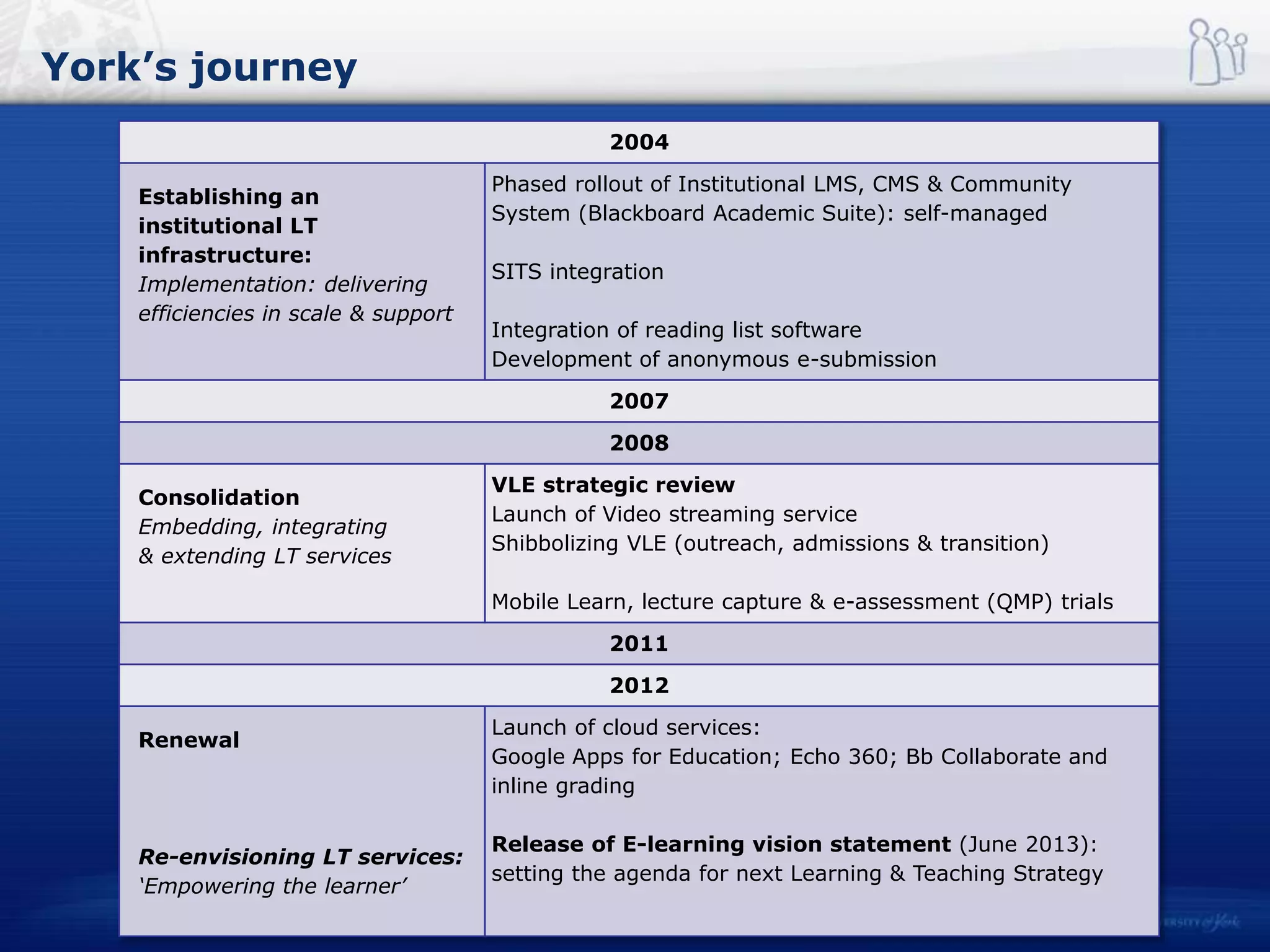
York’s journey
2004
Establishing an
institutional LT
infrastructure:
Implementation: delivering
efficiencies in scale & support
Phased rollout of Institutional LMS, CMS & Community
System (Blackboard Academic Suite): self-managed
SITS integration
Integration of reading list software
Development of anonymous e-submission
2007
2008
Consolidation
Embedding, integrating
& extending LT services
VLE strategic review
Launch of Video streaming service
Shibbolizing VLE (outreach, admissions & transition)
Mobile Learn, lecture capture & e-assessment (QMP) trials
2011
2012
Renewal
Re-envisioning LT services:
‘Empowering the learner’
Launch of cloud services:
Google Apps for Education; Echo 360; Bb Collaborate and
inline grading
Release of E-learning vision statement (June 2013):
setting the agenda for next Learning & Teaching Strategy
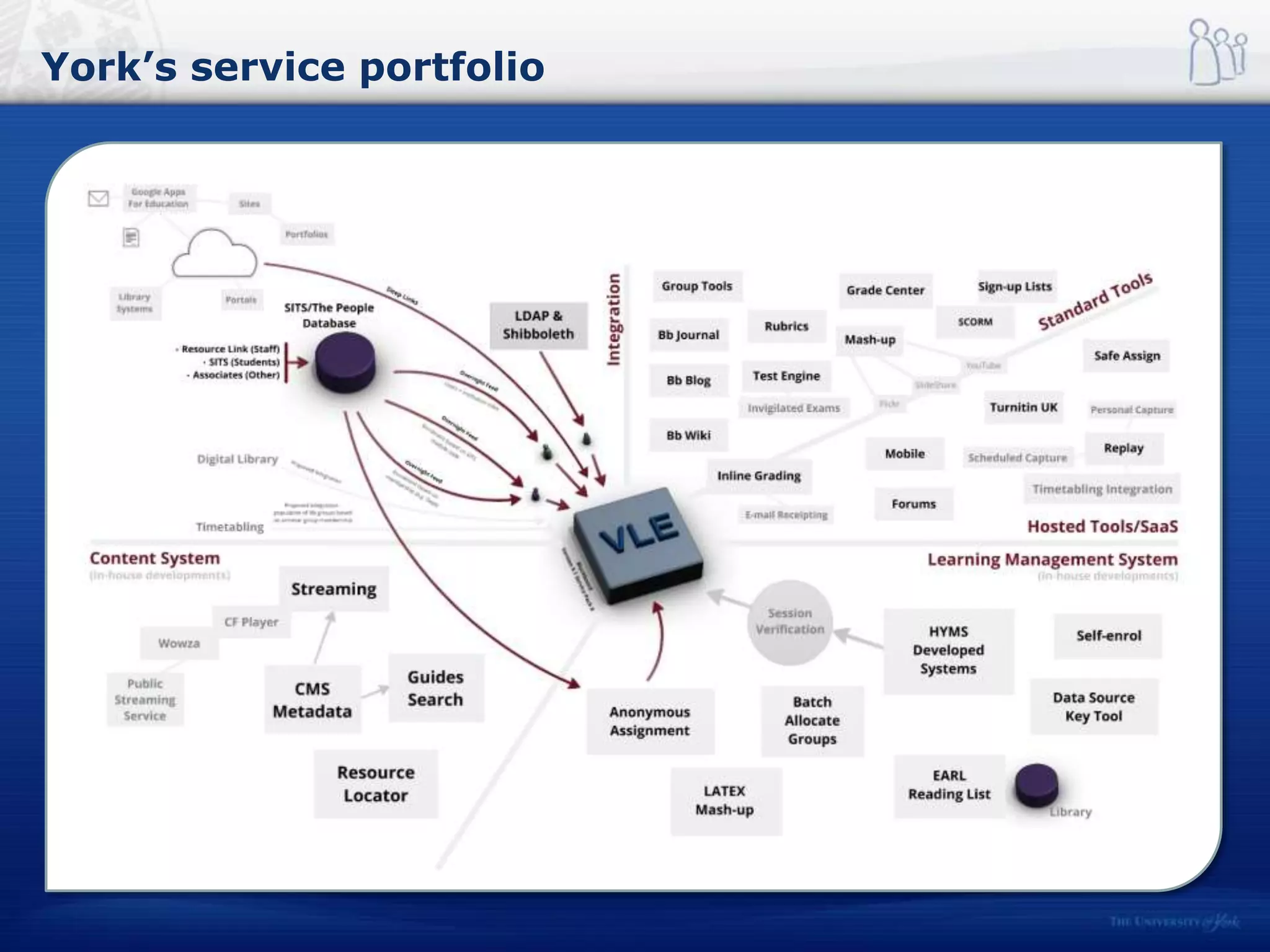
York’s service portfolio
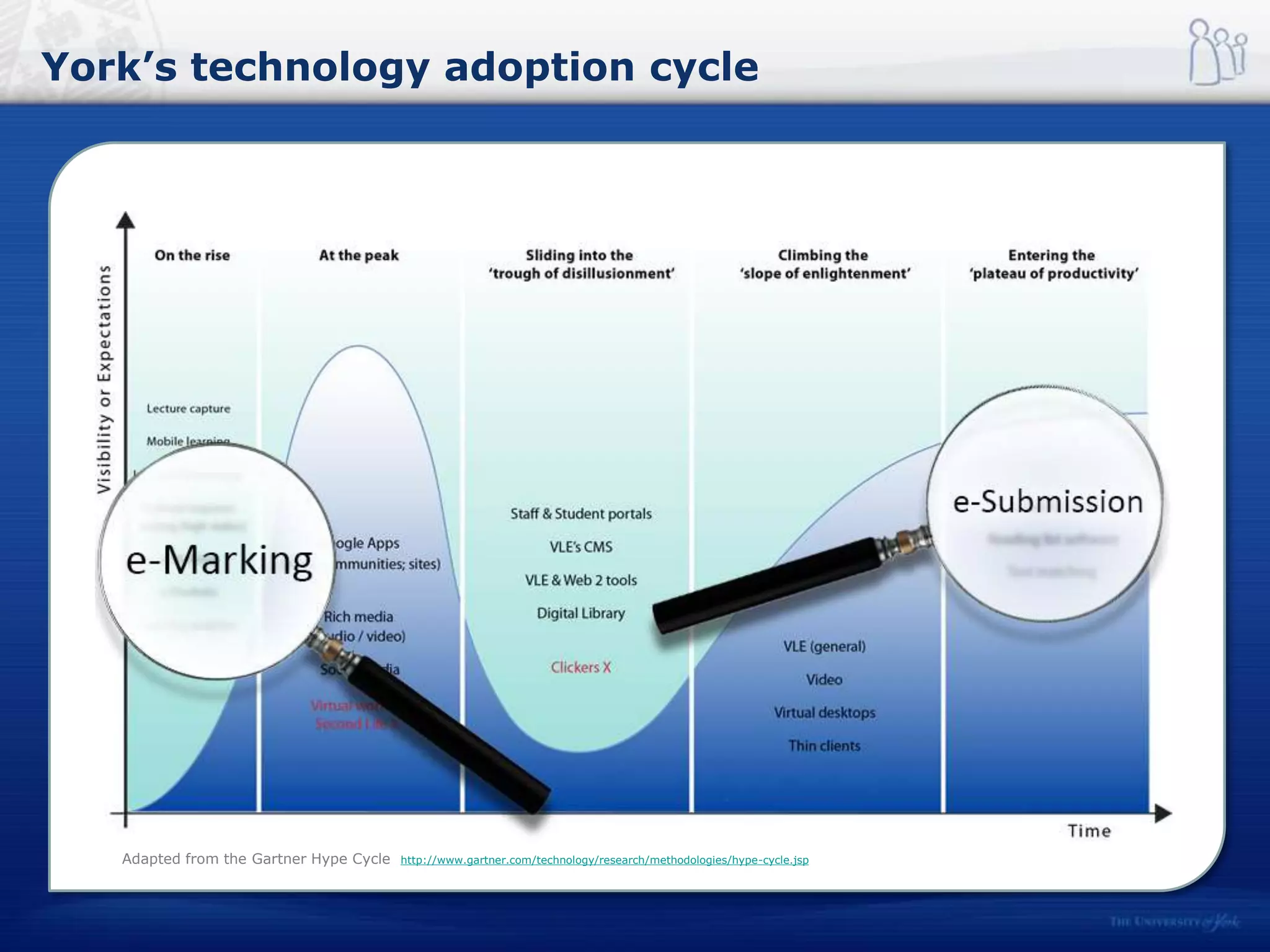
York’s technology adoption cycle
Adapted from the Gartner Hype Cycle http://www.gartner.com/technology/research/methodologies/hype-cycle.jsp
York’s technology adoption cycle
Would you like to see an online submission option made available for all
assessed work that you need to turn in to your department for marking?
Response Percent Response Count
Yes 76% 354
No 11% 54
Not applicable 13% 59
Agree Neutral Disagree
Not
Appropriate
Submission of student work 83% 10% 5% 2%
Management & allocation of work for
markers
51% 34% 10% 6%
Marking 66% 17% 12% 5%
Creation of feedback 66% 22% 10% 2%
Return of work/marks/feedback to
students
68% 25% 5% 2%
Source: University of York Technology Enhanced Learning Student Survey 2014
Source: University of York Technology Enhanced Learning Staff Survey 2014
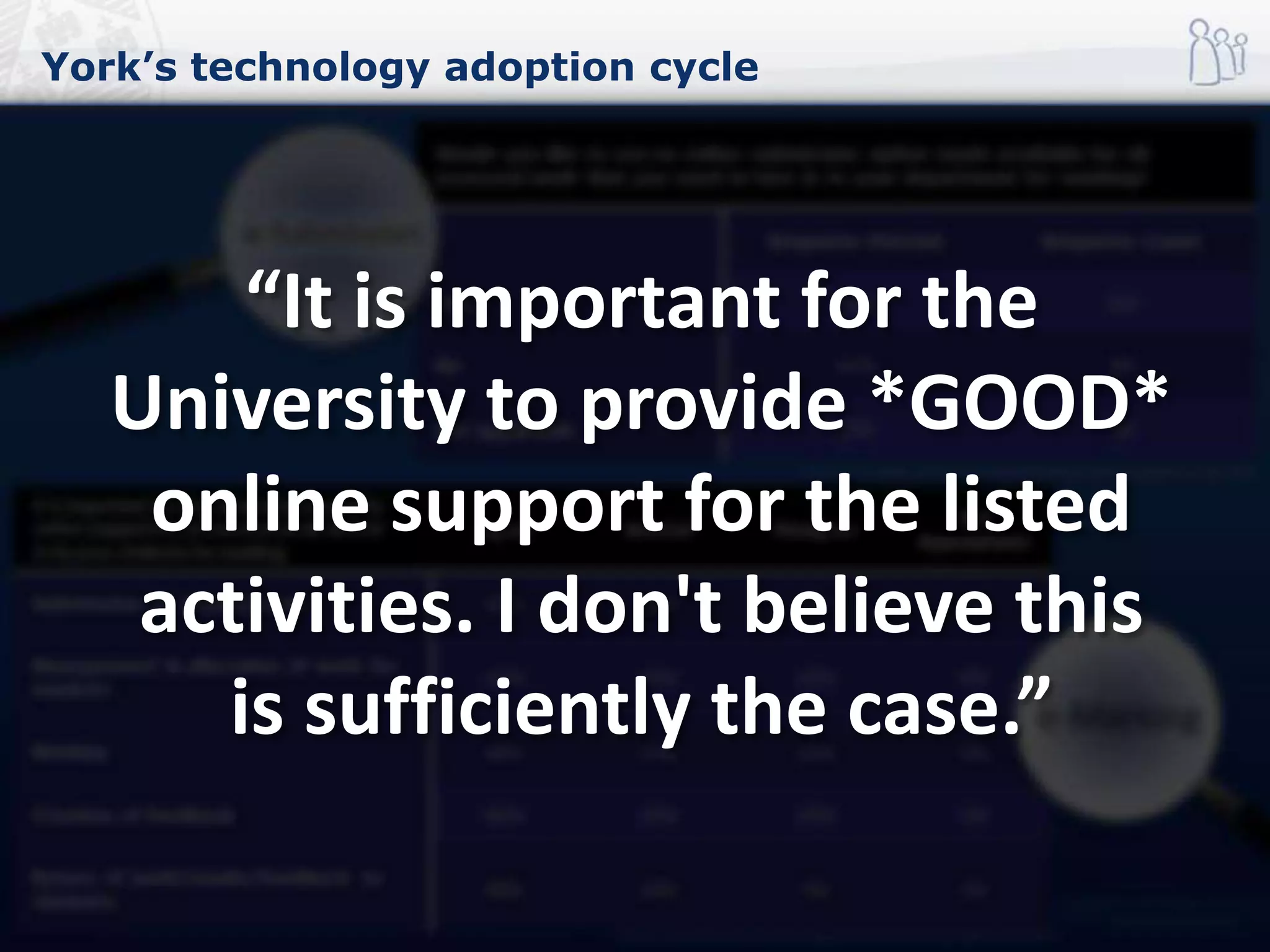
It is important for the University to provide
online support for all assessed work turned
in by your students for marking
“It is important for the
University to provide *GOOD*
online support for the listed
activities. I don't believe this
is sufficiently the case.”
Joining up SRS and assessment systems
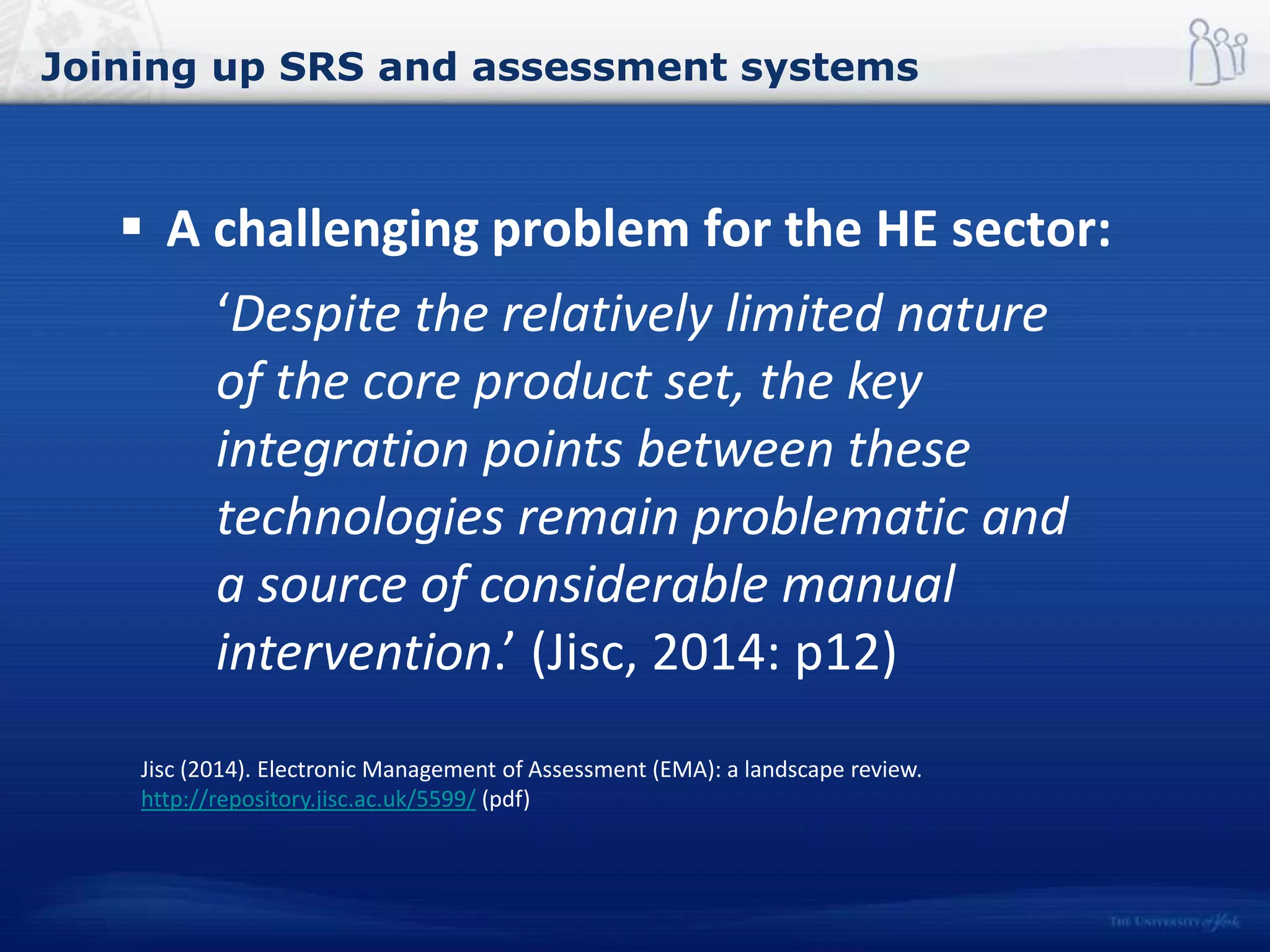
 A challenging problem for the HE sector:
‘Despite the relatively limited nature
of the core product set, the key
integration points between these
technologies remain problematic and
a source of considerable manual
intervention.’ (Jisc, 2014: p12)
Jisc (2014). Electronic Management of Assessment (EMA): a landscape review.
http://repository.jisc.ac.uk/5599/ (pdf)
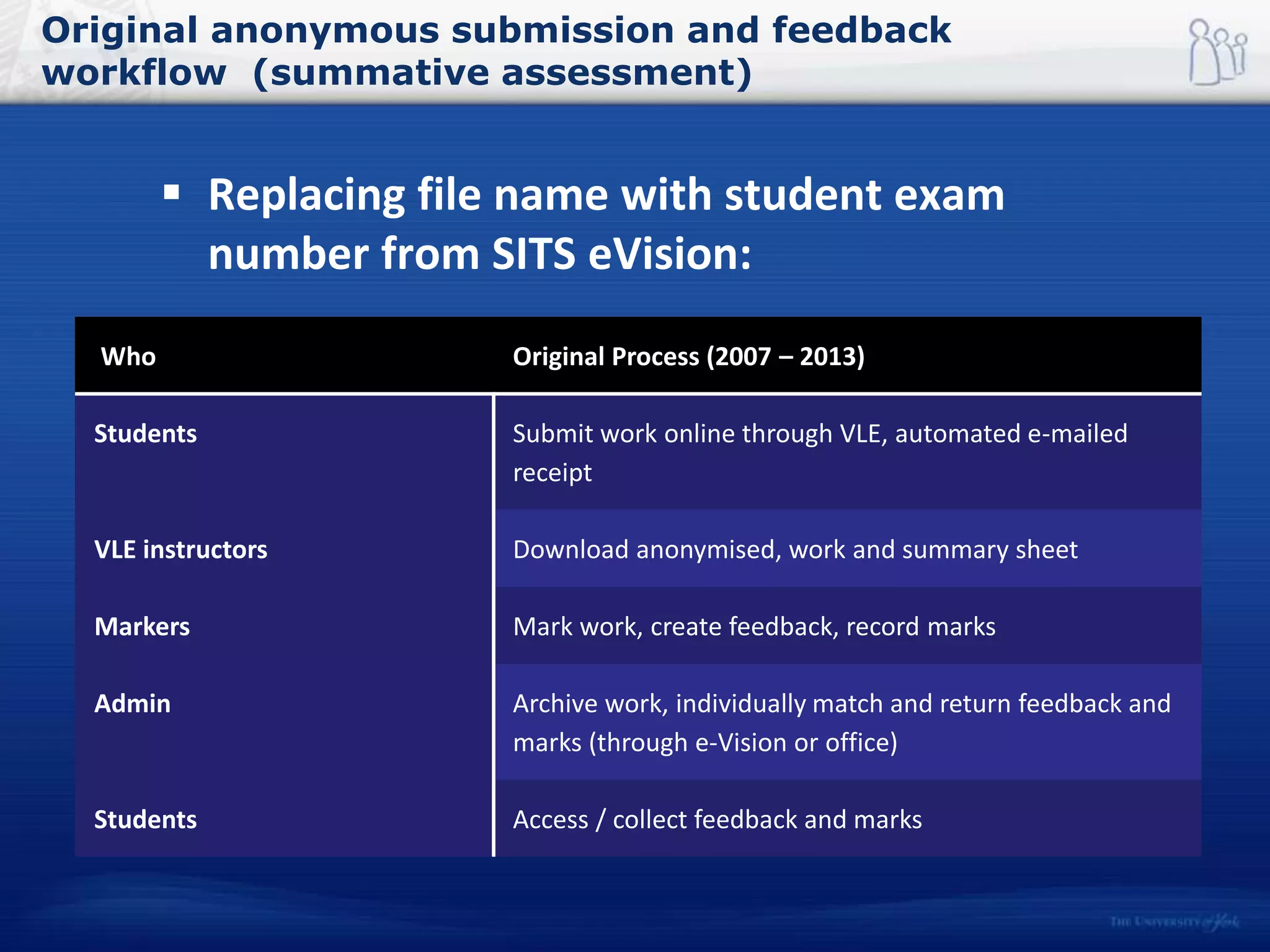
Original anonymous submission and feedback
workflow (summative assessment)
 Replacing file name with student exam
number from SITS eVision:
Who Original Process (2007 – 2013)
Students Submit work online through VLE, automated e-mailed
receipt
VLE instructors Download anonymised, work and summary sheet
Markers Mark work, create feedback, record marks
Admin Archive work, individually match and return feedback and
marks (through e-Vision or office)
Students Access / collect feedback and marks
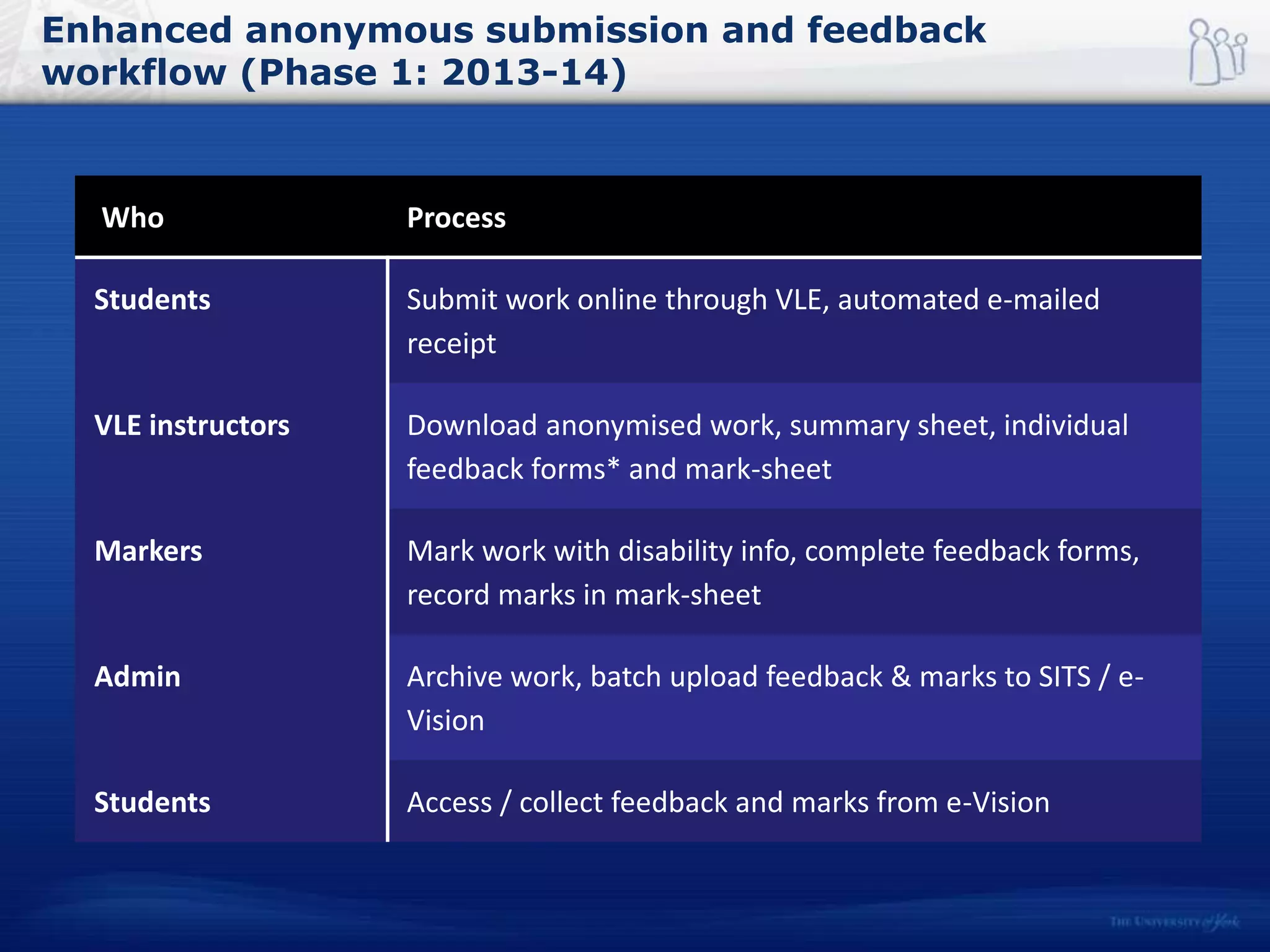
Enhanced anonymous submission and feedback
workflow (Phase 1: 2013-14)
Who Process
Students Submit work online through VLE, automated e-mailed
receipt
VLE instructors Download anonymised work, summary sheet, individual
feedback forms* and mark-sheet
Markers Mark work with disability info, complete feedback forms,
record marks in mark-sheet
Admin Archive work, batch upload feedback & marks to SITS / e-
Vision
Students Access / collect feedback and marks from e-Vision
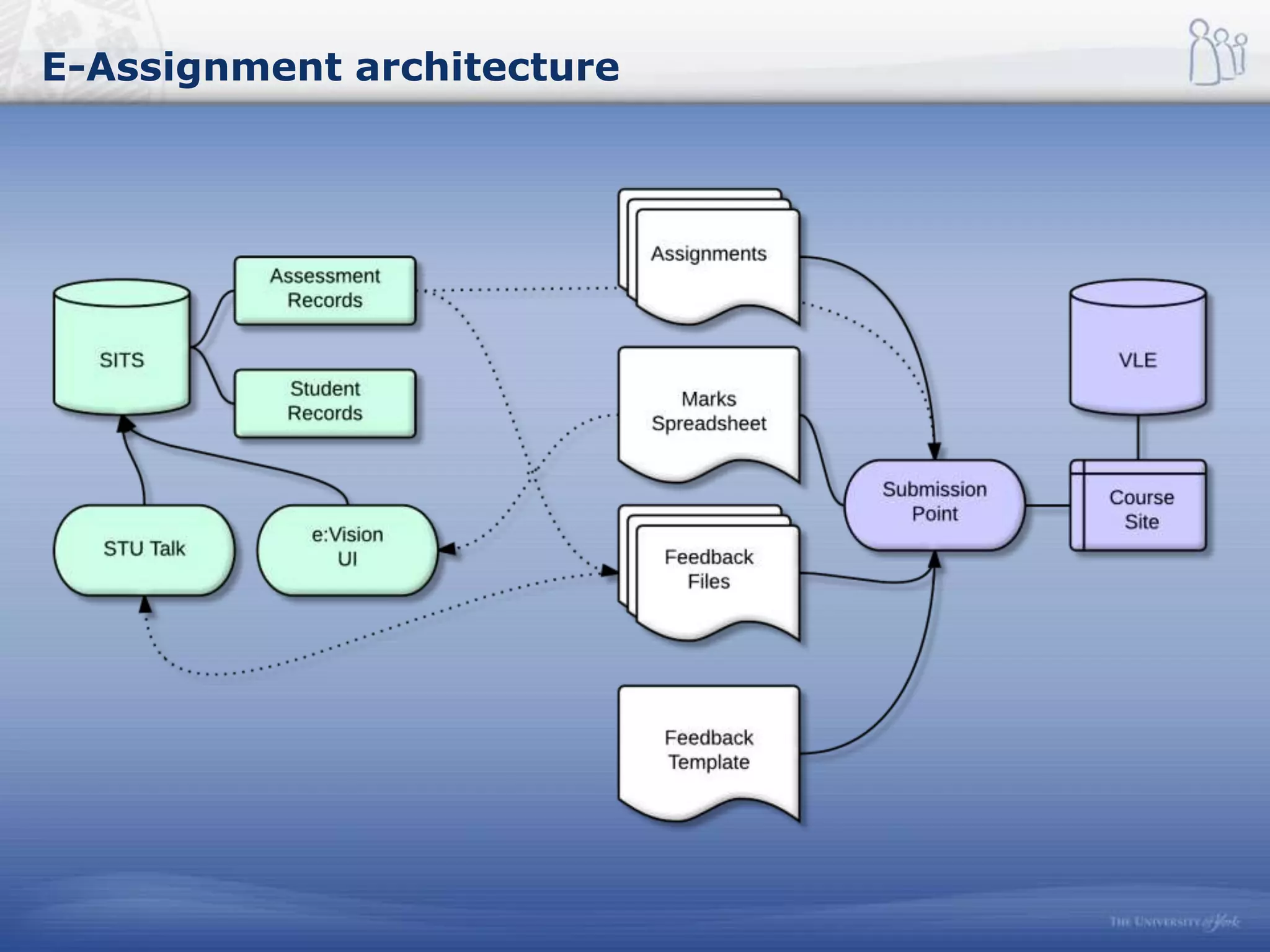
E-Assignment architecture
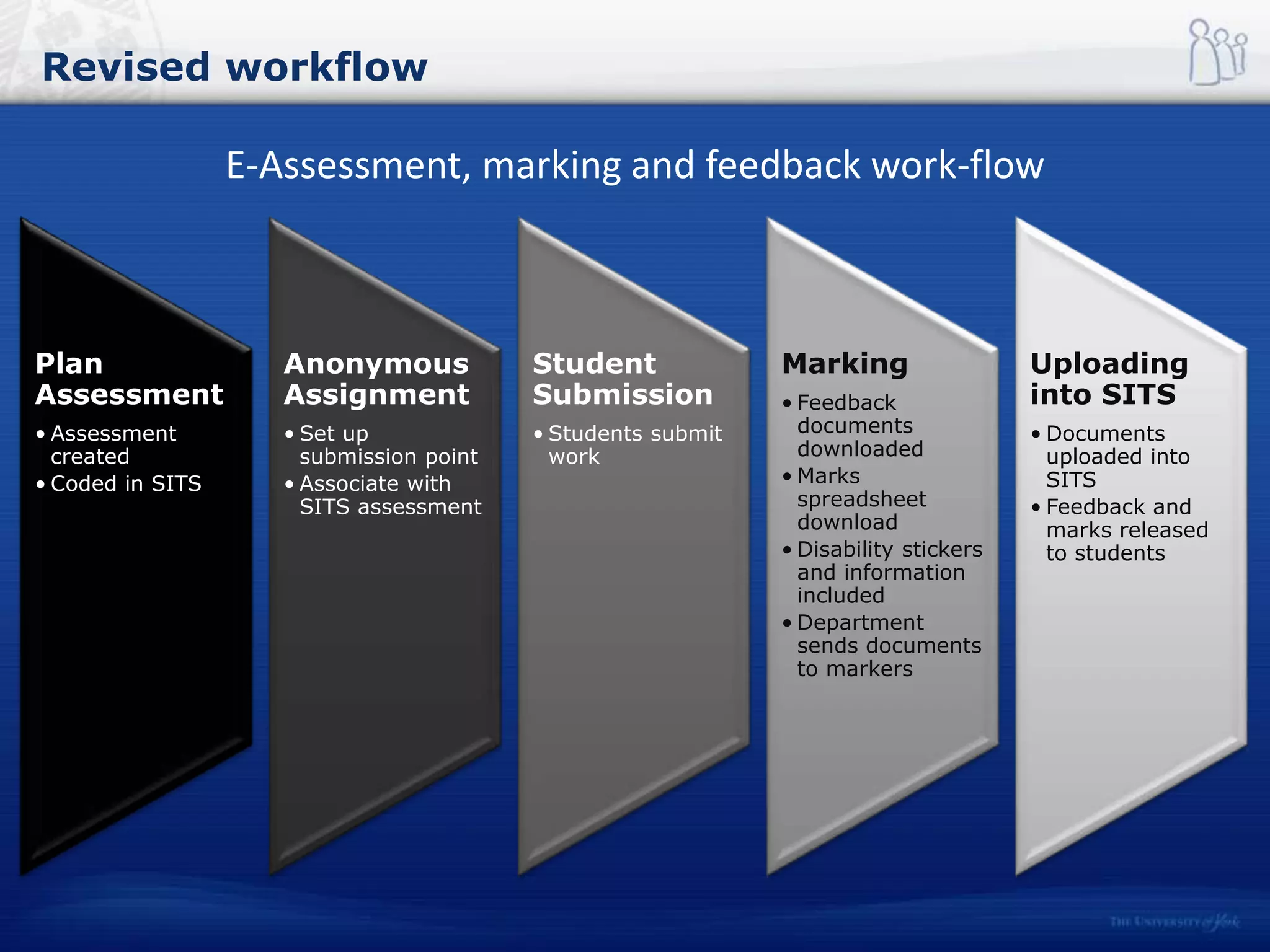
Revised workflow
Plan
Assessment
• Assessment
created
• Coded in SITS
Anonymous
Assignment
• Set up
submission point
• Associate with
SITS assessment
Student
Submission
• Students submit
work
Marking
• Feedback
documents
downloaded
• Marks
spreadsheet
download
• Disability stickers
and information
included
• Department
sends documents
to markers
Uploading
into SITS
• Documents
uploaded into
SITS
• Feedback and
marks released
to students
E-Assessment, marking and feedback work-flow
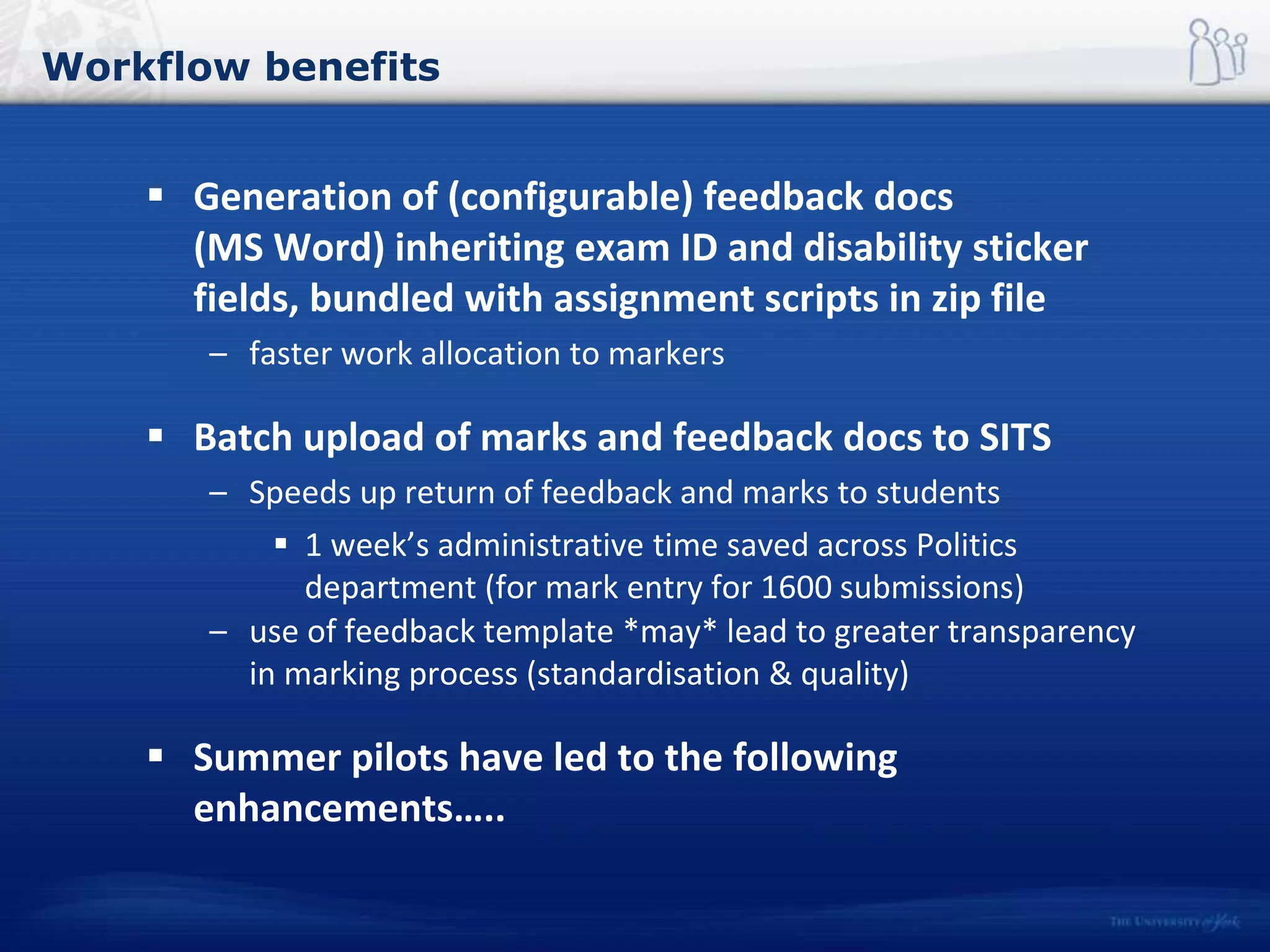
Workflow benefits
 Generation of (configurable) feedback docs
(MS Word) inheriting exam ID and disability sticker
fields, bundled with assignment scripts in zip file
– faster work allocation to markers
 Batch upload of marks and feedback docs to SITS
– Speeds up return of feedback and marks to students
 1 week’s administrative time saved across Politics
department (for mark entry for 1600 submissions)
– use of feedback template *may* lead to greater transparency
in marking process (standardisation & quality)
 Summer pilots have led to the following
enhancements…..
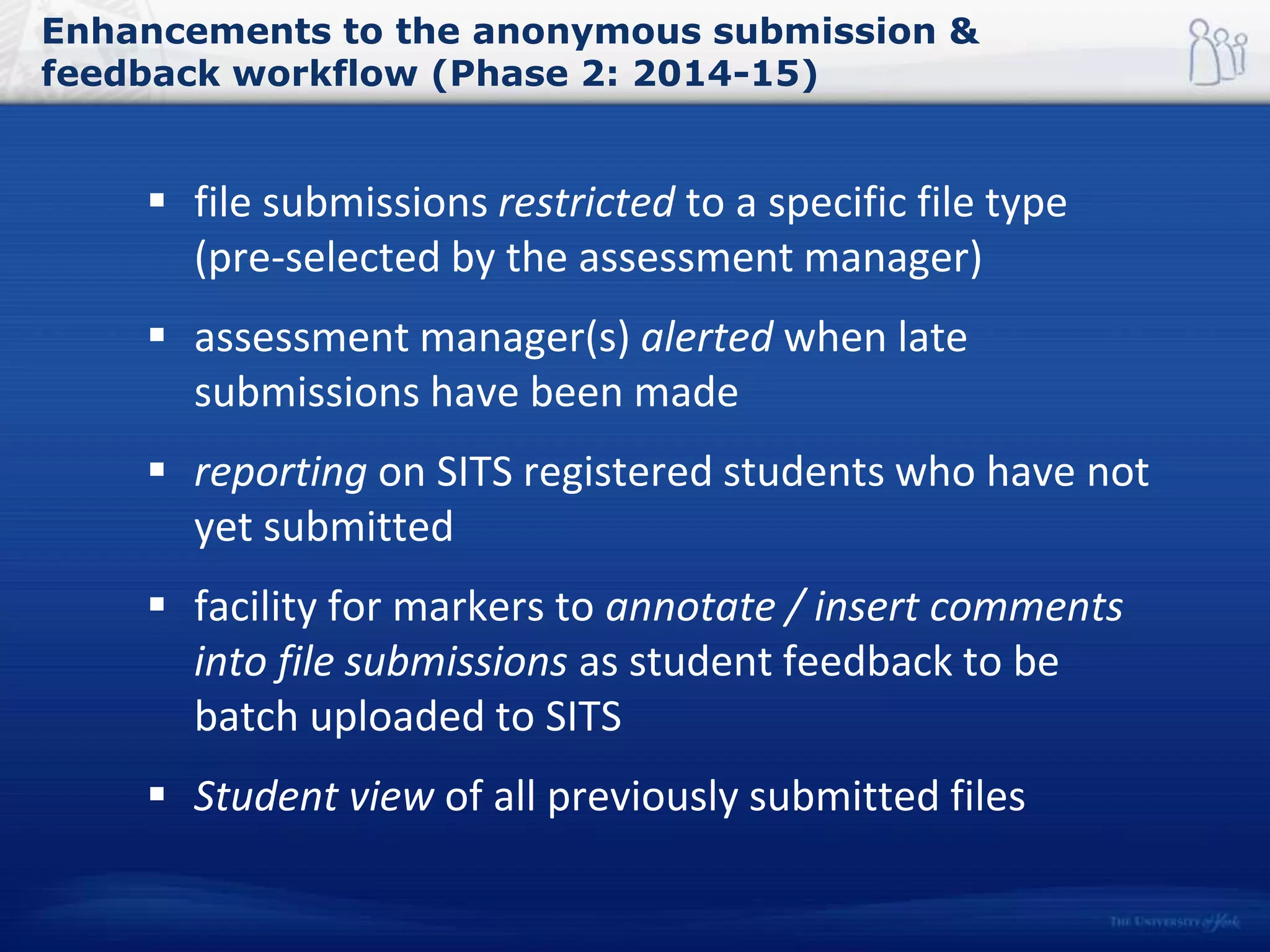
Enhancements to the anonymous submission &
feedback workflow (Phase 2: 2014-15)
 file submissions restricted to a specific file type
(pre-selected by the assessment manager)
 assessment manager(s) alerted when late
submissions have been made
 reporting on SITS registered students who have not
yet submitted
 facility for markers to annotate / insert comments
into file submissions as student feedback to be
batch uploaded to SITS
 Student view of all previously submitted files
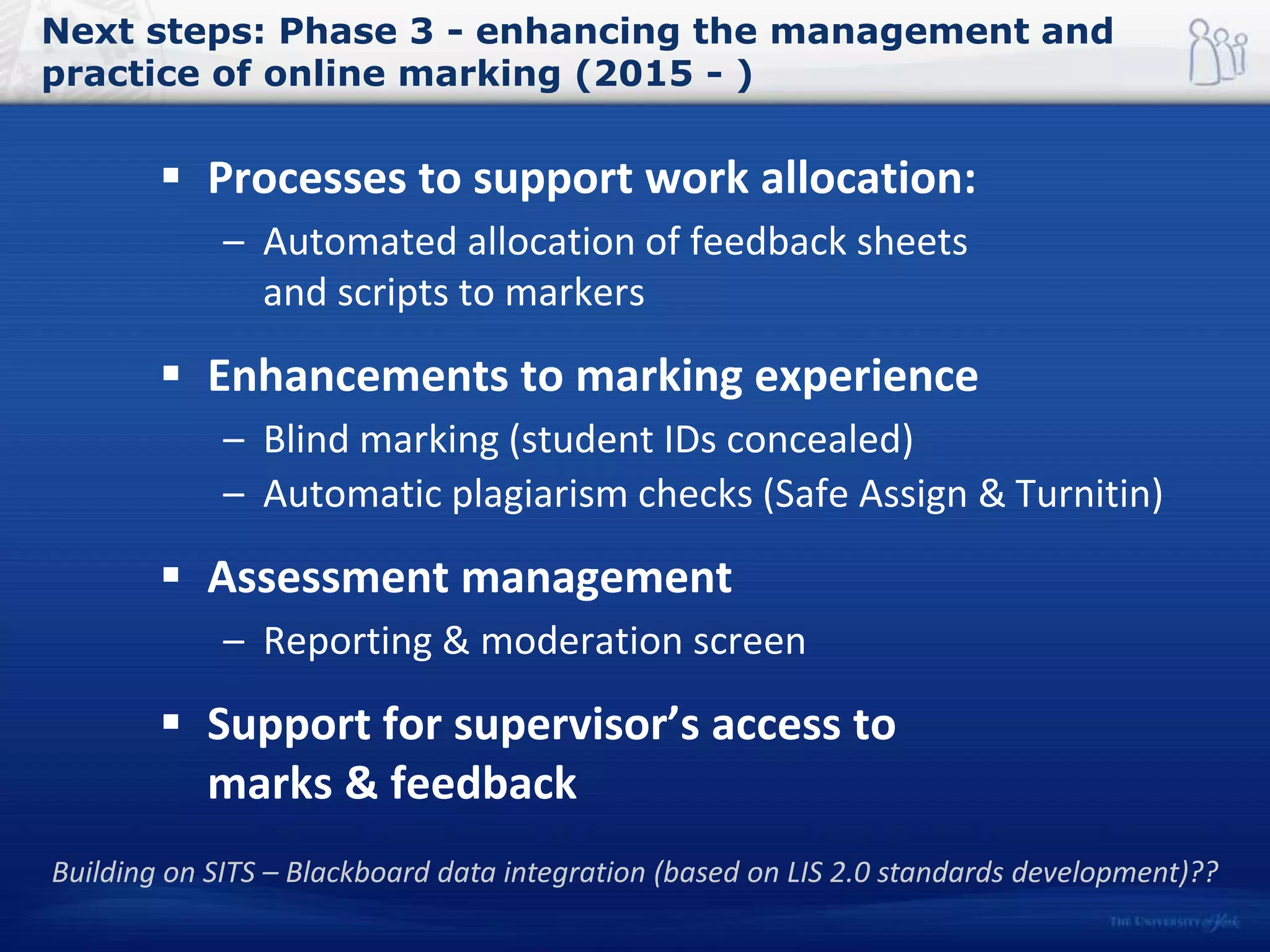
Next steps: Phase 3 - enhancing the management and
practice of online marking (2015 - )
 Processes to support work allocation:
– Automated allocation of feedback sheets
and scripts to markers
 Enhancements to marking experience
– Blind marking (student IDs concealed)
– Automatic plagiarism checks (Safe Assign & Turnitin)
 Assessment management
– Reporting & moderation screen
 Support for supervisor’s access to
marks & feedback
Building on SITS – Blackboard data integration (based on LIS 2.0 standards development)??
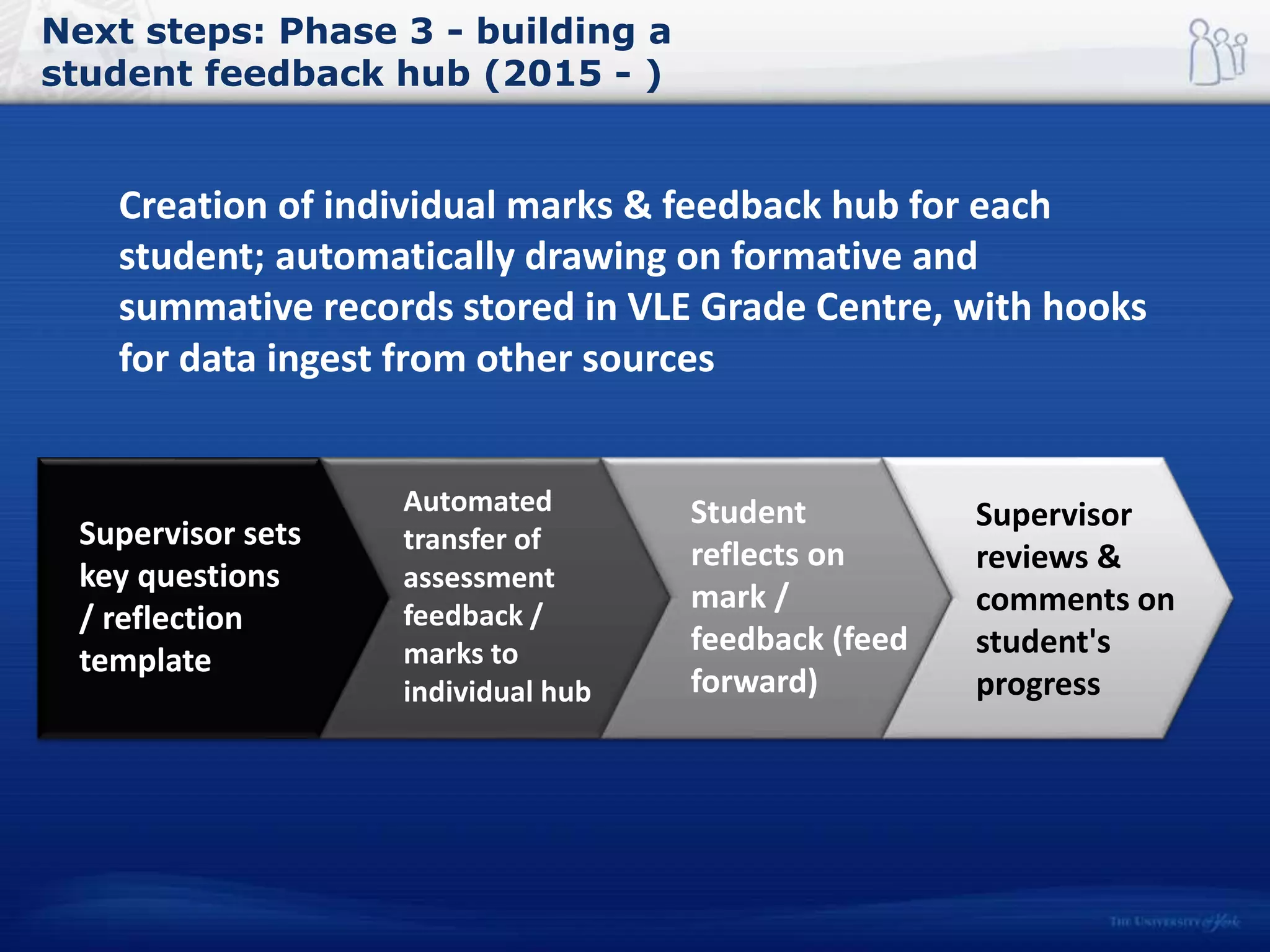
Next steps: Phase 3 - building a
student feedback hub (2015 - )
Creation of individual marks & feedback hub for each
student; automatically drawing on formative and
summative records stored in VLE Grade Centre, with hooks
for data ingest from other sources
Supervisor sets
key questions
/ reflection
template
Automated
transfer of
assessment
feedback /
marks to
individual hub
Student
reflects on
mark /
feedback (feed
forward)
Supervisor
reviews &
comments on
student's
progress
Questions?
University of York, UK
Richard Walker
Reports and summaries on e-assignment workflow
management and marking provision are available at:
http://elearningyork.wordpress.com
@RichardM_Walker richard.walker@york.ac.uk

Enhancing the assessment experience through closer integration between the SRS and VLE

  • 1.
    Enhancing the assessment experience through closerintegration between the SRS and VLE University of York, UK Dr Richard Walker bett 2015 January 21 - 24
  • 2.
    York’s journey 2004 Establishing an institutionalLT infrastructure: Implementation: delivering efficiencies in scale & support Phased rollout of Institutional LMS, CMS & Community System (Blackboard Academic Suite): self-managed SITS integration Integration of reading list software Development of anonymous e-submission 2007 2008 Consolidation Embedding, integrating & extending LT services VLE strategic review Launch of Video streaming service Shibbolizing VLE (outreach, admissions & transition) Mobile Learn, lecture capture & e-assessment (QMP) trials 2011 2012 Renewal Re-envisioning LT services: ‘Empowering the learner’ Launch of cloud services: Google Apps for Education; Echo 360; Bb Collaborate and inline grading Release of E-learning vision statement (June 2013): setting the agenda for next Learning & Teaching Strategy
  • 3.
  • 4.
    York’s technology adoptioncycle Adapted from the Gartner Hype Cycle http://www.gartner.com/technology/research/methodologies/hype-cycle.jsp
  • 5.
    York’s technology adoptioncycle Would you like to see an online submission option made available for all assessed work that you need to turn in to your department for marking? Response Percent Response Count Yes 76% 354 No 11% 54 Not applicable 13% 59 Agree Neutral Disagree Not Appropriate Submission of student work 83% 10% 5% 2% Management & allocation of work for markers 51% 34% 10% 6% Marking 66% 17% 12% 5% Creation of feedback 66% 22% 10% 2% Return of work/marks/feedback to students 68% 25% 5% 2% Source: University of York Technology Enhanced Learning Student Survey 2014 Source: University of York Technology Enhanced Learning Staff Survey 2014 It is important for the University to provide online support for all assessed work turned in by your students for marking “It is important for the University to provide *GOOD* online support for the listed activities. I don't believe this is sufficiently the case.”
  • 6.
    Joining up SRSand assessment systems  A challenging problem for the HE sector: ‘Despite the relatively limited nature of the core product set, the key integration points between these technologies remain problematic and a source of considerable manual intervention.’ (Jisc, 2014: p12) Jisc (2014). Electronic Management of Assessment (EMA): a landscape review. http://repository.jisc.ac.uk/5599/ (pdf)
  • 7.
    Original anonymous submissionand feedback workflow (summative assessment)  Replacing file name with student exam number from SITS eVision: Who Original Process (2007 – 2013) Students Submit work online through VLE, automated e-mailed receipt VLE instructors Download anonymised, work and summary sheet Markers Mark work, create feedback, record marks Admin Archive work, individually match and return feedback and marks (through e-Vision or office) Students Access / collect feedback and marks
  • 8.
    Enhanced anonymous submissionand feedback workflow (Phase 1: 2013-14) Who Process Students Submit work online through VLE, automated e-mailed receipt VLE instructors Download anonymised work, summary sheet, individual feedback forms* and mark-sheet Markers Mark work with disability info, complete feedback forms, record marks in mark-sheet Admin Archive work, batch upload feedback & marks to SITS / e- Vision Students Access / collect feedback and marks from e-Vision
  • 9.
  • 10.
    Revised workflow Plan Assessment • Assessment created •Coded in SITS Anonymous Assignment • Set up submission point • Associate with SITS assessment Student Submission • Students submit work Marking • Feedback documents downloaded • Marks spreadsheet download • Disability stickers and information included • Department sends documents to markers Uploading into SITS • Documents uploaded into SITS • Feedback and marks released to students E-Assessment, marking and feedback work-flow
  • 11.
    Workflow benefits  Generationof (configurable) feedback docs (MS Word) inheriting exam ID and disability sticker fields, bundled with assignment scripts in zip file – faster work allocation to markers  Batch upload of marks and feedback docs to SITS – Speeds up return of feedback and marks to students  1 week’s administrative time saved across Politics department (for mark entry for 1600 submissions) – use of feedback template *may* lead to greater transparency in marking process (standardisation & quality)  Summer pilots have led to the following enhancements…..
  • 12.
    Enhancements to theanonymous submission & feedback workflow (Phase 2: 2014-15)  file submissions restricted to a specific file type (pre-selected by the assessment manager)  assessment manager(s) alerted when late submissions have been made  reporting on SITS registered students who have not yet submitted  facility for markers to annotate / insert comments into file submissions as student feedback to be batch uploaded to SITS  Student view of all previously submitted files
  • 13.
    Next steps: Phase3 - enhancing the management and practice of online marking (2015 - )  Processes to support work allocation: – Automated allocation of feedback sheets and scripts to markers  Enhancements to marking experience – Blind marking (student IDs concealed) – Automatic plagiarism checks (Safe Assign & Turnitin)  Assessment management – Reporting & moderation screen  Support for supervisor’s access to marks & feedback Building on SITS – Blackboard data integration (based on LIS 2.0 standards development)??
  • 14.
    Next steps: Phase3 - building a student feedback hub (2015 - ) Creation of individual marks & feedback hub for each student; automatically drawing on formative and summative records stored in VLE Grade Centre, with hooks for data ingest from other sources Supervisor sets key questions / reflection template Automated transfer of assessment feedback / marks to individual hub Student reflects on mark / feedback (feed forward) Supervisor reviews & comments on student's progress
  • 15.
    Questions? University of York,UK Richard Walker Reports and summaries on e-assignment workflow management and marking provision are available at: http://elearningyork.wordpress.com @RichardM_Walker richard.walker@york.ac.uk