FOUNDATIONS OF 
ENGINEERING
CHAPTER # 4 
Understanding and Using Computers
A BRIEF HISTORY OF COMPUTERS 
Our finger formed the first aid to counting 
Roughly 3000 -> aid for merchant & government officials for tracking money 
Around 2000 years ago -> Hero’s odometer -> counting 
In the early 1600s, John Napier develops the theory of logarithmic 
In 1622, William Oughtred improves Napier’s bones by developing the slide 
rules 
In 1642, Blaise Pascal created an adding/subtracting device similar to 
odometer 
In 1671, Gottfried Leibniz -> created mechanical device -> for 
multiplication/division and also do addition/subtraction. He was the first to 
recognize the importance of binary numbering system
Around 1842, Charles Babbage devised the Analytical Engine, a machine that 
had all the properties of present day computers. It could follow a set of 
instruction stored on punched cards, it could calculate and stored numbers 
In 1890, punched car machine constructed by Herman Hollerith and James 
Powers were used to tabulate census data. The holes were punched by hand 
and the card was placed upon a pool of memory. 
In the late 1930s, John Atanasoff and Clifford Berry built an electronic digital 
computer using capacitor & vacuum tubes to store and manipulate binary 
numbers using logic rather than counting 
In 1944, Howard Aiken completed the Harvard mark I, an electrically driven 
mechanically computer that was jointly developed by IBM & Harvard University. 
It used punched paper tape to find instruction and data. Capable of performing 
mathematical operation in a controlled sequence. Considered as a 1st 
information-processing machine.
For the war effort, J. Presper Eckert & John W. Mauchly developed ENIAC 
Computer to calculate artillery firing tables that list trajectories for the angles 
of fire, muzzle velocities and so forth. It used a computer architecture 
developed by John von Neuman and contained 18000 vacuum tubes and 1500 
relays, weighed 30 tons, was two stories high and required 15000 square feet. 
It could multiply two digit 10-digit numbers in 0.003s, compared to 3s 
required by the Harvard. 
In 1948, IBM introduced a commercial electronic calculator called 604 that 
used punched card 
 In 1951, a company founded by Eckert & Mauchly introduced the Univac. It 
was the 1st commercial computer capable of running stored programs. 
By 1954, there was many computer available on the market. 
That year saw the introduction of the FORTRAN computer language, 
developed by John Bakus of IBM
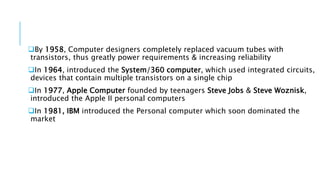
By 1958, Computer designers completely replaced vacuum tubes with 
transistors, thus greatly power requirements & increasing reliability 
In 1964, introduced the System/360 computer, which used integrated circuits, 
devices that contain multiple transistors on a single chip 
In 1977, Apple Computer founded by teenagers Steve Jobs & Steve Woznisk, 
introduced the Apple II personal computers 
In 1981, IBM introduced the Personal computer which soon dominated the 
market
DESIGN CONCEPTS IN DIGITAL 
COMPUTERS 
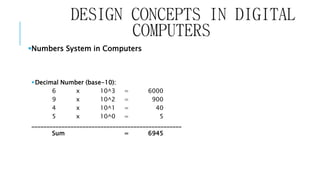
Numbers System in Computers 
Decimal Number (base-10): 
6 x 10^3 = 6000 
9 x 10^2 = 900 
4 x 10^1 = 40 
5 x 10^0 = 5 
__________________________________________________ 
Sum = 6945
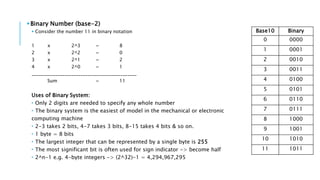
Binary Number (base-2) 
 Consider the number 11 in binary notation 
1 x 2^3 = 8 
2 x 2^2 = 0 
3 x 2^1 = 2 
4 x 2^0 = 1 
_____________________________________________ 
Sum = 11 
Uses of Binary System: 
 Only 2 digits are needed to specify any whole number 
 The binary system is the easiest of model in the mechanical or electronic 
computing machine 
 2-3 takes 2 bits, 4-7 takes 3 bits, 8-15 takes 4 bits & so on. 
 1 byte = 8 bits 
 The largest integer that can be represented by a single byte is 255 
 The most significant bit is often used for sign indicator -> become half 
 2^n-1 e.g. 4-byte integers -> (2^32)-1 = 4,294,967,295 
Base10 Binary 
0 0000 
1 0001 
2 0010 
3 0011 
4 0100 
5 0101 
6 0110 
7 0111 
8 1000 
9 1001 
10 1010 
11 1011
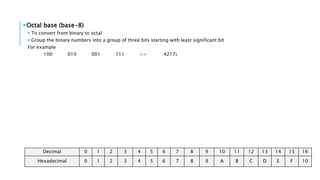
Octal base (base-8) 
 To convert from binary to octal 
 Group the binary numbers into a group of three bits starting with least significant bit 
For example 
100 010 001 111 => 42178 
Decimal 0 1 2 3 4 5 6 7 8 9 10 11 12 13 14 15 16 
Hexadecimal 0 1 2 3 4 5 6 7 8 9 A B C D E F 10
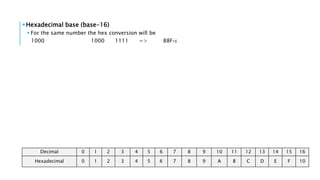
Hexadecimal base (base-16) 
 For the same number the hex conversion will be 
1000 1000 1111 => 88F16 
Decimal 0 1 2 3 4 5 6 7 8 9 10 11 12 13 14 15 16 
Hexadecimal 0 1 2 3 4 5 6 7 8 9 A B C D E F 10
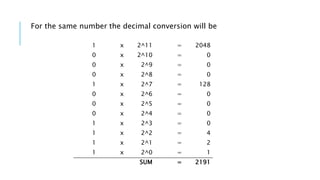
For the same number the decimal conversion will be 
1 x 2^11 = 2048 
0 x 2^10 = 0 
0 x 2^9 = 0 
0 x 2^8 = 0 
1 x 2^7 = 128 
0 x 2^6 = 0 
0 x 2^5 = 0 
0 x 2^4 = 0 
1 x 2^3 = 0 
1 x 2^2 = 4 
1 x 2^1 = 2 
1 x 2^0 = 1 
SUM = 2191
DESIGN CONCEPTS IN DIGITAL 
COMPUTERS 
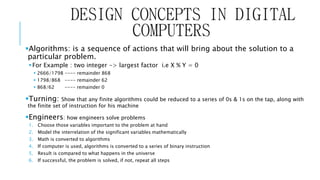
Algorithms: is a sequence of actions that will bring about the solution to a 
particular problem. 
For Example : two integer -> largest factor i.e X % Y = 0 
 2666/1798 ---- remainder 868 
 1798/868 ---- remainder 62 
 868/62 ---- remainder 0 
Turning: Show that any finite algorithms could be reduced to a series of 0s & 1s on the tap, along with 
the finite set of instruction for his machine 
Engineers: how engineers solve problems 
1. Choose those variables important to the problem at hand 
2. Model the interrelation of the significant variables mathematically 
3. Math is converted to algorithms 
4. If computer is used, algorithms is converted to a series of binary instruction 
5. Result is compared to what happens in the universe 
6. If successful, the problem is solved, if not, repeat all steps
BASIC BUILDING BLOCKS IN A 
COMPUTER 
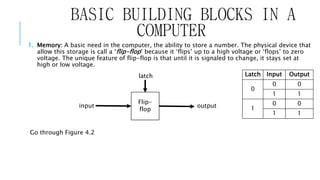
1. Memory: A basic need in the computer, the ability to store a number. The physical device that 
allow this storage is call a ‘flip-flop’ because it ‘flips’ up to a high voltage or ‘flops’ to zero 
voltage. The unique feature of flip-flop is that until it is signaled to change, it stays set at 
high or low voltage. 
Go through Figure 4.2 
Latch Input Output 
0 
0 0 
1 1 
1 
0 0 
1 1 
latch 
Flip-flop 
input output
Central Processing Unit (CPU): 
 Tasks like binary machine instructions by flip-flops, retrieve numbers from different locations, addition, 
comparison of numbers and many more are done in this part of computer. 
Computer Arithmetic 
 Inputs (A & B) to produce Output (X) ; Truth table 
 AND, OR , NOT, NAND, NOR 
Level of Computer Language 
 Machine Language (0-1) 
 Assembly Language (English like commands) 
 High Level Language (Fortran, C , Basic, OS) 
 Operating System (OS): It is a fundamental interface through which the user loads the instructions onto the CPU, routes 
output to printer, or saves work for later use.
GETTING STARTED 
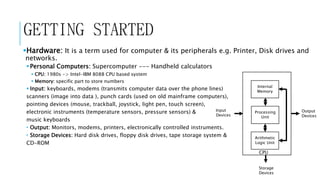
Hardware: It is a term used for computer & its peripherals e.g. Printer, Disk drives and 
networks. 
 Personal Computers: Supercomputer --- Handheld calculators 
 CPU: 1980s -> Intel-IBM 8088 CPU based system 
 Memory: specific part to store numbers 
 Input: keyboards, modems (transmits computer data over the phone lines) 
scanners (image into data ), punch cards (used on old mainframe computers), 
pointing devices (mouse, trackball, joystick, light pen, touch screen), 
electronic instruments (temperature sensors, pressure sensors) & 
music keyboards 
 Output: Monitors, modems, printers, electronically controlled instruments. 
 Storage Devices: Hard disk drives, floppy disk drives, tape storage system & 
CD-ROM 
Internal 
Memory 
Processing 
Unit 
Arithmetic 
Logic Unit 
CPU 
Output 
Devices 
Input 
Devices 
Storage 
Devices
READ OUT ! 
Printers 
Floppy Disk and Hard Drives 
Local Area Networks (LAN)
GETTING STARTED 
Software: It is a collection of instruction that directs computer hardware to 
perform specific tasks. 
 Files 
Disk Operating System & Other Operating Systems 
The Windows Environment 
Writing Equations in Computers
CREATING COMPUTER PROGRAMS 
Flowcharts 
It is a schematic of the logic needed in an algorithm; it describes the sequential order in which 
the steps are done 
Structured Programming 
CODE 
Spaghetti code -> fast but hard to understand 
Structured code -> slow than spaghetti code but easy to understand 
STRUCTURE 
Sequential -> one after another in sequence 
Selection -> if else conditions 
Repetition -> long loops
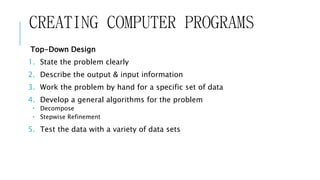
CREATING COMPUTER PROGRAMS 
Top-Down Design 
1. State the problem clearly 
2. Describe the output & input information 
3. Work the problem by hand for a specific set of data 
4. Develop a general algorithms for the problem 
 Decompose 
 Stepwise Refinement 
5. Test the data with a variety of data sets
Program of addition of two numbers

Chapter#4

  • 1.
  • 2.
    CHAPTER # 4 Understanding and Using Computers
  • 3.
    A BRIEF HISTORYOF COMPUTERS Our finger formed the first aid to counting Roughly 3000 -> aid for merchant & government officials for tracking money Around 2000 years ago -> Hero’s odometer -> counting In the early 1600s, John Napier develops the theory of logarithmic In 1622, William Oughtred improves Napier’s bones by developing the slide rules In 1642, Blaise Pascal created an adding/subtracting device similar to odometer In 1671, Gottfried Leibniz -> created mechanical device -> for multiplication/division and also do addition/subtraction. He was the first to recognize the importance of binary numbering system
  • 4.
    Around 1842, CharlesBabbage devised the Analytical Engine, a machine that had all the properties of present day computers. It could follow a set of instruction stored on punched cards, it could calculate and stored numbers In 1890, punched car machine constructed by Herman Hollerith and James Powers were used to tabulate census data. The holes were punched by hand and the card was placed upon a pool of memory. In the late 1930s, John Atanasoff and Clifford Berry built an electronic digital computer using capacitor & vacuum tubes to store and manipulate binary numbers using logic rather than counting In 1944, Howard Aiken completed the Harvard mark I, an electrically driven mechanically computer that was jointly developed by IBM & Harvard University. It used punched paper tape to find instruction and data. Capable of performing mathematical operation in a controlled sequence. Considered as a 1st information-processing machine.
  • 5.
    For the wareffort, J. Presper Eckert & John W. Mauchly developed ENIAC Computer to calculate artillery firing tables that list trajectories for the angles of fire, muzzle velocities and so forth. It used a computer architecture developed by John von Neuman and contained 18000 vacuum tubes and 1500 relays, weighed 30 tons, was two stories high and required 15000 square feet. It could multiply two digit 10-digit numbers in 0.003s, compared to 3s required by the Harvard. In 1948, IBM introduced a commercial electronic calculator called 604 that used punched card  In 1951, a company founded by Eckert & Mauchly introduced the Univac. It was the 1st commercial computer capable of running stored programs. By 1954, there was many computer available on the market. That year saw the introduction of the FORTRAN computer language, developed by John Bakus of IBM
  • 6.
    By 1958, Computerdesigners completely replaced vacuum tubes with transistors, thus greatly power requirements & increasing reliability In 1964, introduced the System/360 computer, which used integrated circuits, devices that contain multiple transistors on a single chip In 1977, Apple Computer founded by teenagers Steve Jobs & Steve Woznisk, introduced the Apple II personal computers In 1981, IBM introduced the Personal computer which soon dominated the market
  • 7.
    DESIGN CONCEPTS INDIGITAL COMPUTERS Numbers System in Computers Decimal Number (base-10): 6 x 10^3 = 6000 9 x 10^2 = 900 4 x 10^1 = 40 5 x 10^0 = 5 __________________________________________________ Sum = 6945
  • 8.
    Binary Number (base-2)  Consider the number 11 in binary notation 1 x 2^3 = 8 2 x 2^2 = 0 3 x 2^1 = 2 4 x 2^0 = 1 _____________________________________________ Sum = 11 Uses of Binary System:  Only 2 digits are needed to specify any whole number  The binary system is the easiest of model in the mechanical or electronic computing machine  2-3 takes 2 bits, 4-7 takes 3 bits, 8-15 takes 4 bits & so on.  1 byte = 8 bits  The largest integer that can be represented by a single byte is 255  The most significant bit is often used for sign indicator -> become half  2^n-1 e.g. 4-byte integers -> (2^32)-1 = 4,294,967,295 Base10 Binary 0 0000 1 0001 2 0010 3 0011 4 0100 5 0101 6 0110 7 0111 8 1000 9 1001 10 1010 11 1011
  • 9.
    Octal base (base-8)  To convert from binary to octal  Group the binary numbers into a group of three bits starting with least significant bit For example 100 010 001 111 => 42178 Decimal 0 1 2 3 4 5 6 7 8 9 10 11 12 13 14 15 16 Hexadecimal 0 1 2 3 4 5 6 7 8 9 A B C D E F 10
  • 10.
    Hexadecimal base (base-16)  For the same number the hex conversion will be 1000 1000 1111 => 88F16 Decimal 0 1 2 3 4 5 6 7 8 9 10 11 12 13 14 15 16 Hexadecimal 0 1 2 3 4 5 6 7 8 9 A B C D E F 10
  • 11.
    For the samenumber the decimal conversion will be 1 x 2^11 = 2048 0 x 2^10 = 0 0 x 2^9 = 0 0 x 2^8 = 0 1 x 2^7 = 128 0 x 2^6 = 0 0 x 2^5 = 0 0 x 2^4 = 0 1 x 2^3 = 0 1 x 2^2 = 4 1 x 2^1 = 2 1 x 2^0 = 1 SUM = 2191
  • 12.
    DESIGN CONCEPTS INDIGITAL COMPUTERS Algorithms: is a sequence of actions that will bring about the solution to a particular problem. For Example : two integer -> largest factor i.e X % Y = 0  2666/1798 ---- remainder 868  1798/868 ---- remainder 62  868/62 ---- remainder 0 Turning: Show that any finite algorithms could be reduced to a series of 0s & 1s on the tap, along with the finite set of instruction for his machine Engineers: how engineers solve problems 1. Choose those variables important to the problem at hand 2. Model the interrelation of the significant variables mathematically 3. Math is converted to algorithms 4. If computer is used, algorithms is converted to a series of binary instruction 5. Result is compared to what happens in the universe 6. If successful, the problem is solved, if not, repeat all steps
  • 13.
    BASIC BUILDING BLOCKSIN A COMPUTER 1. Memory: A basic need in the computer, the ability to store a number. The physical device that allow this storage is call a ‘flip-flop’ because it ‘flips’ up to a high voltage or ‘flops’ to zero voltage. The unique feature of flip-flop is that until it is signaled to change, it stays set at high or low voltage. Go through Figure 4.2 Latch Input Output 0 0 0 1 1 1 0 0 1 1 latch Flip-flop input output
  • 14.
    Central Processing Unit(CPU):  Tasks like binary machine instructions by flip-flops, retrieve numbers from different locations, addition, comparison of numbers and many more are done in this part of computer. Computer Arithmetic  Inputs (A & B) to produce Output (X) ; Truth table  AND, OR , NOT, NAND, NOR Level of Computer Language  Machine Language (0-1)  Assembly Language (English like commands)  High Level Language (Fortran, C , Basic, OS)  Operating System (OS): It is a fundamental interface through which the user loads the instructions onto the CPU, routes output to printer, or saves work for later use.
  • 15.
    GETTING STARTED Hardware:It is a term used for computer & its peripherals e.g. Printer, Disk drives and networks.  Personal Computers: Supercomputer --- Handheld calculators  CPU: 1980s -> Intel-IBM 8088 CPU based system  Memory: specific part to store numbers  Input: keyboards, modems (transmits computer data over the phone lines) scanners (image into data ), punch cards (used on old mainframe computers), pointing devices (mouse, trackball, joystick, light pen, touch screen), electronic instruments (temperature sensors, pressure sensors) & music keyboards  Output: Monitors, modems, printers, electronically controlled instruments.  Storage Devices: Hard disk drives, floppy disk drives, tape storage system & CD-ROM Internal Memory Processing Unit Arithmetic Logic Unit CPU Output Devices Input Devices Storage Devices
  • 16.
    READ OUT ! Printers Floppy Disk and Hard Drives Local Area Networks (LAN)
  • 17.
    GETTING STARTED Software:It is a collection of instruction that directs computer hardware to perform specific tasks.  Files Disk Operating System & Other Operating Systems The Windows Environment Writing Equations in Computers
  • 18.
    CREATING COMPUTER PROGRAMS Flowcharts It is a schematic of the logic needed in an algorithm; it describes the sequential order in which the steps are done Structured Programming CODE Spaghetti code -> fast but hard to understand Structured code -> slow than spaghetti code but easy to understand STRUCTURE Sequential -> one after another in sequence Selection -> if else conditions Repetition -> long loops
  • 19.
    CREATING COMPUTER PROGRAMS Top-Down Design 1. State the problem clearly 2. Describe the output & input information 3. Work the problem by hand for a specific set of data 4. Develop a general algorithms for the problem  Decompose  Stepwise Refinement 5. Test the data with a variety of data sets
  • 20.
    Program of additionof two numbers