 A computer system is defined as
combination of components designed to
process data and store files. A
computer system consists of four major
hardware components; input
devices, output devices, processor and
storage devices. A computer system
requires hardware, software and a user
to fully function.
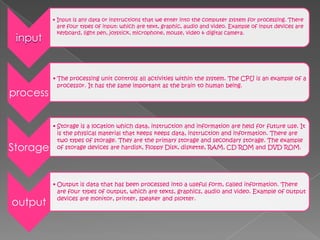
input
• Input is any data or instructions that we enter into the computer system for processing. There
are four types of input: which are text, graphic, audio and video. Example of input devices are
keyboard, light pen, joystick, microphone, mouse, video & digital camera.
process
• The processing unit controls all activities within the system. The CPU is an example of a
processor. It has the same important as the brain to human being.
Storage
• Storage is a location which data, instruction and information are held for future use. It
is the physical material that keeps keeps data, instruction and information. There are
two types of storage. They are the primary storage and secondary storage. The example
of storage devices are hardisk, Floppy Disk, diskette, RAM, CD ROM and DVD ROM.
output
• Output is data that has been processed into a useful form, called information. There
are four types of output, which are texts, graphics, audio and video. Example of output
devices are monitor, printer, speaker and plotter.
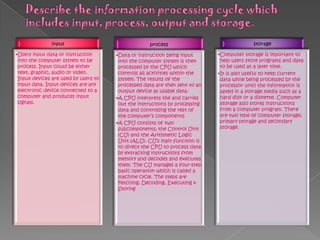
input
•Users input data or instruction
into the computer system to be
process. Input could be either
text, graphic, audio or video.
Input devices are used by users to
input data. Input devices are any
electronic device connected to a
computer and produces input
signals.
process
•Data or instruction being input
into the computer system is then
processed by the CPU which
controls all activities within the
system. The results of the
processed data are then sent to an
output device as usable data.
•A CPU interprets the and carries
out the instructions by processing
data and controlling the rest of
the computer’s components.
•A CPU consists of two
subcomponents; the Control Unit
(CU) and the Arithmetic Logic
Unit (ALU). CU’s main function is
to direct the CPU to process data
by extracting instructions from
memory and decodes and executes
them. The CU manages a four-step
basic operation which is called a
machine cycle. The steps are
Fetching, Decoding, Executing &
Storing
storage
•Computer storage is important to
help users store programs and data
to be used at a later time.
•It is also useful to keep current
data while being processed by the
processor until the information is
saved in a storage media such as a
hard disk or a diskette. Computer
storage also stores instructions
from a computer program. There
are two type of computer storage;
primary storage and secondary
storage.
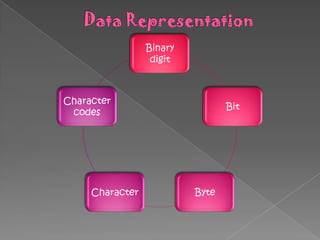
Binary
digit
Bit
ByteCharacter
Character
codes
BINARY DIGIT
 Computers recognize only two discrete states: on and off. These states can be
represented by two digits, 0 and 1. Each 0 or 1 is called a bit in the binary system.
 Bit is the smallest unit of data a computer can process. Bit is a short for binary digit.
The binary system has a base of 2 with the two digits (0 and 1). Combinations of 0s and 1s
represent larger numbers.
BIT
 A bit is the smallest unit of data that the computer can process. Bit is a short for binary
digit. A bit is represented by the numbers 1 and 0. These numbers represent the binary
system. They correspond to the states of on and off, true and false, or yes and no.
 All digital data use the binary system to process the information. This information
include letters, digits or special character.
BYTE
 Byte is a unit of information built from bits. One byte is equals to 8 bits. Eight bits
that are grouped together as a unit. A byte provides enough different
combinations of 0s and 1s to represent 256 individual characters.
 One byte represents a single character such as the number 3, letter b or a $
symbol. Bits and bytes are the basis for representing all meaningful information and
programs on computers.
CHARACTER
 8 bits = 1 byte
 One byte represents one character such as A, 7, 9 and +.Eight bits that are grouped
together as a unit. A byte provides enough different combinations of 0s and 1s to
represent 256 individual characters.
 For example, the capital letter F is represented by the binary code 01000110 that can
be understood by the computer system. Eight bits grouped together as a unit are
called a byte. A byte represents a single character in the computer.
CHARACTER CODES
 There are three character codes to represent characters which are ASCII, EBCDIC
and Unicode. Each byte contains eight bits. A byte provides enough different
combination of 0s and 1s to represent 256 characters.
 The combinations of 0s and 1s are defined by patterns. These patterns are called
coding scheme. The 256-character capability of ASCII and EBCDIC is too small to
handle the characters that are used by other languages such as Arabic, Japanese and
Chinese.
 The Unicode coding scheme is designed to solve this problem. It uses two bytes (16
bits) to represent one character. Unicode will have more than 65,000 different
characters. This can cover all the world’s languages.
ASCII code
 ASCII pronounced as "ask-key" stands for the American
Standard Code for Information Interchange and was
proposed by ASA (American Standard Association) in 963
and was finalised in 1968.ASCII is a standard of 7-bit code
used to represent characters, which include
letters, numbers and punctuation marks.
 7 bits allow the computer to encode a total of 128
characters for the numbers 0-9, uppercase and lowercase
letters A-Z and a few punctuation symbols. However this 128
bit code only suitable for english language speaking users.
 IBM and Apple expanded the amount of space reserved for
the character codes to 8-bits, equivalent to 1 byte.
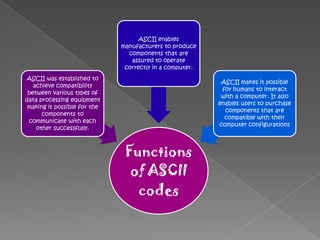
Functions
of ASCII
codes
ASCII was established to
achieve compatibility
between various types of
data processing equipment
making it possible for the
components to
communicate with each
other successfully.
ASCII enables
manufacturers to produce
components that are
assured to operate
correctly in a computer.
ASCII makes it possible
for humans to interact
with a computer. It also
enables users to purchase
components that are
compatible with their
computer configurations
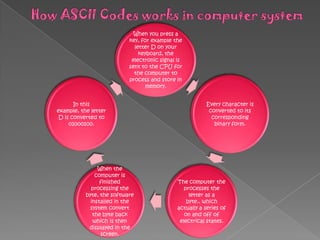
When you press a
key, for example the
letter D on your
keyboard, the
electronic signal is
sent to the CPU for
the computer to
process and store in
memory.
Every character is
converted to its
corresponding
binary form.
The computer the
processes the
letter as a
byte., which
actually a series of
on and off of
electrical states.
When the
computer is
finished
processing the
byte, the software
installed in the
system convert
the byte back
which is then
displayed in the
screen.
In this
example, the letter
D is converted to
01000100.
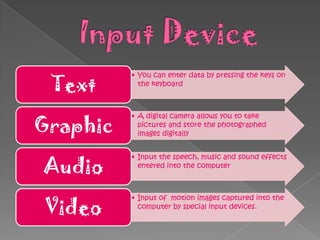
• You can enter data by pressing the keys on
the keyboard
Text
• A digital camera allows you to take
pictures and store the photographed
images digitallyGraphic
• Input the speech, music and sound effects
entered into the computer
Audio
• Input of motion images captured into the
computer by special input devices.
Video
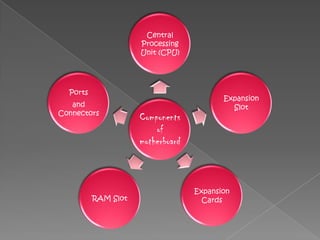
Components
of
motherboard
Central
Processing
Unit (CPU)
Expansion
Slot
Expansion
CardsRAM Slot
Ports
and
Connectors
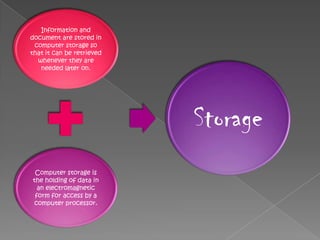
Information and
document are stored in
computer storage so
that it can be retrieved
whenever they are
needed later on.
Computer storage is
the holding of data in
an electromagnetic
form for access by a
computer processor.
Storage
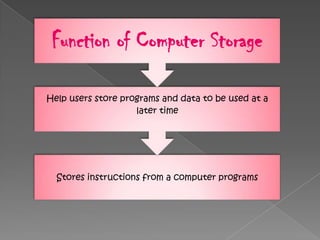
Stores instructions from a computer programs
Help users store programs and data to be used at a
later time
Function of Computer Storage
Definition of operating system
 Set of programs that schedule tasks,
allowcates storage and presents a
default interface to the user between
applications.
Function of the operating system are :
 Starting a computer
 Providing a user interface
 Managing data and programs
 Managing memory
 Configuring devices
Chapter 2 computer system

Chapter 2 computer system

  • 2.
     A computersystem is defined as combination of components designed to process data and store files. A computer system consists of four major hardware components; input devices, output devices, processor and storage devices. A computer system requires hardware, software and a user to fully function.
  • 3.
    input • Input isany data or instructions that we enter into the computer system for processing. There are four types of input: which are text, graphic, audio and video. Example of input devices are keyboard, light pen, joystick, microphone, mouse, video & digital camera. process • The processing unit controls all activities within the system. The CPU is an example of a processor. It has the same important as the brain to human being. Storage • Storage is a location which data, instruction and information are held for future use. It is the physical material that keeps keeps data, instruction and information. There are two types of storage. They are the primary storage and secondary storage. The example of storage devices are hardisk, Floppy Disk, diskette, RAM, CD ROM and DVD ROM. output • Output is data that has been processed into a useful form, called information. There are four types of output, which are texts, graphics, audio and video. Example of output devices are monitor, printer, speaker and plotter.
  • 4.
    input •Users input dataor instruction into the computer system to be process. Input could be either text, graphic, audio or video. Input devices are used by users to input data. Input devices are any electronic device connected to a computer and produces input signals. process •Data or instruction being input into the computer system is then processed by the CPU which controls all activities within the system. The results of the processed data are then sent to an output device as usable data. •A CPU interprets the and carries out the instructions by processing data and controlling the rest of the computer’s components. •A CPU consists of two subcomponents; the Control Unit (CU) and the Arithmetic Logic Unit (ALU). CU’s main function is to direct the CPU to process data by extracting instructions from memory and decodes and executes them. The CU manages a four-step basic operation which is called a machine cycle. The steps are Fetching, Decoding, Executing & Storing storage •Computer storage is important to help users store programs and data to be used at a later time. •It is also useful to keep current data while being processed by the processor until the information is saved in a storage media such as a hard disk or a diskette. Computer storage also stores instructions from a computer program. There are two type of computer storage; primary storage and secondary storage.
  • 5.
  • 6.
    BINARY DIGIT  Computersrecognize only two discrete states: on and off. These states can be represented by two digits, 0 and 1. Each 0 or 1 is called a bit in the binary system.  Bit is the smallest unit of data a computer can process. Bit is a short for binary digit. The binary system has a base of 2 with the two digits (0 and 1). Combinations of 0s and 1s represent larger numbers. BIT  A bit is the smallest unit of data that the computer can process. Bit is a short for binary digit. A bit is represented by the numbers 1 and 0. These numbers represent the binary system. They correspond to the states of on and off, true and false, or yes and no.  All digital data use the binary system to process the information. This information include letters, digits or special character. BYTE  Byte is a unit of information built from bits. One byte is equals to 8 bits. Eight bits that are grouped together as a unit. A byte provides enough different combinations of 0s and 1s to represent 256 individual characters.  One byte represents a single character such as the number 3, letter b or a $ symbol. Bits and bytes are the basis for representing all meaningful information and programs on computers.
  • 7.
    CHARACTER  8 bits= 1 byte  One byte represents one character such as A, 7, 9 and +.Eight bits that are grouped together as a unit. A byte provides enough different combinations of 0s and 1s to represent 256 individual characters.  For example, the capital letter F is represented by the binary code 01000110 that can be understood by the computer system. Eight bits grouped together as a unit are called a byte. A byte represents a single character in the computer. CHARACTER CODES  There are three character codes to represent characters which are ASCII, EBCDIC and Unicode. Each byte contains eight bits. A byte provides enough different combination of 0s and 1s to represent 256 characters.  The combinations of 0s and 1s are defined by patterns. These patterns are called coding scheme. The 256-character capability of ASCII and EBCDIC is too small to handle the characters that are used by other languages such as Arabic, Japanese and Chinese.  The Unicode coding scheme is designed to solve this problem. It uses two bytes (16 bits) to represent one character. Unicode will have more than 65,000 different characters. This can cover all the world’s languages.
  • 8.
    ASCII code  ASCIIpronounced as "ask-key" stands for the American Standard Code for Information Interchange and was proposed by ASA (American Standard Association) in 963 and was finalised in 1968.ASCII is a standard of 7-bit code used to represent characters, which include letters, numbers and punctuation marks.  7 bits allow the computer to encode a total of 128 characters for the numbers 0-9, uppercase and lowercase letters A-Z and a few punctuation symbols. However this 128 bit code only suitable for english language speaking users.  IBM and Apple expanded the amount of space reserved for the character codes to 8-bits, equivalent to 1 byte.
  • 9.
    Functions of ASCII codes ASCII wasestablished to achieve compatibility between various types of data processing equipment making it possible for the components to communicate with each other successfully. ASCII enables manufacturers to produce components that are assured to operate correctly in a computer. ASCII makes it possible for humans to interact with a computer. It also enables users to purchase components that are compatible with their computer configurations
  • 10.
    When you pressa key, for example the letter D on your keyboard, the electronic signal is sent to the CPU for the computer to process and store in memory. Every character is converted to its corresponding binary form. The computer the processes the letter as a byte., which actually a series of on and off of electrical states. When the computer is finished processing the byte, the software installed in the system convert the byte back which is then displayed in the screen. In this example, the letter D is converted to 01000100.
  • 11.
    • You canenter data by pressing the keys on the keyboard Text • A digital camera allows you to take pictures and store the photographed images digitallyGraphic • Input the speech, music and sound effects entered into the computer Audio • Input of motion images captured into the computer by special input devices. Video
  • 12.
  • 13.
    Information and document arestored in computer storage so that it can be retrieved whenever they are needed later on. Computer storage is the holding of data in an electromagnetic form for access by a computer processor. Storage
  • 14.
    Stores instructions froma computer programs Help users store programs and data to be used at a later time Function of Computer Storage
  • 15.
    Definition of operatingsystem  Set of programs that schedule tasks, allowcates storage and presents a default interface to the user between applications. Function of the operating system are :  Starting a computer  Providing a user interface  Managing data and programs  Managing memory  Configuring devices