1
Chapter 1
Microprocessors, Microcomputers, and
Assembly Language
2
Introduction
• In this course we will discus two microprocessors.
– 8-Bit Intel 8085.
• Text Books:
– Gaonkar, R. S. (2002/2013). “Microprocessor
architecture, programming, and application with the
8085”, 5th edition, Prentice Hall.
– Brey, B. B. (1993). “The 8085A microprocessor
software, programming and architecture”, 2nd
edition, Prentice Hall. .
3
Synopsis
• The microprocessor is a general-purpose programmable
logic device.
• Understanding the microprocessor concepts is crucial in
understanding the operation of digital computer.
• This course is an introduction to the basic concept of
microprocessor architecture and operation, programming
model, pins configuration and microprocessor interfacing.
• The content of the course is divided into three sections:
– microprocessor architecture,
– programming and
– interfacing input/output.
• The course is designed around the Intel 8-bit
microprocessor (8085A) and its assembly language.
4
LEARNING OUTCOME
At the end of the course, student should be:
• Able to understand the basic operation of
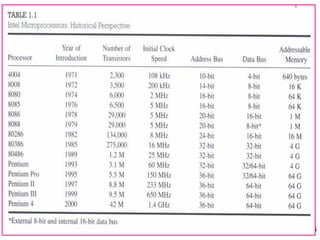
microprocessor.
• Able to understand the basic concept of microprocessor
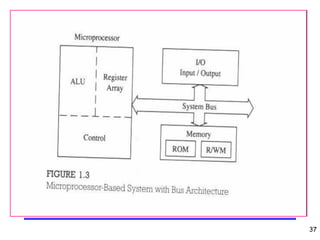
architecture and its pins configuration.
• Able to understand the machine language programs.
• Able to design and write programs in assembly language.
• Able to understand the basic concept of microprocessor
input/output interfacing
5
Introduction
• The majority of people think that computers are
some kind of complicated device that is impossible to
learn and infinitely intelligent, able to think better than
a person.
– The truth is much less glamorous.
• A computer can only do what the programmer
has told it to do, in the form of a program.
• A program is just a sequence of very simple
commands that lead the computer to solve some
problem.
• Once the program is written and debugged, the
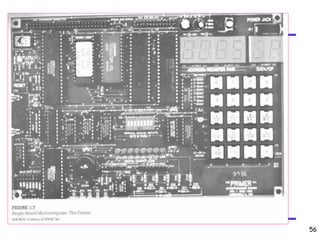
computer can execute the instructions very fast, and
always do it the same, every time, without a mistake.
6
Introduction
• Even though the program consists of very simple
instructions, the overall result can be very
impressive, due mostly to the speed at which the
computer can process the instructions.
• Even though each step in the program is very
simple, the sequence of instructions, executing at
millions of steps per second, can appear to be very
complicated, when taken as a whole.
• The trick is not to think of it as a whole, but as a
series of very simple steps, or commands.
7
Introduction
• The microprocessor itself is usually a single
integrated circuit (IC).
• Most microprocessors (MPU), or very small
computers, have much the same commands or
instructions that they can perform.
– They vary mostly in the names used to describe each
command.
• In a typical MPU, there are commands to move data
around, do simple math (add, subtract, multiply, and
divide), bring data into the micro from the outside
world, and send data out of the micro to the outside
world.
– Sounds too simple....right? .
8
Microprocessors
• The microprocessor is a programmable integrated
device that has computing and decision-making
capability similar to that of the central processing unit
(CPU) of a computer.
• The fact that the microprocessor is programmable
means it can be instructed to perform given tasks
within its capability.
• The microprocessor is a clock-driven semiconductor
device consisting of electronic logic circuits
manufactured by using either a large-scale integration
(LSI) or very-large-scale integration (VLSI) technique.
9
Microprocessors
• A typical MPU has three basic parts inside. They are:
– the Program Counter (PC)
– Memory, and
– Input / Output (I/O).
• The Program Counter keeps track of which command is
to be executed.
• The Memory contains the commands to be executed.
• The Input / Output handles the transfer of data to and
from the outside world (outside the MPU physical
package).
• There are many other actual parts inside the MPU,
however, we will learn about every single one, one step
at a time.
10
Microprocessors
• Nowadays, the microprocessor is being used in a
wide range of products called microprocessor-
based products or systems.
• The microprocessor can he embedded in a larger
system, can be a stand alone unit controlling
processes, or it can function as the CPU of a
computer called a microcomputer.
11
Microprocessors
• The microprocessor communicates and operates
in the binary numbers 0 and 1, called bits.
• Each microprocessor has a fixed set of
instructions in the form of binary patterns called a
machine language.
• It is difficult for humans to communicate in the
language of 0 s and 1 s.
• Therefore, the binary instructions are given
abbreviated names, called mnenomics, which
form the assembly language for a given
microprocessor.
12
Microprocessors
• A typical programmable machine can be
represented with four components:
microprocessor, memory, input, and output.
• These four components work together or interact
with each other to perform a given task; thus,
they comprise a system.
• The physical components of this system are
called hardware.
• A set of instructions written for the
microprocessor to perform a task is called a
program, and a group of programs is called
software.
13
Microprocessors
• The microprocessor applications are classified
primarily in two categories:
– reprogrammable systems and
– embedded systems.
14
Microprocessors
• In reprogrammable systems, such as
microcomputers, the microprocessor is used for
computing and data processing. These systems
include:
– general-purpose microprocessors capable of
handling large data, mass storage devices (such
as disks and CD-ROMs), and peripherals such as
printers;
– a personal computer (PC) is a typical illustration.
15
Microprocessors
• In embedded systems, the microprocessor is a
part of a final product and is not available for
reprogramming to the end user. Example:
– copying machine
– washing machine.
– Air-conditioner
– Etc.
16
Microprocessor, CPU & Microcontroller
• Microprocessor (MPU) - a semiconductor device
(integrated circuit) manufactured by using the LSI
technique.
– It includes the ALU, register arrays, and control
circuits on a single chip.
• CPU - the central processing unit.
– The group of circuits that processes data and
provides control signals and timing. It includes the
arithmetic/logic unit, registers, instruction decoder,
and the control unit.
• Microcontroller - a device that includes
microprocessor, memory, and I/O signal lines on a
single chip, fabricated using VLSI technology.
17
Microprocessor, CPU & Microcontroller
• In large computers, a CPU implemented on one or
more circuit boards performs these computing
functions.
• The microprocessor is in many ways similar to the
CPU, but includes all the logic circuitry, including the
control unit, on one chip.
18
Traditional block diagram of a computer
19
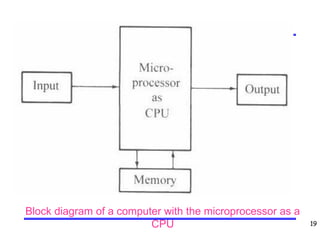
Block diagram of a computer with the microprocessor as a
CPU
20
Block diagram of a microcontroller
21
A Simple Program
• A program is a sequence or series of very simple
commands or instructions.
• A real world example program might be the problem of
crossing a busy street.
– Step 1: Walk up to the traffic lights and stop.
– Step 2: Look at the traffic light.
– Step 3: Is your light green?
– Step 4: If the light is red, goto step 2. (otherwise continue to step
5)
– Step 5: Look to the left.
– Step 6: Are there cars still passing by?
– Step 7: If yes, goto step 5. (otherwise continue to step 8).
– Step 8: Look to the right.
– Step 9: Are there cars still passing by? (there shouldn't be any
by now, but, you never know!)
– Step 10: If yes, goto step 8. (otherwise continue to step 11)
– Step 11: Proceed across the street, carefully!! .
22
A Simple Program
• Now this may seem childish at first glance, but this is
exactly what you do every time you cross a busy street,
that has a traffic light.
• This is also exactly how you would tell a MPU to cross
the street, if one could.
• This is what I mean by a sequence or series of very
simple steps.
• Taken as a whole, the steps lead you cross a busy
intersection, which, if a computer did it, would seem very
intelligent.
• It is intelligence, people are intelligent. A programmer
that programmed these steps into a MPU, would impart
that intelligence to the micro.
• The MPU would not, however, in this case, know what to
do when it got to the other side, since we didn't tell it.
23
A Simple Program
• In a MPU, the problems are different but the logical
steps to solve the problem are similar, that is, a series of
very simple steps, leading to the solution of a larger
problem.
• Also notice that since the steps are numbered, 1 through
11, that is the order in which they're executed.
– The Program Counter (PC), in this case, starting with 1 and
ending with 11, doing what each one says.
– The PC automatically advances to the next step, after doing
what the current step says, unless a branch, or jump, is
encountered.
– A branch is an instruction that directs the PC to go to a specific
step, other than the next in the sequence.
24
A Simple Program
• The point of this lesson is to show how a simple set of
instructions can solve a bigger problem.
– Taken as a whole, the solution could appear to be more
complicated than any of the separate steps it took to solve it.
• The most difficult problem to be solved in programming a
MPU is to define the problem you are trying to solve.
– Sounds silly but I assure you, it's not.
– This is the Logical Thought Process.
– It is having a good understanding of the problem you're trying to
solve.
You must understand the information I'm presenting in
order to pass the course. Trying to remember everything
does not work at university.
25
Decimal, Binary & Hex
• The microprocessor operates in binary digits, 0 and 1,
also known as bits.
– Bit is an abbreviation for the term binary digit.
– These digits are represented in terms of electrical voltages in the
machine: Generally, 0 represents low voltage level, and 1
represents high voltage level.
• Each MPU recognises and processes a group of bits
called the word.
– A word is a group of bits the computer recognizes and processes
at a time.
• MPUs are classified according to their word length.
– For example, a processor with an 8-bit word is known as an 8-bit
microprocessor, and a processor with a 32-bit word is known as
a 32-bit microprocessor.
26
Decimal, Binary & Hex
• All numbering systems follow the same rules.
• Decimal is Base 10, Binary is Base 2, and
Hex(adecimal) is Base 16.
• The base of a system refers to how many possible
numbers can be in each digit position.
– In decimal, a single digit number is 0 through 9.
– In binary a single digit number is 0 or 1.
– In hex a single digit number is 0 through 9, A,B,C,D,E,
and F.
27
Decimal, Binary & Hex
• General format to represent number:
N = AnBn + An-1Bn-1 +……..+A1B1 + A0B0
Where,
N is number
B is base
A is any digit in that base.
A binary 10 (one zero) is decimal 2
A decimal 10 is ten
A hex 10 is decimal 16.
28
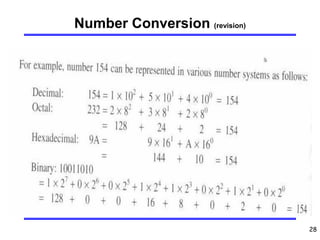
Number Conversion (revision)
29
Number Conversion (revision)
30
Number Conversion
• Convert the binari number 1001 1011 into its hex:
– Arrange the binary digits in groups of four:
1001 1011
– Convert each group into its equivalent Hex number.
1001 1011
B9
31
Advances in Semiconductor Technology
• After the invention of the transistor, integrated circuits
(ICs) appeared on the scene at the end of the 1950s.
– an entire circuit consisting of several transistors,
diodes, and resistors could be designed on a single
chip.
• In the early 1960s, logic gates 7400 series were
commonly available as ICs, and the technology of
integrating the circuits of a logic gate on a single chip
became known as small-scale integration (SSI).
32
Advances in Semiconductor Technology
• As semiconductor technology advanced, more than
100 gates were fabricated on one chip:
– medium-scale integration (MSI).
– Example:a decade counter (7490).
• Within a few years, it was possible to fabricate more
than 1000 gates on a single chip
– large-scale integration (LSI).
• Now we are in the era of very-large- scale integration
(VLSI) and super-large-scale integration (SLSI).
• The lines of demarcation between these different
scales of integration are rather ill defined and
arbitrary.
33
Historical Perspective
• The microprocessor revolution began with a bold and
innovative approach in logic design pioneered by Intel
engineer Ted Hoff.
• In 1969, Intel was primarily in the business of
designing semiconductor memory.
– it introduced a 64-hit bipolar RAM chip that year.
34
Historical Perspective
• Intel coined the term “microprocessor” and in 1971
released the first 4-bit microprocessor as the 4004.
– It was designed with LSI technology;
– It had 2,300 transistors, 640 bytes of memory-
addressing capacity, and a 108 kHz clock. Thus, the
microprocessor revolution began with this tiny chip.
• Gordon Moore, cofounder of Intel Corporation,
predicted that the number of transistors per integrated
circuit would double every 18 months;
– this came to he known as “Moore’s Law.”
– Just twenty-five years since the invention of the 4004,
we have processors that are designed with 15 million
transistors, that can address one terabyte (1 X 112) of
memory, and that can operate at 400 MHz to I .5-0Hz
frequency (see Table 1.1).
35
36
Organization of a Microprocessor-Based
System
• It includes three components:
– Microprocessor;
– I/O (input/output) and
– memory (read/write memory and read-only memory).
• These components are organised around a common
communication path called a bus.
• The entire group of components is also referred to as
a system or a microcomputer system.
37
38
Organization of a Microprocessor-Based
System
• The functions of various components:
– The microprocessor
• reads instructions from memory.
• communicates with all peripherals (memory and 1/Os) using the
system bus.
• controls the timing of information flow.
• performs the computing tasks specified in a program.
– The memory
• stores binary information, called instructions and data.
• provides the instructions and data to the microprocessor on request.
• stores results and data for the microprocessor.
– The input device
• enters data and instructions under the control of a program such as
program.
– The output device
• accepts data from the microprocessor as specified in a program.
– The bus
• carries bits between the microprocessor and memory and I/Os.
39
Microprocessor Instruction Set
and Computer Languages
• Microprocessors recognize and operate in binary
numbers.
• Each microprocessor has its own binary words, meanings,
and language.
• The words are formed by combining a number of bits for a
given machine.
– The word (or word length) is defined as the number of bits the
microprocessor recognizes and processes at a time.
– The word length ranges from 4-bit to 64-bit.
• Another term commonly used to express word length is
byte.
– A byte is defined as a group of eight bits.
– For example, a 16-bit microprocessor has a word length to two
bytes.
• The term nibble stands for a group of four bits.
– A byte has two nibbles.
40
Microprocessor Instruction Set
and Computer Languages
• Each machine has its own set of instructions based
on the design of its CPU or of its microprocessor.
• To communicate with the computer, one must give
instructions in binary language (machine language).
– Difficult for most people to write programs in sets of 0s
and 1s, computer manufacturers have devised English-
like words to represent the binary instructions of a
machine - assembly language.
– An assembly language is machine-specific.
41
Microprocessor Instruction Set
and Computer Languages
• The 8085 is a microprocessor with 8-bit word length:
– its instruction set (or language) is designed by using
various combinations of these eight bits.
– 8085 has 74 different instructions - instruction set.
42
Microprocessor Instruction Set
and Computer Languages
• For convenience, the 8085 instructions can be written
in hexadecimal code and entered in a single-board
microcomputer by using Hex keys.
– E.g., the binary instruction 0011 1100 2 ≡ 3Ch .
– This instruction can be entered in a single-board
microcomputer system with a Hex keyboard by
pressing two keys: 3 and C.
– The monitor program of the system translates these
keys into their equivalent binary pattern.
43
8085 Assembly Language
• Even though the instructions can be written in
hexadecimal code, it is still difficult to understand a
program written in hexadecimal numbers.
– Therefore, each manufacturer of a MPU has devised a
symbolic code for each instruction, called a mnemonic.
– The mnemonic for a particular instruction consists of
letters that suggest the operation to be performed by
that instruction.
– For example, 0011 11002 (3Ch) is represented by the
mnemonic INR A.
44
8085 Assembly Language
• The complete set of 8085 mnemonics is called the
8085 assembly language.
• A program written in these mnemonics is called an
assembly language program.
• Machine language and assembly language are
microprocessor-specific and are both considered low-
level languages.
• The machine language is in binary, and the assembly
language is in English-like words; however, the
microprocessor understands only the binary.
45
8085 Assembly Language
• The mnemonics can be written by hand on paper and
translated manually in hexadecimal code, called hand
assembly.
• Or the mnemonics can be written on a computer
using a program called an Editor in the ASCII code
and translated into binary code by using the program
called an assembler.
ASCII—American Standard Code for Information
Interchange. This is a 7-bit alphanumeric code with 128
combinations. Each combination is assigned to either a
letter, decimal digit, a symbol, or a machine command.
46
Hand Assembly
• To manually write and execute an assembly language
program on a single-board computer, with a Hex
keyboard for input and LEDs for output, the following
steps are necessary:
– Write the instructions in mnemonics obtained from the
instruction set supplied by the manufacturer.
– Find the hexadecimal machine code for each
instruction by searching through the set of instructions.
– Enter (load) the program in the user memory in a
sequential order by using the Hex keyboard as the
input device.
– Execute the program by pressing the Execute key. The
answer will be displayed by the LEDs.
47
Assembler
• The hand assembly:
– tedious and subject to errors;
– suited for small programs.
• Alternative, use assembler:
– The assembler is a program that translates the
mnemonics entered by the ASCII keyboard into the
corresponding binary machine codes of the
microprocessor.
– Each microprocessor has its own assembler because
the mnemonics and machine codes are specific to the
microprocessor being used, and each assembler has
rules that must be followed by the programmer.
48
High-Level Languages
• Programming languages that are intended to be
machine-independent are called high-level languages.
• These include such languages as BASIC, PASCAL,
C, C++ and Java, all of which have certain sets of
rules and draw on symbols and conventions from
English.
• Instructions written in these languages are known as
statements rather than mnemonics.
49
High-Level Languages
• How are words in English converted into the binary
languages of different microprocessors?
– Through another program called either a compiler or an
interpreter.
– These programs accept English-like statements as their
input, called the source code.
– The compiler or interpreter then translates the source
code into the machine language compatible (object
code) with the microprocessor being used in the
system.
– Each microprocessor needs its own compiler or an
interpreter for each high-level language.
50
High-Level Languages
• Compiler - a program that translates English-like
words of a high-level language into the machine
language of a computer.
– A compiler reads a given program, called a source
code, in its entirety and then translates the program into
the machine language, which is called an object code.
• Interpreter - a program that translates the English-like
statements of a high-level language into the machine
language of a computer.
– An interpreter translates one statement at a time from a
source code to an object code.
• Assembler - a computer program that translates an
assembly language program from mnemonics to the
binary machine code of a computer.
51
Operating system
• Operating system - a set of programs that manages
interaction between hardware and software.
– Responsible primarily for storing information on disks
and for communication between microprocessor,
memory, and peripherals.
52
OS and its relationship with various hardware components
53
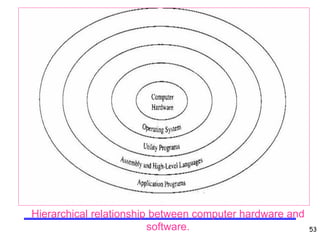
Hierarchical relationship between computer hardware and
software.
54
Single-board microcomputer
• Typically, these microcomputers include an 8- or 16-
bit microprocessor, from 256 bytes to 8K bytes of user
memory, a Hex keyboard, and seven-segment LEDs
as display.
• The interaction between the microprocessor, memory,
and I/Os in these small systems is managed by a
monitor program, which is generally small in size,
stored in less than 2K bytes of ROM.
• When a single-board microcomputer is turned on, the
monitor program is in charge of the system;
– it monitors the keyboard inputs, interprets those keys,
stores progranis in memory, sends system displays to
the LEDs, and enables the execution of the user
programs.
55
Single-board microcomputer
• Monitor program - a program that interprets the input
from a keyboard and converts the input into its binary
equivalent.
– The function of the monitor program in a small system
is similar to that of the operating system in a large
system.
56
57
Application: Microprocessorcontrolled
Temperature System (Mcts)
• This system is expected:
– to read the temperature in a room;
– display the temperature at a liquid crystal display (LCD)
panel (described later);
– turn on a fan if the temperature is above a set point,
and
– turn on a heater if the temperature is below a set point.
58

Chapter 1-Microprocessors, Microcomputers, and Assembly Language

  • 1.
  • 2.
    2 Introduction • In thiscourse we will discus two microprocessors. – 8-Bit Intel 8085. • Text Books: – Gaonkar, R. S. (2002/2013). “Microprocessor architecture, programming, and application with the 8085”, 5th edition, Prentice Hall. – Brey, B. B. (1993). “The 8085A microprocessor software, programming and architecture”, 2nd edition, Prentice Hall. .
  • 3.
    3 Synopsis • The microprocessoris a general-purpose programmable logic device. • Understanding the microprocessor concepts is crucial in understanding the operation of digital computer. • This course is an introduction to the basic concept of microprocessor architecture and operation, programming model, pins configuration and microprocessor interfacing. • The content of the course is divided into three sections: – microprocessor architecture, – programming and – interfacing input/output. • The course is designed around the Intel 8-bit microprocessor (8085A) and its assembly language.
  • 4.
    4 LEARNING OUTCOME At theend of the course, student should be: • Able to understand the basic operation of microprocessor. • Able to understand the basic concept of microprocessor architecture and its pins configuration. • Able to understand the machine language programs. • Able to design and write programs in assembly language. • Able to understand the basic concept of microprocessor input/output interfacing
  • 5.
    5 Introduction • The majorityof people think that computers are some kind of complicated device that is impossible to learn and infinitely intelligent, able to think better than a person. – The truth is much less glamorous. • A computer can only do what the programmer has told it to do, in the form of a program. • A program is just a sequence of very simple commands that lead the computer to solve some problem. • Once the program is written and debugged, the computer can execute the instructions very fast, and always do it the same, every time, without a mistake.
  • 6.
    6 Introduction • Even thoughthe program consists of very simple instructions, the overall result can be very impressive, due mostly to the speed at which the computer can process the instructions. • Even though each step in the program is very simple, the sequence of instructions, executing at millions of steps per second, can appear to be very complicated, when taken as a whole. • The trick is not to think of it as a whole, but as a series of very simple steps, or commands.
  • 7.
    7 Introduction • The microprocessoritself is usually a single integrated circuit (IC). • Most microprocessors (MPU), or very small computers, have much the same commands or instructions that they can perform. – They vary mostly in the names used to describe each command. • In a typical MPU, there are commands to move data around, do simple math (add, subtract, multiply, and divide), bring data into the micro from the outside world, and send data out of the micro to the outside world. – Sounds too simple....right? .
  • 8.
    8 Microprocessors • The microprocessoris a programmable integrated device that has computing and decision-making capability similar to that of the central processing unit (CPU) of a computer. • The fact that the microprocessor is programmable means it can be instructed to perform given tasks within its capability. • The microprocessor is a clock-driven semiconductor device consisting of electronic logic circuits manufactured by using either a large-scale integration (LSI) or very-large-scale integration (VLSI) technique.
  • 9.
    9 Microprocessors • A typicalMPU has three basic parts inside. They are: – the Program Counter (PC) – Memory, and – Input / Output (I/O). • The Program Counter keeps track of which command is to be executed. • The Memory contains the commands to be executed. • The Input / Output handles the transfer of data to and from the outside world (outside the MPU physical package). • There are many other actual parts inside the MPU, however, we will learn about every single one, one step at a time.
  • 10.
    10 Microprocessors • Nowadays, themicroprocessor is being used in a wide range of products called microprocessor- based products or systems. • The microprocessor can he embedded in a larger system, can be a stand alone unit controlling processes, or it can function as the CPU of a computer called a microcomputer.
  • 11.
    11 Microprocessors • The microprocessorcommunicates and operates in the binary numbers 0 and 1, called bits. • Each microprocessor has a fixed set of instructions in the form of binary patterns called a machine language. • It is difficult for humans to communicate in the language of 0 s and 1 s. • Therefore, the binary instructions are given abbreviated names, called mnenomics, which form the assembly language for a given microprocessor.
  • 12.
    12 Microprocessors • A typicalprogrammable machine can be represented with four components: microprocessor, memory, input, and output. • These four components work together or interact with each other to perform a given task; thus, they comprise a system. • The physical components of this system are called hardware. • A set of instructions written for the microprocessor to perform a task is called a program, and a group of programs is called software.
  • 13.
    13 Microprocessors • The microprocessorapplications are classified primarily in two categories: – reprogrammable systems and – embedded systems.
  • 14.
    14 Microprocessors • In reprogrammablesystems, such as microcomputers, the microprocessor is used for computing and data processing. These systems include: – general-purpose microprocessors capable of handling large data, mass storage devices (such as disks and CD-ROMs), and peripherals such as printers; – a personal computer (PC) is a typical illustration.
  • 15.
    15 Microprocessors • In embeddedsystems, the microprocessor is a part of a final product and is not available for reprogramming to the end user. Example: – copying machine – washing machine. – Air-conditioner – Etc.
  • 16.
    16 Microprocessor, CPU &Microcontroller • Microprocessor (MPU) - a semiconductor device (integrated circuit) manufactured by using the LSI technique. – It includes the ALU, register arrays, and control circuits on a single chip. • CPU - the central processing unit. – The group of circuits that processes data and provides control signals and timing. It includes the arithmetic/logic unit, registers, instruction decoder, and the control unit. • Microcontroller - a device that includes microprocessor, memory, and I/O signal lines on a single chip, fabricated using VLSI technology.
  • 17.
    17 Microprocessor, CPU &Microcontroller • In large computers, a CPU implemented on one or more circuit boards performs these computing functions. • The microprocessor is in many ways similar to the CPU, but includes all the logic circuitry, including the control unit, on one chip.
  • 18.
  • 19.
    19 Block diagram ofa computer with the microprocessor as a CPU
  • 20.
    20 Block diagram ofa microcontroller
  • 21.
    21 A Simple Program •A program is a sequence or series of very simple commands or instructions. • A real world example program might be the problem of crossing a busy street. – Step 1: Walk up to the traffic lights and stop. – Step 2: Look at the traffic light. – Step 3: Is your light green? – Step 4: If the light is red, goto step 2. (otherwise continue to step 5) – Step 5: Look to the left. – Step 6: Are there cars still passing by? – Step 7: If yes, goto step 5. (otherwise continue to step 8). – Step 8: Look to the right. – Step 9: Are there cars still passing by? (there shouldn't be any by now, but, you never know!) – Step 10: If yes, goto step 8. (otherwise continue to step 11) – Step 11: Proceed across the street, carefully!! .
  • 22.
    22 A Simple Program •Now this may seem childish at first glance, but this is exactly what you do every time you cross a busy street, that has a traffic light. • This is also exactly how you would tell a MPU to cross the street, if one could. • This is what I mean by a sequence or series of very simple steps. • Taken as a whole, the steps lead you cross a busy intersection, which, if a computer did it, would seem very intelligent. • It is intelligence, people are intelligent. A programmer that programmed these steps into a MPU, would impart that intelligence to the micro. • The MPU would not, however, in this case, know what to do when it got to the other side, since we didn't tell it.
  • 23.
    23 A Simple Program •In a MPU, the problems are different but the logical steps to solve the problem are similar, that is, a series of very simple steps, leading to the solution of a larger problem. • Also notice that since the steps are numbered, 1 through 11, that is the order in which they're executed. – The Program Counter (PC), in this case, starting with 1 and ending with 11, doing what each one says. – The PC automatically advances to the next step, after doing what the current step says, unless a branch, or jump, is encountered. – A branch is an instruction that directs the PC to go to a specific step, other than the next in the sequence.
  • 24.
    24 A Simple Program •The point of this lesson is to show how a simple set of instructions can solve a bigger problem. – Taken as a whole, the solution could appear to be more complicated than any of the separate steps it took to solve it. • The most difficult problem to be solved in programming a MPU is to define the problem you are trying to solve. – Sounds silly but I assure you, it's not. – This is the Logical Thought Process. – It is having a good understanding of the problem you're trying to solve. You must understand the information I'm presenting in order to pass the course. Trying to remember everything does not work at university.
  • 25.
    25 Decimal, Binary &Hex • The microprocessor operates in binary digits, 0 and 1, also known as bits. – Bit is an abbreviation for the term binary digit. – These digits are represented in terms of electrical voltages in the machine: Generally, 0 represents low voltage level, and 1 represents high voltage level. • Each MPU recognises and processes a group of bits called the word. – A word is a group of bits the computer recognizes and processes at a time. • MPUs are classified according to their word length. – For example, a processor with an 8-bit word is known as an 8-bit microprocessor, and a processor with a 32-bit word is known as a 32-bit microprocessor.
  • 26.
    26 Decimal, Binary &Hex • All numbering systems follow the same rules. • Decimal is Base 10, Binary is Base 2, and Hex(adecimal) is Base 16. • The base of a system refers to how many possible numbers can be in each digit position. – In decimal, a single digit number is 0 through 9. – In binary a single digit number is 0 or 1. – In hex a single digit number is 0 through 9, A,B,C,D,E, and F.
  • 27.
    27 Decimal, Binary &Hex • General format to represent number: N = AnBn + An-1Bn-1 +……..+A1B1 + A0B0 Where, N is number B is base A is any digit in that base. A binary 10 (one zero) is decimal 2 A decimal 10 is ten A hex 10 is decimal 16.
  • 28.
  • 29.
  • 30.
    30 Number Conversion • Convertthe binari number 1001 1011 into its hex: – Arrange the binary digits in groups of four: 1001 1011 – Convert each group into its equivalent Hex number. 1001 1011 B9
  • 31.
    31 Advances in SemiconductorTechnology • After the invention of the transistor, integrated circuits (ICs) appeared on the scene at the end of the 1950s. – an entire circuit consisting of several transistors, diodes, and resistors could be designed on a single chip. • In the early 1960s, logic gates 7400 series were commonly available as ICs, and the technology of integrating the circuits of a logic gate on a single chip became known as small-scale integration (SSI).
  • 32.
    32 Advances in SemiconductorTechnology • As semiconductor technology advanced, more than 100 gates were fabricated on one chip: – medium-scale integration (MSI). – Example:a decade counter (7490). • Within a few years, it was possible to fabricate more than 1000 gates on a single chip – large-scale integration (LSI). • Now we are in the era of very-large- scale integration (VLSI) and super-large-scale integration (SLSI). • The lines of demarcation between these different scales of integration are rather ill defined and arbitrary.
  • 33.
    33 Historical Perspective • Themicroprocessor revolution began with a bold and innovative approach in logic design pioneered by Intel engineer Ted Hoff. • In 1969, Intel was primarily in the business of designing semiconductor memory. – it introduced a 64-hit bipolar RAM chip that year.
  • 34.
    34 Historical Perspective • Intelcoined the term “microprocessor” and in 1971 released the first 4-bit microprocessor as the 4004. – It was designed with LSI technology; – It had 2,300 transistors, 640 bytes of memory- addressing capacity, and a 108 kHz clock. Thus, the microprocessor revolution began with this tiny chip. • Gordon Moore, cofounder of Intel Corporation, predicted that the number of transistors per integrated circuit would double every 18 months; – this came to he known as “Moore’s Law.” – Just twenty-five years since the invention of the 4004, we have processors that are designed with 15 million transistors, that can address one terabyte (1 X 112) of memory, and that can operate at 400 MHz to I .5-0Hz frequency (see Table 1.1).
  • 35.
  • 36.
    36 Organization of aMicroprocessor-Based System • It includes three components: – Microprocessor; – I/O (input/output) and – memory (read/write memory and read-only memory). • These components are organised around a common communication path called a bus. • The entire group of components is also referred to as a system or a microcomputer system.
  • 37.
  • 38.
    38 Organization of aMicroprocessor-Based System • The functions of various components: – The microprocessor • reads instructions from memory. • communicates with all peripherals (memory and 1/Os) using the system bus. • controls the timing of information flow. • performs the computing tasks specified in a program. – The memory • stores binary information, called instructions and data. • provides the instructions and data to the microprocessor on request. • stores results and data for the microprocessor. – The input device • enters data and instructions under the control of a program such as program. – The output device • accepts data from the microprocessor as specified in a program. – The bus • carries bits between the microprocessor and memory and I/Os.
  • 39.
    39 Microprocessor Instruction Set andComputer Languages • Microprocessors recognize and operate in binary numbers. • Each microprocessor has its own binary words, meanings, and language. • The words are formed by combining a number of bits for a given machine. – The word (or word length) is defined as the number of bits the microprocessor recognizes and processes at a time. – The word length ranges from 4-bit to 64-bit. • Another term commonly used to express word length is byte. – A byte is defined as a group of eight bits. – For example, a 16-bit microprocessor has a word length to two bytes. • The term nibble stands for a group of four bits. – A byte has two nibbles.
  • 40.
    40 Microprocessor Instruction Set andComputer Languages • Each machine has its own set of instructions based on the design of its CPU or of its microprocessor. • To communicate with the computer, one must give instructions in binary language (machine language). – Difficult for most people to write programs in sets of 0s and 1s, computer manufacturers have devised English- like words to represent the binary instructions of a machine - assembly language. – An assembly language is machine-specific.
  • 41.
    41 Microprocessor Instruction Set andComputer Languages • The 8085 is a microprocessor with 8-bit word length: – its instruction set (or language) is designed by using various combinations of these eight bits. – 8085 has 74 different instructions - instruction set.
  • 42.
    42 Microprocessor Instruction Set andComputer Languages • For convenience, the 8085 instructions can be written in hexadecimal code and entered in a single-board microcomputer by using Hex keys. – E.g., the binary instruction 0011 1100 2 ≡ 3Ch . – This instruction can be entered in a single-board microcomputer system with a Hex keyboard by pressing two keys: 3 and C. – The monitor program of the system translates these keys into their equivalent binary pattern.
  • 43.
    43 8085 Assembly Language •Even though the instructions can be written in hexadecimal code, it is still difficult to understand a program written in hexadecimal numbers. – Therefore, each manufacturer of a MPU has devised a symbolic code for each instruction, called a mnemonic. – The mnemonic for a particular instruction consists of letters that suggest the operation to be performed by that instruction. – For example, 0011 11002 (3Ch) is represented by the mnemonic INR A.
  • 44.
    44 8085 Assembly Language •The complete set of 8085 mnemonics is called the 8085 assembly language. • A program written in these mnemonics is called an assembly language program. • Machine language and assembly language are microprocessor-specific and are both considered low- level languages. • The machine language is in binary, and the assembly language is in English-like words; however, the microprocessor understands only the binary.
  • 45.
    45 8085 Assembly Language •The mnemonics can be written by hand on paper and translated manually in hexadecimal code, called hand assembly. • Or the mnemonics can be written on a computer using a program called an Editor in the ASCII code and translated into binary code by using the program called an assembler. ASCII—American Standard Code for Information Interchange. This is a 7-bit alphanumeric code with 128 combinations. Each combination is assigned to either a letter, decimal digit, a symbol, or a machine command.
  • 46.
    46 Hand Assembly • Tomanually write and execute an assembly language program on a single-board computer, with a Hex keyboard for input and LEDs for output, the following steps are necessary: – Write the instructions in mnemonics obtained from the instruction set supplied by the manufacturer. – Find the hexadecimal machine code for each instruction by searching through the set of instructions. – Enter (load) the program in the user memory in a sequential order by using the Hex keyboard as the input device. – Execute the program by pressing the Execute key. The answer will be displayed by the LEDs.
  • 47.
    47 Assembler • The handassembly: – tedious and subject to errors; – suited for small programs. • Alternative, use assembler: – The assembler is a program that translates the mnemonics entered by the ASCII keyboard into the corresponding binary machine codes of the microprocessor. – Each microprocessor has its own assembler because the mnemonics and machine codes are specific to the microprocessor being used, and each assembler has rules that must be followed by the programmer.
  • 48.
    48 High-Level Languages • Programminglanguages that are intended to be machine-independent are called high-level languages. • These include such languages as BASIC, PASCAL, C, C++ and Java, all of which have certain sets of rules and draw on symbols and conventions from English. • Instructions written in these languages are known as statements rather than mnemonics.
  • 49.
    49 High-Level Languages • Howare words in English converted into the binary languages of different microprocessors? – Through another program called either a compiler or an interpreter. – These programs accept English-like statements as their input, called the source code. – The compiler or interpreter then translates the source code into the machine language compatible (object code) with the microprocessor being used in the system. – Each microprocessor needs its own compiler or an interpreter for each high-level language.
  • 50.
    50 High-Level Languages • Compiler- a program that translates English-like words of a high-level language into the machine language of a computer. – A compiler reads a given program, called a source code, in its entirety and then translates the program into the machine language, which is called an object code. • Interpreter - a program that translates the English-like statements of a high-level language into the machine language of a computer. – An interpreter translates one statement at a time from a source code to an object code. • Assembler - a computer program that translates an assembly language program from mnemonics to the binary machine code of a computer.
  • 51.
    51 Operating system • Operatingsystem - a set of programs that manages interaction between hardware and software. – Responsible primarily for storing information on disks and for communication between microprocessor, memory, and peripherals.
  • 52.
    52 OS and itsrelationship with various hardware components
  • 53.
    53 Hierarchical relationship betweencomputer hardware and software.
  • 54.
    54 Single-board microcomputer • Typically,these microcomputers include an 8- or 16- bit microprocessor, from 256 bytes to 8K bytes of user memory, a Hex keyboard, and seven-segment LEDs as display. • The interaction between the microprocessor, memory, and I/Os in these small systems is managed by a monitor program, which is generally small in size, stored in less than 2K bytes of ROM. • When a single-board microcomputer is turned on, the monitor program is in charge of the system; – it monitors the keyboard inputs, interprets those keys, stores progranis in memory, sends system displays to the LEDs, and enables the execution of the user programs.
  • 55.
    55 Single-board microcomputer • Monitorprogram - a program that interprets the input from a keyboard and converts the input into its binary equivalent. – The function of the monitor program in a small system is similar to that of the operating system in a large system.
  • 56.
  • 57.
    57 Application: Microprocessorcontrolled Temperature System(Mcts) • This system is expected: – to read the temperature in a room; – display the temperature at a liquid crystal display (LCD) panel (described later); – turn on a fan if the temperature is above a set point, and – turn on a heater if the temperature is below a set point.
  • 58.