PRE-REQUISITE
Basic revision on Microcomputers
By
Smita V More
Revision of Microcomputer System
Terminologies
• Binary Digit (BIT): basic unit of digital storage, a 0 or 1
• Nibble: 4 bits, ½ byte, 1 hex digit
• Byte: grouping of 8 bits handled as a single unit, has 28 = 256 possible values
• Central Processing Unit (CPU): the “brains” of a computer
• Memory (RAM/ROM): digital circuitry used to store programs and data
• Input/Output (I/O): generic term describing how information enters and exits a computer
• Bus: multi-bit communication channel used within a computer system
• Microprocessor (MPU or uP): complex logic I.C. that contains registers, counters & decoders and performs arithmetic, logic & control operations,
a CPU on a single LSI chip
• Microcomputer (uC): a fully functional system including a MPU, memory, I/O and a clock
• Microcontroller (MCU): a microcomputer on a single chip
• Operations (op codes): the set of basic operations that a computer can be instructed to perform, encoded in binary
• Operand: the data operated on by a particular operation • Instruction: combination of an op code and its operand
• Program: group of instructions that allows a computer to perform a specific job
• Programmer: a person who writes programs II. Computer Architecture Basics What is a computer? CPU + Memory + I/O interconnected by buses
and driven by a clock system
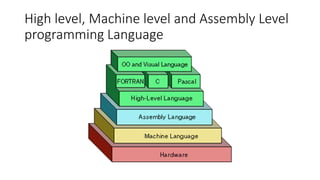
High level, Machine level and Assembly Level
programming Language
Machine level
• MACHINE LANGUAGES: Imagine them as the “native tongue” of the
computer, the language closest to the hardware itself.
• Each unique computer has a unique machine language.
• A machine language program is made up of a series of binary
patterns (e.g., 01011100) which represent simple operations that can
be accomplished by the computer (e.g., add two operands, move data
to a memory location).
• Machine language programs are executable, meaning that they can
be run directly. Programming in machine language requires
memorization of the binary codes and can be difficult for the human
programmer.
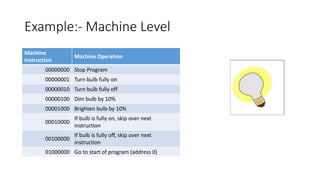
Example:- Machine Level
Machine
Instruction
Machine Operation
00000000 Stop Program
00000001 Turn bulb fully on
00000010 Turn bulb fully off
00000100 Dim bulb by 10%
00001000 Brighten bulb by 10%
00010000
If bulb is fully on, skip over next
instruction
00100000
If bulb is fully off, skip over next
instruction
01000000 Go to start of program (address 0)
ASSEMBLY LANGUAGES
• ASSEMBLY LANGUAGES: They represent an effort to make
programming easier for the human.
• The machine language instructions are replaced with simple
pneumonic abbreviations (e.g., ADD, MOV).
• Thus assembly languages are unique to a specific computer
(machine).
• Prior to execution, an assembly language program requires
translation to machine language. This translation is accomplished by a
computer program known as an Assembler. Assemblers are written
for each unique machine language.
HIGH LEVEL LANGUAGES
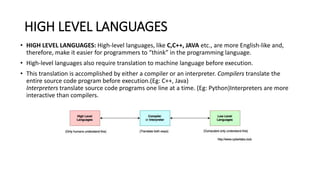
• HIGH LEVEL LANGUAGES: High-level languages, like C,C++, JAVA etc., are more English-like and,
therefore, make it easier for programmers to “think” in the programming language.
• High-level languages also require translation to machine language before execution.
• This translation is accomplished by either a compiler or an interpreter. Compilers translate the
entire source code program before execution.(Eg: C++, Java)
Interpreters translate source code programs one line at a time. (Eg: Python)Interpreters are more
interactive than compilers.
Difference between MicroProcessor &
MicroController
Difference between MicroProcessor &
MicroController
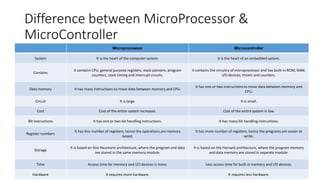
Microprocessor Microcontroller
System It is the heart of the computer system. It is the heart of an embedded system.
Contains
It contains CPU, general purpose registers, stack pointers, program
counters, clock timing and interrupt circuits.
It contains the circuitry of microprocessor and has built-in ROM, RAM,
I/O devices, timers and counters.
Data memory It has many instructions to move data between memory and CPU.
It has one or two instructions to move data between memory and
CPU.
Circuit It is large. It is small.
Cost Cost of the entire system increases. Cost of the entire system is low.
Bit instructions It has one or two bit handling instructions. It has many bit handling instructions.
Register numbers
It has less number of registers; hence the operations are memory
based.
It has more number of registers; hence the programs are easier to
write.
Storage
It is based on Von Neumann architecture, where the program and data
are stored in the same memory module.
It is based on the Harvard architecture, where the program memory
and data memory are stored in separate module.
Time Access time for memory and I/O devices is more. Less access time for built-in memory and I/O devices.
Hardware It requires more hardware. It requires less hardware.

Pre requisite of COA- for Micro controller Embedded systems

  • 1.
    PRE-REQUISITE Basic revision onMicrocomputers By Smita V More
  • 2.
    Revision of MicrocomputerSystem Terminologies • Binary Digit (BIT): basic unit of digital storage, a 0 or 1 • Nibble: 4 bits, ½ byte, 1 hex digit • Byte: grouping of 8 bits handled as a single unit, has 28 = 256 possible values • Central Processing Unit (CPU): the “brains” of a computer • Memory (RAM/ROM): digital circuitry used to store programs and data • Input/Output (I/O): generic term describing how information enters and exits a computer • Bus: multi-bit communication channel used within a computer system • Microprocessor (MPU or uP): complex logic I.C. that contains registers, counters & decoders and performs arithmetic, logic & control operations, a CPU on a single LSI chip • Microcomputer (uC): a fully functional system including a MPU, memory, I/O and a clock • Microcontroller (MCU): a microcomputer on a single chip • Operations (op codes): the set of basic operations that a computer can be instructed to perform, encoded in binary • Operand: the data operated on by a particular operation • Instruction: combination of an op code and its operand • Program: group of instructions that allows a computer to perform a specific job • Programmer: a person who writes programs II. Computer Architecture Basics What is a computer? CPU + Memory + I/O interconnected by buses and driven by a clock system
  • 3.
    High level, Machinelevel and Assembly Level programming Language
  • 4.
    Machine level • MACHINELANGUAGES: Imagine them as the “native tongue” of the computer, the language closest to the hardware itself. • Each unique computer has a unique machine language. • A machine language program is made up of a series of binary patterns (e.g., 01011100) which represent simple operations that can be accomplished by the computer (e.g., add two operands, move data to a memory location). • Machine language programs are executable, meaning that they can be run directly. Programming in machine language requires memorization of the binary codes and can be difficult for the human programmer.
  • 5.
    Example:- Machine Level Machine Instruction MachineOperation 00000000 Stop Program 00000001 Turn bulb fully on 00000010 Turn bulb fully off 00000100 Dim bulb by 10% 00001000 Brighten bulb by 10% 00010000 If bulb is fully on, skip over next instruction 00100000 If bulb is fully off, skip over next instruction 01000000 Go to start of program (address 0)
  • 6.
    ASSEMBLY LANGUAGES • ASSEMBLYLANGUAGES: They represent an effort to make programming easier for the human. • The machine language instructions are replaced with simple pneumonic abbreviations (e.g., ADD, MOV). • Thus assembly languages are unique to a specific computer (machine). • Prior to execution, an assembly language program requires translation to machine language. This translation is accomplished by a computer program known as an Assembler. Assemblers are written for each unique machine language.
  • 7.
    HIGH LEVEL LANGUAGES •HIGH LEVEL LANGUAGES: High-level languages, like C,C++, JAVA etc., are more English-like and, therefore, make it easier for programmers to “think” in the programming language. • High-level languages also require translation to machine language before execution. • This translation is accomplished by either a compiler or an interpreter. Compilers translate the entire source code program before execution.(Eg: C++, Java) Interpreters translate source code programs one line at a time. (Eg: Python)Interpreters are more interactive than compilers.
  • 8.
  • 9.
    Difference between MicroProcessor& MicroController Microprocessor Microcontroller System It is the heart of the computer system. It is the heart of an embedded system. Contains It contains CPU, general purpose registers, stack pointers, program counters, clock timing and interrupt circuits. It contains the circuitry of microprocessor and has built-in ROM, RAM, I/O devices, timers and counters. Data memory It has many instructions to move data between memory and CPU. It has one or two instructions to move data between memory and CPU. Circuit It is large. It is small. Cost Cost of the entire system increases. Cost of the entire system is low. Bit instructions It has one or two bit handling instructions. It has many bit handling instructions. Register numbers It has less number of registers; hence the operations are memory based. It has more number of registers; hence the programs are easier to write. Storage It is based on Von Neumann architecture, where the program and data are stored in the same memory module. It is based on the Harvard architecture, where the program memory and data memory are stored in separate module. Time Access time for memory and I/O devices is more. Less access time for built-in memory and I/O devices. Hardware It requires more hardware. It requires less hardware.