

Chapter Three
E-Security
By: Marya sholevar
Fall 2014
The Scope of the Problem

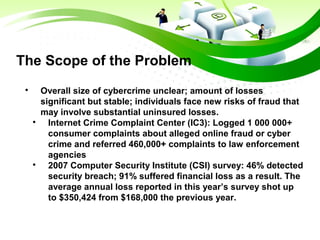
Overall size of cybercrime unclear; amount of losses
significant but stable; individuals face new risks of fraud that
may involve substantial uninsured losses.

Internet Crime Complaint Center (IC3): Logged 1 000 000+
consumer complaints about alleged online fraud or cyber
crime and referred 460,000+ complaints to law enforcement
agencies

2007 Computer Security Institute (CSI) survey: 46% detected
security breach; 91% suffered financial loss as a result. The
average annual loss reported in this year’s survey shot up
to $350,424 from $168,000 the previous year.
The Different Dimensions of
E-commerce Security
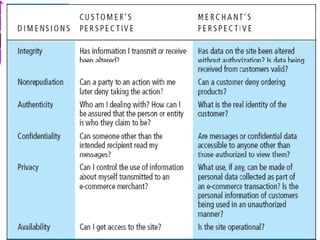
1-Integrity
The ability to ensure that information being displayed
on a web site or transmitted or received over the
internet has not been altered in any way by an
unauthorized party
2-Nonrepudiation
The ability to ensure that e-commerce participants do
not deny (i.e. repudiate) their online actions
3-Authenticity
The ability to identify the identity of a person or entity
with whom you are dealing in the internet
The Different Dimensions of
E-commerce Security
4-Confidentiality
The ability to ensure that messages and data are
available only to those who are authorized to view
them
5-Privacy
The ability to control the use of information about
oneself
6-Availability
The ability to ensure that an e-commerce site continues
top function as intended.
The tension between
security and other values

Security vs. ease of use:

the more security measures added, the more
difficult a site is to use, and the slower it
becomes

Security vs. desire of individuals to act
anonymously

Use of technology by criminals to plan crimes
o threaten nation-state
Security Threats in the E-
commerce Environment

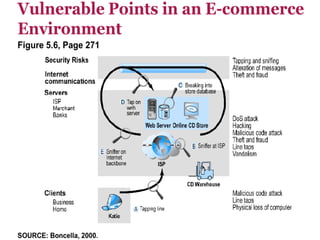
Three key points of vulnerability:

Client

Server

Communications channel
What Is Good E-
commerce Security?

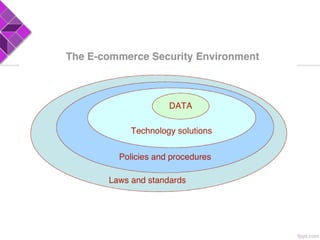
To achieve highest degree of security

New technologies

Organizational policies and procedures

Industry standards and government laws

Other factors

Time value of money

Cost of security vs. potential loss

Security often breaks at weakest link
Common Security Threats
in the E-commerce
1-Malicious code:
1-1 Viruses:

Replicate and spread to other files; most deliver
“payload” destructive or benign)

Macro viruses, file-infecting viruses, script viruses
1-2 Worms:

Designed to spread from computer to computer
Can replicate without being executed by a user or
program like virus
Common Security Threats
in the E-commerce
1-3 Trojan horses:

Appears benign, but does something other than
expected
1-4 Bots, botnets:

Covertly installed on computer; respond to
external commands sent by attacker to create a
network of compromised computers for sending
spam, generating a DDoS attack, and stealing info
from computers
Common Security Threats
in the E-commerce
2- Unwanted programs:

Unwanted Programs Installed without user’s informed
consent
2-1 Browser parasites:

Can monitor and change settings of a user’s browser.
2-2 Adware:Calls for unwanted pop-up ads
2-3 Spyware:

Can be used to obtain information, such as a user’s
keystrokes, e-mail, IMs, etc.
Common Security
Threats: Phishing

Phishing:Deceptive online attempt to obtain
confidential information

Social engineering E-mail scams, Spoofing
legitimate Web sites

Use of information to commit fraudulent acts
(access checking accounts), steal identity
Common Security
Threats: Hackers

Hackers: Individual who intends to gain unauthorized
access to computer systems

Crackers: Hacker with criminal intent

Types of hackers:

White hats – hired by corporate to find weaknesses in
the firm’s computer system

Black hats – hackers with intention of causing harm

Grey hats – hackers breaking in and revealing system
flaws without disrupting site or attempting to profit
from their finds.
Common Security Threats:
Credit Card Fraud

Fear of stolen credit card information deters online
purchases.

US’s federal law limits liability of individuals to $50 for a
stolen credit card.

Hackers target credit card files and other customer.
information files on merchant servers; use stolen data to
establish credit under false identity.

Online companies at higher risk than offline due to difficulty
of guarenteeing true identity of customers.

“E-Sign” law giving digital signatures same authority as
hand-written ones applies only to large corporations, but not
to B2C e-commerce.
Common Security
Threats:Spoofing

Misrepresenting oneself by using fake e-mail
addresses or masquerading as someone else.

Spoofing a Web site is called “pharming,” redirecting a
Web link to another IP address different from the real
one.

Threatens integrity (steal business from true site, or
alter orders and send to true site), and authenticity
(difficult to distinguish between true and fake Web
address).

Carried out by hacking local DNS servers.
Common Security Threats:
Spam (Junk) Web sites

Collection of advertisements for other sites, some of
which containing malicious code.

Appears on search results, hiding their identities by
using domain names similar to legitimate ones, and
redirecting traffic to spammer domains, e.g.,
topsearch10.com.
Common Security Threats:
Denial of service (DoS) attack

Hackers flood Web site with useless traffic to inundate
and overwhelm network.

Use of bot networks built from hundreds of
compromised workstations.
Common Security Threats:
Distributed denial of service (DDoS) attack

Hackers use multiple computers to attack target
network from numerous launch points.

Microsoft and Yahoo have experienced such attacks.
Common Security Threats:
Sniffing, Insider jobs: , ...

Sniffing:

Eavesdropping program that monitors information
traveling over a network.

Insider jobs:

Single largest financial threat .

Poorly designed server and client software:

Due to increase in complexity and size of OS,
application software, and browsers.
Common Security Threats:
Sniffing, Insider jobs: , ...

Social network security:

Social engineering attacks tempting visitors to FB
pages.

Mobile platform threats:

Same risks as any Internet device Malware, botnets,
vishing/smishing .
Technology Solutions

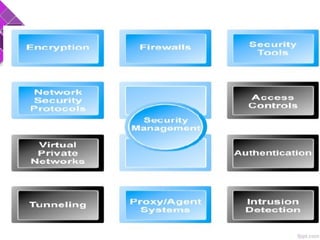
Protecting Internet communications:

Encryption

Securing channels of communication

SSL, S-HTTP, VPNs

Protecting networks

Firewalls

Protecting servers and clients
Protecting Internet Communications:
Encryption

Encryption Transforms plain text data into cipher text
readable only by sender and receiver.

Purpose:

Secures stored information and information
transmission.
Protecting Internet Communications:
Encryption

Provides 4 of 6 key dimensions of e-commerce security:

Message integrity – assurance that message hasn’t been
altered.

Nonrepudiation – prevents user from denying sending the
message.

Authentication – verification of identity of person
(computer) sending the msg.

Confidentiality – assurance that msg. was not read by
others.
Securing Channels of Communication
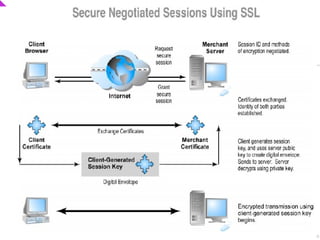
Secure Sockets Layer (SSL):

Establishes a secure, negotiated client-server session in
which URL of requested document, along with contents, is
encrypted.

Designed to establish a secure connection between two
computers .
Virtual Private Network (VPN):

Allows remote users to securely access internal network
via the Internet, using Point-to-Point Tunneling Protocol
(PPTP)
Protecting Networks
Firewall:

Hardware or software that filters packets (prevents some
packets from entering the network) by using security
policy.
Two main methods:

Packet filters – looks inside data packets to decide
whether they are destined for a prohibited port or originate
from a prohibited IP address.

Application gateways – filters communications based on
the application being requested, rather than the source or
destination of the message
Protecting Networks

Application gateways provide greater security than packet
filters, but can compromise system performance
Proxy servers (proxies):

Software servers that handle all communications
originating from or being sent to the Internet.

Initially for limiting access of internal clients to external
Internet servers.

Can be used to restrict access to certain types of sites,
such as porno, auction, or stock-trading sites, or to
cache frequently-accessed Web pages to reduce
download times.
Protecting Servers and Clients

Operating system security enhancements :

Upgrades, patches.

Anti-virus software:

Easiest and least expensive way to prevent threats to
system integrity.

Requires daily updates
Chapter three e-security

Chapter three e-security

  • 1.
  • 2.
    The Scope ofthe Problem  Overall size of cybercrime unclear; amount of losses significant but stable; individuals face new risks of fraud that may involve substantial uninsured losses.  Internet Crime Complaint Center (IC3): Logged 1 000 000+ consumer complaints about alleged online fraud or cyber crime and referred 460,000+ complaints to law enforcement agencies  2007 Computer Security Institute (CSI) survey: 46% detected security breach; 91% suffered financial loss as a result. The average annual loss reported in this year’s survey shot up to $350,424 from $168,000 the previous year.
  • 6.
    The Different Dimensionsof E-commerce Security 1-Integrity The ability to ensure that information being displayed on a web site or transmitted or received over the internet has not been altered in any way by an unauthorized party 2-Nonrepudiation The ability to ensure that e-commerce participants do not deny (i.e. repudiate) their online actions 3-Authenticity The ability to identify the identity of a person or entity with whom you are dealing in the internet
  • 7.
    The Different Dimensionsof E-commerce Security 4-Confidentiality The ability to ensure that messages and data are available only to those who are authorized to view them 5-Privacy The ability to control the use of information about oneself 6-Availability The ability to ensure that an e-commerce site continues top function as intended.
  • 8.
    The tension between securityand other values  Security vs. ease of use:  the more security measures added, the more difficult a site is to use, and the slower it becomes  Security vs. desire of individuals to act anonymously  Use of technology by criminals to plan crimes o threaten nation-state
  • 9.
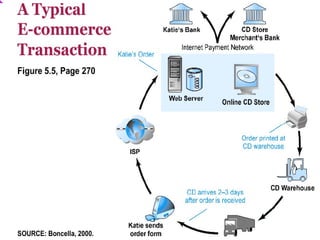
    Security Threats inthe E- commerce Environment  Three key points of vulnerability:  Client  Server  Communications channel
  • 12.
    What Is GoodE- commerce Security?  To achieve highest degree of security  New technologies  Organizational policies and procedures  Industry standards and government laws  Other factors  Time value of money  Cost of security vs. potential loss  Security often breaks at weakest link
  • 13.
    Common Security Threats inthe E-commerce 1-Malicious code: 1-1 Viruses:  Replicate and spread to other files; most deliver “payload” destructive or benign)  Macro viruses, file-infecting viruses, script viruses 1-2 Worms:  Designed to spread from computer to computer Can replicate without being executed by a user or program like virus
  • 14.
    Common Security Threats inthe E-commerce 1-3 Trojan horses:  Appears benign, but does something other than expected 1-4 Bots, botnets:  Covertly installed on computer; respond to external commands sent by attacker to create a network of compromised computers for sending spam, generating a DDoS attack, and stealing info from computers
  • 15.
    Common Security Threats inthe E-commerce 2- Unwanted programs:  Unwanted Programs Installed without user’s informed consent 2-1 Browser parasites:  Can monitor and change settings of a user’s browser. 2-2 Adware:Calls for unwanted pop-up ads 2-3 Spyware:  Can be used to obtain information, such as a user’s keystrokes, e-mail, IMs, etc.
  • 16.
    Common Security Threats: Phishing  Phishing:Deceptiveonline attempt to obtain confidential information  Social engineering E-mail scams, Spoofing legitimate Web sites  Use of information to commit fraudulent acts (access checking accounts), steal identity
  • 17.
    Common Security Threats: Hackers  Hackers:Individual who intends to gain unauthorized access to computer systems  Crackers: Hacker with criminal intent  Types of hackers:  White hats – hired by corporate to find weaknesses in the firm’s computer system  Black hats – hackers with intention of causing harm  Grey hats – hackers breaking in and revealing system flaws without disrupting site or attempting to profit from their finds.
  • 18.
    Common Security Threats: CreditCard Fraud  Fear of stolen credit card information deters online purchases.  US’s federal law limits liability of individuals to $50 for a stolen credit card.  Hackers target credit card files and other customer. information files on merchant servers; use stolen data to establish credit under false identity.  Online companies at higher risk than offline due to difficulty of guarenteeing true identity of customers.  “E-Sign” law giving digital signatures same authority as hand-written ones applies only to large corporations, but not to B2C e-commerce.
  • 19.
    Common Security Threats:Spoofing  Misrepresenting oneselfby using fake e-mail addresses or masquerading as someone else.  Spoofing a Web site is called “pharming,” redirecting a Web link to another IP address different from the real one.  Threatens integrity (steal business from true site, or alter orders and send to true site), and authenticity (difficult to distinguish between true and fake Web address).  Carried out by hacking local DNS servers.
  • 20.
    Common Security Threats: Spam(Junk) Web sites  Collection of advertisements for other sites, some of which containing malicious code.  Appears on search results, hiding their identities by using domain names similar to legitimate ones, and redirecting traffic to spammer domains, e.g., topsearch10.com.
  • 21.
    Common Security Threats: Denialof service (DoS) attack  Hackers flood Web site with useless traffic to inundate and overwhelm network.  Use of bot networks built from hundreds of compromised workstations.
  • 22.
    Common Security Threats: Distributeddenial of service (DDoS) attack  Hackers use multiple computers to attack target network from numerous launch points.  Microsoft and Yahoo have experienced such attacks.
  • 23.
    Common Security Threats: Sniffing,Insider jobs: , ...  Sniffing:  Eavesdropping program that monitors information traveling over a network.  Insider jobs:  Single largest financial threat .  Poorly designed server and client software:  Due to increase in complexity and size of OS, application software, and browsers.
  • 24.
    Common Security Threats: Sniffing,Insider jobs: , ...  Social network security:  Social engineering attacks tempting visitors to FB pages.  Mobile platform threats:  Same risks as any Internet device Malware, botnets, vishing/smishing .
  • 25.
    Technology Solutions  Protecting Internetcommunications:  Encryption  Securing channels of communication  SSL, S-HTTP, VPNs  Protecting networks  Firewalls  Protecting servers and clients
  • 27.
    Protecting Internet Communications: Encryption  EncryptionTransforms plain text data into cipher text readable only by sender and receiver.  Purpose:  Secures stored information and information transmission.
  • 28.
    Protecting Internet Communications: Encryption  Provides4 of 6 key dimensions of e-commerce security:  Message integrity – assurance that message hasn’t been altered.  Nonrepudiation – prevents user from denying sending the message.  Authentication – verification of identity of person (computer) sending the msg.  Confidentiality – assurance that msg. was not read by others.
  • 29.
    Securing Channels ofCommunication Secure Sockets Layer (SSL):  Establishes a secure, negotiated client-server session in which URL of requested document, along with contents, is encrypted.  Designed to establish a secure connection between two computers . Virtual Private Network (VPN):  Allows remote users to securely access internal network via the Internet, using Point-to-Point Tunneling Protocol (PPTP)
  • 30.
    Protecting Networks Firewall:  Hardware orsoftware that filters packets (prevents some packets from entering the network) by using security policy. Two main methods:  Packet filters – looks inside data packets to decide whether they are destined for a prohibited port or originate from a prohibited IP address.  Application gateways – filters communications based on the application being requested, rather than the source or destination of the message
  • 31.
    Protecting Networks  Application gatewaysprovide greater security than packet filters, but can compromise system performance Proxy servers (proxies):  Software servers that handle all communications originating from or being sent to the Internet.  Initially for limiting access of internal clients to external Internet servers.  Can be used to restrict access to certain types of sites, such as porno, auction, or stock-trading sites, or to cache frequently-accessed Web pages to reduce download times.
  • 32.
    Protecting Servers andClients  Operating system security enhancements :  Upgrades, patches.  Anti-virus software:  Easiest and least expensive way to prevent threats to system integrity.  Requires daily updates