The e-Payment Systems
Electronic Commerce (E-Commerce)
• Commerce refers to all the activities the
purchase and sales of goods or services.
– Marketing, sales, payment, fulfillment, customer service
• Electronic commerce is doing commerce
with the use of computers, networks and
commerce-enabled software (more than just
online shopping)
Advantages of Electronic Commerce
• Increased sales
– Reach narrow market segments in geographically
dispersed locations
– Create virtual communities
• Decreased costs
– Handling of sales inquiries
– Providing price quotes
– Determining product availability
• Being in the space
Disadvantages of Electronic Commerce
• Loss of ability to inspect products from
remote locations
• Rapid developing pace of underlying
technologies
• Difficult to calculate return on investment
Infrastructure for E-commerce
• The Internet
– system of interconnected networks that spans the globe
– routers, TCP/IP, firewalls, network infrastructure,
network protocols
• The World Wide Web (WWW)
– part of the Internet and allows users to share
information with an easy-to-use interface
– Web browsers, web servers, HTTP, HTML
• Web architecture
– Client/server model
– N-tier architecture; e.g., web servers, application
servers, database servers, scalability
Distinct Categories of e-Commerce
• Business to Consumer (B2C)
• Business to business (B2B)
• Consumer to Consumer (C2C)
• Consumer to Business (C2B)
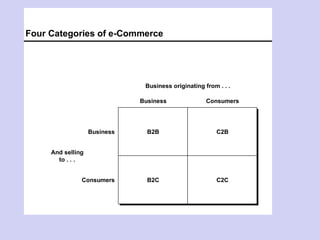
Four Categories of e-Commerce
B2BB2B C2BC2B
B2CB2C C2CC2C
Business Consumers
Business originating from . . .
Business
Consumers
And selling
to . . .
Electronic Payment Systems
E-payment systems
• To transfer money over the Internet
• Methods of traditional payment
– Check, credit card, or cash
• Methods of electronic payment
– Electronic cash, software wallets, smart cards, and
credit/debit cards
Requirements for e-payments
• Atomicity
– Money is not lost or created during a transfer
• Good atomicity
– Money and good are exchanged atomically
• Non-repudiation
– No party can deny its role in the transaction
Desirable Properties of Digital Money
• Universally accepted
• Transferable electronically
• Divisible
• Private (no one except parties know the
amount)
• Anonymous (no one can identify the payer)
No known system satisfies all.
Types of E-payments
• E-cash
• Electronic wallets
• Smart card
• Credit card
Electronic Cash
• Primary advantage is with purchase of
items less than $10
– Credit card transaction fees make small purchases
unprofitable
– Micropayments
o Payments for items costing less than $1
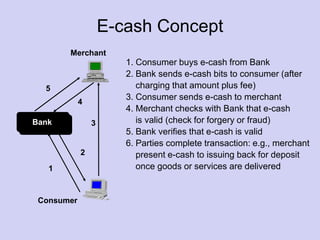
E-cash Concept
Merchant
Consumer
Bank
1
2
3
4
5
1. Consumer buys e-cash from Bank
2. Bank sends e-cash bits to consumer (after
charging that amount plus fee)
3. Consumer sends e-cash to merchant
4. Merchant checks with Bank that e-cash
is valid (check for forgery or fraud)
5. Bank verifies that e-cash is valid
6. Parties complete transaction: e.g., merchant
present e-cash to issuing back for deposit
once goods or services are delivered
Advantages and Disadvantages of
Electronic Cash
• Advantages
– More efficient, eventually meaning lower prices
– Lower transaction costs
– Anybody can use it, unlike credit cards, and does not
require special authorization
• Disadvantages
– Susceptible to forgery
Past and Present E-cash Systems
• E-cash not popular in U.S., but
successful in Europe and Japan
– Reasons for lack of U.S. success not clear
o Manner of implementation too complicated
o Lack of standards and interoperable software that
will run easily on a variety of hardware and software
systems
Past and Present E-cash Systems
• CyberCash
• CyberCoins
• DigiCash
• Coin.Net
Electronic Wallets
• Stores credit card, electronic cash, owner
identification and address
– Makes shopping easier and more efficient
o Eliminates need to repeatedly enter identifying
information into forms to purchase
o Works in many different stores to speed checkout
– Amazon.com one of the first online merchants to eliminate
repeat form-filling for purchases
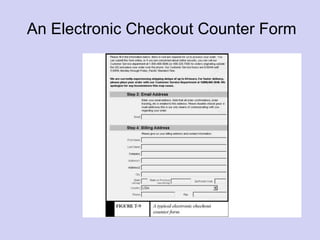
An Electronic Checkout Counter Form
Electronic Wallets
• Agile Wallet
– Developed by CyberCash
– Allows customers to enter credit card and identifying
information once, stored on a central server
– Information pops up in supported merchants’ payment pages,
allowing one-click payment
– Does not support smart cards or CyberCash, but company
expects to soon
• eWallet
– Developed by Launchpad Technologies
– Free wallet software that stores credit card and personal
information on users’ computer, not on a central server; info is
dragged into payment form from eWallet
– Information is encrypted and password protected
– Works with Netscape and Internet Explorer
Electronic Wallets
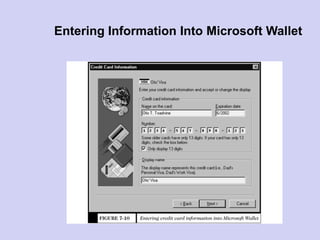
• Microsoft Wallet
– Comes pre-installed in Internet Explorer 4.0, but not in
Netscape
– All information is encrypted and password protected
– Microsoft Wallet Merchant directory shows merchants
setup to accept Microsoft Wallet
Entering Information Into Microsoft Wallet
Smart Cards
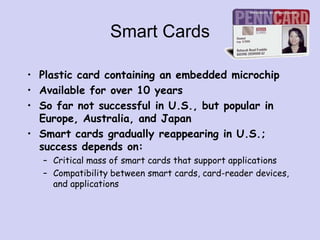
• Plastic card containing an embedded microchip
• Available for over 10 years
• So far not successful in U.S., but popular in
Europe, Australia, and Japan
• Smart cards gradually reappearing in U.S.;
success depends on:
– Critical mass of smart cards that support applications
– Compatibility between smart cards, card-reader devices,
and applications
Smart Cards
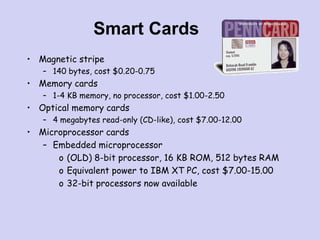
• Magnetic stripe
– 140 bytes, cost $0.20-0.75
• Memory cards
– 1-4 KB memory, no processor, cost $1.00-2.50
• Optical memory cards
– 4 megabytes read-only (CD-like), cost $7.00-12.00
• Microprocessor cards
– Embedded microprocessor
o (OLD) 8-bit processor, 16 KB ROM, 512 bytes RAM
o Equivalent power to IBM XT PC, cost $7.00-15.00
o 32-bit processors now available
Smart Card Applications
• Ticketless travel
– Seoul bus system: 4M cards, 1B transactions since 1996
– Planned the SF Bay Area system
• Authentication, ID
• Medical records
• Ecash
• Personal profiles
• Government
– Licenses
• Mall parking
. . .
Advantages and Disadvantages
of Smart Cards
• Advantages:
1. Atomic, debt-free transactions
2. Feasible for very small transactions (information
commerce)
3. (Potentially) anonymous
4. Security of physical storage
5. (Potentially) currency-neutral
• Disadvantages:
1. Low maximum transaction limit (not suitable for B2B or
most B2C)
2. High Infrastructure costs (not suitable for C2C)
3. Not (yet) widely used
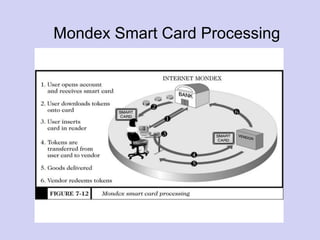
Mondex Smart Card
• Holds and dispenses electronic cash (Smart-card
based, stored-value card)
• Developed by MasterCard International
• Requires specific card reader, called Mondex
terminal, for merchant or customer to use card
over Internet
• Supports micro-payments and works both online
and off-line at stores or over the telephone
• Secret chip-to-chip transfer protocol
Mondex Smart Card Processing
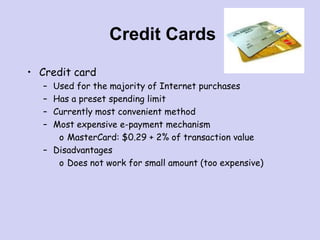
Credit Cards
• Credit card
– Used for the majority of Internet purchases
– Has a preset spending limit
– Currently most convenient method
– Most expensive e-payment mechanism
o MasterCard: $0.29 + 2% of transaction value
– Disadvantages
o Does not work for small amount (too expensive)
EMTM 553
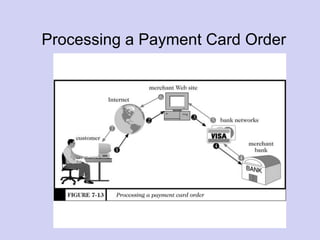
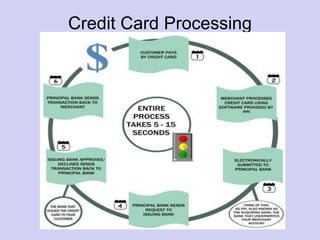
Processing a Payment Card Order
Setting Up Merchant Account
• Merchant bank
– Also called acquiring bank
– Does business with merchants that want to accept
payment cards
– Merchant receives account where they deposit card sales
totals
– Value of sales slips is credited to merchant’s account
Credit Card Processing
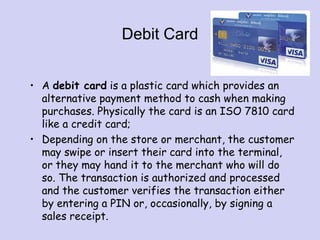
Debit Card
• A debit card is a plastic card which provides an
alternative payment method to cash when making
purchases. Physically the card is an ISO 7810 card
like a credit card;
• Depending on the store or merchant, the customer
may swipe or insert their card into the terminal,
or they may hand it to the merchant who will do
so. The transaction is authorized and processed
and the customer verifies the transaction either
by entering a PIN or, occasionally, by signing a
sales receipt.
Credit card VS Debit card
• You can obtain credit in credit card but not in debit
card.
• Credit card charges interest for using the bank's
money. (debit card is free from this problem)
Thanks
For Feedback
Vishalchd11@yahoo.com

The electronic payment systems

  • 1.
  • 2.
    Electronic Commerce (E-Commerce) •Commerce refers to all the activities the purchase and sales of goods or services. – Marketing, sales, payment, fulfillment, customer service • Electronic commerce is doing commerce with the use of computers, networks and commerce-enabled software (more than just online shopping)
  • 3.
    Advantages of ElectronicCommerce • Increased sales – Reach narrow market segments in geographically dispersed locations – Create virtual communities • Decreased costs – Handling of sales inquiries – Providing price quotes – Determining product availability • Being in the space
  • 4.
    Disadvantages of ElectronicCommerce • Loss of ability to inspect products from remote locations • Rapid developing pace of underlying technologies • Difficult to calculate return on investment
  • 5.
    Infrastructure for E-commerce •The Internet – system of interconnected networks that spans the globe – routers, TCP/IP, firewalls, network infrastructure, network protocols • The World Wide Web (WWW) – part of the Internet and allows users to share information with an easy-to-use interface – Web browsers, web servers, HTTP, HTML • Web architecture – Client/server model – N-tier architecture; e.g., web servers, application servers, database servers, scalability
  • 6.
    Distinct Categories ofe-Commerce • Business to Consumer (B2C) • Business to business (B2B) • Consumer to Consumer (C2C) • Consumer to Business (C2B)
  • 7.
    Four Categories ofe-Commerce B2BB2B C2BC2B B2CB2C C2CC2C Business Consumers Business originating from . . . Business Consumers And selling to . . .
  • 8.
  • 9.
    E-payment systems • Totransfer money over the Internet • Methods of traditional payment – Check, credit card, or cash • Methods of electronic payment – Electronic cash, software wallets, smart cards, and credit/debit cards
  • 10.
    Requirements for e-payments •Atomicity – Money is not lost or created during a transfer • Good atomicity – Money and good are exchanged atomically • Non-repudiation – No party can deny its role in the transaction
  • 11.
    Desirable Properties ofDigital Money • Universally accepted • Transferable electronically • Divisible • Private (no one except parties know the amount) • Anonymous (no one can identify the payer) No known system satisfies all.
  • 12.
    Types of E-payments •E-cash • Electronic wallets • Smart card • Credit card
  • 13.
    Electronic Cash • Primaryadvantage is with purchase of items less than $10 – Credit card transaction fees make small purchases unprofitable – Micropayments o Payments for items costing less than $1
  • 14.
    E-cash Concept Merchant Consumer Bank 1 2 3 4 5 1. Consumerbuys e-cash from Bank 2. Bank sends e-cash bits to consumer (after charging that amount plus fee) 3. Consumer sends e-cash to merchant 4. Merchant checks with Bank that e-cash is valid (check for forgery or fraud) 5. Bank verifies that e-cash is valid 6. Parties complete transaction: e.g., merchant present e-cash to issuing back for deposit once goods or services are delivered
  • 15.
    Advantages and Disadvantagesof Electronic Cash • Advantages – More efficient, eventually meaning lower prices – Lower transaction costs – Anybody can use it, unlike credit cards, and does not require special authorization • Disadvantages – Susceptible to forgery
  • 16.
    Past and PresentE-cash Systems • E-cash not popular in U.S., but successful in Europe and Japan – Reasons for lack of U.S. success not clear o Manner of implementation too complicated o Lack of standards and interoperable software that will run easily on a variety of hardware and software systems
  • 17.
    Past and PresentE-cash Systems • CyberCash • CyberCoins • DigiCash • Coin.Net
  • 18.
    Electronic Wallets • Storescredit card, electronic cash, owner identification and address – Makes shopping easier and more efficient o Eliminates need to repeatedly enter identifying information into forms to purchase o Works in many different stores to speed checkout – Amazon.com one of the first online merchants to eliminate repeat form-filling for purchases
  • 19.
  • 20.
    Electronic Wallets • AgileWallet – Developed by CyberCash – Allows customers to enter credit card and identifying information once, stored on a central server – Information pops up in supported merchants’ payment pages, allowing one-click payment – Does not support smart cards or CyberCash, but company expects to soon • eWallet – Developed by Launchpad Technologies – Free wallet software that stores credit card and personal information on users’ computer, not on a central server; info is dragged into payment form from eWallet – Information is encrypted and password protected – Works with Netscape and Internet Explorer
  • 21.
    Electronic Wallets • MicrosoftWallet – Comes pre-installed in Internet Explorer 4.0, but not in Netscape – All information is encrypted and password protected – Microsoft Wallet Merchant directory shows merchants setup to accept Microsoft Wallet
  • 22.
    Entering Information IntoMicrosoft Wallet
  • 23.
    Smart Cards • Plasticcard containing an embedded microchip • Available for over 10 years • So far not successful in U.S., but popular in Europe, Australia, and Japan • Smart cards gradually reappearing in U.S.; success depends on: – Critical mass of smart cards that support applications – Compatibility between smart cards, card-reader devices, and applications
  • 24.
    Smart Cards • Magneticstripe – 140 bytes, cost $0.20-0.75 • Memory cards – 1-4 KB memory, no processor, cost $1.00-2.50 • Optical memory cards – 4 megabytes read-only (CD-like), cost $7.00-12.00 • Microprocessor cards – Embedded microprocessor o (OLD) 8-bit processor, 16 KB ROM, 512 bytes RAM o Equivalent power to IBM XT PC, cost $7.00-15.00 o 32-bit processors now available
  • 25.
    Smart Card Applications •Ticketless travel – Seoul bus system: 4M cards, 1B transactions since 1996 – Planned the SF Bay Area system • Authentication, ID • Medical records • Ecash • Personal profiles • Government – Licenses • Mall parking . . .
  • 26.
    Advantages and Disadvantages ofSmart Cards • Advantages: 1. Atomic, debt-free transactions 2. Feasible for very small transactions (information commerce) 3. (Potentially) anonymous 4. Security of physical storage 5. (Potentially) currency-neutral • Disadvantages: 1. Low maximum transaction limit (not suitable for B2B or most B2C) 2. High Infrastructure costs (not suitable for C2C) 3. Not (yet) widely used
  • 27.
    Mondex Smart Card •Holds and dispenses electronic cash (Smart-card based, stored-value card) • Developed by MasterCard International • Requires specific card reader, called Mondex terminal, for merchant or customer to use card over Internet • Supports micro-payments and works both online and off-line at stores or over the telephone • Secret chip-to-chip transfer protocol
  • 28.
  • 29.
    Credit Cards • Creditcard – Used for the majority of Internet purchases – Has a preset spending limit – Currently most convenient method – Most expensive e-payment mechanism o MasterCard: $0.29 + 2% of transaction value – Disadvantages o Does not work for small amount (too expensive)
  • 30.
    EMTM 553 Processing aPayment Card Order
  • 31.
    Setting Up MerchantAccount • Merchant bank – Also called acquiring bank – Does business with merchants that want to accept payment cards – Merchant receives account where they deposit card sales totals – Value of sales slips is credited to merchant’s account
  • 32.
  • 33.
    Debit Card • Adebit card is a plastic card which provides an alternative payment method to cash when making purchases. Physically the card is an ISO 7810 card like a credit card; • Depending on the store or merchant, the customer may swipe or insert their card into the terminal, or they may hand it to the merchant who will do so. The transaction is authorized and processed and the customer verifies the transaction either by entering a PIN or, occasionally, by signing a sales receipt.
  • 34.
    Credit card VSDebit card • You can obtain credit in credit card but not in debit card. • Credit card charges interest for using the bank's money. (debit card is free from this problem)
  • 35.