BBA II Sem
Nature, Benefits of E.D.I, Demerits of
E.D.I
Electronic Data Interchange
What is EDI?
 Electronic Data Interchange (EDI) is the
computer-to-computer exchange of business
documents in a standard electronic format
between business partners.
EDI
By moving from a paper-based exchange of
business document to one that is electronic,
businesses enjoy major benefits such
 as reduced cost,
 increased processing speed,
 reduced errors
 improved relationships with business partners.
Each term in the definition is
significant
 Computer-to-computer– EDI replaces postal
mail, fax and email. While email is also an
electronic approach, the documents exchanged
via email must still be handled by people rather
than computers.
 Having people involved slows down the
processing of the documents and also introduces
errors. Instead, EDI documents can flow straight
through to the appropriate application on the
receiver’s computer (e.g., the Order Management
System) and processing can begin immediately.
A typical manual process looks like this, with
lots of paper and people involvement:
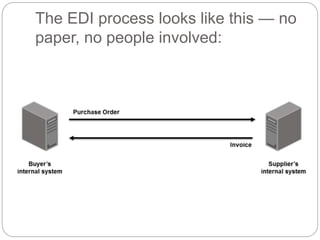
The EDI process looks like this — no
paper, no people involved:
Business documents
 These are any of the documents that are typically
exchanged between businesses. The most
common documents exchanged via EDI are
purchase orders, invoices and advance ship
notices. But there are many, many others such as
bill of lading, customs documents, inventory
documents, shipping status documents and
payment documents.
Standard format
 Because EDI documents must be processed by
computers rather than humans, a standard format
must be used so that the computer will be able to
read and understand the documents. A standard
format describes what each piece of information
is and in what format (e.g., integer, decimal,
mmddyy).
Business partners
 The exchange of EDI documents is typically
between two different companies, referred to as
business partners or trading partners. For
example, Company A may buy goods from
Company B. Company A sends orders to
Company B. Company A and Company B are
business partners.
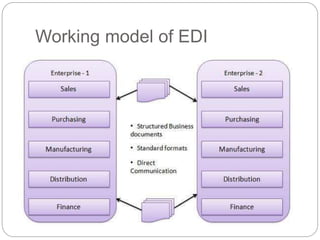
Working model of EDI
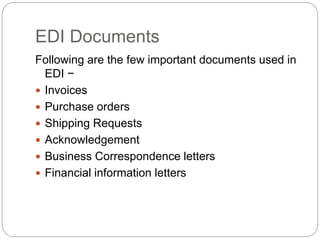
EDI Documents
Following are the few important documents used in
EDI −
 Invoices
 Purchase orders
 Shipping Requests
 Acknowledgement
 Business Correspondence letters
 Financial information letters
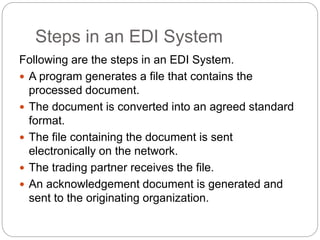
Steps in an EDI System
Following are the steps in an EDI System.
 A program generates a file that contains the
processed document.
 The document is converted into an agreed standard
format.
 The file containing the document is sent
electronically on the network.
 The trading partner receives the file.
 An acknowledgement document is generated and
sent to the originating organization.
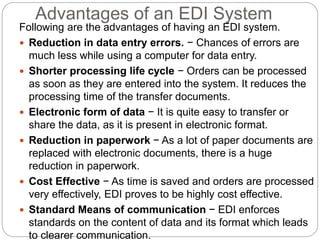
Advantages of an EDI System
Following are the advantages of having an EDI system.
 Reduction in data entry errors. − Chances of errors are
much less while using a computer for data entry.
 Shorter processing life cycle − Orders can be processed
as soon as they are entered into the system. It reduces the
processing time of the transfer documents.
 Electronic form of data − It is quite easy to transfer or
share the data, as it is present in electronic format.
 Reduction in paperwork − As a lot of paper documents are
replaced with electronic documents, there is a huge
reduction in paperwork.
 Cost Effective − As time is saved and orders are processed
very effectively, EDI proves to be highly cost effective.
 Standard Means of communication − EDI enforces
standards on the content of data and its format which leads
to clearer communication.
EDI Terminology
 Trading Partners: Organizations that send or receive
documents between each other are referred to as trading
partners. The trading partners agree on the specific
information to be transmitted and how it should be used.
 Mapping: This term is typically reserved for specific
machine-readable instructions given to the translation
software. Often in a large company these EDI guidelines
will be written to be generic enough to be used by different
branches or divisions and therefore will contain information
not needed for a particular business document exchange.
For other large companies, they may create separate EDI
guidelines for each branch/division.
 Transmission: The sending and receiving party involved
in the exchange of EDI transmissions.VAN is mostly used
prominent transmission method for EDI, Though some
organization have used direct modem to modem
connections and bulletin board systems (BBS) and more
popular internet protocols .
EDI Terminology
 VAN (Value added Network): A third party network
that acts as an intermediary between trading partners
.this service apart of receiving , storing , receiving and
delivering the EDI messages also add audit data and
modify data for automatic error detection, correction
or conversion between communication protocols.
 Translator: An EDI translator has traditionally been
used to take data from a business application and
map it into EDI standard formats. The process of
developing a map is called EDI mapping and the EDI
software is sometimes referred to as an EDI Mapper.
Some EDI translators (mappers) come with the ability
for the user to generate the maps and some do not,
requiring the user to purchase maps from the vendor.
 EDI Processes: A typical EDI exchange involves the
following processes: Inbound Process and Outbound
process.
EDI Terminology
 The outbound process includes, generating and
sending of EDI files.
 Below are the steps of an outbound process.
 Obtain data from existing system.
 Generate EDI file.
 Validate EDI file.
 Send EDI file to trading partner.
EDI Terminology
 The inbound process is the receiving and
translating of EDI files.
 Below are the steps of an inbound process.
 Get EDI file
 Validate and acknowledge EDI file
 Translate EDI file.
 Save data to a database.
Disadvantages of EDI
 Contrasted to XML, which is not strictly standardized,
many consider EDI to have too many standards.
 There are various standards bodies who have
developed 'standard document formats' for EDI which
can cause problems with cross compatibility.
 These standards bodies also push standards
revisions annually which could cause problems if you
have a more recent version of a document than a
business partner.
 EDI systems are extremely expensive making it
difficult for small businesses to implement.
 Many large organizations will only work with others
who utilize EDI. This may limit the business small
companies are able to do with such organizations and
limit trading partners.
Disadvantages of EDI
 1) Expensive
Setup and maintenance of some of the formats of EDI is
expensive.
2) Initial setup is time consuming
Initial cost to setup EDI is time consuming.
3) EDI standard changes
The business process depends on EDI standard format. If
any of the standard format changes then the business
process has to be changed accordingly.
4) System electronic protection
An EDI enabled system needs electronic protection from
viruses, hacking, malware and other frauds.
Disadvantages of EDI
5) Staff training cost
Staff needs training in order to run EDI enabled software.
Investment has to be done in training.
6) Proper backup should be maintained as the whole
data depends on EDI. In case of any crash of EDI system,
proper backup has to be maintained and extra cost is
required for it.
7) Limit your trading partners
Some organization stops doing business which don’t use
EDI. For instance, Wal-Mart prefers to do business only
with those organization which uses EDI.
Case
The Problem/Opportunity
Founded in 1985 by Michael Dell, Dell Computer Corp.
(now known as Dell) was the first company to offer
personal computers (PCs) via mail order. Dell designed
its own PC system (with an Intel 8088 processor
running at 8 MHz)and allowed customers to configure
their own customized systems using the build-to-order
concept. This concept was,and is still, Dell’s
cornerstone business model. By 1993, Dell had
become one of the top five computer makers
worldwide, threatening Compaq, which started a price
war. At that time, Dell was taking orders by fax and
snail mail and losing money. Losses reached over $100
million by 1994.The company was in trouble.
Case
The Solution
Direct Marketing Online. The commercialization of the Internet
in the early 1990s and the introduction of the World Wide
Web in 1993 provided Dell with an opportunity to expand
rapidly. Dell implemented aggressive online order taking
and opened subsidiaries in Europe and Asia. Dell also
started to offer additional products on its website. This
enabled Dell to batter Compaq, and in 2000 Dell became
number one in worldwide PC shipments. At that time,
Internet sales topped $50 million per day (about $18 billion
per year). Today, Dell (dell.com) sells about $62 billion a
year in computer-related products online, from network
switches to printers, employing over 88,000 people. Direct
online marketing is Dell’s major electronic commerce (EC)
activity. Dell sells to the following groups:
◗ Individuals for their homes and home offices
◗ Small businesses (up to 200 employees)
Sales to the first group are classified as business-to-
consumer (B2C). Sales to the other three groups are
classified as business-to-business (B2B).
Consumers shop at dell.com using an electronic
catalog..
In addition, Dell sells refurbished Dell computers and
other products at electronic auctions
(dellauction.com). Online auctions are an important
sales channel. In 2006, Dell opened physical stores,
mainly in reaction to customer demands.
Business-to-Business EC. Most of Dell’s sales are to
businesses. Whereas B2C sales are facilitated by standard
shopping aids (e.g., catalogs, shopping carts, credit card
payments; see Chapter 2), B2B customers obtain
additional help from Dell. Dell provides each of its nearly
100,000 business customers with Premier Dell service. For
example, British Airways (BA) considers Dell to be a
strategic supplier. Dell provides notebooks and desktops to
25,000 BA users. Dell offers two e-procurement services to
BA purchasing agents. The more basic service, Premier
Dell, allows BA (and other businesses) to browse, buy, and
track orders on a Dell website customized for the user’s
requirements.
The site enables authorized users to select
preconfigured PCs for their business unit or
department. A more advanced version, Premier
B2B, supports e-procurement systems such as
those from Ariba. This provides automatic
requisition and order fulfillment once an
authorized user has chosen to buy a PC from
Dell. BA has placed the e-procurement tools on
its E-Working intranet. This allows authorized staff
to purchase PCs through a portal that connects
directly to Dell’s systems.
In addition to supporting its business customers
with e-procurement tools, Dell also is using EC in
its own procurement. Dell developed an e-
procurement model that it shares with its
business partners, such as BA. One aspect of
this model is the use of electronic tendering to
conduct bids
Dell uses electronic tendering when it buys the
components for its products. In 2000, Dell created
a B2B exchange at dell.b2b.com. This venture
was a failure, like most other exchanges
E-Collaboration. Dell has many business partners
with whom it needs to communicate and collaborate.
For example, Dell uses shippers, such as UPS and
FedEx, to deliver its computers to individuals. It also
uses third-party logistics companies to collect,
maintain, and deliver components from its suppliers,
and it has many other partners. Dell is using Web
Services, an EC technology, to facilitate
communication and reduce inventories. Web Services
facilitate B2B integration. Integration efforts began in
2000 with other technologies when Dell encouraged
its customers to buy online. The B2B integration offer
combines Dell PowerEdge servers based on Intel
architecture and webMethods B2B integration
software to link customers’ existing ERP (enterprise
resource planning) or procurement systems directly
In addition, Dell can provide e-procurement applications and
consulting services. Dell also educates customers in its
technologies and offers suggestions on how to use them. This is
particularly true for emerging technologies such as wireless.
Finally, Dell has a superb communication system with its over
15,000 service providers around the globe.
E-Customer Service. Dell uses a number of different tools to
provide superb customer service around the clock. To leverage
customer relationship management (CRM)—a customer service
approach that is customer centered for lasting relationships—
Dell provides a virtual help desk for self-diagnosis and service
as well as direct access to technical support data. In addition, a
phone-based help desk is open 24/7. Customers can also
arrange for a live chat with a customer care agent. Product
support includes troubleshooting, user guides, upgrades,
downloads, news and press releases, FAQs, order status
information, a “my account” page, a community forum (to
exchange ideas, information, and experiences), bulletin boards
and other customer-to-customer interaction features, training
Dell keeps a large customer database. Using data mining
tools, it learns a great deal about its customers and attempts
to make them happy. The database is used to improve
marketing as well.
Intrabusiness EC. To support its build-to-order
capabilities, significantly improve its demand-planning and
factory execution accuracy, reduce order-to-delivery time,
and enhance customer service, Dell partnered with
Accenture to create a new, high-performance supply chain
planning solution. Now in place in Dell’s plants around the
world, the program, which paid for itself five times over
during the first 12 months of operation, enables Dell to
adapt more quickly to rapidly changing technologies and the
business environment, maintaining its position as a high-
performance business. Dell also has automated its factory
scheduling, demand-planning capabilities, and inventory
 Affiliate Program. Dell provides affiliate
partners the opportunity to link from their
websites to Dell.com. Dell pays 2 to 4 percent on
any qualified sale made from clicking on Dell’s
link at the partners’ sites (referring buyers).
The Results
 Dell has been one of Fortune’s top five “Most Admired”
companies since 1999, and it continuously advances in
the rankings of the Fortune 500 and the Fortune Global
500. Dell. has over 100 country-oriented websites, and
profits are nearing $3 billion a year. If you had invested
$10,000 in Dell’s initial public offering (IPO) in 1987, you
would be a millionaire just from that investment. In 2006,
Dell opened physical stores to match its competitors and
customer demands. (Its major competitor is HP. In 2006,
HP regained its “top PC maker” position, leaving Dell in
second place and stayed in the lead through 2008.)
Michael Dell returned to the CEO position in 2006, and a
restructuring of the company began shortly thereafter. All
sales to businesses will be managed centrally, rather than
from three regional headquarters around the globe. The
Still, over 95 percent of its business is online and
through mail orders. It also launched a blog called
Direct2Dell
(en.community.dell.com/blogs/direct2dell). Dell
also is expanding its business not only in the
computer industry but also in consumer
electronics. It is clearly an example of EC
success.
 Questions
1. List all the type of EC transactions used by Dell.
2. List the business models used by Dell.
3. List the competitive advantage of Dell over brick-
and mortar competitors.

E commerce (edi)

  • 1.
    BBA II Sem Nature,Benefits of E.D.I, Demerits of E.D.I Electronic Data Interchange
  • 2.
    What is EDI? Electronic Data Interchange (EDI) is the computer-to-computer exchange of business documents in a standard electronic format between business partners.
  • 3.
    EDI By moving froma paper-based exchange of business document to one that is electronic, businesses enjoy major benefits such  as reduced cost,  increased processing speed,  reduced errors  improved relationships with business partners.
  • 4.
    Each term inthe definition is significant  Computer-to-computer– EDI replaces postal mail, fax and email. While email is also an electronic approach, the documents exchanged via email must still be handled by people rather than computers.  Having people involved slows down the processing of the documents and also introduces errors. Instead, EDI documents can flow straight through to the appropriate application on the receiver’s computer (e.g., the Order Management System) and processing can begin immediately.
  • 5.
    A typical manualprocess looks like this, with lots of paper and people involvement:
  • 6.
    The EDI processlooks like this — no paper, no people involved:
  • 7.
    Business documents  Theseare any of the documents that are typically exchanged between businesses. The most common documents exchanged via EDI are purchase orders, invoices and advance ship notices. But there are many, many others such as bill of lading, customs documents, inventory documents, shipping status documents and payment documents.
  • 8.
    Standard format  BecauseEDI documents must be processed by computers rather than humans, a standard format must be used so that the computer will be able to read and understand the documents. A standard format describes what each piece of information is and in what format (e.g., integer, decimal, mmddyy).
  • 9.
    Business partners  Theexchange of EDI documents is typically between two different companies, referred to as business partners or trading partners. For example, Company A may buy goods from Company B. Company A sends orders to Company B. Company A and Company B are business partners.
  • 10.
  • 11.
    EDI Documents Following arethe few important documents used in EDI −  Invoices  Purchase orders  Shipping Requests  Acknowledgement  Business Correspondence letters  Financial information letters
  • 12.
    Steps in anEDI System Following are the steps in an EDI System.  A program generates a file that contains the processed document.  The document is converted into an agreed standard format.  The file containing the document is sent electronically on the network.  The trading partner receives the file.  An acknowledgement document is generated and sent to the originating organization.
  • 13.
    Advantages of anEDI System Following are the advantages of having an EDI system.  Reduction in data entry errors. − Chances of errors are much less while using a computer for data entry.  Shorter processing life cycle − Orders can be processed as soon as they are entered into the system. It reduces the processing time of the transfer documents.  Electronic form of data − It is quite easy to transfer or share the data, as it is present in electronic format.  Reduction in paperwork − As a lot of paper documents are replaced with electronic documents, there is a huge reduction in paperwork.  Cost Effective − As time is saved and orders are processed very effectively, EDI proves to be highly cost effective.  Standard Means of communication − EDI enforces standards on the content of data and its format which leads to clearer communication.
  • 17.
    EDI Terminology  TradingPartners: Organizations that send or receive documents between each other are referred to as trading partners. The trading partners agree on the specific information to be transmitted and how it should be used.  Mapping: This term is typically reserved for specific machine-readable instructions given to the translation software. Often in a large company these EDI guidelines will be written to be generic enough to be used by different branches or divisions and therefore will contain information not needed for a particular business document exchange. For other large companies, they may create separate EDI guidelines for each branch/division.  Transmission: The sending and receiving party involved in the exchange of EDI transmissions.VAN is mostly used prominent transmission method for EDI, Though some organization have used direct modem to modem connections and bulletin board systems (BBS) and more popular internet protocols .
  • 18.
    EDI Terminology  VAN(Value added Network): A third party network that acts as an intermediary between trading partners .this service apart of receiving , storing , receiving and delivering the EDI messages also add audit data and modify data for automatic error detection, correction or conversion between communication protocols.  Translator: An EDI translator has traditionally been used to take data from a business application and map it into EDI standard formats. The process of developing a map is called EDI mapping and the EDI software is sometimes referred to as an EDI Mapper. Some EDI translators (mappers) come with the ability for the user to generate the maps and some do not, requiring the user to purchase maps from the vendor.  EDI Processes: A typical EDI exchange involves the following processes: Inbound Process and Outbound process.
  • 19.
    EDI Terminology  Theoutbound process includes, generating and sending of EDI files.  Below are the steps of an outbound process.  Obtain data from existing system.  Generate EDI file.  Validate EDI file.  Send EDI file to trading partner.
  • 20.
    EDI Terminology  Theinbound process is the receiving and translating of EDI files.  Below are the steps of an inbound process.  Get EDI file  Validate and acknowledge EDI file  Translate EDI file.  Save data to a database.
  • 21.
    Disadvantages of EDI Contrasted to XML, which is not strictly standardized, many consider EDI to have too many standards.  There are various standards bodies who have developed 'standard document formats' for EDI which can cause problems with cross compatibility.  These standards bodies also push standards revisions annually which could cause problems if you have a more recent version of a document than a business partner.  EDI systems are extremely expensive making it difficult for small businesses to implement.  Many large organizations will only work with others who utilize EDI. This may limit the business small companies are able to do with such organizations and limit trading partners.
  • 22.
    Disadvantages of EDI 1) Expensive Setup and maintenance of some of the formats of EDI is expensive. 2) Initial setup is time consuming Initial cost to setup EDI is time consuming. 3) EDI standard changes The business process depends on EDI standard format. If any of the standard format changes then the business process has to be changed accordingly. 4) System electronic protection An EDI enabled system needs electronic protection from viruses, hacking, malware and other frauds.
  • 23.
    Disadvantages of EDI 5)Staff training cost Staff needs training in order to run EDI enabled software. Investment has to be done in training. 6) Proper backup should be maintained as the whole data depends on EDI. In case of any crash of EDI system, proper backup has to be maintained and extra cost is required for it. 7) Limit your trading partners Some organization stops doing business which don’t use EDI. For instance, Wal-Mart prefers to do business only with those organization which uses EDI.
  • 24.
    Case The Problem/Opportunity Founded in1985 by Michael Dell, Dell Computer Corp. (now known as Dell) was the first company to offer personal computers (PCs) via mail order. Dell designed its own PC system (with an Intel 8088 processor running at 8 MHz)and allowed customers to configure their own customized systems using the build-to-order concept. This concept was,and is still, Dell’s cornerstone business model. By 1993, Dell had become one of the top five computer makers worldwide, threatening Compaq, which started a price war. At that time, Dell was taking orders by fax and snail mail and losing money. Losses reached over $100 million by 1994.The company was in trouble.
  • 25.
    Case The Solution Direct MarketingOnline. The commercialization of the Internet in the early 1990s and the introduction of the World Wide Web in 1993 provided Dell with an opportunity to expand rapidly. Dell implemented aggressive online order taking and opened subsidiaries in Europe and Asia. Dell also started to offer additional products on its website. This enabled Dell to batter Compaq, and in 2000 Dell became number one in worldwide PC shipments. At that time, Internet sales topped $50 million per day (about $18 billion per year). Today, Dell (dell.com) sells about $62 billion a year in computer-related products online, from network switches to printers, employing over 88,000 people. Direct online marketing is Dell’s major electronic commerce (EC) activity. Dell sells to the following groups: ◗ Individuals for their homes and home offices ◗ Small businesses (up to 200 employees)
  • 26.
    Sales to thefirst group are classified as business-to- consumer (B2C). Sales to the other three groups are classified as business-to-business (B2B). Consumers shop at dell.com using an electronic catalog.. In addition, Dell sells refurbished Dell computers and other products at electronic auctions (dellauction.com). Online auctions are an important sales channel. In 2006, Dell opened physical stores, mainly in reaction to customer demands.
  • 27.
    Business-to-Business EC. Mostof Dell’s sales are to businesses. Whereas B2C sales are facilitated by standard shopping aids (e.g., catalogs, shopping carts, credit card payments; see Chapter 2), B2B customers obtain additional help from Dell. Dell provides each of its nearly 100,000 business customers with Premier Dell service. For example, British Airways (BA) considers Dell to be a strategic supplier. Dell provides notebooks and desktops to 25,000 BA users. Dell offers two e-procurement services to BA purchasing agents. The more basic service, Premier Dell, allows BA (and other businesses) to browse, buy, and track orders on a Dell website customized for the user’s requirements.
  • 28.
    The site enablesauthorized users to select preconfigured PCs for their business unit or department. A more advanced version, Premier B2B, supports e-procurement systems such as those from Ariba. This provides automatic requisition and order fulfillment once an authorized user has chosen to buy a PC from Dell. BA has placed the e-procurement tools on its E-Working intranet. This allows authorized staff to purchase PCs through a portal that connects directly to Dell’s systems.
  • 29.
    In addition tosupporting its business customers with e-procurement tools, Dell also is using EC in its own procurement. Dell developed an e- procurement model that it shares with its business partners, such as BA. One aspect of this model is the use of electronic tendering to conduct bids Dell uses electronic tendering when it buys the components for its products. In 2000, Dell created a B2B exchange at dell.b2b.com. This venture was a failure, like most other exchanges
  • 30.
    E-Collaboration. Dell hasmany business partners with whom it needs to communicate and collaborate. For example, Dell uses shippers, such as UPS and FedEx, to deliver its computers to individuals. It also uses third-party logistics companies to collect, maintain, and deliver components from its suppliers, and it has many other partners. Dell is using Web Services, an EC technology, to facilitate communication and reduce inventories. Web Services facilitate B2B integration. Integration efforts began in 2000 with other technologies when Dell encouraged its customers to buy online. The B2B integration offer combines Dell PowerEdge servers based on Intel architecture and webMethods B2B integration software to link customers’ existing ERP (enterprise resource planning) or procurement systems directly
  • 31.
    In addition, Dellcan provide e-procurement applications and consulting services. Dell also educates customers in its technologies and offers suggestions on how to use them. This is particularly true for emerging technologies such as wireless. Finally, Dell has a superb communication system with its over 15,000 service providers around the globe. E-Customer Service. Dell uses a number of different tools to provide superb customer service around the clock. To leverage customer relationship management (CRM)—a customer service approach that is customer centered for lasting relationships— Dell provides a virtual help desk for self-diagnosis and service as well as direct access to technical support data. In addition, a phone-based help desk is open 24/7. Customers can also arrange for a live chat with a customer care agent. Product support includes troubleshooting, user guides, upgrades, downloads, news and press releases, FAQs, order status information, a “my account” page, a community forum (to exchange ideas, information, and experiences), bulletin boards and other customer-to-customer interaction features, training
  • 32.
    Dell keeps alarge customer database. Using data mining tools, it learns a great deal about its customers and attempts to make them happy. The database is used to improve marketing as well. Intrabusiness EC. To support its build-to-order capabilities, significantly improve its demand-planning and factory execution accuracy, reduce order-to-delivery time, and enhance customer service, Dell partnered with Accenture to create a new, high-performance supply chain planning solution. Now in place in Dell’s plants around the world, the program, which paid for itself five times over during the first 12 months of operation, enables Dell to adapt more quickly to rapidly changing technologies and the business environment, maintaining its position as a high- performance business. Dell also has automated its factory scheduling, demand-planning capabilities, and inventory
  • 33.
     Affiliate Program.Dell provides affiliate partners the opportunity to link from their websites to Dell.com. Dell pays 2 to 4 percent on any qualified sale made from clicking on Dell’s link at the partners’ sites (referring buyers).
  • 34.
    The Results  Dellhas been one of Fortune’s top five “Most Admired” companies since 1999, and it continuously advances in the rankings of the Fortune 500 and the Fortune Global 500. Dell. has over 100 country-oriented websites, and profits are nearing $3 billion a year. If you had invested $10,000 in Dell’s initial public offering (IPO) in 1987, you would be a millionaire just from that investment. In 2006, Dell opened physical stores to match its competitors and customer demands. (Its major competitor is HP. In 2006, HP regained its “top PC maker” position, leaving Dell in second place and stayed in the lead through 2008.) Michael Dell returned to the CEO position in 2006, and a restructuring of the company began shortly thereafter. All sales to businesses will be managed centrally, rather than from three regional headquarters around the globe. The
  • 35.
    Still, over 95percent of its business is online and through mail orders. It also launched a blog called Direct2Dell (en.community.dell.com/blogs/direct2dell). Dell also is expanding its business not only in the computer industry but also in consumer electronics. It is clearly an example of EC success.
  • 36.
     Questions 1. Listall the type of EC transactions used by Dell. 2. List the business models used by Dell. 3. List the competitive advantage of Dell over brick- and mortar competitors.