Developing Library, Research,
and Information Literacy Skills
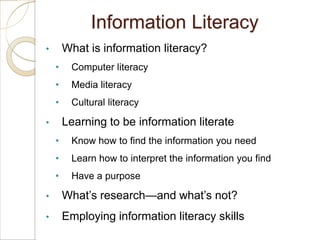
Information Literacy
•       What is information literacy?
    •    Computer literacy
    •    Media literacy
    •    Cultural literacy

•       Learning to be information literate
    •    Know how to find the information you need
    •    Learn how to interpret the information you find
    •    Have a purpose

•       What’s research—and what’s not?
•       Employing information literacy skills
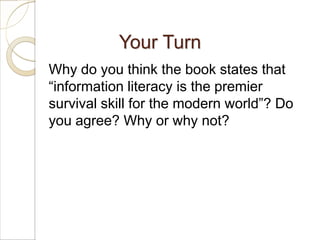
Your Turn
Why do you think the book states that
“information literacy is the premier
survival skill for the modern world”? Do
you agree? Why or why not?
Choosing, Narrowing, and Researching
               a Topic
•       Before starting your research, have an idea of
        what you are looking for
    •    Choose a topic
    •    Narrow it down to a particular aspect that interests you
    •    Figure out what aspects of the subject you will pursue
Using the Library

•       Taking advantage of everything your library has
        to offer
    •     More than a document warehouse
    •     Use the library’s home page as an electronic gateway
          to its services

•       Asking a librarian
    •     Information experts who are trained to assist and guide
          you to the resources you need
Your Turn
Is the library a necessary resource for
learning in college? Why or why not?
Electronic Resources
•       Library catalogs
    •    Tell you what books, magazines, newspapers, videos,
         and other materials are available in a particular library
•       Periodical databases
    •    Let you hunt down articles published in hundreds (even
         thousands) of newspapers, magazines, and scholarly
         journals
•       The World Wide Web
    •    Googling is an aggregation of information, opinion, and
         sales pitches from servers around the globe
•       Guidelines for effective searches
Your Turn
Talk to a faculty member, a parent, or
an older friend who went to college.
Ask this person how he or she
conducted research before the
Internet. Write a short review of the
strategies used by former generations
to access and use information.
Evaluating Sources
•       Relevance
    •     How well does it fit your needs?
•       Authority
    •     Was it created by somebody who has the qualifications to
          write or speak on the subject?
•       Bias
    •     Some signs of bias indicate that you should avoid using a
          source
•       A note on Internet sources
    •     Be cautious of material you find online
    •     Difficult to tell where it came from or who wrote it
Your Turn
How do you find sources for an
important paper? Do you go to the first
several hits on Google, or do you use
a more deliberate process? What
strategies can you use to make sure
your Internet or library research results
in valid information?
Your Turn
In your opinion, what newspapers,
magazines, or TV networks are
biased? Does a biased point of view
make you more or less likely to read or
watch? Why do you think many people
expose themselves only to opinions or
viewpoints like their own?
Your Turn
One of the most frequently visited sites
on the Web is Wikipedia, a
collaborative reference work written
and maintained by thousands of
volunteers. Most of its articles can be
(and have been) edited by anyone with
Internet access. What are the pros and
cons of using such a site as a source
for a research project?
Making Use of What You Find
•       Synthesizing information and ideas
    •    Accept some ideas, reject others, combine related
         concepts, assess implications, and put it all together
    •    Can help create new information and ideas
•       Citing your sources
    •    If you use somebody else’s exact words, you must give
         that person credit
    •    If you use somebody else’s ideas, even in your own
         words, you must give that person credit
•       About plagiarism
    •    Be aware that “I didn’t know” is not a valid excuse
Tech Tip: Check Your Engine
Online research in an academic setting
•   Use peer-reviewed academic journals,
    government Web sites, or newspaper Web sites
•   Use tricks to refine your search
    •   Key words separated by a space or plus sign
    •   Key words separated by the word OR
    •   Key words plus words in brackets
    •   Key words and a minus sign
    •   Framing key words in asterisks
    •   Using asterisks for a wildcard search

Chapter 11 developing library research and information literacy skills

  • 1.
    Developing Library, Research, andInformation Literacy Skills
  • 2.
    Information Literacy • What is information literacy? • Computer literacy • Media literacy • Cultural literacy • Learning to be information literate • Know how to find the information you need • Learn how to interpret the information you find • Have a purpose • What’s research—and what’s not? • Employing information literacy skills
  • 3.
    Your Turn Why doyou think the book states that “information literacy is the premier survival skill for the modern world”? Do you agree? Why or why not?
  • 4.
    Choosing, Narrowing, andResearching a Topic • Before starting your research, have an idea of what you are looking for • Choose a topic • Narrow it down to a particular aspect that interests you • Figure out what aspects of the subject you will pursue
  • 5.
    Using the Library • Taking advantage of everything your library has to offer • More than a document warehouse • Use the library’s home page as an electronic gateway to its services • Asking a librarian • Information experts who are trained to assist and guide you to the resources you need
  • 6.
    Your Turn Is thelibrary a necessary resource for learning in college? Why or why not?
  • 7.
    Electronic Resources • Library catalogs • Tell you what books, magazines, newspapers, videos, and other materials are available in a particular library • Periodical databases • Let you hunt down articles published in hundreds (even thousands) of newspapers, magazines, and scholarly journals • The World Wide Web • Googling is an aggregation of information, opinion, and sales pitches from servers around the globe • Guidelines for effective searches
  • 8.
    Your Turn Talk toa faculty member, a parent, or an older friend who went to college. Ask this person how he or she conducted research before the Internet. Write a short review of the strategies used by former generations to access and use information.
  • 9.
    Evaluating Sources • Relevance • How well does it fit your needs? • Authority • Was it created by somebody who has the qualifications to write or speak on the subject? • Bias • Some signs of bias indicate that you should avoid using a source • A note on Internet sources • Be cautious of material you find online • Difficult to tell where it came from or who wrote it
  • 10.
    Your Turn How doyou find sources for an important paper? Do you go to the first several hits on Google, or do you use a more deliberate process? What strategies can you use to make sure your Internet or library research results in valid information?
  • 11.
    Your Turn In youropinion, what newspapers, magazines, or TV networks are biased? Does a biased point of view make you more or less likely to read or watch? Why do you think many people expose themselves only to opinions or viewpoints like their own?
  • 12.
    Your Turn One ofthe most frequently visited sites on the Web is Wikipedia, a collaborative reference work written and maintained by thousands of volunteers. Most of its articles can be (and have been) edited by anyone with Internet access. What are the pros and cons of using such a site as a source for a research project?
  • 13.
    Making Use ofWhat You Find • Synthesizing information and ideas • Accept some ideas, reject others, combine related concepts, assess implications, and put it all together • Can help create new information and ideas • Citing your sources • If you use somebody else’s exact words, you must give that person credit • If you use somebody else’s ideas, even in your own words, you must give that person credit • About plagiarism • Be aware that “I didn’t know” is not a valid excuse
  • 14.
    Tech Tip: CheckYour Engine Online research in an academic setting • Use peer-reviewed academic journals, government Web sites, or newspaper Web sites • Use tricks to refine your search • Key words separated by a space or plus sign • Key words separated by the word OR • Key words plus words in brackets • Key words and a minus sign • Framing key words in asterisks • Using asterisks for a wildcard search