Models of Information
                                Searching


LIB 601 Libraries and Learning
          Fall 2012
What is the function of an
     information search model?
Ken Haycock:
An information process model, as a support
 structure, fosters the development of
 research, problem-solving and metacognitive
 skills through the collaboration of the classroom
 teacher and teacher-librarian. These concise
 models inform students of the problem-solving
 process and provide context for the assignment.
    When young researchers understand an
 information process model, they can
 comprehend the extent of the task facing them
 and the necessary strategies to complete it.
   • Information Process Models
     Teacher Librarian 32 no1 34 Oct. 2004
                                                     2
Advantages of a school-
             wide model
Haycock:
When teachers and students understand an
 information process model, they use common
 vocabulary to clarify terminology and label
 behaviors, each necessary to enhance
 metacognition.
    A school-wide information process model
 allows students to gradually develop expert
 use patterns that enable them to reduce
 reliance on the scaffold and to use the
 model in different contexts, both in
 and out of school.
  • Information Process Models

                                               3
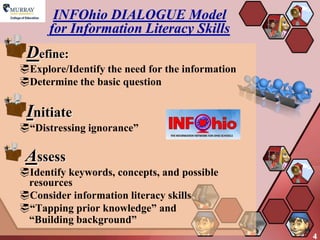
INFOhio DIALOGUE Model
      for Information Literacy Skills
 Define:
Explore/Identify the need for the information
Determine the basic question

 Initiate
―Distressing ignorance‖

 Assess
Identify keywords, concepts, and possible
 resources
Consider information literacy skills
―Tapping prior knowledge‖ and
 ―Building background‖
                                                 4
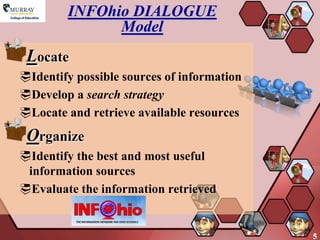
INFOhio DIALOGUE
              Model
 Locate
Identify possible sources of information
Develop a search strategy
Locate and retrieve available resources
 Organize
Identify the best and most useful
 information sources
Evaluate the information retrieved


                                            5
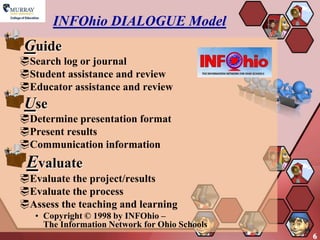
INFOhio DIALOGUE Model
 Guide
Search log or journal
Student assistance and review
Educator assistance and review
 Use
Determine presentation format
Present results
Communication information
 Evaluate
Evaluate the project/results
Evaluate the process
Assess the teaching and learning
   • Copyright © 1998 by INFOhio –
     The Information Network for Ohio Schools
                                                6
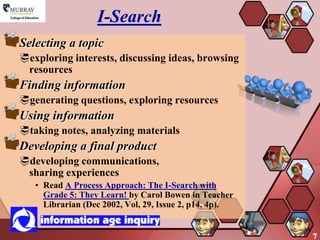
I-Search
Selecting a topic
exploring interests, discussing ideas, browsing
 resources
Finding information
generating questions, exploring resources
Using information
taking notes, analyzing materials
Developing a final product
developing communications,
 sharing experiences
   • Read A Process Approach: The I-Search with
     Grade 5: They Learn! by Carol Bowen in Teacher
     Librarian (Dec 2002, Vol, 29, Issue 2, p14, 4p).


                                                        7
Pathways to Knowledge
Appreciation and Enjoyment
Examine the world
Presearch
Develop an overview; explore relationships
Search
Identify information providers; select
 information resources; seek relevant
 information
Interpretation
Interpret information
                                              8
Pathways to Knowledge
Communication
Apply information; share new
 knowledge
Evaluation
Evaluate process and product
  • The Pathways to Knowledge website is
    no longer available
  • Sponsored by Follett
  • Read Harada, V., & Tepe, A. (1998).
    Pathways to knowledge. Teacher
    Librarian, 26(2), 9. Retrieved Thursday,
    October 19, 2006 from the Academic
    Search Premier database.
                                               9
Ws of Information
             Inquiry
Watching (Exploring)
Wondering (Questioning)
Webbing (Searching)
Wiggling (Evaluating)
Weaving (Synthesizing)
Wrapping (Creating)
Waving (Communicating)
Wishing (Assessing)
Developed by Annette Lamb
 in the early 1990s
                             10
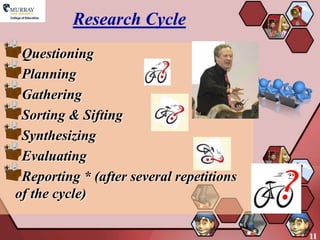
Research Cycle
 Questioning
 Planning
 Gathering
 Sorting & Sifting
 Synthesizing
 Evaluating
 Reporting * (after several repetitions
of the cycle)

                                          11
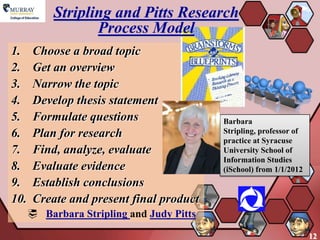
Stripling and Pitts Research
                  Process Model
1.     Choose a broad topic
2.     Get an overview
3.     Narrow the topic
4.     Develop thesis statement
5.     Formulate questions                 Barbara
6.     Plan for research                   Stripling, professor of
                                           practice at Syracuse
7.     Find, analyze, evaluate             University School of
                                           Information Studies
8.     Evaluate evidence                   (iSchool) from 1/1/2012
9.     Establish conclusions
10.    Create and present final product
       Barbara Stripling and Judy Pitts

                                                                     12
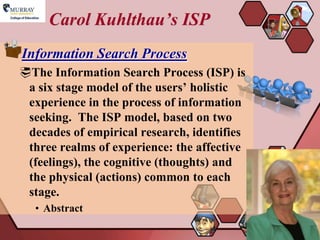
Carol Kuhlthau’s ISP
Information Search Process
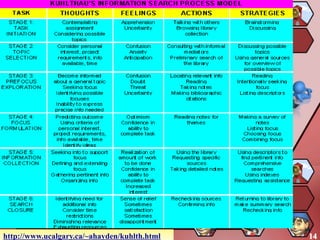
The Information Search Process (ISP) is
 a six stage model of the users’ holistic
 experience in the process of information
 seeking. The ISP model, based on two
 decades of empirical research, identifies
 three realms of experience: the affective
 (feelings), the cognitive (thoughts) and
 the physical (actions) common to each
 stage.
  • Abstract

                                             13
http://www.ucalgary.ca/~ahayden/kuhlth.html   14
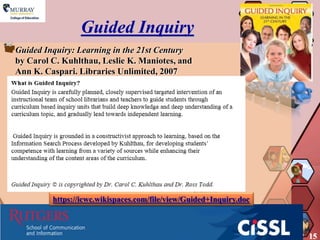
Guided Inquiry
Guided Inquiry: Learning in the 21st Century
by Carol C. Kuhlthau, Leslie K. Maniotes, and
Ann K. Caspari. Libraries Unlimited, 2007


         https://icwc.wikispaces.com/file/view/Guided+Inquiry.doc


                                                                    15
Need for inventory of
               expertise
 Building Guided InquiryTeams for 21st-
Century Learners
Teachers and school librarians experienced in
 collaborative team teaching have a good basis for
 implementing this flexible team approach. They
 can effectively build on what is already in place.
 The first step is for participants to take inventory
 of the expertise at the school—where are the
 strengths? What areas need to be developed? How
 will gaps be filled?
   • Carol C. Kuhlthau and Leslie K. Maniotes
     School Library Monthly/Volume XXVI, Number
     5/January 2010

                                                        16
Big6™ Skills
  What is the Big6?
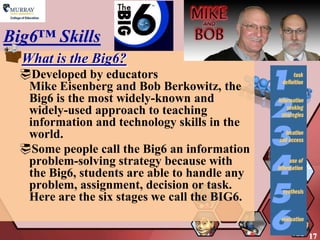
 Developed by educators
  Mike Eisenberg and Bob Berkowitz, the
  Big6 is the most widely-known and
  widely-used approach to teaching
  information and technology skills in the
  world.
 Some people call the Big6 an information
  problem-solving strategy because with
  the Big6, students are able to handle any
  problem, assignment, decision or task.
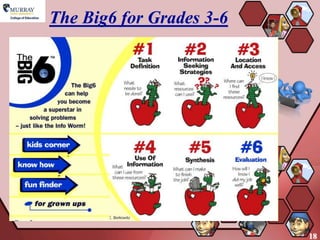
  Here are the six stages we call the BIG6.


                                              17
The Big6 for Grades 3-6


                          18
The Super3


             19
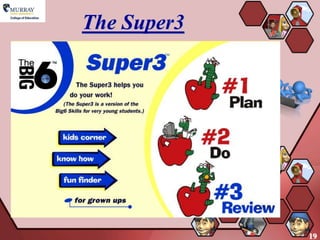
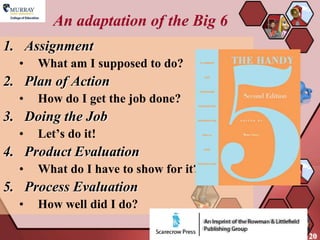
An adaptation of the Big 6
1. Assignment
  •   What am I supposed to do?
2. Plan of Action
  •   How do I get the job done?
3. Doing the Job
  •   Let’s do it!
4. Product Evaluation
  •   What do I have to show for it?
5. Process Evaluation
  •   How well did I do?

                                       20
The Savvy Seven Research
             Model
 Developed by Nancy Miller and Connie Champlin
1. What is the Question?
2. What Resources Should I Use?
3. How Do I Find the Information?
4. How Do I Gather the Information?
5. Which Information Do I Use?
6. How Do I Share What I Learned?
7. How Do I Evaluate My Work?
   http://www.davidvl.org/savvy7.html


                                                 21
So Many Research Models
Research Models
The library media
 specialist should have
 numerous examples of
 research process models
 available for
 consideration by the
 faculty and can take the
 lead in teaching this
 concept to the faculty as a
 whole.
   • [The website is no longer available]
                                            22
23

Models of Information Searching

  • 1.
    Models of Information Searching LIB 601 Libraries and Learning Fall 2012
  • 2.
    What is thefunction of an information search model? Ken Haycock: An information process model, as a support structure, fosters the development of research, problem-solving and metacognitive skills through the collaboration of the classroom teacher and teacher-librarian. These concise models inform students of the problem-solving process and provide context for the assignment. When young researchers understand an information process model, they can comprehend the extent of the task facing them and the necessary strategies to complete it. • Information Process Models Teacher Librarian 32 no1 34 Oct. 2004 2
  • 3.
    Advantages of aschool- wide model Haycock: When teachers and students understand an information process model, they use common vocabulary to clarify terminology and label behaviors, each necessary to enhance metacognition. A school-wide information process model allows students to gradually develop expert use patterns that enable them to reduce reliance on the scaffold and to use the model in different contexts, both in and out of school. • Information Process Models 3
  • 4.
    INFOhio DIALOGUE Model for Information Literacy Skills Define: Explore/Identify the need for the information Determine the basic question Initiate ―Distressing ignorance‖ Assess Identify keywords, concepts, and possible resources Consider information literacy skills ―Tapping prior knowledge‖ and ―Building background‖ 4
  • 5.
    INFOhio DIALOGUE Model Locate Identify possible sources of information Develop a search strategy Locate and retrieve available resources Organize Identify the best and most useful information sources Evaluate the information retrieved 5
  • 6.
    INFOhio DIALOGUE Model Guide Search log or journal Student assistance and review Educator assistance and review Use Determine presentation format Present results Communication information Evaluate Evaluate the project/results Evaluate the process Assess the teaching and learning • Copyright © 1998 by INFOhio – The Information Network for Ohio Schools 6
  • 7.
    I-Search Selecting a topic exploringinterests, discussing ideas, browsing resources Finding information generating questions, exploring resources Using information taking notes, analyzing materials Developing a final product developing communications, sharing experiences • Read A Process Approach: The I-Search with Grade 5: They Learn! by Carol Bowen in Teacher Librarian (Dec 2002, Vol, 29, Issue 2, p14, 4p). 7
  • 8.
    Pathways to Knowledge Appreciationand Enjoyment Examine the world Presearch Develop an overview; explore relationships Search Identify information providers; select information resources; seek relevant information Interpretation Interpret information 8
  • 9.
    Pathways to Knowledge Communication Applyinformation; share new knowledge Evaluation Evaluate process and product • The Pathways to Knowledge website is no longer available • Sponsored by Follett • Read Harada, V., & Tepe, A. (1998). Pathways to knowledge. Teacher Librarian, 26(2), 9. Retrieved Thursday, October 19, 2006 from the Academic Search Premier database. 9
  • 10.
    Ws of Information Inquiry Watching (Exploring) Wondering (Questioning) Webbing (Searching) Wiggling (Evaluating) Weaving (Synthesizing) Wrapping (Creating) Waving (Communicating) Wishing (Assessing) Developed by Annette Lamb in the early 1990s 10
  • 11.
    Research Cycle Questioning Planning Gathering Sorting & Sifting Synthesizing Evaluating Reporting * (after several repetitions of the cycle) 11
  • 12.
    Stripling and PittsResearch Process Model 1. Choose a broad topic 2. Get an overview 3. Narrow the topic 4. Develop thesis statement 5. Formulate questions Barbara 6. Plan for research Stripling, professor of practice at Syracuse 7. Find, analyze, evaluate University School of Information Studies 8. Evaluate evidence (iSchool) from 1/1/2012 9. Establish conclusions 10. Create and present final product  Barbara Stripling and Judy Pitts 12
  • 13.
    Carol Kuhlthau’s ISP InformationSearch Process The Information Search Process (ISP) is a six stage model of the users’ holistic experience in the process of information seeking. The ISP model, based on two decades of empirical research, identifies three realms of experience: the affective (feelings), the cognitive (thoughts) and the physical (actions) common to each stage. • Abstract 13
  • 14.
  • 15.
    Guided Inquiry Guided Inquiry:Learning in the 21st Century by Carol C. Kuhlthau, Leslie K. Maniotes, and Ann K. Caspari. Libraries Unlimited, 2007 https://icwc.wikispaces.com/file/view/Guided+Inquiry.doc 15
  • 16.
    Need for inventoryof expertise Building Guided InquiryTeams for 21st- Century Learners Teachers and school librarians experienced in collaborative team teaching have a good basis for implementing this flexible team approach. They can effectively build on what is already in place. The first step is for participants to take inventory of the expertise at the school—where are the strengths? What areas need to be developed? How will gaps be filled? • Carol C. Kuhlthau and Leslie K. Maniotes School Library Monthly/Volume XXVI, Number 5/January 2010 16
  • 17.
    Big6™ Skills What is the Big6? Developed by educators Mike Eisenberg and Bob Berkowitz, the Big6 is the most widely-known and widely-used approach to teaching information and technology skills in the world. Some people call the Big6 an information problem-solving strategy because with the Big6, students are able to handle any problem, assignment, decision or task. Here are the six stages we call the BIG6. 17
  • 18.
    The Big6 forGrades 3-6 18
  • 19.
  • 20.
    An adaptation ofthe Big 6 1. Assignment • What am I supposed to do? 2. Plan of Action • How do I get the job done? 3. Doing the Job • Let’s do it! 4. Product Evaluation • What do I have to show for it? 5. Process Evaluation • How well did I do? 20
  • 21.
    The Savvy SevenResearch Model Developed by Nancy Miller and Connie Champlin 1. What is the Question? 2. What Resources Should I Use? 3. How Do I Find the Information? 4. How Do I Gather the Information? 5. Which Information Do I Use? 6. How Do I Share What I Learned? 7. How Do I Evaluate My Work?  http://www.davidvl.org/savvy7.html 21
  • 22.
    So Many ResearchModels Research Models The library media specialist should have numerous examples of research process models available for consideration by the faculty and can take the lead in teaching this concept to the faculty as a whole. • [The website is no longer available] 22
  • 23.