Introduction to Digital Image
Processing
deepas1@srmist.edu.in
Dr.S.Deepa
Assistant Professor
SRM Institute of Science and Technology
Outline
►Definition
►Image Sampling and Quantization
► Types of Digital Images
►Stages in Digital Image processing
►Applications
2
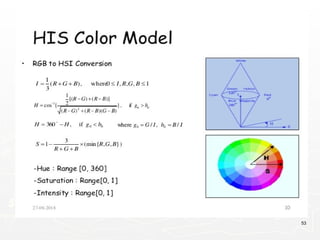
Digital Image
► A digital image is a representation of a two-dimensional
image as a finite set of digital values, called picture
elements or pixels.
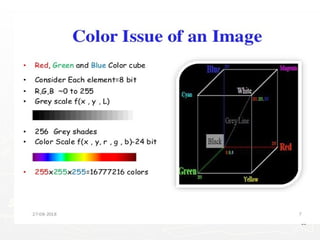
► Pixel values typically represent gray levels, colours ,
heights, opacities etc.
► Digitization implies that a digital image is an
approximation of a real scene.
► Common image formats include black and white
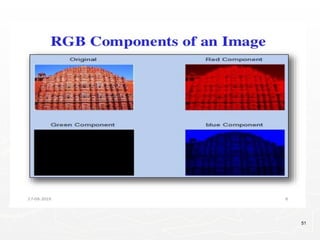
images, grayscale images and RGB images.
3
Digital Image Processing
►Digital Image Processing means
processing digital image by means of a
digital computer.
►It uses computer algorithms, in order to
get enhanced image to extract some
useful information.
4
5
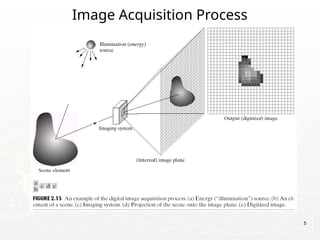
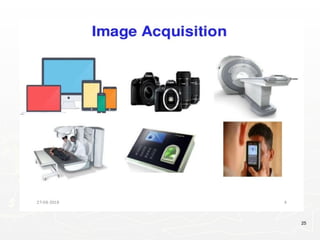
Image Acquisition Process
6
Introduction
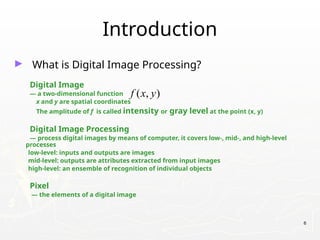
► What is Digital Image Processing?
Digital Image
— a two-dimensional function
x and y are spatial coordinates
The amplitude of f is called intensity or gray level at the point (x, y)
Digital Image Processing
— process digital images by means of computer, it covers low-, mid-, and high-level
processes
low-level: inputs and outputs are images
mid-level: outputs are attributes extracted from input images
high-level: an ensemble of recognition of individual objects
Pixel
— the elements of a digital image
( , )
f x y
7
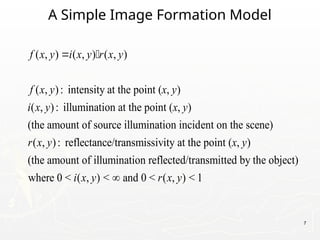
A Simple Image Formation Model
( , ) ( , ) ( , )
( , ): intensity at the point ( , )
( , ): illumination at the point ( , )
(the amount of source illumination incident on the scene)
( , ): reflectance/transmissivity
f x y i x y r x y
f x y x y
i x y x y
r x y
 
at the point ( , )
(the amount of illumination reflected/transmitted by the object)
where 0 < ( , ) < and 0 < ( , ) < 1
x y
i x y r x y

8
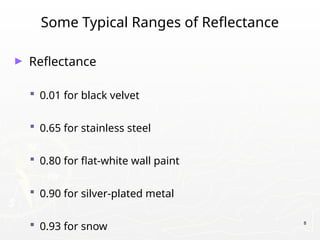
Some Typical Ranges of Reflectance
► Reflectance
 0.01 for black velvet
 0.65 for stainless steel
 0.80 for flat-white wall paint
 0.90 for silver-plated metal
 0.93 for snow
9
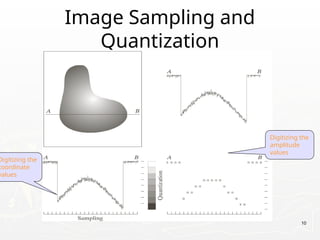
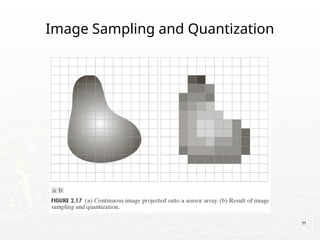
Image Sampling and Quantization
► The sampling rate determines the spatial resolution of
the digitized image, while the quantization level
determines the number of grey levels in the digitized
image.
► Hence in order to create an image which is digital, we
need to covert continuous data into digital form. There
are two steps in which it is done:
Sampling
Quantization
Image Sampling and
Quantization
10
Digitizing the
coordinate
values
Digitizing the
amplitude
values
11
Image Sampling and Quantization
12
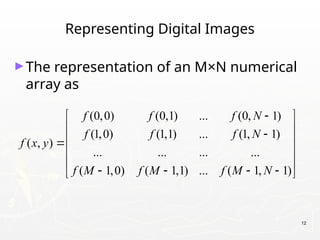
Representing Digital Images
►The representation of an M×N numerical
array as
(0,0) (0,1) ... (0, 1)
(1,0) (1,1) ... (1, 1)
( , )
... ... ... ...
( 1,0) ( 1,1) ... ( 1, 1)
f f f N
f f f N
f x y
f M f M f M N

 
 

 

 
 
   
 
13
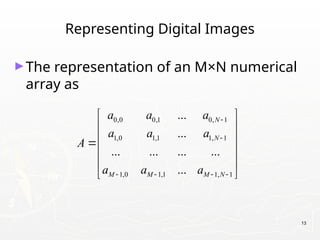
Representing Digital Images
►The representation of an M×N numerical
array as
0,0 0,1 0, 1
1,0 1,1 1, 1
1,0 1,1 1, 1
...
...
... ... ... ...
...
N
N
M M M N
a a a
a a a
A
a a a


   
 
 
 

 
 
 
14
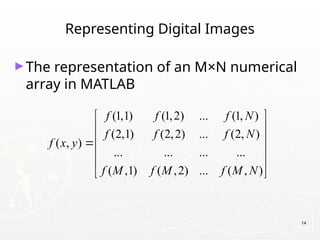
Representing Digital Images
►The representation of an M×N numerical
array in MATLAB
(1,1) (1,2) ... (1, )
(2,1) (2,2) ... (2, )
( , )
... ... ... ...
( ,1) ( ,2) ... ( , )
f f f N
f f f N
f x y
f M f M f M N
 
 
 

 
 
 
Types of Digital Images
► Intensity image or monochrome image: Each pixel
corresponds to light intensity normally represented in
gray scale.
► Color image or RGB image: Each pixel contains a
vector representing red, green and blue components.
► Binary image or black and white image: Each pixel
contains one bit, 1 represents white and 0 represents
black.
15
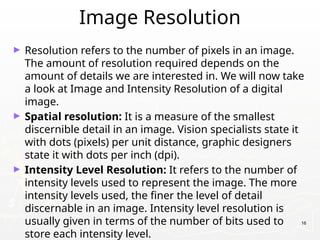
Image Resolution
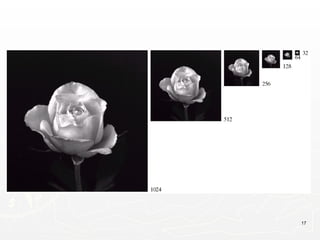
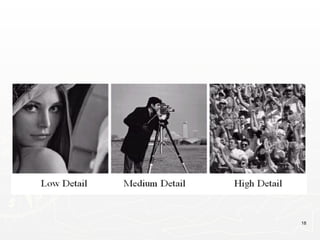
► Resolution refers to the number of pixels in an image.
The amount of resolution required depends on the
amount of details we are interested in. We will now take
a look at Image and Intensity Resolution of a digital
image.
► Spatial resolution: It is a measure of the smallest
discernible detail in an image. Vision specialists state it
with dots (pixels) per unit distance, graphic designers
state it with dots per inch (dpi).
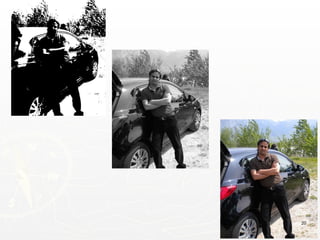
► Intensity Level Resolution: It refers to the number of
intensity levels used to represent the image. The more
intensity levels used, the finer the level of detail
discernable in an image. Intensity level resolution is
usually given in terms of the number of bits used to
store each intensity level.
16
17
18
19
Representing Digital Images
► Discrete intensity interval [0, L-1], L=2k
► The number b of bits required to store a M × N
digitized image
b = M × N × k
20
21
22
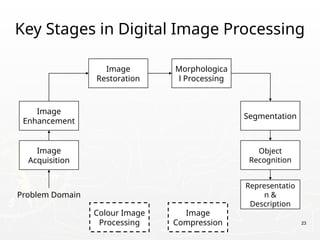
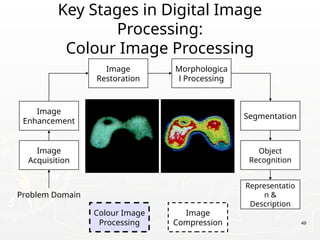
Key Stages in Digital Image Processing
Image
Acquisition
Image
Restoration
Morphologica
l Processing
Segmentation
Representatio
n &
Description
Image
Enhancement
Object
Recognition
Problem Domain
Colour Image
Processing
Image
Compression 23
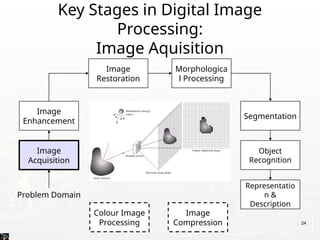
Key Stages in Digital Image
Processing:
Image Aquisition
Image
Acquisition
Image
Restoration
Morphologica
l Processing
Segmentation
Representatio
n &
Description
Image
Enhancement
Object
Recognition
Problem Domain
Colour Image
Processing
Image
Compression 24
25
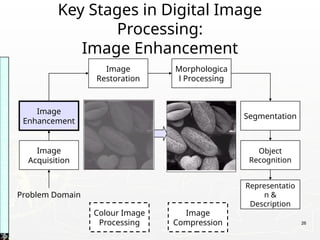
Key Stages in Digital Image
Processing:
Image Enhancement
Image
Acquisition
Image
Restoration
Morphologica
l Processing
Segmentation
Representatio
n &
Description
Image
Enhancement
Object
Recognition
Problem Domain
Colour Image
Processing
Image
Compression
Images
taken
from
Gonzalez
&
Woods,
Digital
Image
Processing
(2002)
26
27
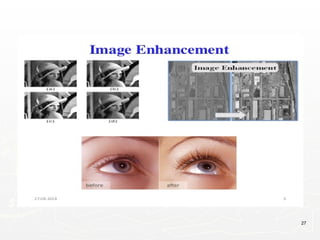
►Image enhancement is the procedure of
improving the quality and information
content of original data before
processing.
►For example, you can remove noise,
sharpen, or brighten an image, making it
easier to identify key features.
28
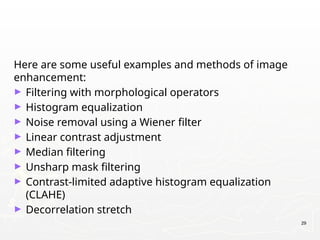
Here are some useful examples and methods of image
enhancement:
► Filtering with morphological operators
► Histogram equalization
► Noise removal using a Wiener filter
► Linear contrast adjustment
► Median filtering
► Unsharp mask filtering
► Contrast-limited adaptive histogram equalization
(CLAHE)
► Decorrelation stretch
29
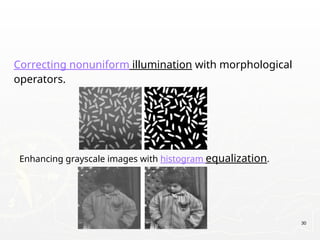
Correcting nonuniform illumination with morphological
operators.
30
Enhancing grayscale images with histogram equalization.
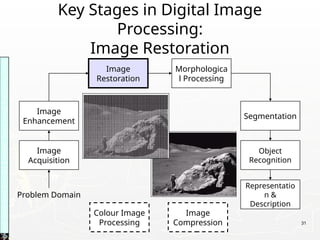
Key Stages in Digital Image
Processing:
Image Restoration
Image
Acquisition
Image
Restoration
Morphologica
l Processing
Segmentation
Representatio
n &
Description
Image
Enhancement
Object
Recognition
Problem Domain
Colour Image
Processing
Image
Compression
Images
taken
from
Gonzalez
&
Woods,
Digital
Image
Processing
(2002)
31
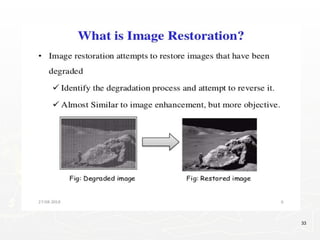
Image Restoration
►To restore extremely blurred or degraded
image. Images blurred due to many
factors like relative motion between
camera and a moving car (eg. Image of a
speeding car).
►Inverse filter, Wiener filter & Lucy-
Richardson filters are used to restore
images.
32
33
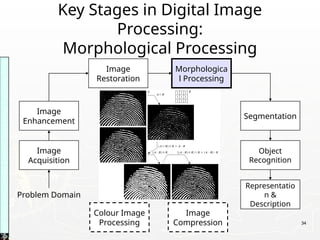
Key Stages in Digital Image
Processing:
Morphological Processing
Image
Acquisition
Image
Restoration
Morphologica
l Processing
Segmentation
Representatio
n &
Description
Image
Enhancement
Object
Recognition
Problem Domain
Colour Image
Processing
Image
Compression
Images
taken
from
Gonzalez
&
Woods,
Digital
Image
Processing
(2002)
34
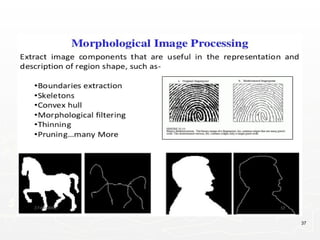
► Morphology is a broad set of image processing
operations that process images based on shapes.
Morphological operations apply a structuring element
to an input image, creating an output image of the
same size.
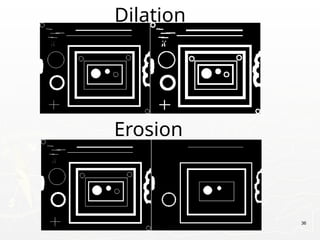
► The most basic morphological operations are dilation
and erosion. Dilation adds pixels to the boundaries of
objects in an image, while erosion removes pixels on
object boundaries.
35
Dilation
36
Erosion
37
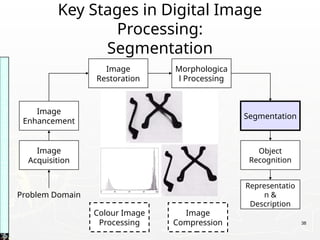
Key Stages in Digital Image
Processing:
Segmentation
Image
Acquisition
Image
Restoration
Morphologica
l Processing
Segmentation
Representatio
n &
Description
Image
Enhancement
Object
Recognition
Problem Domain
Colour Image
Processing
Image
Compression
Images
taken
from
Gonzalez
&
Woods,
Digital
Image
Processing
(2002)
38
39
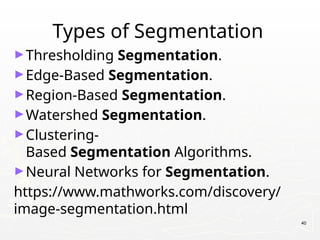
Types of Segmentation
►Thresholding Segmentation.
►Edge-Based Segmentation.
►Region-Based Segmentation.
►Watershed Segmentation.
►Clustering-
Based Segmentation Algorithms.
►Neural Networks for Segmentation.
https://www.mathworks.com/discovery/
image-segmentation.html
40
Key Stages in Digital Image
Processing:
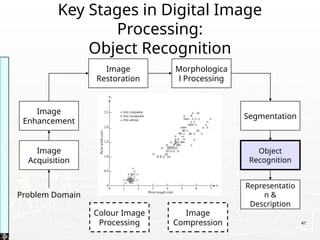
Object Recognition
Image
Acquisition
Image
Restoration
Morphologica
l Processing
Segmentation
Representatio
n &
Description
Image
Enhancement
Object
Recognition
Problem Domain
Colour Image
Processing
Image
Compression
Images
taken
from
Gonzalez
&
Woods,
Digital
Image
Processing
(2002)
41
42
►https://www.mathworks.com/solutions/
image-video-processing/object-
recognition.html
43
Key Stages in Digital Image
Processing:
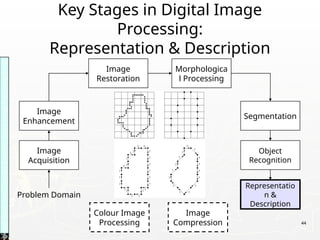
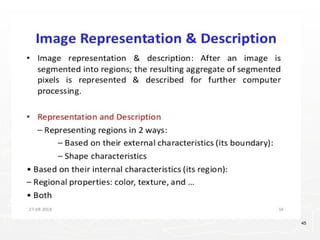
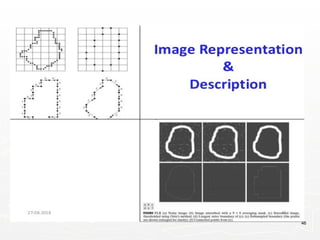
Representation & Description
Image
Acquisition
Image
Restoration
Morphologica
l Processing
Segmentation
Representatio
n &
Description
Image
Enhancement
Object
Recognition
Problem Domain
Colour Image
Processing
Image
Compression
Images
taken
from
Gonzalez
&
Woods,
Digital
Image
Processing
(2002)
44
45
46
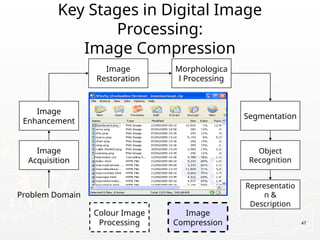
Key Stages in Digital Image
Processing:
Image Compression
Image
Acquisition
Image
Restoration
Morphologica
l Processing
Segmentation
Representatio
n &
Description
Image
Enhancement
Object
Recognition
Problem Domain
Colour Image
Processing
Image
Compression 47
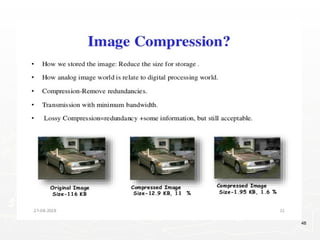
48
Key Stages in Digital Image
Processing:
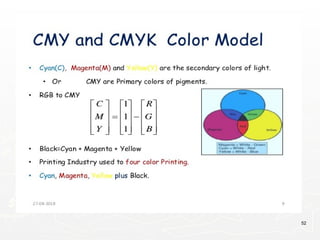
Colour Image Processing
Image
Acquisition
Image
Restoration
Morphologica
l Processing
Segmentation
Representatio
n &
Description
Image
Enhancement
Object
Recognition
Problem Domain
Colour Image
Processing
Image
Compression 49
50
51
52
53
54
55
Applications
&
Research Topics
56
57
Document Handling
Signature Verification
58
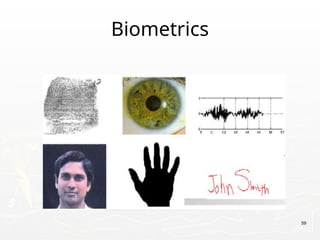
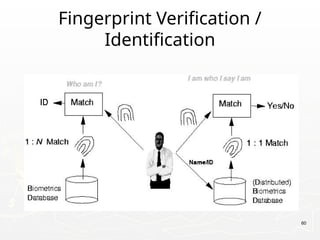
Biometrics
59
Fingerprint Verification /
Identification
60
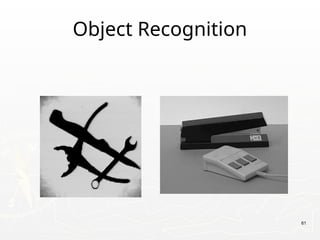
Object Recognition
61
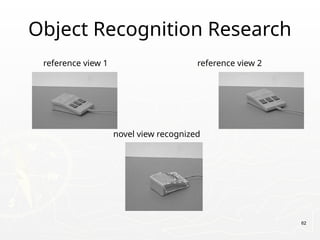
Object Recognition Research
reference view 1 reference view 2
novel view recognized
62
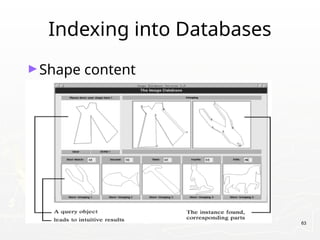
Indexing into Databases
►Shape content
63
64
Indexing into Databases
(cont’d)
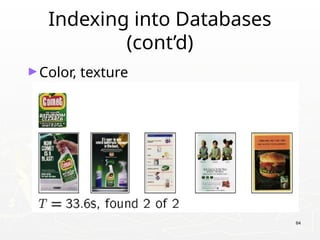
►Color, texture
Target Recognition
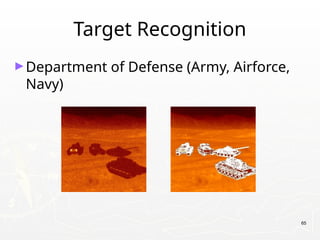
►Department of Defense (Army, Airforce,
Navy)
65
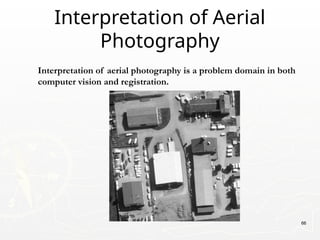
Interpretation of aerial photography is a problem domain in both
computer vision and registration.
Interpretation of Aerial
Photography
66
Autonomous Vehicles
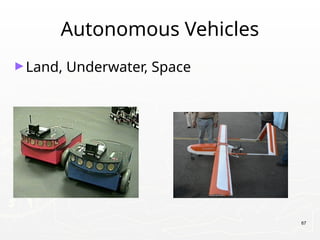
►Land, Underwater, Space
67
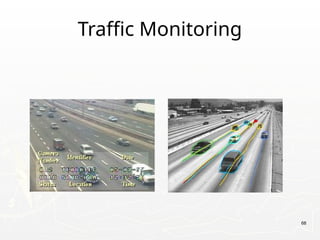
Traffic Monitoring
68
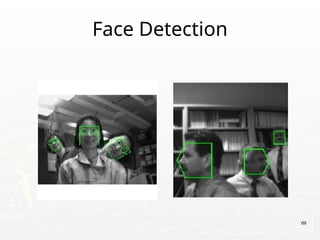
Face Detection
69
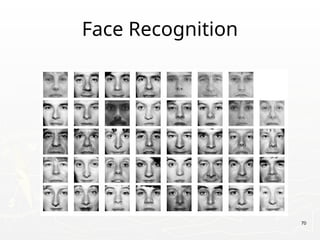
Face Recognition
70
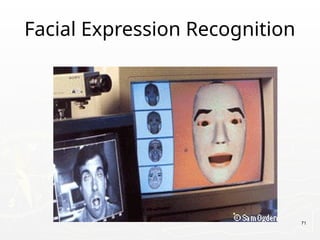
Facial Expression Recognition
71
72
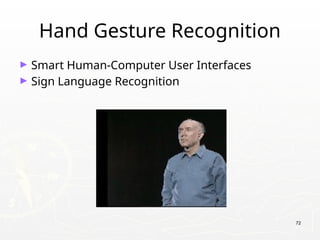
Hand Gesture Recognition
► Smart Human-Computer User Interfaces
► Sign Language Recognition
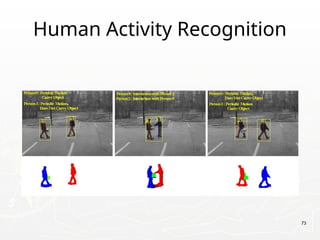
Human Activity Recognition
73
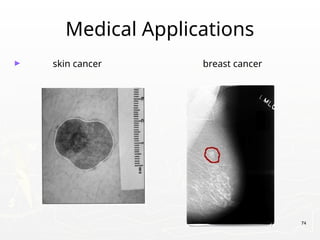
Medical Applications
► skin cancer breast cancer
74
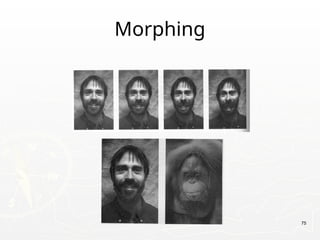
Morphing
75
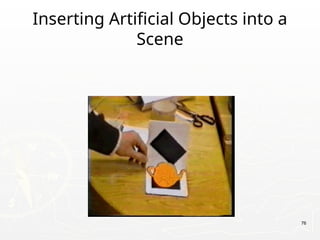
Inserting Artificial Objects into a
Scene
76
Companies In this Field In India
► Sarnoff Corporation
► Kritikal Solutions
► National Instruments
► GE Laboratories
► Ittiam, Bangalore
► Interra Systems, Noida
► Yahoo India (Multimedia Searching)

► nVidia Graphics, Pune (have high requirements)

► Microsoft research
► DRDO labs
► ISRO labs
► … 77
78
Neighborhood Operations in Images
79
80
Basic Relationships Between Pixels
► Neighborhood
► Adjacency
► Connectivity
► Paths
► Regions and boundaries
81
Basic Relationships Between Pixels
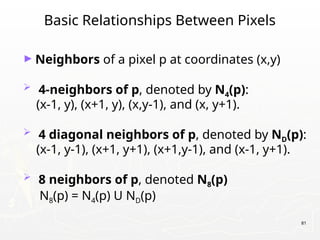
► Neighbors of a pixel p at coordinates (x,y)
 4-neighbors of p, denoted by N4(p):
(x-1, y), (x+1, y), (x,y-1), and (x, y+1).
 4 diagonal neighbors of p, denoted by ND(p):
(x-1, y-1), (x+1, y+1), (x+1,y-1), and (x-1, y+1).
 8 neighbors of p, denoted N8(p)
N8(p) = N4(p) U ND(p)
82
Basic Relationships Between Pixels
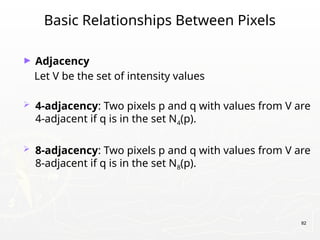
► Adjacency
Let V be the set of intensity values
 4-adjacency: Two pixels p and q with values from V are
4-adjacent if q is in the set N4(p).
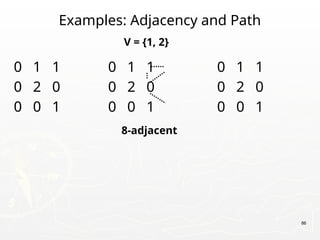
 8-adjacency: Two pixels p and q with values from V are
8-adjacent if q is in the set N8(p).
83
Basic Relationships Between Pixels
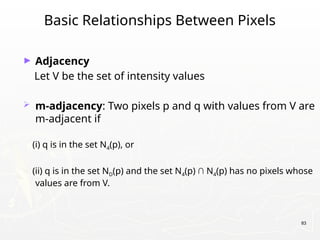
► Adjacency
Let V be the set of intensity values
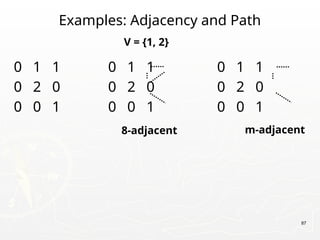
 m-adjacency: Two pixels p and q with values from V are
m-adjacent if
(i) q is in the set N4(p), or
(ii) q is in the set ND(p) and the set N4(p) ∩ N4(p) has no pixels whose
values are from V.
84
Basic Relationships Between Pixels
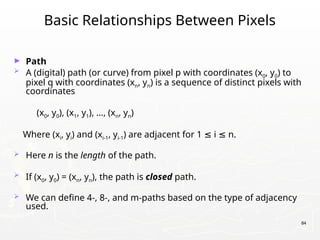
► Path
 A (digital) path (or curve) from pixel p with coordinates (x0, y0) to
pixel q with coordinates (xn, yn) is a sequence of distinct pixels with
coordinates
(x0, y0), (x1, y1), …, (xn, yn)
Where (xi, yi) and (xi-1, yi-1) are adjacent for 1 i n.
≤ ≤
 Here n is the length of the path.
 If (x0, y0) = (xn, yn), the path is closed path.
 We can define 4-, 8-, and m-paths based on the type of adjacency
used.
85
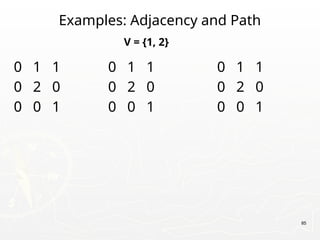
Examples: Adjacency and Path
0 1 1 0 1 1 0 1 1
0 2 0 0 2 0 0 2 0
0 0 1 0 0 1 0 0 1
V = {1, 2}
86
Examples: Adjacency and Path
0 1 1 0 1 1 0 1 1
0 2 0 0 2 0 0 2 0
0 0 1 0 0 1 0 0 1
V = {1, 2}
8-adjacent
87
Examples: Adjacency and Path
0 1 1 0 1 1 0 1 1
0 2 0 0 2 0 0 2 0
0 0 1 0 0 1 0 0 1
V = {1, 2}
8-adjacent m-adjacent
88
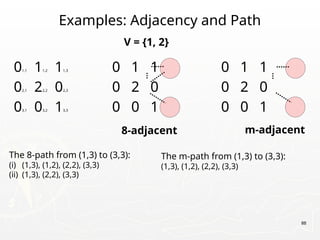
Examples: Adjacency and Path
01,1 11,2 11,3 0 1 1 0 1 1
02,1 22,2 02,3 0 2 0 0 2 0
03,1 03,2 13,3 0 0 1 0 0 1
V = {1, 2}
8-adjacent m-adjacent
The 8-path from (1,3) to (3,3):
(i) (1,3), (1,2), (2,2), (3,3)
(ii) (1,3), (2,2), (3,3)
The m-path from (1,3) to (3,3):
(1,3), (1,2), (2,2), (3,3)
89
Basic Relationships Between Pixels
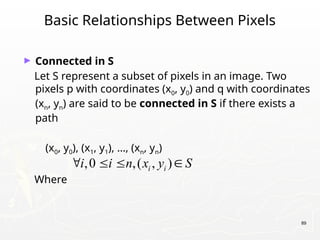
► Connected in S
Let S represent a subset of pixels in an image. Two
pixels p with coordinates (x0, y0) and q with coordinates
(xn, yn) are said to be connected in S if there exists a
path
(x0, y0), (x1, y1), …, (xn, yn)
Where
,0 ,( , )
i i
i i n x y S
   
90
Basic Relationships Between Pixels
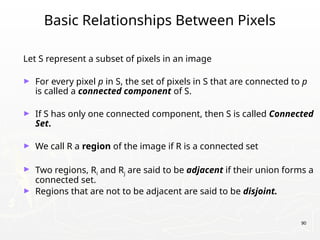
Let S represent a subset of pixels in an image
► For every pixel p in S, the set of pixels in S that are connected to p
is called a connected component of S.
► If S has only one connected component, then S is called Connected
Set.
► We call R a region of the image if R is a connected set
► Two regions, Ri and Rj are said to be adjacent if their union forms a
connected set.
► Regions that are not to be adjacent are said to be disjoint.
91
Basic Relationships Between Pixels
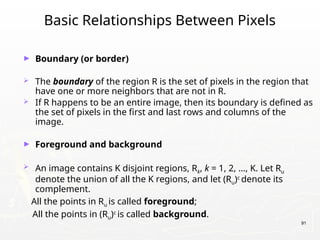
► Boundary (or border)
 The boundary of the region R is the set of pixels in the region that
have one or more neighbors that are not in R.
 If R happens to be an entire image, then its boundary is defined as
the set of pixels in the first and last rows and columns of the
image.
► Foreground and background
 An image contains K disjoint regions, Rk, k = 1, 2, …, K. Let Ru
denote the union of all the K regions, and let (Ru)c
denote its
complement.
All the points in Ru is called foreground;
All the points in (Ru)c
is called background.
92
Distance Measures
► Given pixels p, q and z with coordinates (x, y), (s, t),
(u, v) respectively, the distance function D has
following properties:
a. D(p, q) 0 [D(p, q) = 0, iff p = q]
≥
b. D(p, q) = D(q, p)
c. D(p, z) D(p, q) + D(q, z)
≤
93
Distance Measures
The following are the different Distance measures:
a. Euclidean Distance :
De(p, q) = [(x-s)2
+ (y-t)2
]1/2
b. City Block Distance:
D4(p, q) = |x-s| + |y-t|
c. Chess Board Distance:
D8(p, q) = max(|x-s|, |y-t|)
94
Introduction to Mathematical Operations in
DIP
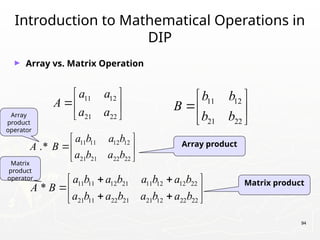
► Array vs. Matrix Operation
11 12
21 22
b b
B
b b
 
 
 
11 12
21 22
a a
A
a a
 
 
 
11 11 12 21 11 12 12 22
21 11 22 21 21 12 22 22
*
a b a b a b a b
A B
a b a b a b a b
 
 
 
 
 
11 11 12 12
21 21 22 22
.*
a b a b
A B
a b a b
 
 
 
Array product
Matrix product
Array
product
operator
Matrix
product
operator
95
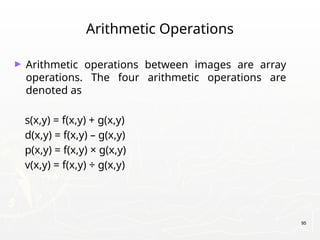
Arithmetic Operations
► Arithmetic operations between images are array
operations. The four arithmetic operations are
denoted as
s(x,y) = f(x,y) + g(x,y)
d(x,y) = f(x,y) – g(x,y)
p(x,y) = f(x,y) × g(x,y)
v(x,y) = f(x,y) ÷ g(x,y)
96
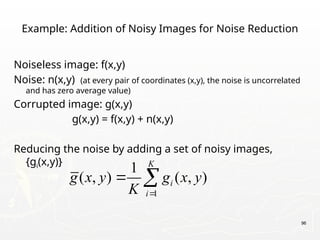
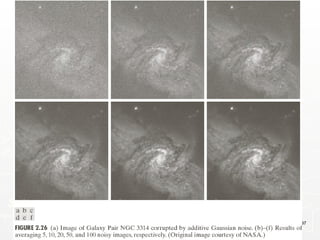
Example: Addition of Noisy Images for Noise Reduction
Noiseless image: f(x,y)
Noise: n(x,y) (at every pair of coordinates (x,y), the noise is uncorrelated
and has zero average value)
Corrupted image: g(x,y)
g(x,y) = f(x,y) + n(x,y)
Reducing the noise by adding a set of noisy images,
{gi(x,y)}
1
1
( , ) ( , )
K
i
i
g x y g x y
K 
 
97
98
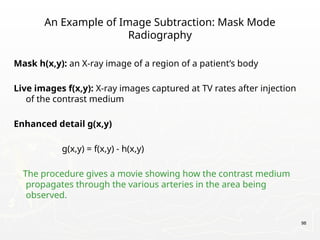
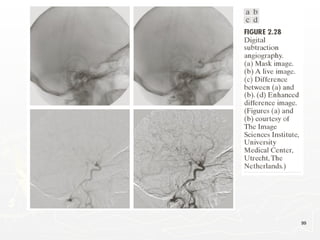
An Example of Image Subtraction: Mask Mode
Radiography
Mask h(x,y): an X-ray image of a region of a patient’s body
Live images f(x,y): X-ray images captured at TV rates after injection
of the contrast medium
Enhanced detail g(x,y)
g(x,y) = f(x,y) - h(x,y)
The procedure gives a movie showing how the contrast medium
propagates through the various arteries in the area being
observed.
99
100
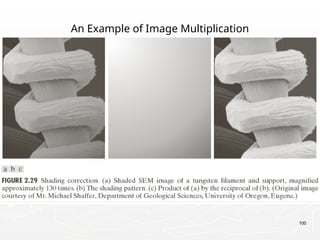
An Example of Image Multiplication
101
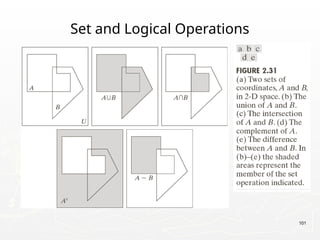
Set and Logical Operations
102
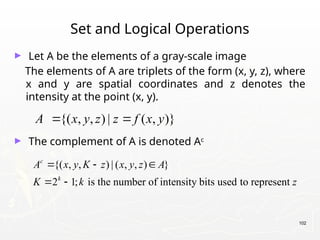
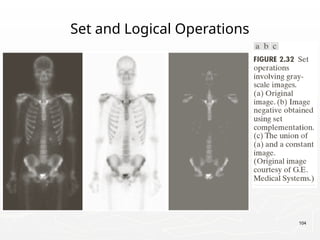
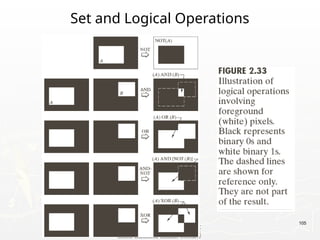
Set and Logical Operations
► Let A be the elements of a gray-scale image
The elements of A are triplets of the form (x, y, z), where
x and y are spatial coordinates and z denotes the
intensity at the point (x, y).
► The complement of A is denoted Ac
{( , , ) | ( , , ) }
2 1; is the number of intensity bits used to represent
c
k
A x y K z x y z A
K k z
  
 
{( , , ) | ( , )}
A x y z z f x y
 
103
Set and Logical Operations
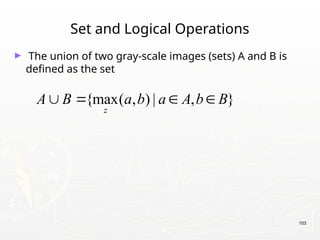
► The union of two gray-scale images (sets) A and B is
defined as the set
{max( , ) | , }
z
A B a b a A b B
   
104
Set and Logical Operations
105
Set and Logical Operations
106
Spatial Operations
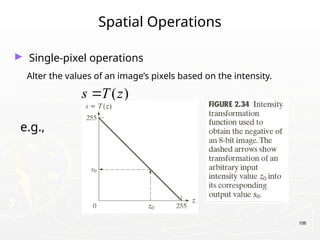
► Single-pixel operations
Alter the values of an image’s pixels based on the intensity.
e.g.,
( )
s T z

107
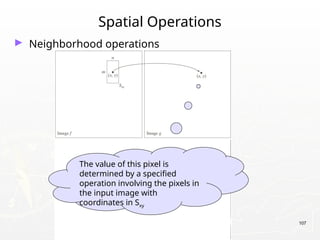
Spatial Operations
► Neighborhood operations
The value of this pixel is
determined by a specified
operation involving the pixels in
the input image with
coordinates in Sxy
108
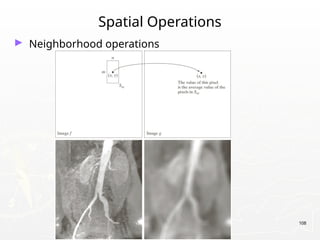
Spatial Operations
► Neighborhood operations
109
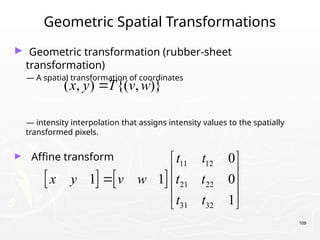
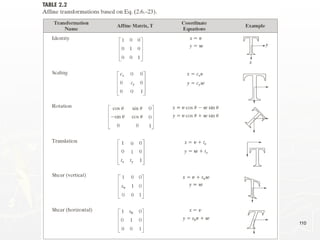
Geometric Spatial Transformations
► Geometric transformation (rubber-sheet
transformation)
— A spatial transformation of coordinates
— intensity interpolation that assigns intensity values to the spatially
transformed pixels.
► Affine transform
( , ) {( , )}
x y T v w

   
11 12
21 22
31 32
0
1 1 0
1
t t
x y v w t t
t t
 
 
  
 
 
110
111
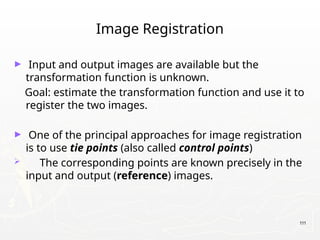
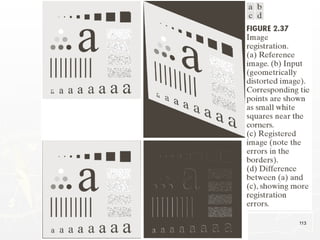
Image Registration
► Input and output images are available but the
transformation function is unknown.
Goal: estimate the transformation function and use it to
register the two images.
► One of the principal approaches for image registration
is to use tie points (also called control points)
 The corresponding points are known precisely in the
input and output (reference) images.
112
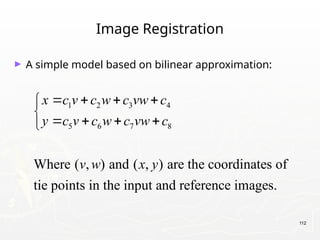
Image Registration
► A simple model based on bilinear approximation:
1 2 3 4
5 6 7 8
Where ( , ) and ( , ) are the coordinates of
tie points in the input and reference images.
x c v c w c vw c
y c v c w c vw c
v w x y
   


   

113
Image Registration
114
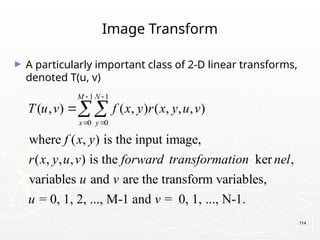
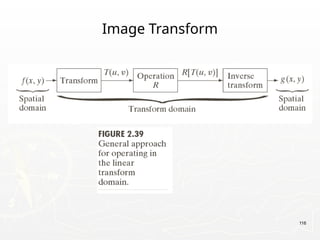
Image Transform
► A particularly important class of 2-D linear transforms,
denoted T(u, v)
1 1
0 0
( , ) ( , ) ( , , , )
where ( , ) is the input image,
( , , , ) is the ker ,
variables and are the transform variables,
= 0, 1, 2, ..., M-1 and = 0, 1,
M N
x y
T u v f x y r x y u v
f x y
r x y u v forward transformation nel
u v
u v
 
 

..., N-1.
115
Image Transform
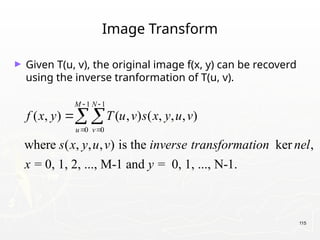
► Given T(u, v), the original image f(x, y) can be recoverd
using the inverse tranformation of T(u, v).
1 1
0 0
( , ) ( , ) ( , , , )
where ( , , , ) is the ker ,
= 0, 1, 2, ..., M-1 and = 0, 1, ..., N-1.
M N
u v
f x y T u v s x y u v
s x y u v inverse transformation nel
x y
 
 

116
Image Transform
117
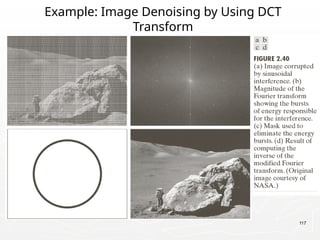
Example: Image Denoising by Using DCT
Transform
118
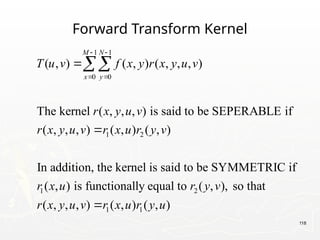
Forward Transform Kernel
1 1
0 0
1 2
1 2
( , ) ( , ) ( , , , )
The kernel ( , , , ) is said to be SEPERABLE if
( , , , ) ( , ) ( , )
In addition, the kernel is said to be SYMMETRIC if
( , ) is functionally equal to ( ,
M N
x y
T u v f x y r x y u v
r x y u v
r x y u v r x u r y v
r x u r y v
 
 



1 1
), so that
( , , , ) ( , ) ( , )
r x y u v r x u r y u

119
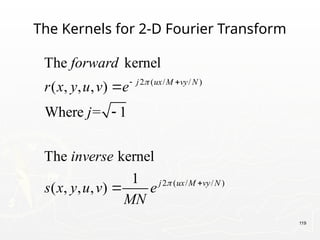
The Kernels for 2-D Fourier Transform
2 ( / / )
2 ( / / )
The kernel
( , , , )
Where = 1
The kernel
1
( , , , )
j ux M vy N
j ux M vy N
forward
r x y u v e
j
inverse
s x y u v e
MN


 




120
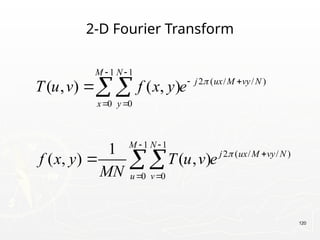
2-D Fourier Transform
1 1
2 ( / / )
0 0
1 1
2 ( / / )
0 0
( , ) ( , )
1
( , ) ( , )
M N
j ux M vy N
x y
M N
j ux M vy N
u v
T u v f x y e
f x y T u v e
MN


 
 
 
 

 




121
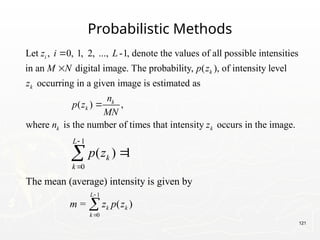
Probabilistic Methods
Let , 0, 1, 2, ..., -1, denote the values of all possible intensities
in an digital image. The probability, ( ), of intensity level
occurring in a given image is estimated as
i
k
k
z i L
M N p z
z


( ) ,
where is the number of times that intensity occurs in the image.
k
k
k k
n
p z
MN
n z

1
0
( ) 1
L
k
k
p z




1
0
The mean (average) intensity is given by
= ( )
L
k k
k
m z p z



122
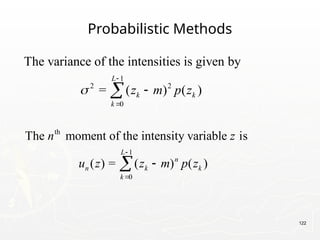
Probabilistic Methods
1
2 2
0
The variance of the intensities is given by
= ( ) ( )
L
k k
k
z m p z





th
1
0
The moment of the intensity variable is
( ) = ( ) ( )
L
n
n k k
k
n z
u z z m p z




123
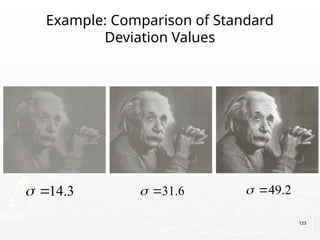
Example: Comparison of Standard
Deviation Values
31.6
 
14.3
  49.2
 

Digital Image Processing Unit 1 NotesPPT

  • 1.
    Introduction to DigitalImage Processing deepas1@srmist.edu.in Dr.S.Deepa Assistant Professor SRM Institute of Science and Technology
  • 2.
    Outline ►Definition ►Image Sampling andQuantization ► Types of Digital Images ►Stages in Digital Image processing ►Applications 2
  • 3.
    Digital Image ► Adigital image is a representation of a two-dimensional image as a finite set of digital values, called picture elements or pixels. ► Pixel values typically represent gray levels, colours , heights, opacities etc. ► Digitization implies that a digital image is an approximation of a real scene. ► Common image formats include black and white images, grayscale images and RGB images. 3
  • 4.
    Digital Image Processing ►DigitalImage Processing means processing digital image by means of a digital computer. ►It uses computer algorithms, in order to get enhanced image to extract some useful information. 4
  • 5.
  • 6.
    6 Introduction ► What isDigital Image Processing? Digital Image — a two-dimensional function x and y are spatial coordinates The amplitude of f is called intensity or gray level at the point (x, y) Digital Image Processing — process digital images by means of computer, it covers low-, mid-, and high-level processes low-level: inputs and outputs are images mid-level: outputs are attributes extracted from input images high-level: an ensemble of recognition of individual objects Pixel — the elements of a digital image ( , ) f x y
  • 7.
    7 A Simple ImageFormation Model ( , ) ( , ) ( , ) ( , ): intensity at the point ( , ) ( , ): illumination at the point ( , ) (the amount of source illumination incident on the scene) ( , ): reflectance/transmissivity f x y i x y r x y f x y x y i x y x y r x y   at the point ( , ) (the amount of illumination reflected/transmitted by the object) where 0 < ( , ) < and 0 < ( , ) < 1 x y i x y r x y 
  • 8.
    8 Some Typical Rangesof Reflectance ► Reflectance  0.01 for black velvet  0.65 for stainless steel  0.80 for flat-white wall paint  0.90 for silver-plated metal  0.93 for snow
  • 9.
    9 Image Sampling andQuantization ► The sampling rate determines the spatial resolution of the digitized image, while the quantization level determines the number of grey levels in the digitized image. ► Hence in order to create an image which is digital, we need to covert continuous data into digital form. There are two steps in which it is done: Sampling Quantization
  • 10.
    Image Sampling and Quantization 10 Digitizingthe coordinate values Digitizing the amplitude values
  • 11.
  • 12.
    12 Representing Digital Images ►Therepresentation of an M×N numerical array as (0,0) (0,1) ... (0, 1) (1,0) (1,1) ... (1, 1) ( , ) ... ... ... ... ( 1,0) ( 1,1) ... ( 1, 1) f f f N f f f N f x y f M f M f M N                   
  • 13.
    13 Representing Digital Images ►Therepresentation of an M×N numerical array as 0,0 0,1 0, 1 1,0 1,1 1, 1 1,0 1,1 1, 1 ... ... ... ... ... ... ... N N M M M N a a a a a a A a a a                   
  • 14.
    14 Representing Digital Images ►Therepresentation of an M×N numerical array in MATLAB (1,1) (1,2) ... (1, ) (2,1) (2,2) ... (2, ) ( , ) ... ... ... ... ( ,1) ( ,2) ... ( , ) f f f N f f f N f x y f M f M f M N             
  • 15.
    Types of DigitalImages ► Intensity image or monochrome image: Each pixel corresponds to light intensity normally represented in gray scale. ► Color image or RGB image: Each pixel contains a vector representing red, green and blue components. ► Binary image or black and white image: Each pixel contains one bit, 1 represents white and 0 represents black. 15
  • 16.
    Image Resolution ► Resolutionrefers to the number of pixels in an image. The amount of resolution required depends on the amount of details we are interested in. We will now take a look at Image and Intensity Resolution of a digital image. ► Spatial resolution: It is a measure of the smallest discernible detail in an image. Vision specialists state it with dots (pixels) per unit distance, graphic designers state it with dots per inch (dpi). ► Intensity Level Resolution: It refers to the number of intensity levels used to represent the image. The more intensity levels used, the finer the level of detail discernable in an image. Intensity level resolution is usually given in terms of the number of bits used to store each intensity level. 16
  • 17.
  • 18.
  • 19.
    19 Representing Digital Images ►Discrete intensity interval [0, L-1], L=2k ► The number b of bits required to store a M × N digitized image b = M × N × k
  • 20.
  • 21.
  • 22.
  • 23.
    Key Stages inDigital Image Processing Image Acquisition Image Restoration Morphologica l Processing Segmentation Representatio n & Description Image Enhancement Object Recognition Problem Domain Colour Image Processing Image Compression 23
  • 24.
    Key Stages inDigital Image Processing: Image Aquisition Image Acquisition Image Restoration Morphologica l Processing Segmentation Representatio n & Description Image Enhancement Object Recognition Problem Domain Colour Image Processing Image Compression 24
  • 25.
  • 26.
    Key Stages inDigital Image Processing: Image Enhancement Image Acquisition Image Restoration Morphologica l Processing Segmentation Representatio n & Description Image Enhancement Object Recognition Problem Domain Colour Image Processing Image Compression Images taken from Gonzalez & Woods, Digital Image Processing (2002) 26
  • 27.
  • 28.
    ►Image enhancement isthe procedure of improving the quality and information content of original data before processing. ►For example, you can remove noise, sharpen, or brighten an image, making it easier to identify key features. 28
  • 29.
    Here are someuseful examples and methods of image enhancement: ► Filtering with morphological operators ► Histogram equalization ► Noise removal using a Wiener filter ► Linear contrast adjustment ► Median filtering ► Unsharp mask filtering ► Contrast-limited adaptive histogram equalization (CLAHE) ► Decorrelation stretch 29
  • 30.
    Correcting nonuniform illuminationwith morphological operators. 30 Enhancing grayscale images with histogram equalization.
  • 31.
    Key Stages inDigital Image Processing: Image Restoration Image Acquisition Image Restoration Morphologica l Processing Segmentation Representatio n & Description Image Enhancement Object Recognition Problem Domain Colour Image Processing Image Compression Images taken from Gonzalez & Woods, Digital Image Processing (2002) 31
  • 32.
    Image Restoration ►To restoreextremely blurred or degraded image. Images blurred due to many factors like relative motion between camera and a moving car (eg. Image of a speeding car). ►Inverse filter, Wiener filter & Lucy- Richardson filters are used to restore images. 32
  • 33.
  • 34.
    Key Stages inDigital Image Processing: Morphological Processing Image Acquisition Image Restoration Morphologica l Processing Segmentation Representatio n & Description Image Enhancement Object Recognition Problem Domain Colour Image Processing Image Compression Images taken from Gonzalez & Woods, Digital Image Processing (2002) 34
  • 35.
    ► Morphology isa broad set of image processing operations that process images based on shapes. Morphological operations apply a structuring element to an input image, creating an output image of the same size. ► The most basic morphological operations are dilation and erosion. Dilation adds pixels to the boundaries of objects in an image, while erosion removes pixels on object boundaries. 35
  • 36.
  • 37.
  • 38.
    Key Stages inDigital Image Processing: Segmentation Image Acquisition Image Restoration Morphologica l Processing Segmentation Representatio n & Description Image Enhancement Object Recognition Problem Domain Colour Image Processing Image Compression Images taken from Gonzalez & Woods, Digital Image Processing (2002) 38
  • 39.
  • 40.
    Types of Segmentation ►ThresholdingSegmentation. ►Edge-Based Segmentation. ►Region-Based Segmentation. ►Watershed Segmentation. ►Clustering- Based Segmentation Algorithms. ►Neural Networks for Segmentation. https://www.mathworks.com/discovery/ image-segmentation.html 40
  • 41.
    Key Stages inDigital Image Processing: Object Recognition Image Acquisition Image Restoration Morphologica l Processing Segmentation Representatio n & Description Image Enhancement Object Recognition Problem Domain Colour Image Processing Image Compression Images taken from Gonzalez & Woods, Digital Image Processing (2002) 41
  • 42.
  • 43.
  • 44.
    Key Stages inDigital Image Processing: Representation & Description Image Acquisition Image Restoration Morphologica l Processing Segmentation Representatio n & Description Image Enhancement Object Recognition Problem Domain Colour Image Processing Image Compression Images taken from Gonzalez & Woods, Digital Image Processing (2002) 44
  • 45.
  • 46.
  • 47.
    Key Stages inDigital Image Processing: Image Compression Image Acquisition Image Restoration Morphologica l Processing Segmentation Representatio n & Description Image Enhancement Object Recognition Problem Domain Colour Image Processing Image Compression 47
  • 48.
  • 49.
    Key Stages inDigital Image Processing: Colour Image Processing Image Acquisition Image Restoration Morphologica l Processing Segmentation Representatio n & Description Image Enhancement Object Recognition Problem Domain Colour Image Processing Image Compression 49
  • 50.
  • 51.
  • 52.
  • 53.
  • 54.
  • 55.
  • 56.
  • 57.
  • 58.
  • 59.
  • 60.
  • 61.
  • 62.
    Object Recognition Research referenceview 1 reference view 2 novel view recognized 62
  • 63.
  • 64.
  • 65.
    Target Recognition ►Department ofDefense (Army, Airforce, Navy) 65
  • 66.
    Interpretation of aerialphotography is a problem domain in both computer vision and registration. Interpretation of Aerial Photography 66
  • 67.
  • 68.
  • 69.
  • 70.
  • 71.
  • 72.
    72 Hand Gesture Recognition ►Smart Human-Computer User Interfaces ► Sign Language Recognition
  • 73.
  • 74.
    Medical Applications ► skincancer breast cancer 74
  • 75.
  • 76.
  • 77.
    Companies In thisField In India ► Sarnoff Corporation ► Kritikal Solutions ► National Instruments ► GE Laboratories ► Ittiam, Bangalore ► Interra Systems, Noida ► Yahoo India (Multimedia Searching) ► nVidia Graphics, Pune (have high requirements) ► Microsoft research ► DRDO labs ► ISRO labs ► … 77
  • 78.
  • 79.
  • 80.
    80 Basic Relationships BetweenPixels ► Neighborhood ► Adjacency ► Connectivity ► Paths ► Regions and boundaries
  • 81.
    81 Basic Relationships BetweenPixels ► Neighbors of a pixel p at coordinates (x,y)  4-neighbors of p, denoted by N4(p): (x-1, y), (x+1, y), (x,y-1), and (x, y+1).  4 diagonal neighbors of p, denoted by ND(p): (x-1, y-1), (x+1, y+1), (x+1,y-1), and (x-1, y+1).  8 neighbors of p, denoted N8(p) N8(p) = N4(p) U ND(p)
  • 82.
    82 Basic Relationships BetweenPixels ► Adjacency Let V be the set of intensity values  4-adjacency: Two pixels p and q with values from V are 4-adjacent if q is in the set N4(p).  8-adjacency: Two pixels p and q with values from V are 8-adjacent if q is in the set N8(p).
  • 83.
    83 Basic Relationships BetweenPixels ► Adjacency Let V be the set of intensity values  m-adjacency: Two pixels p and q with values from V are m-adjacent if (i) q is in the set N4(p), or (ii) q is in the set ND(p) and the set N4(p) ∩ N4(p) has no pixels whose values are from V.
  • 84.
    84 Basic Relationships BetweenPixels ► Path  A (digital) path (or curve) from pixel p with coordinates (x0, y0) to pixel q with coordinates (xn, yn) is a sequence of distinct pixels with coordinates (x0, y0), (x1, y1), …, (xn, yn) Where (xi, yi) and (xi-1, yi-1) are adjacent for 1 i n. ≤ ≤  Here n is the length of the path.  If (x0, y0) = (xn, yn), the path is closed path.  We can define 4-, 8-, and m-paths based on the type of adjacency used.
  • 85.
    85 Examples: Adjacency andPath 0 1 1 0 1 1 0 1 1 0 2 0 0 2 0 0 2 0 0 0 1 0 0 1 0 0 1 V = {1, 2}
  • 86.
    86 Examples: Adjacency andPath 0 1 1 0 1 1 0 1 1 0 2 0 0 2 0 0 2 0 0 0 1 0 0 1 0 0 1 V = {1, 2} 8-adjacent
  • 87.
    87 Examples: Adjacency andPath 0 1 1 0 1 1 0 1 1 0 2 0 0 2 0 0 2 0 0 0 1 0 0 1 0 0 1 V = {1, 2} 8-adjacent m-adjacent
  • 88.
    88 Examples: Adjacency andPath 01,1 11,2 11,3 0 1 1 0 1 1 02,1 22,2 02,3 0 2 0 0 2 0 03,1 03,2 13,3 0 0 1 0 0 1 V = {1, 2} 8-adjacent m-adjacent The 8-path from (1,3) to (3,3): (i) (1,3), (1,2), (2,2), (3,3) (ii) (1,3), (2,2), (3,3) The m-path from (1,3) to (3,3): (1,3), (1,2), (2,2), (3,3)
  • 89.
    89 Basic Relationships BetweenPixels ► Connected in S Let S represent a subset of pixels in an image. Two pixels p with coordinates (x0, y0) and q with coordinates (xn, yn) are said to be connected in S if there exists a path (x0, y0), (x1, y1), …, (xn, yn) Where ,0 ,( , ) i i i i n x y S    
  • 90.
    90 Basic Relationships BetweenPixels Let S represent a subset of pixels in an image ► For every pixel p in S, the set of pixels in S that are connected to p is called a connected component of S. ► If S has only one connected component, then S is called Connected Set. ► We call R a region of the image if R is a connected set ► Two regions, Ri and Rj are said to be adjacent if their union forms a connected set. ► Regions that are not to be adjacent are said to be disjoint.
  • 91.
    91 Basic Relationships BetweenPixels ► Boundary (or border)  The boundary of the region R is the set of pixels in the region that have one or more neighbors that are not in R.  If R happens to be an entire image, then its boundary is defined as the set of pixels in the first and last rows and columns of the image. ► Foreground and background  An image contains K disjoint regions, Rk, k = 1, 2, …, K. Let Ru denote the union of all the K regions, and let (Ru)c denote its complement. All the points in Ru is called foreground; All the points in (Ru)c is called background.
  • 92.
    92 Distance Measures ► Givenpixels p, q and z with coordinates (x, y), (s, t), (u, v) respectively, the distance function D has following properties: a. D(p, q) 0 [D(p, q) = 0, iff p = q] ≥ b. D(p, q) = D(q, p) c. D(p, z) D(p, q) + D(q, z) ≤
  • 93.
    93 Distance Measures The followingare the different Distance measures: a. Euclidean Distance : De(p, q) = [(x-s)2 + (y-t)2 ]1/2 b. City Block Distance: D4(p, q) = |x-s| + |y-t| c. Chess Board Distance: D8(p, q) = max(|x-s|, |y-t|)
  • 94.
    94 Introduction to MathematicalOperations in DIP ► Array vs. Matrix Operation 11 12 21 22 b b B b b       11 12 21 22 a a A a a       11 11 12 21 11 12 12 22 21 11 22 21 21 12 22 22 * a b a b a b a b A B a b a b a b a b           11 11 12 12 21 21 22 22 .* a b a b A B a b a b       Array product Matrix product Array product operator Matrix product operator
  • 95.
    95 Arithmetic Operations ► Arithmeticoperations between images are array operations. The four arithmetic operations are denoted as s(x,y) = f(x,y) + g(x,y) d(x,y) = f(x,y) – g(x,y) p(x,y) = f(x,y) × g(x,y) v(x,y) = f(x,y) ÷ g(x,y)
  • 96.
    96 Example: Addition ofNoisy Images for Noise Reduction Noiseless image: f(x,y) Noise: n(x,y) (at every pair of coordinates (x,y), the noise is uncorrelated and has zero average value) Corrupted image: g(x,y) g(x,y) = f(x,y) + n(x,y) Reducing the noise by adding a set of noisy images, {gi(x,y)} 1 1 ( , ) ( , ) K i i g x y g x y K   
  • 97.
  • 98.
    98 An Example ofImage Subtraction: Mask Mode Radiography Mask h(x,y): an X-ray image of a region of a patient’s body Live images f(x,y): X-ray images captured at TV rates after injection of the contrast medium Enhanced detail g(x,y) g(x,y) = f(x,y) - h(x,y) The procedure gives a movie showing how the contrast medium propagates through the various arteries in the area being observed.
  • 99.
  • 100.
    100 An Example ofImage Multiplication
  • 101.
  • 102.
    102 Set and LogicalOperations ► Let A be the elements of a gray-scale image The elements of A are triplets of the form (x, y, z), where x and y are spatial coordinates and z denotes the intensity at the point (x, y). ► The complement of A is denoted Ac {( , , ) | ( , , ) } 2 1; is the number of intensity bits used to represent c k A x y K z x y z A K k z      {( , , ) | ( , )} A x y z z f x y  
  • 103.
    103 Set and LogicalOperations ► The union of two gray-scale images (sets) A and B is defined as the set {max( , ) | , } z A B a b a A b B    
  • 104.
  • 105.
  • 106.
    106 Spatial Operations ► Single-pixeloperations Alter the values of an image’s pixels based on the intensity. e.g., ( ) s T z 
  • 107.
    107 Spatial Operations ► Neighborhoodoperations The value of this pixel is determined by a specified operation involving the pixels in the input image with coordinates in Sxy
  • 108.
  • 109.
    109 Geometric Spatial Transformations ►Geometric transformation (rubber-sheet transformation) — A spatial transformation of coordinates — intensity interpolation that assigns intensity values to the spatially transformed pixels. ► Affine transform ( , ) {( , )} x y T v w      11 12 21 22 31 32 0 1 1 0 1 t t x y v w t t t t           
  • 110.
  • 111.
    111 Image Registration ► Inputand output images are available but the transformation function is unknown. Goal: estimate the transformation function and use it to register the two images. ► One of the principal approaches for image registration is to use tie points (also called control points)  The corresponding points are known precisely in the input and output (reference) images.
  • 112.
    112 Image Registration ► Asimple model based on bilinear approximation: 1 2 3 4 5 6 7 8 Where ( , ) and ( , ) are the coordinates of tie points in the input and reference images. x c v c w c vw c y c v c w c vw c v w x y           
  • 113.
  • 114.
    114 Image Transform ► Aparticularly important class of 2-D linear transforms, denoted T(u, v) 1 1 0 0 ( , ) ( , ) ( , , , ) where ( , ) is the input image, ( , , , ) is the ker , variables and are the transform variables, = 0, 1, 2, ..., M-1 and = 0, 1, M N x y T u v f x y r x y u v f x y r x y u v forward transformation nel u v u v      ..., N-1.
  • 115.
    115 Image Transform ► GivenT(u, v), the original image f(x, y) can be recoverd using the inverse tranformation of T(u, v). 1 1 0 0 ( , ) ( , ) ( , , , ) where ( , , , ) is the ker , = 0, 1, 2, ..., M-1 and = 0, 1, ..., N-1. M N u v f x y T u v s x y u v s x y u v inverse transformation nel x y     
  • 116.
  • 117.
    117 Example: Image Denoisingby Using DCT Transform
  • 118.
    118 Forward Transform Kernel 11 0 0 1 2 1 2 ( , ) ( , ) ( , , , ) The kernel ( , , , ) is said to be SEPERABLE if ( , , , ) ( , ) ( , ) In addition, the kernel is said to be SYMMETRIC if ( , ) is functionally equal to ( , M N x y T u v f x y r x y u v r x y u v r x y u v r x u r y v r x u r y v        1 1 ), so that ( , , , ) ( , ) ( , ) r x y u v r x u r y u 
  • 119.
    119 The Kernels for2-D Fourier Transform 2 ( / / ) 2 ( / / ) The kernel ( , , , ) Where = 1 The kernel 1 ( , , , ) j ux M vy N j ux M vy N forward r x y u v e j inverse s x y u v e MN        
  • 120.
    120 2-D Fourier Transform 11 2 ( / / ) 0 0 1 1 2 ( / / ) 0 0 ( , ) ( , ) 1 ( , ) ( , ) M N j ux M vy N x y M N j ux M vy N u v T u v f x y e f x y T u v e MN                 
  • 121.
    121 Probabilistic Methods Let ,0, 1, 2, ..., -1, denote the values of all possible intensities in an digital image. The probability, ( ), of intensity level occurring in a given image is estimated as i k k z i L M N p z z   ( ) , where is the number of times that intensity occurs in the image. k k k k n p z MN n z  1 0 ( ) 1 L k k p z     1 0 The mean (average) intensity is given by = ( ) L k k k m z p z   
  • 122.
    122 Probabilistic Methods 1 2 2 0 Thevariance of the intensities is given by = ( ) ( ) L k k k z m p z      th 1 0 The moment of the intensity variable is ( ) = ( ) ( ) L n n k k k n z u z z m p z    
  • 123.
    123 Example: Comparison ofStandard Deviation Values 31.6   14.3   49.2  

Editor's Notes

  • #20 As opposed to [0..255]