1
chapter 1
Introduction To
Computers &
The Internet
2
 Introduction
 The evolution of the internet
 Web basics
 Define URL and domain names
 Static and Dynamic Websites
 Client-Side Scripting versus Server-
Side Scripting.
 World Wide Web Consortium (W3C)
Lecture
Outlines
3
 Define Internet basics
 Understand world wide web basics
 Distinguish between Static and
Dynamic Web Sites
 Differentiate between client-side
language and Server-Side Script
language
Lecture
Objectives
4
Introduction
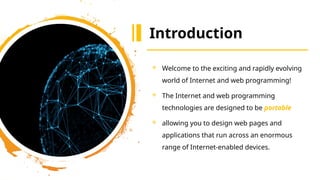
 Welcome to the exciting and rapidly evolving
world of Internet and web programming!
 The Internet and web programming
technologies are designed to be portable
 allowing you to design web pages and
applications that run across an enormous
range of Internet-enabled devices.
5
The
evolution
of the
internet
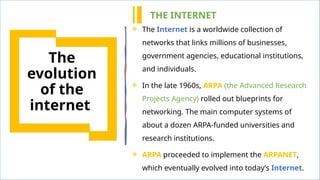
 The Internet is a worldwide collection of
networks that links millions of businesses,
government agencies, educational institutions,
and individuals.
 In the late 1960s, ARPA (the Advanced Research
Projects Agency) rolled out blueprints for
networking. The main computer systems of
about a dozen ARPA-funded universities and
research institutions.
 ARPA proceeded to implement the ARPANET,
which eventually evolved into today’s Internet.
THE INTERNET
6
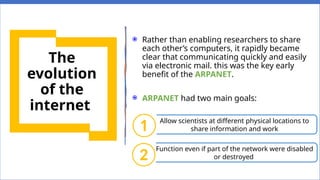
 Rather than enabling researchers to share
each other’s computers, it rapidly became
clear that communicating quickly and easily
via electronic mail. this was the key early
benefit of the ARPANET.
 ARPANET had two main goals:
Allow scientists at different physical locations to
share information and work
Function even if part of the network were disabled
or destroyed
①
②
The
evolution
of the
internet
7
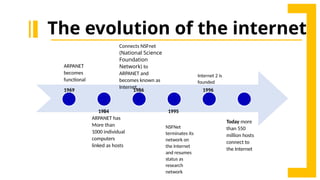
1969
ARPANET
becomes
functional
1984
ARPANET has
More than
1000 individual
computers
linked as hosts
1986
Connects NSFnet
(National Science
Foundation
Network) to
ARPANET and
becomes known as
Internet
1995
NSFNet
terminates its
network on
the Internet
and resumes
status as
research
network
Internet 2 is
founded
Today more
than 550
million hosts
connect to
the Internet
1996
The evolution of the internet
8
The evolution of the internet
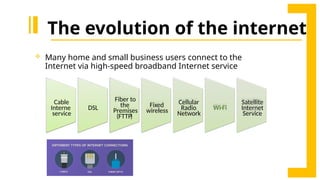
 Many home and small business users connect to the
Internet via high-speed broadband Internet service
Cable
Interne
service
DSL
Fiber to
the
Premises
)
FTTP
(
Fixed
wireless
Cellular
Radio
Network
Wi-Fi
Satellite
Internet
Service
9
The evolution of the internet
How to access the Internet?
 Many organization and businesses have direct access to the Internet
using special high-speed communication lines and equipment.
 Another way to access the Internet is through Internet Service Provider
(ISP) (A commercial organization with permanent connection to the
Internet that sells temporary connections to subscribers).
 To access the Internet, an existing network need to pay a small
registration fee.
10
 WWW (World Wide Web ):
1. allows computer users to execute web-based applications
2. locate and view multimedia-based documents on almost any subject
over the Internet.
 HTML (HyperText Markup Language):
In 1989, Tim Berners-Lee of CERN (the European Organization for Nuclear
Research) began to develop a technology for sharing information via
hyperlinked text documents.
 HTTP (Hypertext Transfer Protocol ):
Tim Berners-Lee also wrote the (HTTP) witch is a communications
protocol used to send information over the web.
Web Basics Concepts.
11
 Web client: is an application that
communicates with a web server,
using HTTP.
 Web server is software and
hardware that uses HTTP and other
protocols to respond to client
requests made over the World
Wide Web.
 The main job of a web server is to
display website content through
storing, processing and delivering
webpages to users.
Web Basics Concepts.
 Web browser: is a software
application for accessing
information on the World Wide Web.
 E.g., Google Chrome, Apple Safari,
Microsoft Internet
Explorer (Edge), Mozilla Firefox,
Opera.
 Web site: A collection of linked
Web pages that has a common
theme or focus.
 E.g., IAU website
• Home page: The main page that
all the pages on a particular Web
site are organized around and link
back to it
12
HTTP (Hypertext Transfer Protocol)
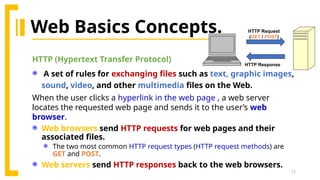
 A set of rules for exchanging files such as text, graphic images,
sound, video, and other multimedia files on the Web.
When the user clicks a hyperlink in the web page , a web server
locates the requested web page and sends it to the user’s web
browser.
 Web browsers send HTTP requests for web pages and their
associated files.
 The two most common HTTP request types (HTTP request methods) are
GET and POST.
 Web servers send HTTP responses back to the web browsers.
HTTP Request
(GET / POST)
HTTP Response
Web Basics Concepts.
13
Web Basics Concepts.
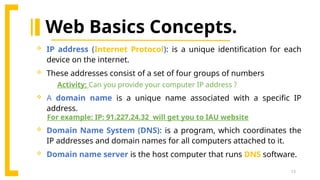
 IP address (Internet Protocol): is a unique identification for each
device on the internet.
 These addresses consist of a set of four groups of numbers
Activity: Can you provide your computer IP address ?
 A domain name is a unique name associated with a specific IP
address.
For example: IP: 91.227.24.32 will get you to IAU website
 Domain Name System (DNS): is a program, which coordinates the
IP addresses and domain names for all computers attached to it.
 Domain name server is the host computer that runs DNS software.
14
Web Basics Concepts.
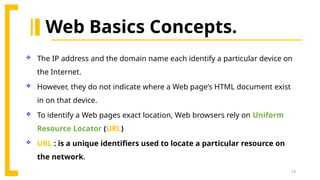
 The IP address and the domain name each identify a particular device on
the Internet.
 However, they do not indicate where a Web page’s HTML document exist
in on that device.
 To identify a Web pages exact location, Web browsers rely on Uniform
Resource Locator (URL)
 URL : is a unique identifiers used to locate a particular resource on
the network.
15
Web Basics Concepts.
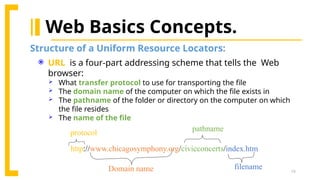
Structure of a Uniform Resource Locators:
http://www.chicagosymphony.org/civicconcerts/index.htm
protocol
Domain name
pathname
filename
 URL is a four-part addressing scheme that tells the Web
browser:
 What transfer protocol to use for transporting the file
 The domain name of the computer on which the file exists in
 The pathname of the folder or directory on the computer on which
the file resides
 The name of the file
16
Static and
Dynamic
Websites
17
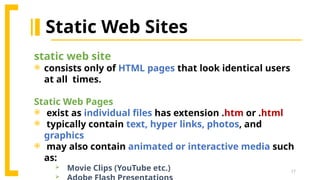
Static Web Sites
static web site
 consists only of HTML pages that look identical users
at all times.
Static Web Pages
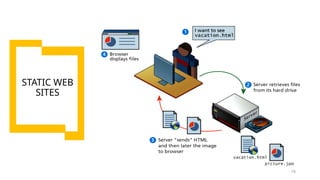
 exist as individual files has extension .htm or .html
 typically contain text, hyper links, photos, and
graphics
 may also contain animated or interactive media such
as:
 Movie Clips (YouTube etc.)

18
STATIC WEB
SITES
19
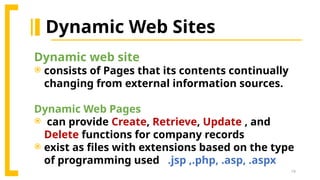
Dynamic Web Sites
Dynamic web site
 consists of Pages that its contents continually
changing from external information sources.
Dynamic Web Pages
 can provide Create, Retrieve, Update , and
Delete functions for company records
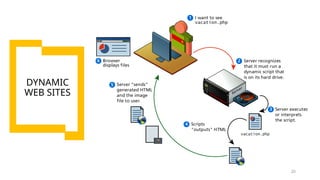
 exist as files with extensions based on the type
of programming used .jsp ,.php, .asp, .aspx
20
DYNAMIC
WEB SITES
21
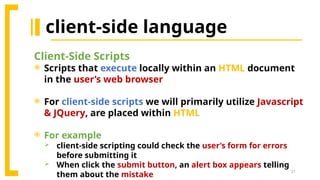
client-side language
Client-Side Scripts
 Scripts that execute locally within an HTML document
in the user’s web browser
 For client-side scripts we will primarily utilize Javascript
& JQuery, are placed within HTML
 For example
 client-side scripting could check the user’s form for errors
before submitting it
 When click the submit button, an alert box appears telling
them about the mistake
22
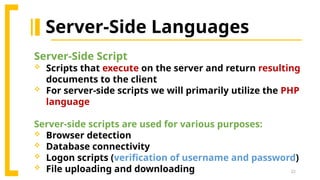
Server-Side Languages
Server-Side Script
 Scripts that execute on the server and return resulting
documents to the client
 For server-side scripts we will primarily utilize the PHP
language
Server-side scripts are used for various purposes:
 Browser detection
 Database connectivity
 Logon scripts (verification of username and password)
 File uploading and downloading
23
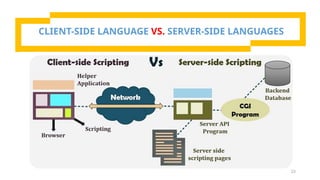
CLIENT-SIDE LANGUAGE VS. SERVER-SIDE LANGUAGES
24
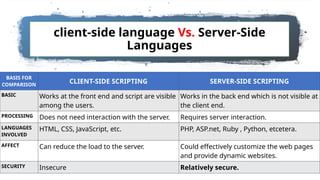
client-side language Vs. Server-Side
Languages
BASIS FOR
COMPARISON
CLIENT-SIDE SCRIPTING SERVER-SIDE SCRIPTING
BASIC Works at the front end and script are visible
among the users.
Works in the back end which is not visible at
the client end.
PROCESSING Does not need interaction with the server. Requires server interaction.
LANGUAGES
INVOLVED
HTML, CSS, JavaScript, etc. PHP, ASP.net, Ruby , Python, etcetera.
AFFECT Can reduce the load to the server. Could effectively customize the web pages
and provide dynamic websites.
SECURITY Insecure Relatively secure.
25
W3C Consortium
 Stands for "World Wide Web Consortium." The
W3C is an international community that
includes a full-time staff, industry experts, and
several member organizations. These groups
work together to develop standards for the
World Wide Web.
 Their mission is to lead the World Wide Web to
its full potential by developing protocols and
guidelines that ensure long-term growth for
the Web.
 Produces specifications, called
Recommendations, in an effort to
standardize web technologies
26
Any
Questions?

Introduction_to_computershfffffffffffffffffffffffffffffffffffffffffffffff_and_the_internet.pptx

  • 1.
  • 2.
    2  Introduction  Theevolution of the internet  Web basics  Define URL and domain names  Static and Dynamic Websites  Client-Side Scripting versus Server- Side Scripting.  World Wide Web Consortium (W3C) Lecture Outlines
  • 3.
    3  Define Internetbasics  Understand world wide web basics  Distinguish between Static and Dynamic Web Sites  Differentiate between client-side language and Server-Side Script language Lecture Objectives
  • 4.
    4 Introduction  Welcome tothe exciting and rapidly evolving world of Internet and web programming!  The Internet and web programming technologies are designed to be portable  allowing you to design web pages and applications that run across an enormous range of Internet-enabled devices.
  • 5.
    5 The evolution of the internet  TheInternet is a worldwide collection of networks that links millions of businesses, government agencies, educational institutions, and individuals.  In the late 1960s, ARPA (the Advanced Research Projects Agency) rolled out blueprints for networking. The main computer systems of about a dozen ARPA-funded universities and research institutions.  ARPA proceeded to implement the ARPANET, which eventually evolved into today’s Internet. THE INTERNET
  • 6.
    6  Rather thanenabling researchers to share each other’s computers, it rapidly became clear that communicating quickly and easily via electronic mail. this was the key early benefit of the ARPANET.  ARPANET had two main goals: Allow scientists at different physical locations to share information and work Function even if part of the network were disabled or destroyed ① ② The evolution of the internet
  • 7.
    7 1969 ARPANET becomes functional 1984 ARPANET has More than 1000individual computers linked as hosts 1986 Connects NSFnet (National Science Foundation Network) to ARPANET and becomes known as Internet 1995 NSFNet terminates its network on the Internet and resumes status as research network Internet 2 is founded Today more than 550 million hosts connect to the Internet 1996 The evolution of the internet
  • 8.
    8 The evolution ofthe internet  Many home and small business users connect to the Internet via high-speed broadband Internet service Cable Interne service DSL Fiber to the Premises ) FTTP ( Fixed wireless Cellular Radio Network Wi-Fi Satellite Internet Service
  • 9.
    9 The evolution ofthe internet How to access the Internet?  Many organization and businesses have direct access to the Internet using special high-speed communication lines and equipment.  Another way to access the Internet is through Internet Service Provider (ISP) (A commercial organization with permanent connection to the Internet that sells temporary connections to subscribers).  To access the Internet, an existing network need to pay a small registration fee.
  • 10.
    10  WWW (WorldWide Web ): 1. allows computer users to execute web-based applications 2. locate and view multimedia-based documents on almost any subject over the Internet.  HTML (HyperText Markup Language): In 1989, Tim Berners-Lee of CERN (the European Organization for Nuclear Research) began to develop a technology for sharing information via hyperlinked text documents.  HTTP (Hypertext Transfer Protocol ): Tim Berners-Lee also wrote the (HTTP) witch is a communications protocol used to send information over the web. Web Basics Concepts.
  • 11.
    11  Web client:is an application that communicates with a web server, using HTTP.  Web server is software and hardware that uses HTTP and other protocols to respond to client requests made over the World Wide Web.  The main job of a web server is to display website content through storing, processing and delivering webpages to users. Web Basics Concepts.  Web browser: is a software application for accessing information on the World Wide Web.  E.g., Google Chrome, Apple Safari, Microsoft Internet Explorer (Edge), Mozilla Firefox, Opera.  Web site: A collection of linked Web pages that has a common theme or focus.  E.g., IAU website • Home page: The main page that all the pages on a particular Web site are organized around and link back to it
  • 12.
    12 HTTP (Hypertext TransferProtocol)  A set of rules for exchanging files such as text, graphic images, sound, video, and other multimedia files on the Web. When the user clicks a hyperlink in the web page , a web server locates the requested web page and sends it to the user’s web browser.  Web browsers send HTTP requests for web pages and their associated files.  The two most common HTTP request types (HTTP request methods) are GET and POST.  Web servers send HTTP responses back to the web browsers. HTTP Request (GET / POST) HTTP Response Web Basics Concepts.
  • 13.
    13 Web Basics Concepts. IP address (Internet Protocol): is a unique identification for each device on the internet.  These addresses consist of a set of four groups of numbers Activity: Can you provide your computer IP address ?  A domain name is a unique name associated with a specific IP address. For example: IP: 91.227.24.32 will get you to IAU website  Domain Name System (DNS): is a program, which coordinates the IP addresses and domain names for all computers attached to it.  Domain name server is the host computer that runs DNS software.
  • 14.
    14 Web Basics Concepts. The IP address and the domain name each identify a particular device on the Internet.  However, they do not indicate where a Web page’s HTML document exist in on that device.  To identify a Web pages exact location, Web browsers rely on Uniform Resource Locator (URL)  URL : is a unique identifiers used to locate a particular resource on the network.
  • 15.
    15 Web Basics Concepts. Structureof a Uniform Resource Locators: http://www.chicagosymphony.org/civicconcerts/index.htm protocol Domain name pathname filename  URL is a four-part addressing scheme that tells the Web browser:  What transfer protocol to use for transporting the file  The domain name of the computer on which the file exists in  The pathname of the folder or directory on the computer on which the file resides  The name of the file
  • 16.
  • 17.
    17 Static Web Sites staticweb site  consists only of HTML pages that look identical users at all times. Static Web Pages  exist as individual files has extension .htm or .html  typically contain text, hyper links, photos, and graphics  may also contain animated or interactive media such as:  Movie Clips (YouTube etc.) 
  • 18.
  • 19.
    19 Dynamic Web Sites Dynamicweb site  consists of Pages that its contents continually changing from external information sources. Dynamic Web Pages  can provide Create, Retrieve, Update , and Delete functions for company records  exist as files with extensions based on the type of programming used .jsp ,.php, .asp, .aspx
  • 20.
  • 21.
    21 client-side language Client-Side Scripts Scripts that execute locally within an HTML document in the user’s web browser  For client-side scripts we will primarily utilize Javascript & JQuery, are placed within HTML  For example  client-side scripting could check the user’s form for errors before submitting it  When click the submit button, an alert box appears telling them about the mistake
  • 22.
    22 Server-Side Languages Server-Side Script Scripts that execute on the server and return resulting documents to the client  For server-side scripts we will primarily utilize the PHP language Server-side scripts are used for various purposes:  Browser detection  Database connectivity  Logon scripts (verification of username and password)  File uploading and downloading
  • 23.
    23 CLIENT-SIDE LANGUAGE VS.SERVER-SIDE LANGUAGES
  • 24.
    24 client-side language Vs.Server-Side Languages BASIS FOR COMPARISON CLIENT-SIDE SCRIPTING SERVER-SIDE SCRIPTING BASIC Works at the front end and script are visible among the users. Works in the back end which is not visible at the client end. PROCESSING Does not need interaction with the server. Requires server interaction. LANGUAGES INVOLVED HTML, CSS, JavaScript, etc. PHP, ASP.net, Ruby , Python, etcetera. AFFECT Can reduce the load to the server. Could effectively customize the web pages and provide dynamic websites. SECURITY Insecure Relatively secure.
  • 25.
    25 W3C Consortium  Standsfor "World Wide Web Consortium." The W3C is an international community that includes a full-time staff, industry experts, and several member organizations. These groups work together to develop standards for the World Wide Web.  Their mission is to lead the World Wide Web to its full potential by developing protocols and guidelines that ensure long-term growth for the Web.  Produces specifications, called Recommendations, in an effort to standardize web technologies
  • 26.