Web 2.0 Team:  Incredibles CMPE 272 Enterprise Software Overview Class Project-Spring 2007
Agenda Web2.0 Introduction Key Components of Web2.0 Web2.0 in Enterprise Market Study Future of Web2.0 Summary
Web2.0 Introduction
What is Web 2.0? Is it just another buzzword? Web 2.0 - phrase coined by O'Reilly Media in 2004. Perceived second generation of Web-based services such as social networking sites, wikis, communication tools, folksonomies, blogs etc Web 2.0 emphasize online collaboration and sharing among users. Focus on ease of use, user at the center, sharing, rich user interfaces
Concepts of Web 2.0 Web as platform Harnessing collective intelligence Data as the driving force Software as Services not product User participation Rich user applications
Web 1.0 vs. web 2.0 Amazon  Barnes and nobles Adsense Doubleclick Architecture participation Architecture consumption Content created by user Content generated by creator Writable web Read-only web Web 2.0 Web 1.0
“ Best Web 2.0 Sites” -- 2006 Social Networking Start Pages Social Bookmarking Peer Production News  Social Media Sharing Online Storage  (Computing) Source:  http://web2.wsj2.com/
Key Components of Web2.0
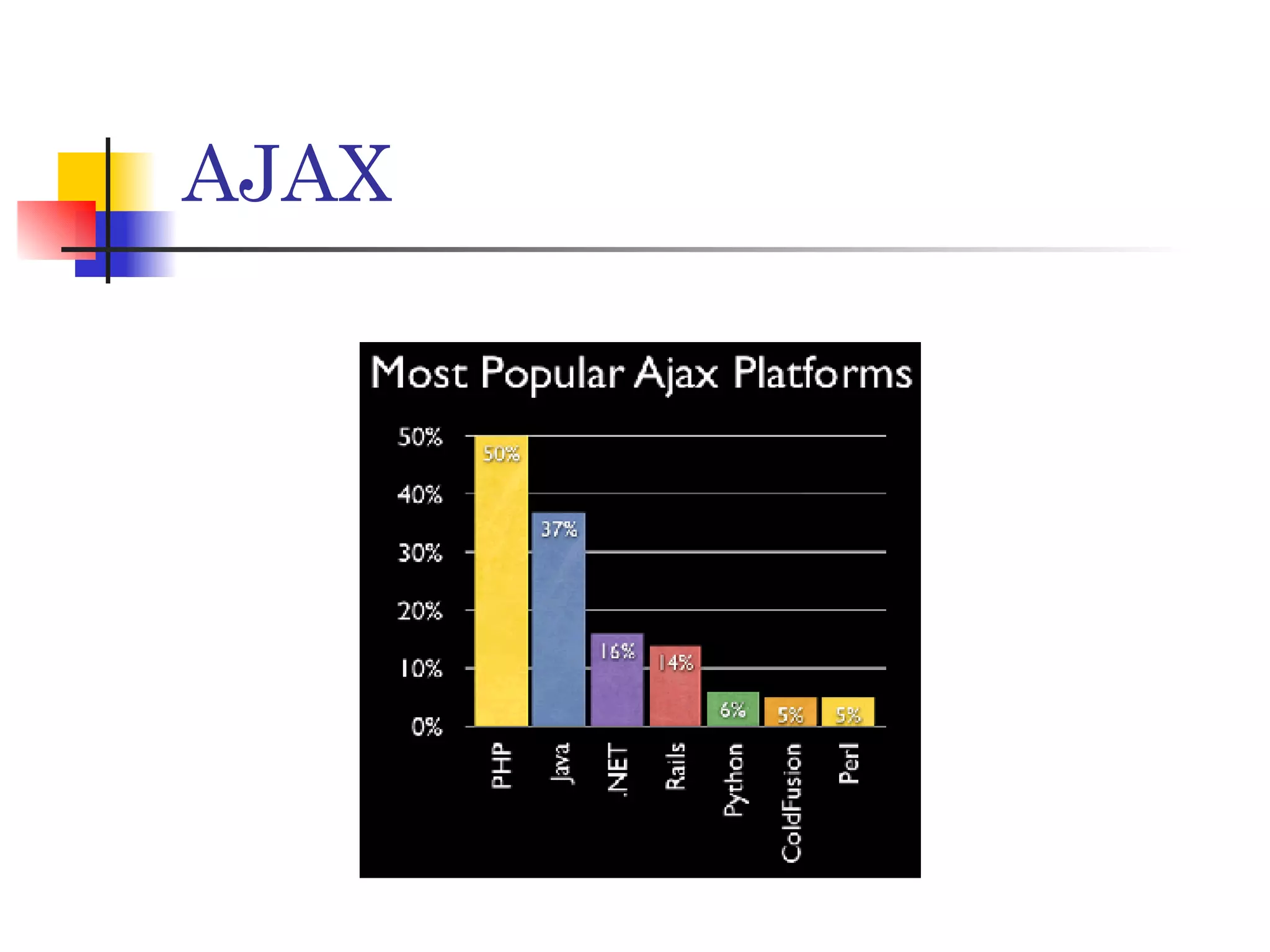
AJAX Collection of technologies such as DHTML, Javascript, XML etc Approach to building interactive websites. It is the bridge between Desktop Applications and Web Applications. Remove the Request/Response model. Update only the necessary information the page needs. Open Standard Better user experience, Bandwidth usage
AJAX
RSS (Really Simple Syndication OR Rich Site Summary) It is a defined standard for syndicating content. Syndication of site content is considered to be a key Web 2.0 feature. RSS is a text-based format and  provides information in XML. RSS feeds can be created using a text editor or using desktop software
RSS – Two Parts Feeds – These are the actual content items  that are produced by web authors. These  could be taken from blogs, journals, news  sites, etc. Aggregators – An aggregator is a program or site that collects the feeds for reading.  Aggregators can be installed as stand-alone programs, or they can be web-based.
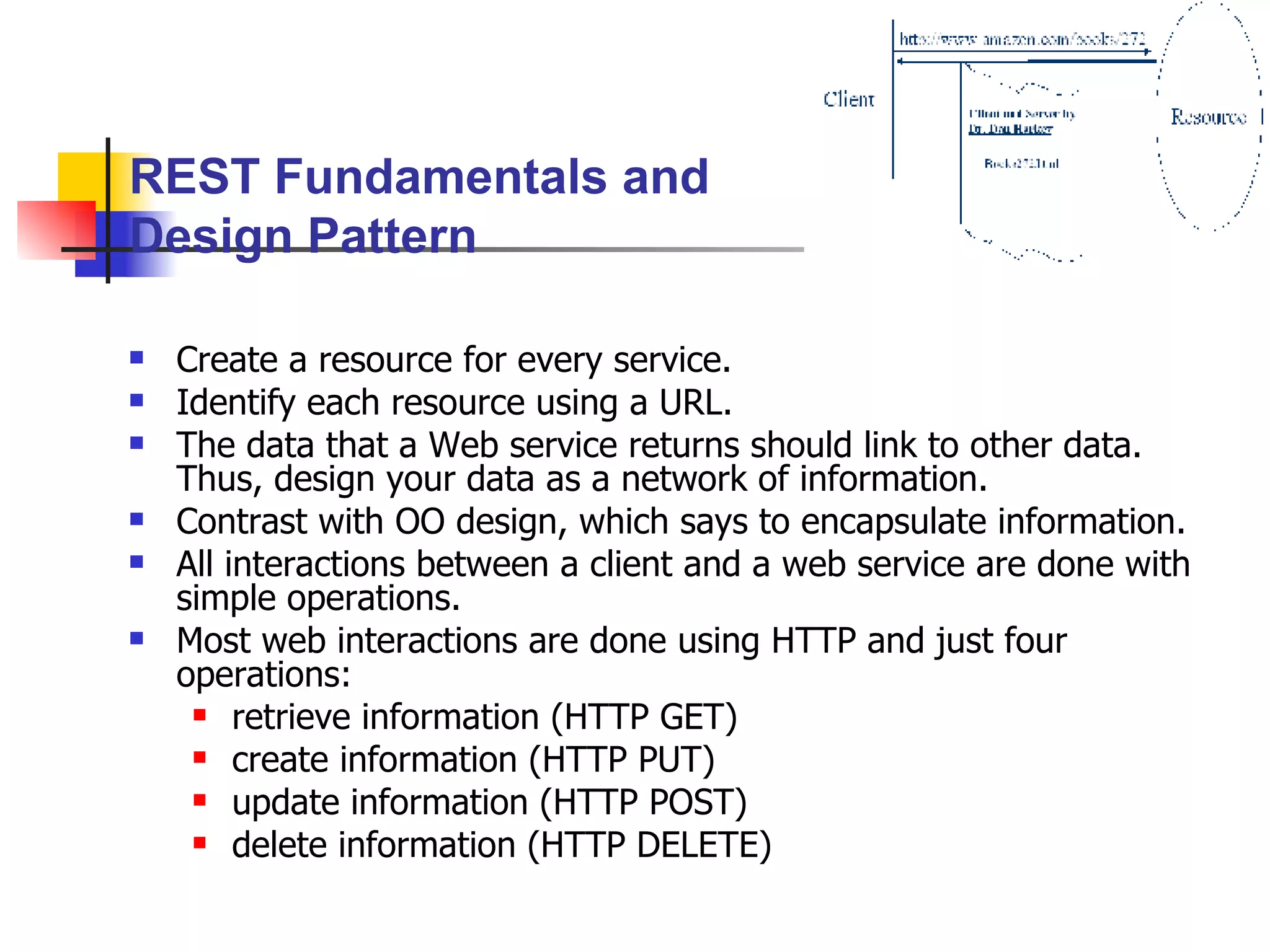
Protocols Used REST = Representational State Transfer Working: The Client references a Web   resource using a URL.  Representation  of the resource is returned in response as an HTML document. This representation places the client in a new  state .  When the client selects a hyperlink on this representation, it accesses another resource.  The new representation places the client application into yet another state.  Thus, the client application  transfers  state with each resource representation. "REST is intended to evoke an image of how a well-designed Web application behaves: a network of web pages, where the user progresses through an application by selecting links (state transitions), resulting in the next page (representing the next state of the application) being transferred to the user and rendered for their use." - Dr. Roy T. Fielding
Create a resource for every service. Identify each resource using a URL. The data that a Web service returns should link to other data.  Thus, design your data as a network of information. Contrast with OO design, which says to encapsulate information. All interactions between a client and a web service are done with simple operations. Most web interactions are done using HTTP and just four operations:  retrieve information (HTTP GET) create information (HTTP PUT) update information (HTTP POST) delete information (HTTP DELETE) REST Fundamentals and Design Pattern
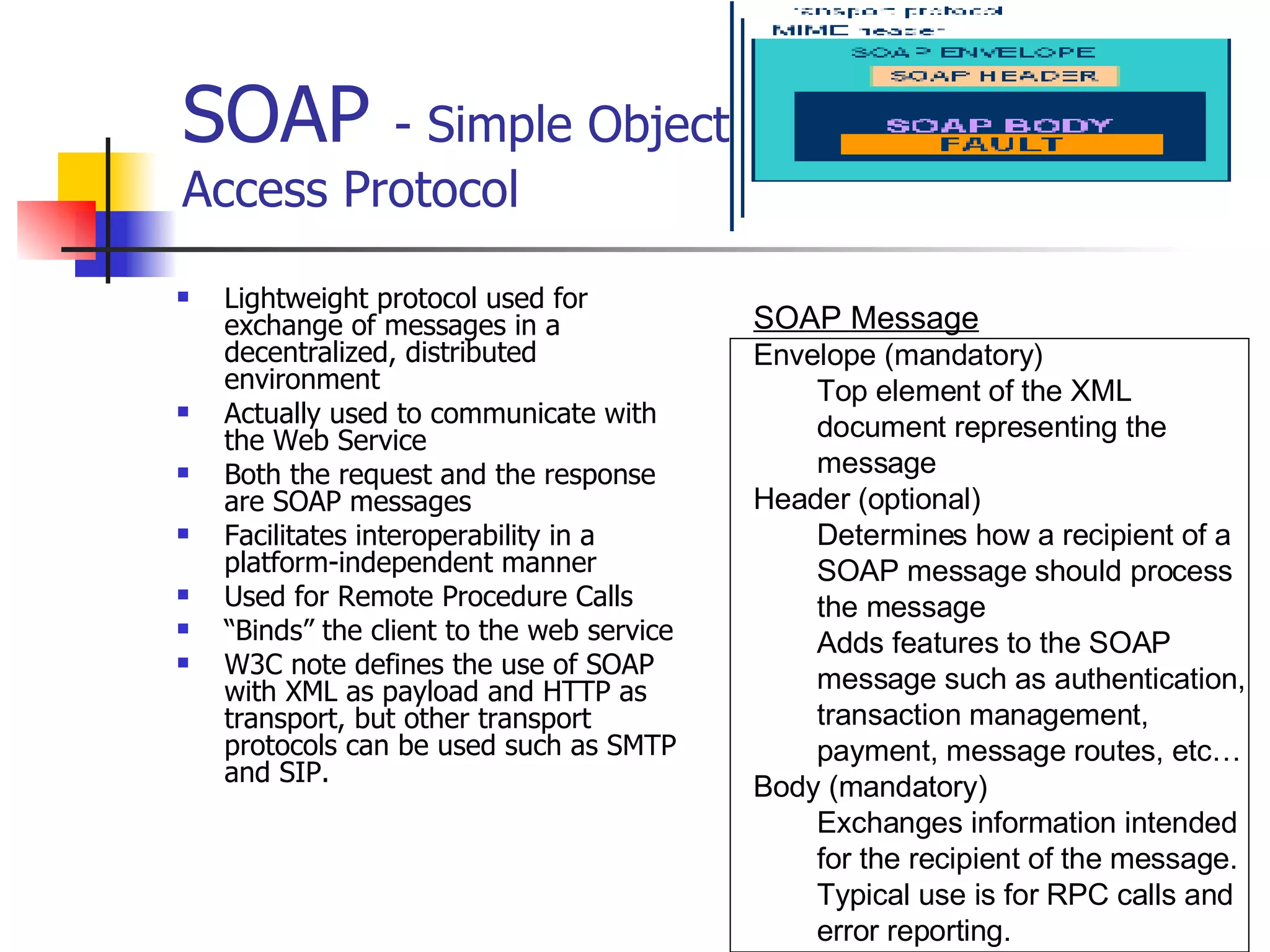
SOAP  - Simple Object Access Protocol  Lightweight protocol used for exchange of messages in a decentralized, distributed environment Actually used to communicate with the Web Service Both the request and the response are SOAP messages Facilitates interoperability in a platform-independent manner Used for Remote Procedure Calls “ Binds” the client to the web service W3C note defines the use of SOAP with XML as payload and HTTP as transport, but other transport protocols can be used such as SMTP and SIP. SOAP Message Envelope (mandatory) Top element of the XML document representing the message Header (optional) Determines how a recipient of a SOAP message should process the message Adds features to the SOAP message such as authentication, transaction management, payment, message routes, etc… Body (mandatory) Exchanges information intended for the recipient of the message.  Typical use is for RPC calls and error reporting.
Advantages & Disadvantages of SOAP Advantages Uses HTTP which is widely used and scalable Wide remote system interoperability Flexible for growth because of XML properties It but can be used for RPC. Disadvantages No good way to describe the serialization pattern (XML schema is optional at this point) Parsing of SOAP packet and mapping to objects reduces performance Doesn’t implement security because it is a wire protocol—relies on HTTP
Web2.0 in Enterprise
Web2.0 in Enterprise Known as Enterprise 2.0 Applying Web2.0 concepts to Enterprises Consumerization (or Socialization) of Enterprises 24% of time spent by information worker in searching and analyzing information Early stages of adoption Enhanced productivity
Web2.0 in Enterprise Customized work place environment Personalized Web pages instead of centrally managed enterprise portals by IT Data access from multiple enterprise applications in one centralized location Single login and password Using blogs for vendor/customer & employee/management relationship Using wikis in knowledge management Using secure RSS to inform customers
Latest Trends in Enterprise2.0 Source: http://blogs.zdnet.com/Hinchcliffe/?p=103
Challenges Web 2.0 applications missing “Enterprise Context”. Structured Data in Real time Security Access controls Cultural differences Technically possible but do we want to do it?
Market Study
Traffic to assorted Web 2.0 sites & Internet Vs Customer Behavior
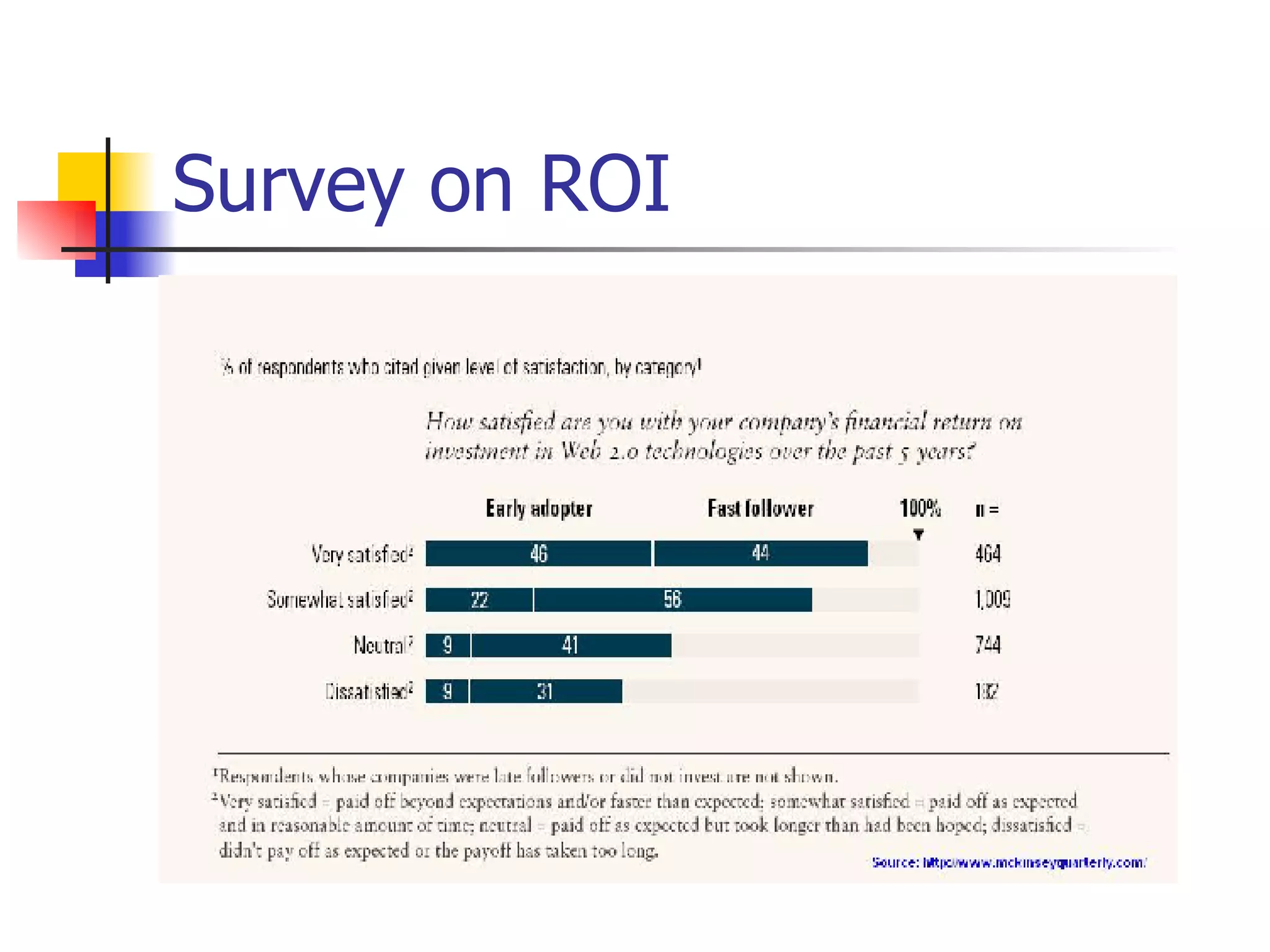
Survey on ROI
What Next? Web 3.0 This term has been coined to describe the semantic web It promises to “organize the world’s information” Can reason about information and make new conclusions Mash ups for the Masses -Content management for the rest of us: Joombla ,LifeRay, Droople -Personalized Content assembly: Web presence for everyone  New user interfaces and HCI -Eg “Sugar” interface on $100 laptop from OLPC Mapping & Location Based Ubiquitous Feedback loops -Today’s examples include Pandora, StumbleUpon -Ties to performance (especially peak performance) Widgets -Universal widget API Context capture and management Location based data and context Activity centric (vs applications) Automated Metadata Economies of Abundance, Long Tail & Right Brain Snowflake Effect
Summary Web2.0 - Collection of concepts & technologies Focus on user participation, sharing, ease of use and user rich interfaces Maturing in consumer space Early Adoption in Enterprise space Survey says ROI on Web2.0 is satisfactory Web3.0 is evolving
References http://www.oreillynet.com http://www.mckinseyquarterly.com/ http://en.wikipedia.org/  http://blogs.zdnet.com/Hinchcliffe/?cat=48 http://myworklight.com http://www.idc.com http://web2.wsj2.com
 

Web2 0 Incredibles

  • 1.
    Web 2.0 Team: Incredibles CMPE 272 Enterprise Software Overview Class Project-Spring 2007
  • 2.
    Agenda Web2.0 IntroductionKey Components of Web2.0 Web2.0 in Enterprise Market Study Future of Web2.0 Summary
  • 3.
  • 4.
    What is Web2.0? Is it just another buzzword? Web 2.0 - phrase coined by O'Reilly Media in 2004. Perceived second generation of Web-based services such as social networking sites, wikis, communication tools, folksonomies, blogs etc Web 2.0 emphasize online collaboration and sharing among users. Focus on ease of use, user at the center, sharing, rich user interfaces
  • 5.
    Concepts of Web2.0 Web as platform Harnessing collective intelligence Data as the driving force Software as Services not product User participation Rich user applications
  • 6.
    Web 1.0 vs.web 2.0 Amazon Barnes and nobles Adsense Doubleclick Architecture participation Architecture consumption Content created by user Content generated by creator Writable web Read-only web Web 2.0 Web 1.0
  • 7.
    “ Best Web2.0 Sites” -- 2006 Social Networking Start Pages Social Bookmarking Peer Production News Social Media Sharing Online Storage (Computing) Source: http://web2.wsj2.com/
  • 8.
  • 9.
    AJAX Collection oftechnologies such as DHTML, Javascript, XML etc Approach to building interactive websites. It is the bridge between Desktop Applications and Web Applications. Remove the Request/Response model. Update only the necessary information the page needs. Open Standard Better user experience, Bandwidth usage
  • 10.
  • 11.
    RSS (Really SimpleSyndication OR Rich Site Summary) It is a defined standard for syndicating content. Syndication of site content is considered to be a key Web 2.0 feature. RSS is a text-based format and provides information in XML. RSS feeds can be created using a text editor or using desktop software
  • 12.
    RSS – TwoParts Feeds – These are the actual content items that are produced by web authors. These could be taken from blogs, journals, news sites, etc. Aggregators – An aggregator is a program or site that collects the feeds for reading. Aggregators can be installed as stand-alone programs, or they can be web-based.
  • 13.
    Protocols Used REST= Representational State Transfer Working: The Client references a Web resource using a URL. Representation of the resource is returned in response as an HTML document. This representation places the client in a new state . When the client selects a hyperlink on this representation, it accesses another resource. The new representation places the client application into yet another state. Thus, the client application transfers state with each resource representation. "REST is intended to evoke an image of how a well-designed Web application behaves: a network of web pages, where the user progresses through an application by selecting links (state transitions), resulting in the next page (representing the next state of the application) being transferred to the user and rendered for their use." - Dr. Roy T. Fielding
  • 14.
    Create a resourcefor every service. Identify each resource using a URL. The data that a Web service returns should link to other data. Thus, design your data as a network of information. Contrast with OO design, which says to encapsulate information. All interactions between a client and a web service are done with simple operations. Most web interactions are done using HTTP and just four operations: retrieve information (HTTP GET) create information (HTTP PUT) update information (HTTP POST) delete information (HTTP DELETE) REST Fundamentals and Design Pattern
  • 15.
    SOAP -Simple Object Access Protocol Lightweight protocol used for exchange of messages in a decentralized, distributed environment Actually used to communicate with the Web Service Both the request and the response are SOAP messages Facilitates interoperability in a platform-independent manner Used for Remote Procedure Calls “ Binds” the client to the web service W3C note defines the use of SOAP with XML as payload and HTTP as transport, but other transport protocols can be used such as SMTP and SIP. SOAP Message Envelope (mandatory) Top element of the XML document representing the message Header (optional) Determines how a recipient of a SOAP message should process the message Adds features to the SOAP message such as authentication, transaction management, payment, message routes, etc… Body (mandatory) Exchanges information intended for the recipient of the message. Typical use is for RPC calls and error reporting.
  • 16.
    Advantages & Disadvantagesof SOAP Advantages Uses HTTP which is widely used and scalable Wide remote system interoperability Flexible for growth because of XML properties It but can be used for RPC. Disadvantages No good way to describe the serialization pattern (XML schema is optional at this point) Parsing of SOAP packet and mapping to objects reduces performance Doesn’t implement security because it is a wire protocol—relies on HTTP
  • 17.
  • 18.
    Web2.0 in EnterpriseKnown as Enterprise 2.0 Applying Web2.0 concepts to Enterprises Consumerization (or Socialization) of Enterprises 24% of time spent by information worker in searching and analyzing information Early stages of adoption Enhanced productivity
  • 19.
    Web2.0 in EnterpriseCustomized work place environment Personalized Web pages instead of centrally managed enterprise portals by IT Data access from multiple enterprise applications in one centralized location Single login and password Using blogs for vendor/customer & employee/management relationship Using wikis in knowledge management Using secure RSS to inform customers
  • 20.
    Latest Trends inEnterprise2.0 Source: http://blogs.zdnet.com/Hinchcliffe/?p=103
  • 21.
    Challenges Web 2.0applications missing “Enterprise Context”. Structured Data in Real time Security Access controls Cultural differences Technically possible but do we want to do it?
  • 22.
  • 23.
    Traffic to assortedWeb 2.0 sites & Internet Vs Customer Behavior
  • 24.
  • 25.
    What Next? Web3.0 This term has been coined to describe the semantic web It promises to “organize the world’s information” Can reason about information and make new conclusions Mash ups for the Masses -Content management for the rest of us: Joombla ,LifeRay, Droople -Personalized Content assembly: Web presence for everyone New user interfaces and HCI -Eg “Sugar” interface on $100 laptop from OLPC Mapping & Location Based Ubiquitous Feedback loops -Today’s examples include Pandora, StumbleUpon -Ties to performance (especially peak performance) Widgets -Universal widget API Context capture and management Location based data and context Activity centric (vs applications) Automated Metadata Economies of Abundance, Long Tail & Right Brain Snowflake Effect
  • 26.
    Summary Web2.0 -Collection of concepts & technologies Focus on user participation, sharing, ease of use and user rich interfaces Maturing in consumer space Early Adoption in Enterprise space Survey says ROI on Web2.0 is satisfactory Web3.0 is evolving
  • 27.
    References http://www.oreillynet.com http://www.mckinseyquarterly.com/http://en.wikipedia.org/ http://blogs.zdnet.com/Hinchcliffe/?cat=48 http://myworklight.com http://www.idc.com http://web2.wsj2.com
  • 28.