3D Viewing
                            Chen Jing-Fung (2006/12/1)
                             Assistant Research Fellow,
                                Digital Media Center,
                          National Taiwan Normal University


                                       Video Processing Lab
                                             臺灣師範大學數位媒體中心視訊處理研究室

Ch7: Computer Graphics with OpenGL 3th, Hearn Baker
Ch5: Interactive Computer Graphics 3th, Addison Wesley
3D viewing framework
• How to view 3D

• Some kind types of 3D projections

• How to do 3D views


                       Video Processing Lab   2
                          臺灣師範大學數位媒體中心視訊處理研究室
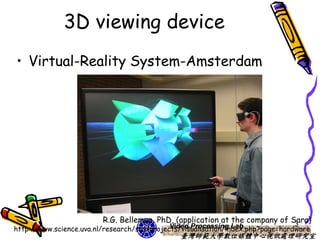
3D viewing device
• Virtual-Reality System-Amsterdam


                         R.G. Belleman, PhD, (application at the company of Sara)
                                                                             3
                                             Video Processing Lab
http://www.science.uva.nl/research/scs/projects/visualisation/index.php?page=hardware
                                               臺灣師範大學數位媒體中心視訊處理研究室
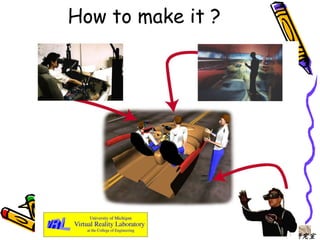
How to make it ?


          Video Processing Lab   4
             臺灣師範大學數位媒體中心視訊處理研究室
2D -> 3D
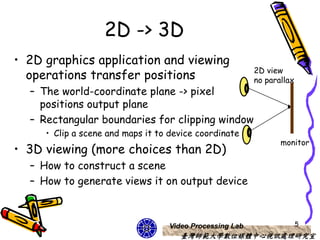
• 2D graphics application and viewing
                                                          2D view
  operations transfer positions                           no parallax
  – The world-coordinate plane -> pixel
    positions output plane
  – Rectangular boundaries for clipping window
     • Clip a scene and maps it to device coordinate
                                                                 monitor
• 3D viewing (more choices than 2D)
  – How to construct a scene
  – How to generate views it on output device


                                   Video Processing Lab                 5
                                      臺灣師範大學數位媒體中心視訊處理研究室
Two eyes game
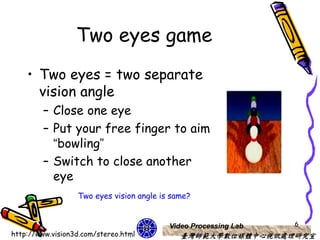
    • Two eyes = two separate
      vision angle
         – Close one eye
         – Put your free finger to aim
           “bowling”
         – Switch to close another
           eye
                  Two eyes vision angle is same?


                                          Video Processing Lab   6
http://www.vision3d.com/stereo.html          臺灣師範大學數位媒體中心視訊處理研究室
How to see 3D?
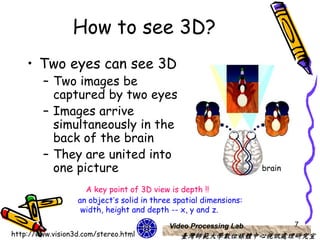
    • Two eyes can see 3D
         – Two images be
           captured by two eyes
         – Images arrive
           simultaneously in the
           back of the brain
         – They are united into
           one picture                                             brain

                    A key point of 3D view is depth !!
                  an object’s solid in three spatial dimensions:
                   width, height and depth -- x, y and z.
                                           Video Processing Lab            7
http://www.vision3d.com/stereo.html           臺灣師範大學數位媒體中心視訊處理研究室
Overview 3D viewing
        concepts
• Object in 3D scene
  – A set of surfaces (object descriptions)
    • Generate views of an object’s surface
      features
  – Closed boundary around the object
    • Provide routines
       – displaying internal components
       – Cross-sectional views of a solid object


                              Video Processing Lab   8
                                 臺灣師範大學數位媒體中心視訊處理研究室
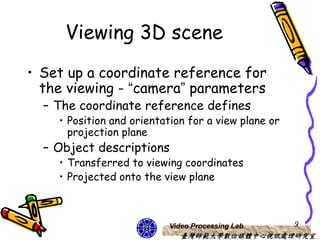
Viewing 3D scene
• Set up a coordinate reference for
  the viewing - “camera” parameters
  – The coordinate reference defines
    • Position and orientation for a view plane or
      projection plane
  – Object descriptions
    • Transferred to viewing coordinates
    • Projected onto the view plane


                          Video Processing Lab       9
                             臺灣師範大學數位媒體中心視訊處理研究室
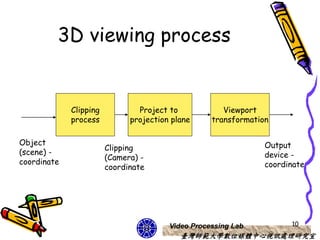
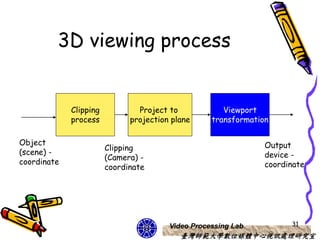
3D viewing process


             Clipping           Project to            Viewport
             process          projection plane     transformation

Object                                                          Output
                        Clipping
(scene) -                                                       device -
                        (Camera) -
coordinate                                                      coordinate
                        coordinate


                                        Video Processing Lab          10
                                           臺灣師範大學數位媒體中心視訊處理研究室
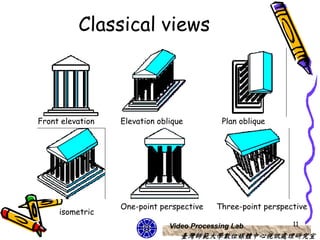
Classical views


Front elevation   Elevation oblique          Plan oblique


                  One-point perspective    Three-point perspective
     isometric
                               Video Processing Lab           11
                                  臺灣師範大學數位媒體中心視訊處理研究室
Three projections

•   Introduction projection & views
•   Axonometric projections
•   Oblique projections
•   Perspective projections


                       Video Processing Lab   12
                          臺灣師範大學數位媒體中心視訊處理研究室
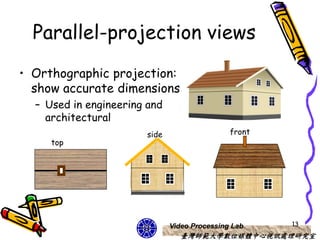
Parallel-projection views
• Orthographic projection:
  show accurate dimensions
  – Used in engineering and
    architectural
                        side                   front
     top


                               Video Processing Lab    13
                                  臺灣師範大學數位媒體中心視訊處理研究室
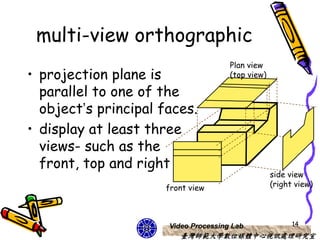
multi-view orthographic
                                      Plan view
• projection plane is                 (top view)

  parallel to one of the
  object’s principal faces.
• display at least three
  views- such as the
  front, top and right
                                                   side view
                     front view                    (right view)


                      Video Processing Lab               14
                         臺灣師範大學數位媒體中心視訊處理研究室
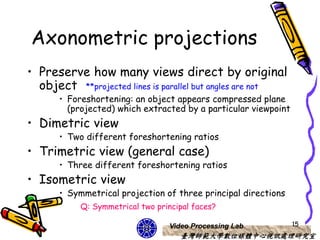
Axonometric projections
• Preserve how many views direct by original
  object **projected lines is parallel but angles are not
       • Foreshortening: an object appears compressed plane
         (projected) which extracted by a particular viewpoint
• Dimetric view
       • Two different foreshortening ratios
• Trimetric view (general case)
       • Three different foreshortening ratios
• Isometric view
       • Symmetrical projection of three principal directions
            Q: Symmetrical two principal faces?

                                  Video Processing Lab           15
                                     臺灣師範大學數位媒體中心視訊處理研究室
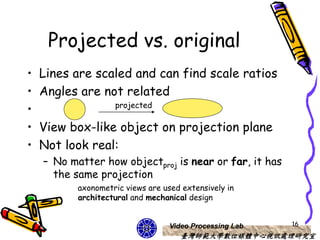
Projected vs. original
•   Lines are scaled and can find scale ratios
•   Angles are not related
                    projected
•
•   View box-like object on projection plane
•   Not look real:
    – No matter how objectproj is near or far, it has
      the same projection
           axonometric views are used extensively in
           architectural and mechanical design


                                   Video Processing Lab   16
                                      臺灣師範大學數位媒體中心視訊處理研究室
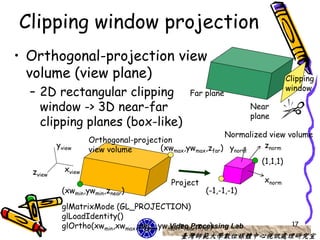
Clipping window projection
• Orthogonal-projection view
  volume (view plane)                                                      Clipping
                                                                           window
  – 2D rectangular clipping                   Far plane
    window -> 3D near-far                                       Near
                                                                plane
    clipping planes (box-like)
                                                        Normalized view volume
                    Orthogonal-projection
          yview                       (xwmax,ywmax,zfar) ynorm    znorm
                    view volume
                                                                 (1,1,1)
  zview     xview
                                         Project                   xnorm
           (xwmin,ywmin,znear)                     (-1,-1,-1)

           glMatrixMode (GL_PROJECTION)
           glLoadIdentity()
           glOrtho(xwmin,xwmax,ywmin,ywmax,znear,zfar)
                                       Video Processing Lab                 17
                                           臺灣師範大學數位媒體中心視訊處理研究室
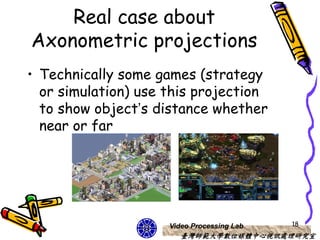
Real case about
Axonometric projections
• Technically some games (strategy
  or simulation) use this projection
  to show object’s distance whether
  near or far


                     Video Processing Lab   18
                        臺灣師範大學數位媒體中心視訊處理研究室
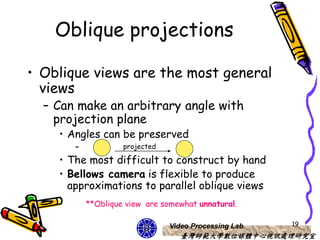
Oblique projections

• Oblique views are the most general
  views
  – Can make an arbitrary angle with
    projection plane
    • Angles can be preserved
       –            projected

    • The most difficult to construct by hand
    • Bellows camera is flexible to produce
      approximations to parallel oblique views
           **Oblique view are somewhat unnatural.

                                Video Processing Lab   19
                                   臺灣師範大學數位媒體中心視訊處理研究室
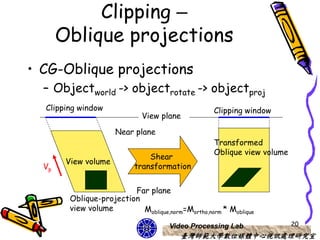
Clipping –
       Oblique projections
• CG-Oblique projections
  – Objectworld -> objectrotate -> objectproj
  Clipping window                                   Clipping window
                              View plane

                      Near plane
                                                    Transformed
                                                    Oblique view volume
                                Shear
        View volume
  Vp                        transformation


                          Far plane
         Oblique-projection
         view volume        Moblique,norm=Mortho,norm * Moblique

                                      Video Processing Lab                20
                                          臺灣師範大學數位媒體中心視訊處理研究室
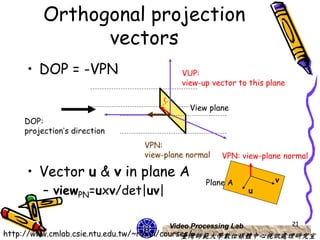
Orthogonal projection
               vectors
    • DOP = -VPN                      VUP:
                                      view-up vector to this plane


                                        View plane
    DOP:
    projection’s direction
                             VPN:
                             view-plane normal   VPN: view-plane normal

    • Vector u & v in plane A                                  v
                                            Plane A
         – viewPN=uxv/det|uv|                             u


                                   Video Processing Lab              21
http://www.cmlab.csie.ntu.edu.tw/~robin/courses/
                                             臺灣師範大學數位媒體中心視訊處理研究室
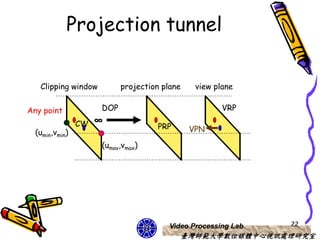
Projection tunnel

   Clipping window         projection plane    view plane


Any point            DOP                              VRP
                CW   ∞
                                    PRP       VPN
  (umin,vmin)
                     (umav,vmax)


                                        Video Processing Lab   22
                                           臺灣師範大學數位媒體中心視訊處理研究室
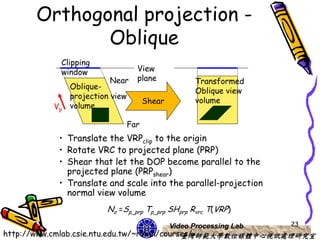
Orthogonal projection -
             Oblique
           Clipping
           window                  View
                         Near      plane             Transformed
               Oblique-
                                                     Oblique view
               projection view
                                       Shear         volume
          Vp   volume

                                 Far
           • Translate the VRPclip to the origin
           • Rotate VRC to projected plane (PRP)
           • Shear that let the DOP become parallel to the
             projected plane (PRPshear)
           • Translate and scale into the parallel-projection
             normal view volume
                        No =Sp_prp Tp_prp SHprp Rvrc T(VRP)
                                               Video Processing Lab   23
http://www.cmlab.csie.ntu.edu.tw/~robin/courses/
                                             臺灣師範大學數位媒體中心視訊處理研究室
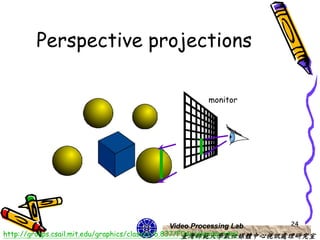
Perspective projections

                                               monitor


                                                 Video Processing Lab 24
http://groups.csail.mit.edu/graphics/classes/6.837/F04/calendar.html
                                                    臺灣師範大學數位媒體中心視訊處理研究室
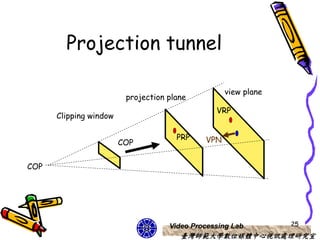
Projection tunnel

                                                   view plane
                         projection plane
                                                VRP
      Clipping window

                                      PRP    VPN
                        COP


COP


                                    Video Processing Lab        25
                                       臺灣師範大學數位媒體中心視訊處理研究室
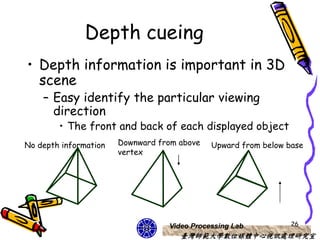
Depth cueing
• Depth information is important in 3D
  scene
    – Easy identify the particular viewing
      direction
        • The front and back of each displayed object
No depth information   Downward from above   Upward from below base
                       vertex


                                  Video Processing Lab          26
                                     臺灣師範大學數位媒體中心視訊處理研究室
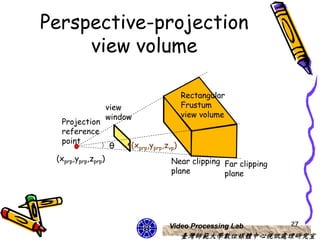
Perspective-projection
     view volume

                                           Rectangular
                    view                   Frustum
                    window                 view volume
  Projection
  reference
  point
                    θ    (xprp,yprp,zvp)
 (xprp,yprp,zprp)                     Near clipping Far clipping
                                      plane         plane


                                     Video Processing Lab          27
                                           臺灣師範大學數位媒體中心視訊處理研究室
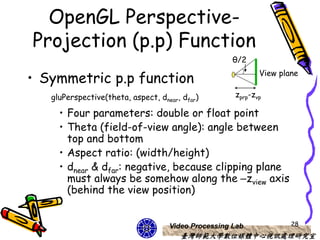
OpenGL Perspective-
Projection (p.p) Function
                                                     θ/2

• Symmetric p.p function                                    View plane


   gluPerspective(theta, aspect, dnear, dfar)        zprp-zvp

     • Four parameters: double or float point
     • Theta (field-of-view angle): angle between
       top and bottom
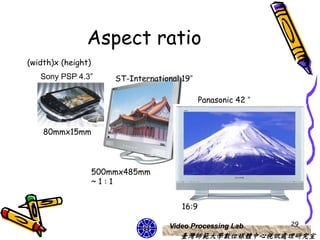
     • Aspect ratio: (width/height)
     • dnear & dfar: negative, because clipping plane
       must always be somehow along the –zview axis
       (behind the view position)


                                    Video Processing Lab            28
                                       臺灣師範大學數位媒體中心視訊處理研究室
Aspect ratio
(width)x (height)
   Sony PSP 4.3”        ST-International 19”

                                                Panasonic 42 ”


    80mmx15mm


                    500mmx485mm
                    ~1:1


                                         16:9

                                     Video Processing Lab        29
                                        臺灣師範大學數位媒體中心視訊處理研究室
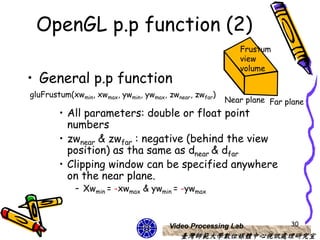
OpenGL p.p function (2)
                                                           Frustum
                                                           view
                                                           volume
• General p.p function
gluFrustum(xwmin, xwmax, ywmin, ywmax, zwnear, zwfar)
                                                        Near plane Far plane
        • All parameters: double or float point
          numbers
        • zwnear & zwfar : negative (behind the view
          position) as tha same as dnear & dfar
        • Clipping window can be specified anywhere
          on the near plane.
            – Xwmin = -xwmax & ywmin = -ywmax


                                       Video Processing Lab             30
                                          臺灣師範大學數位媒體中心視訊處理研究室
3D viewing process


             Clipping           Project to            Viewport
             process          projection plane     transformation

Object                                                          Output
                        Clipping
(scene) -                                                       device -
                        (Camera) -
coordinate                                                      coordinate
                        coordinate


                                        Video Processing Lab          31
                                           臺灣師範大學數位媒體中心視訊處理研究室
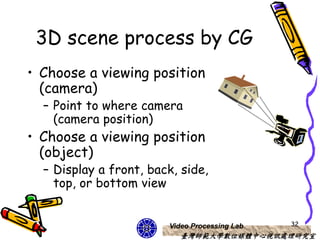
3D scene process by CG
• Choose a viewing position
  (camera)
  – Point to where camera
    (camera position)
• Choose a viewing position
  (object)
  – Display a front, back, side,
    top, or bottom view


                        Video Processing Lab   32
                           臺灣師範大學數位媒體中心視訊處理研究室
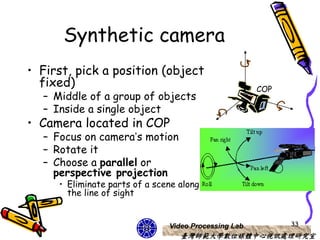
Synthetic camera
• First, pick a position (object
  fixed)                                              COP
  – Middle of a group of objects
  – Inside a single object
• Camera located in COP
  – Focus on camera’s motion
  – Rotate it
  – Choose a parallel or
    perspective projection
     • Eliminate parts of a scene along
       the line of sight


                               Video Processing Lab         33
                                  臺灣師範大學數位媒體中心視訊處理研究室
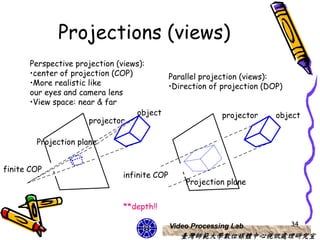
Projections (views)
      Perspective projection (views):
      •center of projection (COP)        Parallel projection (views):
      •More realistic like               •Direction of projection (DOP)
      our eyes and camera lens
      •View space: near & far
                                  object                projector     object
                      projector

        Projection plane


finite COP
                              infinite COP
                                                 Projection plane


                              **depth!!

                                             Video Processing Lab        34
                                                臺灣師範大學數位媒體中心視訊處理研究室
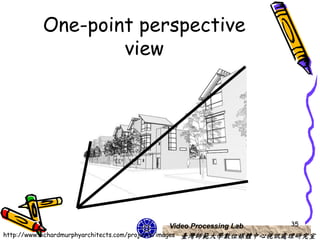
One-point perspective
                 view


                                       Video Processing Lab         35
http://www.richardmurphyarchitects.com/projects/images 臺灣師範大學數位媒體中心視訊處理研究室
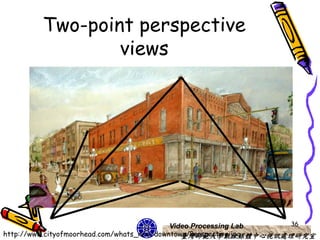
Two-point perspective
                views


                                            Video Processing Lab 36
http://www.cityofmoorhead.com/whats_new/downtown/Perspective.jpg
                                               臺灣師範大學數位媒體中心視訊處理研究室
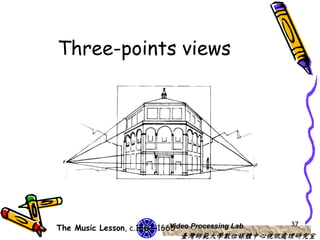
Three-points views


                                                   37
The Music Lesson, c.1662-1665
                            Video Processing Lab
                               臺灣師範大學數位媒體中心視訊處理研究室
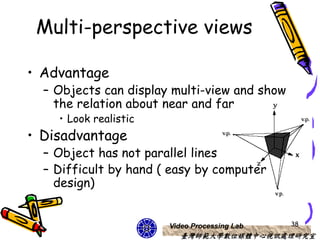
Multi-perspective views

• Advantage
  – Objects can display multi-view and show
    the relation about near and far
    • Look realistic
• Disadvantage
  – Object has not parallel lines
  – Difficult by hand ( easy by computer
    design)


                       Video Processing Lab   38
                          臺灣師範大學數位媒體中心視訊處理研究室
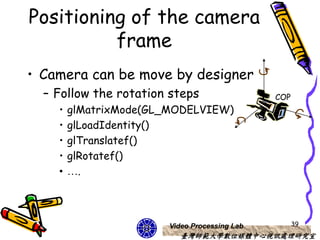
Positioning of the camera
          frame
• Camera can be move by designer
  – Follow the rotation steps                 COP
    •   glMatrixMode(GL_MODELVIEW)
    •   glLoadIdentity()
    •   glTranslatef()
    •   glRotatef()
    •   ….


                       Video Processing Lab         39
                          臺灣師範大學數位媒體中心視訊處理研究室
VPN       VUP

                                            VRP         v
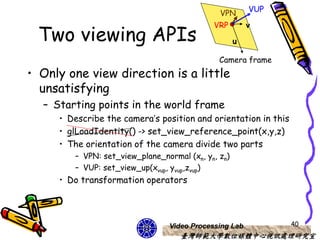
 Two viewing APIs                                   u

                                              Camera frame
• Only one view direction is a little
  unsatisfying
  – Starting points in the world frame
     • Describe the camera’s position and orientation in this
     • glLoadIdentity() -> set_view_reference_point(x,y,z)
     • The orientation of the camera divide two parts
        – VPN: set_view_plane_normal (xn, yn, zn)
        – VUP: set_view_up(xvup, yvup,zvup)
     • Do transformation operators


                                Video Processing Lab            40
                                   臺灣師範大學數位媒體中心視訊處理研究室
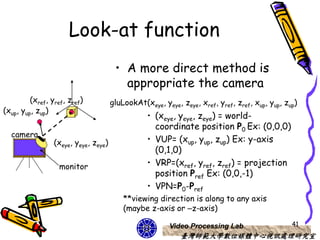
Look-at function
                                       • A more direct method is
                                         appropriate the camera
         (xref, yref, zref)           gluLookAt(xeye, yeye, zeye, xref, yref, zref, xup, yup, zup)
(xup, yup, zup)
                                                 • (xeye, yeye, zeye) = world-
                                                   coordinate position P0 Ex: (0,0,0)
  camera
                 (xeye, yeye, zeye)              • VUP= (xup, yup, zup) Ex: y-axis
                                                   (0,1,0)
                  monitor                        • VRP=(xref, yref, zref) = projection
                                                   position Pref Ex: (0,0,-1)
                                                 • VPN=P0-Pref
                                          **viewing direction is along to any axis
                                          (maybe z-axis or –z-axis)

                                                         Video Processing Lab                   41
                                                            臺灣師範大學數位媒體中心視訊處理研究室
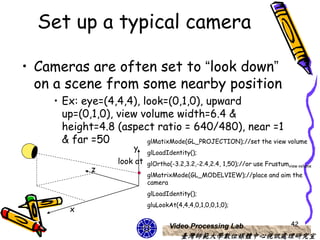
Set up a typical camera

• Cameras are often set to “look down”
  on a scene from some nearby position
    • Ex: eye=(4,4,4), look=(0,1,0), upward
      up=(0,1,0), view volume width=6.4 &
      height=4.8 (aspect ratio = 640/480), near =1
      & far =50         glMatixMode(GL_PROJECTION);//set the view volume
                         y
                               glLoadIdentity();
                     look at   glOrtho(-3.2,3.2,-2.4,2.4, 1,50);//or use Frustumview volume
              z
                               glMatrixMode(GL_MODELVIEW);//place and aim the
                               camera
                               glLoadIdentity();
                               gluLookAt(4,4,4,0,1,0,0,1,0);
        x

                                       Video Processing Lab                        42
                                           臺灣師範大學數位媒體中心視訊處理研究室
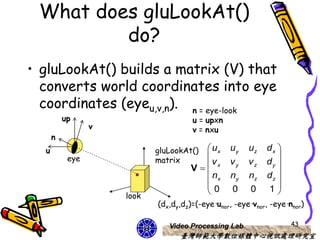
What does gluLookAt()
         do?
• gluLookAt() builds a matrix (V) that
  converts world coordinates into eye
  coordinates (eyeu,v,n). n = eye-look
          up                          u = upxn
                 v                    v = nxu
      n
  u                         gluLookAt()  ux     uy    uz   dx 
           eye              matrix                            
                                     V vx      vy    vz   dy 
                                         nx     ny    nz   dz 
                                                              
                                        0       0     0    1
                     look
                            (dx,dy,dz)=(-eye·unor, -eye·vnor, -eye·nnor)

                               Video Processing Lab                 43
                                  臺灣師範大學數位媒體中心視訊處理研究室
Inquiring about values in
   a matrix in OpenGL
• gluLookAt(4,4,4,0,1,0,0,1,0);
   – Eye: (4,4,4), look: (0,1,0), up: (0,1,0)
                  n = eye-look              ux   uy   uz   dx 
                  u = upxn                                    
                                             v    vy   vz   dy 
                                         V x
                  v = nxu                   nx   ny   nz   dz 
                                                              
(dx,dy,dz)=(-eye·unor, -eye·vnor, -        0     0    0    1
eye·nnor)
   – To see what is stored in the modelview matrix
        • Define an array GLFloat mat[16]
        • Use glGetFloatv(GL_MODELVIEW_MATRIX,mat)

           mat:                       matT = V                     Modelview
                                                                   matrix will
                                                                   copy to mat[]
                                         Video Processing Lab                44
                                            臺灣師範大學數位媒體中心視訊處理研究室
Homework & next class
• Homework
  – A. Multi-points views, B. 3D projection
     • create one polyhedron such as cube or others
     • A. multi-points views and observe what happen
        – Perspective and Axonometric projections
     • B. 3D projection
        – Change x, y, z (axis) projection and observe what
          happen
• Next class will introduce how to construct
  3D object


                                 Video Processing Lab         45
                                    臺灣師範大學數位媒體中心視訊處理研究室
reference
• http://graphics.im.ntu.edu.tw/~robin
  /courses/
• http://www.cs.brown.edu/courses/cs
  123/lectures.shtml


                    Video Processing Lab   46
                       臺灣師範大學數位媒體中心視訊處理研究室

CG OpenGL 3D viewing-course 7

  • 1.
    3D Viewing Chen Jing-Fung (2006/12/1) Assistant Research Fellow, Digital Media Center, National Taiwan Normal University Video Processing Lab 臺灣師範大學數位媒體中心視訊處理研究室 Ch7: Computer Graphics with OpenGL 3th, Hearn Baker Ch5: Interactive Computer Graphics 3th, Addison Wesley
  • 2.
    3D viewing framework •How to view 3D • Some kind types of 3D projections • How to do 3D views Video Processing Lab 2 臺灣師範大學數位媒體中心視訊處理研究室
  • 3.
    3D viewing device •Virtual-Reality System-Amsterdam R.G. Belleman, PhD, (application at the company of Sara) 3 Video Processing Lab http://www.science.uva.nl/research/scs/projects/visualisation/index.php?page=hardware 臺灣師範大學數位媒體中心視訊處理研究室
  • 4.
    How to makeit ? Video Processing Lab 4 臺灣師範大學數位媒體中心視訊處理研究室
  • 5.
    2D -> 3D •2D graphics application and viewing 2D view operations transfer positions no parallax – The world-coordinate plane -> pixel positions output plane – Rectangular boundaries for clipping window • Clip a scene and maps it to device coordinate monitor • 3D viewing (more choices than 2D) – How to construct a scene – How to generate views it on output device Video Processing Lab 5 臺灣師範大學數位媒體中心視訊處理研究室
  • 6.
    Two eyes game • Two eyes = two separate vision angle – Close one eye – Put your free finger to aim “bowling” – Switch to close another eye Two eyes vision angle is same? Video Processing Lab 6 http://www.vision3d.com/stereo.html 臺灣師範大學數位媒體中心視訊處理研究室
  • 7.
    How to see3D? • Two eyes can see 3D – Two images be captured by two eyes – Images arrive simultaneously in the back of the brain – They are united into one picture brain A key point of 3D view is depth !! an object’s solid in three spatial dimensions: width, height and depth -- x, y and z. Video Processing Lab 7 http://www.vision3d.com/stereo.html 臺灣師範大學數位媒體中心視訊處理研究室
  • 8.
    Overview 3D viewing concepts • Object in 3D scene – A set of surfaces (object descriptions) • Generate views of an object’s surface features – Closed boundary around the object • Provide routines – displaying internal components – Cross-sectional views of a solid object Video Processing Lab 8 臺灣師範大學數位媒體中心視訊處理研究室
  • 9.
    Viewing 3D scene •Set up a coordinate reference for the viewing - “camera” parameters – The coordinate reference defines • Position and orientation for a view plane or projection plane – Object descriptions • Transferred to viewing coordinates • Projected onto the view plane Video Processing Lab 9 臺灣師範大學數位媒體中心視訊處理研究室
  • 10.
    3D viewing process Clipping Project to Viewport process projection plane transformation Object Output Clipping (scene) - device - (Camera) - coordinate coordinate coordinate Video Processing Lab 10 臺灣師範大學數位媒體中心視訊處理研究室
  • 11.
    Classical views Front elevation Elevation oblique Plan oblique One-point perspective Three-point perspective isometric Video Processing Lab 11 臺灣師範大學數位媒體中心視訊處理研究室
  • 12.
    Three projections • Introduction projection & views • Axonometric projections • Oblique projections • Perspective projections Video Processing Lab 12 臺灣師範大學數位媒體中心視訊處理研究室
  • 13.
    Parallel-projection views • Orthographicprojection: show accurate dimensions – Used in engineering and architectural side front top Video Processing Lab 13 臺灣師範大學數位媒體中心視訊處理研究室
  • 14.
    multi-view orthographic Plan view • projection plane is (top view) parallel to one of the object’s principal faces. • display at least three views- such as the front, top and right side view front view (right view) Video Processing Lab 14 臺灣師範大學數位媒體中心視訊處理研究室
  • 15.
    Axonometric projections • Preservehow many views direct by original object **projected lines is parallel but angles are not • Foreshortening: an object appears compressed plane (projected) which extracted by a particular viewpoint • Dimetric view • Two different foreshortening ratios • Trimetric view (general case) • Three different foreshortening ratios • Isometric view • Symmetrical projection of three principal directions Q: Symmetrical two principal faces? Video Processing Lab 15 臺灣師範大學數位媒體中心視訊處理研究室
  • 16.
    Projected vs. original • Lines are scaled and can find scale ratios • Angles are not related projected • • View box-like object on projection plane • Not look real: – No matter how objectproj is near or far, it has the same projection axonometric views are used extensively in architectural and mechanical design Video Processing Lab 16 臺灣師範大學數位媒體中心視訊處理研究室
  • 17.
    Clipping window projection •Orthogonal-projection view volume (view plane) Clipping window – 2D rectangular clipping Far plane window -> 3D near-far Near plane clipping planes (box-like) Normalized view volume Orthogonal-projection yview (xwmax,ywmax,zfar) ynorm znorm view volume (1,1,1) zview xview Project xnorm (xwmin,ywmin,znear) (-1,-1,-1) glMatrixMode (GL_PROJECTION) glLoadIdentity() glOrtho(xwmin,xwmax,ywmin,ywmax,znear,zfar) Video Processing Lab 17 臺灣師範大學數位媒體中心視訊處理研究室
  • 18.
    Real case about Axonometricprojections • Technically some games (strategy or simulation) use this projection to show object’s distance whether near or far Video Processing Lab 18 臺灣師範大學數位媒體中心視訊處理研究室
  • 19.
    Oblique projections • Obliqueviews are the most general views – Can make an arbitrary angle with projection plane • Angles can be preserved – projected • The most difficult to construct by hand • Bellows camera is flexible to produce approximations to parallel oblique views **Oblique view are somewhat unnatural. Video Processing Lab 19 臺灣師範大學數位媒體中心視訊處理研究室
  • 20.
    Clipping – Oblique projections • CG-Oblique projections – Objectworld -> objectrotate -> objectproj Clipping window Clipping window View plane Near plane Transformed Oblique view volume Shear View volume Vp transformation Far plane Oblique-projection view volume Moblique,norm=Mortho,norm * Moblique Video Processing Lab 20 臺灣師範大學數位媒體中心視訊處理研究室
  • 21.
    Orthogonal projection vectors • DOP = -VPN VUP: view-up vector to this plane View plane DOP: projection’s direction VPN: view-plane normal VPN: view-plane normal • Vector u & v in plane A v Plane A – viewPN=uxv/det|uv| u Video Processing Lab 21 http://www.cmlab.csie.ntu.edu.tw/~robin/courses/ 臺灣師範大學數位媒體中心視訊處理研究室
  • 22.
    Projection tunnel Clipping window projection plane view plane Any point DOP VRP CW ∞ PRP VPN (umin,vmin) (umav,vmax) Video Processing Lab 22 臺灣師範大學數位媒體中心視訊處理研究室
  • 23.
    Orthogonal projection - Oblique Clipping window View Near plane Transformed Oblique- Oblique view projection view Shear volume Vp volume Far • Translate the VRPclip to the origin • Rotate VRC to projected plane (PRP) • Shear that let the DOP become parallel to the projected plane (PRPshear) • Translate and scale into the parallel-projection normal view volume No =Sp_prp Tp_prp SHprp Rvrc T(VRP) Video Processing Lab 23 http://www.cmlab.csie.ntu.edu.tw/~robin/courses/ 臺灣師範大學數位媒體中心視訊處理研究室
  • 24.
    Perspective projections monitor Video Processing Lab 24 http://groups.csail.mit.edu/graphics/classes/6.837/F04/calendar.html 臺灣師範大學數位媒體中心視訊處理研究室
  • 25.
    Projection tunnel view plane projection plane VRP Clipping window PRP VPN COP COP Video Processing Lab 25 臺灣師範大學數位媒體中心視訊處理研究室
  • 26.
    Depth cueing • Depthinformation is important in 3D scene – Easy identify the particular viewing direction • The front and back of each displayed object No depth information Downward from above Upward from below base vertex Video Processing Lab 26 臺灣師範大學數位媒體中心視訊處理研究室
  • 27.
    Perspective-projection view volume Rectangular view Frustum window view volume Projection reference point θ (xprp,yprp,zvp) (xprp,yprp,zprp) Near clipping Far clipping plane plane Video Processing Lab 27 臺灣師範大學數位媒體中心視訊處理研究室
  • 28.
    OpenGL Perspective- Projection (p.p)Function θ/2 • Symmetric p.p function View plane gluPerspective(theta, aspect, dnear, dfar) zprp-zvp • Four parameters: double or float point • Theta (field-of-view angle): angle between top and bottom • Aspect ratio: (width/height) • dnear & dfar: negative, because clipping plane must always be somehow along the –zview axis (behind the view position) Video Processing Lab 28 臺灣師範大學數位媒體中心視訊處理研究室
  • 29.
    Aspect ratio (width)x (height) Sony PSP 4.3” ST-International 19” Panasonic 42 ” 80mmx15mm 500mmx485mm ~1:1 16:9 Video Processing Lab 29 臺灣師範大學數位媒體中心視訊處理研究室
  • 30.
    OpenGL p.p function(2) Frustum view volume • General p.p function gluFrustum(xwmin, xwmax, ywmin, ywmax, zwnear, zwfar) Near plane Far plane • All parameters: double or float point numbers • zwnear & zwfar : negative (behind the view position) as tha same as dnear & dfar • Clipping window can be specified anywhere on the near plane. – Xwmin = -xwmax & ywmin = -ywmax Video Processing Lab 30 臺灣師範大學數位媒體中心視訊處理研究室
  • 31.
    3D viewing process Clipping Project to Viewport process projection plane transformation Object Output Clipping (scene) - device - (Camera) - coordinate coordinate coordinate Video Processing Lab 31 臺灣師範大學數位媒體中心視訊處理研究室
  • 32.
    3D scene processby CG • Choose a viewing position (camera) – Point to where camera (camera position) • Choose a viewing position (object) – Display a front, back, side, top, or bottom view Video Processing Lab 32 臺灣師範大學數位媒體中心視訊處理研究室
  • 33.
    Synthetic camera • First,pick a position (object fixed) COP – Middle of a group of objects – Inside a single object • Camera located in COP – Focus on camera’s motion – Rotate it – Choose a parallel or perspective projection • Eliminate parts of a scene along the line of sight Video Processing Lab 33 臺灣師範大學數位媒體中心視訊處理研究室
  • 34.
    Projections (views) Perspective projection (views): •center of projection (COP) Parallel projection (views): •More realistic like •Direction of projection (DOP) our eyes and camera lens •View space: near & far object projector object projector Projection plane finite COP infinite COP Projection plane **depth!! Video Processing Lab 34 臺灣師範大學數位媒體中心視訊處理研究室
  • 35.
    One-point perspective view Video Processing Lab 35 http://www.richardmurphyarchitects.com/projects/images 臺灣師範大學數位媒體中心視訊處理研究室
  • 36.
    Two-point perspective views Video Processing Lab 36 http://www.cityofmoorhead.com/whats_new/downtown/Perspective.jpg 臺灣師範大學數位媒體中心視訊處理研究室
  • 37.
    Three-points views 37 The Music Lesson, c.1662-1665 Video Processing Lab 臺灣師範大學數位媒體中心視訊處理研究室
  • 38.
    Multi-perspective views • Advantage – Objects can display multi-view and show the relation about near and far • Look realistic • Disadvantage – Object has not parallel lines – Difficult by hand ( easy by computer design) Video Processing Lab 38 臺灣師範大學數位媒體中心視訊處理研究室
  • 39.
    Positioning of thecamera frame • Camera can be move by designer – Follow the rotation steps COP • glMatrixMode(GL_MODELVIEW) • glLoadIdentity() • glTranslatef() • glRotatef() • …. Video Processing Lab 39 臺灣師範大學數位媒體中心視訊處理研究室
  • 40.
    VPN VUP VRP v Two viewing APIs u Camera frame • Only one view direction is a little unsatisfying – Starting points in the world frame • Describe the camera’s position and orientation in this • glLoadIdentity() -> set_view_reference_point(x,y,z) • The orientation of the camera divide two parts – VPN: set_view_plane_normal (xn, yn, zn) – VUP: set_view_up(xvup, yvup,zvup) • Do transformation operators Video Processing Lab 40 臺灣師範大學數位媒體中心視訊處理研究室
  • 41.
    Look-at function • A more direct method is appropriate the camera (xref, yref, zref) gluLookAt(xeye, yeye, zeye, xref, yref, zref, xup, yup, zup) (xup, yup, zup) • (xeye, yeye, zeye) = world- coordinate position P0 Ex: (0,0,0) camera (xeye, yeye, zeye) • VUP= (xup, yup, zup) Ex: y-axis (0,1,0) monitor • VRP=(xref, yref, zref) = projection position Pref Ex: (0,0,-1) • VPN=P0-Pref **viewing direction is along to any axis (maybe z-axis or –z-axis) Video Processing Lab 41 臺灣師範大學數位媒體中心視訊處理研究室
  • 42.
    Set up atypical camera • Cameras are often set to “look down” on a scene from some nearby position • Ex: eye=(4,4,4), look=(0,1,0), upward up=(0,1,0), view volume width=6.4 & height=4.8 (aspect ratio = 640/480), near =1 & far =50 glMatixMode(GL_PROJECTION);//set the view volume y glLoadIdentity(); look at glOrtho(-3.2,3.2,-2.4,2.4, 1,50);//or use Frustumview volume z glMatrixMode(GL_MODELVIEW);//place and aim the camera glLoadIdentity(); gluLookAt(4,4,4,0,1,0,0,1,0); x Video Processing Lab 42 臺灣師範大學數位媒體中心視訊處理研究室
  • 43.
    What does gluLookAt() do? • gluLookAt() builds a matrix (V) that converts world coordinates into eye coordinates (eyeu,v,n). n = eye-look up u = upxn v v = nxu n u gluLookAt()  ux uy uz dx  eye matrix   V vx vy vz dy   nx ny nz dz    0 0 0 1 look (dx,dy,dz)=(-eye·unor, -eye·vnor, -eye·nnor) Video Processing Lab 43 臺灣師範大學數位媒體中心視訊處理研究室
  • 44.
    Inquiring about valuesin a matrix in OpenGL • gluLookAt(4,4,4,0,1,0,0,1,0); – Eye: (4,4,4), look: (0,1,0), up: (0,1,0) n = eye-look  ux uy uz dx  u = upxn   v vy vz dy  V x v = nxu  nx ny nz dz    (dx,dy,dz)=(-eye·unor, -eye·vnor, - 0 0 0 1 eye·nnor) – To see what is stored in the modelview matrix • Define an array GLFloat mat[16] • Use glGetFloatv(GL_MODELVIEW_MATRIX,mat) mat: matT = V Modelview matrix will copy to mat[] Video Processing Lab 44 臺灣師範大學數位媒體中心視訊處理研究室
  • 45.
    Homework & nextclass • Homework – A. Multi-points views, B. 3D projection • create one polyhedron such as cube or others • A. multi-points views and observe what happen – Perspective and Axonometric projections • B. 3D projection – Change x, y, z (axis) projection and observe what happen • Next class will introduce how to construct 3D object Video Processing Lab 45 臺灣師範大學數位媒體中心視訊處理研究室
  • 46.
    reference • http://graphics.im.ntu.edu.tw/~robin /courses/ • http://www.cs.brown.edu/courses/cs 123/lectures.shtml Video Processing Lab 46 臺灣師範大學數位媒體中心視訊處理研究室