Unit 4
3D Viewing Pipeline
Part - 2
Projections
Madhulika (18010), Assistant
Professor, LPU.
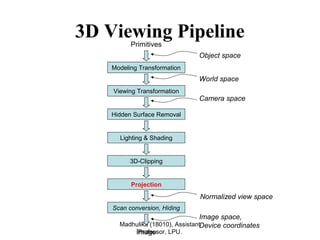
Normalized view space
Modeling Transformation
Viewing Transformation
Lighting & Shading
3D-Clipping
Projection
Scan conversion, Hiding
Primitives
Image
Object space
World space
Camera space
Image space,
Device coordinates
Hidden Surface Removal
3D Viewing Pipeline
Contents
1. Introduction
2. Perspective Projections
3. Parallel Projections
Viewing and Projection
• Camera Analogy:
1. Set up your tripod and point the camera at
the scene (viewing transformation).
2. Arrange the scene to be photographed into
the desired composition (modeling transformation).
3. Choose a camera lens or adjust the zoom
(projection transformation).
4. Determine how large you want the final
photograph to be - for example, you might
want it enlarged (viewport transformation).
Madhulika (18010), Assistant
Professor, LPU.
Madhulika (18010), Assistant
Professor, LPU.
Madhulika (18010), Assistant
Professor, LPU.
Projections
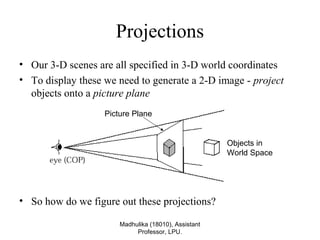
• Our 3-D scenes are all specified in 3-D world coordinates
• To display these we need to generate a 2-D image - project
objects onto a picture plane
• So how do we figure out these projections?
Picture Plane
Objects in
World Space
Madhulika (18010), Assistant
Professor, LPU.
Projections
• Projection is just one part of the process of converting from
3-D world coordinates to a 2-D image
Clip against
view volume
Project onto
projection
plane
Transform to
2-D device
coordinates
3-D world
coordinate
output
primitives
2-D device
coordinates
Projection Transformation
Madhulika (18010), Assistant
Professor, LPU.
Madhulika (18010), Assistant
Professor, LPU.
Madhulika (18010), Assistant
Professor, LPU.
Projections
• There are two broad classes of projection:
– Parallel: Typically used for architectural and engineering
drawings
– Perspective: Realistic looking and used in computer graphics
Perspective Projection Parallel Projection
Classical viewing
Viewing requires three basic elements
• One or more objects
• A viewer with a projection surface
• Projectors that go from the object(s) to the projection surface
Classical views are based on the relationship among these
elements
• The viewer picks up the object and orients it how she would
like to see it
Each object is assumed to constructed from flat principal
faces
• Buildings, polyhedra, manufactured objects
Madhulika (18010), Assistant
Professor, LPU.
Classical Projections
Madhulika (18010), Assistant
Professor, LPU.
Madhulika (18010), Assistant
Professor, LPU.
Projections
ProjectionsProjections
PERSPECTIVE
Converging Projectors
(View Point)
PERSPECTIVE
Converging Projectors
(View Point)
PARALLEL
(View Direction)
PARALLEL
(View Direction)
OBLIQUE
Projector not ⊥ to
View plane
OBLIQUE
Projector not ⊥ to
View plane
ORTHOGRAPHIC
Projector ⊥ to
View plane
ORTHOGRAPHIC
Projector ⊥ to
View plane
GENERALGENERAL
MULTI VIEW
View plane || to
principal plane
MULTI VIEW
View plane || to
principal plane
AXONOMETRIC
View plane not ||
To principal plane
AXONOMETRIC
View plane not ||
To principal plane
1-Principal
vanishing point
1-Principal
vanishing point
2-Principal
vanishing point
2-Principal
vanishing point
3-Principal
vanishing point
3-Principal
vanishing point
Three viewsThree views
Auxiliary ViewAuxiliary View
Sectional ViewSectional View
ISOMETRIC
Equal angle with
all three axis
ISOMETRIC
Equal angle with
all three axis
DIMETRIC
Equal angle with
any two axis
DIMETRIC
Equal angle with
any two axis
TRIMETRIC
Unequal angle with
all three axis
TRIMETRIC
Unequal angle with
all three axis
CAVALIER
No foreshortening of lines
⊥ To XY-Plane
CAVALIER
No foreshortening of lines
⊥ To XY-Plane
CABINET
foreshortening of lines
⊥ To XY-Plane by 1/2
CABINET
foreshortening of lines
⊥ To XY-Plane by 1/2
Contents
1. Introduction
2. Perspective Projections
3. Parallel Projections
Madhulika (18010), Assistant
Professor, LPU.
Perspective Projections
• Perspective projections are much more realistic than parallel
projections and are used by artists.
Madhulika (18010), Assistant
Professor, LPU.
Perspective Projections
• Perspective projections are described by
– Centre of projection: Eye of artists or lens of camera
– View Plane: Plane containing canvas or film strip or frame buffer
• A ray called projector is drawn from COP to object point, its
intersection with view plane determines the projected image
point on view plane.
X-axis
Projector
COP
View Plane
Y-axis
Z-axis
Object point
Projected point
Perspective Projection
Madhulika (18010), Assistant
Professor, LPU.
Parallel Projections
Madhulika (18010), Assistant
Professor, LPU.
Madhulika (18010), Assistant
Professor, LPU.
Perspective Projections
• There are a number of different kinds of perspective views
• The most common are one-point and two point perspectives
Madhulika (18010), Assistant
Professor, LPU.
Perspective Projections
• Perspective drawings are characterised by
1. Perspective foreshortening
2. Vanishing points
3. View Confusion
4. Topological Distortion
– These are also known as Perspective Anomalies.
– These anomalies enhance realism in terms of depth cues, but
distorts the actual size, shape and relationship between parts
of object.
Madhulika (18010), Assistant
Professor, LPU.
Perspective Projections
1. Perspective foreshortening: an illusion that objects and
lengths appear smaller as their distance form COP increases.
– We can see three balls have different dimensions, since
they placed at different distances they are projected to
same length
COP(0,0,-d)
Z-axis
Y-axis
Madhulika (18010), Assistant
Professor, LPU.
Perspective Projections
• Increasing the field of view angle increases the height of the
view plane and so increases foreshortening
Madhulika (18010), Assistant
Professor, LPU.
Perspective Projections
• The amount of foreshortening that is present can greatly affect
the appearance of our scenes
Madhulika (18010), Assistant
Professor, LPU.
Perspective Projections
2. Vanishing points: An illusion that certain sets of parallel
lines appear to meet at a point (called vanishing point).
– These are those lines that are not
parallel to view plane i.e. lines that
are not ⊥ to view plane normal.
– Principal vanishing points are
formed by apparent intersection of
lines parallel to one of the three
principal axes.
– The number of principal vanishing
points is determined by the number
of principal axis intersected by the
view plane.
X-axis
Z-axis
Y-axis COP
(0,0,-d)
L1
L2L’1
L’2
O
Madhulika (18010), Assistant
Professor, LPU.
(from Donald Hearn and Pauline Baker)
Perspective Projections
Classes of Perspective
Projection
Classes of Perspective
Projection
• One-Point Perspective
• Two-Point Perspective
• Three-Point Perspective
• One-Point Perspective
• Two-Point Perspective
• Three-Point Perspective
26
One-Point PerspectiveOne-Point Perspective
27
Two-point perspective projection:Two-point perspective projection:
– This is often used in architectural, engineering
and industrial design drawings.
–
28
Three-point perspective
projection
Three-point perspective
projection
• Three-point perspective projection is used less
frequently as it adds little extra realism to that
offered by two-point perspective projection
• Three-point perspective projection is used less
frequently as it adds little extra realism to that
offered by two-point perspective projection
29
Madhulika (18010), Assistant
Professor, LPU.
Perspective Projections
3. View Confusion: An object behind the COP is projected
upside down and backward onto the view plane.
X-axis
Z-axis
Y-axis
COP(0,0,-d)
L1
L2
L’1
L’2
O
Madhulika (18010), Assistant
Professor, LPU.
Perspective Projections
4. Topological Distortion: All points lying on the plane
parallel to view plane and passing through the COP are
projected to ∞ by the perspective transformation.
– This may make a finite line segment
to appear as two infinite rays.
X-axis
Z-axis
Y-axis
COP(0,0,-d)
O
P1
P2
P’1
P’2
P3
∞ ∞
Madhulika (18010), Assistant
Professor, LPU.
Perspective Projections
Madhulika (18010), Assistant
Professor, LPU.
Perspective Projections
• Although a perspective
projection is set up by
specifying the position and size
of the view plane and the
position of the projection
reference point called COP
• However, this can be kind of
awkward
Madhulika (18010), Assistant
Professor, LPU.
Perspective Projections
• The field of view angle can be a more intuitive way to specify
perspective projections
• This is analogous to choosing a lense for a camera
Field of view
Madhulika (18010), Assistant
Professor, LPU.
Perspective Projections
• We need one more thing to specify a perspective projections
using the filed of view angle
• The aspect ratio gives the ratio between the width sand height
of the view plane
Contents
1. Introduction
2. Perspective Projections
3. Parallel Projections
Madhulika (18010), Assistant
Professor, LPU.
Parallel Projections
• Parallel projections are used by drafter and engineers to create working
drawings of an object as they preserve scale and shape
• These are described by
– Viewing Direction: which describe the direction of projection
– View Plane: Plane containing canvas or film strip or frame buffer
• A ray called projector is drawn || to Viewing direction and passing through
object point, its intersection with view plane determines the projected
image point on view plane.
X-axisView Plane
Y-axis
Z-axis
Object
Viewing Direction
Object’
Madhulika (18010), Assistant
Professor, LPU.
Parallel Projection
• Center of projection is at infinity
– Direction of projection (DOP) same for all points
DOP
View
Plane
Madhulika (18010), Assistant
Professor, LPU.
Parallel Projections
Parallel ProjectionsParallel Projections
OBLIQUE
Projector not ⊥ to
View plane
OBLIQUE
Projector not ⊥ to
View plane
ORTHOGRAPHIC
Projector ⊥ to
View plane
ORTHOGRAPHIC
Projector ⊥ to
View plane
GENERALGENERAL
MULTI VIEW
View plane || to
principal plane
MULTI VIEW
View plane || to
principal plane
AXONOMETRIC
View plane not ||
To principal plane
AXONOMETRIC
View plane not ||
To principal plane
Three viewsThree views
Auxiliary ViewAuxiliary View
Sectional ViewSectional View
ISOMETRIC
Equal angle with
all three axis
ISOMETRIC
Equal angle with
all three axis
DIMETRIC
Equal angle with
any two axis
DIMETRIC
Equal angle with
any two axis
TRIMETRIC
Unequal angle with
all three axis
TRIMETRIC
Unequal angle with
all three axis
CAVALIER
No foreshortening of lines
⊥ To XY-Plane
CAVALIER
No foreshortening of lines
⊥ To XY-Plane
CABINET
foreshortening of lines
⊥ To XY-Plane by 1/2
CABINET
foreshortening of lines
⊥ To XY-Plane by 1/2
Madhulika (18010), Assistant
Professor, LPU.
Orthographic Projections
Top Side
Front
• DOP perpendicular to view plane
Madhulika (18010), Assistant
Professor, LPU.
Oblique Projections
• DOP not perpendicular to view plane
Cavalier
(DOP θ = 45
o
)
Cabinet
(DOP θ = 63.4
o
)
45=φ
4.63=φ
• Cavalier Projection- It is obtained when the angle
between the oblique projectors and the plane of
projection is 45 degree and the foreshortening factors for
all three principal directions are equal.
• In Cavalier projection , the resulting figure is too thick.
Madhulika (18010), Assistant
Professor, LPU.
• Cabinet Projection- It is used to correct the deficiency
that is produced by Cavalier projection.
• An oblique projection for which the foreshortening factor
for the edge perpendicular to the plane of projection is
one-half is called Cabinet projection.
• For a cabinet projection, the angle between the
projectors and the plane of projection is 63.43.
Madhulika (18010), Assistant
Professor, LPU.
Madhulika (18010), Assistant
Professor, LPU.
Parallel Projections
• Identify type parallel projections
Orthographic Projection
Oblique Projection
Isometric Projection
Madhulika (18010), Assistant
Professor, LPU.
Parallel Projections
• Isometric projections have been used in computer games from
the very early days of the industry up to today
Q*Bert Sim City Virtual Magic Kingdom
Madhulika (18010), Assistant
Professor, LPU.

3D transformation

  • 1.
    Unit 4 3D ViewingPipeline Part - 2 Projections
  • 2.
    Madhulika (18010), Assistant Professor,LPU. Normalized view space Modeling Transformation Viewing Transformation Lighting & Shading 3D-Clipping Projection Scan conversion, Hiding Primitives Image Object space World space Camera space Image space, Device coordinates Hidden Surface Removal 3D Viewing Pipeline
  • 3.
    Contents 1. Introduction 2. PerspectiveProjections 3. Parallel Projections
  • 4.
    Viewing and Projection •Camera Analogy: 1. Set up your tripod and point the camera at the scene (viewing transformation). 2. Arrange the scene to be photographed into the desired composition (modeling transformation). 3. Choose a camera lens or adjust the zoom (projection transformation). 4. Determine how large you want the final photograph to be - for example, you might want it enlarged (viewport transformation). Madhulika (18010), Assistant Professor, LPU.
  • 5.
  • 6.
    Madhulika (18010), Assistant Professor,LPU. Projections • Our 3-D scenes are all specified in 3-D world coordinates • To display these we need to generate a 2-D image - project objects onto a picture plane • So how do we figure out these projections? Picture Plane Objects in World Space
  • 7.
    Madhulika (18010), Assistant Professor,LPU. Projections • Projection is just one part of the process of converting from 3-D world coordinates to a 2-D image Clip against view volume Project onto projection plane Transform to 2-D device coordinates 3-D world coordinate output primitives 2-D device coordinates
  • 8.
  • 9.
  • 10.
    Madhulika (18010), Assistant Professor,LPU. Projections • There are two broad classes of projection: – Parallel: Typically used for architectural and engineering drawings – Perspective: Realistic looking and used in computer graphics Perspective Projection Parallel Projection
  • 11.
    Classical viewing Viewing requiresthree basic elements • One or more objects • A viewer with a projection surface • Projectors that go from the object(s) to the projection surface Classical views are based on the relationship among these elements • The viewer picks up the object and orients it how she would like to see it Each object is assumed to constructed from flat principal faces • Buildings, polyhedra, manufactured objects Madhulika (18010), Assistant Professor, LPU.
  • 12.
  • 13.
    Madhulika (18010), Assistant Professor,LPU. Projections ProjectionsProjections PERSPECTIVE Converging Projectors (View Point) PERSPECTIVE Converging Projectors (View Point) PARALLEL (View Direction) PARALLEL (View Direction) OBLIQUE Projector not ⊥ to View plane OBLIQUE Projector not ⊥ to View plane ORTHOGRAPHIC Projector ⊥ to View plane ORTHOGRAPHIC Projector ⊥ to View plane GENERALGENERAL MULTI VIEW View plane || to principal plane MULTI VIEW View plane || to principal plane AXONOMETRIC View plane not || To principal plane AXONOMETRIC View plane not || To principal plane 1-Principal vanishing point 1-Principal vanishing point 2-Principal vanishing point 2-Principal vanishing point 3-Principal vanishing point 3-Principal vanishing point Three viewsThree views Auxiliary ViewAuxiliary View Sectional ViewSectional View ISOMETRIC Equal angle with all three axis ISOMETRIC Equal angle with all three axis DIMETRIC Equal angle with any two axis DIMETRIC Equal angle with any two axis TRIMETRIC Unequal angle with all three axis TRIMETRIC Unequal angle with all three axis CAVALIER No foreshortening of lines ⊥ To XY-Plane CAVALIER No foreshortening of lines ⊥ To XY-Plane CABINET foreshortening of lines ⊥ To XY-Plane by 1/2 CABINET foreshortening of lines ⊥ To XY-Plane by 1/2
  • 14.
    Contents 1. Introduction 2. PerspectiveProjections 3. Parallel Projections
  • 15.
    Madhulika (18010), Assistant Professor,LPU. Perspective Projections • Perspective projections are much more realistic than parallel projections and are used by artists.
  • 16.
    Madhulika (18010), Assistant Professor,LPU. Perspective Projections • Perspective projections are described by – Centre of projection: Eye of artists or lens of camera – View Plane: Plane containing canvas or film strip or frame buffer • A ray called projector is drawn from COP to object point, its intersection with view plane determines the projected image point on view plane. X-axis Projector COP View Plane Y-axis Z-axis Object point Projected point
  • 17.
  • 18.
    Parallel Projections Madhulika (18010),Assistant Professor, LPU.
  • 19.
    Madhulika (18010), Assistant Professor,LPU. Perspective Projections • There are a number of different kinds of perspective views • The most common are one-point and two point perspectives
  • 20.
    Madhulika (18010), Assistant Professor,LPU. Perspective Projections • Perspective drawings are characterised by 1. Perspective foreshortening 2. Vanishing points 3. View Confusion 4. Topological Distortion – These are also known as Perspective Anomalies. – These anomalies enhance realism in terms of depth cues, but distorts the actual size, shape and relationship between parts of object.
  • 21.
    Madhulika (18010), Assistant Professor,LPU. Perspective Projections 1. Perspective foreshortening: an illusion that objects and lengths appear smaller as their distance form COP increases. – We can see three balls have different dimensions, since they placed at different distances they are projected to same length COP(0,0,-d) Z-axis Y-axis
  • 22.
    Madhulika (18010), Assistant Professor,LPU. Perspective Projections • Increasing the field of view angle increases the height of the view plane and so increases foreshortening
  • 23.
    Madhulika (18010), Assistant Professor,LPU. Perspective Projections • The amount of foreshortening that is present can greatly affect the appearance of our scenes
  • 24.
    Madhulika (18010), Assistant Professor,LPU. Perspective Projections 2. Vanishing points: An illusion that certain sets of parallel lines appear to meet at a point (called vanishing point). – These are those lines that are not parallel to view plane i.e. lines that are not ⊥ to view plane normal. – Principal vanishing points are formed by apparent intersection of lines parallel to one of the three principal axes. – The number of principal vanishing points is determined by the number of principal axis intersected by the view plane. X-axis Z-axis Y-axis COP (0,0,-d) L1 L2L’1 L’2 O
  • 25.
    Madhulika (18010), Assistant Professor,LPU. (from Donald Hearn and Pauline Baker) Perspective Projections
  • 26.
    Classes of Perspective Projection Classesof Perspective Projection • One-Point Perspective • Two-Point Perspective • Three-Point Perspective • One-Point Perspective • Two-Point Perspective • Three-Point Perspective 26
  • 27.
  • 28.
    Two-point perspective projection:Two-pointperspective projection: – This is often used in architectural, engineering and industrial design drawings. – 28
  • 29.
    Three-point perspective projection Three-point perspective projection •Three-point perspective projection is used less frequently as it adds little extra realism to that offered by two-point perspective projection • Three-point perspective projection is used less frequently as it adds little extra realism to that offered by two-point perspective projection 29
  • 30.
    Madhulika (18010), Assistant Professor,LPU. Perspective Projections 3. View Confusion: An object behind the COP is projected upside down and backward onto the view plane. X-axis Z-axis Y-axis COP(0,0,-d) L1 L2 L’1 L’2 O
  • 31.
    Madhulika (18010), Assistant Professor,LPU. Perspective Projections 4. Topological Distortion: All points lying on the plane parallel to view plane and passing through the COP are projected to ∞ by the perspective transformation. – This may make a finite line segment to appear as two infinite rays. X-axis Z-axis Y-axis COP(0,0,-d) O P1 P2 P’1 P’2 P3 ∞ ∞
  • 32.
    Madhulika (18010), Assistant Professor,LPU. Perspective Projections
  • 33.
    Madhulika (18010), Assistant Professor,LPU. Perspective Projections • Although a perspective projection is set up by specifying the position and size of the view plane and the position of the projection reference point called COP • However, this can be kind of awkward
  • 34.
    Madhulika (18010), Assistant Professor,LPU. Perspective Projections • The field of view angle can be a more intuitive way to specify perspective projections • This is analogous to choosing a lense for a camera Field of view
  • 35.
    Madhulika (18010), Assistant Professor,LPU. Perspective Projections • We need one more thing to specify a perspective projections using the filed of view angle • The aspect ratio gives the ratio between the width sand height of the view plane
  • 36.
    Contents 1. Introduction 2. PerspectiveProjections 3. Parallel Projections
  • 37.
    Madhulika (18010), Assistant Professor,LPU. Parallel Projections • Parallel projections are used by drafter and engineers to create working drawings of an object as they preserve scale and shape • These are described by – Viewing Direction: which describe the direction of projection – View Plane: Plane containing canvas or film strip or frame buffer • A ray called projector is drawn || to Viewing direction and passing through object point, its intersection with view plane determines the projected image point on view plane. X-axisView Plane Y-axis Z-axis Object Viewing Direction Object’
  • 38.
    Madhulika (18010), Assistant Professor,LPU. Parallel Projection • Center of projection is at infinity – Direction of projection (DOP) same for all points DOP View Plane
  • 39.
    Madhulika (18010), Assistant Professor,LPU. Parallel Projections Parallel ProjectionsParallel Projections OBLIQUE Projector not ⊥ to View plane OBLIQUE Projector not ⊥ to View plane ORTHOGRAPHIC Projector ⊥ to View plane ORTHOGRAPHIC Projector ⊥ to View plane GENERALGENERAL MULTI VIEW View plane || to principal plane MULTI VIEW View plane || to principal plane AXONOMETRIC View plane not || To principal plane AXONOMETRIC View plane not || To principal plane Three viewsThree views Auxiliary ViewAuxiliary View Sectional ViewSectional View ISOMETRIC Equal angle with all three axis ISOMETRIC Equal angle with all three axis DIMETRIC Equal angle with any two axis DIMETRIC Equal angle with any two axis TRIMETRIC Unequal angle with all three axis TRIMETRIC Unequal angle with all three axis CAVALIER No foreshortening of lines ⊥ To XY-Plane CAVALIER No foreshortening of lines ⊥ To XY-Plane CABINET foreshortening of lines ⊥ To XY-Plane by 1/2 CABINET foreshortening of lines ⊥ To XY-Plane by 1/2
  • 40.
    Madhulika (18010), Assistant Professor,LPU. Orthographic Projections Top Side Front • DOP perpendicular to view plane
  • 41.
    Madhulika (18010), Assistant Professor,LPU. Oblique Projections • DOP not perpendicular to view plane Cavalier (DOP θ = 45 o ) Cabinet (DOP θ = 63.4 o ) 45=φ 4.63=φ
  • 42.
    • Cavalier Projection-It is obtained when the angle between the oblique projectors and the plane of projection is 45 degree and the foreshortening factors for all three principal directions are equal. • In Cavalier projection , the resulting figure is too thick. Madhulika (18010), Assistant Professor, LPU.
  • 43.
    • Cabinet Projection-It is used to correct the deficiency that is produced by Cavalier projection. • An oblique projection for which the foreshortening factor for the edge perpendicular to the plane of projection is one-half is called Cabinet projection. • For a cabinet projection, the angle between the projectors and the plane of projection is 63.43. Madhulika (18010), Assistant Professor, LPU.
  • 44.
    Madhulika (18010), Assistant Professor,LPU. Parallel Projections • Identify type parallel projections Orthographic Projection Oblique Projection Isometric Projection
  • 45.
    Madhulika (18010), Assistant Professor,LPU. Parallel Projections • Isometric projections have been used in computer games from the very early days of the industry up to today Q*Bert Sim City Virtual Magic Kingdom
  • 46.