3D object
                     representations
                            Chen Jing-Fung (2006/12/5)
                             Assistant Research Fellow,
                                Digital Media Center,
                          National Taiwan Normal University


                                       Video Processing Lab
                                             臺灣師範大學數位媒體中心視訊處理研究室

Ch8: Computer Graphics with OpenGL 3th, Hearn Baker
Ch6: Interactive Computer Graphics 3th, Addison Wesley
3D objects
• Regular Polyhedrons

  – Solid

  – Mesh surface


                    Video Processing Lab   2
                        臺灣師範大學數位媒體中心視訊處理研究室
Graphics scenes
• Contain many different kinds of objects
  and material surfaces
  – Trees, flowers, clouds, rocks, water, bricks …
• Polygon and quadric surfaces provide
  precise descriptions for simple Euclidean
  objects
  – Polyhedrons & ellipsoids
  – Quadric surfaces (Ex: spline surfaces…)
     • Mathematical method modify those objects


                             Video Processing Lab    3
                                臺灣師範大學數位媒體中心視訊處理研究室
Useful design
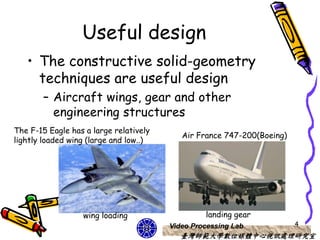
   • The constructive solid-geometry
     techniques are useful design
       – Aircraft wings, gear and other
         engineering structures
The F-15 Eagle has a large relatively
                                           Air France 747-200(Boeing)
lightly loaded wing (large and low..)


                  wing loading                   landing gear
                                        Video Processing Lab            4
                                           臺灣師範大學數位媒體中心視訊處理研究室
Polyhedrons
• The most commonly used boundary to show
  3D graphics object
  – A set of surface polygons to enclose the object
    interior
• Simply & speed up the surface rendering
  and display of object
  – Graphics systems store all object descriptions
     • Standard graphics objects


                              Video Processing Lab    5
                                   臺灣師範大學數位媒體中心視訊處理研究室
OpenGL polyhedron
        functions
• Polygon Fill-Area functions
  – OpenGL primitive constants
    • GL_POLYGON, GL_TRIANGLES,
      GL_TRIANGLE_STRIP,
      GL_TRIANGLE_FAN, GL_QUADS and
      GL_QUAD_STRIP
       – All faces compose by a group of parallelograms,
         all faces compose by triangular surfaces or other
         polygon from..


                             Video Processing Lab            6
                                臺灣師範大學數位媒體中心視訊處理研究室
GLUT regular Polyhedron
     functions (1)
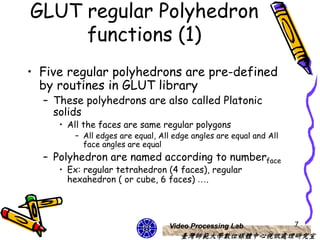
• Five regular polyhedrons are pre-defined
  by routines in GLUT library
  – These polyhedrons are also called Platonic
    solids
     • All the faces are same regular polygons
        – All edges are equal, All edge angles are equal and All
          face angles are equal
  – Polyhedron are named according to numberface
     • Ex: regular tetrahedron (4 faces), regular
       hexahedron ( or cube, 6 faces) ….


                                 Video Processing Lab              7
                                     臺灣師範大學數位媒體中心視訊處理研究室
GLUT regular Polyhedron
     functions (2)
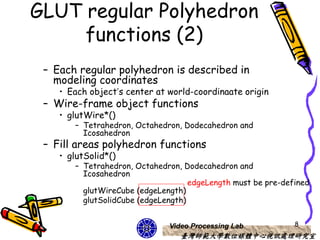
 – Each regular polyhedron is described in
   modeling coordinates
    • Each object’s center at world-coordinaate origin
 – Wire-frame object functions
    • glutWire*()
       – Tetrahedron, Octahedron, Dodecahedron and
         Icosahedron
 – Fill areas polyhedron functions
    • glutSolid*()
       – Tetrahedron, Octahedron, Dodecahedron and
         Icosahedron
                                    edgeLength must be pre-defined
         glutWireCube (edgeLength)
         glutSolidCube (edgeLength)


                              Video Processing Lab            8
                                 臺灣師範大學數位媒體中心視訊處理研究室
Design notices
• Display function
  – Set viewing transformation
    • gluLookAt()
• Reshape function
  – glMatrixMode(GL_PROJECTION)
    • 3D projection
       – glFrustum() or glOrtho() ….

              demo


                             Video Processing Lab   9
                                臺灣師範大學數位媒體中心視訊處理研究室
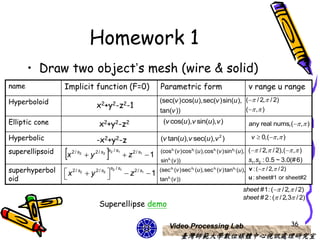
Regular 3D object’s mesh
• What is 3D object’s mesh?
  – Like the object’s skin


• How to construct it?
  – Curved surfaces coordinate
  – What polygon can be used?


                        Video Processing Lab   10
                             臺灣師範大學數位媒體中心視訊處理研究室
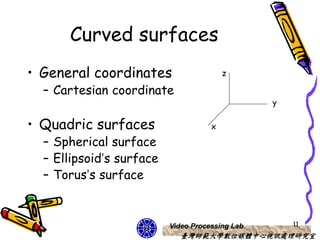
Curved surfaces
• General coordinates                    z

  – Cartesian coordinate
                                                 y

• Quadric surfaces                   x

  – Spherical surface
  – Ellipsoid’s surface
  – Torus’s surface


                          Video Processing Lab       11
                             臺灣師範大學數位媒體中心視訊處理研究室
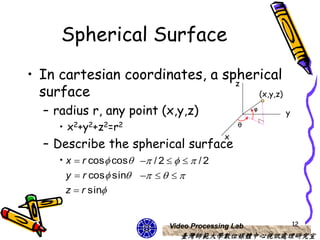
Spherical Surface
• In cartesian coordinates, a spherical
                                z
  surface                          (x,y,z)

  – radius r, any point (x,y,z)                       φ
                                                          y
     • x2+y2+z2=r2                               θ
                                             x
  – Describe the spherical surface
     • x  r cos cos  / 2     / 2
       y  r cos sin     
       z  r sin


                               Video Processing Lab           12
                                  臺灣師範大學數位媒體中心視訊處理研究室
Think!!
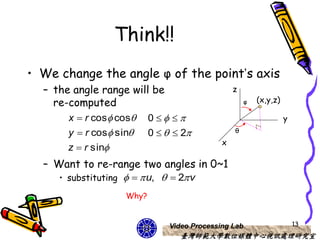
• We change the angle φ of the point’s axis
  – the angle range will be                   z
    re-computed                                   φ   (x,y,z)

       x  r cos cos 0                                    y
       y  r cos sin 0    2             θ
                                          x
       z  r sin
  – Want to re-range two angles in 0~1
     • substituting    u,   2 v

                   Why?


                            Video Processing Lab                    13
                               臺灣師範大學數位媒體中心視訊處理研究室
Draw a sphere wire
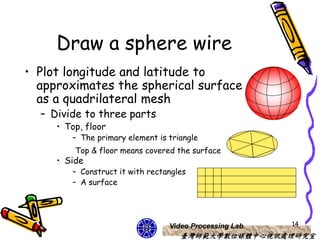
• Plot longitude and latitude to
  approximates the spherical surface
  as a quadrilateral mesh
  – Divide to three parts
     • Top, floor
        – The primary element is triangle
         Top & floor means covered the surface
     • Side
        – Construct it with rectangles
        – A surface


                                 Video Processing Lab   14
                                    臺灣師範大學數位媒體中心視訊處理研究室
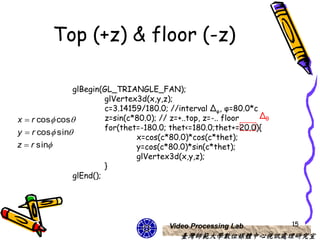
Top (+z) & floor (-z)

               glBegin(GL_TRIANGLE_FAN);
                        glVertex3d(x,y,z);
                        c=3.14159/180.0; //interval Δφ, φ=80.0*c
x  r cos cos         z=sin(c*80.0); // z=+..top, z=-.. floor  Δθ
                        for(thet=-180.0; thet<=180.0;thet+=20.0){
y  r cos sin
                                x=cos(c*80.0)*cos(c*thet);
z  r sin                      y=cos(c*80.0)*sin(c*thet);
                                glVertex3d(x,y,z);
                        }
               glEnd();


                                        Video Processing Lab          15
                                           臺灣師範大學數位媒體中心視訊處理研究室
Side
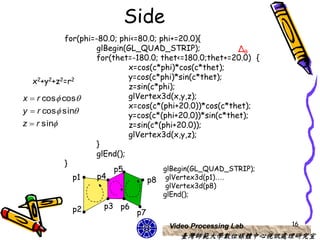
            for(phi=-80.0; phi<=80.0; phi+=20.0){
                     glBegin(GL_QUAD_STRIP);               Δθ
                     for(thet=-180.0; thet<=180.0;thet+=20.0) {
                              x=cos(c*phi)*cos(c*thet);
                              y=cos(c*phi)*sin(c*thet);
   x2+y2+z2=r2
                              z=sin(c*phi);
x  r cos cos               glVertex3d(x,y,z);
                              x=cos(c*(phi+20.0))*cos(c*thet);
y  r cos sin
                              y=cos(c*(phi+20.0))*sin(c*thet);
z  r sin                    z=sin(c*(phi+20.0));
                              glVertex3d(x,y,z);
                     }
                     glEnd();
            }
                          p5           glBegin(GL_QUAD_STRIP);
              p1     p4            p8 glVertex3d(p1)….
                                      glVertex3d(p8)
                                     glEnd();

             p2      p3 p6
                              p7
                                       Video Processing Lab       16
                                          臺灣師範大學數位媒體中心視訊處理研究室
Advantage of this design
• Put each design component to list
  function in initial function
  – Ex: top, floor or side
• In display function call our design to
  let them move
• Next page will show how to design


                         Video Processing Lab   17
                             臺灣師範大學數位媒體中心視訊處理研究室
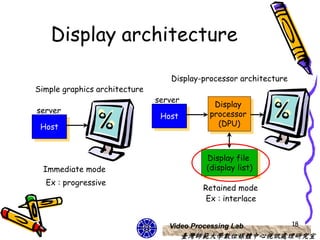
Display architecture

                                   Display-processor architecture
Simple graphics architecture
                               server
                                              Display
server                                       processor
                                Host
 Host                                          (DPU)


                                            Display file
  Immediate mode                            (display list)
  Ex : progressive
                                           Retained mode
                                            Ex : interlace


                                  Video Processing Lab              18
                                        臺灣師範大學數位媒體中心視訊處理研究室
Definition & execution of
       display lists
• Display lists have much in common
  with ordinary files.
  – Define (create)
    • What contents of display list
  – Manipulate (place information in)
    • What functions of display lists
       – Such as: flexible enough….


                            Video Processing Lab   19
                               臺灣師範大學數位媒體中心視訊處理研究室
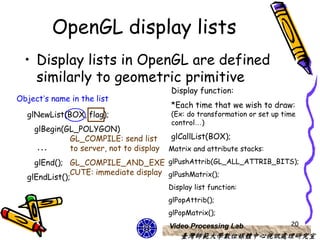
OpenGL display lists
  • Display lists in OpenGL are defined
    similarly to geometric primitive
                                         Display function:
Object’s name in the list
                                         *Each time that we wish to draw:
  glNewList(BOX, flag);                  (Ex: do transformation or set up time
                                         control…)
    glBegin(GL_POLYGON)
             GL_COMPILE: send list       glCallList(BOX);
     …       to server, not to display   Matrix and attribute stacks:
    glEnd(); GL_COMPILE_AND_EXE glPushAttrib(GL_ALL_ATTRIB_BITS);
              CUTE: immediate display glPushMatrix();
  glEndList();
                                         Display list function:
                                         glPopAttrib();
                                         glPopMatrix();
                                         Video Processing Lab               20
                                            臺灣師範大學數位媒體中心視訊處理研究室
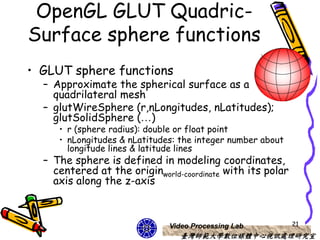
OpenGL GLUT Quadric-
Surface sphere functions
• GLUT sphere functions
  – Approximate the spherical surface as a
    quadrilateral mesh
  – glutWireSphere (r,nLongitudes, nLatitudes);
    glutSolidSphere (…)
     • r (sphere radius): double or float point
     • nLongitudes & nLatitudes: the integer number about
       longitude lines & latitude lines
  – The sphere is defined in modeling coordinates,
    centered at the originworld-coordinate with its polar
    axis along the z-axis


                              Video Processing Lab          21
                                 臺灣師範大學數位媒體中心視訊處理研究室
height
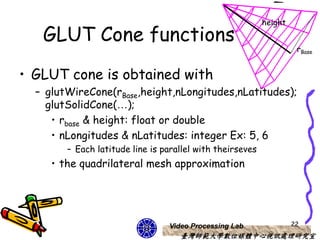
   GLUT Cone functions
                                                                     rBase


• GLUT cone is obtained with
  – glutWireCone(rBase,height,nLongitudes,nLatitudes);
    glutSolidCone(…);
     • rbase & height: float or double
     • nLongitudes & nLatitudes: integer Ex: 5, 6
        – Each latitude line is parallel with theirseves
     • the quadrilateral mesh approximation


                                 Video Processing Lab               22
                                    臺灣師範大學數位媒體中心視訊處理研究室
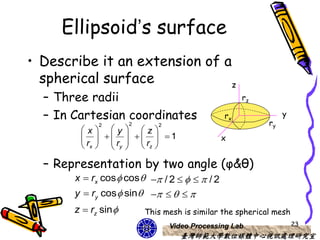
Ellipsoid’s surface
• Describe it an extension of a
  spherical surface            z
  – Three radii                                     rz

  – In Cartesian coordinates                   rx               y
                      2                                    ry
        x y z
             2               2

              1
                                             x
         rx   ry   rz 

  – Representation by two angle (φ&θ)
       x  rx cos  cos   / 2     / 2
       y  ry cos  sin     
       z  rz sin        This mesh is similar the spherical mesh
                                 Video Processing Lab               23
                                    臺灣師範大學數位媒體中心視訊處理研究室
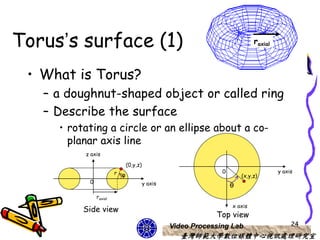
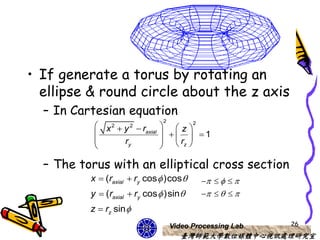
Torus’s surface (1)                                                         raxial


 • What is Torus?
   – a doughnut-shaped object or called ring
   – Describe the surface
     • rotating a circle or an ellipse about a co-
       planar axis line
          z axis

                              (0,y,z)
                        r φ                                    0                     y axis
                                                                       (x,y,z)
           0                            y axis                     θ
               raxial
                                                                   x axis
          Side view
                                                             Top view
                                                 Video Processing Lab                     24
                                                    臺灣師範大學數位媒體中心視訊處理研究室
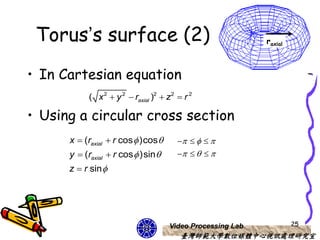
Torus’s surface (2)                                        raxial


• In Cartesian equation
           ( x 2  y 2  raxial )2  z2  r 2

• Using a circular cross section
      x  (raxial  r cos  )cos           
      y  (raxial  r cos  )sin           
      z  r sin


                                     Video Processing Lab            25
                                         臺灣師範大學數位媒體中心視訊處理研究室
• If generate a torus by rotating an
  ellipse & round circle about the z axis
  – In Cartesian equation
                                 2
            x2  y 2  r          z 2
                        axial
                                    1
                 ry               rz 
                                

  – The torus with an elliptical cross section
          x  (raxial  ry cos  )cos           
          y  (raxial  ry cos  )sin           
          z  rz sin 
                                     Video Processing Lab   26
                                        臺灣師範大學數位媒體中心視訊處理研究室
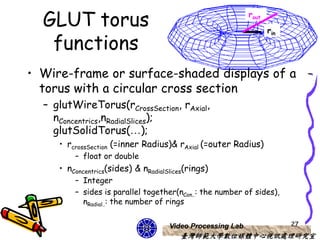
GLUT torus                                                rout

                                                                   rin

   functions
• Wire-frame or surface-shaded displays of a
  torus with a circular cross section
  – glutWireTorus(rCrossSection, rAxial,
    nConcentrics,nRadialSlices);
    glutSolidTorus(…);
     • rcrossSection (=inner Radius)& rAxial (=outer Radius)
         – float or double
     • nConcentrics(sides) & nRadialSlices(rings)
         – Integer
         – sides is parallel together(nCon..: the number of sides),
           nRadial..: the number of rings


                                     Video Processing Lab                27
                                        臺灣師範大學數位媒體中心視訊處理研究室
GLU Quadric-Surface
       functions
• Quadric surface can used GLU functions to
  design
  – Assign a name to the quadric
  – Activate the GLU quadric render
  – Designate values for surface parameters
• Set other parameter values to control the
  appearance of a GLU quadric surface.


                          Video Processing Lab   28
                             臺灣師範大學數位媒體中心視訊處理研究室
Some GLU functions
• Sphere:
  – gluSphere(name,r,nLongitudes,nLatitudes);
• Cylinder:
  – gluCylinder(name,rBase,rTop,height,
    nLongitudes,nLatitudes);
• A section of ring:
  – gluPartialDisk(name, rin,rout,nRadii,nRings, Anglestart,
    Anglesweep);


                               Video Processing Lab        29
                                  臺灣師範大學數位媒體中心視訊處理研究室
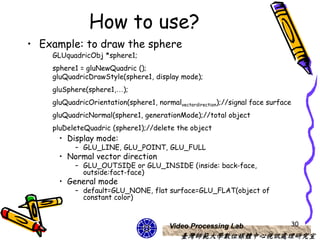
How to use?
• Example: to draw the sphere
    GLUquadricObj *sphere1;
    sphere1 = gluNewQuadric ();
    gluQuadricDrawStyle(sphere1, display mode);
    gluSphere(sphere1,…);
    gluQuadricOrientation(sphere1, normalvectordirection);//signal face surface
    gluQuadricNormal(sphere1, generationMode);//total object
    pluDeleteQuadric (sphere1);//delete the object
      • Display mode:
           – GLU_LINE, GLU_POINT, GLU_FULL
      • Normal vector direction
           – GLU_OUTSIDE or GLU_INSIDE (inside: back-face,
             outside:fact-face)
      • General mode
           – default=GLU_NONE, flat surface=GLU_FLAT(object of
             constant color)


                                        Video Processing Lab                  30
                                            臺灣師範大學數位媒體中心視訊處理研究室
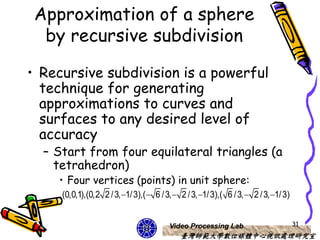
Approximation of a sphere
  by recursive subdivision

• Recursive subdivision is a powerful
  technique for generating
  approximations to curves and
  surfaces to any desired level of
  accuracy
  – Start from four equilateral triangles (a
    tetrahedron)
    • Four vertices (points) in unit sphere:
     (0,0,1),(0,2 2 / 3, 1/ 3),( 6 / 3,  2 / 3, 1/ 3),( 6 / 3,  2 / 3, 1/ 3)


                                         Video Processing Lab                        31
                                             臺灣師範大學數位媒體中心視訊處理研究室
Triangle -> tetrahedron

void triangle( point a, point b, point             void tetrahedron() {
c)// display one triangle using a line                      triangle(v[0],v[1],v[2]);
loop for wire frame                                         triangle(v[3],v[2],v[1]);
{                                                           triangle(v[0],v[3],v[1]);
glBegin(GL_LINE_LOOP);                                      triangle(v[0],v[2],v[3]);
                                                   }
      glVertex3fv(a);
      glVertex3fv(b);                    v0
      glVertex3fv(c);
    glEnd();
}

                           v1                 v2      v3


                                                   Video Processing Lab                 32
                                                       臺灣師範大學數位媒體中心視訊處理研究室
void normal(point p){                       void tetrahedron( int m){
/* normalize a vector */                    /* Apply triangle subdivision to faces of
   double sqrt();                           tetrahedron */
   float d =0.0;                               divide_triangle(v[0], v[1], v[2], m);
   int i;                                      divide_triangle(v[3], v[2], v[1], m);
   for(i=0; i<3; i++) d+=p[i]*p[i];            divide_triangle(v[0], v[3], v[1], m);
   d=sqrt(d);                                  divide_triangle(v[0], v[2], v[3], m);}
   if(d>0.0) for(i=0; i<3; i++) p[i]/=d;}
                            void divide_triangle(point a, point b, point c, int m){
               p
 Vnor                       /* triangle subdivision using vertex numbers
           det(p)            righthand rule applied to create outward pointing faces */
                                point v1, v2, v3;
              v0                int j;
                                if(m>0) {
                                    for(j=0; j<3; j++) v1[j]=a[j]+b[j];
                                    normal(v1);
                                    for(j=0; j<3; j++) v2[j]=a[j]+c[j];
                        v3          normal(v2);
 v1              v2
                                    for(j=0; j<3; j++) v3[j]=b[j]+c[j];
                                     normal(v3);
                                    divide_triangle(a, v1, v2, m-1);
                                    divide_triangle(c, v2, v3, m-1);
                                    divide_triangle(b, v3, v1, m-1);
                                    divide_triangle(v1, v3, v2, m-1); }
                                else(triangle(a,b,c)); /* draw triangle at end of recursion */}
                                                   Video Processing Lab                    33
                                                       臺灣師範大學數位媒體中心視訊處理研究室
Approximate object
• Recursive subdivision
  – We could design a object’s surface
    numbers.
  – Recursive from coarse to fine
• Mesh object related its surface
  – Direction: Longitude and latitude


                       Video Processing Lab   34
                          臺灣師範大學數位媒體中心視訊處理研究室
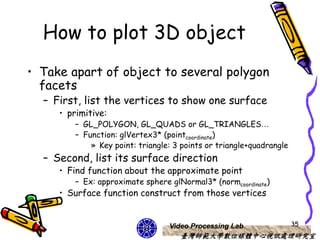
How to plot 3D object
• Take apart of object to several polygon
  facets
  – First, list the vertices to show one surface
     • primitive:
         – GL_POLYGON, GL_QUADS or GL_TRIANGLES…
         – Function: glVertex3* (pointcoordinate)
             » Key point: triangle: 3 points or triangle+quadrangle
  – Second, list its surface direction
     • Find function about the approximate point
         – Ex: approximate sphere glNormal3* (normcoordinate)
     • Surface function construct from those vertices


                                  Video Processing Lab                35
                                     臺灣師範大學數位媒體中心視訊處理研究室
Homework 1
       • Draw two object’s mesh (wire & solid)
name             Implicit function (F=0)                                   Parametric form                            v range u range
Hyperboloid                                                                (sec(v )cos(u ),sec(v )sin(u ), (  / 2, / 2)
                                    x2+y2-z2-1                                                             (  , )
                                                                           tan(v ))
Elliptic cone                         x2+y2-z2                              (v cos(u ),v sin(u ),v )                  any real nums,( , )

Hyperbolic                                                                                                             v  0,( , )
                                    -x2+y2-z                               (v tan(u ),v sec(u ),v 2 )
superellipsoid   x   2 / s2
                               y         
                                    2 / s2 s2 / s1
                                                        z   2 / s1
                                                                      1
                                                                           (coss1 (v )coss2 (u ),coss1 (v )sins2 (u ), (  / 2, / 2),(  , )
                                                                           sins1 (v ))                                s1, s2 : 0.5 ~ 3.0(# 6)
superhyperbol                                 s2 / s1                      (sec s (v )sec s (u ),sec s (v )tans (u ), v : (  / 2, / 2)
                  x 2 / s2  y 2 / s2                  z2 / s1  1
                                                                                 1        2          1         2


oid                                                                      tans1 (v ))                               u : sheet#1 or sheet#2

                                                                                                                   sheet #1: ( / 2, / 2)
                                                                                                                   sheet # 2 : ( / 2,3 / 2)
                                      Superellipse demo

                                                                                Video Processing Lab                                      36
                                                                                         臺灣師範大學數位媒體中心視訊處理研究室
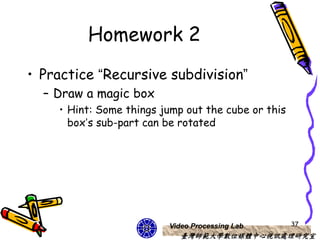
Homework 2
• Practice “Recursive subdivision”
  – Draw a magic box
    • Hint: Some things jump out the cube or this
      box’s sub-part can be rotated


                         Video Processing Lab       37
                            臺灣師範大學數位媒體中心視訊處理研究室
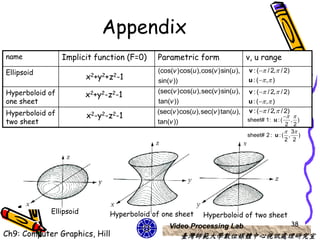
Appendix
name             Implicit function (F=0)   Parametric form                   v, u range
Ellipsoid                                  (cos(v )cos(u ),cos(v )sin(u ),   v : (  / 2, / 2)
                        x2+y2+z2-1         sin(v ))                          u : (  , )

Hyperboloid of                                                               v : (  / 2, / 2)
                        x2+y2-z2-1         (sec(v )cos(u ),sec(v )sin(u ),
one sheet                                  tan(v ))                          u : (  , )
Hyperboloid of                             (sec(v )cos(u ),sec(v )tan(u ),   v : ( / 2, / 2)
                        x2-y2-z2-1                                                            
two sheet                                  tan(v ))                          sheet# 1: u : (   , )
                                                                                              2 2
                                                                                              3
                                                                             sheet# 2 : u : ( , )
                                                                                             2 2


            Ellipsoid         Hyperboloid of one sheet      Hyperboloid of two sheet
                                               Video Processing Lab                                38
Ch9: Computer Graphics, Hill                          臺灣師範大學數位媒體中心視訊處理研究室
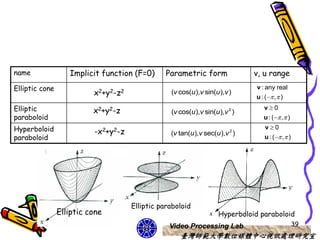
name               Implicit function (F=0)      Parametric form               v, u range
Elliptic cone                                                                  v : any real
                          x2+y2-z2               (v cos(u ),v sin(u ),v )
                                                                               u : (  , )
Elliptic                  x2+y2-z                (v cos(u ),v sin(u ),v 2 )
                                                                                  v0
paraboloid                                                                        u : (  , )
Hyperboloid                                                                       v0
                          -x2+y2-z               (v tan(u ),v sec(u ),v )2
paraboloid                                                                        u : (  , )


                                     Elliptic paraboloid
                Elliptic cone                                       Hyperboloid paraboloid
                                                 Video Processing Lab                             39
                                                    臺灣師範大學數位媒體中心視訊處理研究室
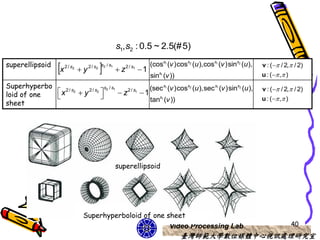
s1, s2 : 0.5 ~ 2.5(# 5)

superellipsoid
                     x   2 / s2
                                   y         
                                        2 / s2 s2 / s1
                                                         z   2 / s1
                                                                       1
                                                                            (coss1 (v )coss2 (u ),coss1 (v )sins2 (u ),
                                                                            sins1 (v ))
                                                                                                                          v : (  / 2, / 2)
                                                                                                                          u : (  , )
Superhyperbo                       s2 / s1             (sec s1 (v )coss2 (u ),sec s1 (v )sins2 (u ),                      v : (  / 2, / 2)
loid of one  x 2 / s2
                       y 2 / s2
                                          z 2 / s1
                                                     1 s
                                                     tan 1 (v ))                                                        u : (  , )
sheet


                                                         superellipsoid


                                    Superhyperboloid of one sheet
                                                             Video Processing Lab                                                      40
                                                                                          臺灣師範大學數位媒體中心視訊處理研究室
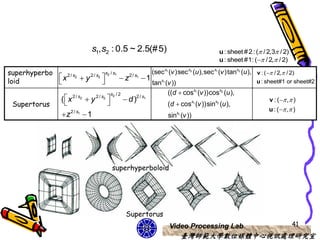
s1, s2 : 0.5 ~ 2.5(# 5)                                 u : sheet # 2 : ( / 2,3 / 2)
                                                                                          u : sheet #1: ( / 2, / 2)

superhyperbo                         s2 / s1              (sec s (v )sec s (u ),sec s (v )tans (u ), v : (  / 2, / 2)
                                                                  1             2     1           2


loid
              x 2 / s2  y 2 / s2           z2 / s1  1 s
                                                        tan (v ))
                                                              1                                      u : sheet#1 or sheet#2

                                        s2 / 2                   ((d  coss1 (v ))coss2 (u ),
                     ( x
                     2/s
                      
                             2
                                 y
                                2/s   2
                                          
                                                 d)2/s1
                                                                                                               v : (  , )
 Supertorus                                                       (d  coss1 (v ))sins2 (u ),
                                                                                                               u : (  , )
                      z 2 / s1  1                                   sins1 (v ))


                                              superhyperboloid


                                                 Supertorus
                                                                      Video Processing Lab                                 41
                                                                           臺灣師範大學數位媒體中心視訊處理研究室

CG OpenGL 3D object representations-course 8

  • 1.
    3D object representations Chen Jing-Fung (2006/12/5) Assistant Research Fellow, Digital Media Center, National Taiwan Normal University Video Processing Lab 臺灣師範大學數位媒體中心視訊處理研究室 Ch8: Computer Graphics with OpenGL 3th, Hearn Baker Ch6: Interactive Computer Graphics 3th, Addison Wesley
  • 2.
    3D objects • RegularPolyhedrons – Solid – Mesh surface Video Processing Lab 2 臺灣師範大學數位媒體中心視訊處理研究室
  • 3.
    Graphics scenes • Containmany different kinds of objects and material surfaces – Trees, flowers, clouds, rocks, water, bricks … • Polygon and quadric surfaces provide precise descriptions for simple Euclidean objects – Polyhedrons & ellipsoids – Quadric surfaces (Ex: spline surfaces…) • Mathematical method modify those objects Video Processing Lab 3 臺灣師範大學數位媒體中心視訊處理研究室
  • 4.
    Useful design • The constructive solid-geometry techniques are useful design – Aircraft wings, gear and other engineering structures The F-15 Eagle has a large relatively Air France 747-200(Boeing) lightly loaded wing (large and low..) wing loading landing gear Video Processing Lab 4 臺灣師範大學數位媒體中心視訊處理研究室
  • 5.
    Polyhedrons • The mostcommonly used boundary to show 3D graphics object – A set of surface polygons to enclose the object interior • Simply & speed up the surface rendering and display of object – Graphics systems store all object descriptions • Standard graphics objects Video Processing Lab 5 臺灣師範大學數位媒體中心視訊處理研究室
  • 6.
    OpenGL polyhedron functions • Polygon Fill-Area functions – OpenGL primitive constants • GL_POLYGON, GL_TRIANGLES, GL_TRIANGLE_STRIP, GL_TRIANGLE_FAN, GL_QUADS and GL_QUAD_STRIP – All faces compose by a group of parallelograms, all faces compose by triangular surfaces or other polygon from.. Video Processing Lab 6 臺灣師範大學數位媒體中心視訊處理研究室
  • 7.
    GLUT regular Polyhedron functions (1) • Five regular polyhedrons are pre-defined by routines in GLUT library – These polyhedrons are also called Platonic solids • All the faces are same regular polygons – All edges are equal, All edge angles are equal and All face angles are equal – Polyhedron are named according to numberface • Ex: regular tetrahedron (4 faces), regular hexahedron ( or cube, 6 faces) …. Video Processing Lab 7 臺灣師範大學數位媒體中心視訊處理研究室
  • 8.
    GLUT regular Polyhedron functions (2) – Each regular polyhedron is described in modeling coordinates • Each object’s center at world-coordinaate origin – Wire-frame object functions • glutWire*() – Tetrahedron, Octahedron, Dodecahedron and Icosahedron – Fill areas polyhedron functions • glutSolid*() – Tetrahedron, Octahedron, Dodecahedron and Icosahedron edgeLength must be pre-defined glutWireCube (edgeLength) glutSolidCube (edgeLength) Video Processing Lab 8 臺灣師範大學數位媒體中心視訊處理研究室
  • 9.
    Design notices • Displayfunction – Set viewing transformation • gluLookAt() • Reshape function – glMatrixMode(GL_PROJECTION) • 3D projection – glFrustum() or glOrtho() …. demo Video Processing Lab 9 臺灣師範大學數位媒體中心視訊處理研究室
  • 10.
    Regular 3D object’smesh • What is 3D object’s mesh? – Like the object’s skin • How to construct it? – Curved surfaces coordinate – What polygon can be used? Video Processing Lab 10 臺灣師範大學數位媒體中心視訊處理研究室
  • 11.
    Curved surfaces • Generalcoordinates z – Cartesian coordinate y • Quadric surfaces x – Spherical surface – Ellipsoid’s surface – Torus’s surface Video Processing Lab 11 臺灣師範大學數位媒體中心視訊處理研究室
  • 12.
    Spherical Surface • Incartesian coordinates, a spherical z surface (x,y,z) – radius r, any point (x,y,z) φ y • x2+y2+z2=r2 θ x – Describe the spherical surface • x  r cos cos  / 2     / 2 y  r cos sin      z  r sin Video Processing Lab 12 臺灣師範大學數位媒體中心視訊處理研究室
  • 13.
    Think!! • We changethe angle φ of the point’s axis – the angle range will be z re-computed φ (x,y,z) x  r cos cos 0     y y  r cos sin 0    2 θ x z  r sin – Want to re-range two angles in 0~1 • substituting    u,   2 v Why? Video Processing Lab 13 臺灣師範大學數位媒體中心視訊處理研究室
  • 14.
    Draw a spherewire • Plot longitude and latitude to approximates the spherical surface as a quadrilateral mesh – Divide to three parts • Top, floor – The primary element is triangle Top & floor means covered the surface • Side – Construct it with rectangles – A surface Video Processing Lab 14 臺灣師範大學數位媒體中心視訊處理研究室
  • 15.
    Top (+z) &floor (-z) glBegin(GL_TRIANGLE_FAN); glVertex3d(x,y,z); c=3.14159/180.0; //interval Δφ, φ=80.0*c x  r cos cos z=sin(c*80.0); // z=+..top, z=-.. floor Δθ for(thet=-180.0; thet<=180.0;thet+=20.0){ y  r cos sin x=cos(c*80.0)*cos(c*thet); z  r sin y=cos(c*80.0)*sin(c*thet); glVertex3d(x,y,z); } glEnd(); Video Processing Lab 15 臺灣師範大學數位媒體中心視訊處理研究室
  • 16.
    Side for(phi=-80.0; phi<=80.0; phi+=20.0){ glBegin(GL_QUAD_STRIP); Δθ for(thet=-180.0; thet<=180.0;thet+=20.0) { x=cos(c*phi)*cos(c*thet); y=cos(c*phi)*sin(c*thet); x2+y2+z2=r2 z=sin(c*phi); x  r cos cos glVertex3d(x,y,z); x=cos(c*(phi+20.0))*cos(c*thet); y  r cos sin y=cos(c*(phi+20.0))*sin(c*thet); z  r sin z=sin(c*(phi+20.0)); glVertex3d(x,y,z); } glEnd(); } p5 glBegin(GL_QUAD_STRIP); p1 p4 p8 glVertex3d(p1)…. glVertex3d(p8) glEnd(); p2 p3 p6 p7 Video Processing Lab 16 臺灣師範大學數位媒體中心視訊處理研究室
  • 17.
    Advantage of thisdesign • Put each design component to list function in initial function – Ex: top, floor or side • In display function call our design to let them move • Next page will show how to design Video Processing Lab 17 臺灣師範大學數位媒體中心視訊處理研究室
  • 18.
    Display architecture Display-processor architecture Simple graphics architecture server Display server processor Host Host (DPU) Display file Immediate mode (display list) Ex : progressive Retained mode Ex : interlace Video Processing Lab 18 臺灣師範大學數位媒體中心視訊處理研究室
  • 19.
    Definition & executionof display lists • Display lists have much in common with ordinary files. – Define (create) • What contents of display list – Manipulate (place information in) • What functions of display lists – Such as: flexible enough…. Video Processing Lab 19 臺灣師範大學數位媒體中心視訊處理研究室
  • 20.
    OpenGL display lists • Display lists in OpenGL are defined similarly to geometric primitive Display function: Object’s name in the list *Each time that we wish to draw: glNewList(BOX, flag); (Ex: do transformation or set up time control…) glBegin(GL_POLYGON) GL_COMPILE: send list glCallList(BOX); … to server, not to display Matrix and attribute stacks: glEnd(); GL_COMPILE_AND_EXE glPushAttrib(GL_ALL_ATTRIB_BITS); CUTE: immediate display glPushMatrix(); glEndList(); Display list function: glPopAttrib(); glPopMatrix(); Video Processing Lab 20 臺灣師範大學數位媒體中心視訊處理研究室
  • 21.
    OpenGL GLUT Quadric- Surfacesphere functions • GLUT sphere functions – Approximate the spherical surface as a quadrilateral mesh – glutWireSphere (r,nLongitudes, nLatitudes); glutSolidSphere (…) • r (sphere radius): double or float point • nLongitudes & nLatitudes: the integer number about longitude lines & latitude lines – The sphere is defined in modeling coordinates, centered at the originworld-coordinate with its polar axis along the z-axis Video Processing Lab 21 臺灣師範大學數位媒體中心視訊處理研究室
  • 22.
    height GLUT Cone functions rBase • GLUT cone is obtained with – glutWireCone(rBase,height,nLongitudes,nLatitudes); glutSolidCone(…); • rbase & height: float or double • nLongitudes & nLatitudes: integer Ex: 5, 6 – Each latitude line is parallel with theirseves • the quadrilateral mesh approximation Video Processing Lab 22 臺灣師範大學數位媒體中心視訊處理研究室
  • 23.
    Ellipsoid’s surface • Describeit an extension of a spherical surface z – Three radii rz – In Cartesian coordinates rx y 2 ry x y z 2 2       1   x  rx   ry   rz  – Representation by two angle (φ&θ) x  rx cos  cos   / 2     / 2 y  ry cos  sin      z  rz sin  This mesh is similar the spherical mesh Video Processing Lab 23 臺灣師範大學數位媒體中心視訊處理研究室
  • 24.
    Torus’s surface (1) raxial • What is Torus? – a doughnut-shaped object or called ring – Describe the surface • rotating a circle or an ellipse about a co- planar axis line z axis (0,y,z) r φ 0 y axis (x,y,z) 0 y axis θ raxial x axis Side view Top view Video Processing Lab 24 臺灣師範大學數位媒體中心視訊處理研究室
  • 25.
    Torus’s surface (2) raxial • In Cartesian equation ( x 2  y 2  raxial )2  z2  r 2 • Using a circular cross section x  (raxial  r cos  )cos      y  (raxial  r cos  )sin      z  r sin Video Processing Lab 25 臺灣師範大學數位媒體中心視訊處理研究室
  • 26.
    • If generatea torus by rotating an ellipse & round circle about the z axis – In Cartesian equation 2  x2  y 2  r   z 2  axial    1  ry   rz    – The torus with an elliptical cross section x  (raxial  ry cos  )cos       y  (raxial  ry cos  )sin      z  rz sin  Video Processing Lab 26 臺灣師範大學數位媒體中心視訊處理研究室
  • 27.
    GLUT torus rout rin functions • Wire-frame or surface-shaded displays of a torus with a circular cross section – glutWireTorus(rCrossSection, rAxial, nConcentrics,nRadialSlices); glutSolidTorus(…); • rcrossSection (=inner Radius)& rAxial (=outer Radius) – float or double • nConcentrics(sides) & nRadialSlices(rings) – Integer – sides is parallel together(nCon..: the number of sides), nRadial..: the number of rings Video Processing Lab 27 臺灣師範大學數位媒體中心視訊處理研究室
  • 28.
    GLU Quadric-Surface functions • Quadric surface can used GLU functions to design – Assign a name to the quadric – Activate the GLU quadric render – Designate values for surface parameters • Set other parameter values to control the appearance of a GLU quadric surface. Video Processing Lab 28 臺灣師範大學數位媒體中心視訊處理研究室
  • 29.
    Some GLU functions •Sphere: – gluSphere(name,r,nLongitudes,nLatitudes); • Cylinder: – gluCylinder(name,rBase,rTop,height, nLongitudes,nLatitudes); • A section of ring: – gluPartialDisk(name, rin,rout,nRadii,nRings, Anglestart, Anglesweep); Video Processing Lab 29 臺灣師範大學數位媒體中心視訊處理研究室
  • 30.
    How to use? •Example: to draw the sphere GLUquadricObj *sphere1; sphere1 = gluNewQuadric (); gluQuadricDrawStyle(sphere1, display mode); gluSphere(sphere1,…); gluQuadricOrientation(sphere1, normalvectordirection);//signal face surface gluQuadricNormal(sphere1, generationMode);//total object pluDeleteQuadric (sphere1);//delete the object • Display mode: – GLU_LINE, GLU_POINT, GLU_FULL • Normal vector direction – GLU_OUTSIDE or GLU_INSIDE (inside: back-face, outside:fact-face) • General mode – default=GLU_NONE, flat surface=GLU_FLAT(object of constant color) Video Processing Lab 30 臺灣師範大學數位媒體中心視訊處理研究室
  • 31.
    Approximation of asphere by recursive subdivision • Recursive subdivision is a powerful technique for generating approximations to curves and surfaces to any desired level of accuracy – Start from four equilateral triangles (a tetrahedron) • Four vertices (points) in unit sphere: (0,0,1),(0,2 2 / 3, 1/ 3),( 6 / 3,  2 / 3, 1/ 3),( 6 / 3,  2 / 3, 1/ 3) Video Processing Lab 31 臺灣師範大學數位媒體中心視訊處理研究室
  • 32.
    Triangle -> tetrahedron voidtriangle( point a, point b, point void tetrahedron() { c)// display one triangle using a line triangle(v[0],v[1],v[2]); loop for wire frame triangle(v[3],v[2],v[1]); { triangle(v[0],v[3],v[1]); glBegin(GL_LINE_LOOP); triangle(v[0],v[2],v[3]); } glVertex3fv(a); glVertex3fv(b); v0 glVertex3fv(c); glEnd(); } v1 v2 v3 Video Processing Lab 32 臺灣師範大學數位媒體中心視訊處理研究室
  • 33.
    void normal(point p){ void tetrahedron( int m){ /* normalize a vector */ /* Apply triangle subdivision to faces of double sqrt(); tetrahedron */ float d =0.0; divide_triangle(v[0], v[1], v[2], m); int i; divide_triangle(v[3], v[2], v[1], m); for(i=0; i<3; i++) d+=p[i]*p[i]; divide_triangle(v[0], v[3], v[1], m); d=sqrt(d); divide_triangle(v[0], v[2], v[3], m);} if(d>0.0) for(i=0; i<3; i++) p[i]/=d;}  void divide_triangle(point a, point b, point c, int m){ p Vnor  /* triangle subdivision using vertex numbers det(p) righthand rule applied to create outward pointing faces */ point v1, v2, v3; v0 int j; if(m>0) { for(j=0; j<3; j++) v1[j]=a[j]+b[j]; normal(v1); for(j=0; j<3; j++) v2[j]=a[j]+c[j]; v3 normal(v2); v1 v2 for(j=0; j<3; j++) v3[j]=b[j]+c[j]; normal(v3); divide_triangle(a, v1, v2, m-1); divide_triangle(c, v2, v3, m-1); divide_triangle(b, v3, v1, m-1); divide_triangle(v1, v3, v2, m-1); } else(triangle(a,b,c)); /* draw triangle at end of recursion */} Video Processing Lab 33 臺灣師範大學數位媒體中心視訊處理研究室
  • 34.
    Approximate object • Recursivesubdivision – We could design a object’s surface numbers. – Recursive from coarse to fine • Mesh object related its surface – Direction: Longitude and latitude Video Processing Lab 34 臺灣師範大學數位媒體中心視訊處理研究室
  • 35.
    How to plot3D object • Take apart of object to several polygon facets – First, list the vertices to show one surface • primitive: – GL_POLYGON, GL_QUADS or GL_TRIANGLES… – Function: glVertex3* (pointcoordinate) » Key point: triangle: 3 points or triangle+quadrangle – Second, list its surface direction • Find function about the approximate point – Ex: approximate sphere glNormal3* (normcoordinate) • Surface function construct from those vertices Video Processing Lab 35 臺灣師範大學數位媒體中心視訊處理研究室
  • 36.
    Homework 1 • Draw two object’s mesh (wire & solid) name Implicit function (F=0) Parametric form v range u range Hyperboloid (sec(v )cos(u ),sec(v )sin(u ), (  / 2, / 2) x2+y2-z2-1 (  , ) tan(v )) Elliptic cone x2+y2-z2 (v cos(u ),v sin(u ),v ) any real nums,( , ) Hyperbolic v  0,( , ) -x2+y2-z (v tan(u ),v sec(u ),v 2 ) superellipsoid x 2 / s2 y  2 / s2 s2 / s1 z 2 / s1 1 (coss1 (v )coss2 (u ),coss1 (v )sins2 (u ), (  / 2, / 2),(  , ) sins1 (v )) s1, s2 : 0.5 ~ 3.0(# 6) superhyperbol s2 / s1 (sec s (v )sec s (u ),sec s (v )tans (u ), v : (  / 2, / 2)  x 2 / s2  y 2 / s2   z2 / s1  1 1 2 1 2 oid   tans1 (v )) u : sheet#1 or sheet#2 sheet #1: ( / 2, / 2) sheet # 2 : ( / 2,3 / 2) Superellipse demo Video Processing Lab 36 臺灣師範大學數位媒體中心視訊處理研究室
  • 37.
    Homework 2 • Practice“Recursive subdivision” – Draw a magic box • Hint: Some things jump out the cube or this box’s sub-part can be rotated Video Processing Lab 37 臺灣師範大學數位媒體中心視訊處理研究室
  • 38.
    Appendix name Implicit function (F=0) Parametric form v, u range Ellipsoid (cos(v )cos(u ),cos(v )sin(u ), v : (  / 2, / 2) x2+y2+z2-1 sin(v )) u : (  , ) Hyperboloid of v : (  / 2, / 2) x2+y2-z2-1 (sec(v )cos(u ),sec(v )sin(u ), one sheet tan(v )) u : (  , ) Hyperboloid of (sec(v )cos(u ),sec(v )tan(u ), v : ( / 2, / 2) x2-y2-z2-1   two sheet tan(v )) sheet# 1: u : ( , ) 2 2  3 sheet# 2 : u : ( , ) 2 2 Ellipsoid Hyperboloid of one sheet Hyperboloid of two sheet Video Processing Lab 38 Ch9: Computer Graphics, Hill 臺灣師範大學數位媒體中心視訊處理研究室
  • 39.
    name Implicit function (F=0) Parametric form v, u range Elliptic cone v : any real x2+y2-z2 (v cos(u ),v sin(u ),v ) u : (  , ) Elliptic x2+y2-z (v cos(u ),v sin(u ),v 2 ) v0 paraboloid u : (  , ) Hyperboloid v0 -x2+y2-z (v tan(u ),v sec(u ),v )2 paraboloid u : (  , ) Elliptic paraboloid Elliptic cone Hyperboloid paraboloid Video Processing Lab 39 臺灣師範大學數位媒體中心視訊處理研究室
  • 40.
    s1, s2 :0.5 ~ 2.5(# 5) superellipsoid x 2 / s2 y  2 / s2 s2 / s1 z 2 / s1 1 (coss1 (v )coss2 (u ),coss1 (v )sins2 (u ), sins1 (v )) v : (  / 2, / 2) u : (  , ) Superhyperbo s2 / s1 (sec s1 (v )coss2 (u ),sec s1 (v )sins2 (u ), v : (  / 2, / 2) loid of one x 2 / s2 y 2 / s2  z 2 / s1 1 s   tan 1 (v )) u : (  , ) sheet superellipsoid Superhyperboloid of one sheet Video Processing Lab 40 臺灣師範大學數位媒體中心視訊處理研究室
  • 41.
    s1, s2 :0.5 ~ 2.5(# 5) u : sheet # 2 : ( / 2,3 / 2) u : sheet #1: ( / 2, / 2) superhyperbo s2 / s1 (sec s (v )sec s (u ),sec s (v )tans (u ), v : (  / 2, / 2) 1 2 1 2 loid  x 2 / s2  y 2 / s2   z2 / s1  1 s   tan (v )) 1 u : sheet#1 or sheet#2 s2 / 2 ((d  coss1 (v ))coss2 (u ), ( x 2/s  2 y 2/s 2    d)2/s1 v : (  , ) Supertorus (d  coss1 (v ))sins2 (u ), u : (  , )  z 2 / s1  1 sins1 (v )) superhyperboloid Supertorus Video Processing Lab 41 臺灣師範大學數位媒體中心視訊處理研究室