Shadows + Light
                      +Texture
                           Chen Jing-Fung (2006/12/15)
                            Assistant Research Fellow,
                               Digital Media Center,
                         National Taiwan Normal University


Ch10: Computer Graphics with OpenGL 3th, Hearn Baker
Ch6: Interactive Computer Graphics 3th, Addison Wesley
Ch7: Interactive Computer Graphics 3th, Addison Wesley
outline
• How to construct the object’s
  shadow in a scene

• Camera’s walking in a scene

• Several kinds about light


                                  2
shadows
• Create simple shadows is an
  interesting application of projection
  matrices
  – Shadows are not geometric objects in
    OpenGL
  – Shadows can realistic images and give
    many visual clues to the spatial
    relationships among objects in a scene


                                             3
How to create the
     object’s shadow
• Starting from a view point
• Lighting source is also required
  (infinitely light)
  – If light source is at the center of
    projection, there are no visible shadows
    (shadows are behind the objects)


                                               4
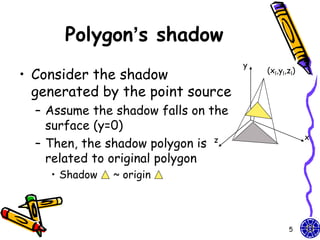
Polygon’s shadow
                                     y
• Consider the shadow                    (xl,yl,zl)

  generated by the point source
  – Assume the shadow falls on the
    surface (y=0)
                                                      x
  – Then, the shadow polygon is z
    related to original polygon
    • Shadow   ~ origin


                                                5
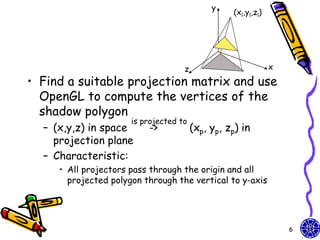
y
                                                  (xl,yl,zl)


                                    z                          x
• Find a suitable projection matrix and use
  OpenGL to compute the vertices of the
  shadow polygon
                      is projected to
  – (x,y,z) in space      ->            (xp, yp, zp) in
    projection plane
  – Characteristic:
     • All projectors pass through the origin and all
       projected polygon through the vertical to y-axis


                                                                   6
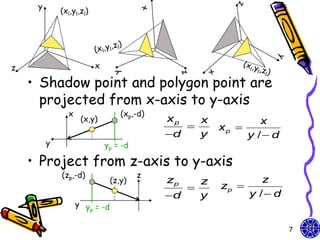
y
             (xl,yl,zl)


z                         x

    • Shadow point and polygon point are
      projected from x-axis to y-axis
               x                  (xp,-d)
                    (x,y)                   xp       x           x
                                                        xp 
                                            d       y        y / d
         y                    yp = -d

    • Project from z-axis to y-axis
             (zp,-d)                    z
                               (z,y)        zp   z               z
                                                        zp 
                                            d   y            y / d
                   y y = -d
                      p


                                                                       7
Homogeneous
                 coordinates
• Original homogeneous coordinates:
         x             x p  1         0    0 0  x 
 xp 
      y / d           y  0           1    0 0  y 
                       p                      
 yp = y                zp  0           0   1 0  z 
 zp 
             z          0              1      
                                              0 0  1 
          y / d      1              d       
                          Perspective projection matrix:            Our light can be
                          shadow projection Matrix                  moved by design
                                              GLfloat light[3]={0.0, 10.0, 0.0};
           GLfloat m[16];                     light[0]=10.0*sin((6.28/180.0)*theta);
                                              light[2]=10.0*cos((6.28/180.0)*theta);
           for(i=0;i<16;i++) m[i]=0.0;
           m[0]=m[5]=m[10]=1.0; m[7]=-1.0/light[1];

                                                                                8
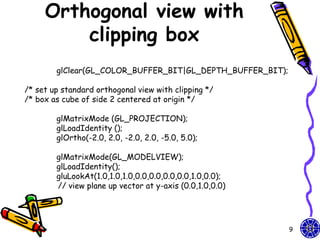
Orthogonal view with
         clipping box
        glClear(GL_COLOR_BUFFER_BIT|GL_DEPTH_BUFFER_BIT);

/* set up standard orthogonal view with clipping */
/* box as cube of side 2 centered at origin */

        glMatrixMode (GL_PROJECTION);
        glLoadIdentity ();
        glOrtho(-2.0, 2.0, -2.0, 2.0, -5.0, 5.0);

        glMatrixMode(GL_MODELVIEW);
        glLoadIdentity();
        gluLookAt(1.0,1.0,1.0,0.0,0.0,0.0,0.0,1.0,0.0);
        // view plane up vector at y-axis (0.0,1.0,0.0)


                                                            9
Polygon & its shadow
  /* define unit square polygon */
  glColor3f(1.0, 0.0, 0.0);/* set drawing/fill color to red*/
  glBegin(GL_POLYGON);
           glVertex3f(…); …
  glEnd();
  glPushMatrix(); //save state
  glTranslatef(light[0], light[1],light[2]); //translate back
  glMultMatrixf(m);           //project
  glTranslatef(-light[0], -light[1],-light[2]); //return origin
  //shadow object
  glColor3f(0.0,0.0,0.0);
  glBegin(GL_POLYGON);
           glVertex3f(…);…
  glEnd();
  glPopMatrix(); //restore state

           How to design the different size
           between original polygon & its shadow?
                                                                  10
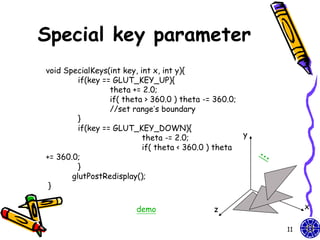
Special key parameter
void SpecialKeys(int key, int x, int y){
         if(key == GLUT_KEY_UP){
                  theta += 2.0;
                  if( theta > 360.0 ) theta -= 360.0;
                  //set range’s boundary
         }
         if(key == GLUT_KEY_DOWN){
                           theta -= 2.0;              y
                           if( theta < 360.0 ) theta
+= 360.0;
         }
       glutPostRedisplay();
 }

                        demo                 z                 x

                                                          11
How to design walking
       object?
• Walking direction?

• Viewer (camera) parameter

• Reshape projected function


                               12
Viewer (camera) moving (1)
• Viewer move the camera in a scene by
  depressing the x, X, y, Y, z, Z keys on
  keyboard
         void keys(unsigned char key, int x, int y){
                  if(key == ‘x’) viewer[0] -= 1.0;
                  if(key == ‘X’) viewer[0] += 1.0;
                   if(key == ‘y’) viewer[1] -= 1.0;
                   if(key == ‘Y’) viewer[1] += 1.0;
                   if(key == ‘z’) viewer[2] -= 1.0;
                   if(key == ‘Z’) viewer[2] += 1.0;
                  glutPostRedisplay();           }
       Walking in a scene.
       What problem happen if object is walked far away?
                                                           13
Viewer (camera) moving (2)
• The gluLookAt function provides a
  simple way to reposition and reorient
  the camera
   void display(void){
         glClear(GL_COLOR_BUFFER_BIT | GL_DEPTH_BUFFER_BIT);
         glLoadIdentity();
         gluLookAt(viewer[0],viewer[1],viewer[2],0.0,0.0,0.0,0.0,1.0,0.0);
    /* rotate cube */
         glRotatef(theta[0], 1.0, 0.0, 0.0);
         glRotatef(theta[1], 0.0, 1.0, 0.0);
         glRotatef(theta[2], 0.0, 0.0, 1.0);

        colorcube();
        glFlush();
        glutSwapBuffers();                }

                                                                    14
Viewer (camera) moving (3)

• Invoke glFrustum in the reshape
  callback to specify the camera lens
    void myReshape(int w, int h){
     glViewport(0, 0, w, h);
     glMatrixMode(GL_PROJECTION);
     glLoadIdentity();
     if(w<=h) glFrustum(-2.0, 2.0, -2.0 * (GLfloat) h/ (GLfloat) w,
         2.0* (GLfloat) h / (GLfloat) w, 2.0, 20.0);
     else glFrustum(-2.0, 2.0, -2.0 * (GLfloat) w/ (GLfloat) h,
         2.0* (GLfloat) w / (GLfloat) h, 2.0, 20.0);

    glMatrixMode(GL_MODELVIEW);                  }


                        demo

                                                                      15
Light & surface
• Light reflection method is very
  complicated
  – Describe that light source is reflected from an
    actual surface
  – Maybe depends an many factors
     • Light source’s direction, observer’s eye and the
       normal to the surface
        – Surface characteristics can also consider that its
          roughness or surface’s color … (surface’s texture)


                                                               16
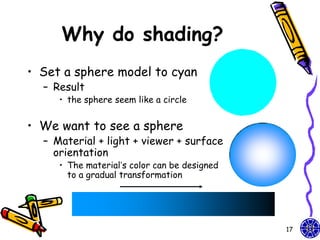
Why do shading?
• Set a sphere model to cyan
  – Result
     • the sphere seem like a circle


• We want to see a sphere
  – Material + light + viewer + surface
    orientation
     • The material’s color can be designed
       to a gradual transformation


                                              17
Lighting phenomenon
• Light sources
  – Point light sources
    • Infinitely distant light sources
    • Radial intensity attenuation
  – Directional light sources and spotlight
    effects
    • Angular intensity attenuation
• Surface lighting effects


                                              18
Point light sources
• The simplest model for an object and
  its light source
  – Light rays are generated along radially
    diverging paths from the single-color
    source position
     • light source is a single color
         – The light source’s size is smaller than object
         – We can use an illumination model to calculate the
           light direction to a selected object surface’s
           position


                                                               19
Infinitely distant light
         sources
• A large light source (sun) that is very far
  from a scene like a point light source
• Large light source is small different to
  point light source
  – When remote the point light source, the
    object is illuminated at only one direction
  – In constant to sun which is very far so it
    shines everywhere


                                                  20
Radial intensity
      attenuation (1)
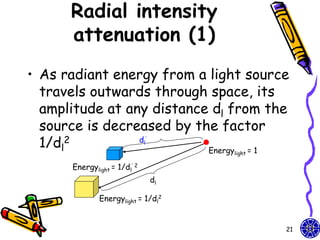
• As radiant energy from a light source
  travels outwards through space, its
  amplitude at any distance dl from the
  source is decreased by the factor
  1/dl2          d             ’
                              l
                           Energy =1    light

      Energylight = 1/dl’ 2
                                   dl

              Energylight = 1/dl2


                                                21
Radial intensity
               attenuation (2)
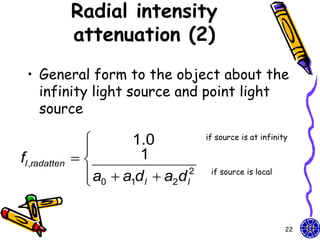
 • General form to the object about the
   infinity light source and point light
   source

                       1.0             if source is at infinity
                
fl ,radatten            1
                 a0  a1d l  a2d l
                
                                    2    if source is local


                                                               22
Directional light sources
 and spotlight effects
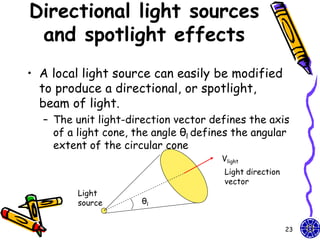
• A local light source can easily be modified
  to produce a directional, or spotlight,
  beam of light.
  – The unit light-direction vector defines the axis
    of a light cone, the angle θl defines the angular
    extent of the circular cone
                                       Vlight
                                       Light direction
                                       vector
         Light
         source       θl


                                                         23
spotlight effects
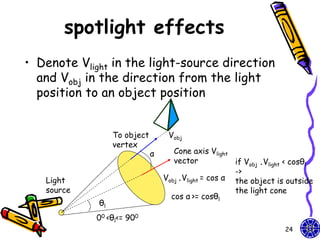
• Denote Vlight in the light-source direction
  and Vobj in the direction from the light
  position to an object position


                  To object        Vobj
                  vertex
                              α      Cone axis Vlight
                                     vector            if Vobj .Vlight < cosθl
                                                       ->
   Light                          Vobj .Vlight = cos α the object is outside
   source                                              the light cone
                                    cos α >= cosθl
             θl
            00 <θl<= 900
                                                                     24
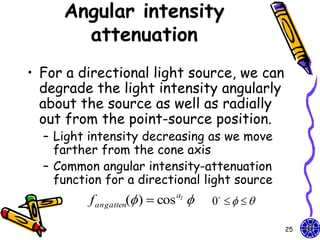
Angular intensity
       attenuation
• For a directional light source, we can
  degrade the light intensity angularly
  about the source as well as radially
  out from the point-source position.
  – Light intensity decreasing as we move
    farther from the cone axis
  – Common angular intensity-attenuation
    function for a directional light source
          f angatten( )  cos al    0    

                                                   25
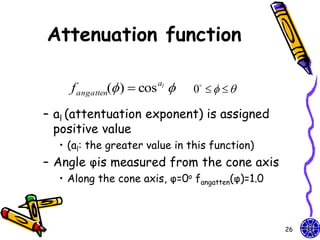
Attenuation function

    f angatten( )  cos al    0    

– al (attentuation exponent) is assigned
  positive value
  • (al: the greater value in this function)
– Angle φis measured from the cone axis
  • Along the cone axis, φ=0o fangatten(φ)=1.0


                                                 26
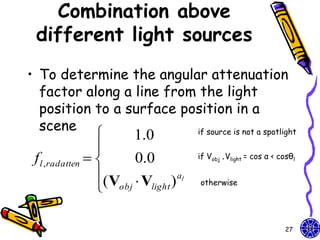
Combination above
 different light sources
• To determine the angular attenuation
  factor along a line from the light
  position to a surface position in a
  scene
                     1.0 if source is not a spotlight

                 
 f l ,radatten      0.0         if Vobj .Vlight = cos α < cosθl

                 (V  V ) al
                  obj light      otherwise


                                                             27
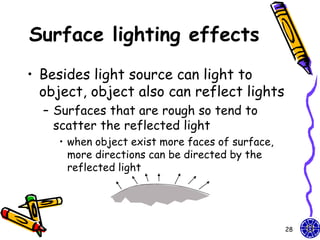
Surface lighting effects
• Besides light source can light to
  object, object also can reflect lights
  – Surfaces that are rough so tend to
    scatter the reflected light
    • when object exist more faces of surface,
      more directions can be directed by the
      reflected light


                                                 28
Specular reflection
• Some of the reflected light is
  concentrated into a highlight called
  specular reflection
  – The lighting effect is more outstanding
    on shiny surfaces


                                              29
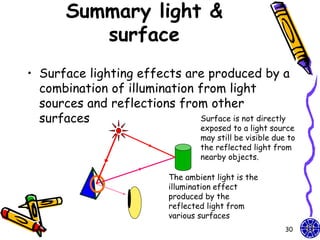
Summary light &
          surface
• Surface lighting effects are produced by a
  combination of illumination from light
  sources and reflections from other
  surfaces                    Surface is not directly
                                    exposed to a light source
                                    may still be visible due to
                                    the reflected light from
                                    nearby objects.

                            The ambient light is the
                            illumination effect
                            produced by the
                            reflected light from
                            various surfaces
                                                            30
Homework
• Walking in a scene
                         void polygon(int a, int b, int c , int d){
  – Hint: Object                   glBegin(GL_POLYGON);
    walking or walking                        glColor3fv(colors[a]);
                                              glNormal3fv(normals[a]);
    above floor                               glVertex3fv(vertices[a]);
                                              glColor3fv(colors[b]);
  – Example: color                            glNormal3fv(normals[b]);
    cube                                      glVertex3fv(vertices[b]);
                                              glColor3fv(colors[c]);
                                              glNormal3fv(normals[c]);
                                              glVertex3fv(vertices[c]);
                                              glColor3fv(colors[d]);
                                              glNormal3fv(normals[d]);
                                              glVertex3fv(vertices[d]);
                                   glEnd();          }
          demo

                                                                   31
Texture


Ch10: Computer Graphics with OpenGL 3th, Hearn Baker
Ch7: Interactive Computer Graphics 3th, Addison Wesley
Mapping methods
• Texture mapping

• Environmental maps

• The complex domain’s figure


                                33
Simple buffer mapping
• How we design program which can both
  write into and read from buffers.
     • (Generally, two factors make these operations
       different between reading and writing into computer
       memory)
  – First, read or write a single pixel or bit
  – Rather, extend to read and write rectangular
    blocks of pixels (called bit blocks)


                                                         34
Example: read &
      write
                                                      I love
                 monitor                              OpenGL

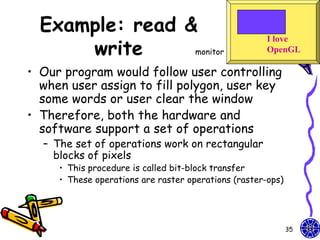
• Our program would follow user controlling
  when user assign to fill polygon, user key
  some words or user clear the window
• Therefore, both the hardware and
  software support a set of operations
  – The set of operations work on rectangular
    blocks of pixels
     • This procedure is called bit-block transfer
     • These operations are raster operations (raster-ops)


                                                             35
bit-block transfer
             (bitblt)
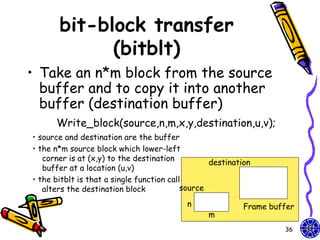
• Take an n*m block from the source
  buffer and to copy it into another
  buffer (destination buffer)
      Write_block(source,n,m,x,y,destination,u,v);
• source and destination are the buffer
• the n*m source block which lower-left
   corner is at (x,y) to the destination
                                                  destination
   buffer at a location (u,v)
• the bitblt is that a single function call
   alters the destination block            source

                                           n               Frame buffer
                                                 m
                                                                    36
raster operations
      (raster-ops)
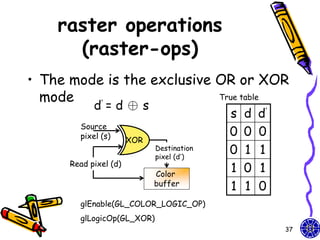
• The mode is the exclusive OR or XOR
  mode                      True table
          ’ d=d⊕s
                                           s   d   d’
        Source
        pixel (s)                          0   0   0
                       XOR
                             Destination
                             pixel (d’)
                                           0   1   1
      Read pixel (d)
                             Color
                                           1   0   1
                             buffer
                                           1   1   0
        glEnable(GL_COLOR_LOGIC_OP)
        glLogicOp(GL_XOR)
                                                        37
Erasable Line
• What is Erasable Line ?


• How to implement?


                            38
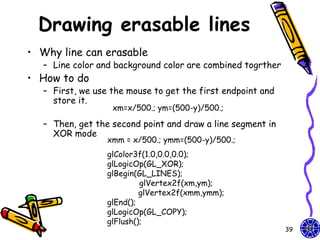
Drawing erasable lines
• Why line can erasable
   – Line color and background color are combined togrther
• How to do
   – First, we use the mouse to get the first endpoint and
     store it.
                   xm=x/500.; ym=(500-y)/500.;

   – Then, get the second point and draw a line segment in
     XOR mode
                  xmm = x/500.; ymm=(500-y)/500.;
                  glColor3f(1.0,0.0,0.0);
                  glLogicOp(GL_XOR);
                  glBegin(GL_LINES);
                           glVertex2f(xm,ym);
                           glVertex2f(xmm,ymm);
                  glEnd();
                  glLogicOp(GL_COPY);
                  glFlush();
                                                             39
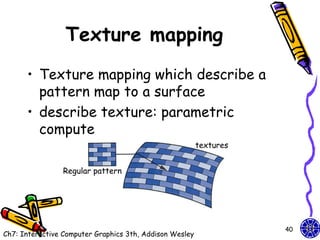
Texture mapping
      • Texture mapping which describe a
        pattern map to a surface
      • describe texture: parametric
        compute
                                                         textures


                Regular pattern


                                                                    40
Ch7: Interactive Computer Graphics 3th, Addison Wesley
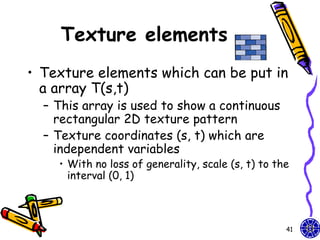
Texture elements
• Texture elements which can be put in
  a array T(s,t)
  – This array is used to show a continuous
    rectangular 2D texture pattern
  – Texture coordinates (s, t) which are
    independent variables
    • With no loss of generality, scale (s, t) to the
      interval (0, 1)


                                                    41
Texture maps (1)
• Texture map on a geometric object where
  mapped to screen coordinates for display
  – Object in spatial coordinates [(x,y,z) or
    (x,y,z,w)] & texture elements (s,t)
     • The mapping function:
       x = x(s,t), y = y(s,t), z = z(s,t), w = w(s,t)
     • The inverse function:
       s = s(x,y,z,w), t = t(x,y,z,w)


                                                        42
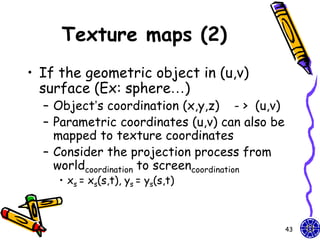
Texture maps (2)
• If the geometric object in (u,v)
  surface (Ex: sphere…)
  – Object’s coordination (x,y,z) - > (u,v)
  – Parametric coordinates (u,v) can also be
    mapped to texture coordinates
  – Consider the projection process from
    worldcoordination to screencoordination
    • xs = xs(s,t), ys = ys(s,t)


                                               43
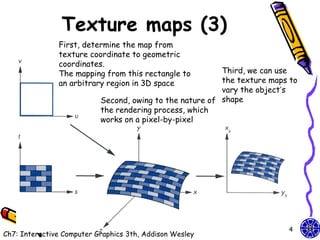
Texture maps (3)
               First, determine the map from
               texture coordinate to geometric
               coordinates.
               The mapping from this rectangle to         Third, we can use
               an arbitrary region in 3D space            the texture maps to
                                                          vary the object’s
                           Second, owing to the nature of shape
                           the rendering process, which
                           works on a pixel-by-pixel


                                                                         44
Ch7: Interactive Computer Graphics 3th, Addison Wesley
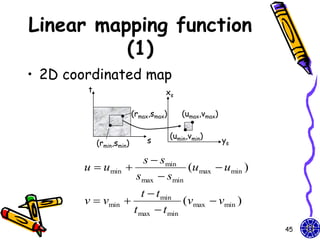
Linear mapping function
          (1)
• 2D coordinated map
        t                           xs

                          (rmax,smax)      (umax,vmax)

                                        (umin,vmin)
            (rmin,smin)       s                          ys

                        s  smin
       u  umin                   (umax  umin )
                       smax  smin
                          t  t min
       v  vmin                     (vmax  vmin )
                       t max  t min
                                                              45
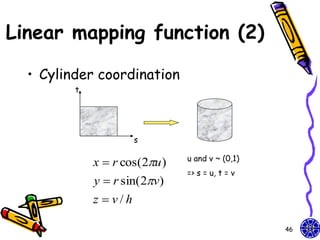
Linear mapping function (2)

  • Cylinder coordination
         t


                       s

                               u and v ~ (0,1)
             x  r cos(2u )
                               => s = u, t = v
             y  r sin( 2v)
             z  v/h

                                                 46
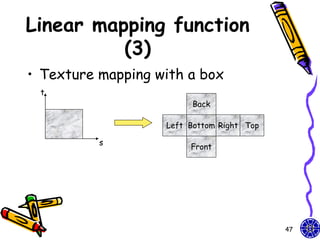
Linear mapping function
          (3)
• Texture mapping with a box
 t
                        Back

                   Left Bottom Right Top

          s
                        Front


                                           47
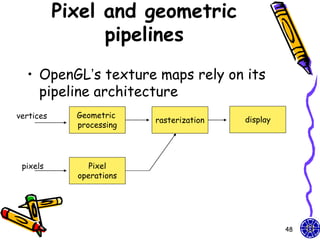
Pixel and geometric
                 pipelines
  • OpenGL’s texture maps rely on its
    pipeline architecture
vertices     Geometric
                          rasterization   display
             processing


 pixels         Pixel
             operations


                                                    48
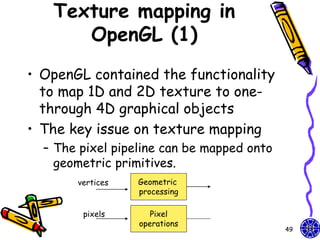
Texture mapping in
      OpenGL (1)
• OpenGL contained the functionality
  to map 1D and 2D texture to one-
  through 4D graphical objects
• The key issue on texture mapping
  – The pixel pipeline can be mapped onto
    geometric primitives.
       vertices   Geometric
                  processing

        pixels       Pixel
                  operations
                                            49
Texture mapping in
       OpenGL (2)
• In particular, texture mapping is
  done as primitives are rasterized
• This process maps 3D points to
  locations (pixels) on the display
• Each fragment that is generated is
  tested for visibility (with z-buffer)


                                          50
2D texture mapping (1)
• Support we have a 512*512 image my_texels
          GLubye my_texels[512][512]
• Specify this array is too be used as a 2D texture
    glTexImage2D(GL_TEXTURE_2D, level, components,
                 width, height, border, format,type,tarry);
   – tarray size is the same the width*height
   – The value components is the (1-4) of color components
     (RGBA) or 3 (RGB)
   – The format (RGBA) = 4 or 3 (RGB)
   – In processor memory, tarry’s pixels are moved through
     the pixel pipeline (** not in the frame buffer)
   – The parameters level and border give us fine control
    Ex: glTexImage2D(GL_TEXTURE_2D, 0, 3, 512, 512,
                  0, GL_RGB,GL_UNSIGNED_BYTE,my_texels);

                                                              51
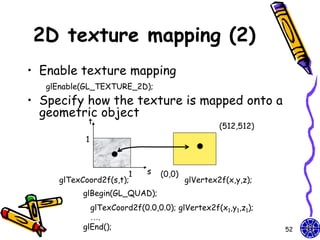
2D texture mapping (2)
• Enable texture mapping
   glEnable(GL_TEXTURE_2D);
• Specify how the texture is mapped onto a
  geometric object
            t
                                                 (512,512)
           1


                       1    s   (0,0)
     glTexCoord2f(s,t);                 glVertex2f(x,y,z);
           glBegin(GL_QUAD);
             glTexCoord2f(0.0,0.0); glVertex2f(x1,y1,z1);
             ….
           glEnd();                                          52
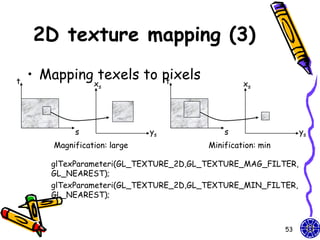
2D texture mapping (3)

t
    • Mapping texels to pixels
                         t
                 xs                              xs


            s                 ys            s                    ys
       Magnification: large             Minification: min

       glTexParameteri(GL_TEXTURE_2D,GL_TEXTURE_MAG_FILTER,
       GL_NEAREST);
       glTexParameteri(GL_TEXTURE_2D,GL_TEXTURE_MIN_FILTER,
       GL_NEAREST);


                                                            53
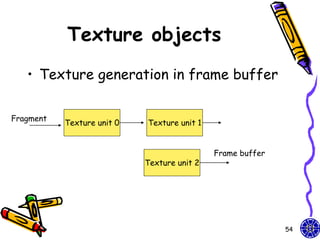
Texture objects
   • Texture generation in frame buffer

Fragment
           Texture unit 0   Texture unit 1


                                             Frame buffer
                            Texture unit 2


                                                            54
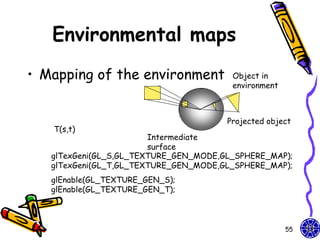
Environmental maps
• Mapping of the environment            Object in
                                        environment


                                       Projected object
   T(s,t)
                        Intermediate
                        surface
   glTexGeni(GL_S,GL_TEXTURE_GEN_MODE,GL_SPHERE_MAP);
   glTexGeni(GL_T,GL_TEXTURE_GEN_MODE,GL_SPHERE_MAP);
   glEnable(GL_TEXTURE_GEN_S);
   glEnable(GL_TEXTURE_GEN_T);


                                                      55
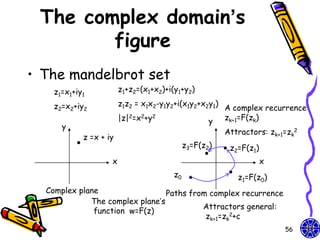
The complex domain’s
        figure
• The mandelbrot set
    z1=x1+iy1           z1+z2=(x1+x2)+i(y1+y2)

    z2=x2+iy2           z1z2 = x1x2-y1y2+i(x1y2+x2y1)
                                                        A complex recurrence
                        |z|2=x2+y2                  y   zk+1=F(zk)
      y
                                                        Attractors: zk+1=zk2
            z =x + iy
                                             z3=F(z2)    z2=F(z1)
                    x                                               x
                                        z0                 z1=F(z0)
  Complex plane                  Paths from complex recurrence
             The complex plane’s
                                          Attractors general:
              function w=F(z)
                                           zk+1=zk2+c
                                                                        56
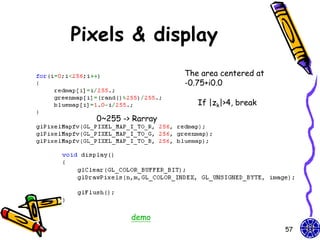
Pixels & display
                    The area centered at
                    -0.75+i0.0

                       If |zk|>4, break

  0~255 -> Rarray


          demo
                                           57

CG OpenGL Shadows + Light + Texture -course 10

  • 1.
    Shadows + Light +Texture Chen Jing-Fung (2006/12/15) Assistant Research Fellow, Digital Media Center, National Taiwan Normal University Ch10: Computer Graphics with OpenGL 3th, Hearn Baker Ch6: Interactive Computer Graphics 3th, Addison Wesley Ch7: Interactive Computer Graphics 3th, Addison Wesley
  • 2.
    outline • How toconstruct the object’s shadow in a scene • Camera’s walking in a scene • Several kinds about light 2
  • 3.
    shadows • Create simpleshadows is an interesting application of projection matrices – Shadows are not geometric objects in OpenGL – Shadows can realistic images and give many visual clues to the spatial relationships among objects in a scene 3
  • 4.
    How to createthe object’s shadow • Starting from a view point • Lighting source is also required (infinitely light) – If light source is at the center of projection, there are no visible shadows (shadows are behind the objects) 4
  • 5.
    Polygon’s shadow y • Consider the shadow (xl,yl,zl) generated by the point source – Assume the shadow falls on the surface (y=0) x – Then, the shadow polygon is z related to original polygon • Shadow ~ origin 5
  • 6.
    y (xl,yl,zl) z x • Find a suitable projection matrix and use OpenGL to compute the vertices of the shadow polygon is projected to – (x,y,z) in space -> (xp, yp, zp) in projection plane – Characteristic: • All projectors pass through the origin and all projected polygon through the vertical to y-axis 6
  • 7.
    y (xl,yl,zl) z x • Shadow point and polygon point are projected from x-axis to y-axis x (xp,-d) (x,y) xp x x  xp  d y y / d y yp = -d • Project from z-axis to y-axis (zp,-d) z (z,y) zp z z  zp  d y y / d y y = -d p 7
  • 8.
    Homogeneous coordinates • Original homogeneous coordinates: x  x p  1 0 0 0  x  xp  y / d  y  0 1 0 0  y   p     yp = y  zp  0 0 1 0  z  zp  z   0 1  0 0  1  y / d 1   d   Perspective projection matrix: Our light can be shadow projection Matrix moved by design GLfloat light[3]={0.0, 10.0, 0.0}; GLfloat m[16]; light[0]=10.0*sin((6.28/180.0)*theta); light[2]=10.0*cos((6.28/180.0)*theta); for(i=0;i<16;i++) m[i]=0.0; m[0]=m[5]=m[10]=1.0; m[7]=-1.0/light[1]; 8
  • 9.
    Orthogonal view with clipping box glClear(GL_COLOR_BUFFER_BIT|GL_DEPTH_BUFFER_BIT); /* set up standard orthogonal view with clipping */ /* box as cube of side 2 centered at origin */ glMatrixMode (GL_PROJECTION); glLoadIdentity (); glOrtho(-2.0, 2.0, -2.0, 2.0, -5.0, 5.0); glMatrixMode(GL_MODELVIEW); glLoadIdentity(); gluLookAt(1.0,1.0,1.0,0.0,0.0,0.0,0.0,1.0,0.0); // view plane up vector at y-axis (0.0,1.0,0.0) 9
  • 10.
    Polygon & itsshadow /* define unit square polygon */ glColor3f(1.0, 0.0, 0.0);/* set drawing/fill color to red*/ glBegin(GL_POLYGON); glVertex3f(…); … glEnd(); glPushMatrix(); //save state glTranslatef(light[0], light[1],light[2]); //translate back glMultMatrixf(m); //project glTranslatef(-light[0], -light[1],-light[2]); //return origin //shadow object glColor3f(0.0,0.0,0.0); glBegin(GL_POLYGON); glVertex3f(…);… glEnd(); glPopMatrix(); //restore state How to design the different size between original polygon & its shadow? 10
  • 11.
    Special key parameter voidSpecialKeys(int key, int x, int y){ if(key == GLUT_KEY_UP){ theta += 2.0; if( theta > 360.0 ) theta -= 360.0; //set range’s boundary } if(key == GLUT_KEY_DOWN){ theta -= 2.0; y if( theta < 360.0 ) theta += 360.0; } glutPostRedisplay(); } demo z x 11
  • 12.
    How to designwalking object? • Walking direction? • Viewer (camera) parameter • Reshape projected function 12
  • 13.
    Viewer (camera) moving(1) • Viewer move the camera in a scene by depressing the x, X, y, Y, z, Z keys on keyboard void keys(unsigned char key, int x, int y){ if(key == ‘x’) viewer[0] -= 1.0; if(key == ‘X’) viewer[0] += 1.0; if(key == ‘y’) viewer[1] -= 1.0; if(key == ‘Y’) viewer[1] += 1.0; if(key == ‘z’) viewer[2] -= 1.0; if(key == ‘Z’) viewer[2] += 1.0; glutPostRedisplay(); } Walking in a scene. What problem happen if object is walked far away? 13
  • 14.
    Viewer (camera) moving(2) • The gluLookAt function provides a simple way to reposition and reorient the camera void display(void){ glClear(GL_COLOR_BUFFER_BIT | GL_DEPTH_BUFFER_BIT); glLoadIdentity(); gluLookAt(viewer[0],viewer[1],viewer[2],0.0,0.0,0.0,0.0,1.0,0.0); /* rotate cube */ glRotatef(theta[0], 1.0, 0.0, 0.0); glRotatef(theta[1], 0.0, 1.0, 0.0); glRotatef(theta[2], 0.0, 0.0, 1.0); colorcube(); glFlush(); glutSwapBuffers(); } 14
  • 15.
    Viewer (camera) moving(3) • Invoke glFrustum in the reshape callback to specify the camera lens void myReshape(int w, int h){ glViewport(0, 0, w, h); glMatrixMode(GL_PROJECTION); glLoadIdentity(); if(w<=h) glFrustum(-2.0, 2.0, -2.0 * (GLfloat) h/ (GLfloat) w, 2.0* (GLfloat) h / (GLfloat) w, 2.0, 20.0); else glFrustum(-2.0, 2.0, -2.0 * (GLfloat) w/ (GLfloat) h, 2.0* (GLfloat) w / (GLfloat) h, 2.0, 20.0); glMatrixMode(GL_MODELVIEW); } demo 15
  • 16.
    Light & surface •Light reflection method is very complicated – Describe that light source is reflected from an actual surface – Maybe depends an many factors • Light source’s direction, observer’s eye and the normal to the surface – Surface characteristics can also consider that its roughness or surface’s color … (surface’s texture) 16
  • 17.
    Why do shading? •Set a sphere model to cyan – Result • the sphere seem like a circle • We want to see a sphere – Material + light + viewer + surface orientation • The material’s color can be designed to a gradual transformation 17
  • 18.
    Lighting phenomenon • Lightsources – Point light sources • Infinitely distant light sources • Radial intensity attenuation – Directional light sources and spotlight effects • Angular intensity attenuation • Surface lighting effects 18
  • 19.
    Point light sources •The simplest model for an object and its light source – Light rays are generated along radially diverging paths from the single-color source position • light source is a single color – The light source’s size is smaller than object – We can use an illumination model to calculate the light direction to a selected object surface’s position 19
  • 20.
    Infinitely distant light sources • A large light source (sun) that is very far from a scene like a point light source • Large light source is small different to point light source – When remote the point light source, the object is illuminated at only one direction – In constant to sun which is very far so it shines everywhere 20
  • 21.
    Radial intensity attenuation (1) • As radiant energy from a light source travels outwards through space, its amplitude at any distance dl from the source is decreased by the factor 1/dl2 d ’ l Energy =1 light Energylight = 1/dl’ 2 dl Energylight = 1/dl2 21
  • 22.
    Radial intensity attenuation (2) • General form to the object about the infinity light source and point light source  1.0 if source is at infinity  fl ,radatten  1  a0  a1d l  a2d l  2 if source is local 22
  • 23.
    Directional light sources and spotlight effects • A local light source can easily be modified to produce a directional, or spotlight, beam of light. – The unit light-direction vector defines the axis of a light cone, the angle θl defines the angular extent of the circular cone Vlight Light direction vector Light source θl 23
  • 24.
    spotlight effects • DenoteVlight in the light-source direction and Vobj in the direction from the light position to an object position To object Vobj vertex α Cone axis Vlight vector if Vobj .Vlight < cosθl -> Light Vobj .Vlight = cos α the object is outside source the light cone cos α >= cosθl θl 00 <θl<= 900 24
  • 25.
    Angular intensity attenuation • For a directional light source, we can degrade the light intensity angularly about the source as well as radially out from the point-source position. – Light intensity decreasing as we move farther from the cone axis – Common angular intensity-attenuation function for a directional light source f angatten( )  cos al  0     25
  • 26.
    Attenuation function f angatten( )  cos al  0     – al (attentuation exponent) is assigned positive value • (al: the greater value in this function) – Angle φis measured from the cone axis • Along the cone axis, φ=0o fangatten(φ)=1.0 26
  • 27.
    Combination above differentlight sources • To determine the angular attenuation factor along a line from the light position to a surface position in a scene  1.0 if source is not a spotlight  f l ,radatten   0.0 if Vobj .Vlight = cos α < cosθl (V  V ) al  obj light otherwise 27
  • 28.
    Surface lighting effects •Besides light source can light to object, object also can reflect lights – Surfaces that are rough so tend to scatter the reflected light • when object exist more faces of surface, more directions can be directed by the reflected light 28
  • 29.
    Specular reflection • Someof the reflected light is concentrated into a highlight called specular reflection – The lighting effect is more outstanding on shiny surfaces 29
  • 30.
    Summary light & surface • Surface lighting effects are produced by a combination of illumination from light sources and reflections from other surfaces Surface is not directly exposed to a light source may still be visible due to the reflected light from nearby objects. The ambient light is the illumination effect produced by the reflected light from various surfaces 30
  • 31.
    Homework • Walking ina scene void polygon(int a, int b, int c , int d){ – Hint: Object glBegin(GL_POLYGON); walking or walking glColor3fv(colors[a]); glNormal3fv(normals[a]); above floor glVertex3fv(vertices[a]); glColor3fv(colors[b]); – Example: color glNormal3fv(normals[b]); cube glVertex3fv(vertices[b]); glColor3fv(colors[c]); glNormal3fv(normals[c]); glVertex3fv(vertices[c]); glColor3fv(colors[d]); glNormal3fv(normals[d]); glVertex3fv(vertices[d]); glEnd(); } demo 31
  • 32.
    Texture Ch10: Computer Graphicswith OpenGL 3th, Hearn Baker Ch7: Interactive Computer Graphics 3th, Addison Wesley
  • 33.
    Mapping methods • Texturemapping • Environmental maps • The complex domain’s figure 33
  • 34.
    Simple buffer mapping •How we design program which can both write into and read from buffers. • (Generally, two factors make these operations different between reading and writing into computer memory) – First, read or write a single pixel or bit – Rather, extend to read and write rectangular blocks of pixels (called bit blocks) 34
  • 35.
    Example: read & write I love monitor OpenGL • Our program would follow user controlling when user assign to fill polygon, user key some words or user clear the window • Therefore, both the hardware and software support a set of operations – The set of operations work on rectangular blocks of pixels • This procedure is called bit-block transfer • These operations are raster operations (raster-ops) 35
  • 36.
    bit-block transfer (bitblt) • Take an n*m block from the source buffer and to copy it into another buffer (destination buffer) Write_block(source,n,m,x,y,destination,u,v); • source and destination are the buffer • the n*m source block which lower-left corner is at (x,y) to the destination destination buffer at a location (u,v) • the bitblt is that a single function call alters the destination block source n Frame buffer m 36
  • 37.
    raster operations (raster-ops) • The mode is the exclusive OR or XOR mode True table ’ d=d⊕s s d d’ Source pixel (s) 0 0 0 XOR Destination pixel (d’) 0 1 1 Read pixel (d) Color 1 0 1 buffer 1 1 0 glEnable(GL_COLOR_LOGIC_OP) glLogicOp(GL_XOR) 37
  • 38.
    Erasable Line • Whatis Erasable Line ? • How to implement? 38
  • 39.
    Drawing erasable lines •Why line can erasable – Line color and background color are combined togrther • How to do – First, we use the mouse to get the first endpoint and store it. xm=x/500.; ym=(500-y)/500.; – Then, get the second point and draw a line segment in XOR mode xmm = x/500.; ymm=(500-y)/500.; glColor3f(1.0,0.0,0.0); glLogicOp(GL_XOR); glBegin(GL_LINES); glVertex2f(xm,ym); glVertex2f(xmm,ymm); glEnd(); glLogicOp(GL_COPY); glFlush(); 39
  • 40.
    Texture mapping • Texture mapping which describe a pattern map to a surface • describe texture: parametric compute textures Regular pattern 40 Ch7: Interactive Computer Graphics 3th, Addison Wesley
  • 41.
    Texture elements • Textureelements which can be put in a array T(s,t) – This array is used to show a continuous rectangular 2D texture pattern – Texture coordinates (s, t) which are independent variables • With no loss of generality, scale (s, t) to the interval (0, 1) 41
  • 42.
    Texture maps (1) •Texture map on a geometric object where mapped to screen coordinates for display – Object in spatial coordinates [(x,y,z) or (x,y,z,w)] & texture elements (s,t) • The mapping function: x = x(s,t), y = y(s,t), z = z(s,t), w = w(s,t) • The inverse function: s = s(x,y,z,w), t = t(x,y,z,w) 42
  • 43.
    Texture maps (2) •If the geometric object in (u,v) surface (Ex: sphere…) – Object’s coordination (x,y,z) - > (u,v) – Parametric coordinates (u,v) can also be mapped to texture coordinates – Consider the projection process from worldcoordination to screencoordination • xs = xs(s,t), ys = ys(s,t) 43
  • 44.
    Texture maps (3) First, determine the map from texture coordinate to geometric coordinates. The mapping from this rectangle to Third, we can use an arbitrary region in 3D space the texture maps to vary the object’s Second, owing to the nature of shape the rendering process, which works on a pixel-by-pixel 44 Ch7: Interactive Computer Graphics 3th, Addison Wesley
  • 45.
    Linear mapping function (1) • 2D coordinated map t xs (rmax,smax) (umax,vmax) (umin,vmin) (rmin,smin) s ys s  smin u  umin  (umax  umin ) smax  smin t  t min v  vmin  (vmax  vmin ) t max  t min 45
  • 46.
    Linear mapping function(2) • Cylinder coordination t s u and v ~ (0,1) x  r cos(2u ) => s = u, t = v y  r sin( 2v) z  v/h 46
  • 47.
    Linear mapping function (3) • Texture mapping with a box t Back Left Bottom Right Top s Front 47
  • 48.
    Pixel and geometric pipelines • OpenGL’s texture maps rely on its pipeline architecture vertices Geometric rasterization display processing pixels Pixel operations 48
  • 49.
    Texture mapping in OpenGL (1) • OpenGL contained the functionality to map 1D and 2D texture to one- through 4D graphical objects • The key issue on texture mapping – The pixel pipeline can be mapped onto geometric primitives. vertices Geometric processing pixels Pixel operations 49
  • 50.
    Texture mapping in OpenGL (2) • In particular, texture mapping is done as primitives are rasterized • This process maps 3D points to locations (pixels) on the display • Each fragment that is generated is tested for visibility (with z-buffer) 50
  • 51.
    2D texture mapping(1) • Support we have a 512*512 image my_texels GLubye my_texels[512][512] • Specify this array is too be used as a 2D texture glTexImage2D(GL_TEXTURE_2D, level, components, width, height, border, format,type,tarry); – tarray size is the same the width*height – The value components is the (1-4) of color components (RGBA) or 3 (RGB) – The format (RGBA) = 4 or 3 (RGB) – In processor memory, tarry’s pixels are moved through the pixel pipeline (** not in the frame buffer) – The parameters level and border give us fine control Ex: glTexImage2D(GL_TEXTURE_2D, 0, 3, 512, 512, 0, GL_RGB,GL_UNSIGNED_BYTE,my_texels); 51
  • 52.
    2D texture mapping(2) • Enable texture mapping glEnable(GL_TEXTURE_2D); • Specify how the texture is mapped onto a geometric object t (512,512) 1 1 s (0,0) glTexCoord2f(s,t); glVertex2f(x,y,z); glBegin(GL_QUAD); glTexCoord2f(0.0,0.0); glVertex2f(x1,y1,z1); …. glEnd(); 52
  • 53.
    2D texture mapping(3) t • Mapping texels to pixels t xs xs s ys s ys Magnification: large Minification: min glTexParameteri(GL_TEXTURE_2D,GL_TEXTURE_MAG_FILTER, GL_NEAREST); glTexParameteri(GL_TEXTURE_2D,GL_TEXTURE_MIN_FILTER, GL_NEAREST); 53
  • 54.
    Texture objects • Texture generation in frame buffer Fragment Texture unit 0 Texture unit 1 Frame buffer Texture unit 2 54
  • 55.
    Environmental maps • Mappingof the environment Object in environment Projected object T(s,t) Intermediate surface glTexGeni(GL_S,GL_TEXTURE_GEN_MODE,GL_SPHERE_MAP); glTexGeni(GL_T,GL_TEXTURE_GEN_MODE,GL_SPHERE_MAP); glEnable(GL_TEXTURE_GEN_S); glEnable(GL_TEXTURE_GEN_T); 55
  • 56.
    The complex domain’s figure • The mandelbrot set z1=x1+iy1 z1+z2=(x1+x2)+i(y1+y2) z2=x2+iy2 z1z2 = x1x2-y1y2+i(x1y2+x2y1) A complex recurrence |z|2=x2+y2 y zk+1=F(zk) y Attractors: zk+1=zk2 z =x + iy z3=F(z2) z2=F(z1) x x z0 z1=F(z0) Complex plane Paths from complex recurrence The complex plane’s Attractors general: function w=F(z) zk+1=zk2+c 56
  • 57.
    Pixels & display The area centered at -0.75+i0.0 If |zk|>4, break 0~255 -> Rarray demo 57