Content-Based Image Retrieval
(CBIR)
By:
Swati Chauhan
Contents
1. Introduction
2. Applications
3. Classes of CBIR
4. Description Of Contents:- Image Processing
5. Techniques
6. How to represent and retrieve images?
7. How Images are represented?
8. Feature extraction
9. Examples
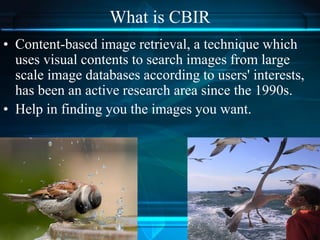
What is CBIR
• Content-based image retrieval, a technique which
uses visual contents to search images from large
scale image databases according to users' interests,
has been an active research area since the 1990s.
• Help in finding you the images you want.
Application CBIR
• Search for one specific image.
• General browsing to make an interactive choice.
• Search for a picture to go with a broad story or
search to illustrate a document.
• Search based on the esthetic value of the picture.
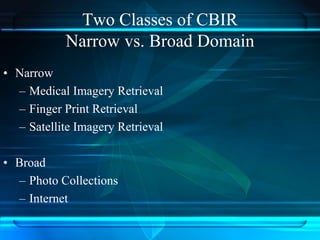
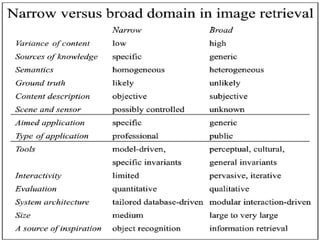
Two Classes of CBIR
Narrow vs. Broad Domain
• Narrow
– Medical Imagery Retrieval
– Finger Print Retrieval
– Satellite Imagery Retrieval
• Broad
– Photo Collections
– Internet
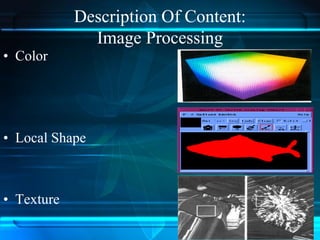
Description Of Content:
Image Processing
• Color
• Local Shape
• Texture
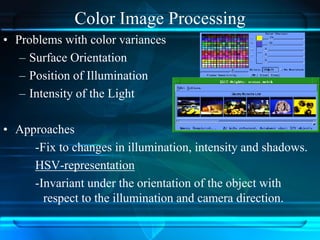
Color Image Processing
• Problems with color variances
– Surface Orientation
– Position of Illumination
– Intensity of the Light
• Approaches
-Fix to changes in illumination, intensity and shadows.
HSV-representation
-Invariant under the orientation of the object with
respect to the illumination and camera direction.
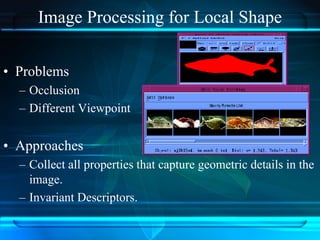
Image Processing for Local Shape
• Problems
– Occlusion
– Different Viewpoint
• Approaches
– Collect all properties that capture geometric details in the
image.
– Invariant Descriptors.
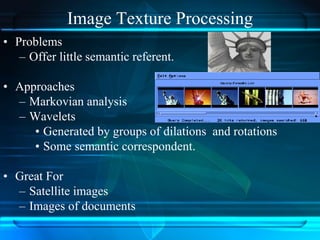
Image Texture Processing
• Problems
– Offer little semantic referent.
• Approaches
– Markovian analysis
– Wavelets
• Generated by groups of dilations and rotations
• Some semantic correspondent.
• Great For
– Satellite images
– Images of documents
CBIR Techniques
• Color Operators
• Texture operators
• Shape
• Frequency and phase domain information
How to represent and retrieve images?
– By annotation (manual)
• Text retrieval
• Semantic level (good for picture with people,
architectures)
– By the content (automatic)
• Color, texture, shape
• Vague description of picture (good for pictures of
scenery and with pattern and texture)
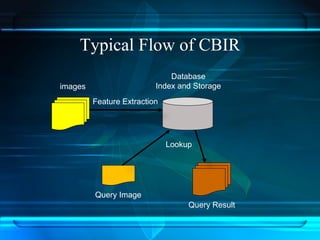
Typical Flow of CBIR
images
Database
Index and Storage
Feature Extraction
Query Result
Query Image
Lookup
How Images are represented ?
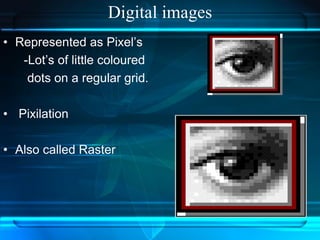
Digital images
• Represented as Pixel’s
-Lot’s of little coloured
dots on a regular grid.
• Pixilation
• Also called Raster
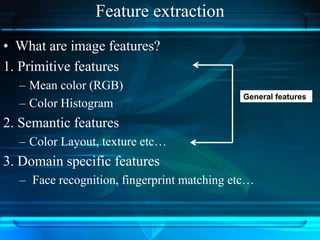
Feature extraction
• What are image features?
1. Primitive features
– Mean color (RGB)
– Color Histogram
2. Semantic features
– Color Layout, texture etc…
3. Domain specific features
– Face recognition, fingerprint matching etc…
General features
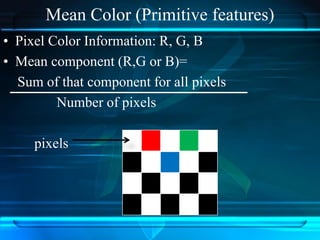
Mean Color (Primitive features)
• Pixel Color Information: R, G, B
• Mean component (R,G or B)=
Sum of that component for all pixels
Number of pixels
pixels
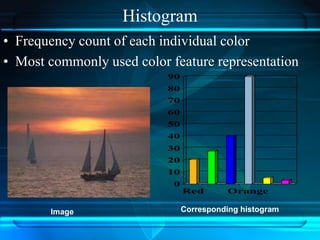
Histogram
• Frequency count of each individual color
• Most commonly used color feature representation
Image Corresponding histogram
0
10
20
30
40
50
60
70
80
90
Red Orange
• Histogram is a measure used to describe the image. In
simple words it means the distribution of color brightness
across the image. The brightness values range in [0..255]
Adv:- robustness with respect to geometric changes of the
objects in the image.
• Region based means that the histogram measure is not taken
globally for the whole image, but locally for different image
regions. This region-histogram features were used as index
of the image database.
Visual content description: since we are using histogram of
image,
we transform the file of the image to its bitmap representation.
That means 2D array where each cell contains
a triple with the RGB brightness values for the colors
•Red,
•Green,
•Blue.
Histogram in Image Retrieval
Procedure To find the desired image
 We assume that the images are of fixed size
200*200 pixels. (If not, converts them to that
size).
 We use local histogram values. The image is
divided into N * N square areas, and then the
histogram computed in each area.
Each image is represented with N*N length
vector where each coordinate is the histogram in
the appropriate area.
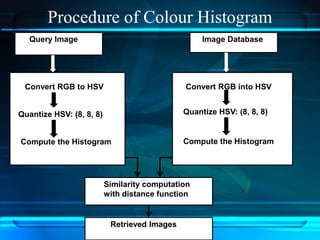
Procedure of Colour Histogram
Query Image Image Database
Similarity computation
with distance function
Retrieved Images
Convert RGB to HSV
Quantize HSV: (8, 8, 8)
Compute the Histogram
Convert RGB into HSV
Quantize HSV: (8, 8, 8)
Compute the Histogram
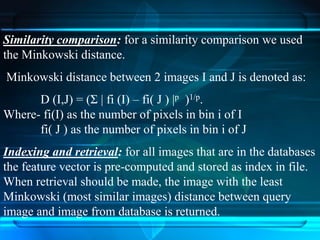
Similarity comparison: for a similarity comparison we used
the Minkowski distance.
Minkowski distance between 2 images I and J is denoted as:
D (I,J) = (Σ | fi (I) – fi( J ) |p )1/p.
Where- fi(I) as the number of pixels in bin i of I
fi( J ) as the number of pixels in bin i of J
Indexing and retrieval: for all images that are in the databases
the feature vector is pre-computed and stored as index in file.
When retrieval should be made, the image with the least
Minkowski (most similar images) distance between query
image and image from database is returned.
Wavelet-Based Colour Histogram Image
Retrieval (WBCHIR)
• Only Colour histogram is not sufficient.
• Wavelet-Based Colour Histogram Image Retrieval
(WBCHIR) is a combination of
Colour Histogram
Discrete Wavelet Transforms.
Which is used to provide the texture mapping among
images. Decompose an image into orthogonal components
using Wavelet Transform, to convert an image from spatial
domain into frequency domain for quantization.
Examples
 SQUID(Shape Queries Using Image
Databases)
 IBM’s QBIC (Query by Image
Content)
(http://wwwqbic.almaden.ibm.com)
 UC Berkeley’s Blobworld
(http://elib.cs.berkeley.edu/blobworld)
 Like.com (http://www.like.com)
 HotBot (http://hotbot.lycos.com)
 ADL(Alexandria Digital Library)
 Content-Based Visual Query
(http://maya.ctr.columbia.edu:8088/
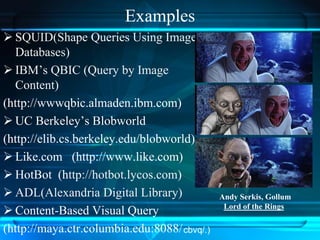
Andy Serkis, Gollum
Lord of the Rings
cbvq/.)
• References:-
• C. Carson, S. Belongie, H. Greenspan and J. Malik, “Blobworld: image
segmentation using expectation-maximization and its application to image
querying”, IEEE Trans. Pattern Anal. Mach. Intell. 8 (8), pp. 1026–1038, 2002
• C.H. Lin, R.T. Chen and Y.K. Chan, “A smart content-based image retrieval
system based on color and texture feature”, Image and Vision Computing
vol.27, pp.658–665, 2009
• G. Raghupathi, R.S. Anand, and M.L Dewal, “Color and Texture Features for
content Based image retrieval”, Second International conference on multimedia
and content based image retrieval, July-2010
• S. Manimala and K. Hemachandran, “Performance analysis of Color Spaces in
Image Retrieval”, Assam University Journal of science & Technology, Vol. 7
Number II 94-104, 2011.
• Arnold W.M Smeulders, Marcel Woring ,Simone Santini, Amarnath Gupta ,
Ramesh Jain “Content Based Image Retrieval at the end of early year”IEEE
Trans. On Pattern analysis and machine intelligence ,vol-22,Dec 2000.
• Manimala Singha and K. Hemachandran. “Content Based Image Retrieval
using Color and Texture”. Signal & Image Processing : An International Journal
(SIPIJ) Vol.3, No.1, February 2012
Thank You

Content Based Image Retrieval

  • 1.
  • 2.
    Contents 1. Introduction 2. Applications 3.Classes of CBIR 4. Description Of Contents:- Image Processing 5. Techniques 6. How to represent and retrieve images? 7. How Images are represented? 8. Feature extraction 9. Examples
  • 3.
    What is CBIR •Content-based image retrieval, a technique which uses visual contents to search images from large scale image databases according to users' interests, has been an active research area since the 1990s. • Help in finding you the images you want.
  • 4.
    Application CBIR • Searchfor one specific image. • General browsing to make an interactive choice. • Search for a picture to go with a broad story or search to illustrate a document. • Search based on the esthetic value of the picture.
  • 5.
    Two Classes ofCBIR Narrow vs. Broad Domain • Narrow – Medical Imagery Retrieval – Finger Print Retrieval – Satellite Imagery Retrieval • Broad – Photo Collections – Internet
  • 7.
    Description Of Content: ImageProcessing • Color • Local Shape • Texture
  • 8.
    Color Image Processing •Problems with color variances – Surface Orientation – Position of Illumination – Intensity of the Light • Approaches -Fix to changes in illumination, intensity and shadows. HSV-representation -Invariant under the orientation of the object with respect to the illumination and camera direction.
  • 9.
    Image Processing forLocal Shape • Problems – Occlusion – Different Viewpoint • Approaches – Collect all properties that capture geometric details in the image. – Invariant Descriptors.
  • 10.
    Image Texture Processing •Problems – Offer little semantic referent. • Approaches – Markovian analysis – Wavelets • Generated by groups of dilations and rotations • Some semantic correspondent. • Great For – Satellite images – Images of documents
  • 11.
    CBIR Techniques • ColorOperators • Texture operators • Shape • Frequency and phase domain information
  • 12.
    How to representand retrieve images? – By annotation (manual) • Text retrieval • Semantic level (good for picture with people, architectures) – By the content (automatic) • Color, texture, shape • Vague description of picture (good for pictures of scenery and with pattern and texture)
  • 13.
    Typical Flow ofCBIR images Database Index and Storage Feature Extraction Query Result Query Image Lookup
  • 14.
    How Images arerepresented ?
  • 15.
    Digital images • Representedas Pixel’s -Lot’s of little coloured dots on a regular grid. • Pixilation • Also called Raster
  • 16.
    Feature extraction • Whatare image features? 1. Primitive features – Mean color (RGB) – Color Histogram 2. Semantic features – Color Layout, texture etc… 3. Domain specific features – Face recognition, fingerprint matching etc… General features
  • 17.
    Mean Color (Primitivefeatures) • Pixel Color Information: R, G, B • Mean component (R,G or B)= Sum of that component for all pixels Number of pixels pixels
  • 18.
    Histogram • Frequency countof each individual color • Most commonly used color feature representation Image Corresponding histogram 0 10 20 30 40 50 60 70 80 90 Red Orange
  • 19.
    • Histogram isa measure used to describe the image. In simple words it means the distribution of color brightness across the image. The brightness values range in [0..255] Adv:- robustness with respect to geometric changes of the objects in the image. • Region based means that the histogram measure is not taken globally for the whole image, but locally for different image regions. This region-histogram features were used as index of the image database.
  • 20.
    Visual content description:since we are using histogram of image, we transform the file of the image to its bitmap representation. That means 2D array where each cell contains a triple with the RGB brightness values for the colors •Red, •Green, •Blue.
  • 21.
  • 22.
    Procedure To findthe desired image  We assume that the images are of fixed size 200*200 pixels. (If not, converts them to that size).  We use local histogram values. The image is divided into N * N square areas, and then the histogram computed in each area. Each image is represented with N*N length vector where each coordinate is the histogram in the appropriate area.
  • 23.
    Procedure of ColourHistogram Query Image Image Database Similarity computation with distance function Retrieved Images Convert RGB to HSV Quantize HSV: (8, 8, 8) Compute the Histogram Convert RGB into HSV Quantize HSV: (8, 8, 8) Compute the Histogram
  • 24.
    Similarity comparison: fora similarity comparison we used the Minkowski distance. Minkowski distance between 2 images I and J is denoted as: D (I,J) = (Σ | fi (I) – fi( J ) |p )1/p. Where- fi(I) as the number of pixels in bin i of I fi( J ) as the number of pixels in bin i of J Indexing and retrieval: for all images that are in the databases the feature vector is pre-computed and stored as index in file. When retrieval should be made, the image with the least Minkowski (most similar images) distance between query image and image from database is returned.
  • 25.
    Wavelet-Based Colour HistogramImage Retrieval (WBCHIR) • Only Colour histogram is not sufficient. • Wavelet-Based Colour Histogram Image Retrieval (WBCHIR) is a combination of Colour Histogram Discrete Wavelet Transforms. Which is used to provide the texture mapping among images. Decompose an image into orthogonal components using Wavelet Transform, to convert an image from spatial domain into frequency domain for quantization.
  • 26.
    Examples  SQUID(Shape QueriesUsing Image Databases)  IBM’s QBIC (Query by Image Content) (http://wwwqbic.almaden.ibm.com)  UC Berkeley’s Blobworld (http://elib.cs.berkeley.edu/blobworld)  Like.com (http://www.like.com)  HotBot (http://hotbot.lycos.com)  ADL(Alexandria Digital Library)  Content-Based Visual Query (http://maya.ctr.columbia.edu:8088/ Andy Serkis, Gollum Lord of the Rings cbvq/.)
  • 27.
    • References:- • C.Carson, S. Belongie, H. Greenspan and J. Malik, “Blobworld: image segmentation using expectation-maximization and its application to image querying”, IEEE Trans. Pattern Anal. Mach. Intell. 8 (8), pp. 1026–1038, 2002 • C.H. Lin, R.T. Chen and Y.K. Chan, “A smart content-based image retrieval system based on color and texture feature”, Image and Vision Computing vol.27, pp.658–665, 2009 • G. Raghupathi, R.S. Anand, and M.L Dewal, “Color and Texture Features for content Based image retrieval”, Second International conference on multimedia and content based image retrieval, July-2010 • S. Manimala and K. Hemachandran, “Performance analysis of Color Spaces in Image Retrieval”, Assam University Journal of science & Technology, Vol. 7 Number II 94-104, 2011. • Arnold W.M Smeulders, Marcel Woring ,Simone Santini, Amarnath Gupta , Ramesh Jain “Content Based Image Retrieval at the end of early year”IEEE Trans. On Pattern analysis and machine intelligence ,vol-22,Dec 2000. • Manimala Singha and K. Hemachandran. “Content Based Image Retrieval using Color and Texture”. Signal & Image Processing : An International Journal (SIPIJ) Vol.3, No.1, February 2012
  • 28.