Renaldas Zioma
Unity Labs
Trip down the GPU lane
with Machine Learning
@__ReJ__
Despite architectural differences between CPU & GPU
what dominates the speed of training Convolutional Neural Net
is the raw TFLOPs of a given chip!
CPU -vs- GPU
Single Instruction Multiple Data Single Instruction Multiple Threads
SIMD SIMT
+
+
Single Instruction Multiple Data Single Instruction Multiple Threads
SIMD SIMT
+
Lane
Instruction
applied to all
lanes
Data
Multiple lanes
aka vector
+
4 lanes (SSE)
8 lanes (AVX)
32 lanes
16 lanes (Mobile GPU)
64 lanes (AMD)
SIMD SIMT
SIMT is almost the same as SIMD, but much wider
+
+
Executes “any” instruction that
has all source operands ready
Warp is 32 threads working in-sync
Threads must share the same program!
1 core* can keep 64** warps in flight
Executes warp that has all source operands ready
Very lightweight switch between warps
Out Of Order Warp or Wavefront
Aim is to hide memory latency
By Core here I mean Streaming Multiprocessor
(SM) in Nvidia or Compute Unit (CU) in AMD
GPU, but not “CUDA core”. While SM and CU are
comparable to CPU core, “CUDA core” is more of
a marketing term than a full-fledged core.
Depends actually - 40 on AMD, 128 on GP100…
*)
**)
SIMT in one picture
+
+
Thread = Lane
1 thread is mapped to 1 hardware lane
Warp of threads
Each core
maintains many
warps in flight
Warp
Warp is 32* threads working in a lockstep
All threads execute the same program
Each thread is mapped to a single SIMT lane
Processor will “juggle” warps to hide memory latency
The number of threads per warp
is actually hardware dependent
and ranges from 16 on Mobile to
64 on AMD
*)
Take Away
Need lots of parallel work - in 1000s* of threads
IF-ELSE block executes both IF and ELSE**
If SIMT lane is not doing work, it is wasted!
Number of cores (SM/CU) ×
number of threads in warp ×
number of warps in flight
For example optimised matrix
multiplication kernel would
need at least 10240 threads
to saturate GTX 1080

= 20 SMs × 32 warps × 16
*)
Unless of course all threads
in the warp agree on the
result of conditional
statement. In such case only
one path needs to be
executed, either IF or ELSE
**)
Wasted!
L3 + L2 + L1 L2 + L1
Constant + Texture cache
LDS (Local Data Store)
explicitly programmable “cache”
Lots of registers!
Cache Cache + “Scratchpad”
LDS - Local Data Share
Piece of small, but ultra fast memory - up to 8TB/s!
Explicitly programmable “cache”
Fast data exchange between threads
NVIDIA calls it “Shared Memory”*
But “Shared Memory” is such a generic term, lets be more
specific and call it Local Data Share for the rest of the slides.
*
Memory and execution is
sequential
Some instructions see
memory as 2D / 3D blocks
Work scheduled in groups
One dimensional Multidimensional view
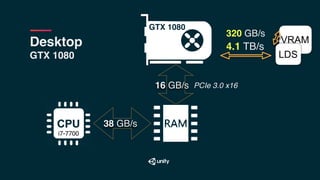
Memory Bandwidth
320 GB/s
38* GB/s
PCIe 3.0 x1616 GB/s
Desktop
GTX 1080
VRAM
GTX 1080
i7-7700
Numbers provided here and onward are
for peak bandwidth. Practical achievable
bandwidth is usually 75% of peak and can
be even lower for CPU.
*)
VRAM
38 GB/s
16 GB/s
Desktop
GTX 1080
4.1 TB/s
320 GB/s
LDS
PCIe 3.0 x16
GTX 1080
i7-7700
81 GB/s

1.7 TB/s
24 GB/s
PCIe 3.0 x88 GB/s
Laptop
MacBookPro2016
VRAM
Radeon PRO 460
LDS
i7-6920HQ
Take Away
MYTH: PCIe is very slow
CPU GPU (PCIe) speed is not too terrible comparing
with common CPU memory ~ 1:3 ratio
PCIe speed is mostly an issue when training with multi-GPU setup
Take Away
Need to access the same data several times on GPU to
make worth the transfer
FLOPs per byte metric
Take Away
Getting results back from GPU can be slow,
but NOT because of PCIe speed
Rather due to latency - CPU & GPU work async!
PS4 Pro — 218 GB/s
iPad Pro — 51 GB/s
Mobile/Console
Unified Memory Architecture
CPU & GPU share same memory
Take Away
CPU & GPU exchange data much faster
But overall bandwidth is limited
RAM
Multi-GPU
Tesla V100
VRAM
8..16* GB/s
7.8 TB/s
900 GB/s
V100
LDS
8..16* GB/s
V100
RAM
…
Motherboard might not have
enough PCIe lanes to provide
16 dedicated lanes per GPU
*
Cloud
P3 instance on AWS
VRAM
68 GB/s
7.8 TB/s
900 GB/s
V100
LDS
V100
NVLink 2.0
25 GB/s
RAM
…
Xeon E5 v4
8 GB/s 8 GB/s
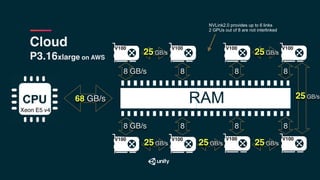
Cloud
P3.16xlarge on AWS
68 GB/s
Xeon E5 v4
V100 V100 V100 V100
V100 V100 V100 V100
RAM
8 GB/s 8 8 8
8 GB/s 8 8 8
25 GB/s 25 GB/s
25 GB/s25 GB/s25 GB/s
25 GB/s
NVLink2.0 provides up to 6 links
2 GPUs out of 8 are not interlinked
Take Away
PCIe speed is the bottleneck, if you need to synchronise multiple GPU
NVLink is essential for fast multi-GPU setup
Programming Model
Programming model is scalar!
Compiler maps 32 scalar “threads” to 1 SIMT instruction
Memory access across 32 “threads” are grouped as well…
32 threads are executed
in lock-step, each step is
1 SIMT instruction
Memory accesses are grouped… wait, what?
Accesses are grouped into large transactions to
max memory bandwidth
Single memory transaction 256 bit
imagine a single
memory read
worth of 32 floats
imagine a single
memory write
worth of 32 floats
Memory accesses are grouped
Called “Coalesced Access to Memory”
Will automatically map to as few
cache line accesses as possible!
address #0
address #4
address #8
address #12
address #16
address #20
address #24
address #28
address #32
address #36
address #40
address #44
address #48
address #52
address #56
address #60
address #64
address #68
address #72
address #76
address #80
Naive “sequential” memory access
Good access pattern on CPU
Naive “sequential” memory access
Good access pattern on CPU
Naive “sequential” memory access
Good access pattern on CPU
Naive “sequential” memory access
Good access pattern on CPU
Naive “sequential” memory access
Turns BAD on GPU!
Naive “sequential” memory access
GPU runs many threads in parallel…
Naive “sequential” memory access
Each thread access different cache line
Naive “sequential” memory access
Each thread access different cache line
Naive “sequential” memory access
Each thread access different cache line
Warp-aware memory access
Good!
Warp-aware memory access
Good! Now nearby threads share cache lines
Warp-aware memory access
Good! Now nearby threads share cache lines
Warp-aware memory access
Another good!
Warp-aware memory access
Another good!
Warp-aware memory access
Another good!
Programming Model part 2
CUDA pipeline
CUDA C PTX cubin / SASS
CUDA C — that is what you usually write
cubin / SASS — that is what actually runs on GPU
CUDA
CUDA C PTX cubin / SASS
PTX — bytecode for GPU
Intermediate step
NVIDIA only, but architecture* independent
cubin / SASS — binary for GPU
NVIDIA only and architecture* specific
By saying ‘architecture’ here, I mean:
Volta, Pascal, Maxwell, Kepler, etc
*
CUDA
CUDA C PTX
nvcc — nvidia open source LLVM based compiler
PTX cubin / SASS
ptxas — nvidia closed source assembler
OpenCL
Doesn’t integrate well with the cross-platform engine
DirectX + OpenCL = ?
PS4 + OpenCL = ?
Mobile + OpenCL = ?
Code is compiled by OpenCL run-time (“driver”)
Result might be hit-or-miss in terms of performance
Performance is not portable
Platform specific Zoo
DirectCompute — Windows, XBOX
Metal Compute — iOS, MacOS
GLSL Compute — PS4, Linux, Android ES3.1
Vulkan Compute is cross-platform, but not widely implemented yet!
All Integrate well with the rendering engine
Asyncronous compute - graphics and compute workloads simultaneously
Unity Compute ☛ bit.ly/unity-compute-docs
Cross compiles to platform specific Compute:
Integrated well with the rendering engine
Performance is not portable
DirectCompute — Windows, XBOX
Metal Compute — iOS, MacOS
GLSL Compute — PS4, Linux, Android ES3.1
Vulkan Compute — Android, …
Practical Performance
Large Matrix Multiplication
Workhorse of Machine Learning
• Fully Connected layer is matrix multiplication
• Convolutional layer has a lot in common /w matrix multiplication
SGEMM in BLAS
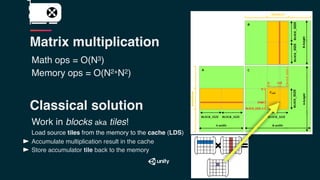
Matrix multiplication
Math ops = O(N3)
Memory ops = O(N2+N2)
Math ops = O(N3)
Memory ops = O(N2+N2)
Classical solution
Work in blocks aka tiles!
Load source tiles from the memory to the cache (LDS)
Accumulate multiplication result in the cache
Store accumulator tile back to the memory
Matrix multiplication
Math ops = O(N3)
Memory ops = O(N2+N2)
Work in blocks aka tiles!
Load source tiles from the memory to the cache (LDS)
Accumulate multiplication result in the cache
Store accumulator tile back to the memory × =
Classical solution
Matrix multiplication
Math ops = O(N3)
Memory ops = O(N2+N2)
Work in blocks aka tiles!
Load source tiles from the memory to the cache (LDS)
Accumulate multiplication result in the cache
Store accumulator tile back to the memory
Classical solution
Matrix multiplication
Math ops = O(N3)
Memory ops = O(N2+N2)
Work in blocks aka tiles!
Load source tiles from the memory to the cache (LDS)
Accumulate multiplication result in the cache
Store accumulator tile back to the memory × =
Classical solution
Matrix multiplication
Not too fast!
Still far from the maximum TFLOPs
Why?
More ALU than LoaD/STore
GPU can issue more MultiplyAdd instructions than
memory reads per cycle
GPU packs more arithmetic (ALU)
than memory access units (LD/ST)
4:1 is a common ratio
GTX 1080
GTX 1080
320 GB/s — VRAM

4.1 TB/s — LDS
30+ TB/s — Registers
GTX 1080 320 GB/s — VRAM

4.1 TB/s — LDS
30+ TB/s — Registers
GTX 1080
File of 16K scalar registers shared for up to 16 warps
Up to 256 scalar (FP32) registers per thread
Matrix multiplication #2
Cache big tiles in LDS
to minimize VRAM bandwidth
Cache small tiles (4x4) in registers
to minimize LD/ST issue
Arithmetic operations on 4x4 blocks
VRAM
LDS
registers
× =
ALU
Take away
Reaching the best performance requires data dimensions to be
multiple of tile size
Minibatch size is especially crucial for Fully Connected layers
Take away
Sweet spot for Convolutional layers is between 16 and 32
Preferably all dimensions divisible by 4 or 8
small tile loaded into registers
Volta TensorCore
Speed of Convolutional Nets
due to minibatch size
Sweet spot:
VGG — 16+
ResNet — 32+
Despite architectural differences between CPU & GPU
what dominates the speed of training Convolutional Neural Net
is the raw TFLOPs of a given chip!*
Xeon E5 v4 @ 2.2Ghz × 20 cores
0.7 TFLOPs**
i7-7700 @ 3.6Ghz × 4 cores
0.36 TFLOPs
iPad Pro, A9Xm @ 2.26Ghz × 2 cores
0.08 TFLOPs
Tesla V100 @ 1.4Ghz × 80 SM cores
14.9 TFLOPs***
GTX 1080 Ti @ 1.5Ghz × 28 SM cores
11.34 TFLOPs
iPad Pro, A9X-PVR-7XT @ 0.45Ghz × 12
0.35 TFLOPs
Numbers for both CPU & GPU are
specified at full FP32 precision
***)CPU numbers here are measured and
do not completely agree with theoretical -
some errors might have crept in ;)
**)
Given that reasonably optimised code is used - like
cuDNN lib for GPU and Intel-MKL-DNN for CPU
*)
Hiring ML + Graphics experts

Trip down the GPU lane with Machine Learning

  • 1.
    Renaldas Zioma Unity Labs Tripdown the GPU lane with Machine Learning @__ReJ__
  • 2.
    Despite architectural differencesbetween CPU & GPU what dominates the speed of training Convolutional Neural Net is the raw TFLOPs of a given chip!
  • 3.
  • 4.
    Single Instruction MultipleData Single Instruction Multiple Threads SIMD SIMT + +
  • 5.
    Single Instruction MultipleData Single Instruction Multiple Threads SIMD SIMT + Lane Instruction applied to all lanes Data Multiple lanes aka vector +
  • 6.
    4 lanes (SSE) 8lanes (AVX) 32 lanes 16 lanes (Mobile GPU) 64 lanes (AMD) SIMD SIMT SIMT is almost the same as SIMD, but much wider + +
  • 7.
    Executes “any” instructionthat has all source operands ready Warp is 32 threads working in-sync Threads must share the same program! 1 core* can keep 64** warps in flight Executes warp that has all source operands ready Very lightweight switch between warps Out Of Order Warp or Wavefront Aim is to hide memory latency By Core here I mean Streaming Multiprocessor (SM) in Nvidia or Compute Unit (CU) in AMD GPU, but not “CUDA core”. While SM and CU are comparable to CPU core, “CUDA core” is more of a marketing term than a full-fledged core. Depends actually - 40 on AMD, 128 on GP100… *) **)
  • 8.
    SIMT in onepicture + + Thread = Lane 1 thread is mapped to 1 hardware lane Warp of threads Each core maintains many warps in flight
  • 9.
    Warp Warp is 32*threads working in a lockstep All threads execute the same program Each thread is mapped to a single SIMT lane Processor will “juggle” warps to hide memory latency The number of threads per warp is actually hardware dependent and ranges from 16 on Mobile to 64 on AMD *)
  • 10.
    Take Away Need lotsof parallel work - in 1000s* of threads IF-ELSE block executes both IF and ELSE** If SIMT lane is not doing work, it is wasted! Number of cores (SM/CU) × number of threads in warp × number of warps in flight For example optimised matrix multiplication kernel would need at least 10240 threads to saturate GTX 1080
 = 20 SMs × 32 warps × 16 *) Unless of course all threads in the warp agree on the result of conditional statement. In such case only one path needs to be executed, either IF or ELSE **)
  • 11.
  • 12.
    L3 + L2+ L1 L2 + L1 Constant + Texture cache LDS (Local Data Store) explicitly programmable “cache” Lots of registers! Cache Cache + “Scratchpad”
  • 13.
    LDS - LocalData Share Piece of small, but ultra fast memory - up to 8TB/s! Explicitly programmable “cache” Fast data exchange between threads NVIDIA calls it “Shared Memory”* But “Shared Memory” is such a generic term, lets be more specific and call it Local Data Share for the rest of the slides. *
  • 14.
    Memory and executionis sequential Some instructions see memory as 2D / 3D blocks Work scheduled in groups One dimensional Multidimensional view
  • 15.
  • 16.
    320 GB/s 38* GB/s PCIe3.0 x1616 GB/s Desktop GTX 1080 VRAM GTX 1080 i7-7700 Numbers provided here and onward are for peak bandwidth. Practical achievable bandwidth is usually 75% of peak and can be even lower for CPU. *)
  • 17.
    VRAM 38 GB/s 16 GB/s Desktop GTX1080 4.1 TB/s 320 GB/s LDS PCIe 3.0 x16 GTX 1080 i7-7700
  • 18.
    81 GB/s
 1.7 TB/s 24GB/s PCIe 3.0 x88 GB/s Laptop MacBookPro2016 VRAM Radeon PRO 460 LDS i7-6920HQ
  • 19.
    Take Away MYTH: PCIeis very slow CPU GPU (PCIe) speed is not too terrible comparing with common CPU memory ~ 1:3 ratio PCIe speed is mostly an issue when training with multi-GPU setup
  • 20.
    Take Away Need toaccess the same data several times on GPU to make worth the transfer FLOPs per byte metric
  • 21.
    Take Away Getting resultsback from GPU can be slow, but NOT because of PCIe speed Rather due to latency - CPU & GPU work async!
  • 22.
    PS4 Pro —218 GB/s iPad Pro — 51 GB/s Mobile/Console Unified Memory Architecture CPU & GPU share same memory Take Away CPU & GPU exchange data much faster But overall bandwidth is limited RAM
  • 23.
    Multi-GPU Tesla V100 VRAM 8..16* GB/s 7.8TB/s 900 GB/s V100 LDS 8..16* GB/s V100 RAM … Motherboard might not have enough PCIe lanes to provide 16 dedicated lanes per GPU *
  • 24.
    Cloud P3 instance onAWS VRAM 68 GB/s 7.8 TB/s 900 GB/s V100 LDS V100 NVLink 2.0 25 GB/s RAM … Xeon E5 v4 8 GB/s 8 GB/s
  • 25.
    Cloud P3.16xlarge on AWS 68GB/s Xeon E5 v4 V100 V100 V100 V100 V100 V100 V100 V100 RAM 8 GB/s 8 8 8 8 GB/s 8 8 8 25 GB/s 25 GB/s 25 GB/s25 GB/s25 GB/s 25 GB/s NVLink2.0 provides up to 6 links 2 GPUs out of 8 are not interlinked
  • 26.
    Take Away PCIe speedis the bottleneck, if you need to synchronise multiple GPU NVLink is essential for fast multi-GPU setup
  • 27.
  • 28.
    Programming model isscalar! Compiler maps 32 scalar “threads” to 1 SIMT instruction Memory access across 32 “threads” are grouped as well… 32 threads are executed in lock-step, each step is 1 SIMT instruction
  • 29.
    Memory accesses aregrouped… wait, what? Accesses are grouped into large transactions to max memory bandwidth Single memory transaction 256 bit imagine a single memory read worth of 32 floats imagine a single memory write worth of 32 floats
  • 30.
    Memory accesses aregrouped Called “Coalesced Access to Memory” Will automatically map to as few cache line accesses as possible! address #0 address #4 address #8 address #12 address #16 address #20 address #24 address #28 address #32 address #36 address #40 address #44 address #48 address #52 address #56 address #60 address #64 address #68 address #72 address #76 address #80
  • 31.
  • 32.
    Naive “sequential” memoryaccess Good access pattern on CPU
  • 33.
    Naive “sequential” memoryaccess Good access pattern on CPU
  • 34.
    Naive “sequential” memoryaccess Good access pattern on CPU
  • 35.
    Naive “sequential” memoryaccess Good access pattern on CPU
  • 36.
    Naive “sequential” memoryaccess Turns BAD on GPU!
  • 37.
    Naive “sequential” memoryaccess GPU runs many threads in parallel…
  • 38.
    Naive “sequential” memoryaccess Each thread access different cache line
  • 39.
    Naive “sequential” memoryaccess Each thread access different cache line
  • 40.
    Naive “sequential” memoryaccess Each thread access different cache line
  • 41.
  • 42.
    Warp-aware memory access Good!Now nearby threads share cache lines
  • 43.
    Warp-aware memory access Good!Now nearby threads share cache lines
  • 44.
  • 45.
  • 46.
  • 47.
  • 48.
    CUDA pipeline CUDA CPTX cubin / SASS CUDA C — that is what you usually write cubin / SASS — that is what actually runs on GPU
  • 49.
    CUDA CUDA C PTXcubin / SASS PTX — bytecode for GPU Intermediate step NVIDIA only, but architecture* independent cubin / SASS — binary for GPU NVIDIA only and architecture* specific By saying ‘architecture’ here, I mean: Volta, Pascal, Maxwell, Kepler, etc *
  • 50.
    CUDA CUDA C PTX nvcc— nvidia open source LLVM based compiler PTX cubin / SASS ptxas — nvidia closed source assembler
  • 51.
    OpenCL Doesn’t integrate wellwith the cross-platform engine DirectX + OpenCL = ? PS4 + OpenCL = ? Mobile + OpenCL = ? Code is compiled by OpenCL run-time (“driver”) Result might be hit-or-miss in terms of performance Performance is not portable
  • 52.
    Platform specific Zoo DirectCompute— Windows, XBOX Metal Compute — iOS, MacOS GLSL Compute — PS4, Linux, Android ES3.1 Vulkan Compute is cross-platform, but not widely implemented yet! All Integrate well with the rendering engine Asyncronous compute - graphics and compute workloads simultaneously
  • 53.
    Unity Compute ☛bit.ly/unity-compute-docs Cross compiles to platform specific Compute: Integrated well with the rendering engine Performance is not portable DirectCompute — Windows, XBOX Metal Compute — iOS, MacOS GLSL Compute — PS4, Linux, Android ES3.1 Vulkan Compute — Android, …
  • 54.
  • 55.
    Large Matrix Multiplication Workhorseof Machine Learning • Fully Connected layer is matrix multiplication • Convolutional layer has a lot in common /w matrix multiplication SGEMM in BLAS
  • 56.
    Matrix multiplication Math ops= O(N3) Memory ops = O(N2+N2)
  • 57.
    Math ops =O(N3) Memory ops = O(N2+N2) Classical solution Work in blocks aka tiles! Load source tiles from the memory to the cache (LDS) Accumulate multiplication result in the cache Store accumulator tile back to the memory Matrix multiplication
  • 58.
    Math ops =O(N3) Memory ops = O(N2+N2) Work in blocks aka tiles! Load source tiles from the memory to the cache (LDS) Accumulate multiplication result in the cache Store accumulator tile back to the memory × = Classical solution Matrix multiplication
  • 59.
    Math ops =O(N3) Memory ops = O(N2+N2) Work in blocks aka tiles! Load source tiles from the memory to the cache (LDS) Accumulate multiplication result in the cache Store accumulator tile back to the memory Classical solution Matrix multiplication
  • 60.
    Math ops =O(N3) Memory ops = O(N2+N2) Work in blocks aka tiles! Load source tiles from the memory to the cache (LDS) Accumulate multiplication result in the cache Store accumulator tile back to the memory × = Classical solution Matrix multiplication
  • 61.
    Not too fast! Stillfar from the maximum TFLOPs Why?
  • 63.
    More ALU thanLoaD/STore GPU can issue more MultiplyAdd instructions than memory reads per cycle GPU packs more arithmetic (ALU) than memory access units (LD/ST) 4:1 is a common ratio
  • 64.
    GTX 1080 GTX 1080 320GB/s — VRAM
 4.1 TB/s — LDS 30+ TB/s — Registers
  • 65.
    GTX 1080 320GB/s — VRAM
 4.1 TB/s — LDS 30+ TB/s — Registers GTX 1080 File of 16K scalar registers shared for up to 16 warps Up to 256 scalar (FP32) registers per thread
  • 66.
    Matrix multiplication #2 Cachebig tiles in LDS to minimize VRAM bandwidth Cache small tiles (4x4) in registers to minimize LD/ST issue Arithmetic operations on 4x4 blocks VRAM LDS registers × = ALU
  • 67.
    Take away Reaching thebest performance requires data dimensions to be multiple of tile size Minibatch size is especially crucial for Fully Connected layers
  • 68.
    Take away Sweet spotfor Convolutional layers is between 16 and 32 Preferably all dimensions divisible by 4 or 8 small tile loaded into registers Volta TensorCore
  • 69.
    Speed of ConvolutionalNets due to minibatch size Sweet spot: VGG — 16+ ResNet — 32+
  • 70.
    Despite architectural differencesbetween CPU & GPU what dominates the speed of training Convolutional Neural Net is the raw TFLOPs of a given chip!* Xeon E5 v4 @ 2.2Ghz × 20 cores 0.7 TFLOPs** i7-7700 @ 3.6Ghz × 4 cores 0.36 TFLOPs iPad Pro, A9Xm @ 2.26Ghz × 2 cores 0.08 TFLOPs Tesla V100 @ 1.4Ghz × 80 SM cores 14.9 TFLOPs*** GTX 1080 Ti @ 1.5Ghz × 28 SM cores 11.34 TFLOPs iPad Pro, A9X-PVR-7XT @ 0.45Ghz × 12 0.35 TFLOPs Numbers for both CPU & GPU are specified at full FP32 precision ***)CPU numbers here are measured and do not completely agree with theoretical - some errors might have crept in ;) **) Given that reasonably optimised code is used - like cuDNN lib for GPU and Intel-MKL-DNN for CPU *)
  • 71.
    Hiring ML +Graphics experts