© 2007 Cisco Systems, Inc. All rights reserved. Cisco Public
ITE PC v4.0
Chapter 1 1
Introduction to Routing
and Packet Forwarding
Routing Protocols and
Concepts – Chapter 1
ITE PC v4.0
Chapter 1 2© 2007 Cisco Systems, Inc. All rights reserved. Cisco Public
Objectives
 Identify a router as a computer with an OS and
hardware designed for the routing process.
 Demonstrate the ability to configure devices and apply
addresses.
 Describe the structure of a routing table.
 Describe how a router determines a path and
switches packets
ITE PC v4.0
Chapter 1 3© 2007 Cisco Systems, Inc. All rights reserved. Cisco Public
Router as a Computer
 Describe the basic purpose of a router
-Computers that specialize in sending packets over the data
network. They are responsible for interconnecting networks by
selecting the best path for a packet to travel and forwarding
packets to their destination
 Routers are the network center
-Routers generally have 2 connections:
-WAN connection (Connection to ISP)
-LAN connection
ITE PC v4.0
Chapter 1 4© 2007 Cisco Systems, Inc. All rights reserved. Cisco Public
Router as a Computer
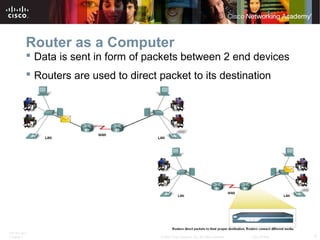
 Data is sent in form of packets between 2 end devices
 Routers are used to direct packet to its destination
ITE PC v4.0
Chapter 1 5© 2007 Cisco Systems, Inc. All rights reserved. Cisco Public
Router as a Computer
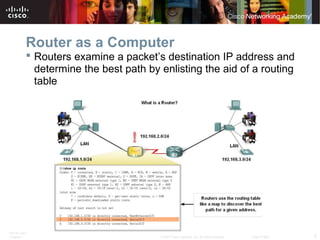
 Routers examine a packet’s destination IP address and
determine the best path by enlisting the aid of a routing
table
ITE PC v4.0
Chapter 1 6© 2007 Cisco Systems, Inc. All rights reserved. Cisco Public
Router as a Computer
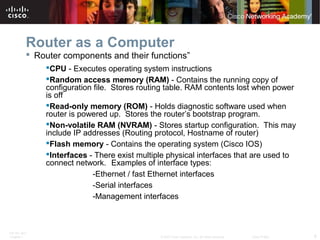
 Router components and their functions”
CPU - Executes operating system instructions
Random access memory (RAM) - Contains the running copy of
configuration file. Stores routing table. RAM contents lost when power
is off
Read-only memory (ROM) - Holds diagnostic software used when
router is powered up. Stores the router’s bootstrap program.
Non-volatile RAM (NVRAM) - Stores startup configuration. This may
include IP addresses (Routing protocol, Hostname of router)
Flash memory - Contains the operating system (Cisco IOS)
Interfaces - There exist multiple physical interfaces that are used to
connect network. Examples of interface types:
-Ethernet / fast Ethernet interfaces
-Serial interfaces
-Management interfaces
ITE PC v4.0
Chapter 1 7© 2007 Cisco Systems, Inc. All rights reserved. Cisco Public
Router as a Computer
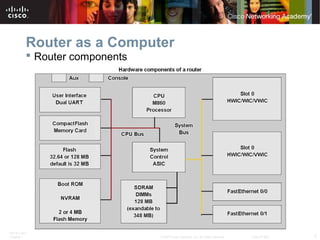
 Router components
ITE PC v4.0
Chapter 1 8© 2007 Cisco Systems, Inc. All rights reserved. Cisco Public
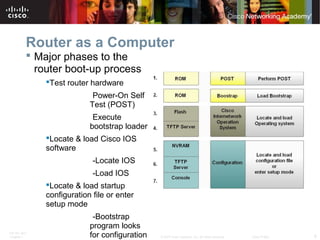
Router as a Computer
 Major phases to the
router boot-up process
Test router hardware
Power-On Self
Test (POST)
Execute
bootstrap loader
Locate & load Cisco IOS
software
-Locate IOS
-Load IOS
Locate & load startup
configuration file or enter
setup mode
-Bootstrap
program looks
for configuration
ITE PC v4.0
Chapter 1 9© 2007 Cisco Systems, Inc. All rights reserved. Cisco Public
Router as a Computer
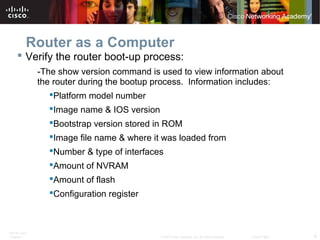
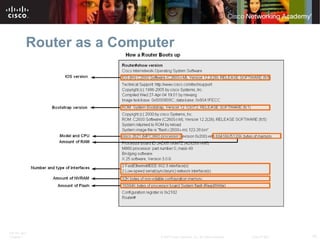
 Verify the router boot-up process:
-The show version command is used to view information about
the router during the bootup process. Information includes:
Platform model number
Image name & IOS version
Bootstrap version stored in ROM
Image file name & where it was loaded from
Number & type of interfaces
Amount of NVRAM
Amount of flash
Configuration register
ITE PC v4.0
Chapter 1 10© 2007 Cisco Systems, Inc. All rights reserved. Cisco Public
Router as a Computer
ITE PC v4.0
Chapter 1 11© 2007 Cisco Systems, Inc. All rights reserved. Cisco Public
Router as a Computer
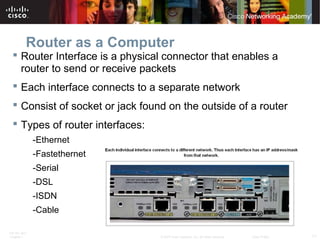
 Router Interface is a physical connector that enables a
router to send or receive packets
 Each interface connects to a separate network
 Consist of socket or jack found on the outside of a router
 Types of router interfaces:
-Ethernet
-Fastethernet
-Serial
-DSL
-ISDN
-Cable
ITE PC v4.0
Chapter 1 12© 2007 Cisco Systems, Inc. All rights reserved. Cisco Public
Router as a Computer
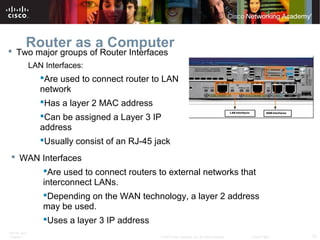
 Two major groups of Router Interfaces
LAN Interfaces:
Are used to connect router to LAN
network
Has a layer 2 MAC address
Can be assigned a Layer 3 IP
address
Usually consist of an RJ-45 jack
 WAN Interfaces
Are used to connect routers to external networks that
interconnect LANs.
Depending on the WAN technology, a layer 2 address
may be used.
Uses a layer 3 IP address
ITE PC v4.0
Chapter 1 13© 2007 Cisco Systems, Inc. All rights reserved. Cisco Public
Router as a Computer
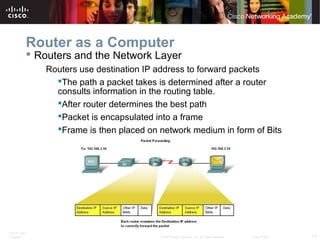
 Routers and the Network Layer
Routers use destination IP address to forward packets
The path a packet takes is determined after a router
consults information in the routing table.
After router determines the best path
Packet is encapsulated into a frame
Frame is then placed on network medium in form of Bits
ITE PC v4.0
Chapter 1 14© 2007 Cisco Systems, Inc. All rights reserved. Cisco Public
Router as a Computer
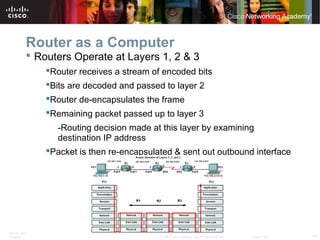
 Routers Operate at Layers 1, 2 & 3
Router receives a stream of encoded bits
Bits are decoded and passed to layer 2
Router de-encapsulates the frame
Remaining packet passed up to layer 3
-Routing decision made at this layer by examining
destination IP address
Packet is then re-encapsulated & sent out outbound interface
ITE PC v4.0
Chapter 1 15© 2007 Cisco Systems, Inc. All rights reserved. Cisco Public
Configure Devices and Apply Addresses
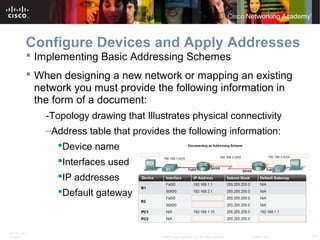
 Implementing Basic Addressing Schemes
 When designing a new network or mapping an existing
network you must provide the following information in
the form of a document:
-Topology drawing that Illustrates physical connectivity
–Address table that provides the following information:
Device name
Interfaces used
IP addresses
Default gateway
ITE PC v4.0
Chapter 1 16© 2007 Cisco Systems, Inc. All rights reserved. Cisco Public
Configure Devices and Apply Addresses
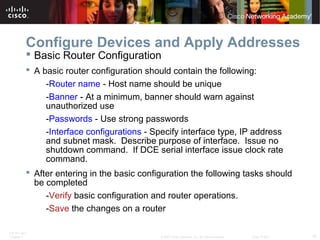
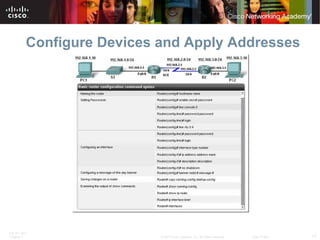
 Basic Router Configuration
 A basic router configuration should contain the following:
-Router name - Host name should be unique
-Banner - At a minimum, banner should warn against
unauthorized use
-Passwords - Use strong passwords
-Interface configurations - Specify interface type, IP address
and subnet mask. Describe purpose of interface. Issue no
shutdown command. If DCE serial interface issue clock rate
command.
 After entering in the basic configuration the following tasks should
be completed
-Verify basic configuration and router operations.
-Save the changes on a router
ITE PC v4.0
Chapter 1 17© 2007 Cisco Systems, Inc. All rights reserved. Cisco Public
Configure Devices and Apply Addresses
ITE PC v4.0
Chapter 1 18© 2007 Cisco Systems, Inc. All rights reserved. Cisco Public
Configure Devices and Apply Addresses
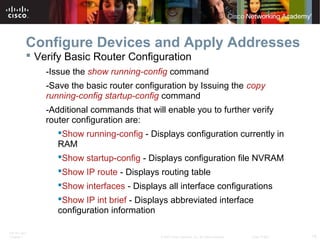
 Verify Basic Router Configuration
-Issue the show running-config command
-Save the basic router configuration by Issuing the copy
running-config startup-config command
-Additional commands that will enable you to further verify
router configuration are:
Show running-config - Displays configuration currently in
RAM
Show startup-config - Displays configuration file NVRAM
Show IP route - Displays routing table
Show interfaces - Displays all interface configurations
Show IP int brief - Displays abbreviated interface
configuration information
ITE PC v4.0
Chapter 1 19© 2007 Cisco Systems, Inc. All rights reserved. Cisco Public
Routing Table Structure
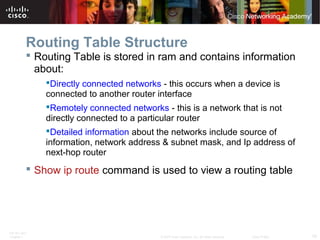
 Routing Table is stored in ram and contains information
about:
Directly connected networks - this occurs when a device is
connected to another router interface
Remotely connected networks - this is a network that is not
directly connected to a particular router
Detailed information about the networks include source of
information, network address & subnet mask, and Ip address of
next-hop router
 Show ip route command is used to view a routing table
ITE PC v4.0
Chapter 1 20© 2007 Cisco Systems, Inc. All rights reserved. Cisco Public
Routing Table Structure
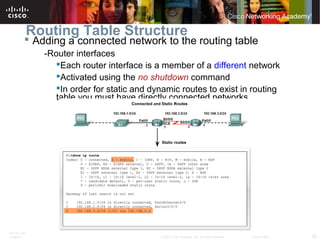
 Adding a connected network to the routing table
-Router interfaces
Each router interface is a member of a different network
Activated using the no shutdown command
In order for static and dynamic routes to exist in routing
table you must have directly connected networks
ITE PC v4.0
Chapter 1 21© 2007 Cisco Systems, Inc. All rights reserved. Cisco Public
Routing Table Structure
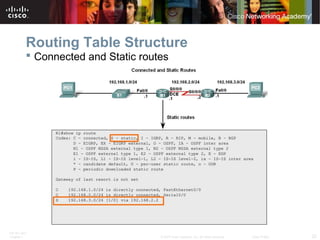
 Static routes in the routing table
-Includes: network address and subnet mask and IP address of
next hop router or exit interface
-Denoted with the code S in the routing table
-Routing tables must contain directly connected networks used
to connect remote networks before static or dynamic routing
can be used
 When to use static routes
-When network only consists of a few routers
-Network is connected to internet only through one ISP
-Hub & spoke topology is used on a large network
ITE PC v4.0
Chapter 1 22© 2007 Cisco Systems, Inc. All rights reserved. Cisco Public
Routing Table Structure
 Connected and Static routes
ITE PC v4.0
Chapter 1 23© 2007 Cisco Systems, Inc. All rights reserved. Cisco Public
Routing Table Structure
 Dynamic routing protocols
-Used to add remote networks to a routing table
-Are used to discover networks
-Are used to update and maintain routing tables
 Automatic network discovery
-Routers are able discover new networks by sharing routing
table information
ITE PC v4.0
Chapter 1 24© 2007 Cisco Systems, Inc. All rights reserved. Cisco Public
Routing Table Structure
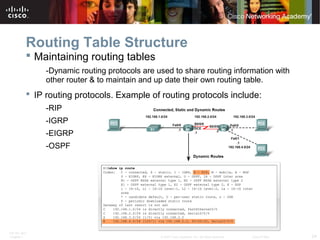
 Maintaining routing tables
-Dynamic routing protocols are used to share routing information with
other router & to maintain and up date their own routing table.
 IP routing protocols. Example of routing protocols include:
-RIP
-IGRP
-EIGRP
-OSPF
ITE PC v4.0
Chapter 1 25© 2007 Cisco Systems, Inc. All rights reserved. Cisco Public
Routing Table Structure
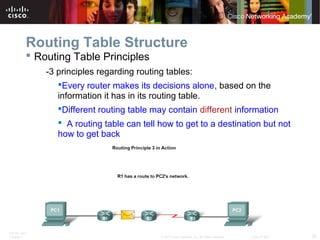
 Routing Table Principles
-3 principles regarding routing tables:
Every router makes its decisions alone, based on the
information it has in its routing table.
Different routing table may contain different information
 A routing table can tell how to get to a destination but not
how to get back
ITE PC v4.0
Chapter 1 26© 2007 Cisco Systems, Inc. All rights reserved. Cisco Public
Routing Table Structure
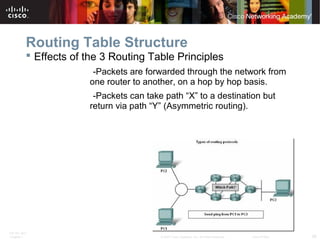
 Effects of the 3 Routing Table Principles
-Packets are forwarded through the network from
one router to another, on a hop by hop basis.
-Packets can take path “X” to a destination but
return via path “Y” (Asymmetric routing).
ITE PC v4.0
Chapter 1 27© 2007 Cisco Systems, Inc. All rights reserved. Cisco Public
Router Paths and Packet Switching
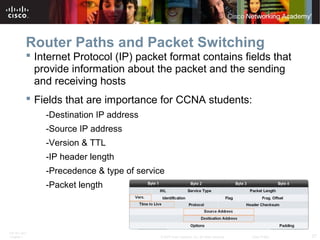
 Internet Protocol (IP) packet format contains fields that
provide information about the packet and the sending
and receiving hosts
 Fields that are importance for CCNA students:
-Destination IP address
-Source IP address
-Version & TTL
-IP header length
-Precedence & type of service
-Packet length
ITE PC v4.0
Chapter 1 28© 2007 Cisco Systems, Inc. All rights reserved. Cisco Public
Router Paths and Packet Switching
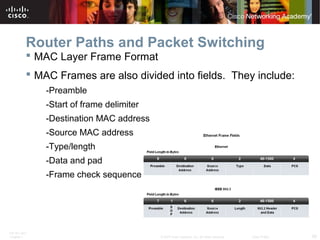
 MAC Layer Frame Format
 MAC Frames are also divided into fields. They include:
-Preamble
-Start of frame delimiter
-Destination MAC address
-Source MAC address
-Type/length
-Data and pad
-Frame check sequence
ITE PC v4.0
Chapter 1 29© 2007 Cisco Systems, Inc. All rights reserved. Cisco Public
Router Paths and Packet Switching
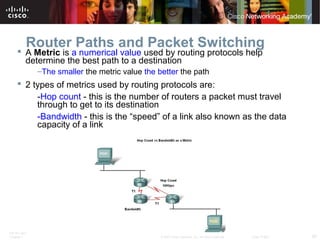
 A Metric is a numerical value used by routing protocols help
determine the best path to a destination
–The smaller the metric value the better the path
 2 types of metrics used by routing protocols are:
-Hop count - this is the number of routers a packet must travel
through to get to its destination
-Bandwidth - this is the “speed” of a link also known as the data
capacity of a link
ITE PC v4.0
Chapter 1 30© 2007 Cisco Systems, Inc. All rights reserved. Cisco Public
Router Paths and Packet Switching
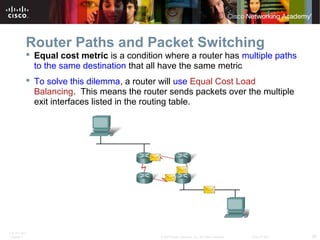
 Equal cost metric is a condition where a router has multiple paths
to the same destination that all have the same metric
 To solve this dilemma, a router will use Equal Cost Load
Balancing. This means the router sends packets over the multiple
exit interfaces listed in the routing table.
ITE PC v4.0
Chapter 1 31© 2007 Cisco Systems, Inc. All rights reserved. Cisco Public
Router Paths and Packet Switching
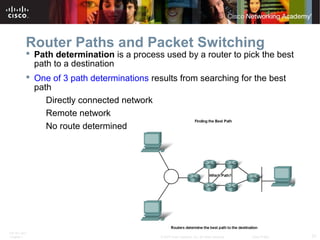
 Path determination is a process used by a router to pick the best
path to a destination
 One of 3 path determinations results from searching for the best
path
Directly connected network
Remote network
No route determined
ITE PC v4.0
Chapter 1 32© 2007 Cisco Systems, Inc. All rights reserved. Cisco Public
Router Paths and Packet Switching
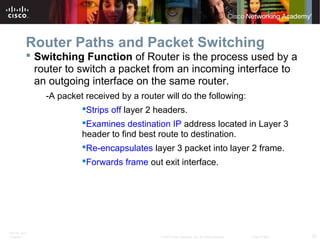
 Switching Function of Router is the process used by a
router to switch a packet from an incoming interface to
an outgoing interface on the same router.
-A packet received by a router will do the following:
Strips off layer 2 headers.
Examines destination IP address located in Layer 3
header to find best route to destination.
Re-encapsulates layer 3 packet into layer 2 frame.
Forwards frame out exit interface.
ITE PC v4.0
Chapter 1 33© 2007 Cisco Systems, Inc. All rights reserved. Cisco Public
Router Paths and Packet Switching
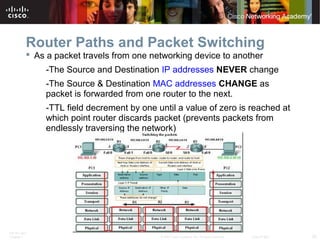
 As a packet travels from one networking device to another
-The Source and Destination IP addresses NEVER change
-The Source & Destination MAC addresses CHANGE as
packet is forwarded from one router to the next.
-TTL field decrement by one until a value of zero is reached at
which point router discards packet (prevents packets from
endlessly traversing the network)
ITE PC v4.0
Chapter 1 34© 2007 Cisco Systems, Inc. All rights reserved. Cisco Public
Router Paths and Packet Switching
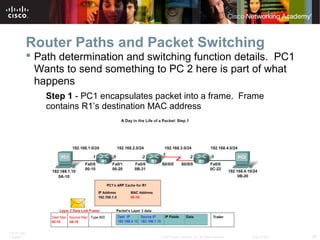
 Path determination and switching function details. PC1
Wants to send something to PC 2 here is part of what
happens
Step 1 - PC1 encapsulates packet into a frame. Frame
contains R1’s destination MAC address
ITE PC v4.0
Chapter 1 35© 2007 Cisco Systems, Inc. All rights reserved. Cisco Public
Router Paths and Packet Switching
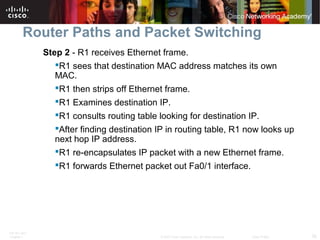
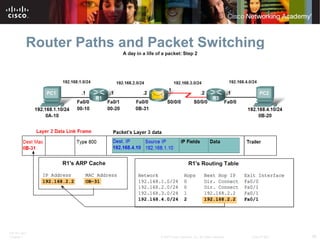
Step 2 - R1 receives Ethernet frame.
R1 sees that destination MAC address matches its own
MAC.
R1 then strips off Ethernet frame.
R1 Examines destination IP.
R1 consults routing table looking for destination IP.
After finding destination IP in routing table, R1 now looks up
next hop IP address.
R1 re-encapsulates IP packet with a new Ethernet frame.
R1 forwards Ethernet packet out Fa0/1 interface.
ITE PC v4.0
Chapter 1 36© 2007 Cisco Systems, Inc. All rights reserved. Cisco Public
Router Paths and Packet Switching
ITE PC v4.0
Chapter 1 37© 2007 Cisco Systems, Inc. All rights reserved. Cisco Public
Router Paths and Packet Switching
 Path determination and switching function details. PC1 Wants to
send something to PC 2 here is part of what happens
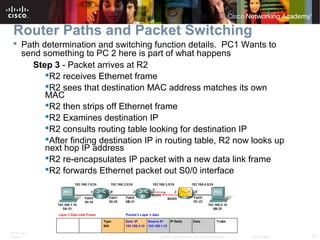
Step 3 - Packet arrives at R2
R2 receives Ethernet frame
R2 sees that destination MAC address matches its own
MAC
R2 then strips off Ethernet frame
R2 Examines destination IP
R2 consults routing table looking for destination IP
After finding destination IP in routing table, R2 now looks up
next hop IP address
R2 re-encapsulates IP packet with a new data link frame
R2 forwards Ethernet packet out S0/0 interface
ITE PC v4.0
Chapter 1 38© 2007 Cisco Systems, Inc. All rights reserved. Cisco Public
Router Paths and Packet Switching
 Path determination and switching function details. PC1 Wants to
send something to PC 2 here is part of what happens
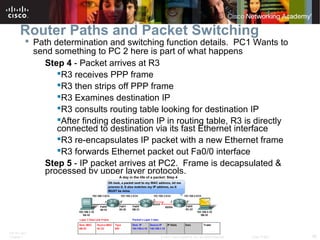
Step 4 - Packet arrives at R3
R3 receives PPP frame
R3 then strips off PPP frame
R3 Examines destination IP
R3 consults routing table looking for destination IP
After finding destination IP in routing table, R3 is directly
connected to destination via its fast Ethernet interface
R3 re-encapsulates IP packet with a new Ethernet frame
R3 forwards Ethernet packet out Fa0/0 interface
Step 5 - IP packet arrives at PC2. Frame is decapsulated &
processed by upper layer protocols.
ITE PC v4.0
Chapter 1 39© 2007 Cisco Systems, Inc. All rights reserved. Cisco Public
Summary
 Routers are computers that specialize in sending data over a network.
 Routers are composed of:
-Hardware i.e. CPU, Memory, System bus, Interfaces
-Software used to direct the routing process
IOS
Configuration file
 Routers need to be configured. Basic configuration consists of:
-Router name
-Router banner
-Password(s)
-Interface configurations i.e. IP address and subnet mask
 Routing tables contain the following information
-Directly connected networks
-Remotely connected networks
-Network addresses and subnet masks
-IP address of next hop address
ITE PC v4.0
Chapter 1 40© 2007 Cisco Systems, Inc. All rights reserved. Cisco Public
Summary
 Routers determine a packets path to its destination by
doing the following
Receiving an encapsulated frame & examining destination
MAC address.
If the MAC address matches then Frame is de-encapsulated
so that router can examine the destination IP address.
If destination IP address is in routing table or there is a static
route then Router determines next hop IP address. Router will
re-encapsulate packet with appropriate layer 2 frame and send
it out to next destination.
Process continues until packet reaches destination.
Note - only the MAC addresses will change the source and
destination IP addresses do not change.
ITE PC v4.0
Chapter 1 41© 2007 Cisco Systems, Inc. All rights reserved. Cisco Public

CCNA Exploration 2 - Chapter 1

  • 1.
    © 2007 CiscoSystems, Inc. All rights reserved. Cisco Public ITE PC v4.0 Chapter 1 1 Introduction to Routing and Packet Forwarding Routing Protocols and Concepts – Chapter 1
  • 2.
    ITE PC v4.0 Chapter1 2© 2007 Cisco Systems, Inc. All rights reserved. Cisco Public Objectives  Identify a router as a computer with an OS and hardware designed for the routing process.  Demonstrate the ability to configure devices and apply addresses.  Describe the structure of a routing table.  Describe how a router determines a path and switches packets
  • 3.
    ITE PC v4.0 Chapter1 3© 2007 Cisco Systems, Inc. All rights reserved. Cisco Public Router as a Computer  Describe the basic purpose of a router -Computers that specialize in sending packets over the data network. They are responsible for interconnecting networks by selecting the best path for a packet to travel and forwarding packets to their destination  Routers are the network center -Routers generally have 2 connections: -WAN connection (Connection to ISP) -LAN connection
  • 4.
    ITE PC v4.0 Chapter1 4© 2007 Cisco Systems, Inc. All rights reserved. Cisco Public Router as a Computer  Data is sent in form of packets between 2 end devices  Routers are used to direct packet to its destination
  • 5.
    ITE PC v4.0 Chapter1 5© 2007 Cisco Systems, Inc. All rights reserved. Cisco Public Router as a Computer  Routers examine a packet’s destination IP address and determine the best path by enlisting the aid of a routing table
  • 6.
    ITE PC v4.0 Chapter1 6© 2007 Cisco Systems, Inc. All rights reserved. Cisco Public Router as a Computer  Router components and their functions” CPU - Executes operating system instructions Random access memory (RAM) - Contains the running copy of configuration file. Stores routing table. RAM contents lost when power is off Read-only memory (ROM) - Holds diagnostic software used when router is powered up. Stores the router’s bootstrap program. Non-volatile RAM (NVRAM) - Stores startup configuration. This may include IP addresses (Routing protocol, Hostname of router) Flash memory - Contains the operating system (Cisco IOS) Interfaces - There exist multiple physical interfaces that are used to connect network. Examples of interface types: -Ethernet / fast Ethernet interfaces -Serial interfaces -Management interfaces
  • 7.
    ITE PC v4.0 Chapter1 7© 2007 Cisco Systems, Inc. All rights reserved. Cisco Public Router as a Computer  Router components
  • 8.
    ITE PC v4.0 Chapter1 8© 2007 Cisco Systems, Inc. All rights reserved. Cisco Public Router as a Computer  Major phases to the router boot-up process Test router hardware Power-On Self Test (POST) Execute bootstrap loader Locate & load Cisco IOS software -Locate IOS -Load IOS Locate & load startup configuration file or enter setup mode -Bootstrap program looks for configuration
  • 9.
    ITE PC v4.0 Chapter1 9© 2007 Cisco Systems, Inc. All rights reserved. Cisco Public Router as a Computer  Verify the router boot-up process: -The show version command is used to view information about the router during the bootup process. Information includes: Platform model number Image name & IOS version Bootstrap version stored in ROM Image file name & where it was loaded from Number & type of interfaces Amount of NVRAM Amount of flash Configuration register
  • 10.
    ITE PC v4.0 Chapter1 10© 2007 Cisco Systems, Inc. All rights reserved. Cisco Public Router as a Computer
  • 11.
    ITE PC v4.0 Chapter1 11© 2007 Cisco Systems, Inc. All rights reserved. Cisco Public Router as a Computer  Router Interface is a physical connector that enables a router to send or receive packets  Each interface connects to a separate network  Consist of socket or jack found on the outside of a router  Types of router interfaces: -Ethernet -Fastethernet -Serial -DSL -ISDN -Cable
  • 12.
    ITE PC v4.0 Chapter1 12© 2007 Cisco Systems, Inc. All rights reserved. Cisco Public Router as a Computer  Two major groups of Router Interfaces LAN Interfaces: Are used to connect router to LAN network Has a layer 2 MAC address Can be assigned a Layer 3 IP address Usually consist of an RJ-45 jack  WAN Interfaces Are used to connect routers to external networks that interconnect LANs. Depending on the WAN technology, a layer 2 address may be used. Uses a layer 3 IP address
  • 13.
    ITE PC v4.0 Chapter1 13© 2007 Cisco Systems, Inc. All rights reserved. Cisco Public Router as a Computer  Routers and the Network Layer Routers use destination IP address to forward packets The path a packet takes is determined after a router consults information in the routing table. After router determines the best path Packet is encapsulated into a frame Frame is then placed on network medium in form of Bits
  • 14.
    ITE PC v4.0 Chapter1 14© 2007 Cisco Systems, Inc. All rights reserved. Cisco Public Router as a Computer  Routers Operate at Layers 1, 2 & 3 Router receives a stream of encoded bits Bits are decoded and passed to layer 2 Router de-encapsulates the frame Remaining packet passed up to layer 3 -Routing decision made at this layer by examining destination IP address Packet is then re-encapsulated & sent out outbound interface
  • 15.
    ITE PC v4.0 Chapter1 15© 2007 Cisco Systems, Inc. All rights reserved. Cisco Public Configure Devices and Apply Addresses  Implementing Basic Addressing Schemes  When designing a new network or mapping an existing network you must provide the following information in the form of a document: -Topology drawing that Illustrates physical connectivity –Address table that provides the following information: Device name Interfaces used IP addresses Default gateway
  • 16.
    ITE PC v4.0 Chapter1 16© 2007 Cisco Systems, Inc. All rights reserved. Cisco Public Configure Devices and Apply Addresses  Basic Router Configuration  A basic router configuration should contain the following: -Router name - Host name should be unique -Banner - At a minimum, banner should warn against unauthorized use -Passwords - Use strong passwords -Interface configurations - Specify interface type, IP address and subnet mask. Describe purpose of interface. Issue no shutdown command. If DCE serial interface issue clock rate command.  After entering in the basic configuration the following tasks should be completed -Verify basic configuration and router operations. -Save the changes on a router
  • 17.
    ITE PC v4.0 Chapter1 17© 2007 Cisco Systems, Inc. All rights reserved. Cisco Public Configure Devices and Apply Addresses
  • 18.
    ITE PC v4.0 Chapter1 18© 2007 Cisco Systems, Inc. All rights reserved. Cisco Public Configure Devices and Apply Addresses  Verify Basic Router Configuration -Issue the show running-config command -Save the basic router configuration by Issuing the copy running-config startup-config command -Additional commands that will enable you to further verify router configuration are: Show running-config - Displays configuration currently in RAM Show startup-config - Displays configuration file NVRAM Show IP route - Displays routing table Show interfaces - Displays all interface configurations Show IP int brief - Displays abbreviated interface configuration information
  • 19.
    ITE PC v4.0 Chapter1 19© 2007 Cisco Systems, Inc. All rights reserved. Cisco Public Routing Table Structure  Routing Table is stored in ram and contains information about: Directly connected networks - this occurs when a device is connected to another router interface Remotely connected networks - this is a network that is not directly connected to a particular router Detailed information about the networks include source of information, network address & subnet mask, and Ip address of next-hop router  Show ip route command is used to view a routing table
  • 20.
    ITE PC v4.0 Chapter1 20© 2007 Cisco Systems, Inc. All rights reserved. Cisco Public Routing Table Structure  Adding a connected network to the routing table -Router interfaces Each router interface is a member of a different network Activated using the no shutdown command In order for static and dynamic routes to exist in routing table you must have directly connected networks
  • 21.
    ITE PC v4.0 Chapter1 21© 2007 Cisco Systems, Inc. All rights reserved. Cisco Public Routing Table Structure  Static routes in the routing table -Includes: network address and subnet mask and IP address of next hop router or exit interface -Denoted with the code S in the routing table -Routing tables must contain directly connected networks used to connect remote networks before static or dynamic routing can be used  When to use static routes -When network only consists of a few routers -Network is connected to internet only through one ISP -Hub & spoke topology is used on a large network
  • 22.
    ITE PC v4.0 Chapter1 22© 2007 Cisco Systems, Inc. All rights reserved. Cisco Public Routing Table Structure  Connected and Static routes
  • 23.
    ITE PC v4.0 Chapter1 23© 2007 Cisco Systems, Inc. All rights reserved. Cisco Public Routing Table Structure  Dynamic routing protocols -Used to add remote networks to a routing table -Are used to discover networks -Are used to update and maintain routing tables  Automatic network discovery -Routers are able discover new networks by sharing routing table information
  • 24.
    ITE PC v4.0 Chapter1 24© 2007 Cisco Systems, Inc. All rights reserved. Cisco Public Routing Table Structure  Maintaining routing tables -Dynamic routing protocols are used to share routing information with other router & to maintain and up date their own routing table.  IP routing protocols. Example of routing protocols include: -RIP -IGRP -EIGRP -OSPF
  • 25.
    ITE PC v4.0 Chapter1 25© 2007 Cisco Systems, Inc. All rights reserved. Cisco Public Routing Table Structure  Routing Table Principles -3 principles regarding routing tables: Every router makes its decisions alone, based on the information it has in its routing table. Different routing table may contain different information  A routing table can tell how to get to a destination but not how to get back
  • 26.
    ITE PC v4.0 Chapter1 26© 2007 Cisco Systems, Inc. All rights reserved. Cisco Public Routing Table Structure  Effects of the 3 Routing Table Principles -Packets are forwarded through the network from one router to another, on a hop by hop basis. -Packets can take path “X” to a destination but return via path “Y” (Asymmetric routing).
  • 27.
    ITE PC v4.0 Chapter1 27© 2007 Cisco Systems, Inc. All rights reserved. Cisco Public Router Paths and Packet Switching  Internet Protocol (IP) packet format contains fields that provide information about the packet and the sending and receiving hosts  Fields that are importance for CCNA students: -Destination IP address -Source IP address -Version & TTL -IP header length -Precedence & type of service -Packet length
  • 28.
    ITE PC v4.0 Chapter1 28© 2007 Cisco Systems, Inc. All rights reserved. Cisco Public Router Paths and Packet Switching  MAC Layer Frame Format  MAC Frames are also divided into fields. They include: -Preamble -Start of frame delimiter -Destination MAC address -Source MAC address -Type/length -Data and pad -Frame check sequence
  • 29.
    ITE PC v4.0 Chapter1 29© 2007 Cisco Systems, Inc. All rights reserved. Cisco Public Router Paths and Packet Switching  A Metric is a numerical value used by routing protocols help determine the best path to a destination –The smaller the metric value the better the path  2 types of metrics used by routing protocols are: -Hop count - this is the number of routers a packet must travel through to get to its destination -Bandwidth - this is the “speed” of a link also known as the data capacity of a link
  • 30.
    ITE PC v4.0 Chapter1 30© 2007 Cisco Systems, Inc. All rights reserved. Cisco Public Router Paths and Packet Switching  Equal cost metric is a condition where a router has multiple paths to the same destination that all have the same metric  To solve this dilemma, a router will use Equal Cost Load Balancing. This means the router sends packets over the multiple exit interfaces listed in the routing table.
  • 31.
    ITE PC v4.0 Chapter1 31© 2007 Cisco Systems, Inc. All rights reserved. Cisco Public Router Paths and Packet Switching  Path determination is a process used by a router to pick the best path to a destination  One of 3 path determinations results from searching for the best path Directly connected network Remote network No route determined
  • 32.
    ITE PC v4.0 Chapter1 32© 2007 Cisco Systems, Inc. All rights reserved. Cisco Public Router Paths and Packet Switching  Switching Function of Router is the process used by a router to switch a packet from an incoming interface to an outgoing interface on the same router. -A packet received by a router will do the following: Strips off layer 2 headers. Examines destination IP address located in Layer 3 header to find best route to destination. Re-encapsulates layer 3 packet into layer 2 frame. Forwards frame out exit interface.
  • 33.
    ITE PC v4.0 Chapter1 33© 2007 Cisco Systems, Inc. All rights reserved. Cisco Public Router Paths and Packet Switching  As a packet travels from one networking device to another -The Source and Destination IP addresses NEVER change -The Source & Destination MAC addresses CHANGE as packet is forwarded from one router to the next. -TTL field decrement by one until a value of zero is reached at which point router discards packet (prevents packets from endlessly traversing the network)
  • 34.
    ITE PC v4.0 Chapter1 34© 2007 Cisco Systems, Inc. All rights reserved. Cisco Public Router Paths and Packet Switching  Path determination and switching function details. PC1 Wants to send something to PC 2 here is part of what happens Step 1 - PC1 encapsulates packet into a frame. Frame contains R1’s destination MAC address
  • 35.
    ITE PC v4.0 Chapter1 35© 2007 Cisco Systems, Inc. All rights reserved. Cisco Public Router Paths and Packet Switching Step 2 - R1 receives Ethernet frame. R1 sees that destination MAC address matches its own MAC. R1 then strips off Ethernet frame. R1 Examines destination IP. R1 consults routing table looking for destination IP. After finding destination IP in routing table, R1 now looks up next hop IP address. R1 re-encapsulates IP packet with a new Ethernet frame. R1 forwards Ethernet packet out Fa0/1 interface.
  • 36.
    ITE PC v4.0 Chapter1 36© 2007 Cisco Systems, Inc. All rights reserved. Cisco Public Router Paths and Packet Switching
  • 37.
    ITE PC v4.0 Chapter1 37© 2007 Cisco Systems, Inc. All rights reserved. Cisco Public Router Paths and Packet Switching  Path determination and switching function details. PC1 Wants to send something to PC 2 here is part of what happens Step 3 - Packet arrives at R2 R2 receives Ethernet frame R2 sees that destination MAC address matches its own MAC R2 then strips off Ethernet frame R2 Examines destination IP R2 consults routing table looking for destination IP After finding destination IP in routing table, R2 now looks up next hop IP address R2 re-encapsulates IP packet with a new data link frame R2 forwards Ethernet packet out S0/0 interface
  • 38.
    ITE PC v4.0 Chapter1 38© 2007 Cisco Systems, Inc. All rights reserved. Cisco Public Router Paths and Packet Switching  Path determination and switching function details. PC1 Wants to send something to PC 2 here is part of what happens Step 4 - Packet arrives at R3 R3 receives PPP frame R3 then strips off PPP frame R3 Examines destination IP R3 consults routing table looking for destination IP After finding destination IP in routing table, R3 is directly connected to destination via its fast Ethernet interface R3 re-encapsulates IP packet with a new Ethernet frame R3 forwards Ethernet packet out Fa0/0 interface Step 5 - IP packet arrives at PC2. Frame is decapsulated & processed by upper layer protocols.
  • 39.
    ITE PC v4.0 Chapter1 39© 2007 Cisco Systems, Inc. All rights reserved. Cisco Public Summary  Routers are computers that specialize in sending data over a network.  Routers are composed of: -Hardware i.e. CPU, Memory, System bus, Interfaces -Software used to direct the routing process IOS Configuration file  Routers need to be configured. Basic configuration consists of: -Router name -Router banner -Password(s) -Interface configurations i.e. IP address and subnet mask  Routing tables contain the following information -Directly connected networks -Remotely connected networks -Network addresses and subnet masks -IP address of next hop address
  • 40.
    ITE PC v4.0 Chapter1 40© 2007 Cisco Systems, Inc. All rights reserved. Cisco Public Summary  Routers determine a packets path to its destination by doing the following Receiving an encapsulated frame & examining destination MAC address. If the MAC address matches then Frame is de-encapsulated so that router can examine the destination IP address. If destination IP address is in routing table or there is a static route then Router determines next hop IP address. Router will re-encapsulate packet with appropriate layer 2 frame and send it out to next destination. Process continues until packet reaches destination. Note - only the MAC addresses will change the source and destination IP addresses do not change.
  • 41.
    ITE PC v4.0 Chapter1 41© 2007 Cisco Systems, Inc. All rights reserved. Cisco Public