More Related Content

PPTX
VLAN chapters for networking CCNA_RSE_Chp6.pptx 
PPTX

PPTX
SRWE_Mod-3.pptxazsDFGHJK,./.L,MNBVCXZzxCV 
PPTX

PPTX

PPTX
CCNA (R & S) Module 03 - Routing & Switching Essentials - Chapter 6 
PDF
CCNAv5 - S2: Chapter3 Vlans 
PPTX
KPUCC-Rs instructor ppt_chapter3_final Similar to CCNA_RSE_Chp6 Virtual Local Area Network

PDF

PPTX
VLANS Routing and Protocols Chapter 12 of Routing 
PPTX

PPT

PPTX
CCNA 2 Routing and Switching v5.0 Chapter 3 
PDF
Cisco Packet Tracer- SRWE_Module_3_VLAN.pdf 
PPTX
VLAN (Virtual Local Area Network) Full details.pptx 
PPT

PPTX
Virtual Local Area Network 
PPTX
Vlans configuration and explanation (Ali).pptx 
PPTX

PDF
W3-Presentation-VLANs-AMA COMPUTER COLLEGE.pdf 
PPTX
LAN Switching and Wireless: Ch3 - Virtual Local Area Networks (VLANs) 
PPT

PPT
Virtual local area network 
PPTX

PPT

PPT

DOC

PPTX
Week 9 VLAN, SISTIM INFORMASI MANAGEMEN More from MonchaiPhaichitchan1

PPTX
CCNA_RSE_Chp4 - Switched Networks for CCNA 
PPTX
CCNA_RSE_Chp5 Switch Configuration For Network 
PPTX
CCNA CISCO Chapter 01 Routing Concepts and Network 
PPTX
CCNA_RSE_Chp10-01 for Networking Engineer.pptx 
PPTX
CCNA_RSE_Chp9-01 for Networking Engineer.pptx 
PPTX
CCNA_RSE_Chp3 - Dynamic Routing of Network 
PPTX
CCNA CISCO Chapter 02 Routing Concepts and Network Recently uploaded

PDF
Security Technologys: Access Control, Firewall, VPN 
PDF
Eredità digitale sugli smartphone: cosa resta di noi nei dispositivi mobili 
PDF
Day 1 - Cloud Security Strategy and Planning ~ 2nd Sight Lab ~ Cloud Security... 
PDF
Six Shifts For 2026 (And The Next Six Years) 
PDF
TrustArc Webinar - Looking Ahead: The 2026 Privacy Landscape 
PDF
Is It Possible to Have Wi-Fi Without an Internet Provider 
PDF
Decoding the DNA: The Digital Networks Act, the Open Internet, and IP interco... 
PPT
software-security-intro in information security.ppt 
PPTX
Cybersecurity Best Practices - Step by Step guidelines 
PPTX
Ritesh_kumar_Aatmanirbhar Bharat: Make in India, Make for the World.pptx 
PDF
Usage Control for Process Discovery through a Trusted Execution Environment 
PDF
Session 1 - Solving Semi-Structured Documents with Document Understanding 
PDF
Generative AI in UiPath: Mastering the Generative Extractor for Intelligent D... 
PDF
Zero Trust & Defense-in-Depth: The Future of Critical Infrastructure Security 
PDF
Igniting the Future: Copilot trends, agentic transformation and product roadm... 
PDF
Knowing and Doing: Knowledge graphs, AI, and work 
PDF
Accelerating Responsible AI Adoption in Public Sector and Private Organizations. 
PDF
The major tech developments for 2026 by Pluralsight, a research and training ... 
PDF
Generative AI in 2026: Hype, Bubble, Winter or The Real Deal? 
PDF
Greetings All Students Update 3 by Mia Corp CCNA_RSE_Chp6 Virtual Local Area Network
- 1.
- 2.
2
© 2016 Ciscoand/or its affiliates. All rights reserved. Cisco Confidential
6.1 VLAN Segmentation
• Explain the purpose of VLANs in a switched network.
• Explain how a switch forwards frames based on VLAN configuration in a multi-switch
environment.
6.2 VLAN Implementations
• Configure a switch port to be assigned to a VLAN based on requirements.
• Configure a trunk port on a LAN switch.
• Troubleshoot VLAN and trunk configurations in a switched network.
6.3 Inter-VLAN Routing Using Routers
• Describe the two options for configuring Inter-VLAN routing.
• Configure legacy Inter-VLAN Routing.
• Configure Router-on-a-Stick Inter-VLAN Routing
Chapter 6 - Sections & Objectives
- 3.
3
© 2016 Ciscoand/or its affiliates. All rights reserved. Cisco Confidential
6.1 VLAN Segmentation
- 4.
4
© 2016 Ciscoand/or its affiliates. All rights reserved. Cisco Confidential
6.1 VLAN Segmentation
- 5.
5
© 2016 Ciscoand/or its affiliates. All rights reserved. Cisco Confidential
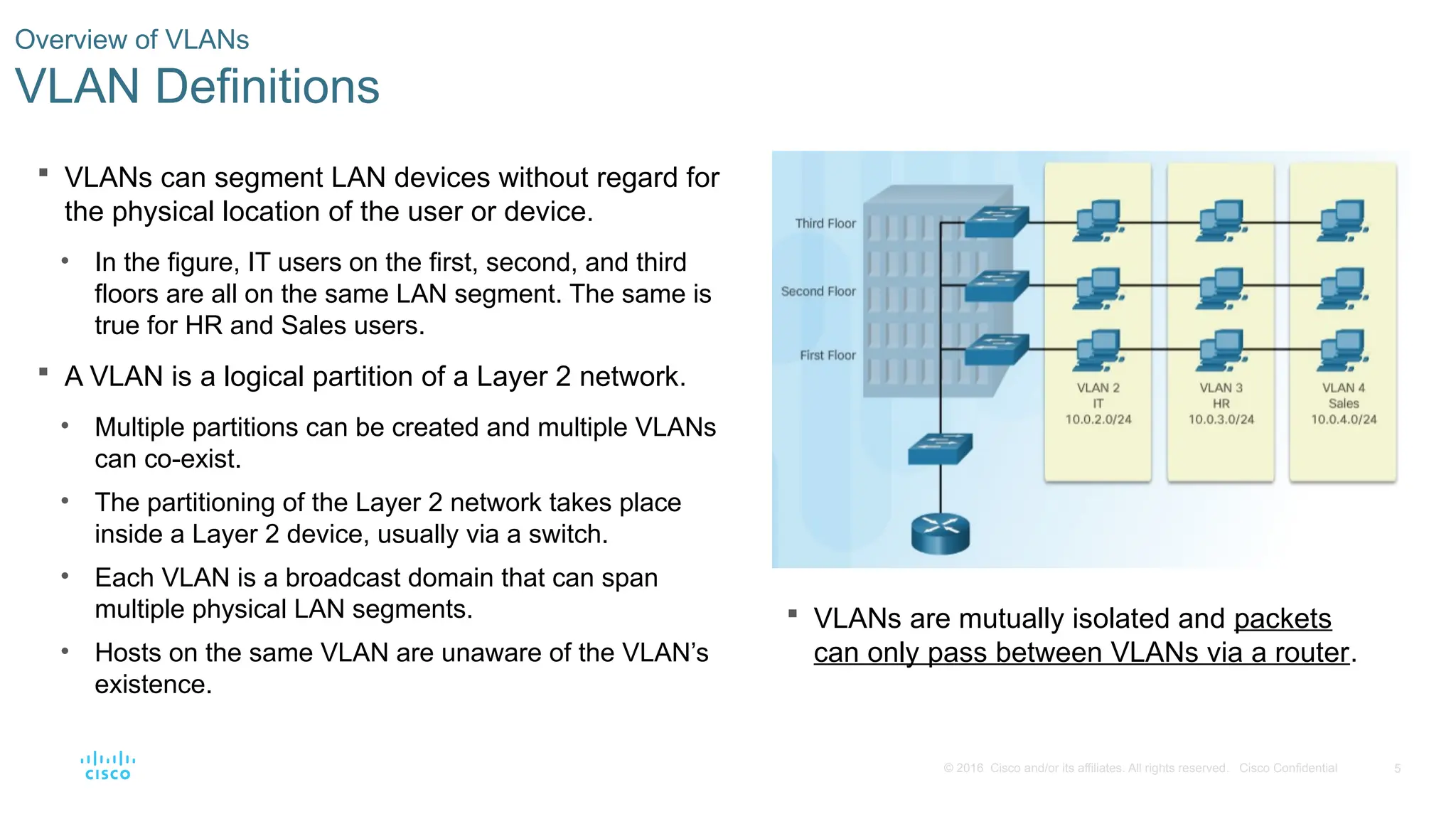
VLANs can segment LAN devices without regard for
the physical location of the user or device.
• In the figure, IT users on the first, second, and third
floors are all on the same LAN segment. The same is
true for HR and Sales users.
A VLAN is a logical partition of a Layer 2 network.
• Multiple partitions can be created and multiple VLANs
can co-exist.
• The partitioning of the Layer 2 network takes place
inside a Layer 2 device, usually via a switch.
• Each VLAN is a broadcast domain that can span
multiple physical LAN segments.
• Hosts on the same VLAN are unaware of the VLAN’s
existence.
Overview of VLANs
VLAN Definitions
VLANs are mutually isolated and packets
can only pass between VLANs via a router.
- 6.
6
© 2016 Ciscoand/or its affiliates. All rights reserved. Cisco Confidential
Overview of VLANs
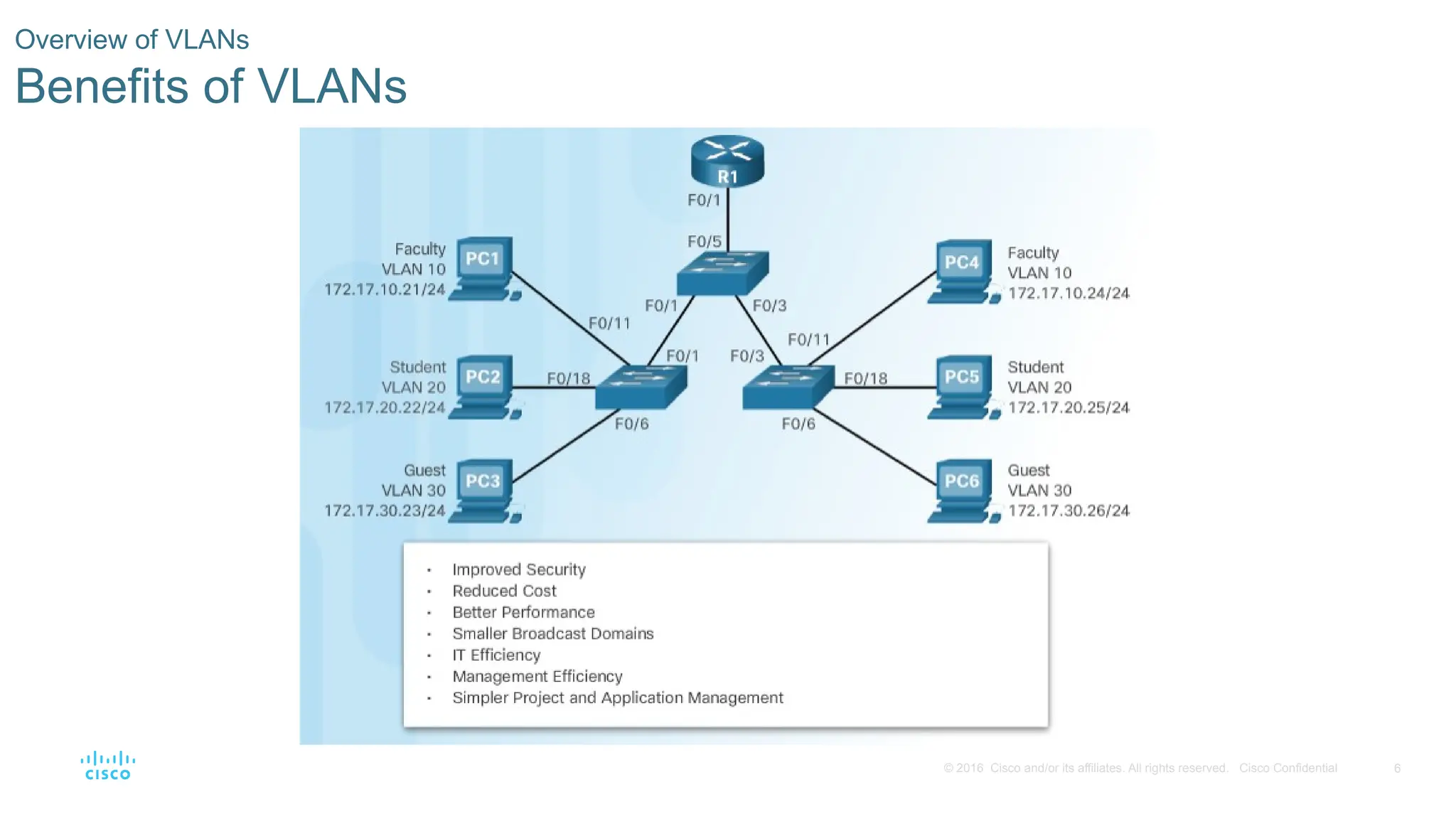
Benefits of VLANs
- 7.
7
© 2016 Ciscoand/or its affiliates. All rights reserved. Cisco Confidential
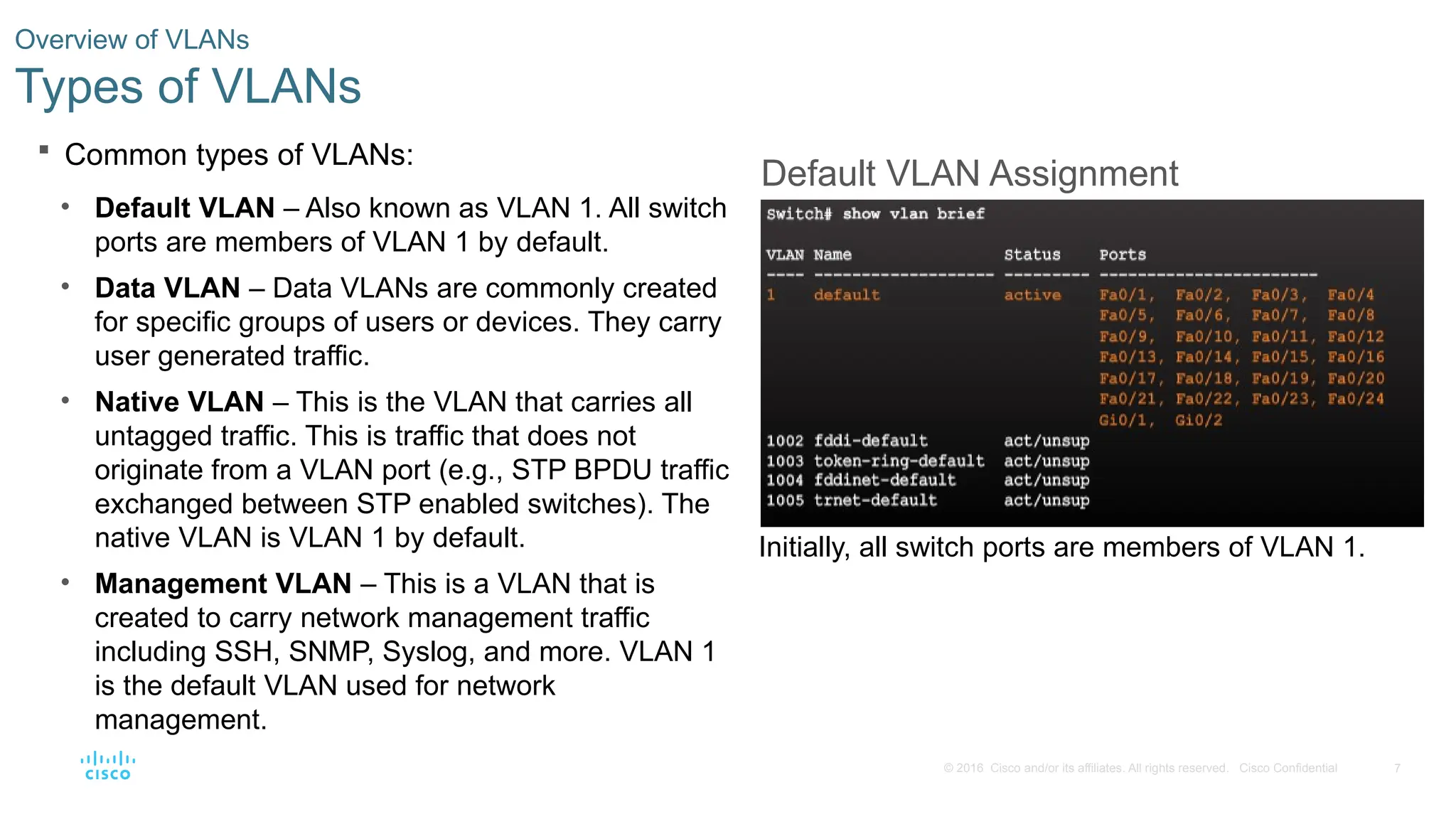
Common types of VLANs:
• Default VLAN – Also known as VLAN 1. All switch
ports are members of VLAN 1 by default.
• Data VLAN – Data VLANs are commonly created
for specific groups of users or devices. They carry
user generated traffic.
• Native VLAN – This is the VLAN that carries all
untagged traffic. This is traffic that does not
originate from a VLAN port (e.g., STP BPDU traffic
exchanged between STP enabled switches). The
native VLAN is VLAN 1 by default.
• Management VLAN – This is a VLAN that is
created to carry network management traffic
including SSH, SNMP, Syslog, and more. VLAN 1
is the default VLAN used for network
management.
Overview of VLANs
Types of VLANs
Default VLAN Assignment
Initially, all switch ports are members of VLAN 1.
- 8.
8
© 2016 Ciscoand/or its affiliates. All rights reserved. Cisco Confidential
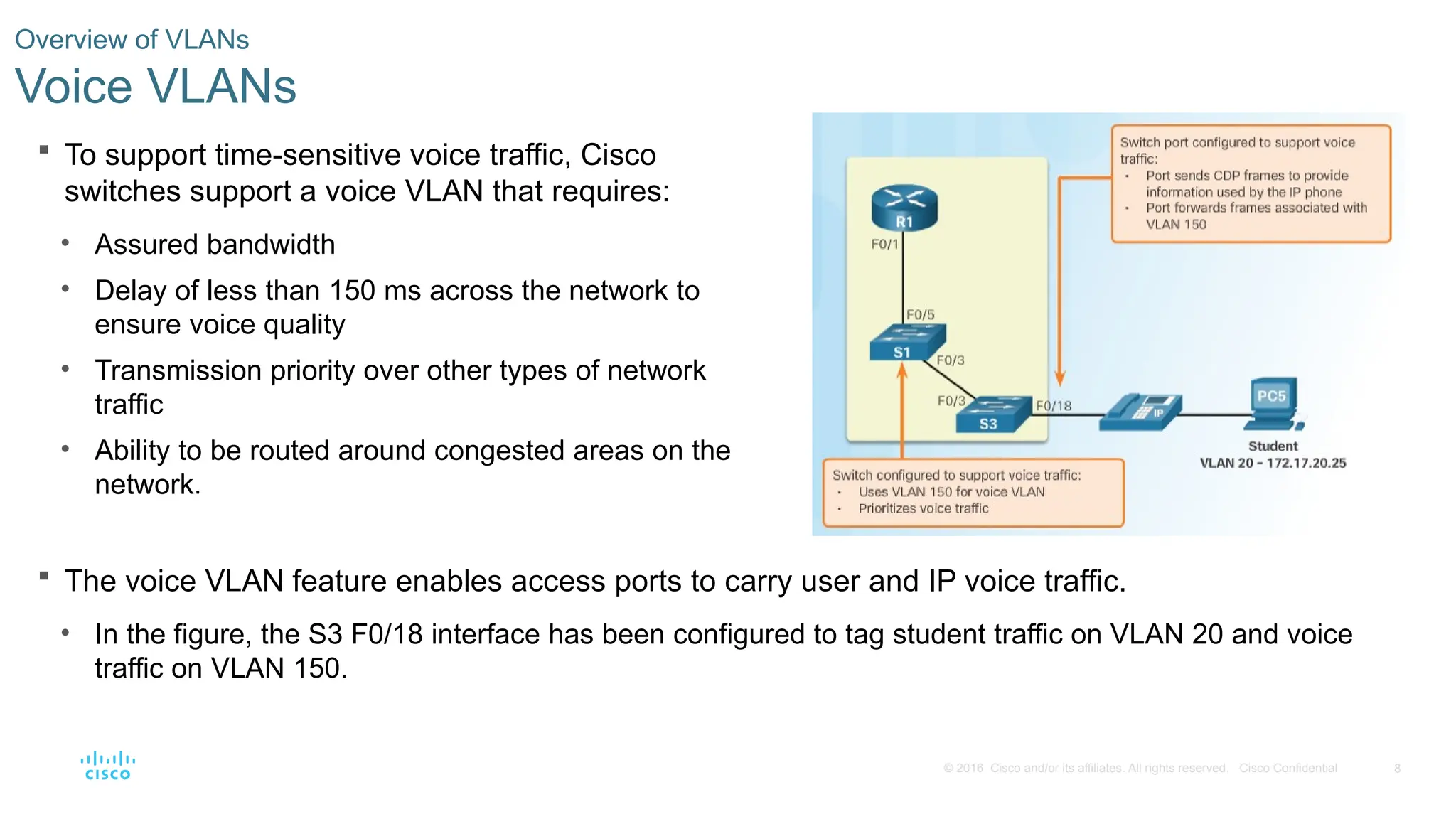
To support time-sensitive voice traffic, Cisco
switches support a voice VLAN that requires:
• Assured bandwidth
• Delay of less than 150 ms across the network to
ensure voice quality
• Transmission priority over other types of network
traffic
• Ability to be routed around congested areas on the
network.
Overview of VLANs
Voice VLANs
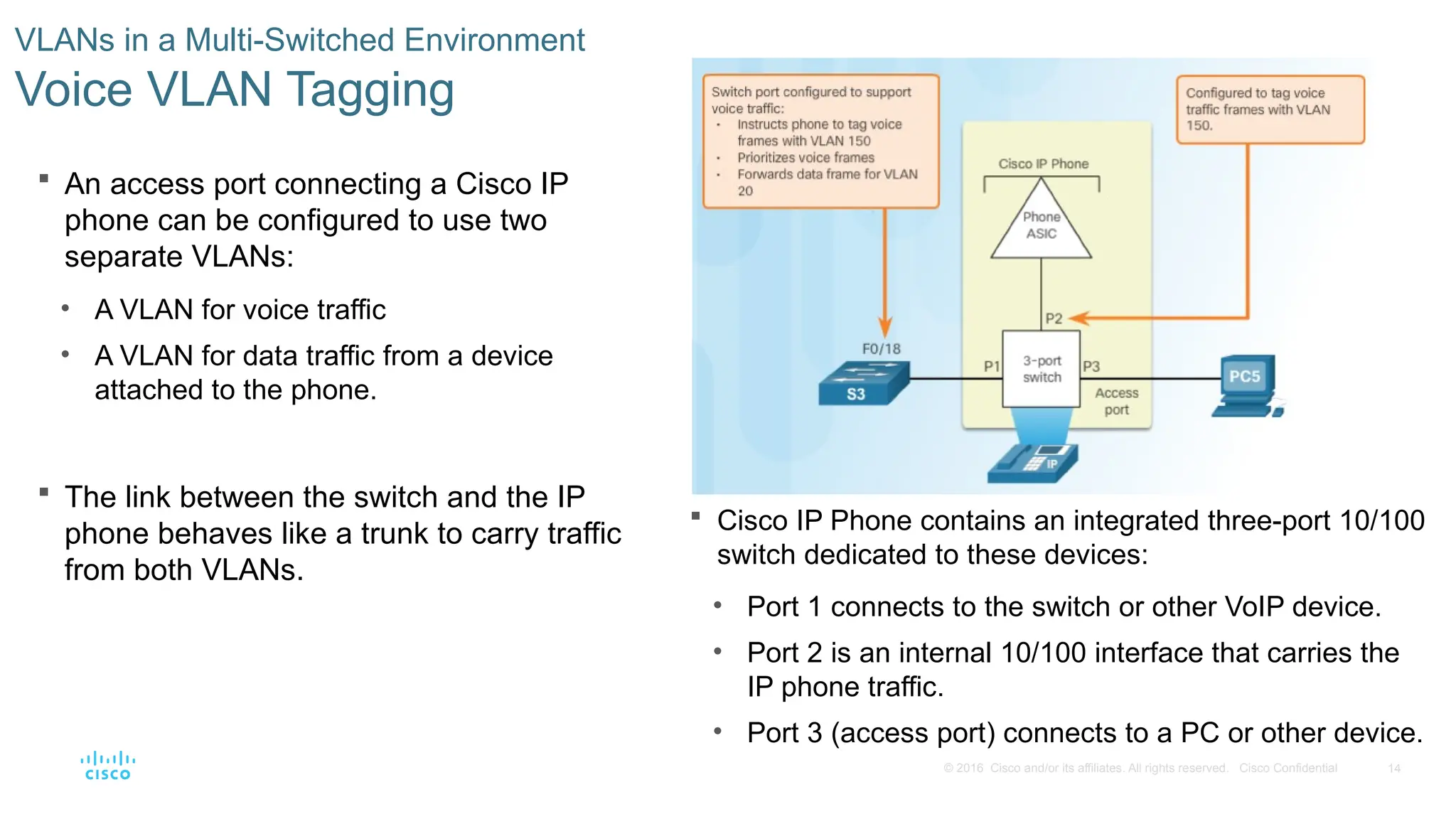
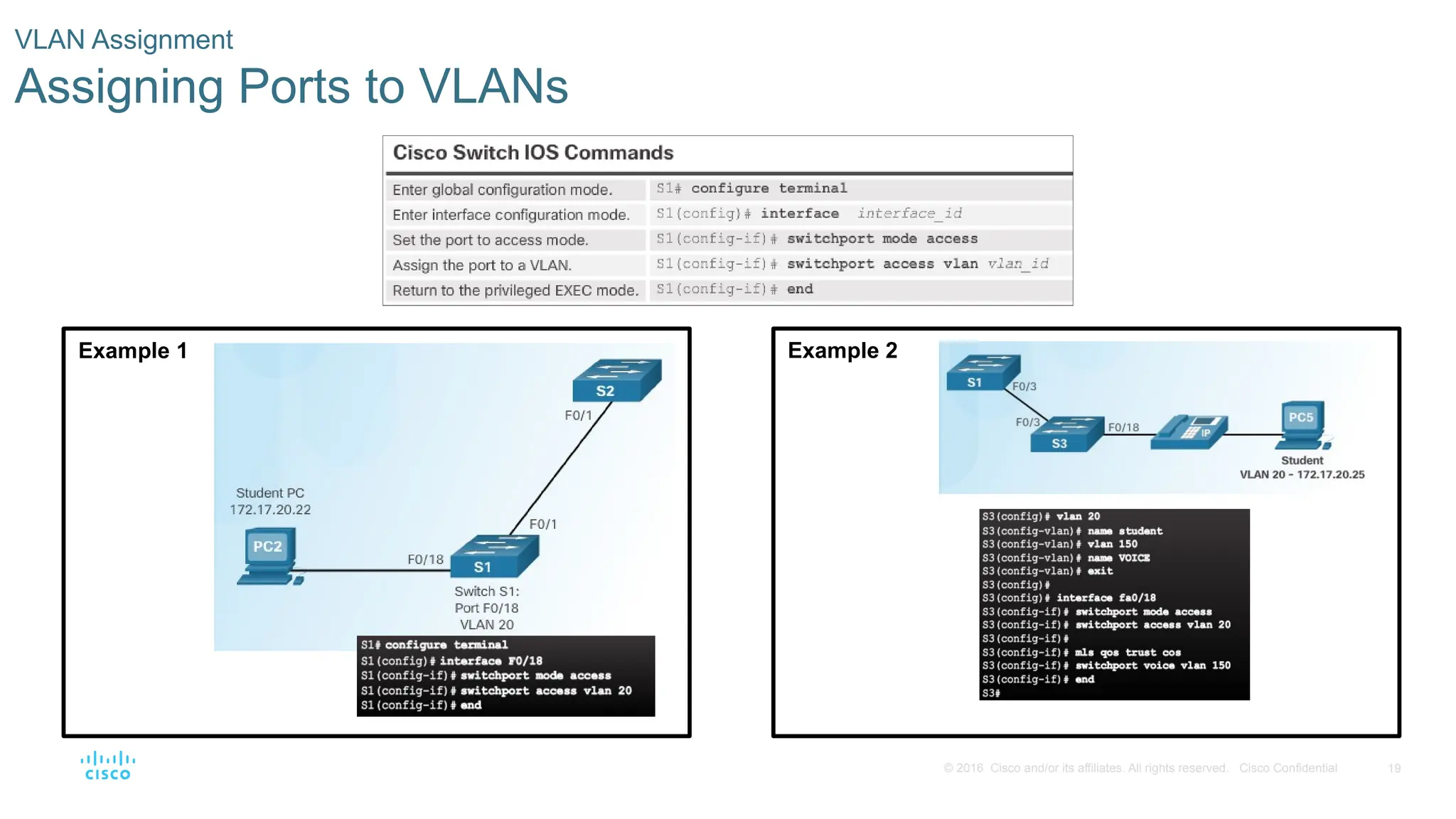
The voice VLAN feature enables access ports to carry user and IP voice traffic.
• In the figure, the S3 F0/18 interface has been configured to tag student traffic on VLAN 20 and voice
traffic on VLAN 150.
- 9.
9
© 2016 Ciscoand/or its affiliates. All rights reserved. Cisco Confidential
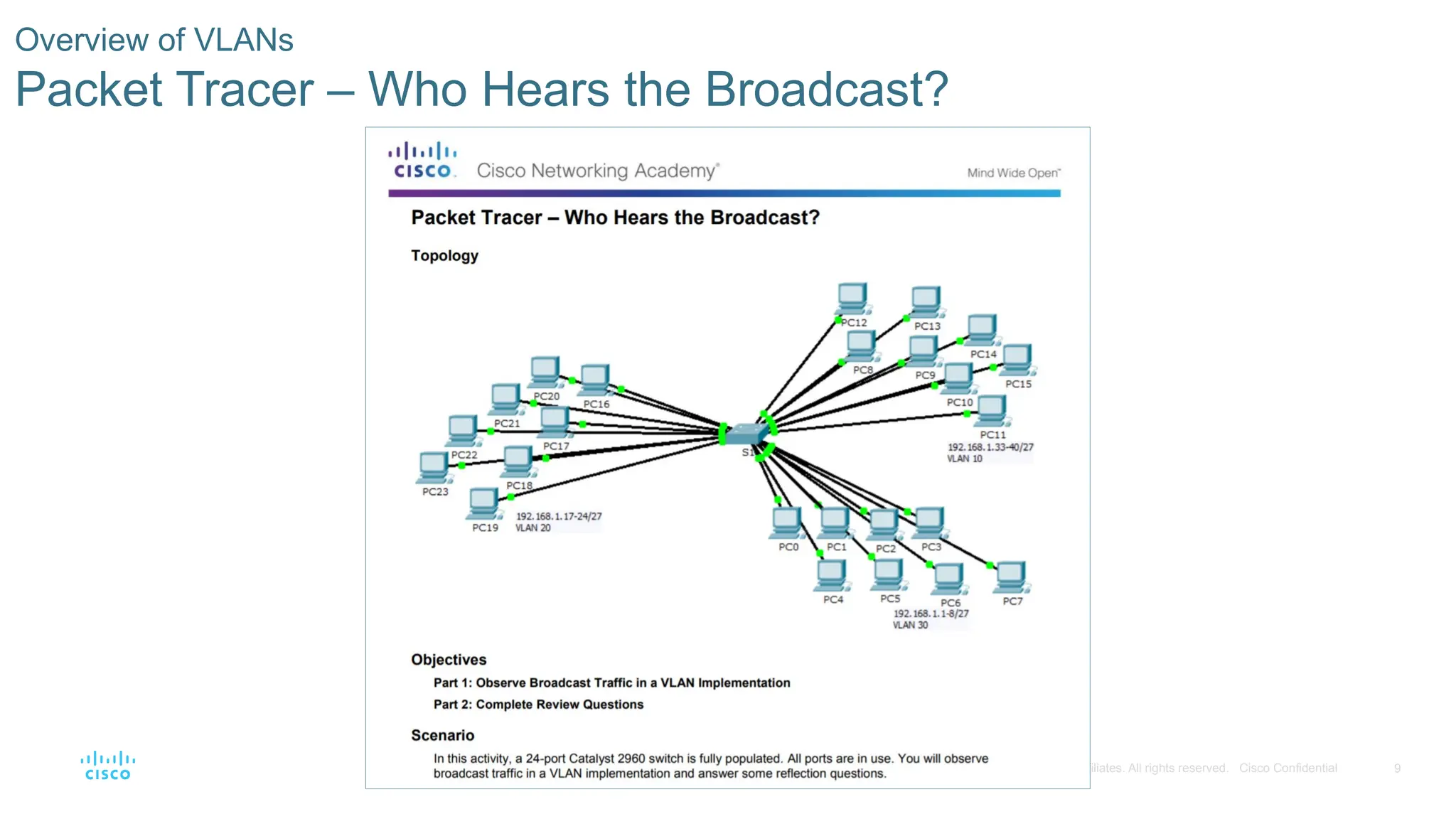
Overview of VLANs
Packet Tracer – Who Hears the Broadcast?
- 10.
10
© 2016 Ciscoand/or its affiliates. All rights reserved. Cisco Confidential
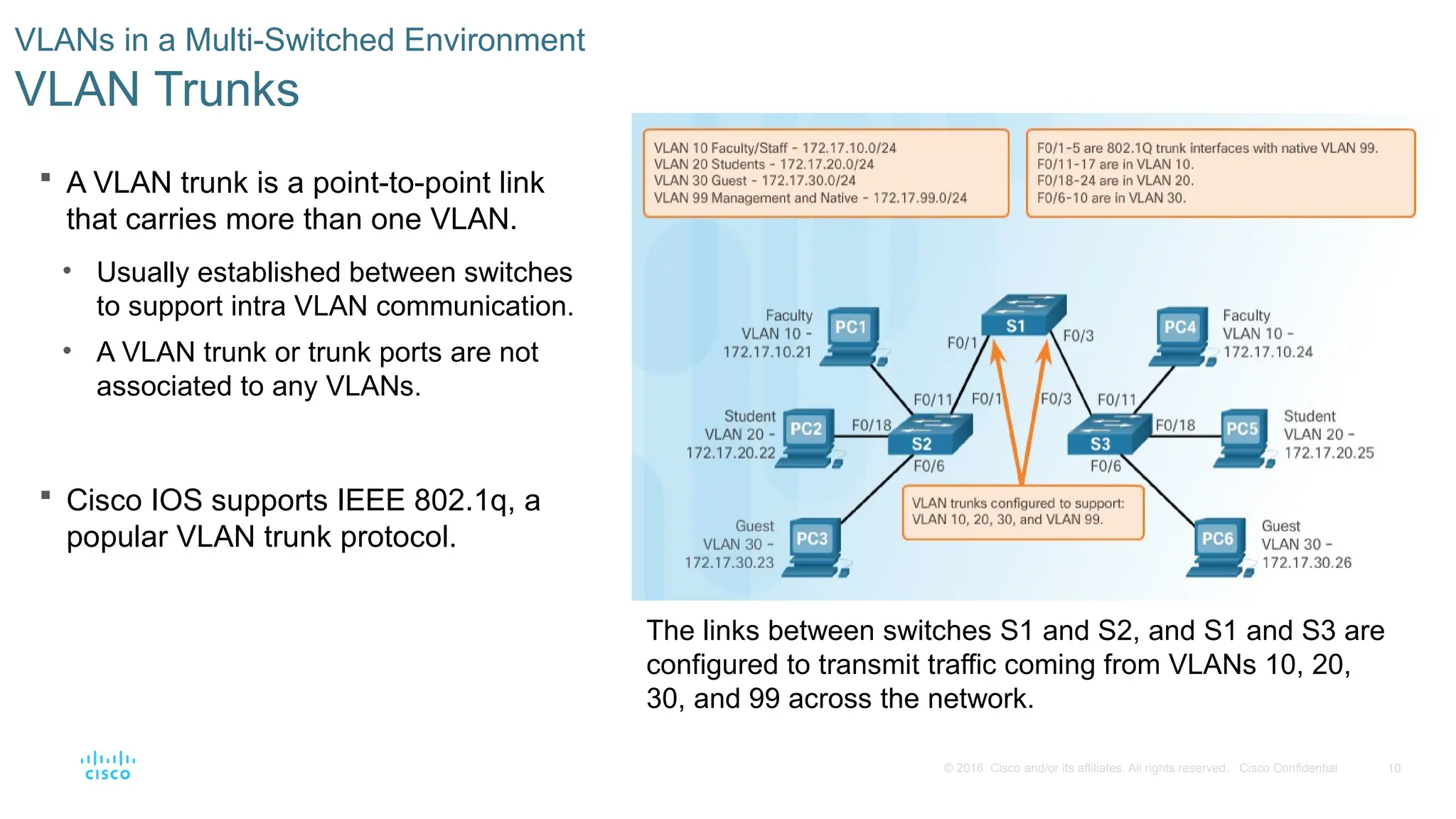
A VLAN trunk is a point-to-point link
that carries more than one VLAN.
• Usually established between switches
to support intra VLAN communication.
• A VLAN trunk or trunk ports are not
associated to any VLANs.
Cisco IOS supports IEEE 802.1q, a
popular VLAN trunk protocol.
VLANs in a Multi-Switched Environment
VLAN Trunks
The links between switches S1 and S2, and S1 and S3 are
configured to transmit traffic coming from VLANs 10, 20,
30, and 99 across the network.
- 11.
11
© 2016 Ciscoand/or its affiliates. All rights reserved. Cisco Confidential
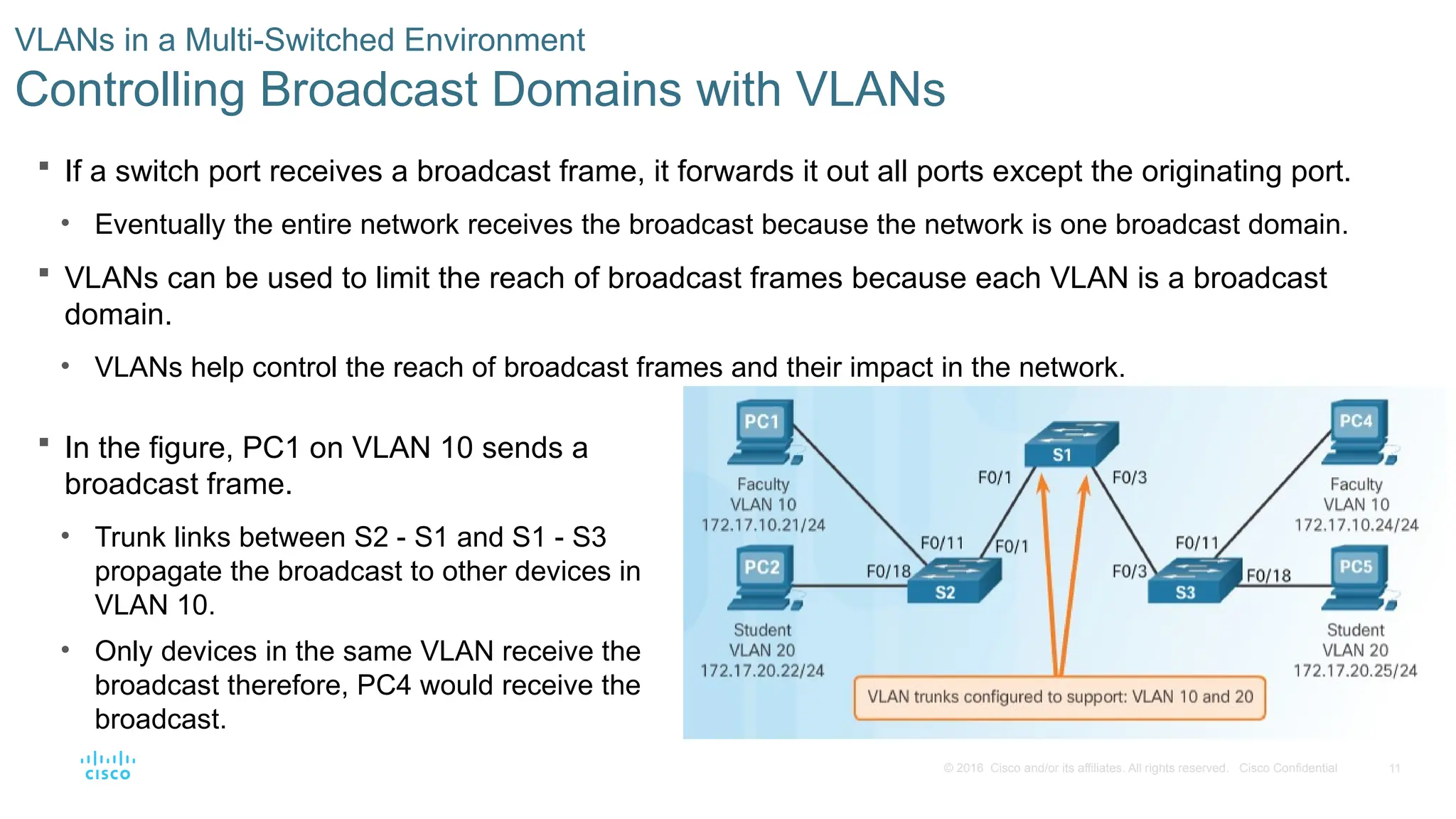
If a switch port receives a broadcast frame, it forwards it out all ports except the originating port.
• Eventually the entire network receives the broadcast because the network is one broadcast domain.
VLANs can be used to limit the reach of broadcast frames because each VLAN is a broadcast
domain.
• VLANs help control the reach of broadcast frames and their impact in the network.
VLANs in a Multi-Switched Environment
Controlling Broadcast Domains with VLANs
In the figure, PC1 on VLAN 10 sends a
broadcast frame.
• Trunk links between S2 - S1 and S1 - S3
propagate the broadcast to other devices in
VLAN 10.
• Only devices in the same VLAN receive the
broadcast therefore, PC4 would receive the
broadcast.
- 12.
12
© 2016 Ciscoand/or its affiliates. All rights reserved. Cisco Confidential
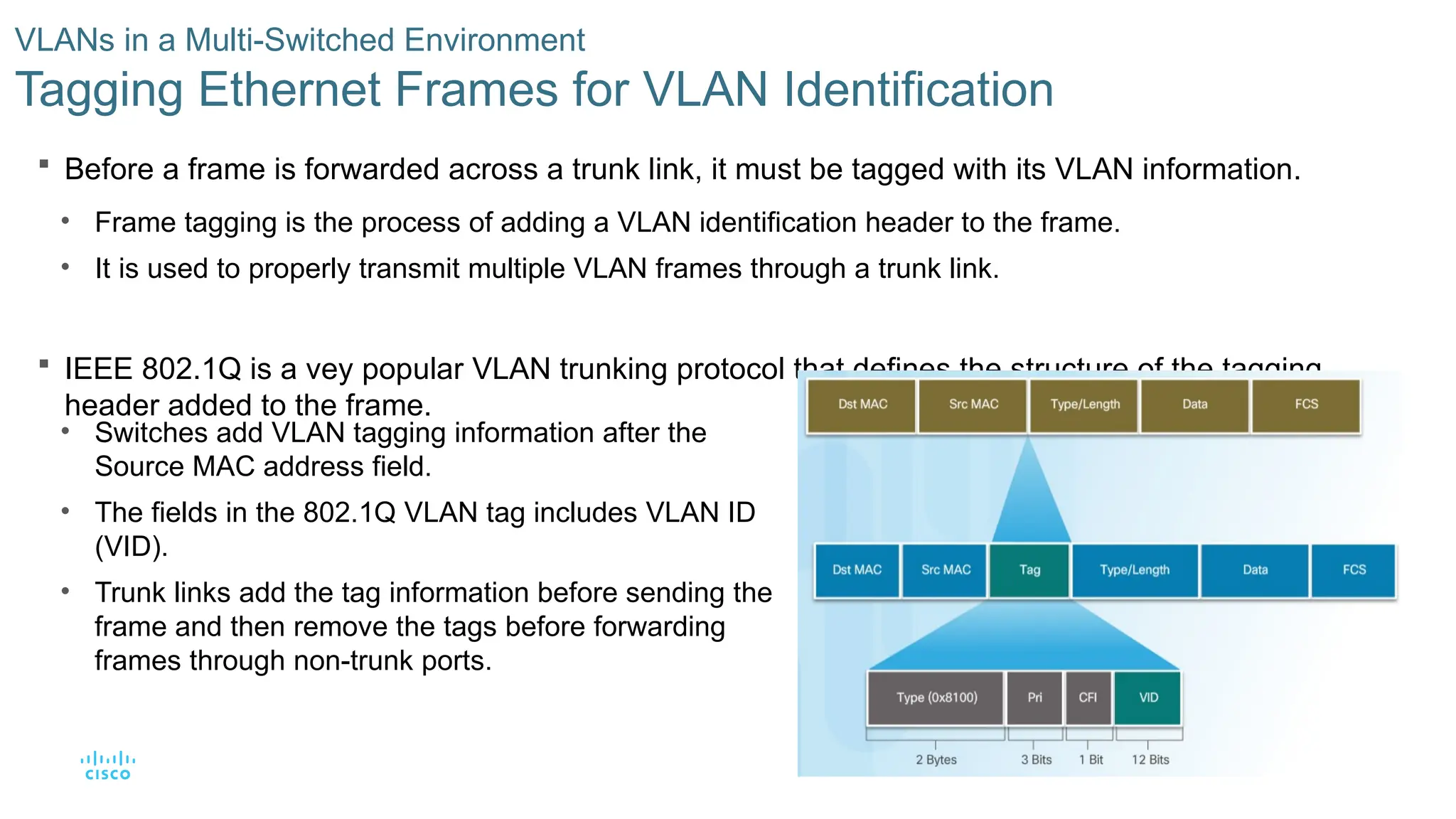
Before a frame is forwarded across a trunk link, it must be tagged with its VLAN information.
• Frame tagging is the process of adding a VLAN identification header to the frame.
• It is used to properly transmit multiple VLAN frames through a trunk link.
IEEE 802.1Q is a vey popular VLAN trunking protocol that defines the structure of the tagging
header added to the frame.
VLANs in a Multi-Switched Environment
Tagging Ethernet Frames for VLAN Identification
• Switches add VLAN tagging information after the
Source MAC address field.
• The fields in the 802.1Q VLAN tag includes VLAN ID
(VID).
• Trunk links add the tag information before sending the
frame and then remove the tags before forwarding
frames through non-trunk ports.
- 13.
13
© 2016 Ciscoand/or its affiliates. All rights reserved. Cisco Confidential
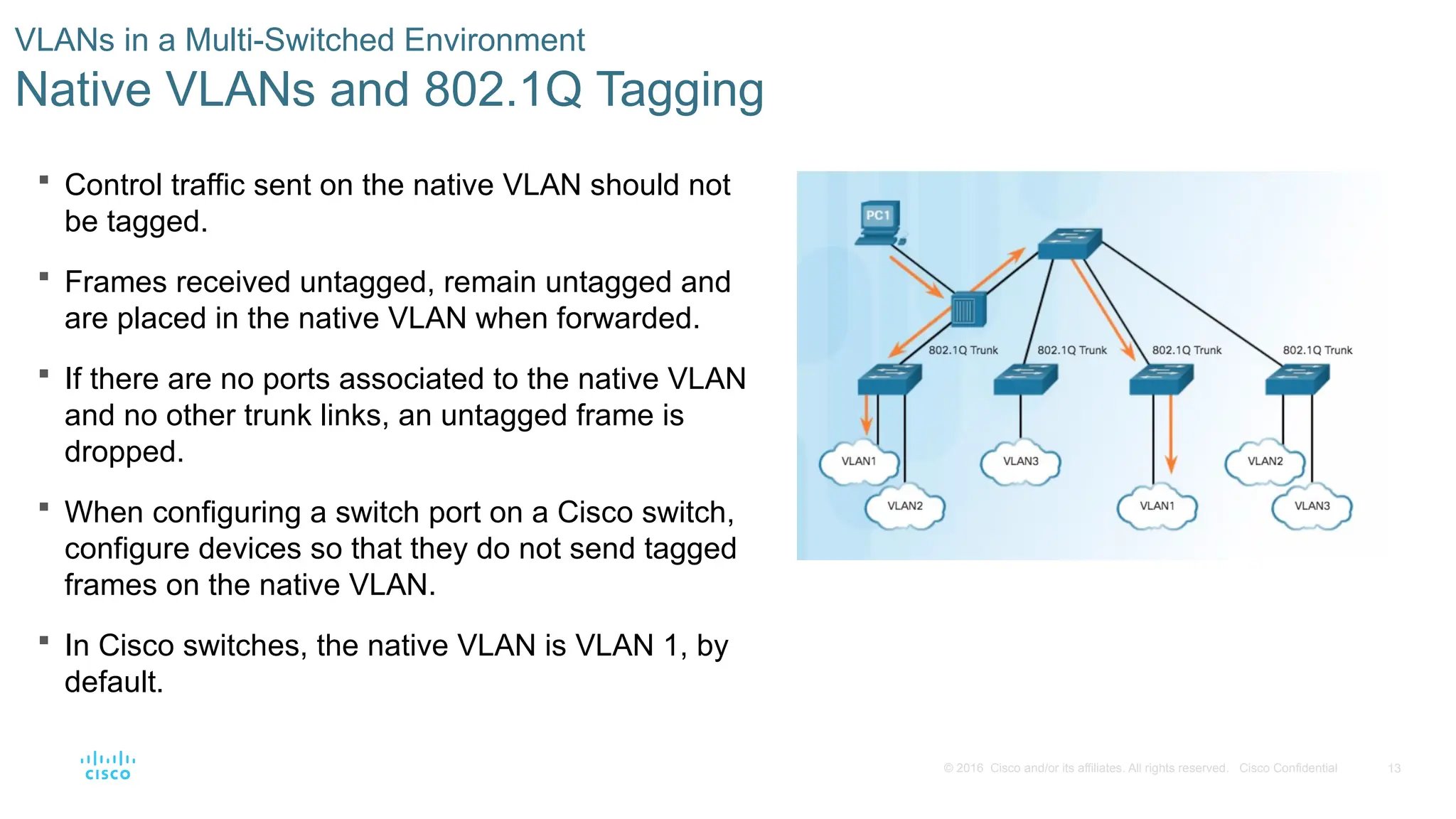
Control traffic sent on the native VLAN should not
be tagged.
Frames received untagged, remain untagged and
are placed in the native VLAN when forwarded.
If there are no ports associated to the native VLAN
and no other trunk links, an untagged frame is
dropped.
When configuring a switch port on a Cisco switch,
configure devices so that they do not send tagged
frames on the native VLAN.
In Cisco switches, the native VLAN is VLAN 1, by
default.
VLANs in a Multi-Switched Environment
Native VLANs and 802.1Q Tagging
- 14.
14
© 2016 Ciscoand/or its affiliates. All rights reserved. Cisco Confidential
An access port connecting a Cisco IP
phone can be configured to use two
separate VLANs:
• A VLAN for voice traffic
• A VLAN for data traffic from a device
attached to the phone.
The link between the switch and the IP
phone behaves like a trunk to carry traffic
from both VLANs.
VLANs in a Multi-Switched Environment
Voice VLAN Tagging
Cisco IP Phone contains an integrated three-port 10/100
switch dedicated to these devices:
• Port 1 connects to the switch or other VoIP device.
• Port 2 is an internal 10/100 interface that carries the
IP phone traffic.
• Port 3 (access port) connects to a PC or other device.
- 15.
15
© 2016 Ciscoand/or its affiliates. All rights reserved. Cisco Confidential
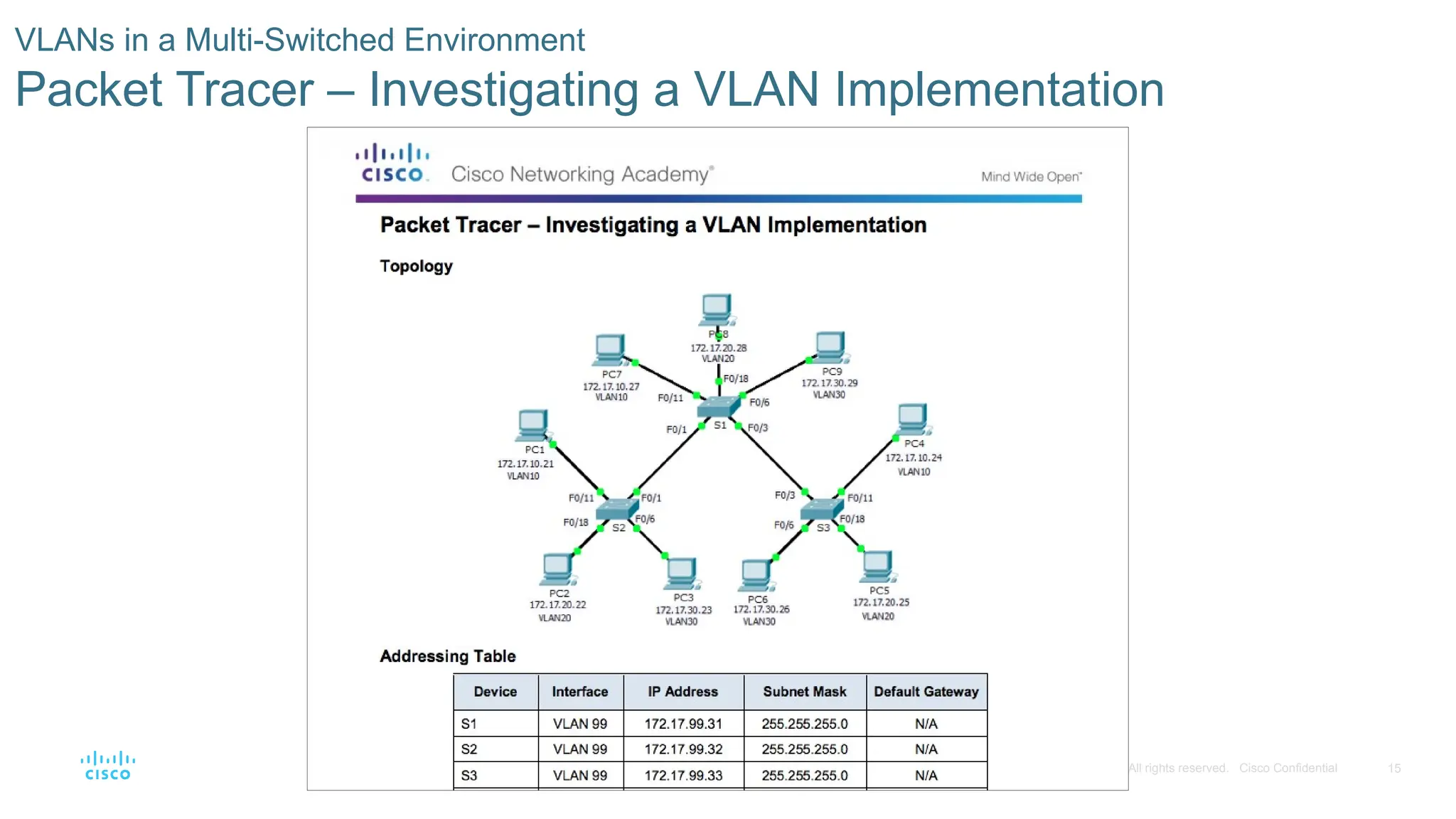
VLANs in a Multi-Switched Environment
Packet Tracer – Investigating a VLAN Implementation
- 16.
16
© 2016 Ciscoand/or its affiliates. All rights reserved. Cisco Confidential
6.2 VLAN Implementation
- 17.
17
© 2016 Ciscoand/or its affiliates. All rights reserved. Cisco Confidential
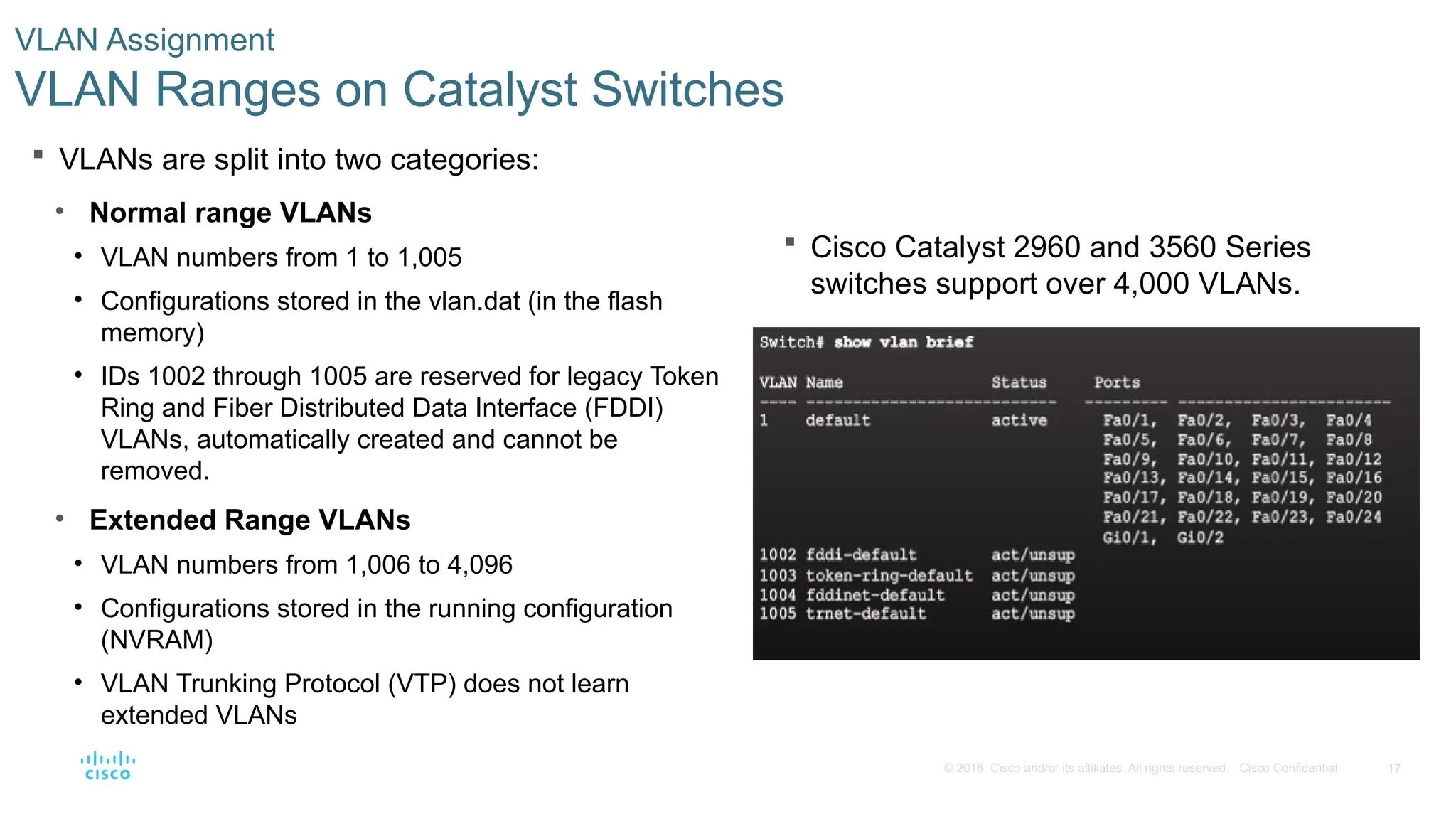
Cisco Catalyst 2960 and 3560 Series
switches support over 4,000 VLANs.
VLAN Assignment
VLAN Ranges on Catalyst Switches
VLANs are split into two categories:
• Normal range VLANs
• VLAN numbers from 1 to 1,005
• Configurations stored in the vlan.dat (in the flash
memory)
• IDs 1002 through 1005 are reserved for legacy Token
Ring and Fiber Distributed Data Interface (FDDI)
VLANs, automatically created and cannot be
removed.
• Extended Range VLANs
• VLAN numbers from 1,006 to 4,096
• Configurations stored in the running configuration
(NVRAM)
• VLAN Trunking Protocol (VTP) does not learn
extended VLANs
- 18.
18
© 2016 Ciscoand/or its affiliates. All rights reserved. Cisco Confidential
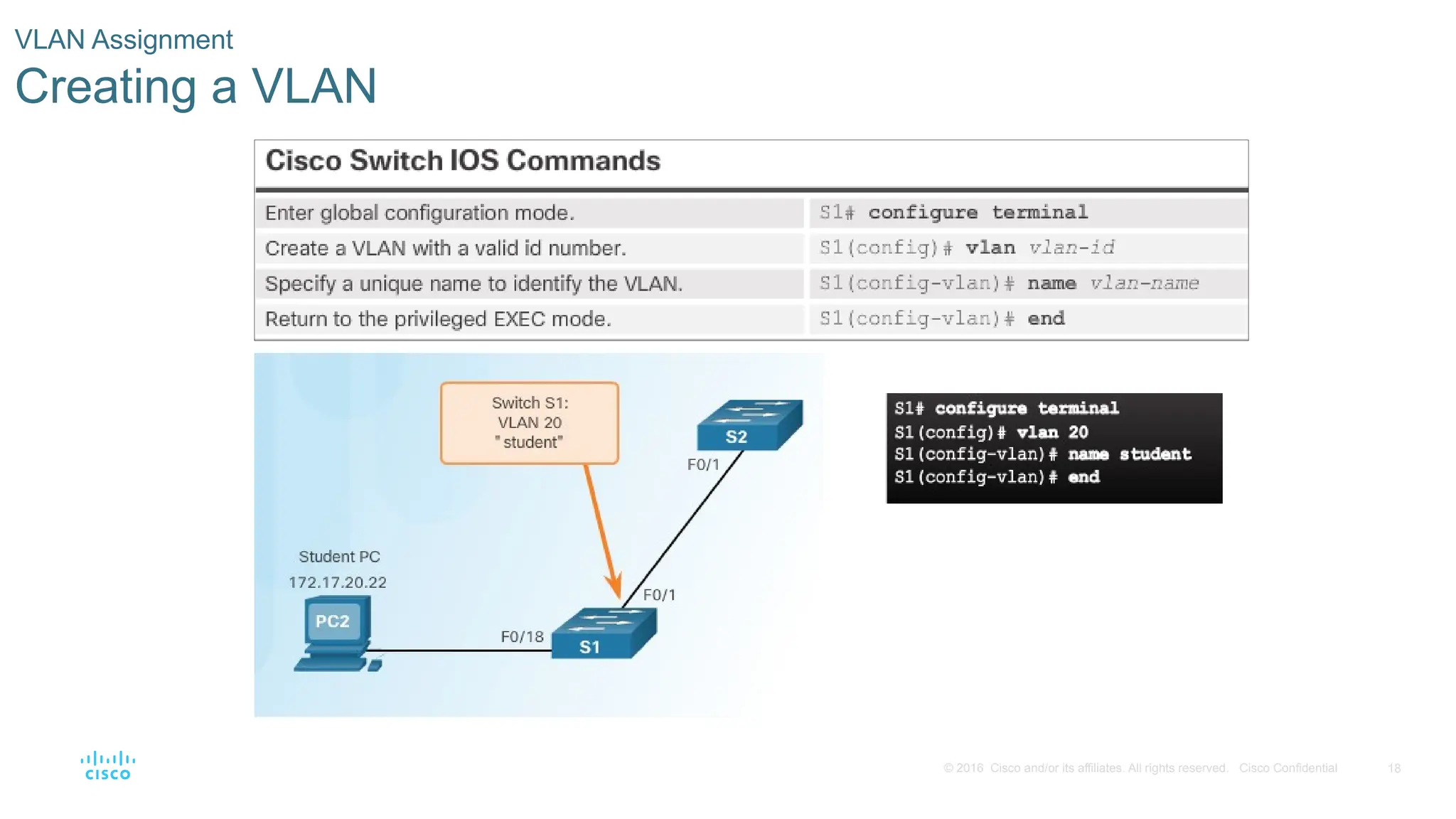
VLAN Assignment
Creating a VLAN
- 19.
19
© 2016 Ciscoand/or its affiliates. All rights reserved. Cisco Confidential
VLAN Assignment
Assigning Ports to VLANs
Example 1 Example 2
- 20.
20
© 2016 Ciscoand/or its affiliates. All rights reserved. Cisco Confidential
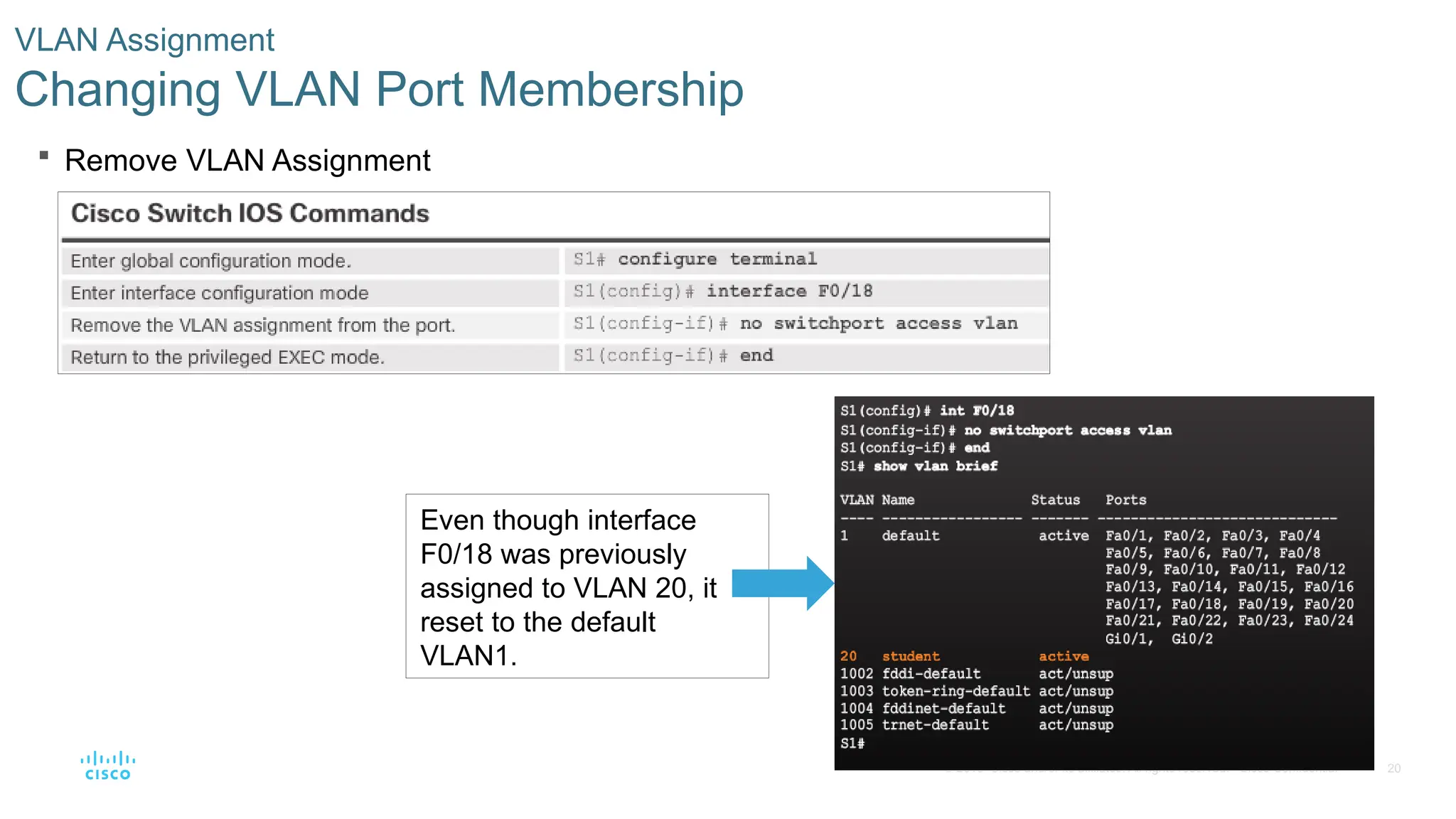
Remove VLAN Assignment
VLAN Assignment
Changing VLAN Port Membership
Even though interface
F0/18 was previously
assigned to VLAN 20, it
reset to the default
VLAN1.
- 21.
21
© 2016 Ciscoand/or its affiliates. All rights reserved. Cisco Confidential
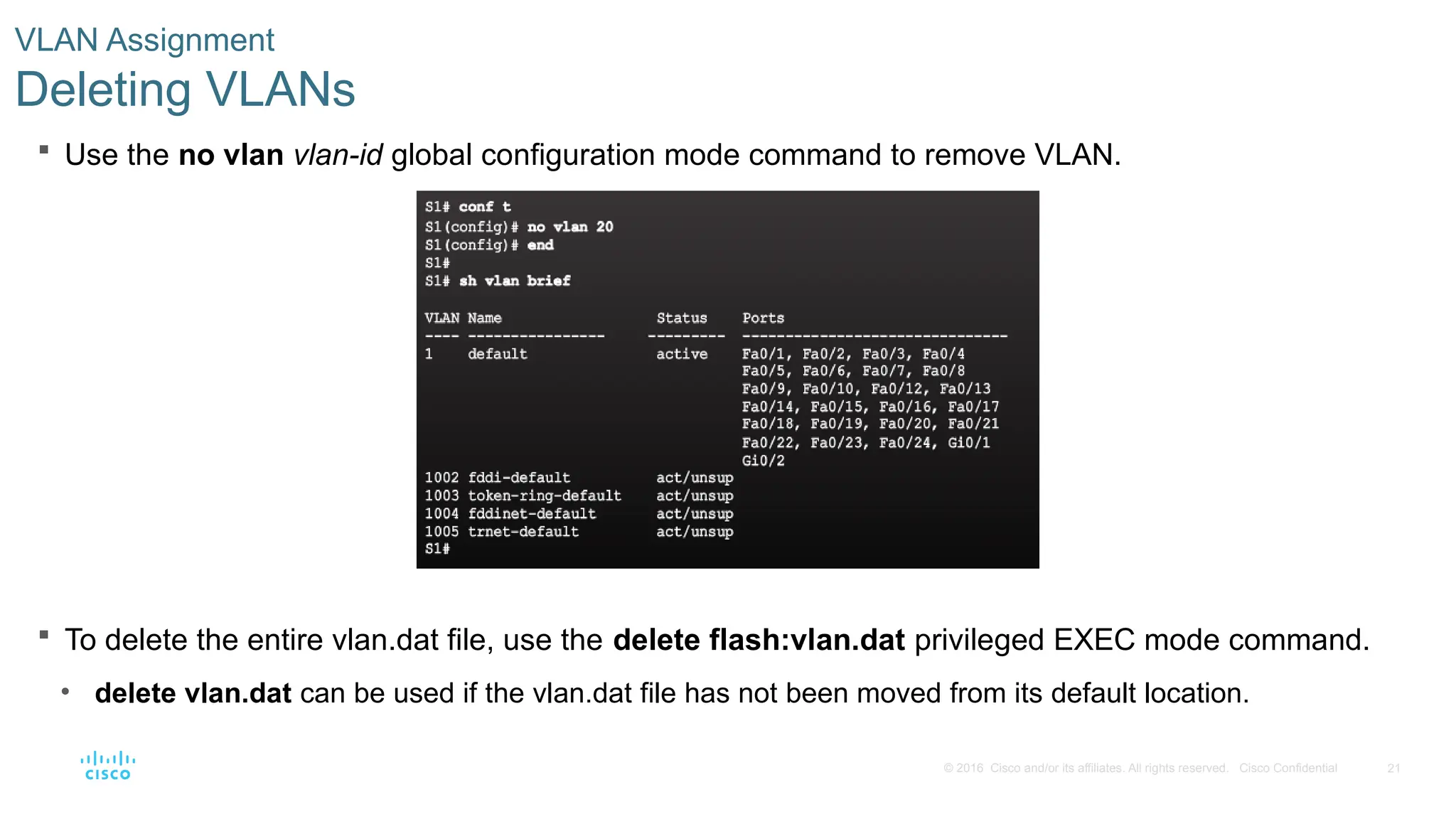
Use the no vlan vlan-id global configuration mode command to remove VLAN.
To delete the entire vlan.dat file, use the delete flash:vlan.dat privileged EXEC mode command.
• delete vlan.dat can be used if the vlan.dat file has not been moved from its default location.
VLAN Assignment
Deleting VLANs
- 22.
22
© 2016 Ciscoand/or its affiliates. All rights reserved. Cisco Confidential
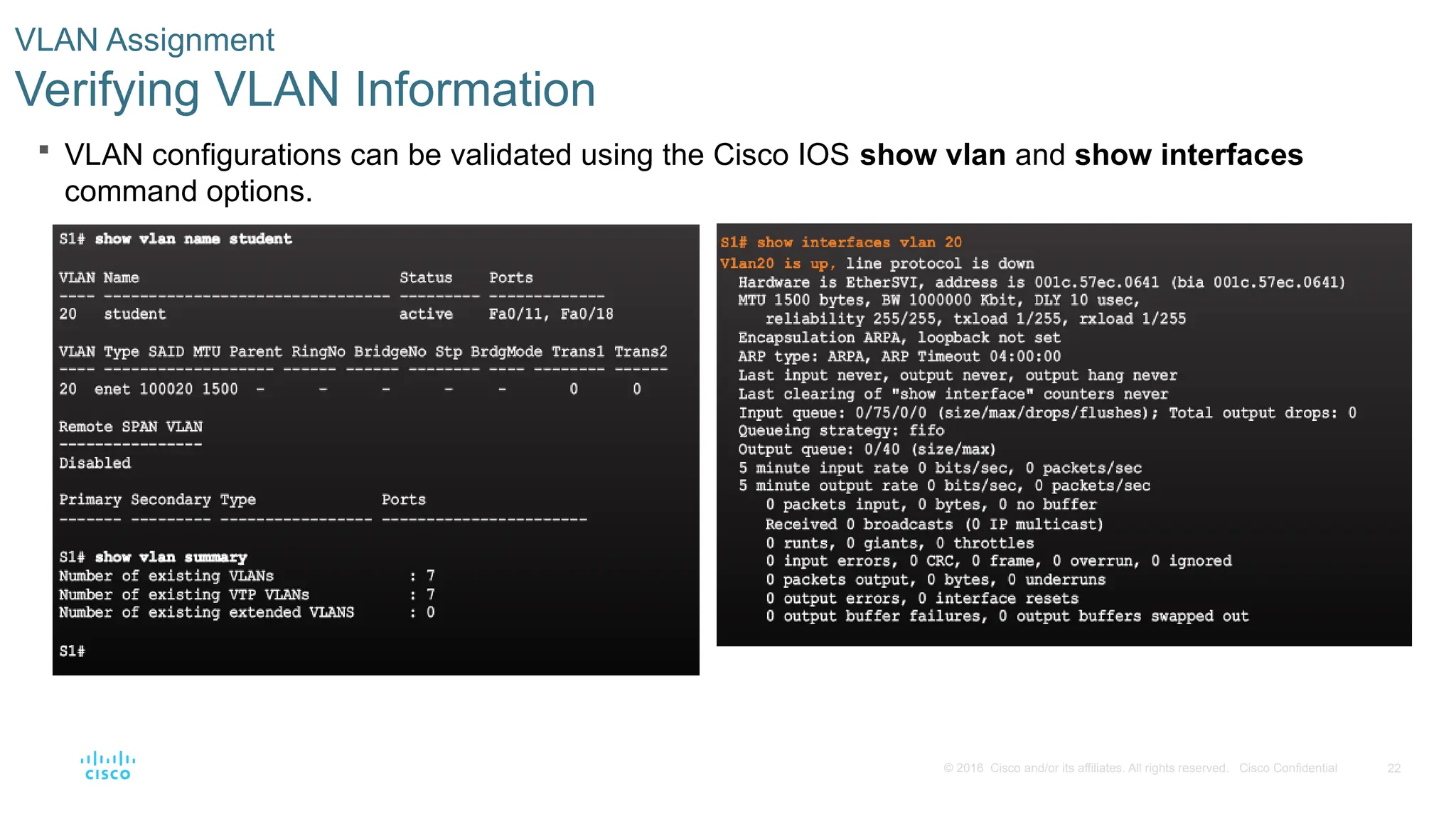
VLAN configurations can be validated using the Cisco IOS show vlan and show interfaces
command options.
VLAN Assignment
Verifying VLAN Information
- 23.
23
© 2016 Ciscoand/or its affiliates. All rights reserved. Cisco Confidential
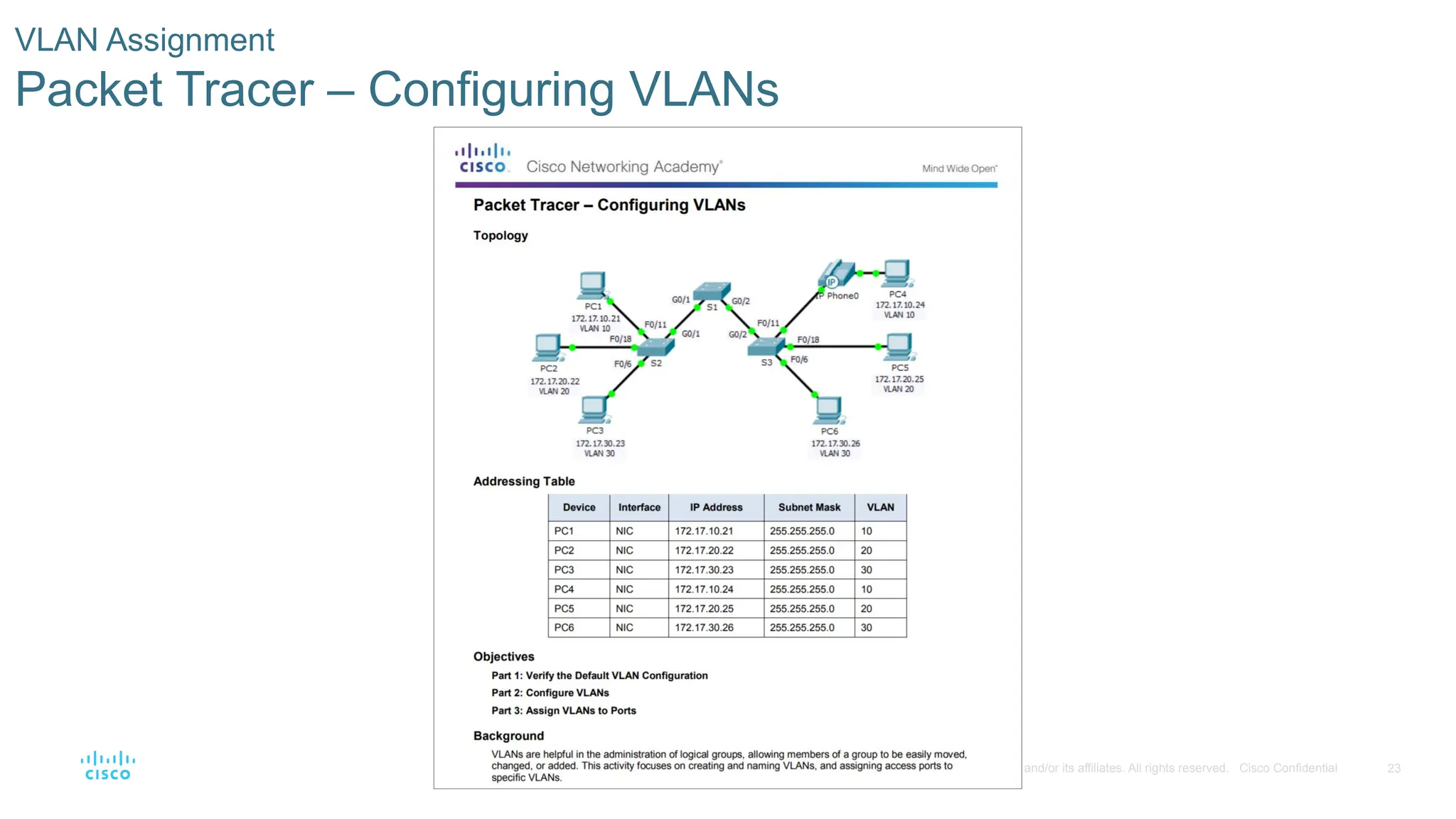
VLAN Assignment
Packet Tracer – Configuring VLANs
- 24.
24
© 2016 Ciscoand/or its affiliates. All rights reserved. Cisco Confidential
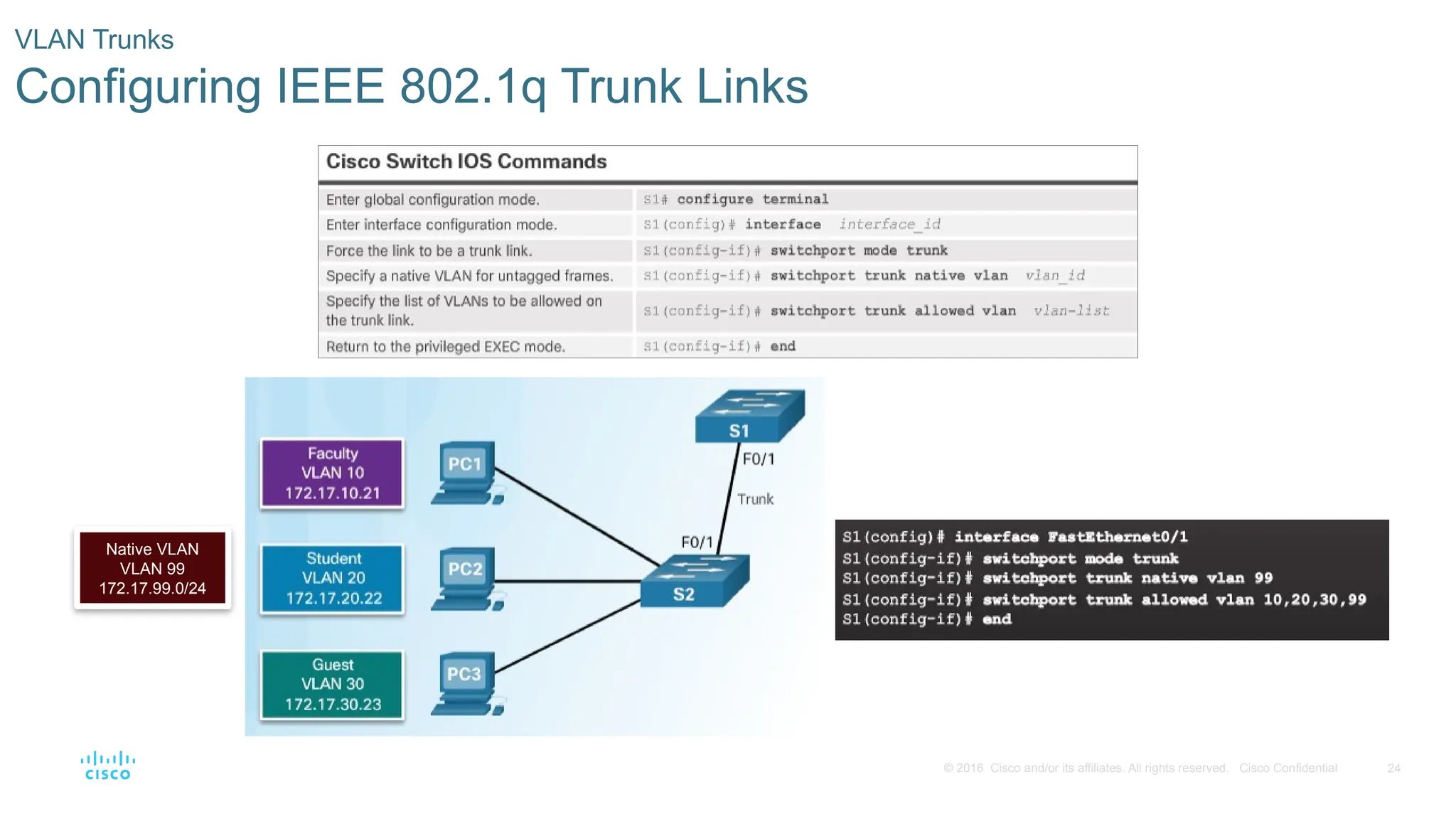
VLAN Trunks
Configuring IEEE 802.1q Trunk Links
Native VLAN
VLAN 99
172.17.99.0/24
- 25.
25
© 2016 Ciscoand/or its affiliates. All rights reserved. Cisco Confidential
VLAN Trunks
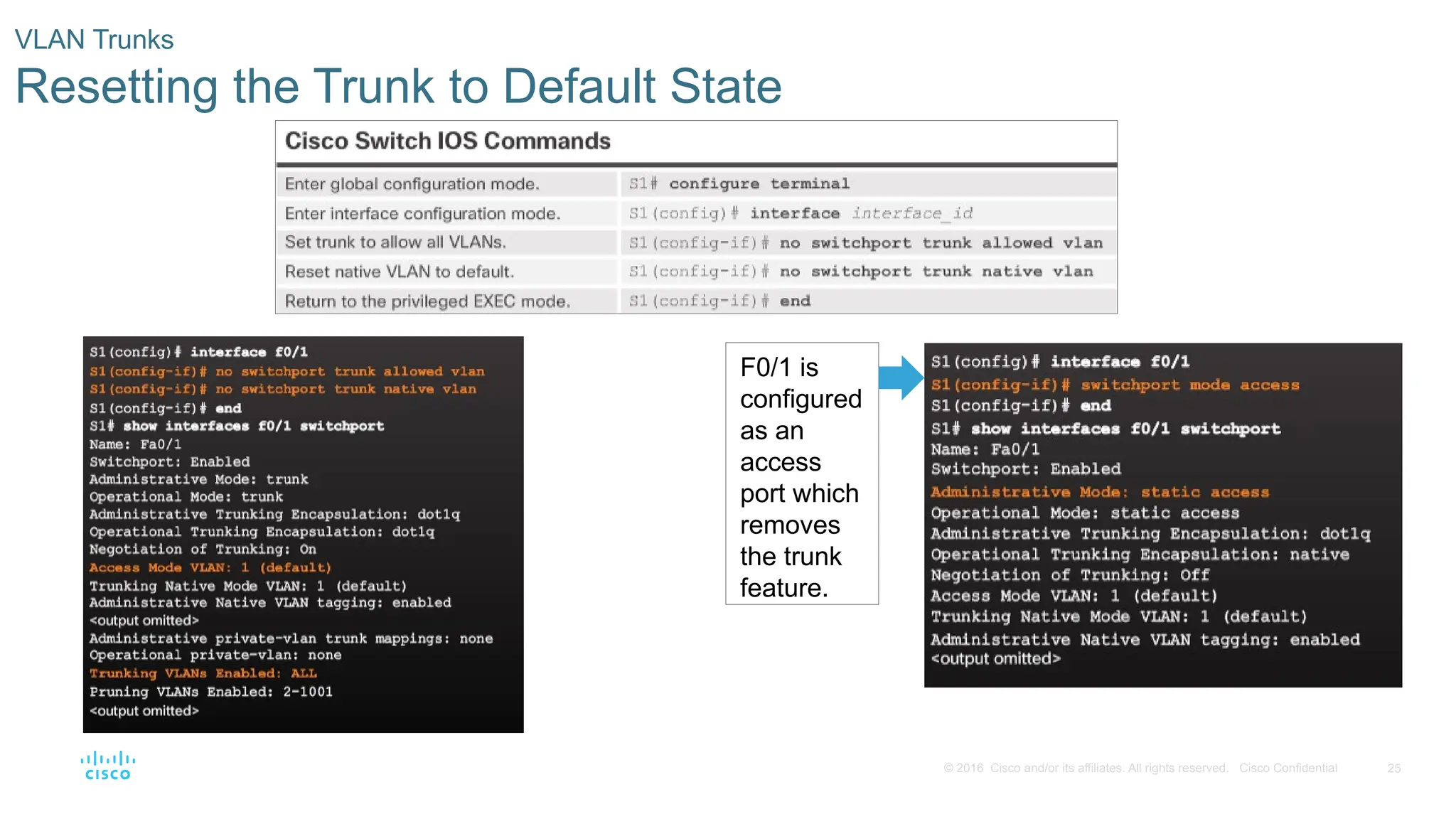
Resetting the Trunk to Default State
F0/1 is
configured
as an
access
port which
removes
the trunk
feature.
- 26.
26
© 2016 Ciscoand/or its affiliates. All rights reserved. Cisco Confidential
VLAN Trunks
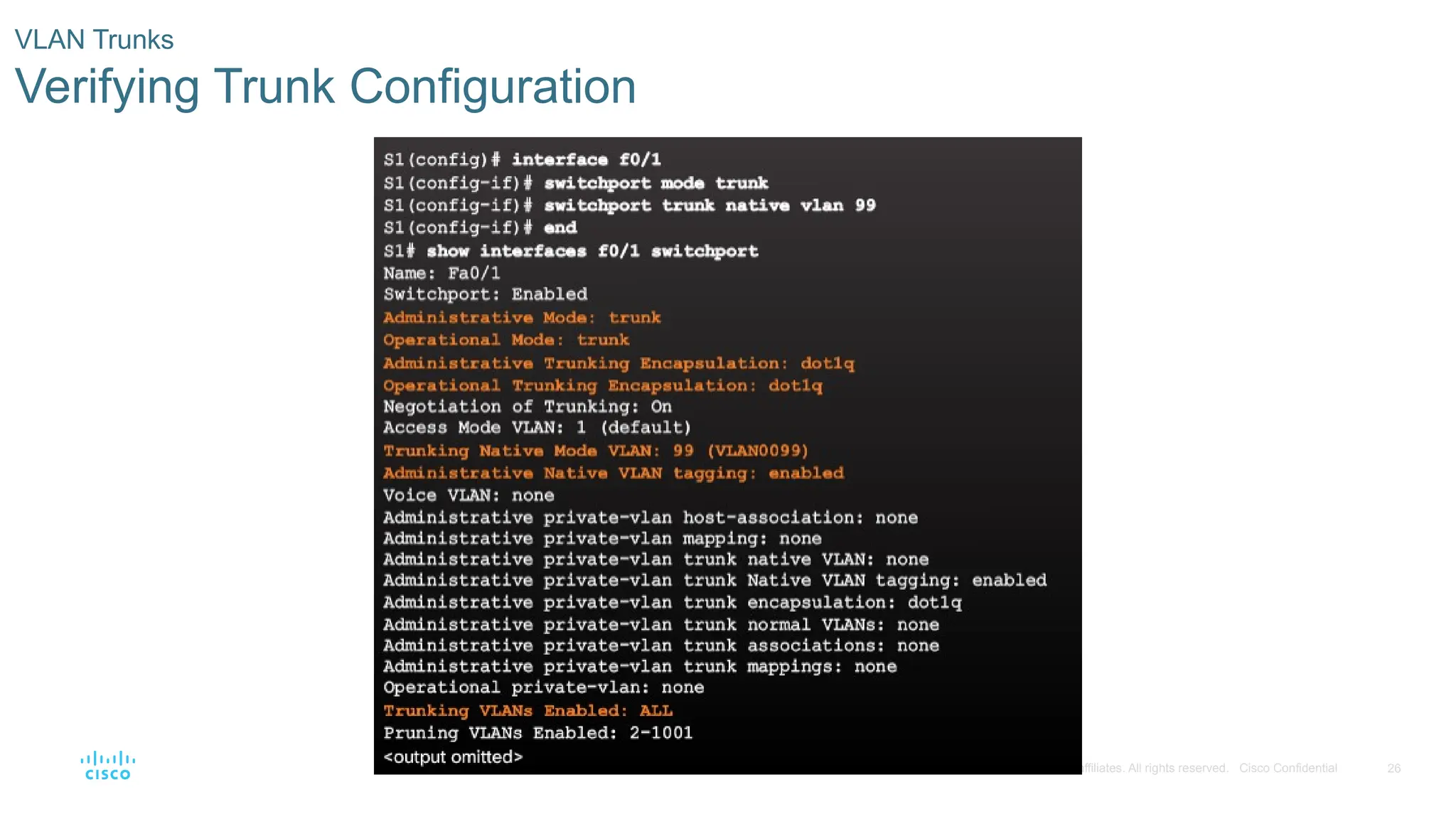
Verifying Trunk Configuration
- 27.
27
© 2016 Ciscoand/or its affiliates. All rights reserved. Cisco Confidential
VLAN Trunks
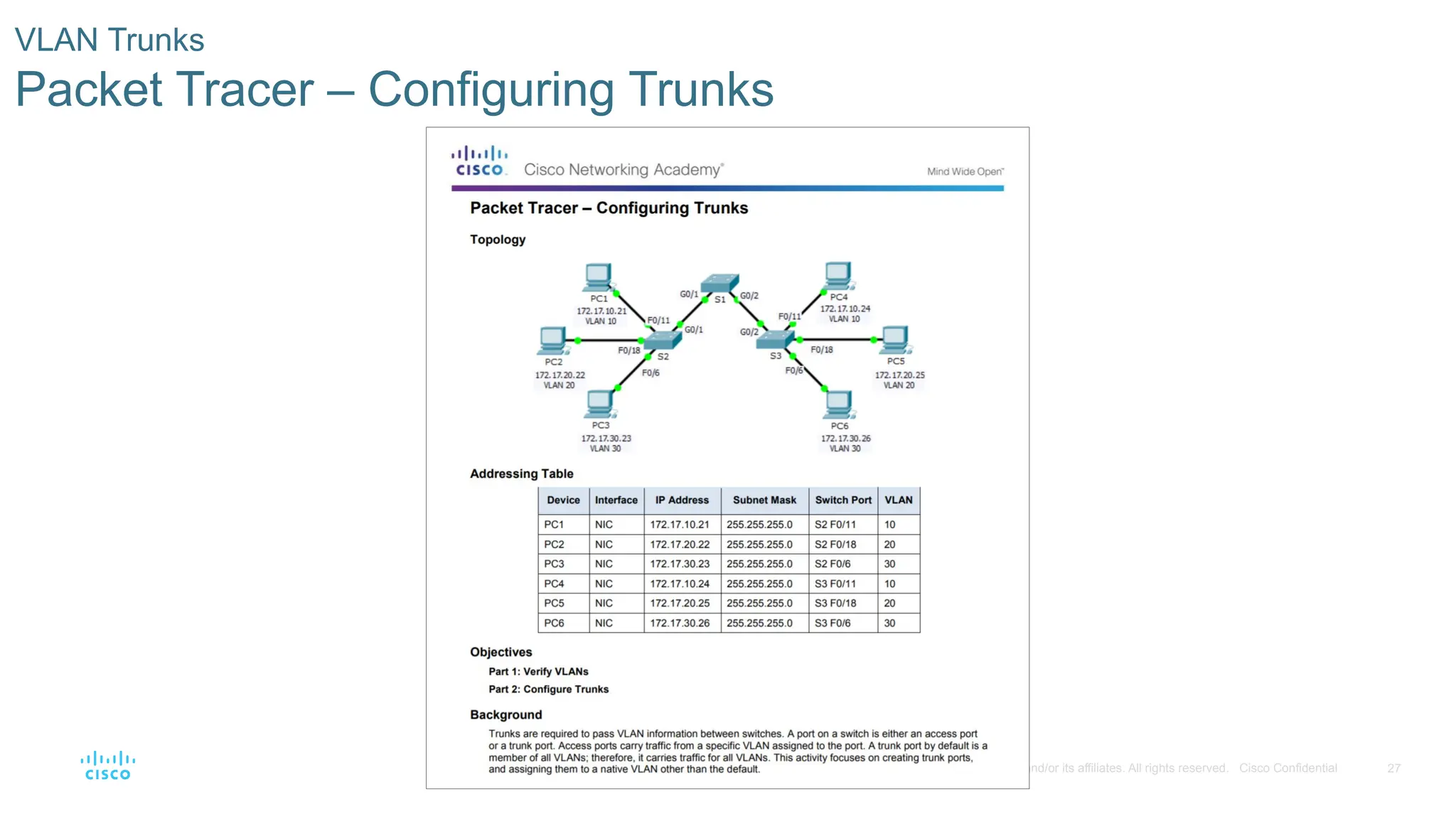
Packet Tracer – Configuring Trunks
- 28.
28
© 2016 Ciscoand/or its affiliates. All rights reserved. Cisco Confidential
VLAN Trunks
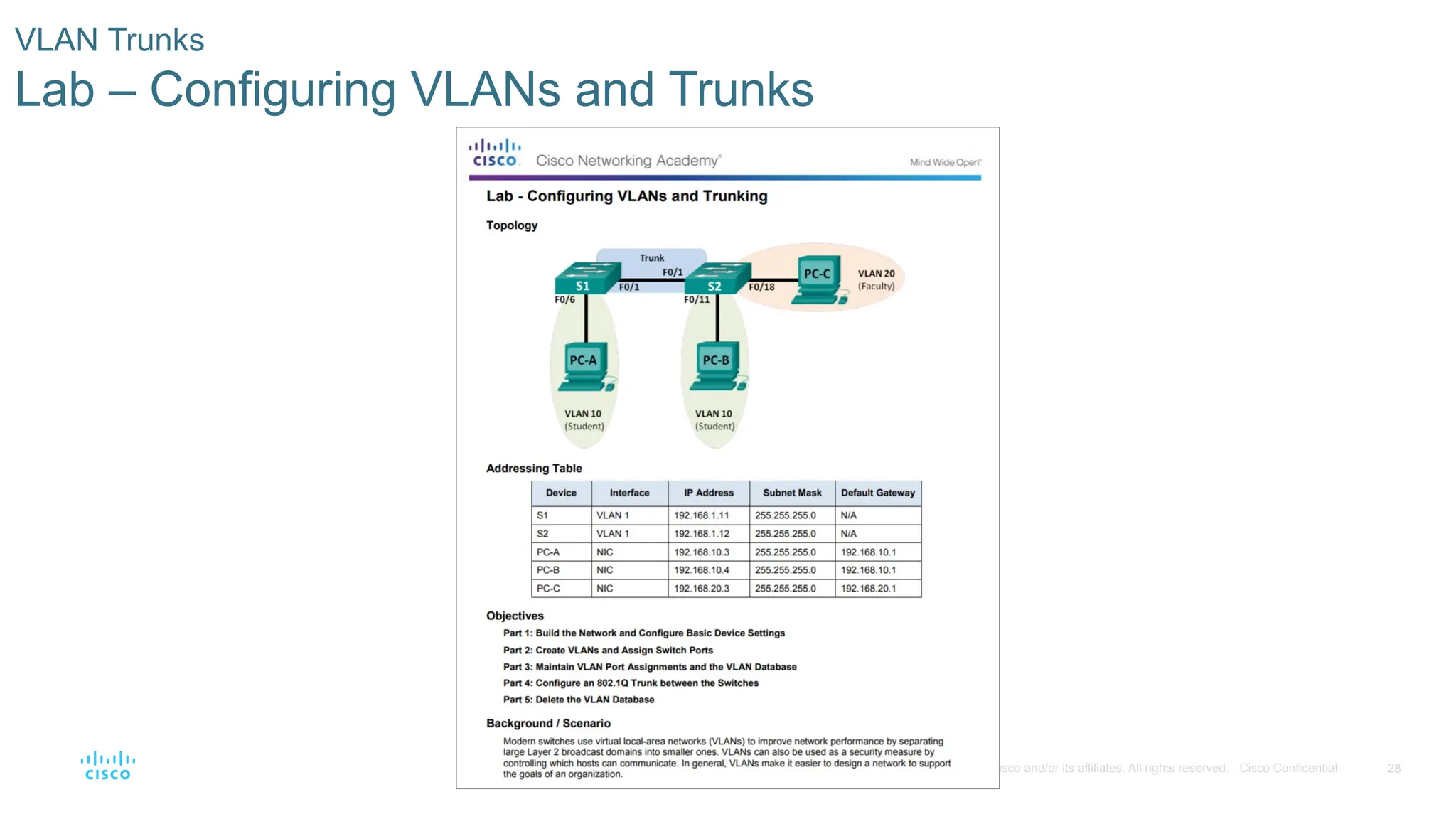
Lab – Configuring VLANs and Trunks
- 29.
29
© 2016 Ciscoand/or its affiliates. All rights reserved. Cisco Confidential
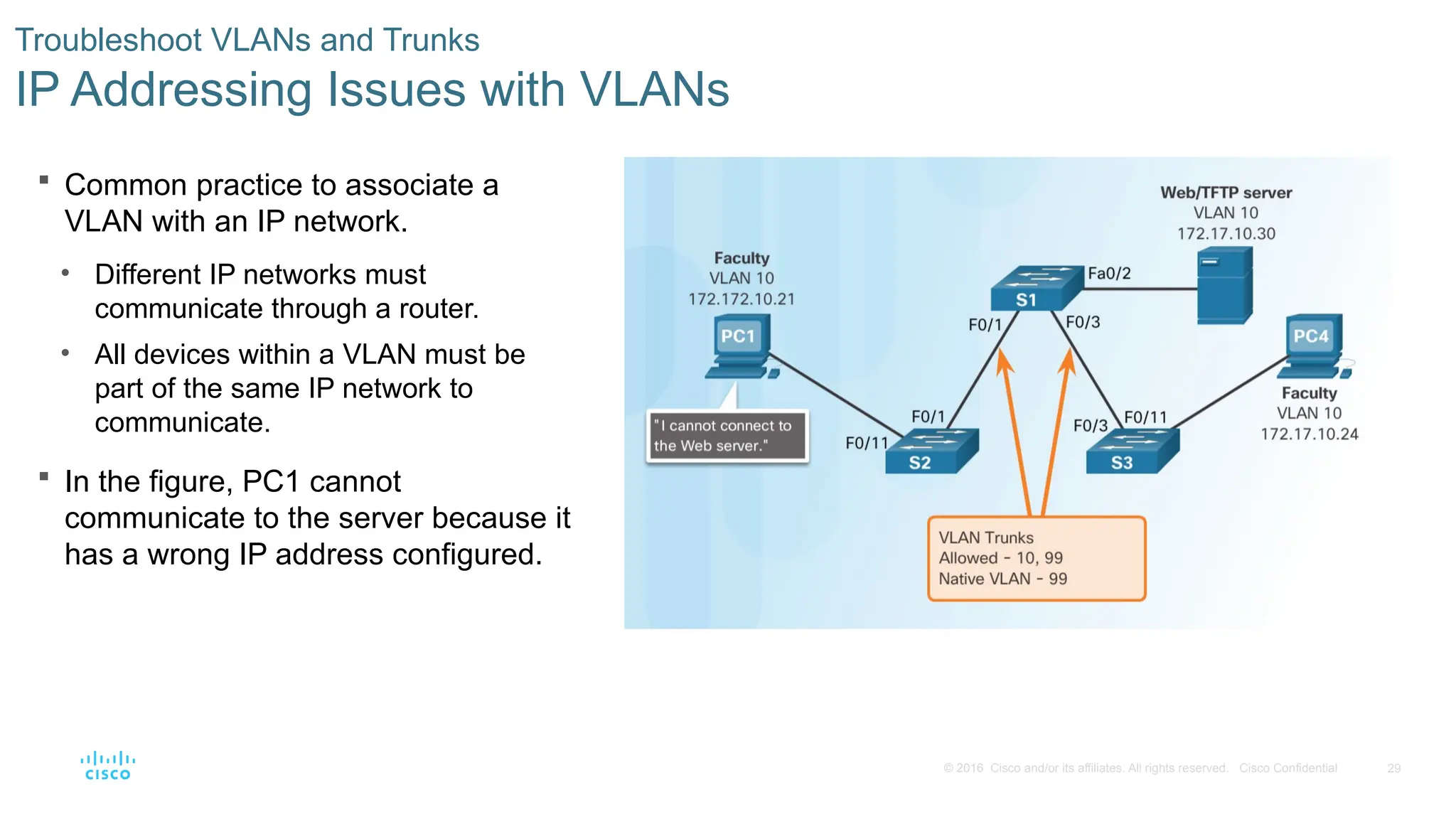
Common practice to associate a
VLAN with an IP network.
• Different IP networks must
communicate through a router.
• All devices within a VLAN must be
part of the same IP network to
communicate.
Troubleshoot VLANs and Trunks
IP Addressing Issues with VLANs
In the figure, PC1 cannot
communicate to the server because it
has a wrong IP address configured.
- 30.
30
© 2016 Ciscoand/or its affiliates. All rights reserved. Cisco Confidential
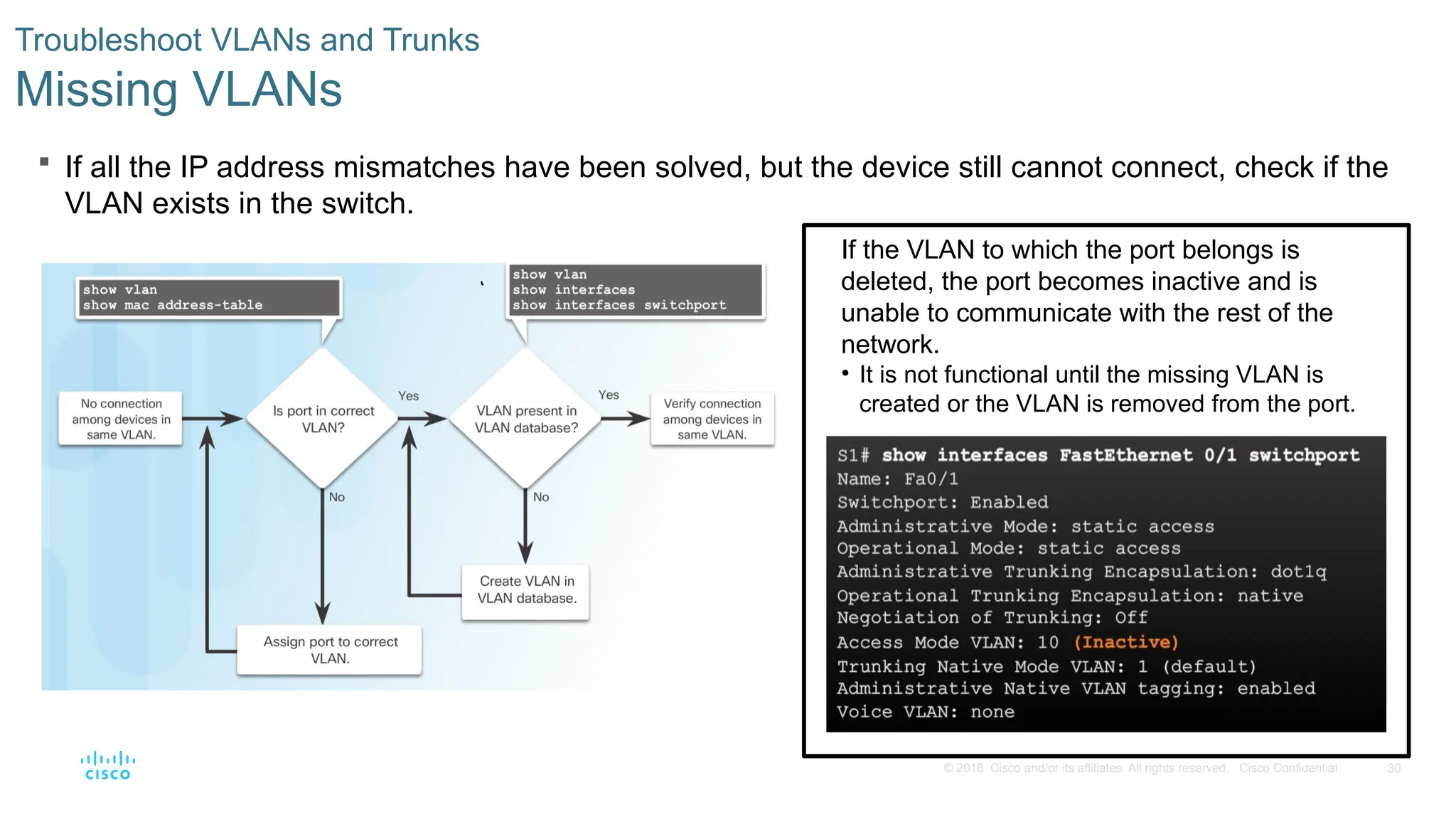
If all the IP address mismatches have been solved, but the device still cannot connect, check if the
VLAN exists in the switch.
Troubleshoot VLANs and Trunks
Missing VLANs
If the VLAN to which the port belongs is
deleted, the port becomes inactive and is
unable to communicate with the rest of the
network.
• It is not functional until the missing VLAN is
created or the VLAN is removed from the port.
- 31.
31
© 2016 Ciscoand/or its affiliates. All rights reserved. Cisco Confidential
Troubleshoot VLANs and Trunks
Introduction to Troubleshooting Trunks
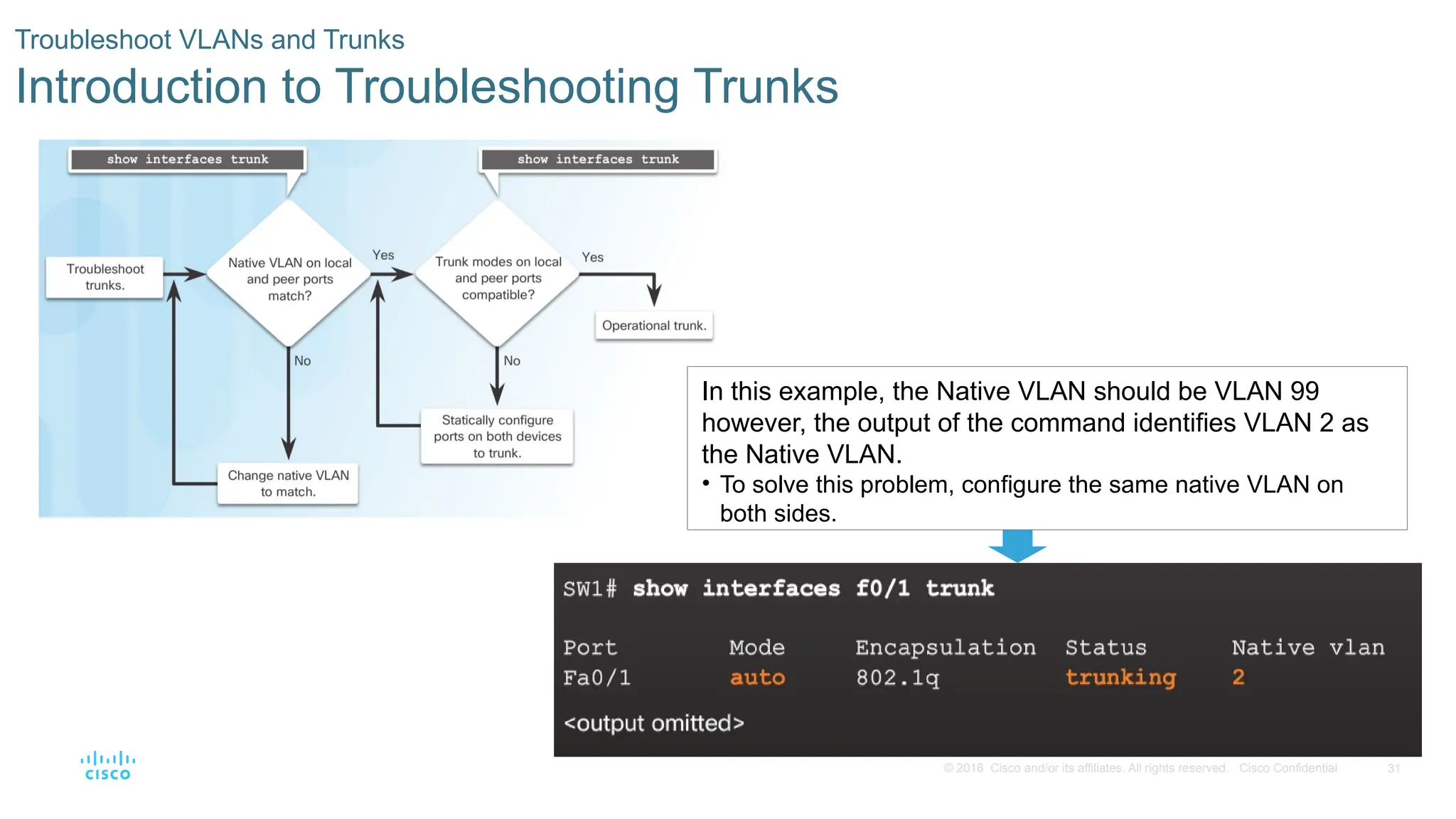
In this example, the Native VLAN should be VLAN 99
however, the output of the command identifies VLAN 2 as
the Native VLAN.
• To solve this problem, configure the same native VLAN on
both sides.
- 32.
32
© 2016 Ciscoand/or its affiliates. All rights reserved. Cisco Confidential
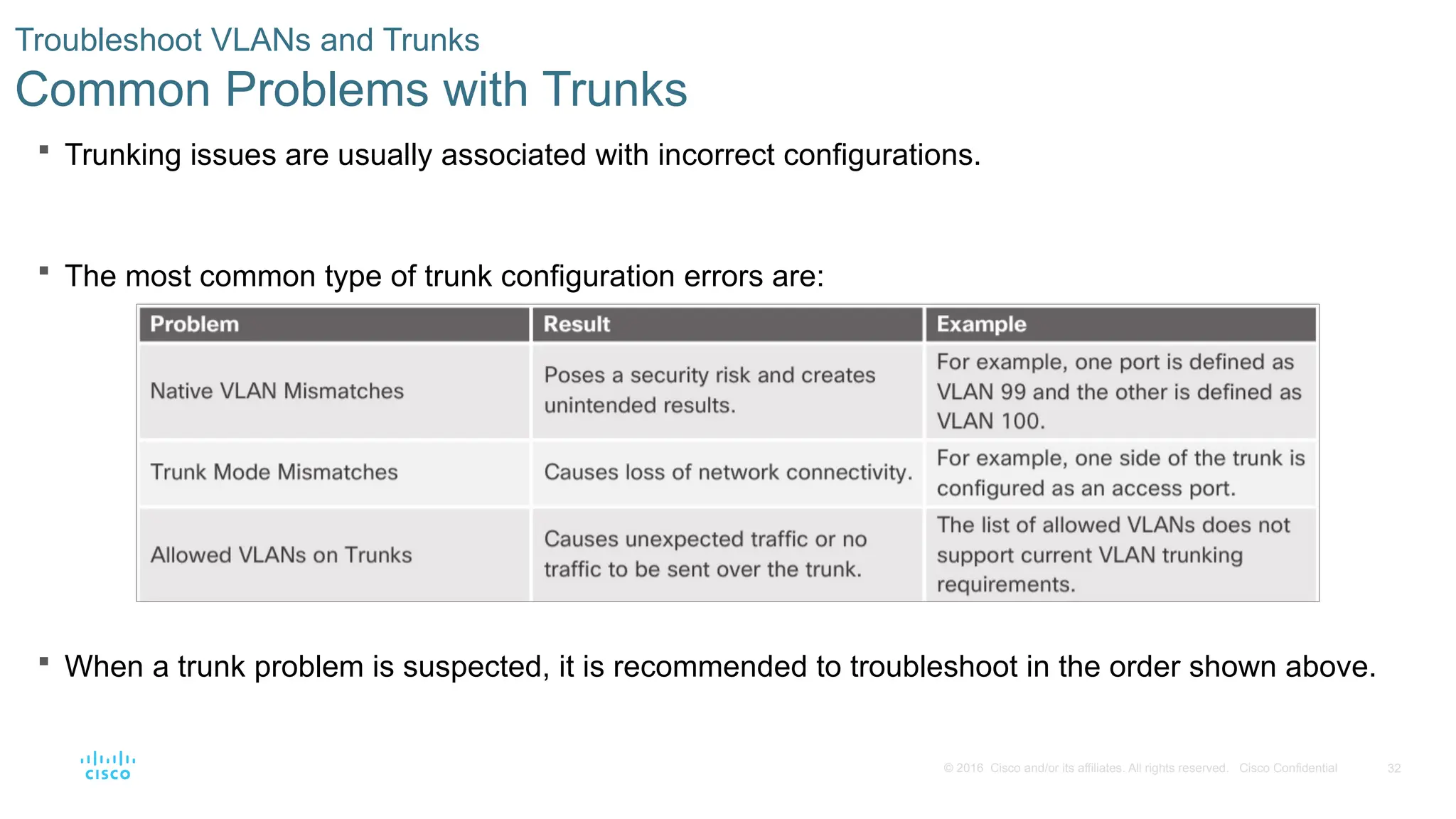
Trunking issues are usually associated with incorrect configurations.
The most common type of trunk configuration errors are:
When a trunk problem is suspected, it is recommended to troubleshoot in the order shown above.
Troubleshoot VLANs and Trunks
Common Problems with Trunks
- 33.
33
© 2016 Ciscoand/or its affiliates. All rights reserved. Cisco Confidential
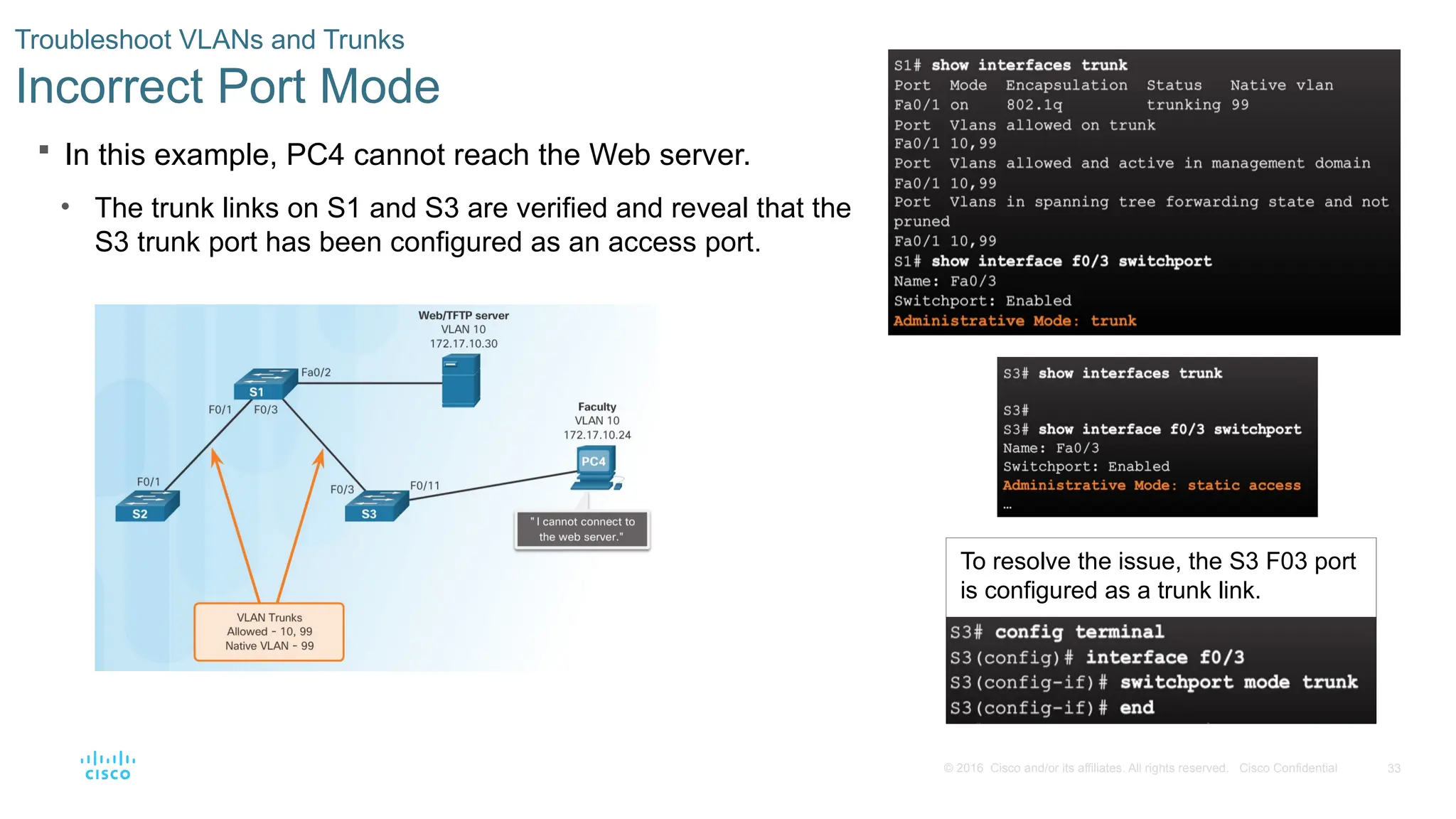
In this example, PC4 cannot reach the Web server.
• The trunk links on S1 and S3 are verified and reveal that the
S3 trunk port has been configured as an access port.
Troubleshoot VLANs and Trunks
Incorrect Port Mode
To resolve the issue, the S3 F03 port
is configured as a trunk link.
- 34.
34
© 2016 Ciscoand/or its affiliates. All rights reserved. Cisco Confidential
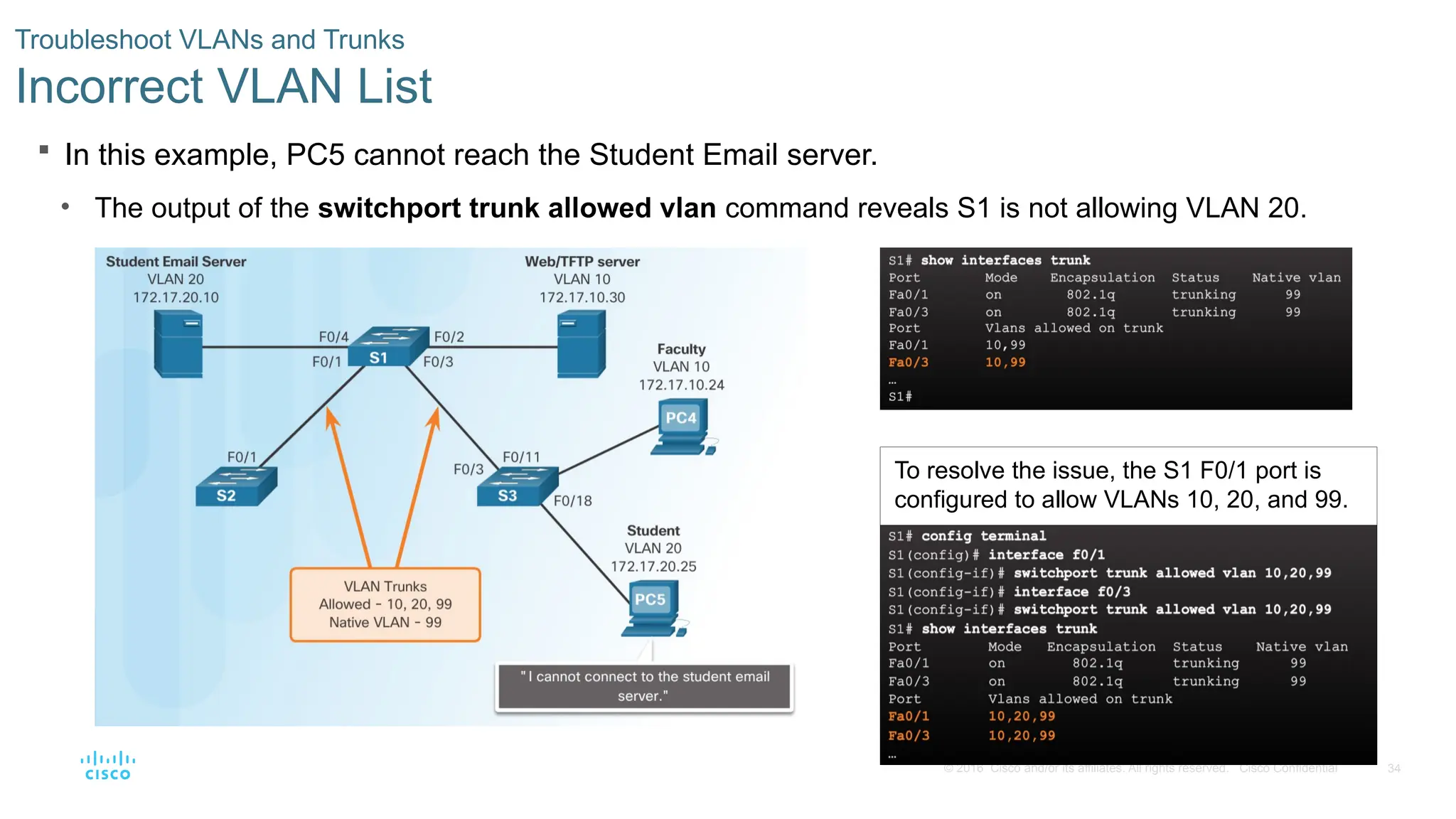
In this example, PC5 cannot reach the Student Email server.
• The output of the switchport trunk allowed vlan command reveals S1 is not allowing VLAN 20.
Troubleshoot VLANs and Trunks
Incorrect VLAN List
To resolve the issue, the S1 F0/1 port is
configured to allow VLANs 10, 20, and 99.
- 35.
35
© 2016 Ciscoand/or its affiliates. All rights reserved. Cisco Confidential
Troubleshoot VLANs and Trunks
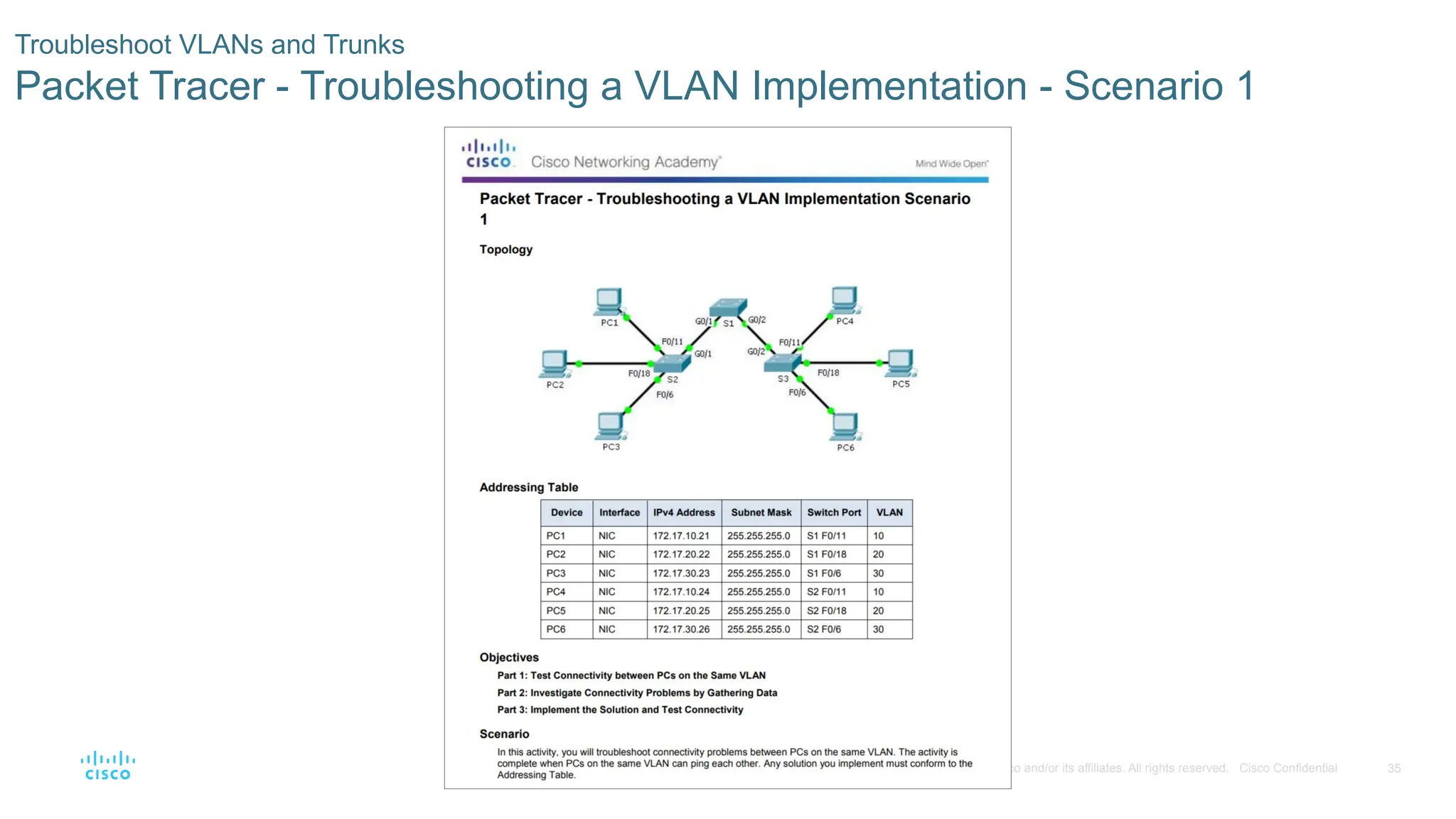
Packet Tracer - Troubleshooting a VLAN Implementation - Scenario 1
- 36.
36
© 2016 Ciscoand/or its affiliates. All rights reserved. Cisco Confidential
Troubleshoot VLANs and Trunks
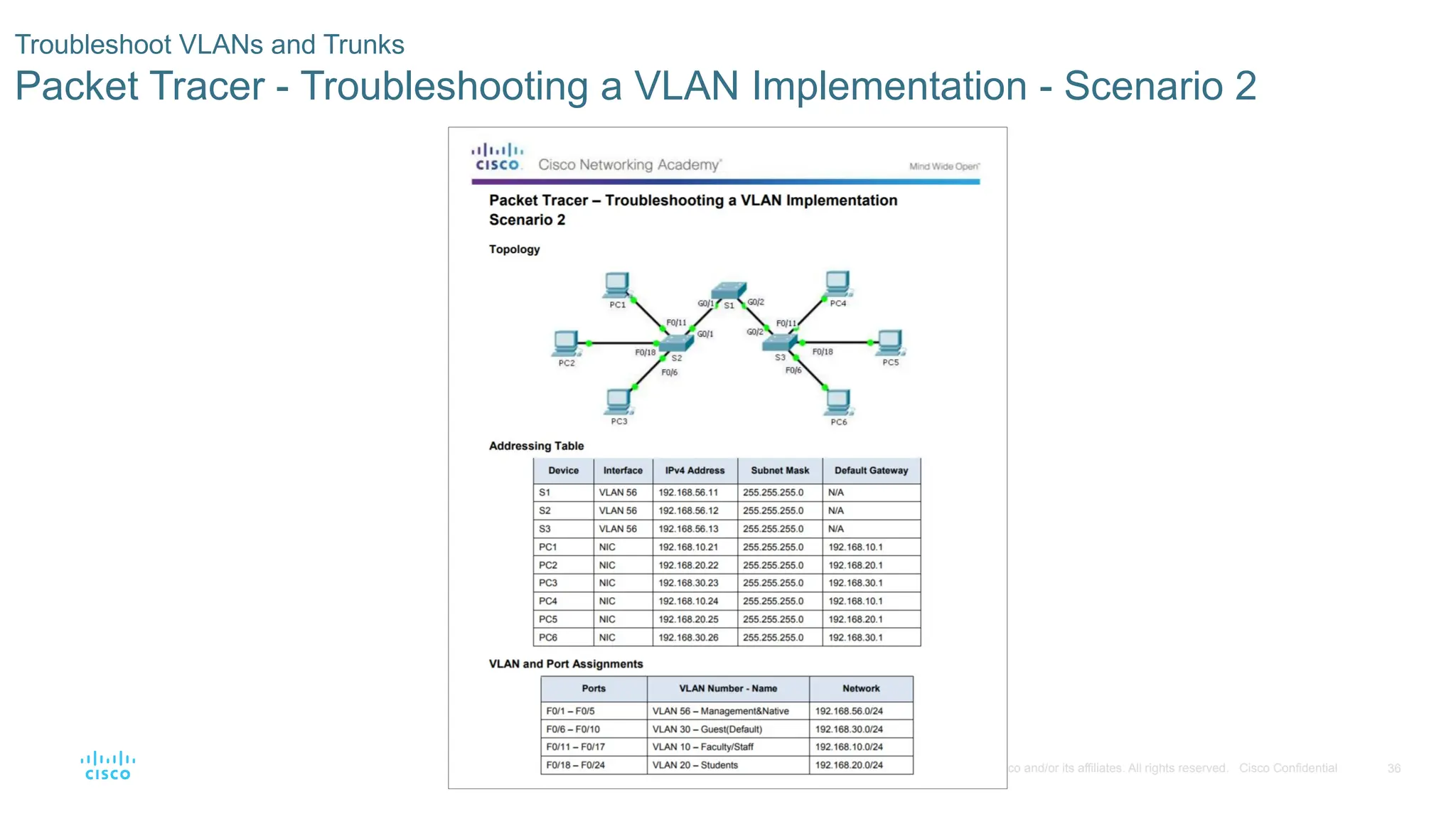
Packet Tracer - Troubleshooting a VLAN Implementation - Scenario 2
- 37.
37
© 2016 Ciscoand/or its affiliates. All rights reserved. Cisco Confidential
Troubleshoot VLANs and Trunks
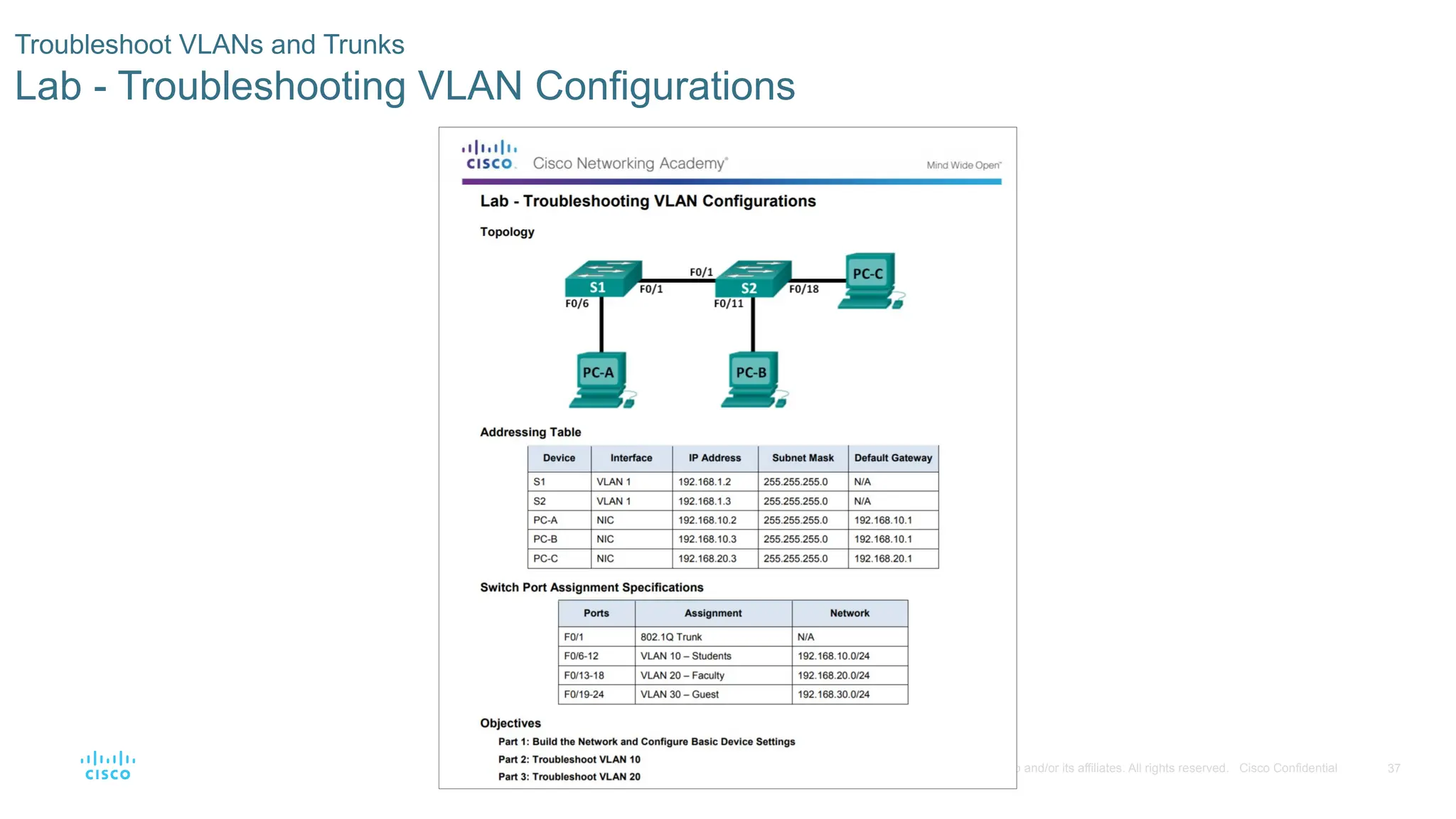
Lab - Troubleshooting VLAN Configurations
- 38.
38
© 2016 Ciscoand/or its affiliates. All rights reserved. Cisco Confidential
6.3 Inter-VLAN Routing Using Routers
- 39.
39
© 2016 Ciscoand/or its affiliates. All rights reserved. Cisco Confidential
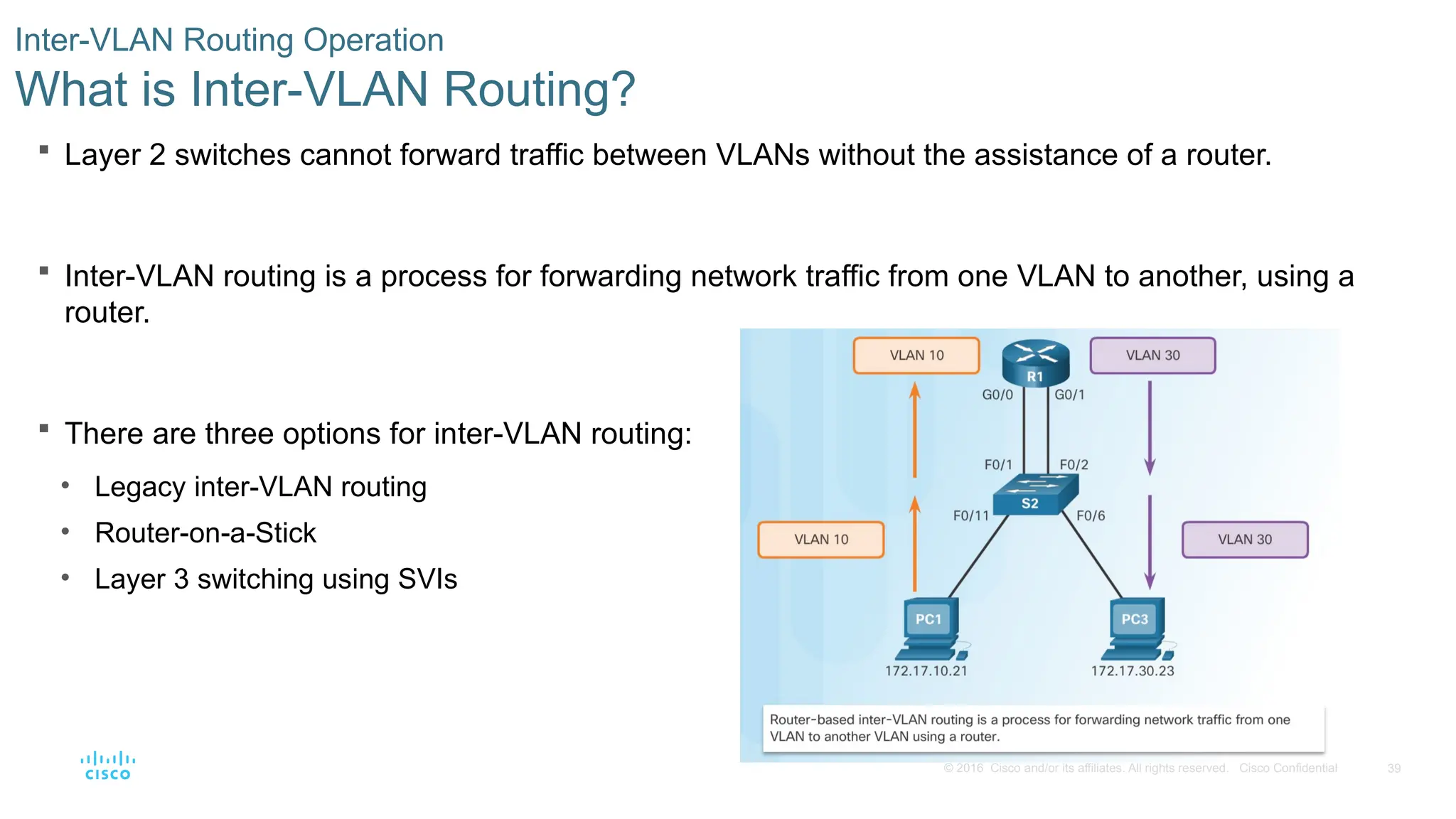
Layer 2 switches cannot forward traffic between VLANs without the assistance of a router.
Inter-VLAN routing is a process for forwarding network traffic from one VLAN to another, using a
router.
There are three options for inter-VLAN routing:
• Legacy inter-VLAN routing
• Router-on-a-Stick
• Layer 3 switching using SVIs
Inter-VLAN Routing Operation
What is Inter-VLAN Routing?
- 40.
40
© 2016 Ciscoand/or its affiliates. All rights reserved. Cisco Confidential
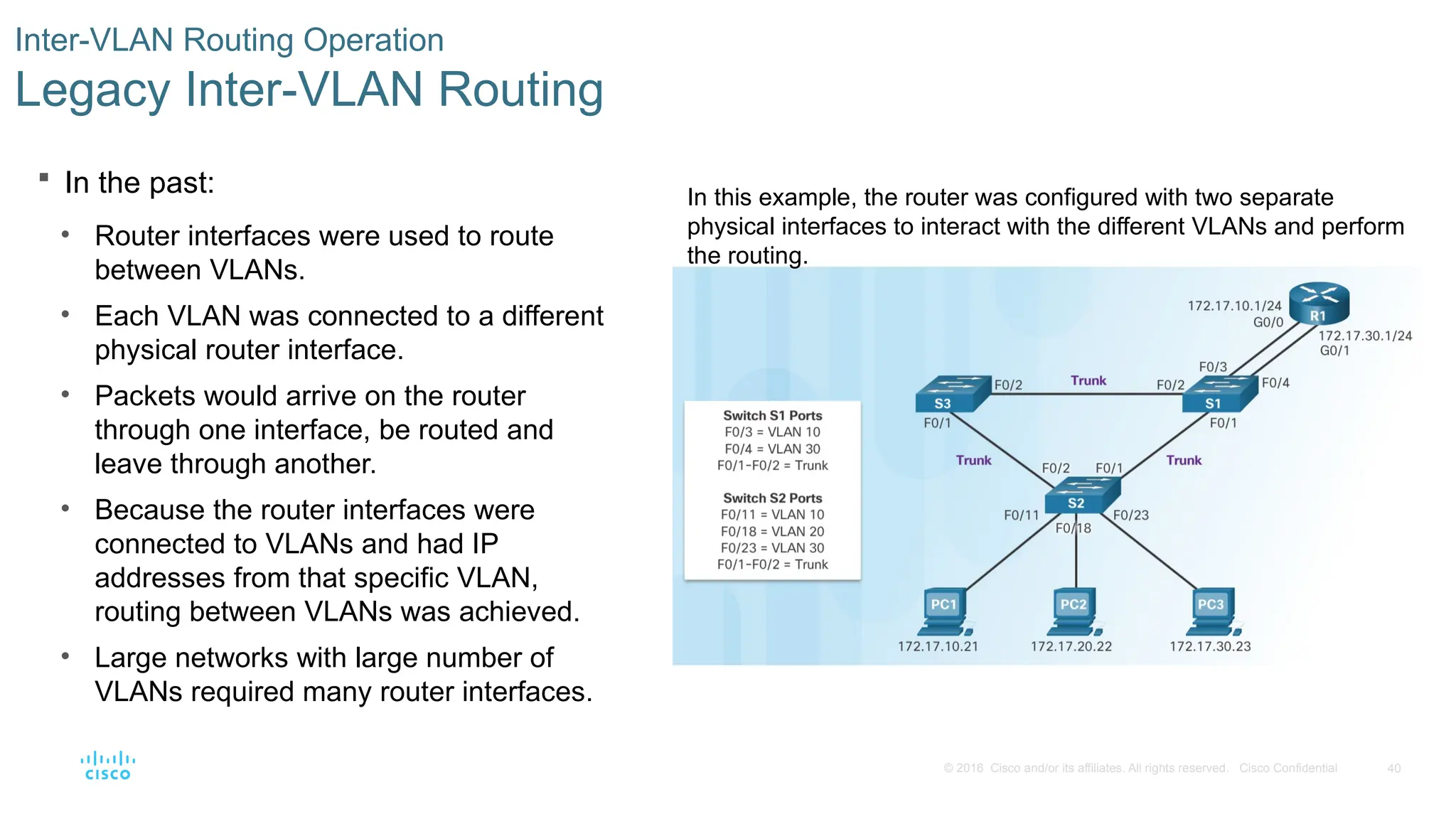
In the past:
• Router interfaces were used to route
between VLANs.
• Each VLAN was connected to a different
physical router interface.
• Packets would arrive on the router
through one interface, be routed and
leave through another.
• Because the router interfaces were
connected to VLANs and had IP
addresses from that specific VLAN,
routing between VLANs was achieved.
• Large networks with large number of
VLANs required many router interfaces.
Inter-VLAN Routing Operation
Legacy Inter-VLAN Routing
In this example, the router was configured with two separate
physical interfaces to interact with the different VLANs and perform
the routing.
- 41.
41
© 2016 Ciscoand/or its affiliates. All rights reserved. Cisco Confidential
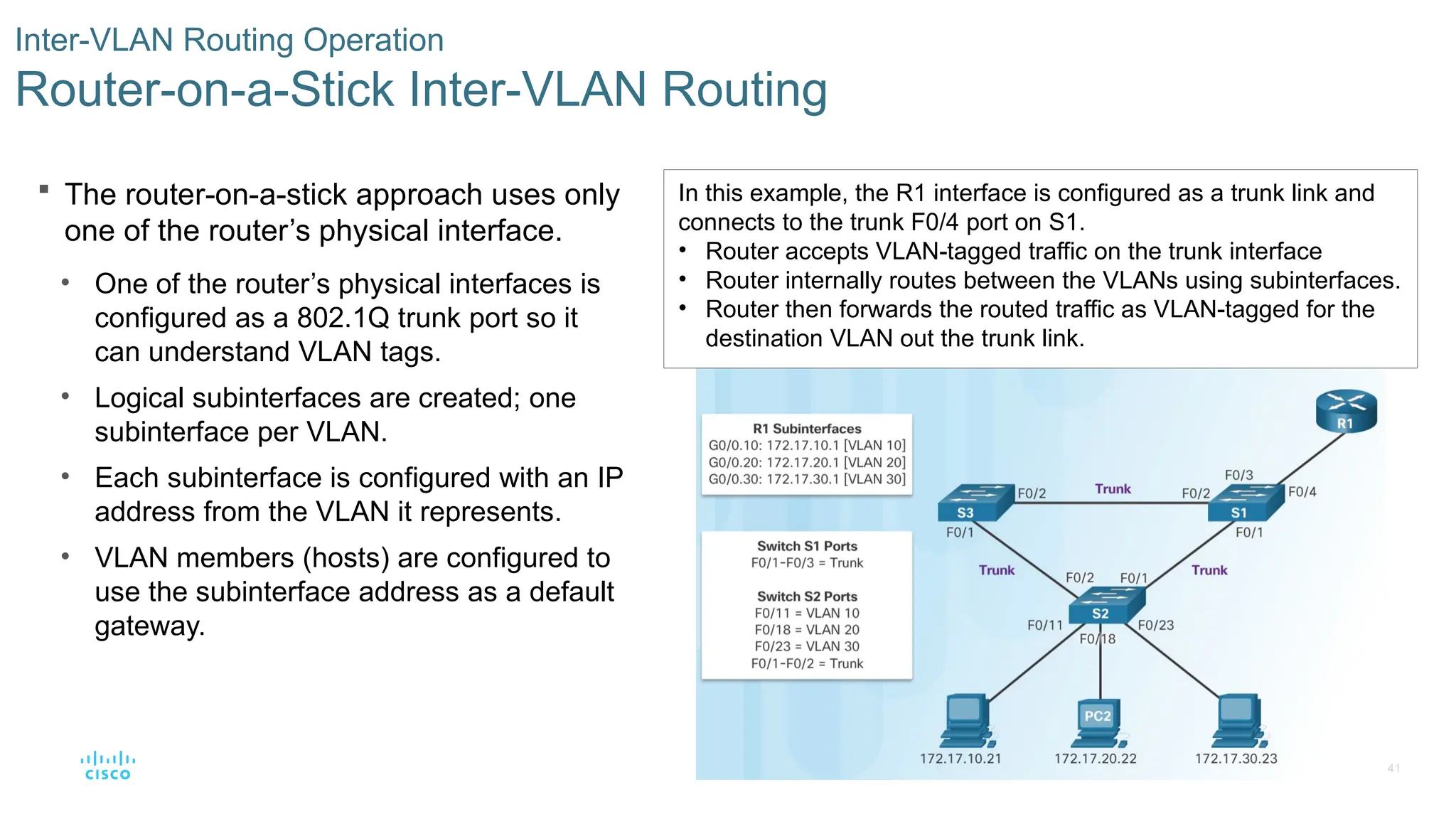
The router-on-a-stick approach uses only
one of the router’s physical interface.
• One of the router’s physical interfaces is
configured as a 802.1Q trunk port so it
can understand VLAN tags.
• Logical subinterfaces are created; one
subinterface per VLAN.
• Each subinterface is configured with an IP
address from the VLAN it represents.
• VLAN members (hosts) are configured to
use the subinterface address as a default
gateway.
Inter-VLAN Routing Operation
Router-on-a-Stick Inter-VLAN Routing
In this example, the R1 interface is configured as a trunk link and
connects to the trunk F0/4 port on S1.
• Router accepts VLAN-tagged traffic on the trunk interface
• Router internally routes between the VLANs using subinterfaces.
• Router then forwards the routed traffic as VLAN-tagged for the
destination VLAN out the trunk link.
- 42.
42
© 2016 Ciscoand/or its affiliates. All rights reserved. Cisco Confidential
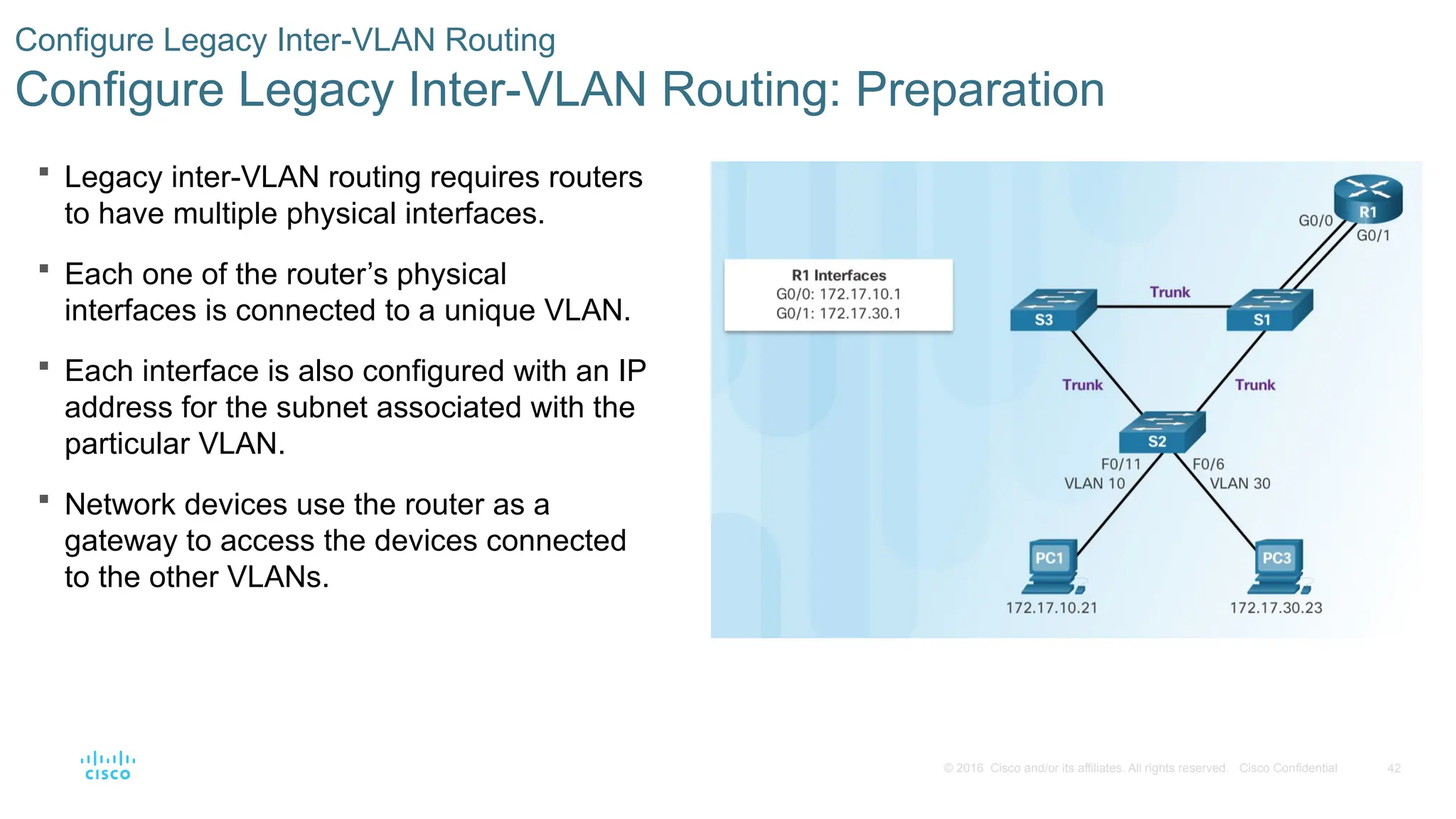
Legacy inter-VLAN routing requires routers
to have multiple physical interfaces.
Each one of the router’s physical
interfaces is connected to a unique VLAN.
Each interface is also configured with an IP
address for the subnet associated with the
particular VLAN.
Network devices use the router as a
gateway to access the devices connected
to the other VLANs.
Configure Legacy Inter-VLAN Routing
Configure Legacy Inter-VLAN Routing: Preparation
- 43.
43
© 2016 Ciscoand/or its affiliates. All rights reserved. Cisco Confidential
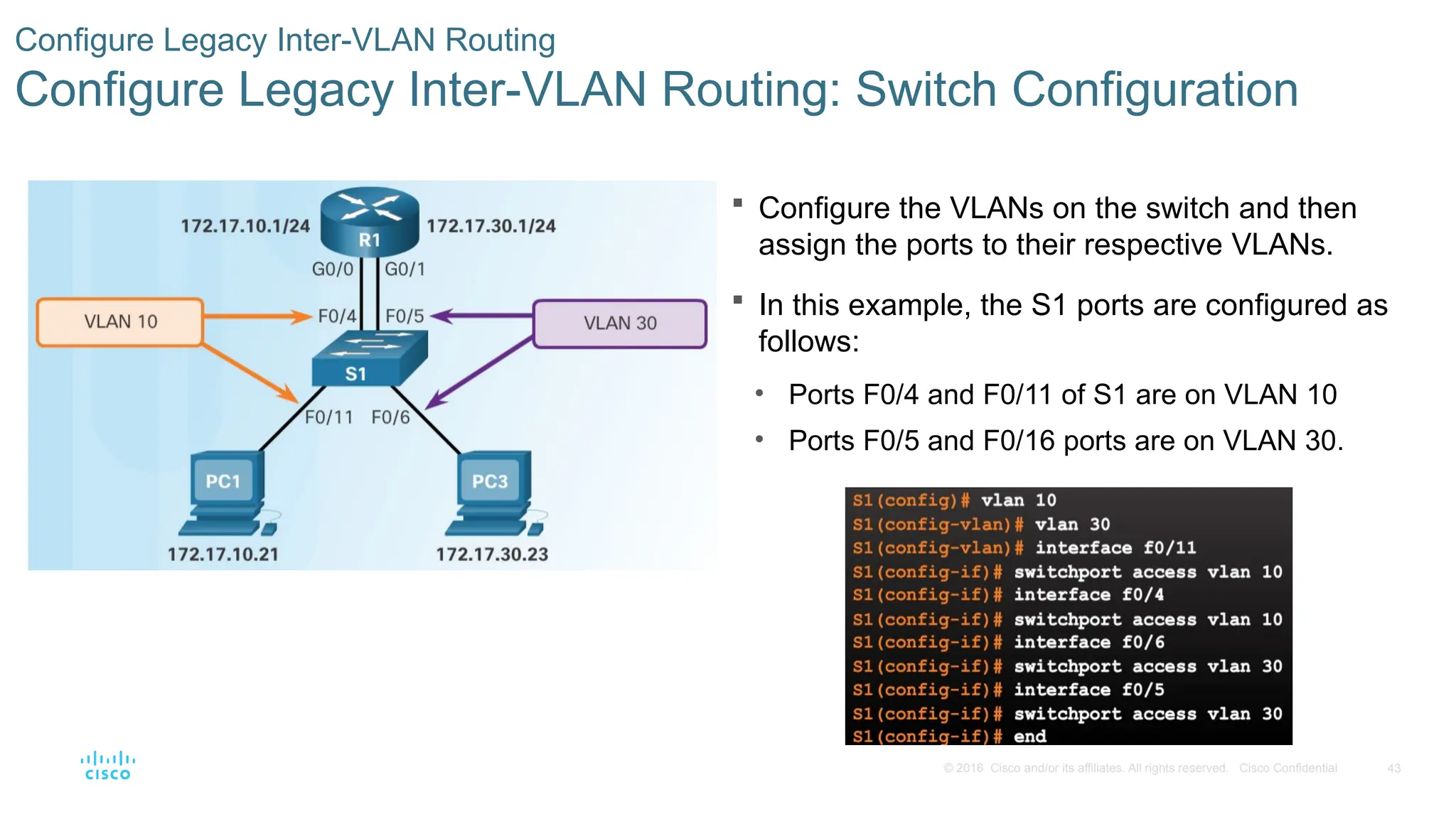
Configure the VLANs on the switch and then
assign the ports to their respective VLANs.
In this example, the S1 ports are configured as
follows:
• Ports F0/4 and F0/11 of S1 are on VLAN 10
• Ports F0/5 and F0/16 ports are on VLAN 30.
Configure Legacy Inter-VLAN Routing
Configure Legacy Inter-VLAN Routing: Switch Configuration
- 44.
44
© 2016 Ciscoand/or its affiliates. All rights reserved. Cisco Confidential
Configure Legacy Inter-VLAN Routing
Configure Legacy Inter-VLAN Routing: Router Interface Configuration
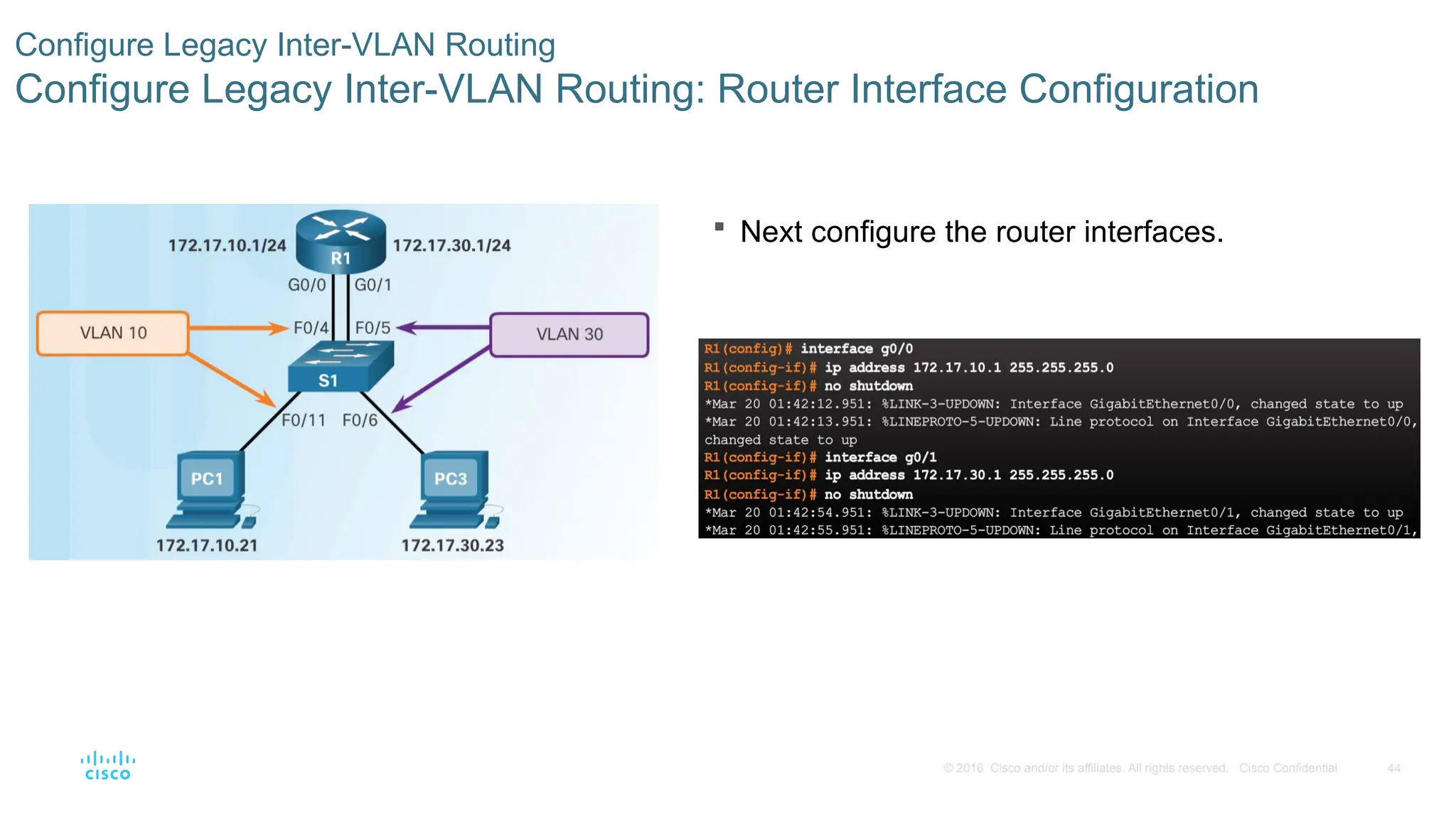
Next configure the router interfaces.
- 45.
45
© 2016 Ciscoand/or its affiliates. All rights reserved. Cisco Confidential
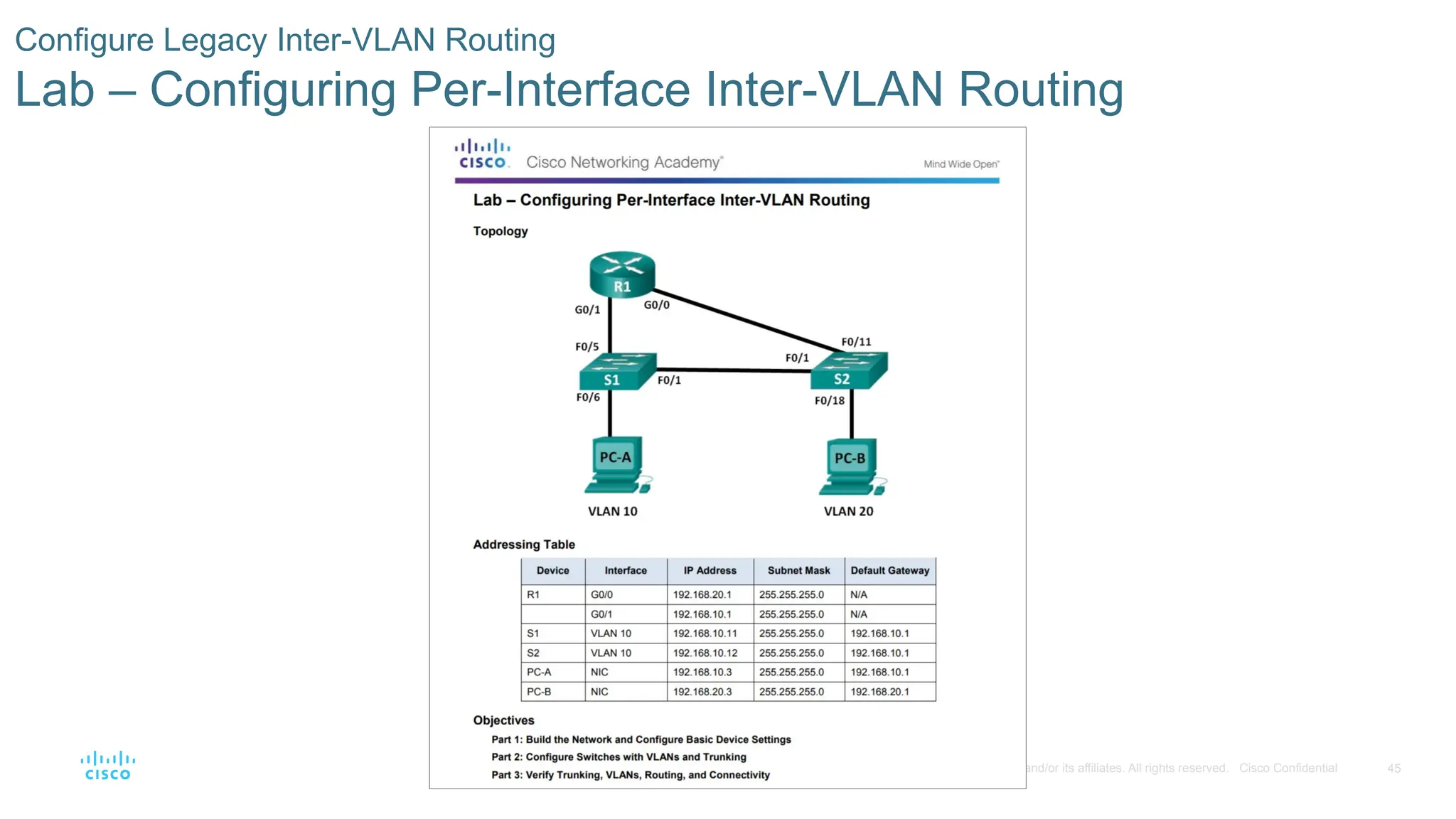
Configure Legacy Inter-VLAN Routing
Lab – Configuring Per-Interface Inter-VLAN Routing
- 46.
46
© 2016 Ciscoand/or its affiliates. All rights reserved. Cisco Confidential
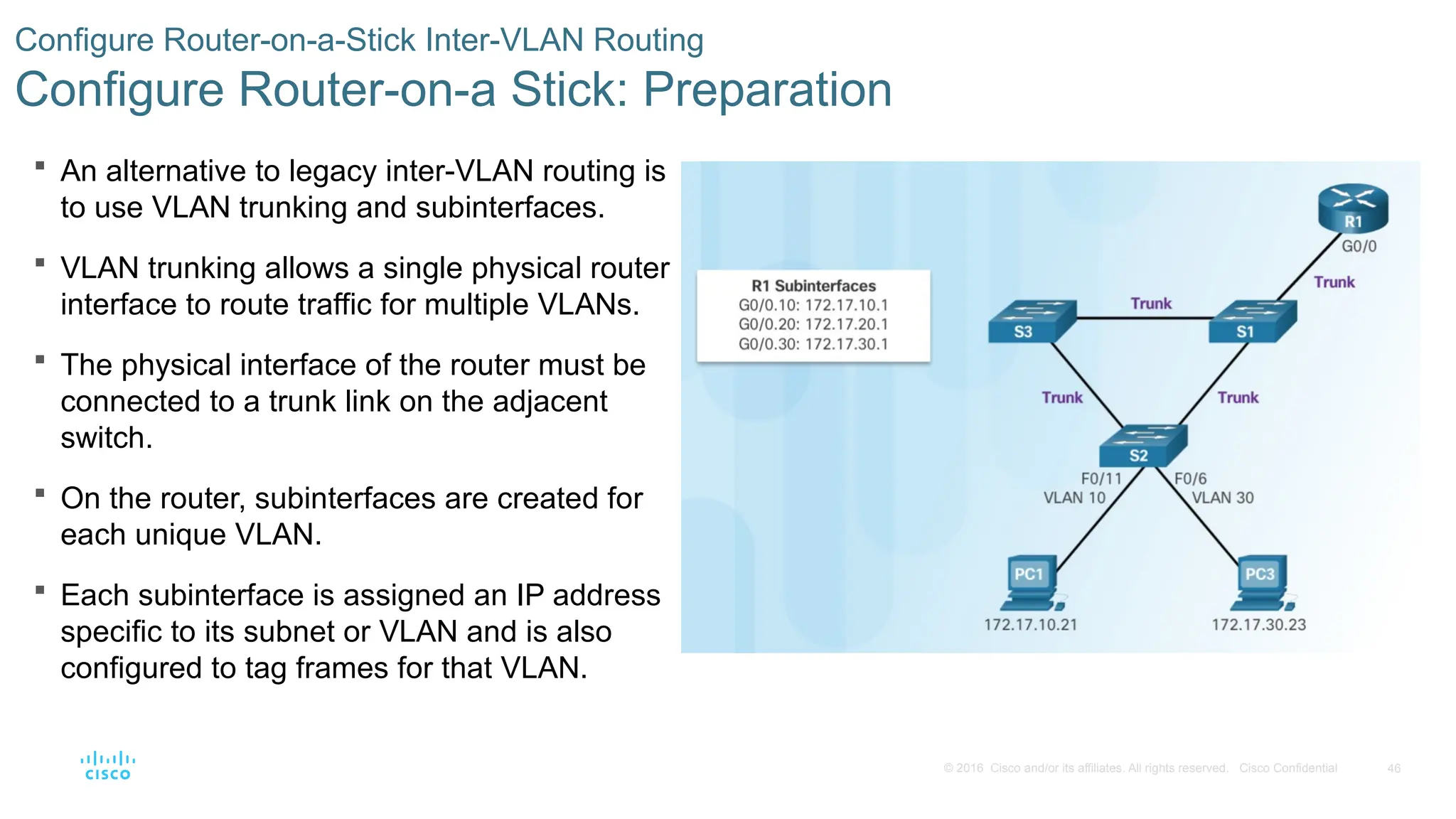
An alternative to legacy inter-VLAN routing is
to use VLAN trunking and subinterfaces.
VLAN trunking allows a single physical router
interface to route traffic for multiple VLANs.
The physical interface of the router must be
connected to a trunk link on the adjacent
switch.
On the router, subinterfaces are created for
each unique VLAN.
Each subinterface is assigned an IP address
specific to its subnet or VLAN and is also
configured to tag frames for that VLAN.
Configure Router-on-a-Stick Inter-VLAN Routing
Configure Router-on-a Stick: Preparation
- 47.
47
© 2016 Ciscoand/or its affiliates. All rights reserved. Cisco Confidential
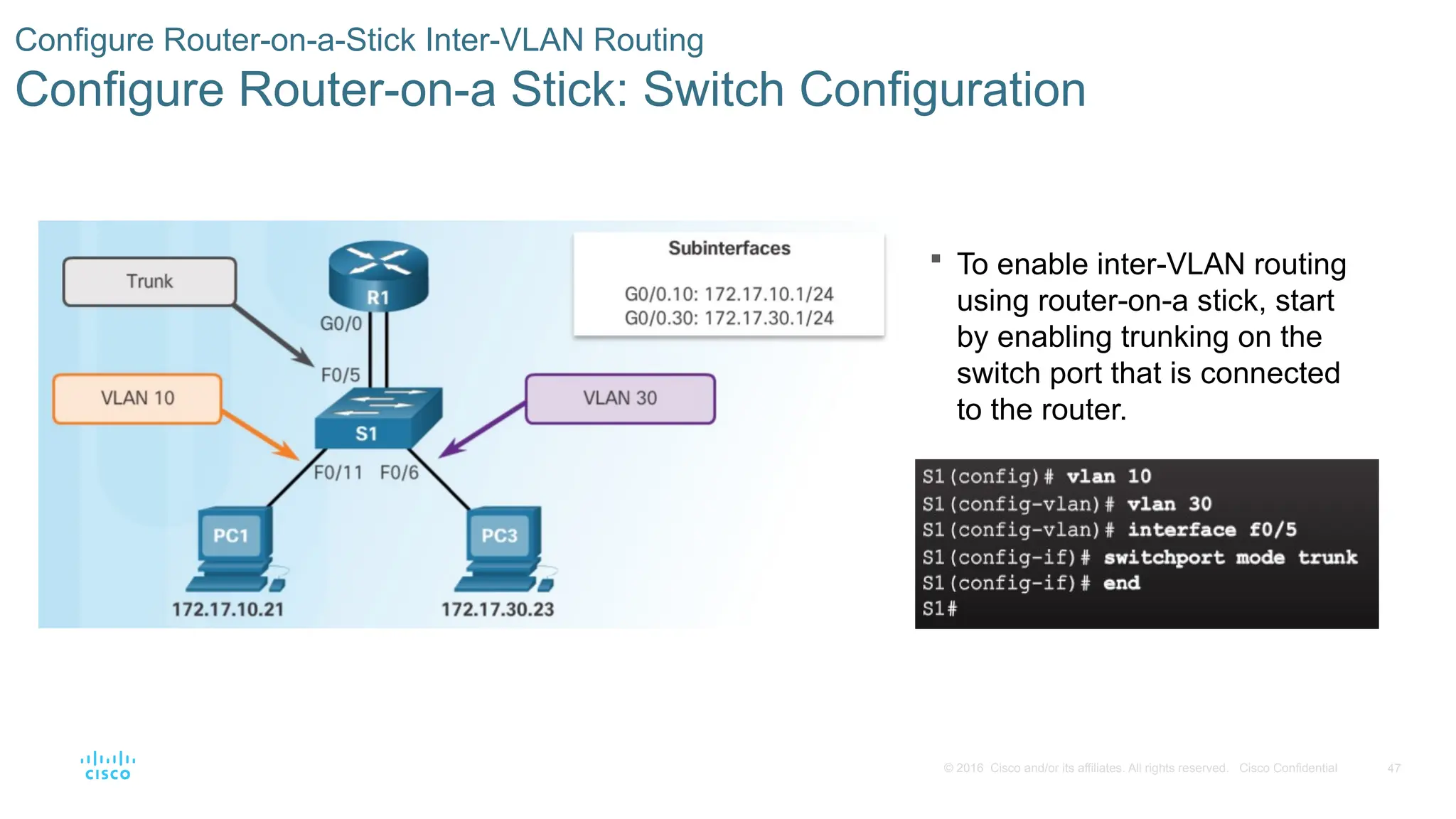
To enable inter-VLAN routing
using router-on-a stick, start
by enabling trunking on the
switch port that is connected
to the router.
Configure Router-on-a-Stick Inter-VLAN Routing
Configure Router-on-a Stick: Switch Configuration
- 48.
48
© 2016 Ciscoand/or its affiliates. All rights reserved. Cisco Confidential
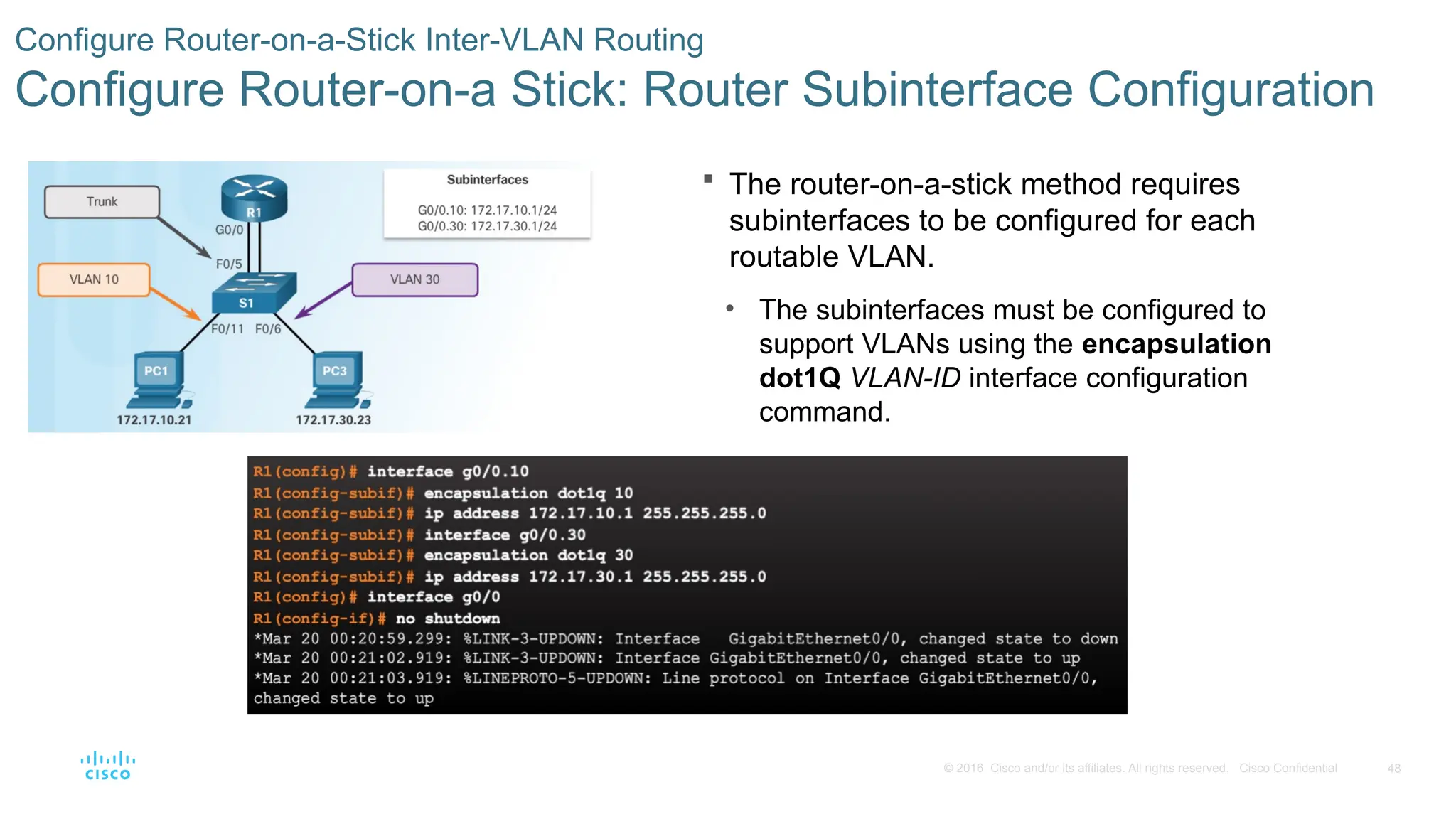
The router-on-a-stick method requires
subinterfaces to be configured for each
routable VLAN.
• The subinterfaces must be configured to
support VLANs using the encapsulation
dot1Q VLAN-ID interface configuration
command.
Configure Router-on-a-Stick Inter-VLAN Routing
Configure Router-on-a Stick: Router Subinterface Configuration
- 49.
49
© 2016 Ciscoand/or its affiliates. All rights reserved. Cisco Confidential
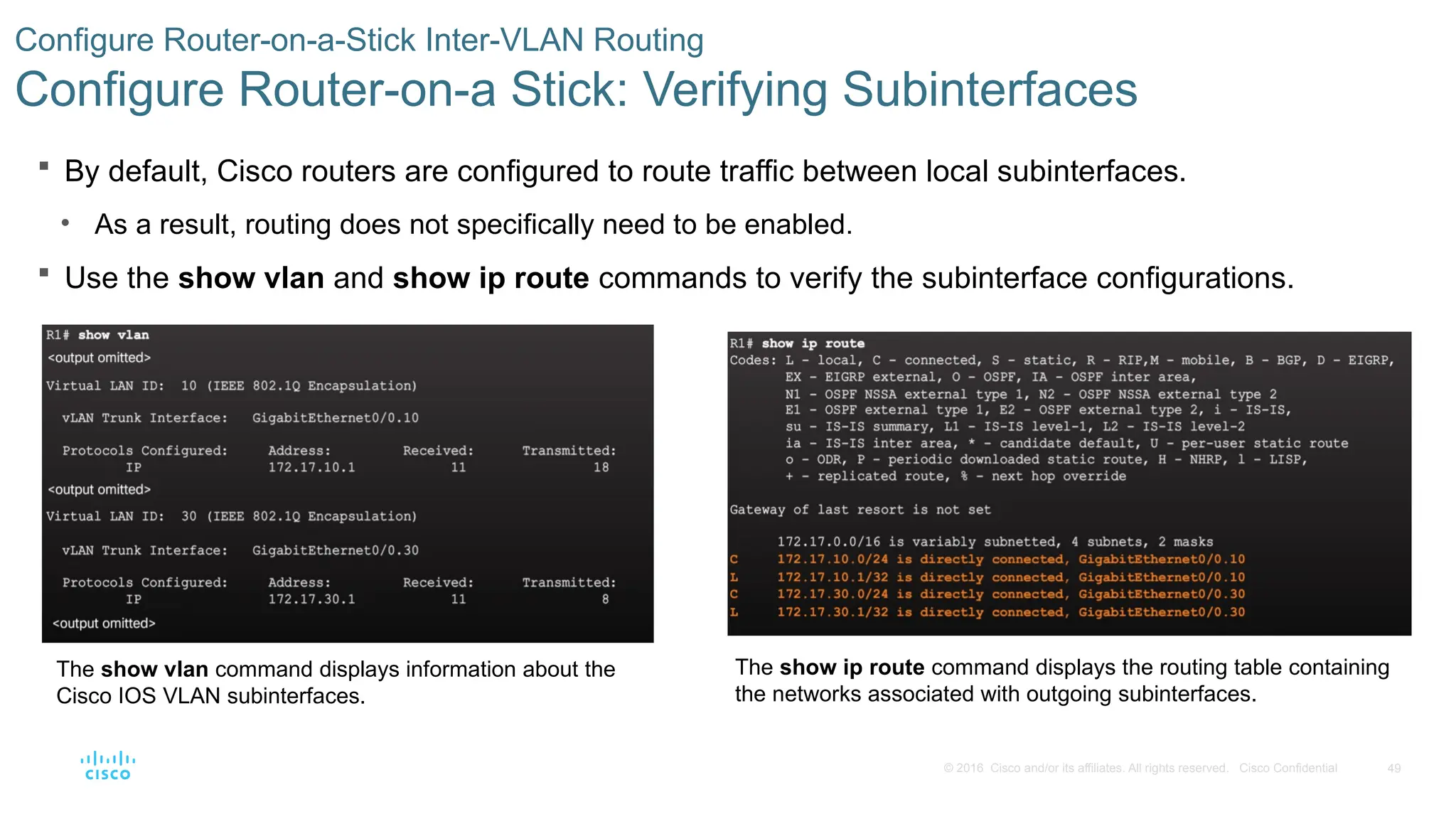
By default, Cisco routers are configured to route traffic between local subinterfaces.
• As a result, routing does not specifically need to be enabled.
Use the show vlan and show ip route commands to verify the subinterface configurations.
Configure Router-on-a-Stick Inter-VLAN Routing
Configure Router-on-a Stick: Verifying Subinterfaces
The show vlan command displays information about the
Cisco IOS VLAN subinterfaces.
The show ip route command displays the routing table containing
the networks associated with outgoing subinterfaces.
- 50.
50
© 2016 Ciscoand/or its affiliates. All rights reserved. Cisco Confidential
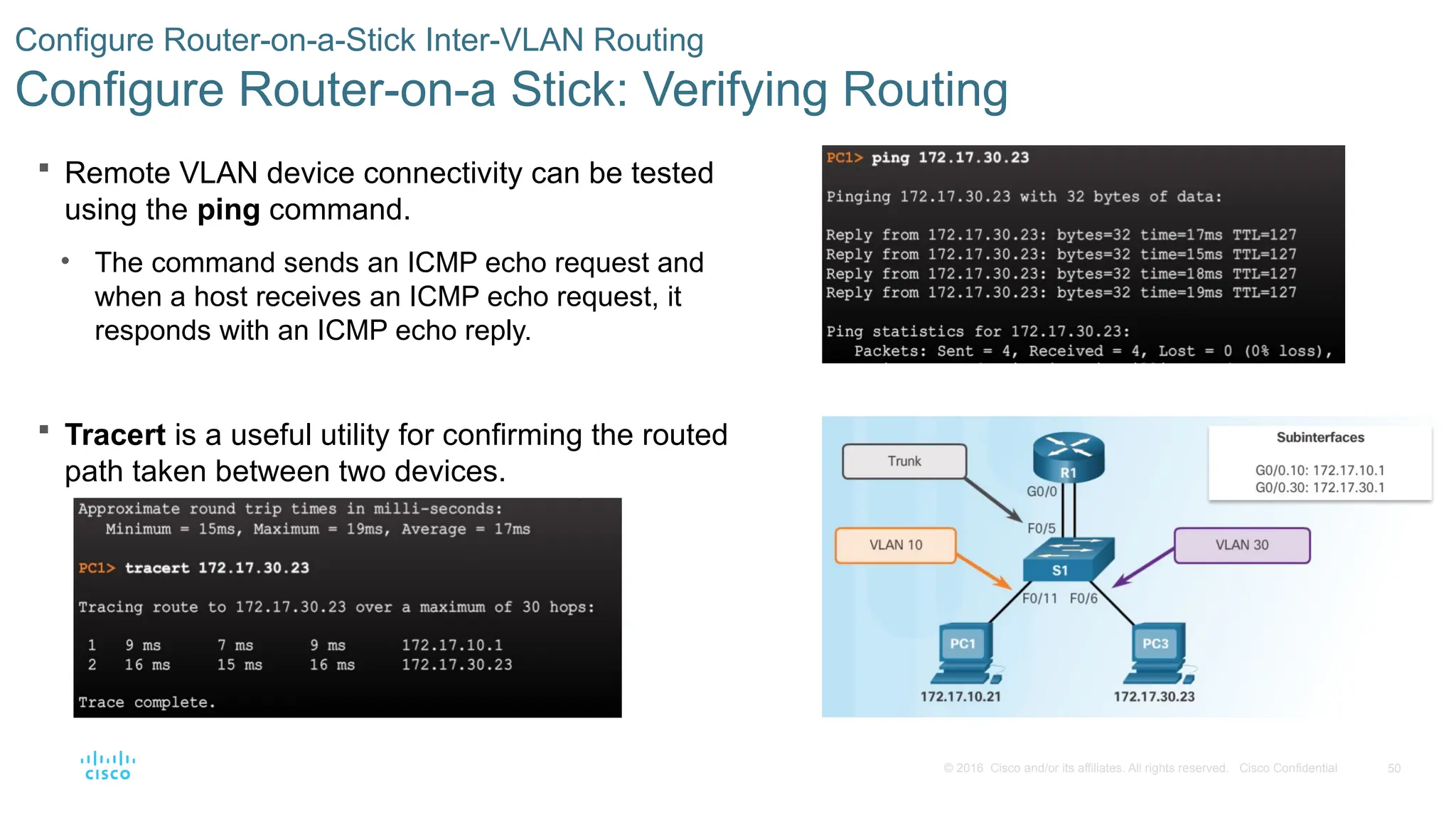
Remote VLAN device connectivity can be tested
using the ping command.
• The command sends an ICMP echo request and
when a host receives an ICMP echo request, it
responds with an ICMP echo reply.
Tracert is a useful utility for confirming the routed
path taken between two devices.
Configure Router-on-a-Stick Inter-VLAN Routing
Configure Router-on-a Stick: Verifying Routing
- 51.
51
© 2016 Ciscoand/or its affiliates. All rights reserved. Cisco Confidential
Configure Router-on-a-Stick Inter-VLAN Routing
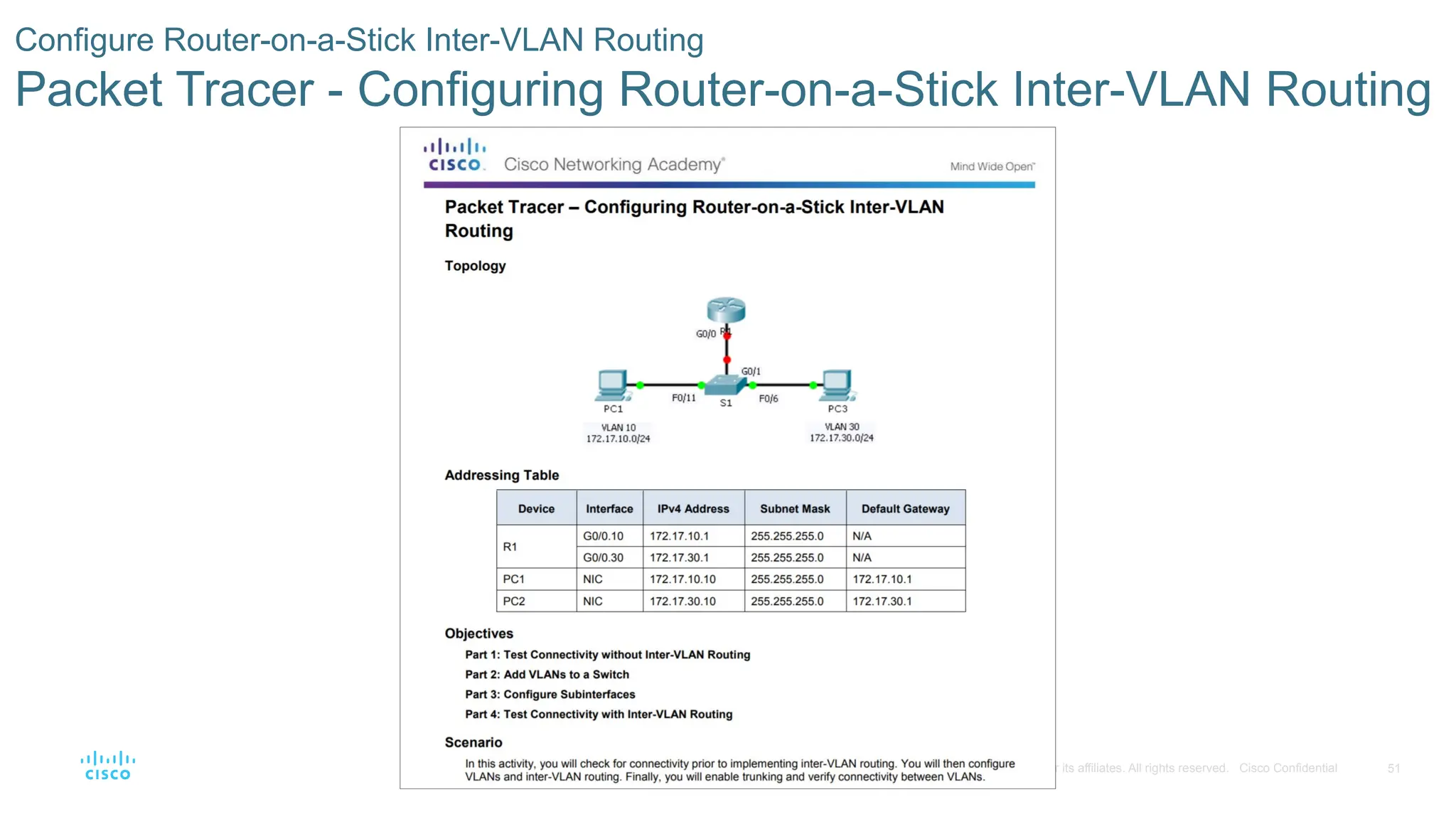
Packet Tracer - Configuring Router-on-a-Stick Inter-VLAN Routing
- 52.
52
© 2016 Ciscoand/or its affiliates. All rights reserved. Cisco Confidential
Configure Router-on-a-Stick Inter-VLAN Routing
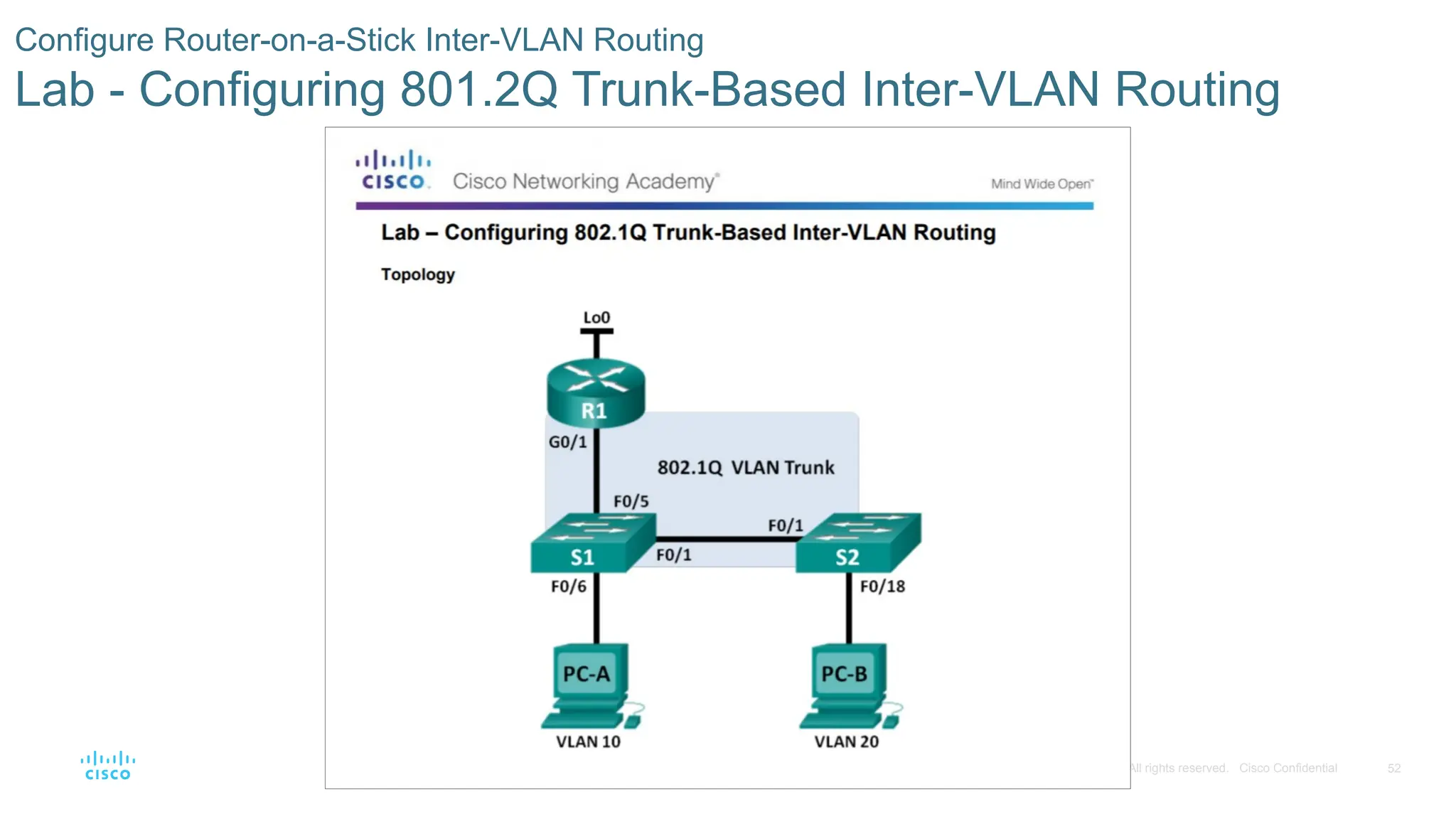
Lab - Configuring 801.2Q Trunk-Based Inter-VLAN Routing
- 53.
53
© 2016 Ciscoand/or its affiliates. All rights reserved. Cisco Confidential
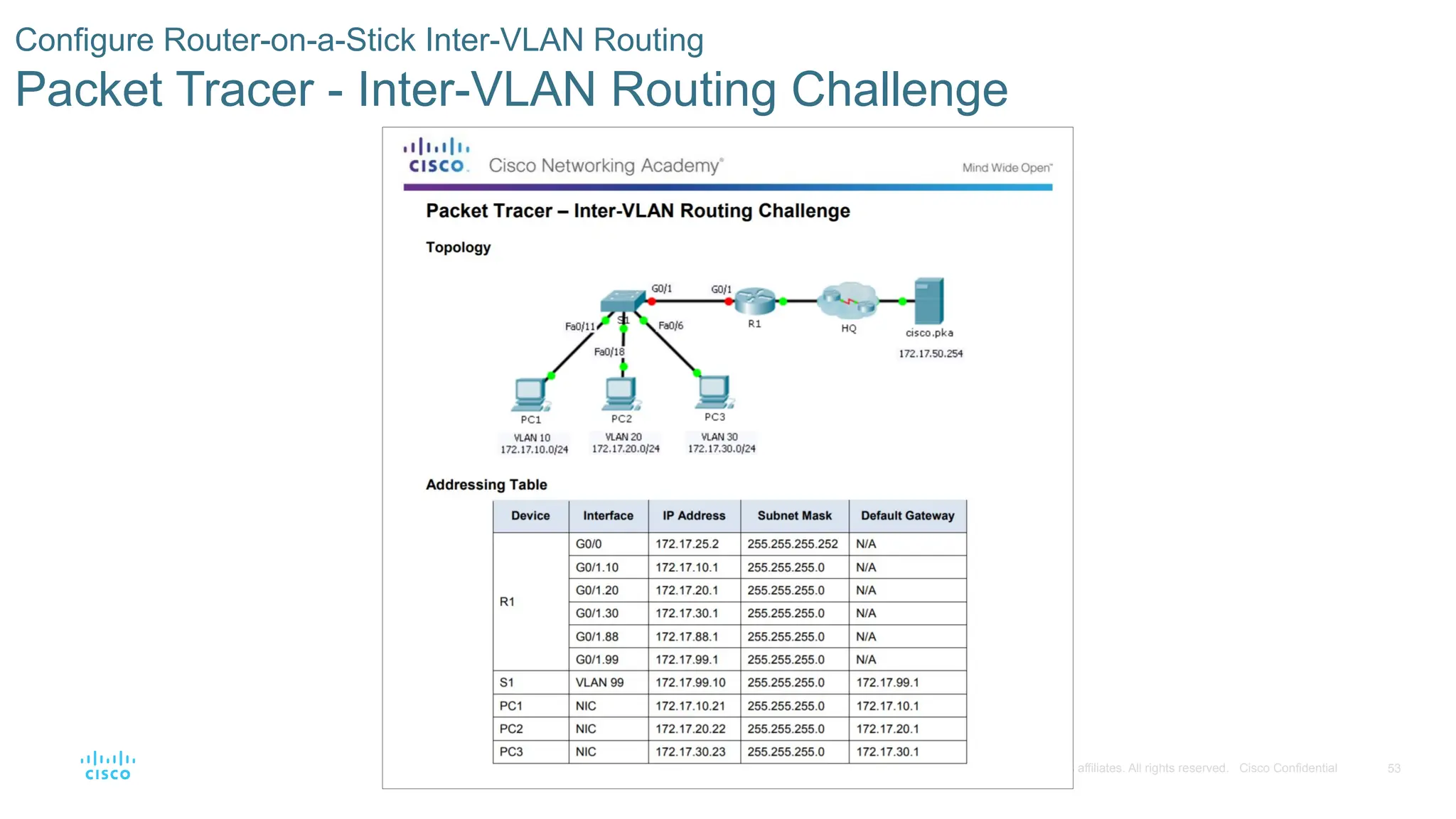
Configure Router-on-a-Stick Inter-VLAN Routing
Packet Tracer - Inter-VLAN Routing Challenge
- 54.
54
© 2016 Ciscoand/or its affiliates. All rights reserved. Cisco Confidential
6.4 Chapter Summary
- 55.
55
© 2016 Ciscoand/or its affiliates. All rights reserved. Cisco Confidential
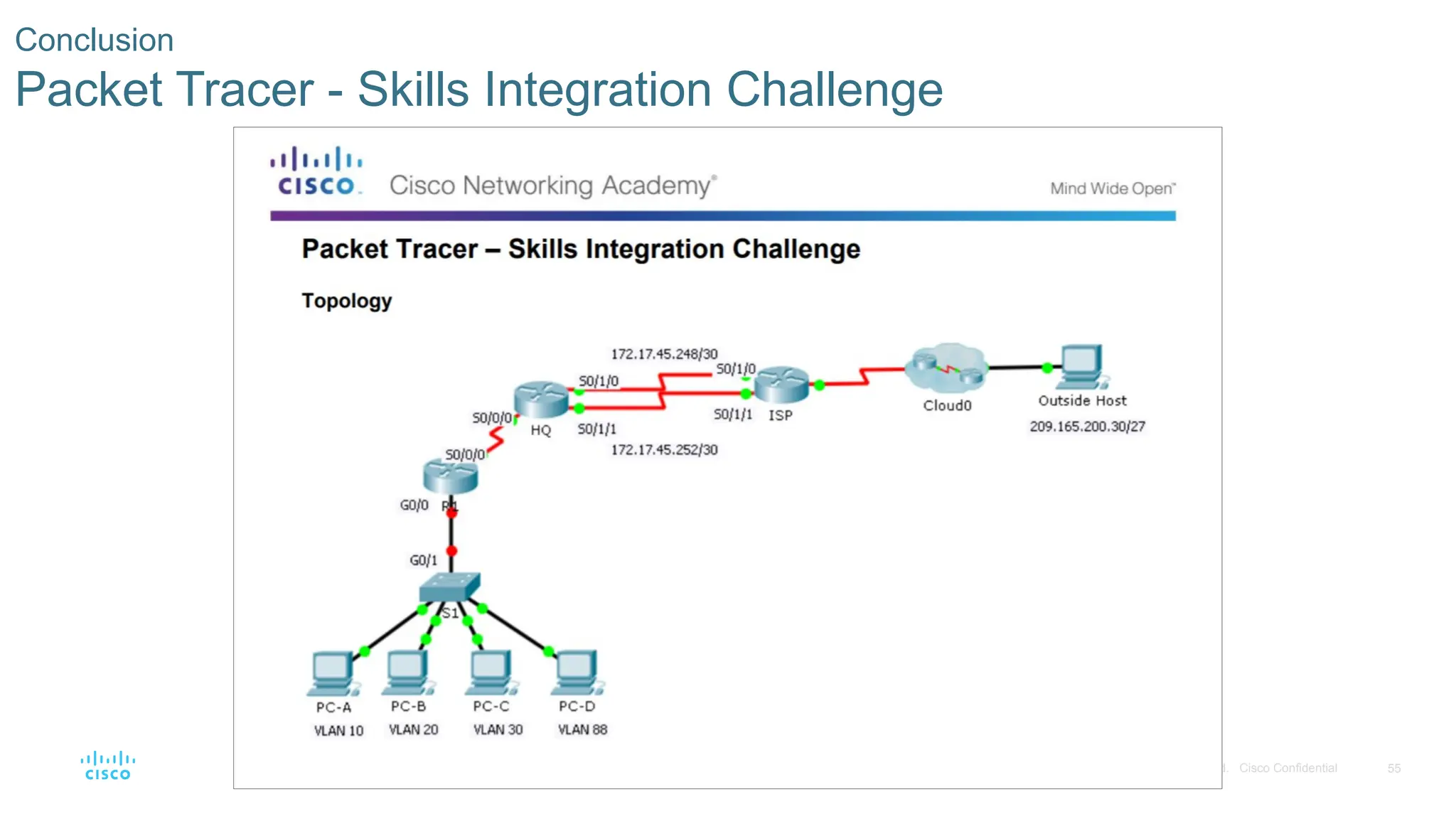
Conclusion
Packet Tracer - Skills Integration Challenge
- 56.
56
© 2016 Ciscoand/or its affiliates. All rights reserved. Cisco Confidential
Explain how VLANs segment broadcast domains in a small to medium-sized business network.
Implement VLANs to segment a small to medium-sized business network..
Configure routing between VLANs in a small to medium-sized business network.
Conclusion
Chapter 6: VLANs
Editor's Notes
- #1 Cisco Networking Academy Program
Routing and Switching Essentials v6.0
Chapter 6: VLANs
- #2 Cisco Networking Academy Program
Routing and Switching Essentials v6.0
Chapter 6: VLANs
- #3 6 - VLANs
6.1 – VLAN Segmentation
- #4 6 - VLANs
6.1 – VLAN Segmentation
- #5 6.1 – VLAN Segmentation
6.1.1 – Overview of VLANs
6.1.1.1 – VLAN Definitions
- #6 6.1 – VLAN Segmentation
6.1.1 – Overview of VLANs
6.1.1.2 – Benefits of VLANs
- #7 6.1 – VLAN Segmentation
6.1.1 – Overview of VLANs
6.1.1.3 – Types of VLANs
- #8 6.1 – VLAN Segmentation
6.1.1 – Overview of VLANs
6.1.1.4 – Voice VLANs
- #9 6.1 – VLAN Segmentation
6.1.1 – Overview of VLANs
6.1.1.5 – Packet Tracer – Who Hears the Broadcast?
- #10 6.1 – VLAN Segmentation
6.1.2 – VLANs in a Multi-Switched Environment
6.1.2.1 – VLAN Trunks
- #11 6.1 – VLAN Segmentation
6.1.2 – VLANs in a Multi-Switched Environment
6.1.2.2 - Controlling Broadcast Domains with VLANs
- #12 6.1 – VLAN Segmentation
6.1.2 – VLANs in a Multi-Switched Environment
6.1.2.3 - Tagging Ethernet Frames for VLAN Identification
- #13 6.1 – VLAN Segmentation
6.1.2 – VLANs in a Multi-Switched Environment
6.1.2.4 - Native VLANs and 802.1Q Tagging
- #14 6.1 – VLAN Segmentation
6.1.2 – VLANs in a Multi-Switched Environment
6.1.2.5 - Voice VLAN Tagging
- #15 6.1 – VLAN Segmentation
6.1.2 – VLANs in a Multi-Switched Environment
6.1.2.7 – Packet Tracer – Investigating a VLAN Implementation
- #16 6 - VLANs
6.2 – VLAN Implementation
- #17 6.2 – VLAN Implementations
6.2.1 – VLAN Assignment
6.2.1.1 - VLAN Ranges on Catalyst Switches
- #18 6.2 – VLAN Implementations
6.2.1 – VLAN Assignment
6.2.1.2 – Creating a VLAN
- #19 6.2 – VLAN Implementations
6.2.1 – VLAN Assignment
6.2.1.3 – Assigning Ports to VLANs
- #20 6.2 – VLAN Implementations
6.2.1 – VLAN Assignment
6.2.1.4 - Changing VLAN Port Membership
- #21 6.2 – VLAN Implementations
6.2.1 – VLAN Assignment
6.2.1.5 – Deleting VLANs
- #22 6.2 – VLAN Implementations
6.2.1 – VLAN Assignment
6.2.1.6 - Verifying VLAN Information
- #23 6.2 – VLAN Implementations
6.2.1 – VLAN Assignment
6.2.1.7 – Packet Tracer – Configuring VLANs
- #24 6.2 – VLAN Implementations
6.2.2 – VLAN Trunks
6.2.2.1 - Configuring IEEE 802.1q Trunk Links
- #25 6.2 – VLAN Implementations
6.2.2 – VLAN Trunks
6.2.2.2 - Resetting the Trunk to Default State
- #26 6.2 – VLAN Implementations
6.2.2 – VLAN Trunk
6.2.2.3 - Verifying Trunk Configuration
- #27 6.2 – VLAN Implementations
6.2.2 – VLAN Trunks
6.2.2.4 - Packet Tracer – Configuring Trunks
- #28 6.2 – VLAN Implementations
6.2.2 – VLAN Trunks
6.2.2.5 – Lab – Configuring VLANs and Trunks
- #29 6.2 – VLAN Implementations
6.2.3 – Troubleshoot VLANs and Trunks
6.2.3.1 - IP Addressing Issues with VLANs
- #30 6.2 – VLAN Implementations
6.2.3 – Troubleshoot VLANs and Trunks
6.2.3.2 - Missing VLANs
- #31 6.2 – VLAN Implementations
6.2.3 – Troubleshoot VLANs and Trunks
6.2.3.3 - Introduction to Troubleshooting Trunks
- #32 6.2 – VLAN Implementations
6.2.3 – Troubleshoot VLANs and Trunks
6.2.3.4 - Common Problems with Trunks
- #33 6.2 – VLAN Implementations
6.2.3 – Troubleshoot VLANs and Trunks
6.2.3.5 - Incorrect Port Mode
- #34 6.2 – VLAN Implementations
6.2.3 – Troubleshoot VLANs and Trunks
6.2.3.6 - Incorrect VLAN List
- #35 6.2 – VLAN Implementations
6.2.3 – Troubleshoot VLANs and Trunks
6.2.3.7 - Packet Tracer - Troubleshooting a VLAN Implementation - Scenario 1
- #36 6.2 – VLAN Implementations
6.2.3 – Troubleshoot VLANs and Trunks
6.2.3.8 - Packet Tracer - Troubleshooting a VLAN Implementation - Scenario 2
- #37 6.2 – VLAN Implementations
6.2.3 – Troubleshoot VLANs and Trunks
6.2.3.9 – Lab - Troubleshooting VLAN Configurations
- #38 6 - VLANs
6.3 – Inter-VLAN Routing Using Routers
- #39 6.3 – Inter-VLAN Routing Using Routers
6.3.1 – Inter-VLAN Routing Operation
6.3.1.1 - What is Inter-VLAN Routing?
- #40 6.3 – Inter-VLAN Routing Using Routers
6.3.1 – Inter-VLAN Routing Operation
6.3.1.2 - Legacy Inter-VLAN Routing
- #41 6.3 – Inter-VLAN Routing Using Routers
6.3.1 – Inter-VLAN Routing Operation
6.3.1.3 - Router-on-a-Stick Inter-VLAN Routing
- #42 6.3 – Inter-VLAN Routing Using Routers
6.3.2 – Configure Legacy Inter-VLAN Routing
6.3.2.1 - Configure Legacy Inter-VLAN Routing: Preparation
- #43 6.3 – Inter-VLAN Routing Using Routers
6.3.2 – Configure Legacy Inter-VLAN Routing
6.3.2.2 - Configure Legacy Inter-VLAN Routing: Switch Configuration
- #44 6.3 – Inter-VLAN Routing Using Routers
6.3.2 – Configure Legacy Inter-VLAN Routing
6.3.2.3 - Configure Legacy Inter-VLAN Routing: Router Interface Configuration
- #45 6.3 – Inter-VLAN Routing Using Routers
6.3.2 – Configure Legacy Inter-VLAN Routing
6.3.2.4 – Lab – Configuring Per-Interface Inter-VLAN Routing
- #46 6.3 – Inter-VLAN Routing Using Routers
6.3.3 – Configure Router-on-a-Stick Inter-VLAN Routing
6.3.3.1 - Configure Router-on-a Stick: Preparation
- #47 6.3 – Inter-VLAN Routing Using Routers
6.3.3 – Configure Router-on-a-Stick Inter-VLAN Routing
6.3.3.2 - Configure Router-on-a Stick: Switch Configuration
- #48 6.3 – Inter-VLAN Routing Using Routers
6.3.3 – Configure Router-on-a-Stick Inter-VLAN Routing
6.3.3.3 - Configure Router-on-a Stick: Router Subinterface Configuration
- #49 6.3 – Inter-VLAN Routing Using Routers
6.3.3 – Configure Router-on-a-Stick Inter-VLAN Routing
6.3.3.4 - Configure Router-on-a Stick: Verifying Subinterfaces
- #50 6.3 – Inter-VLAN Routing Using Routers
6.3.3 – Configure Router-on-a-Stick Inter-VLAN Routing
6.3.3.5 - Configure Router-on-a Stick: Verifying Routing
- #51 6.3 – Inter-VLAN Routing Using Routers
6.3.3 – Configure Router-on-a-Stick Inter-VLAN Routing
6.3.3.6 -Packet Tracer - Configuring Router-on-a-Stick Inter-VLAN Routing
- #52 6.3 – Inter-VLAN Routing Using Routers
6.3.3 – Configure Router-on-a-Stick Inter-VLAN Routing
6.3.3.7 -Lab - Configuring 801.2Q Trunk-Based Inter-VLAN Routing
- #53 6.3 – Inter-VLAN Routing Using Routers
6.3.3 – Configure Router-on-a-Stick Inter-VLAN Routing
6.3.3.8 -Packet Tracer - Inter-VLAN Routing Challenge
- #54 6 - VLANs
6.4 – Summary
- #55 6.4 – Summary
6.4.1 – Conclusion
6.4.1.2 – Packet Tracer - Skills Integration Challenge
- #56 6.4 – Summary
6.4.1 – Conclusion
6.4.1.3 – Chapter 6: VLANs
- #57 New Terms and Commands
- #58 New Terms and Commands
- #59 New Terms and Commands