30-Jun-13
Outline
 General Concepts of VLAN
 What is VLAN ?
 Why use VLAN's?
 The role of VLANs in a network
 Trunking VLANs
 Different way to assign VLAN Membership.
 Spanning Tree in VLAN
 Frame processing and 802.1Q standard
 Different kind of logical VLAN architecture
 Configure VLANs on switches
 Troubleshoot common VLAN problems
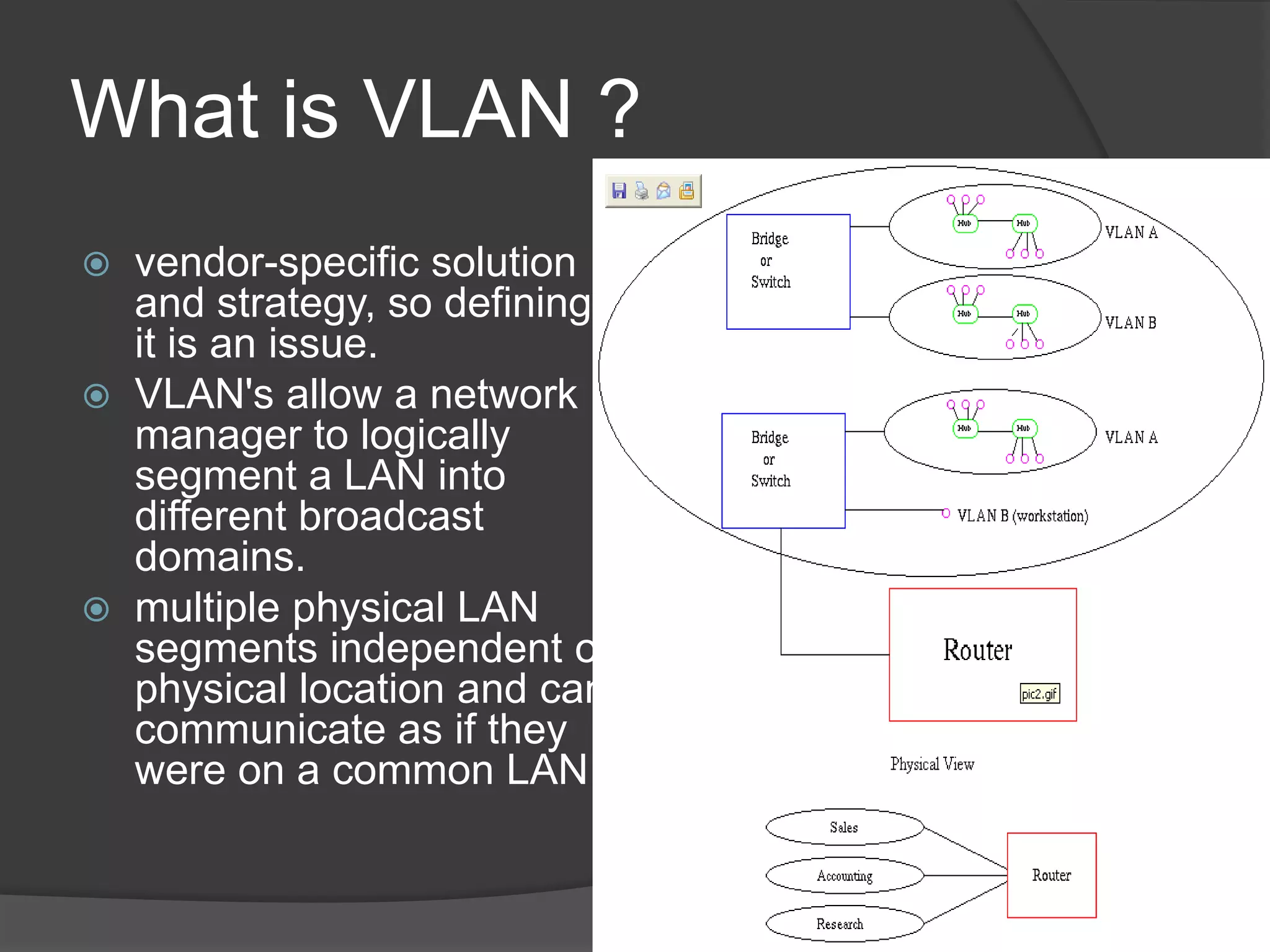
What is VLAN ?
 vendor-specific solution
and strategy, so defining
it is an issue.
 VLAN's allow a network
manager to logically
segment a LAN into
different broadcast
domains.
 multiple physical LAN
segments independent of
physical location and can
communicate as if they
were on a common LAN
Some requirements of LANs
 Need to split up broadcast domains to
make good use of bandwidth
 People in the same department may
need to be grouped together for access
to servers
 Security: restrict access by certain users
to some areas of the LAN
 Provide a way for different areas of the
LAN to communicate with each other
30-Jun-13
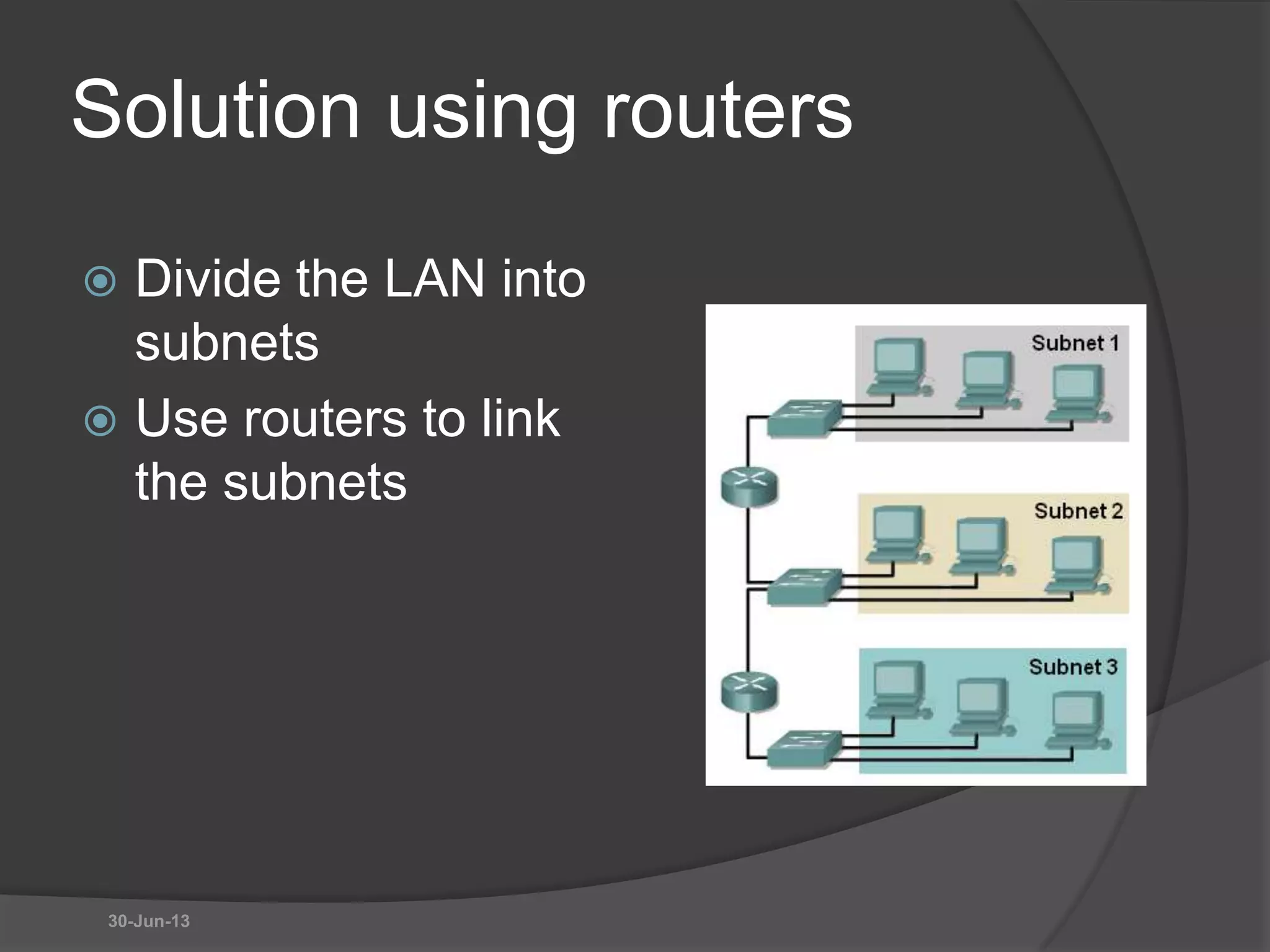
Solution using routers
 Divide the LAN into
subnets
 Use routers to link
the subnets
30-Jun-13
Solution using routers
BUT
 Routers are expensive
 Routers are slower than switches
 Subnets are restricted to limited physical
areas
 Subnets are inflexible
30-Jun-13
Why use VLAN's?
 Performance
 Formation of Virtual Workgroups
 Simplified Administration
 Reduced Cost
 Security
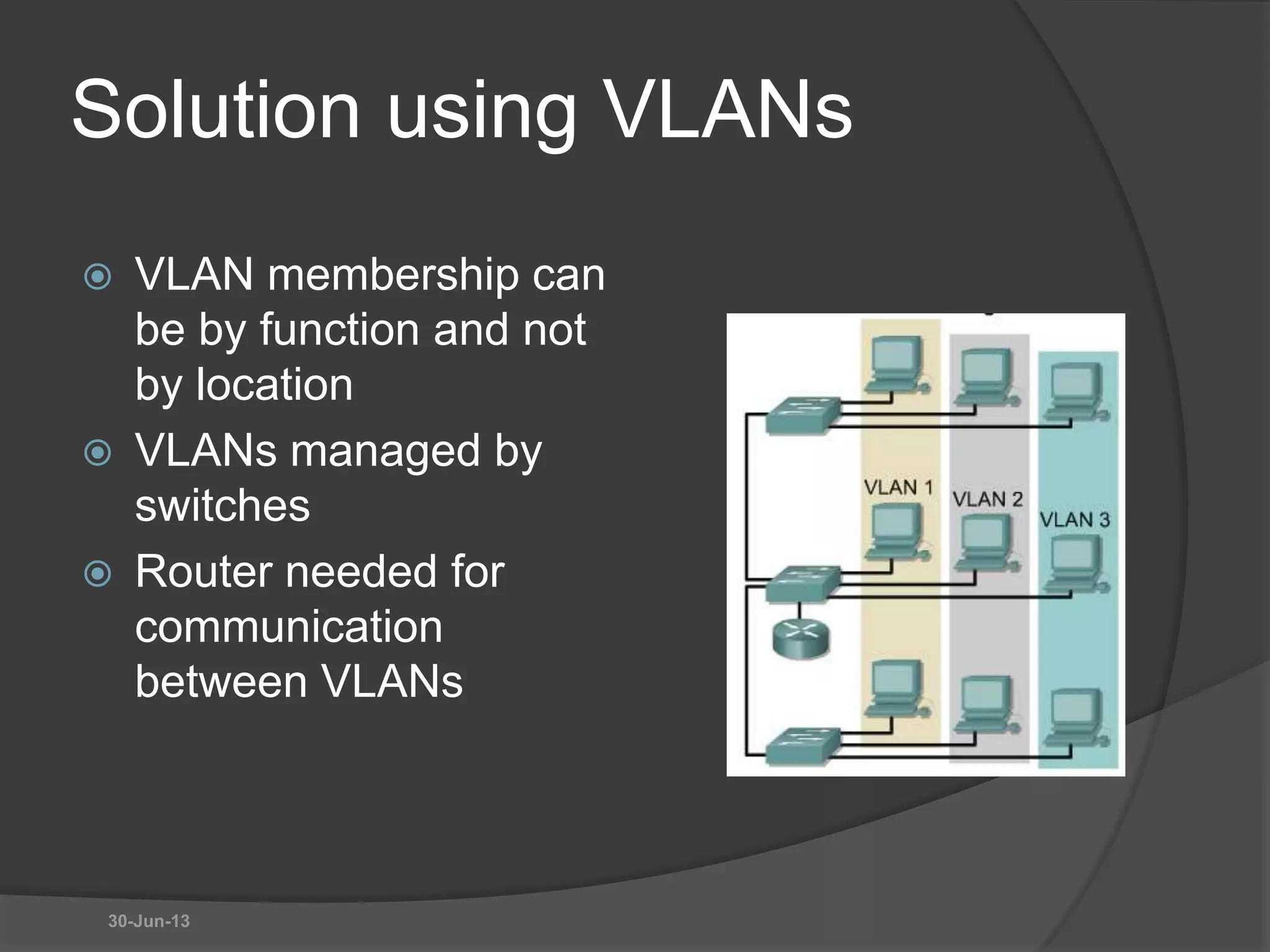
Solution using VLANs
 VLAN membership can
be by function and not
by location
 VLANs managed by
switches
 Router needed for
communication
between VLANs
30-Jun-13
VLANs
 All hosts in a VLAN have addresses in the
same subnet. A VLAN is a subnet.
 Broadcasts are kept within the VLAN. A VLAN
is a broadcast domain.
 The switch has a separate MAC address table
for each VLAN. Traffic for each VLAN is kept
separate from other VLANs.
 Layer 2 switches cannot route between VLANs.
30-Jun-13
VLAN Membership
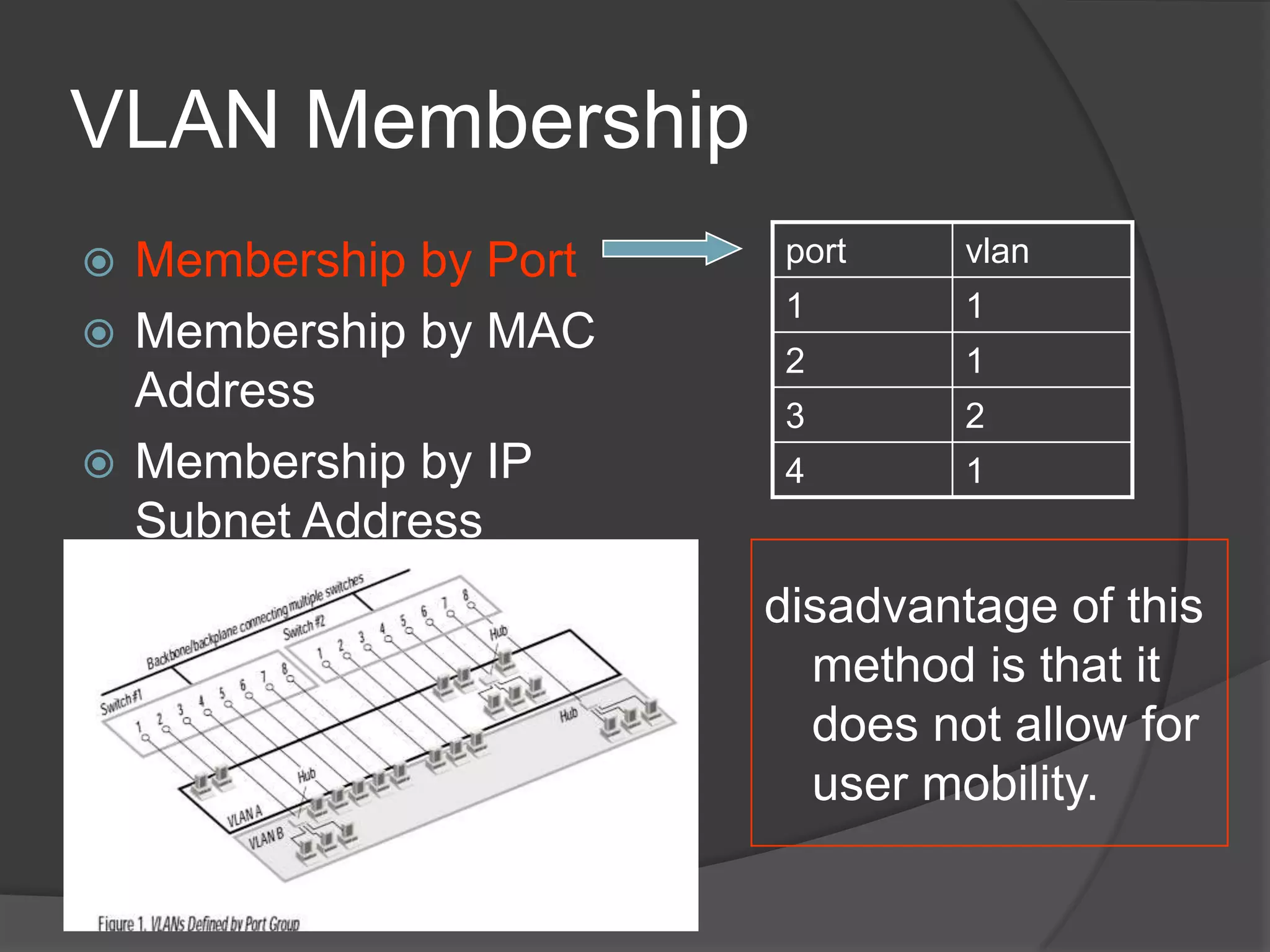
 Membership by Port
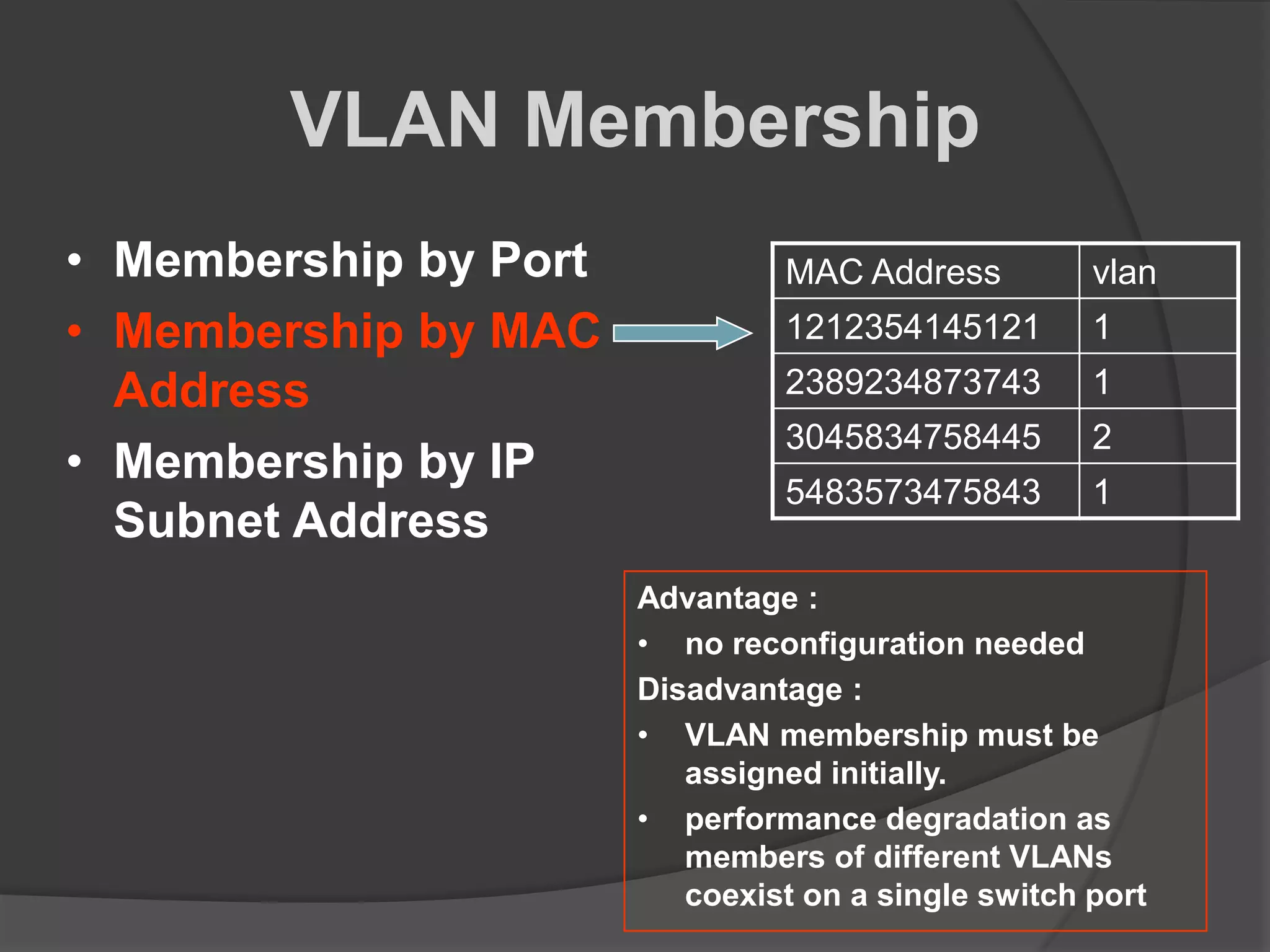
 Membership by MAC
Address
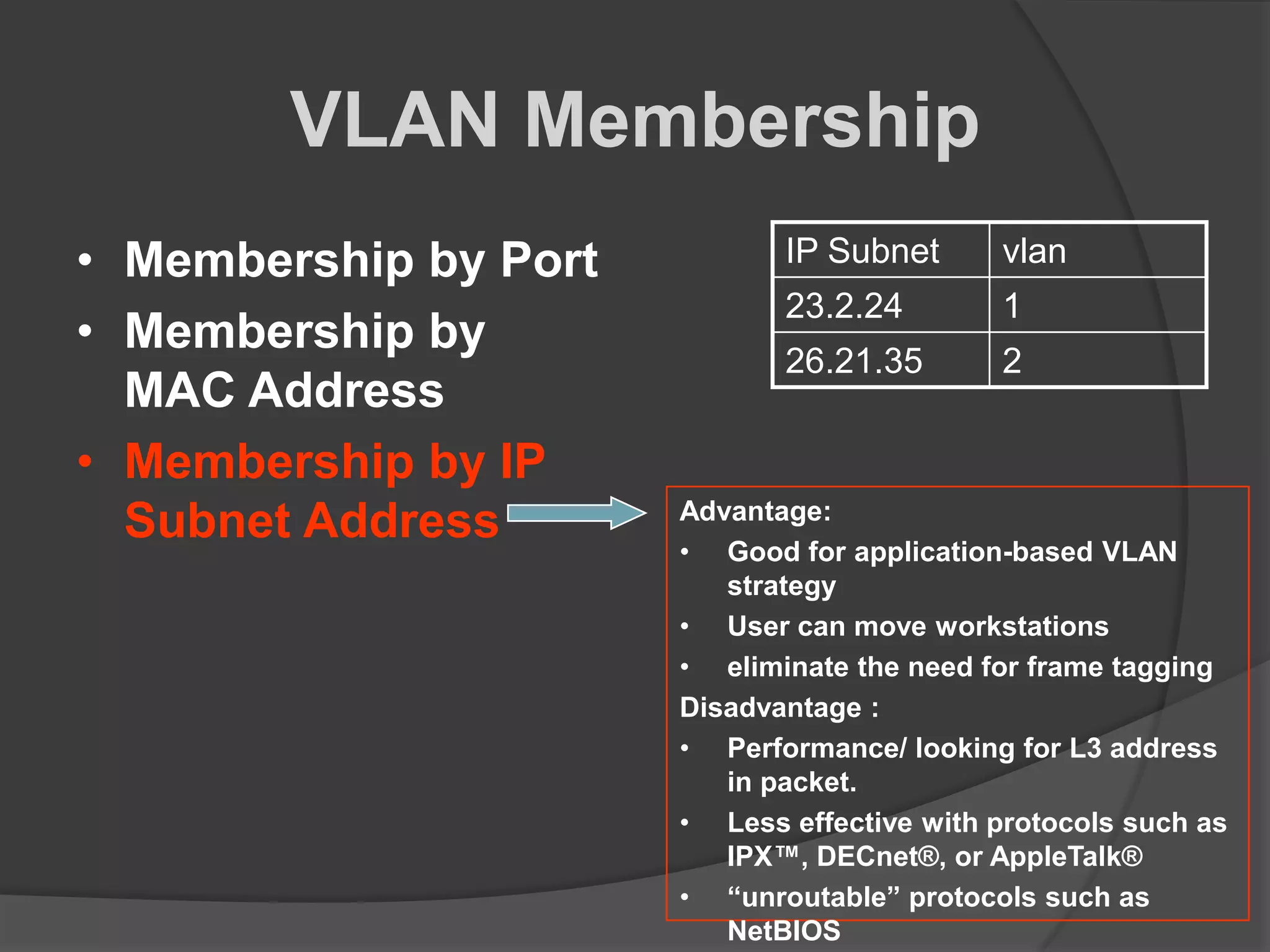
 Membership by IP
Subnet Address
port vlan
1 1
2 1
3 2
4 1
disadvantage of this
method is that it
does not allow for
user mobility.
VLAN Membership
• Membership by Port
• Membership by MAC
Address
• Membership by IP
Subnet Address
MAC Address vlan
1212354145121 1
2389234873743 1
3045834758445 2
5483573475843 1
Advantage :
• no reconfiguration needed
Disadvantage :
• VLAN membership must be
assigned initially.
• performance degradation as
members of different VLANs
coexist on a single switch port
VLAN Membership
• Membership by Port
• Membership by
MAC Address
• Membership by IP
Subnet Address
IP Subnet vlan
23.2.24 1
26.21.35 2
Advantage:
• Good for application-based VLAN
strategy
• User can move workstations
• eliminate the need for frame tagging
Disadvantage :
• Performance/ looking for L3 address
in packet.
• Less effective with protocols such as
IPX™, DECnet®, or AppleTalk®
• “unroutable” protocols such as
NetBIOS
VLAN numbers
 VLAN 1: default Ethernet LAN, all ports start in
this VLAN.
 VLANs 1002 – 1005 automatically created for
Token Ring and FDDI
 Numbers 2 to 1001 can be used for new
VLANs
 Up to 255 VLANs on Catalyst 2960 switch
 Extended range 1006 – 4094 possible but
fewer features
30-Jun-13
VLAN information
 VLAN information is stored in the VLAN
database.
 vlan.dat in the flash memory of the
switch.
30-Jun-13
Port based
 Each switch port intended for an end
device is configured to belong to a
VLAN.
 Any device connecting to that port
belongs to the port’s VLAN.
 There are other ways of assigning
VLANs but this is now the normal way.
 Ports that link switches can be
configured to carry traffic for all VLANs
(trunking)
30-Jun-13
Types of VLAN
 Data or user VLAN
 Voice VLAN
 Management VLAN
 Native VLAN
 Default VLAN
30-Jun-13
Data VLAN
 Carry files, e-mails, shared application
traffic, most user traffic.
 Separate VLAN for each group of users.
30-Jun-13
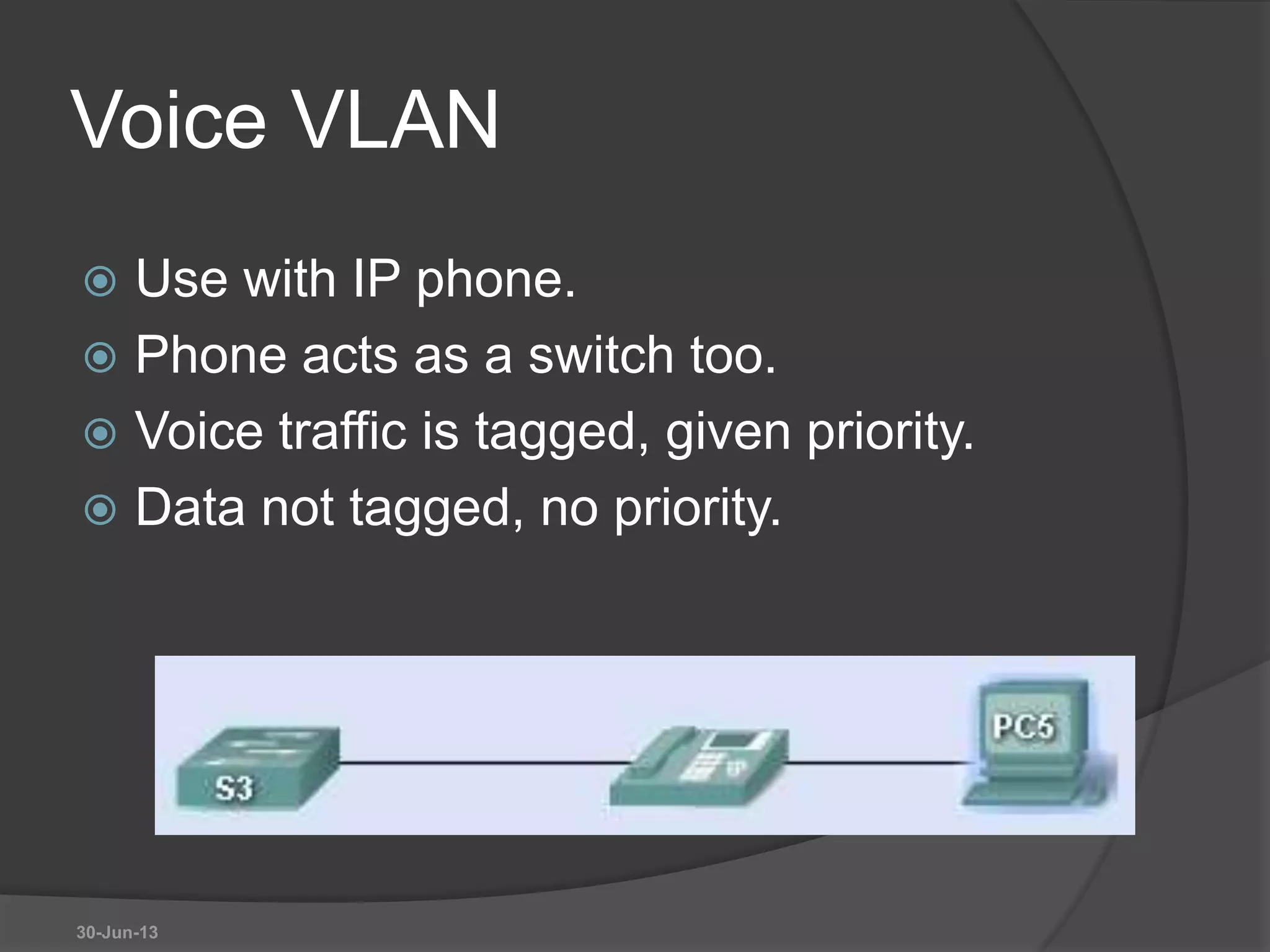
Voice VLAN
 Use with IP phone.
 Phone acts as a switch too.
 Voice traffic is tagged, given priority.
 Data not tagged, no priority.
30-Jun-13
Management VLAN
 Has the switch IP address.
 Used for telnet/SSH or web access for
management purposes.
 Better not to use VLAN 1 for security
reasons.
30-Jun-13
Native VLAN
 For backward compatibility with older
systems.
 Relevant to trunk ports.
 Trunk ports carry traffic from multiple
VLANs.
 VLAN is identified by a “tag” in the
frame.
 Native VLAN does not have a tag.
30-Jun-13
Default VLAN
 VLAN 1 on Cisco switches.
 Carries CDP and STP (spanning tree
protocol) traffic.
 Initially all ports are in this VLAN.
 Do not use it for data, voice or
management traffic for security reasons.
30-Jun-13
Static VLAN
 The normal type. Port configured to be
on a VLAN. Connected device is on this
VLAN.
 VLAN can be created using CLI
command, given number and name.
 VLAN can be learned from another
switch.
 If a port is put on a VLAN and the VLAN
does not exist, then the VLAN is
created.
30-Jun-13
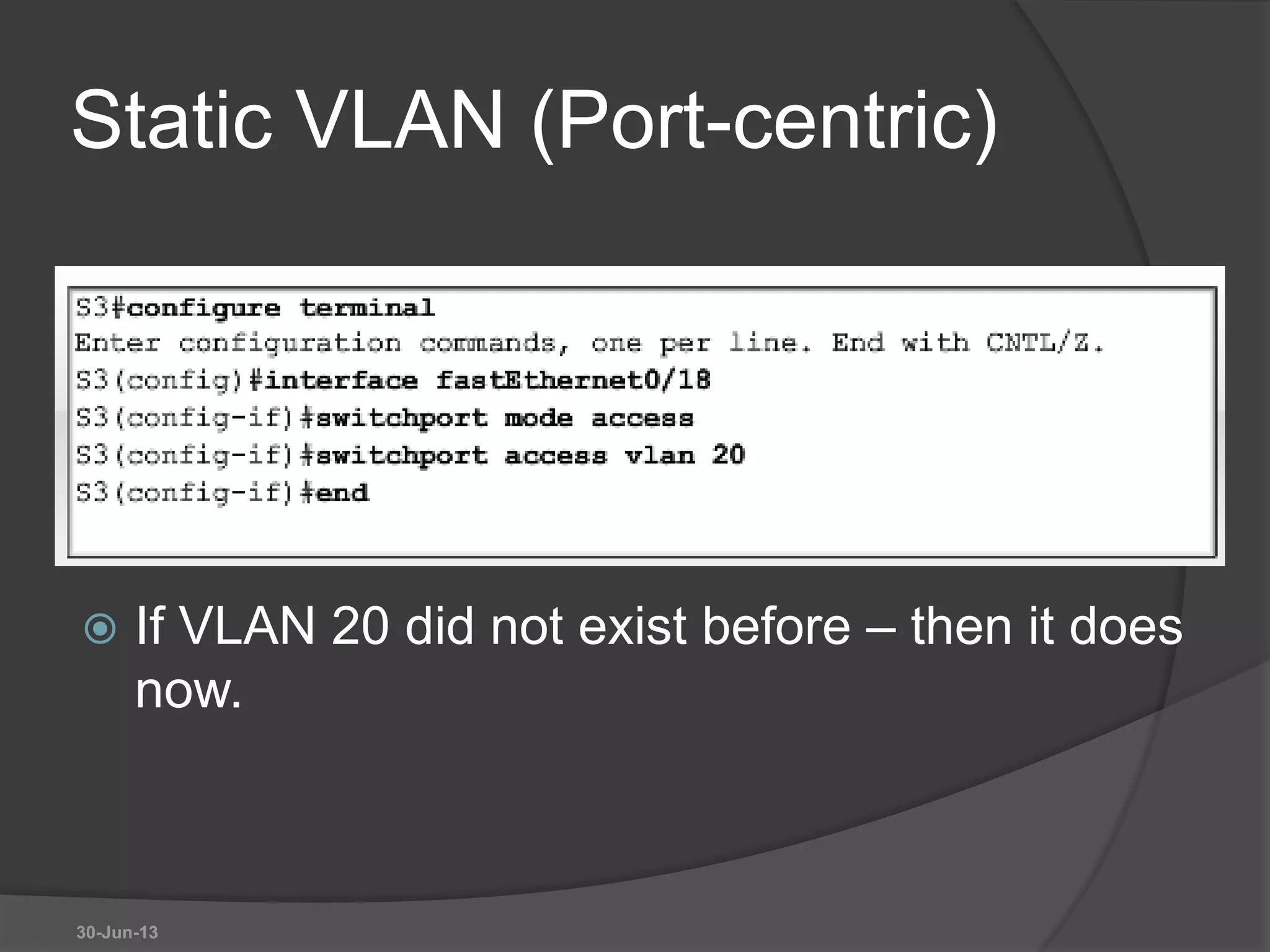
Static VLAN (Port-centric)
 If VLAN 20 did not exist before – then it does
now.
30-Jun-13
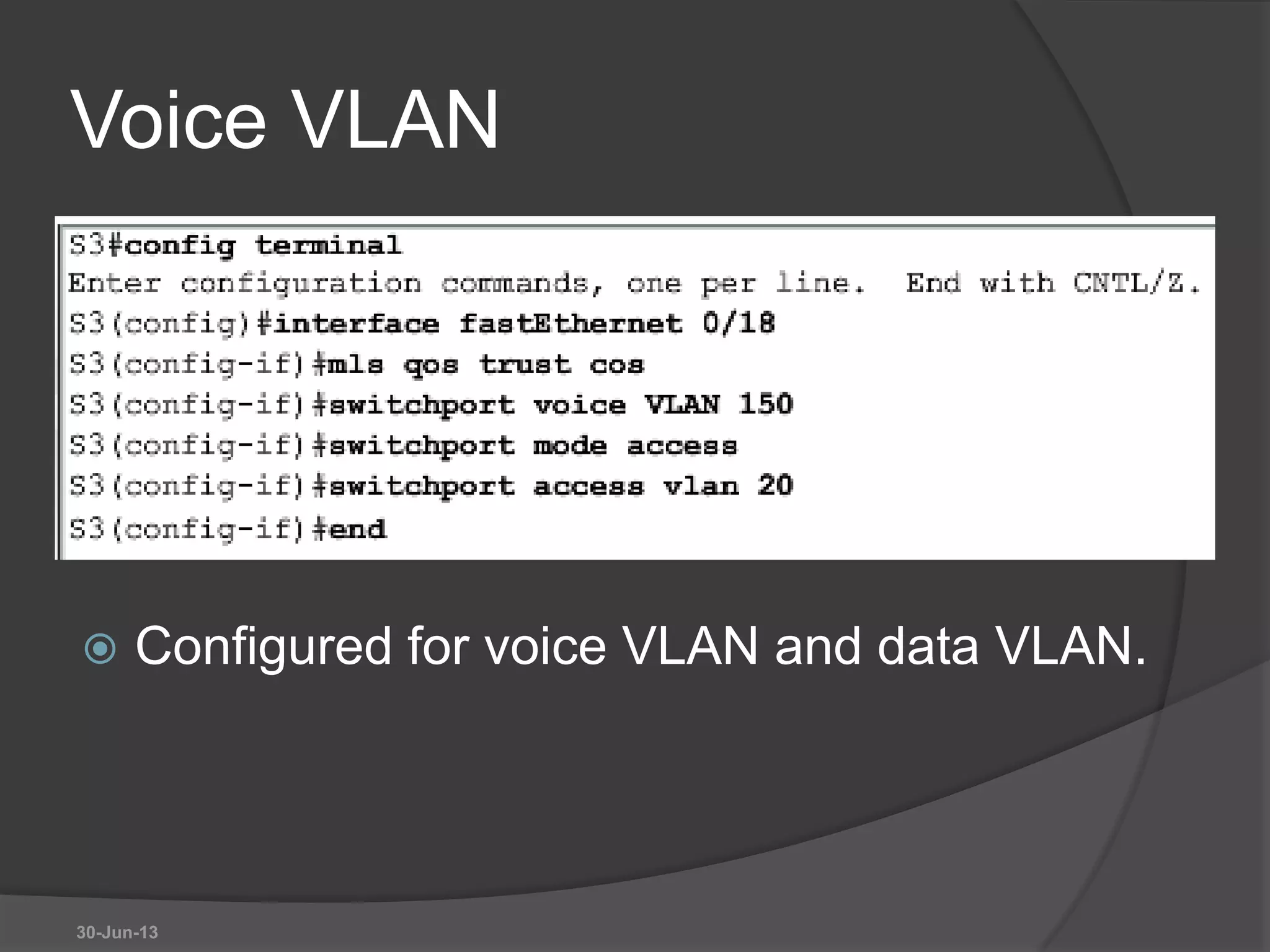
Voice VLAN
 Configured for voice VLAN and data VLAN.
30-Jun-13
Dynamic VLAN
 Not widely used.
 Use a VLAN Membership Policy Server
(VMPS).
 Assign a device to a VLAN based on its
MAC address.
 Connect device, server assigns VLAN.
 Useful if you want to move devices
around.
30-Jun-13
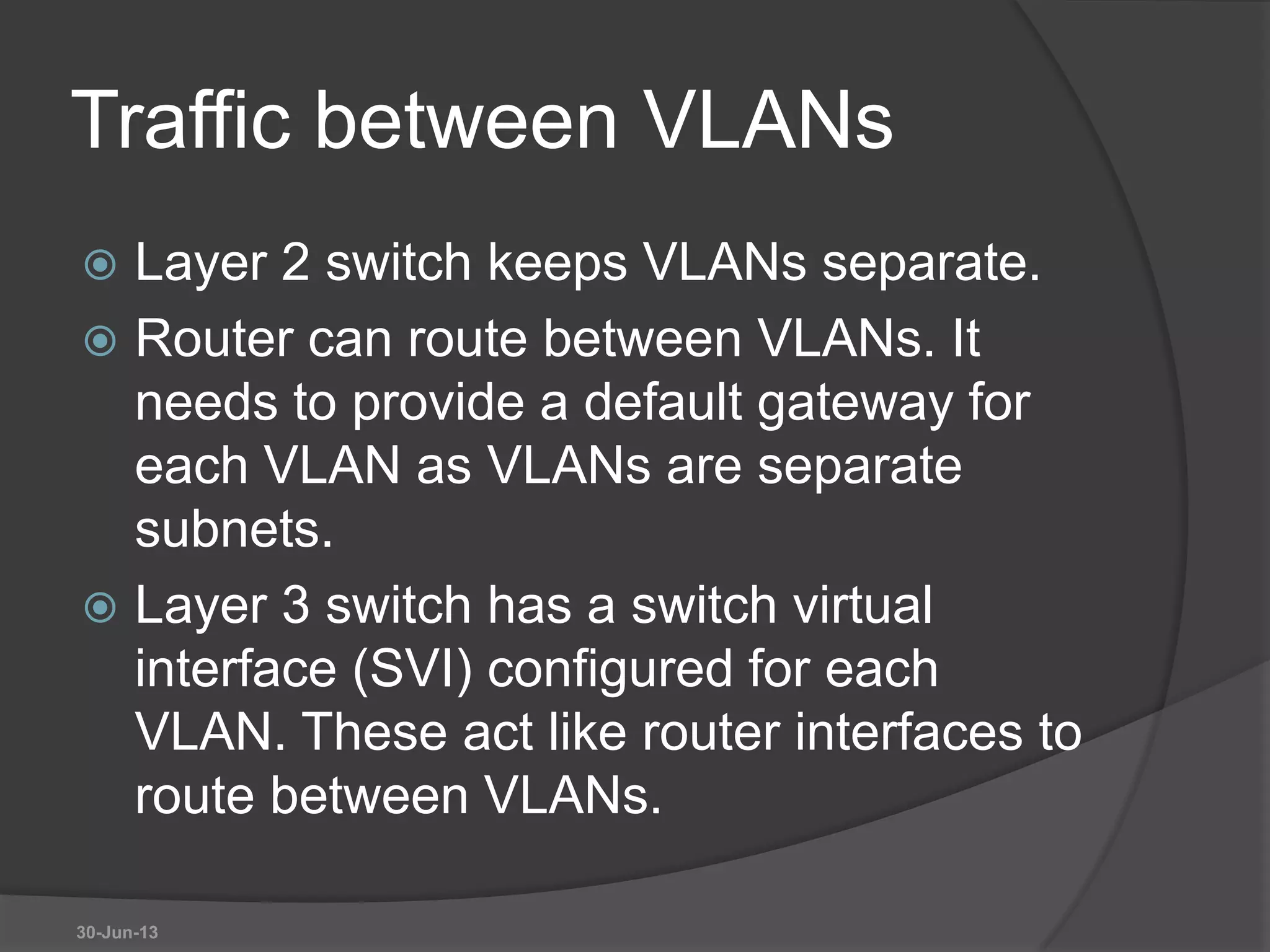
Traffic between VLANs
 Layer 2 switch keeps VLANs separate.
 Router can route between VLANs. It
needs to provide a default gateway for
each VLAN as VLANs are separate
subnets.
 Layer 3 switch has a switch virtual
interface (SVI) configured for each
VLAN. These act like router interfaces to
route between VLANs.
30-Jun-13
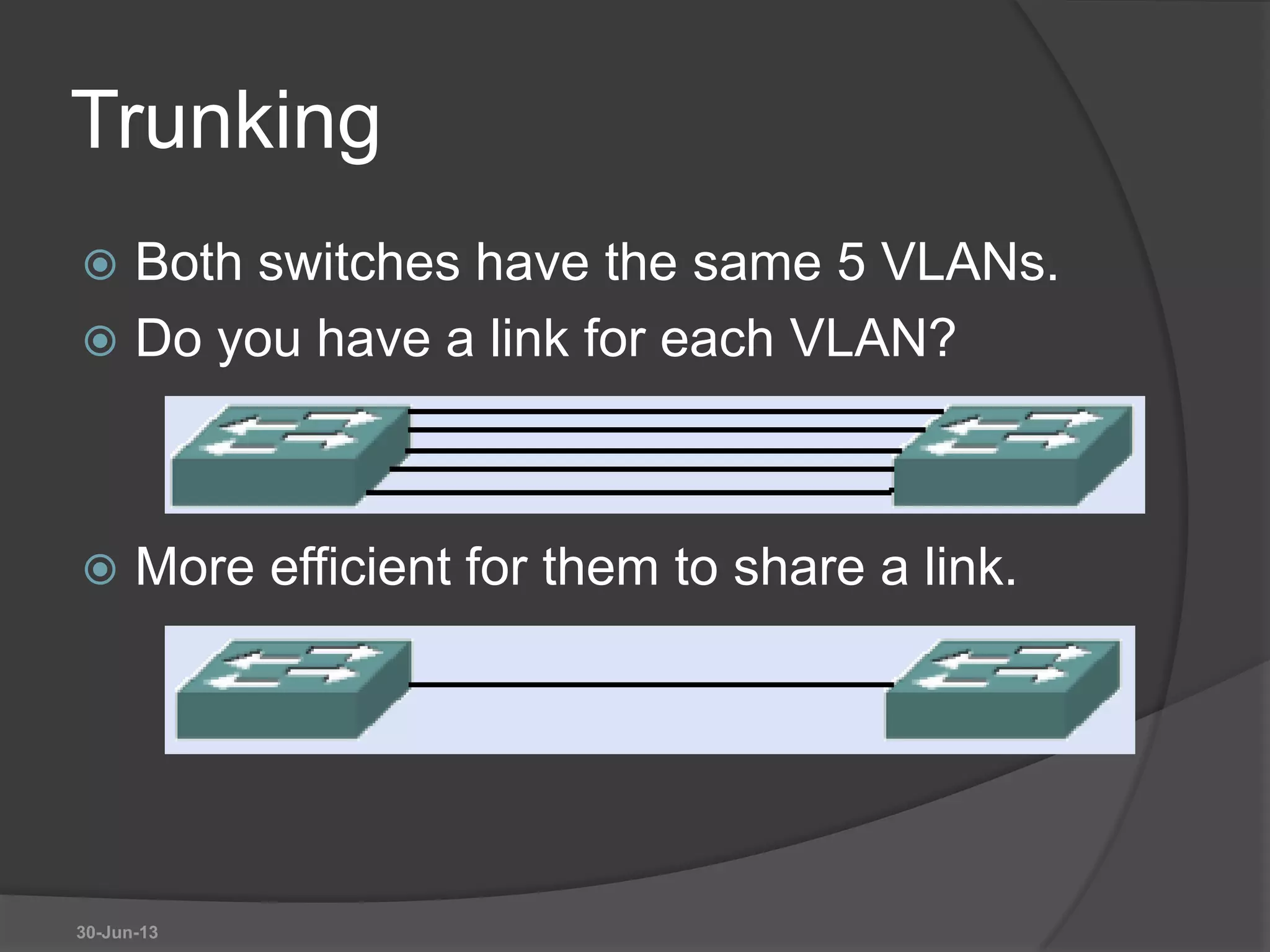
Trunking
 Both switches have the same 5 VLANs.
 Do you have a link for each VLAN?
 More efficient for them to share a link.
30-Jun-13
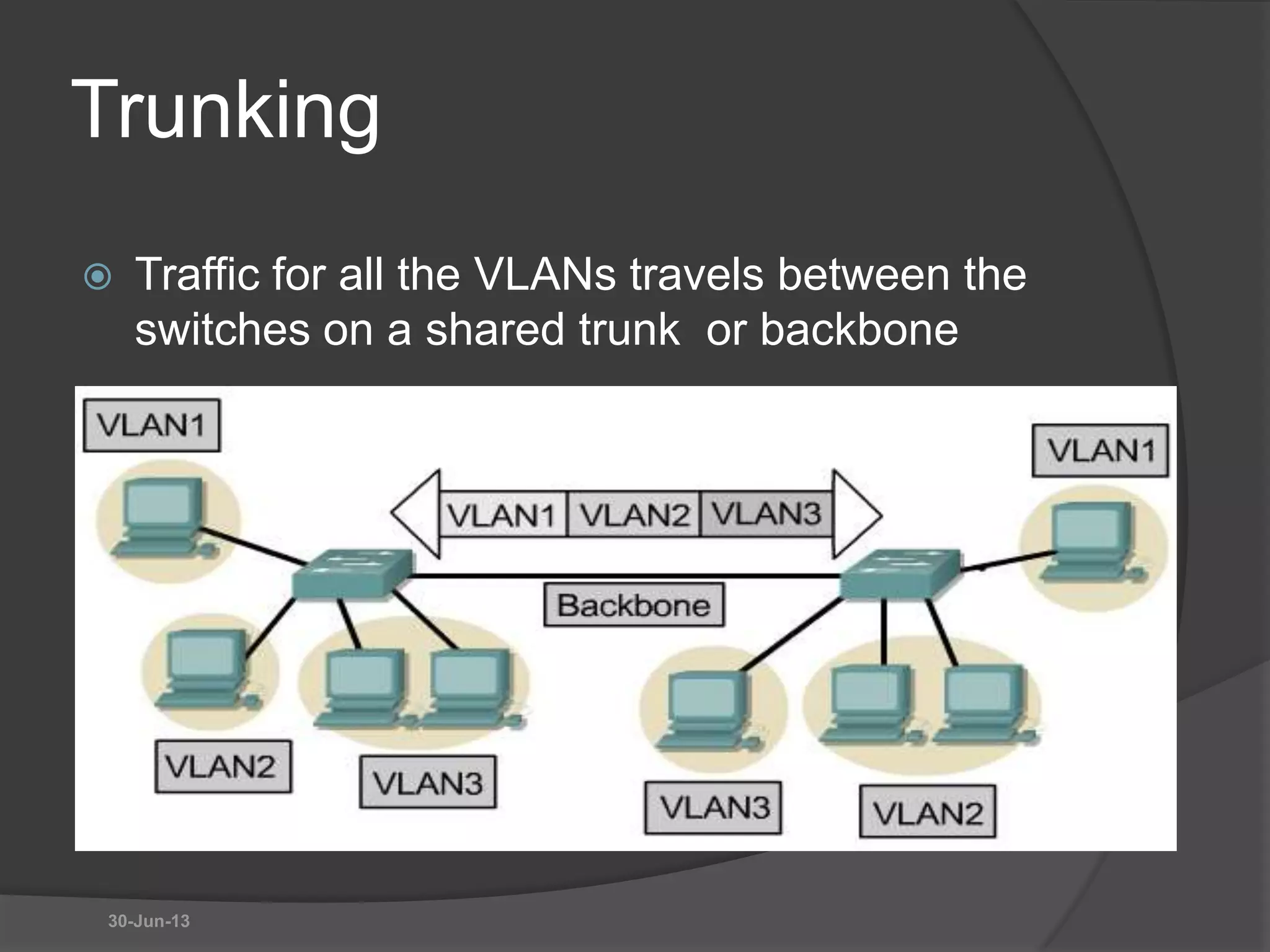
Trunking
 Traffic for all the VLANs travels between the
switches on a shared trunk or backbone
30-Jun-13
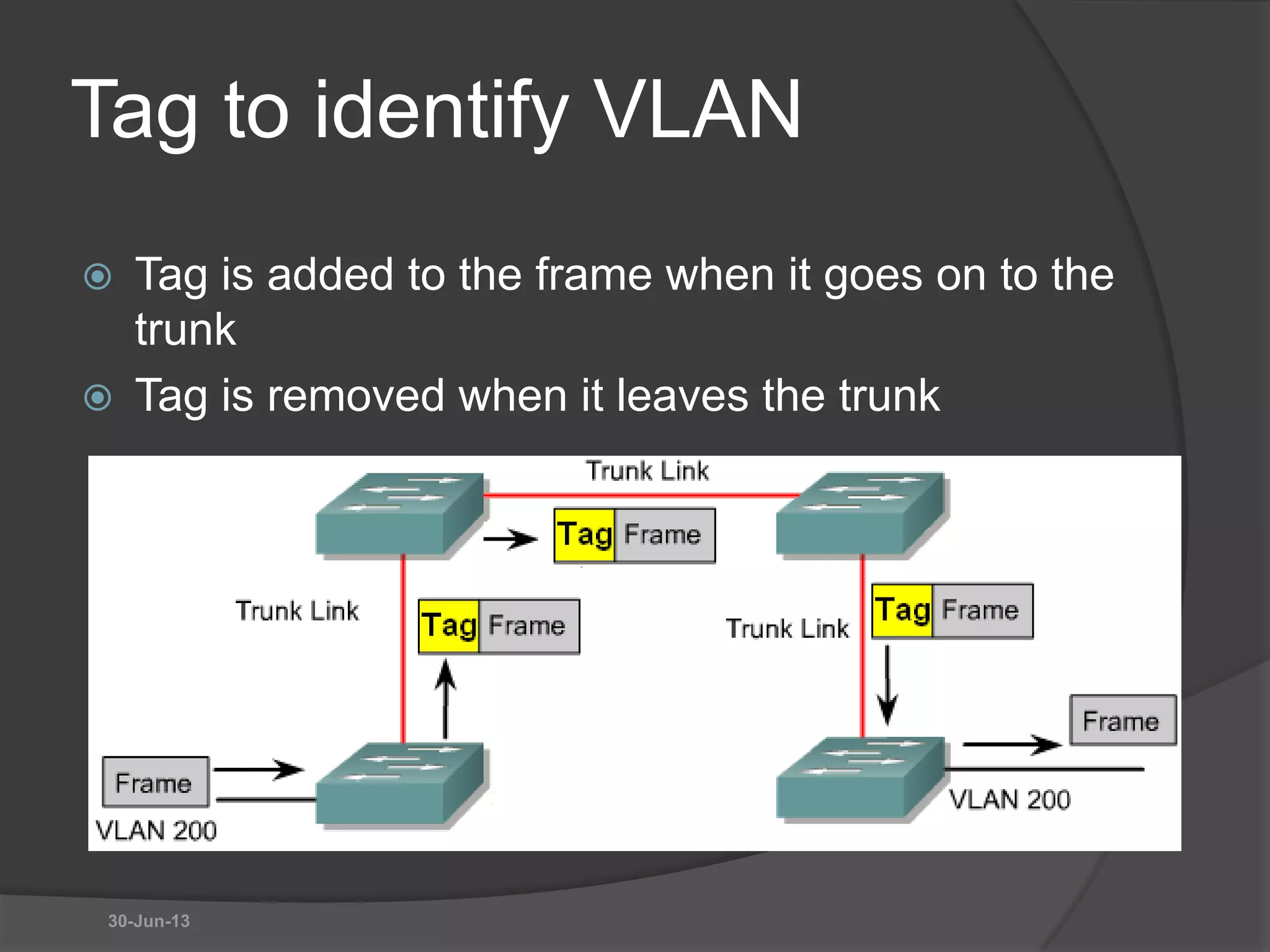
Tag to identify VLAN
 Tag is added to the frame when it goes on to the
trunk
 Tag is removed when it leaves the trunk
30-Jun-13
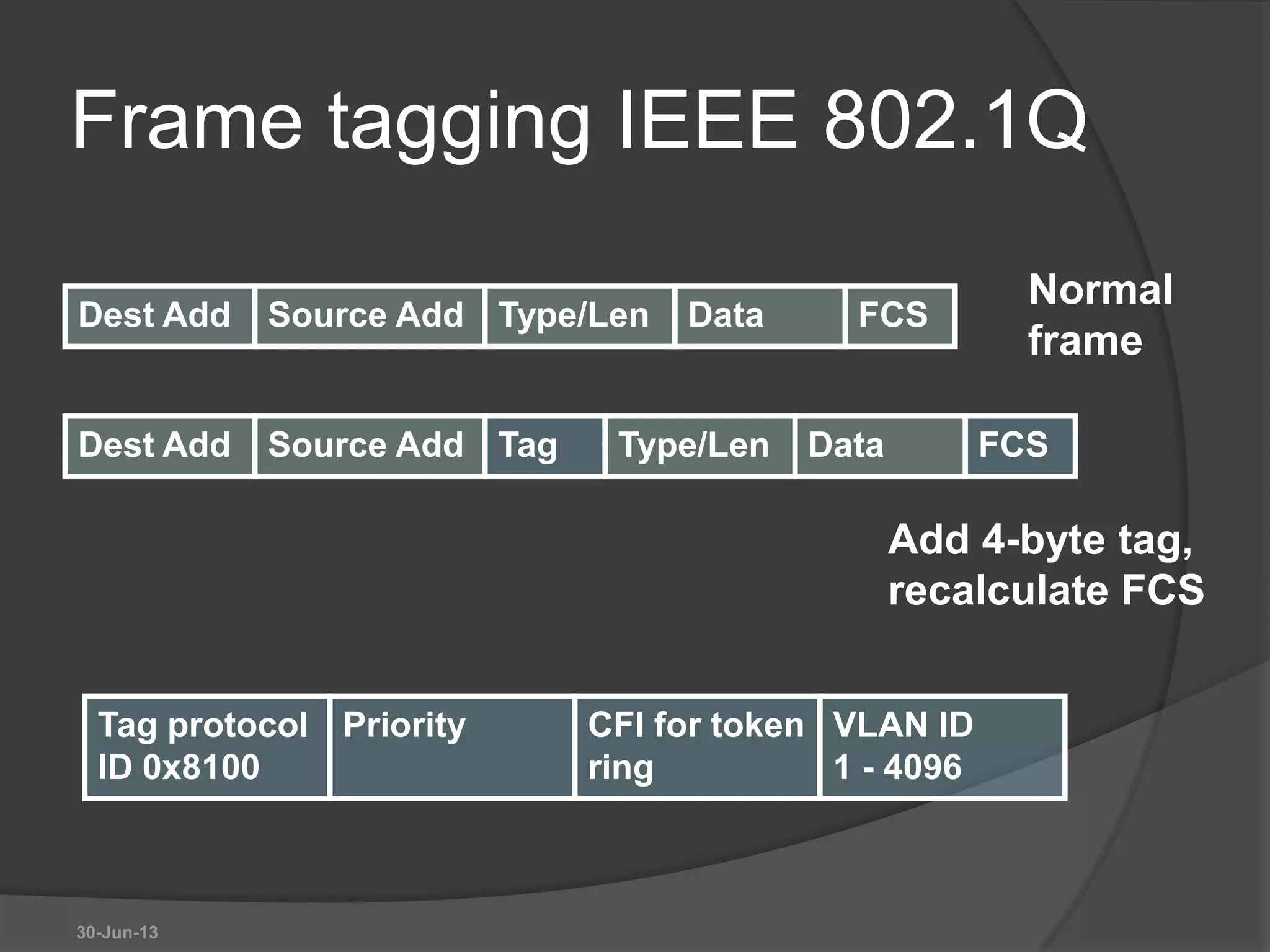
Frame tagging IEEE 802.1Q
30-Jun-13
Dest Add Source Add Type/Len Data FCS
Dest Add Source Add Type/Len Data FCSTag
Normal
frame
Add 4-byte tag,
recalculate FCS
Tag protocol
ID 0x8100
Priority CFI for token
ring
VLAN ID
1 - 4096
Native VLAN
 Untagged frames received on a trunk
port are forwarded on to the native
VLAN.
 Frame received from the native VLAN
should be untagged.
 Switch will drop tagged frames received
from the native VLAN. This can happen
if non-Cisco devices are connected.
30-Jun-13
Configure trunk port
 Make a port into a trunk port and tell it
which VLAN is native.
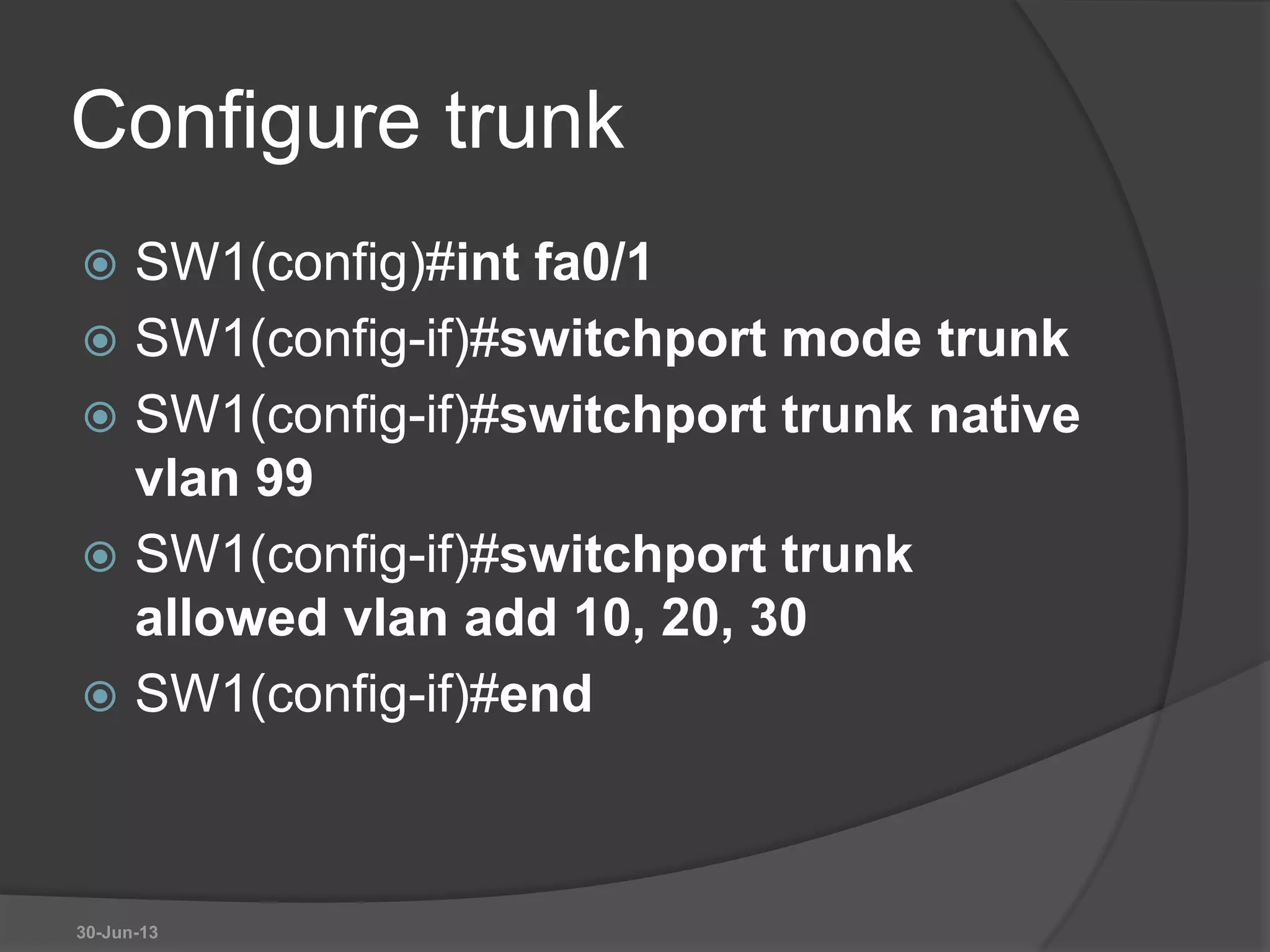
 SW1(config)#int fa0/1
 SW1(config-if)switchport mode trunk
 SW1(config-if)switchport trunk native
vlan 99
 By default native VLAN is 1.
30-Jun-13
Create a VLAN
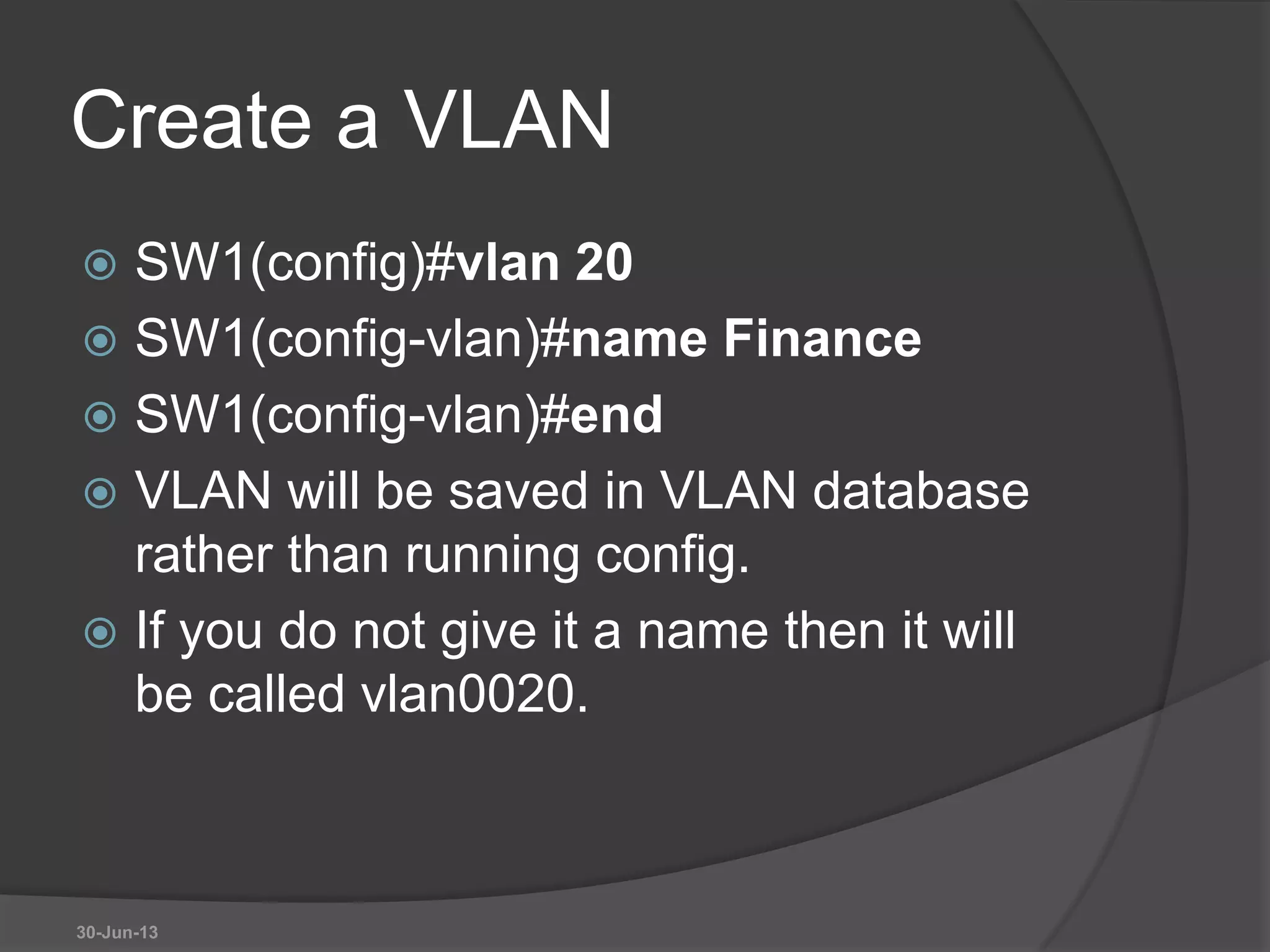
 SW1(config)#vlan 20
 SW1(config-vlan)#name Finance
 SW1(config-vlan)#end
 VLAN will be saved in VLAN database
rather than running config.
 If you do not give it a name then it will
be called vlan0020.
30-Jun-13
Assign port to VLAN
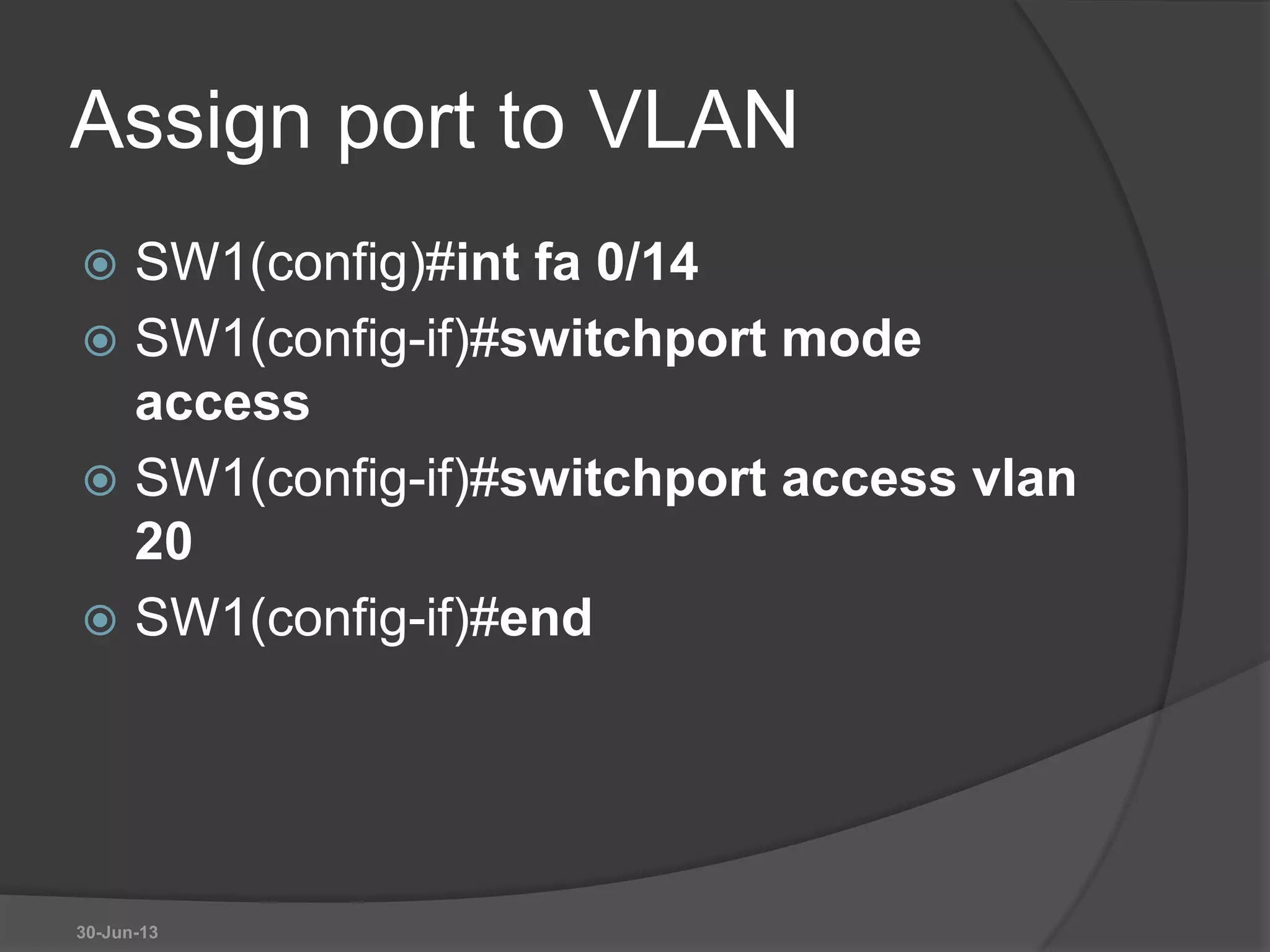
 SW1(config)#int fa 0/14
 SW1(config-if)#switchport mode
access
 SW1(config-if)#switchport access vlan
20
 SW1(config-if)#end
30-Jun-13
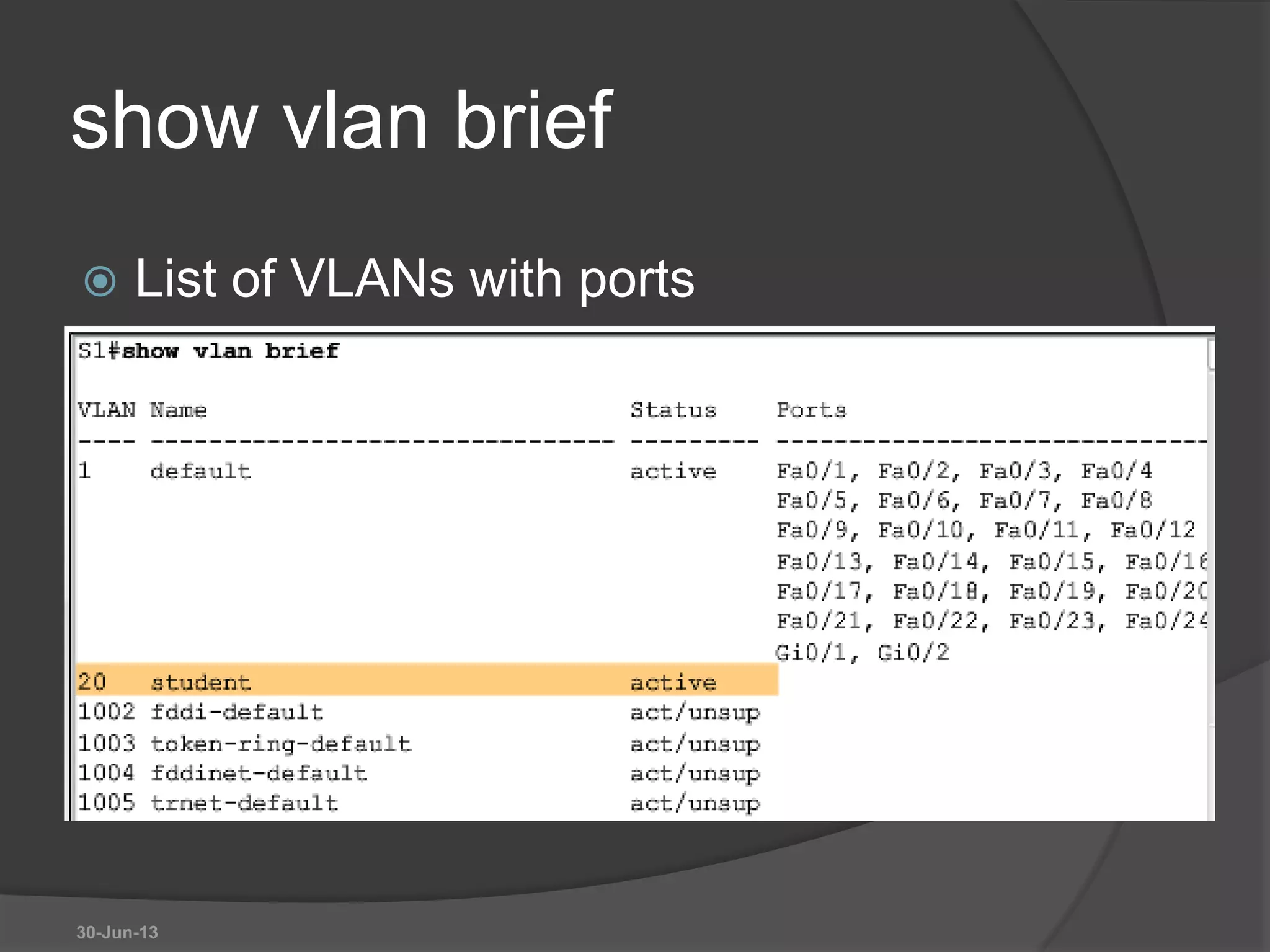
show vlan brief
 List of VLANs with ports
30-Jun-13
Show commands
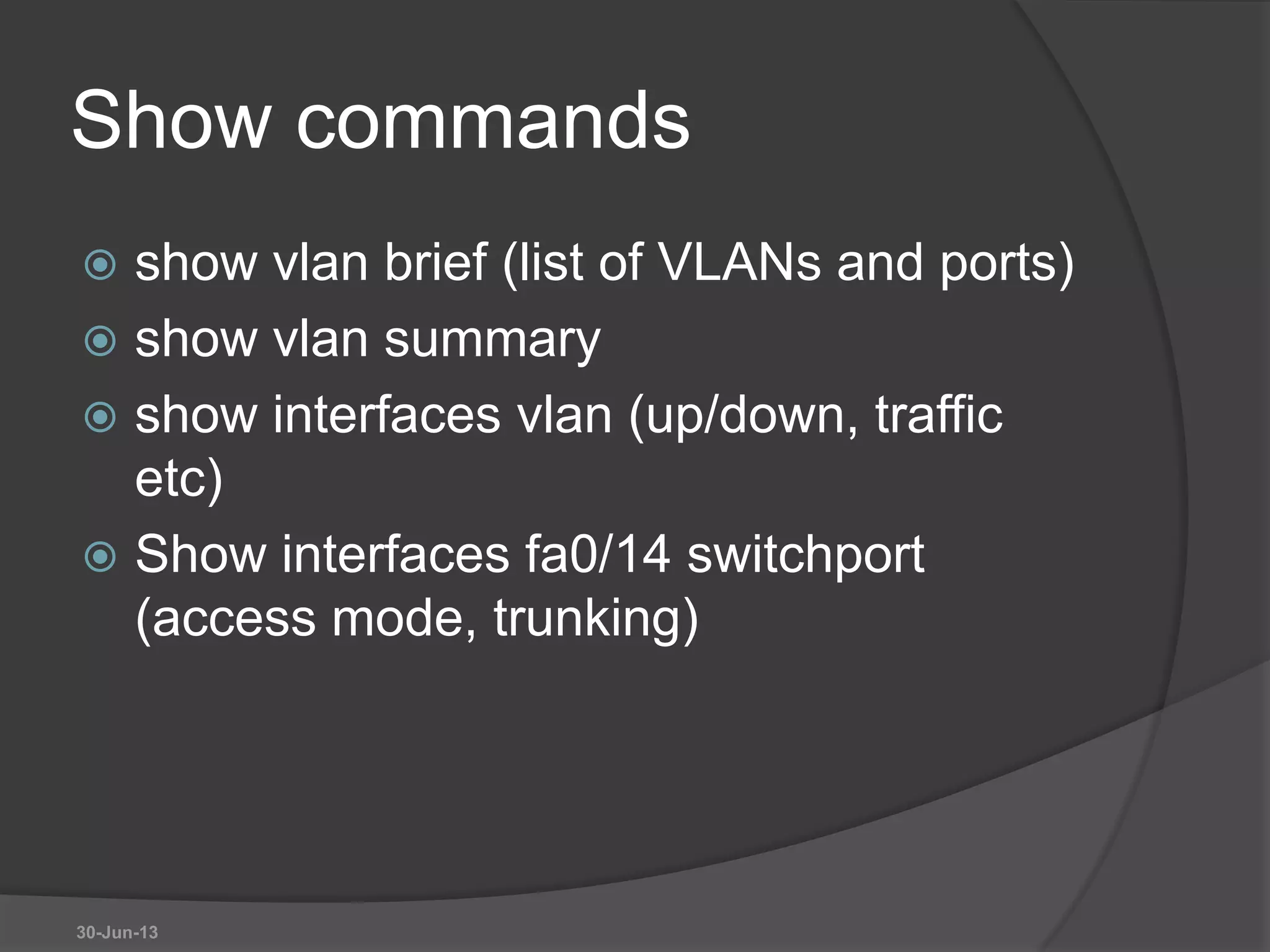
 show vlan brief (list of VLANs and ports)
 show vlan summary
 show interfaces vlan (up/down, traffic
etc)
 Show interfaces fa0/14 switchport
(access mode, trunking)
30-Jun-13
Remove port from VLAN
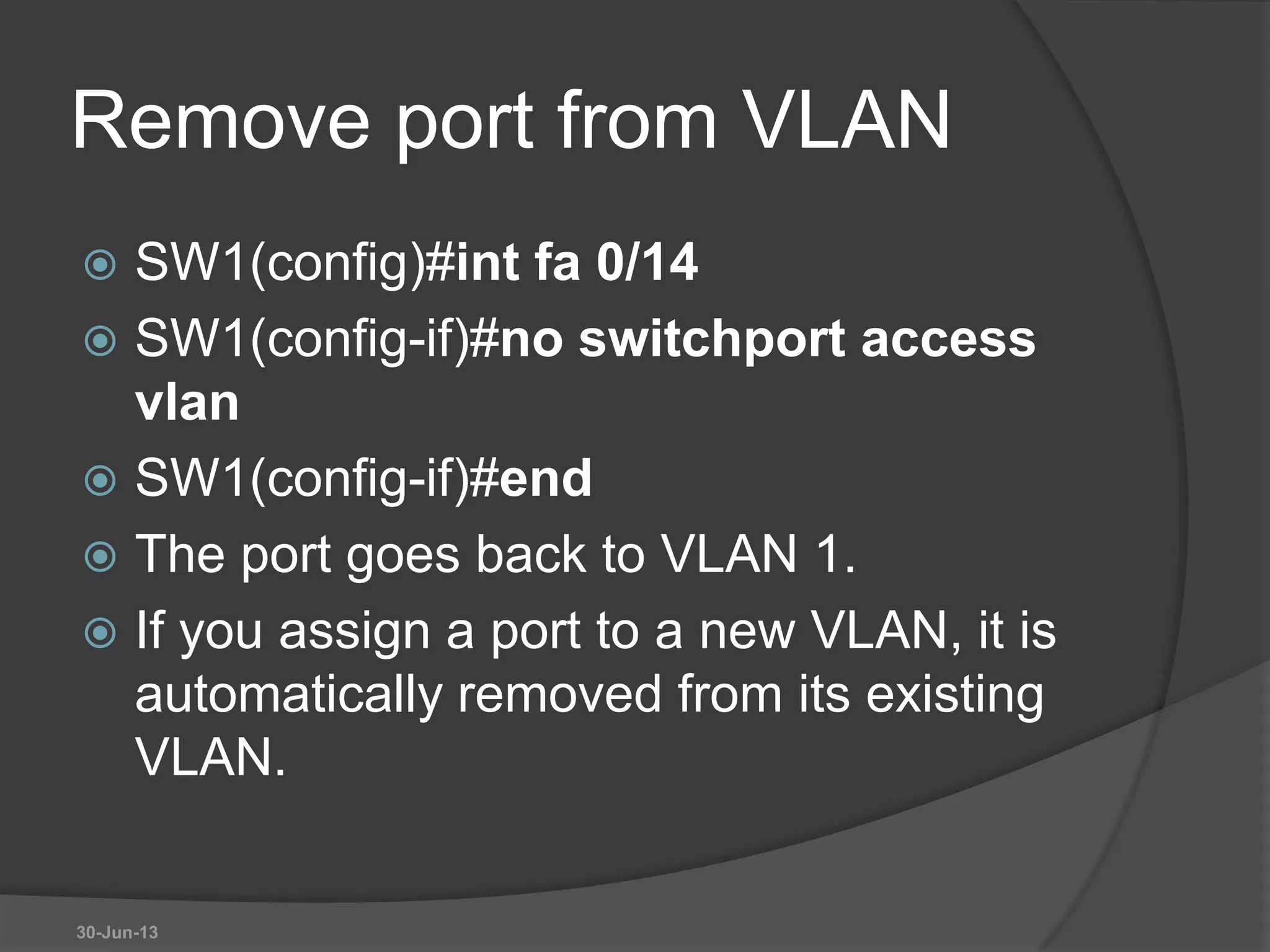
 SW1(config)#int fa 0/14
 SW1(config-if)#no switchport access
vlan
 SW1(config-if)#end
 The port goes back to VLAN 1.
 If you assign a port to a new VLAN, it is
automatically removed from its existing
VLAN.
30-Jun-13
Delete a VLAN
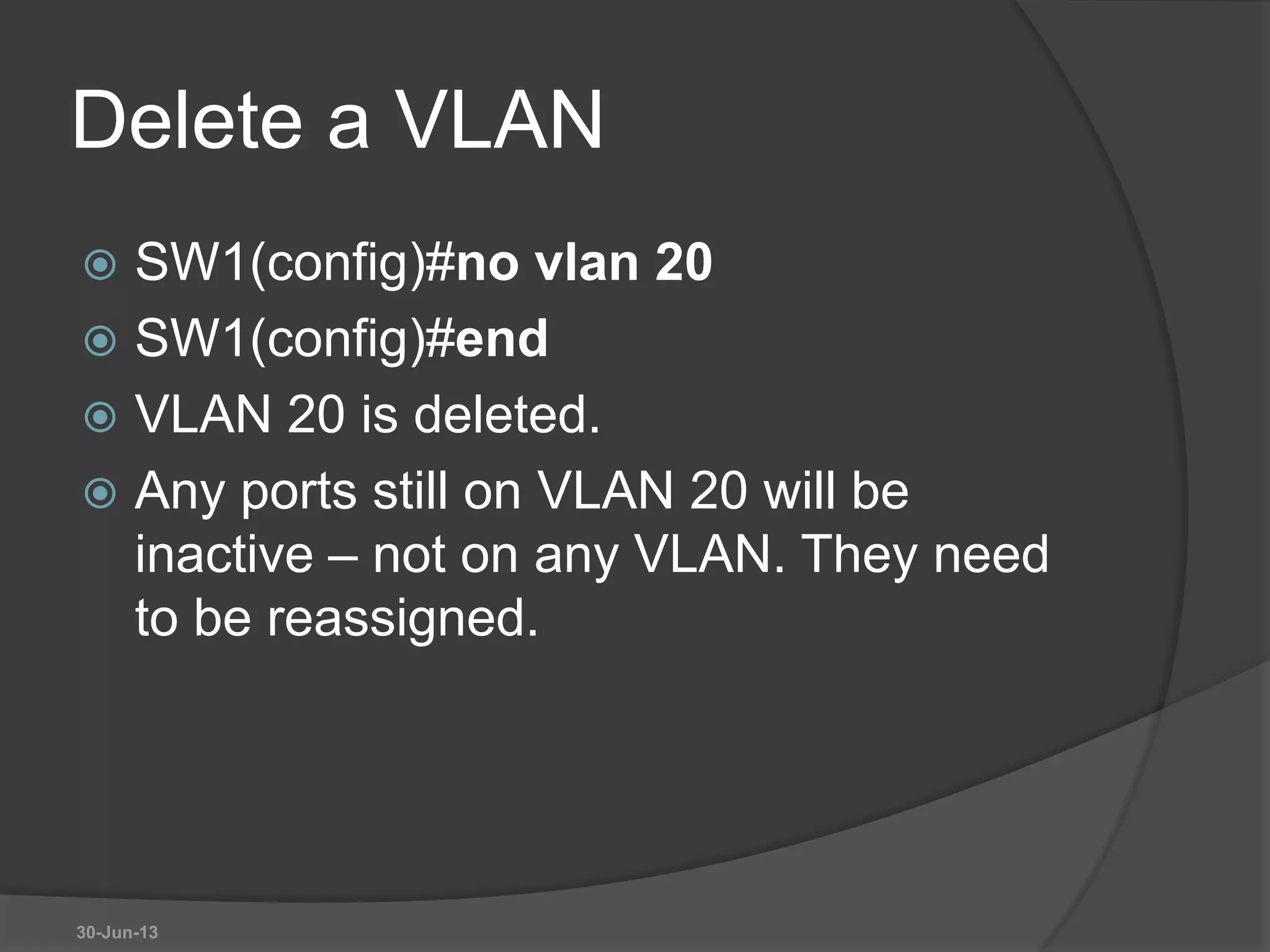
 SW1(config)#no vlan 20
 SW1(config)#end
 VLAN 20 is deleted.
 Any ports still on VLAN 20 will be
inactive – not on any VLAN. They need
to be reassigned.
30-Jun-13
Delete VLAN database
 Erasing the startup configuration does
not get rid of VLANs because they are
saved in a separate file.
 SW1#delete flash:vlan.dat
 Switch goes back to the default with all
ports in VLAN 1.
 You cannot delete VLAN 1.
30-Jun-13
Configure trunk
 SW1(config)#int fa0/1
 SW1(config-if)#switchport mode trunk
 SW1(config-if)#switchport trunk native
vlan 99
 SW1(config-if)#switchport trunk
allowed vlan add 10, 20, 30
 SW1(config-if)#end
30-Jun-13
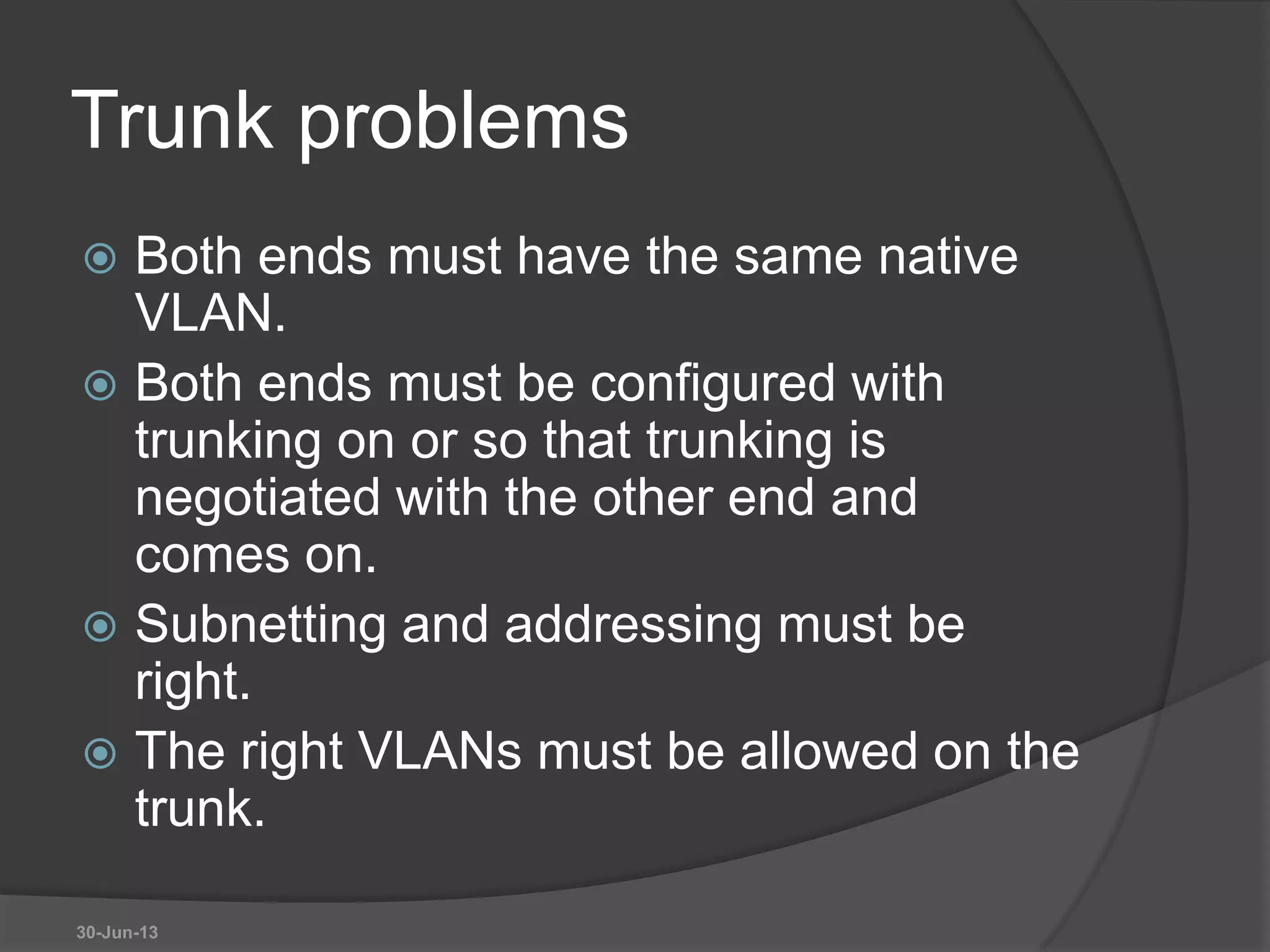
Trunk problems
 Both ends must have the same native
VLAN.
 Both ends must be configured with
trunking on or so that trunking is
negotiated with the other end and
comes on.
 Subnetting and addressing must be
right.
 The right VLANs must be allowed on the
trunk.
30-Jun-13
30-Jun-13

Week 9 VLAN, SISTIM INFORMASI MANAGEMEN

  • 1.
  • 2.
    Outline  General Conceptsof VLAN  What is VLAN ?  Why use VLAN's?  The role of VLANs in a network  Trunking VLANs  Different way to assign VLAN Membership.  Spanning Tree in VLAN  Frame processing and 802.1Q standard  Different kind of logical VLAN architecture  Configure VLANs on switches  Troubleshoot common VLAN problems
  • 3.
    What is VLAN?  vendor-specific solution and strategy, so defining it is an issue.  VLAN's allow a network manager to logically segment a LAN into different broadcast domains.  multiple physical LAN segments independent of physical location and can communicate as if they were on a common LAN
  • 4.
    Some requirements ofLANs  Need to split up broadcast domains to make good use of bandwidth  People in the same department may need to be grouped together for access to servers  Security: restrict access by certain users to some areas of the LAN  Provide a way for different areas of the LAN to communicate with each other 30-Jun-13
  • 5.
    Solution using routers Divide the LAN into subnets  Use routers to link the subnets 30-Jun-13
  • 6.
    Solution using routers BUT Routers are expensive  Routers are slower than switches  Subnets are restricted to limited physical areas  Subnets are inflexible 30-Jun-13
  • 7.
    Why use VLAN's? Performance  Formation of Virtual Workgroups  Simplified Administration  Reduced Cost  Security
  • 8.
    Solution using VLANs VLAN membership can be by function and not by location  VLANs managed by switches  Router needed for communication between VLANs 30-Jun-13
  • 9.
    VLANs  All hostsin a VLAN have addresses in the same subnet. A VLAN is a subnet.  Broadcasts are kept within the VLAN. A VLAN is a broadcast domain.  The switch has a separate MAC address table for each VLAN. Traffic for each VLAN is kept separate from other VLANs.  Layer 2 switches cannot route between VLANs. 30-Jun-13
  • 10.
    VLAN Membership  Membershipby Port  Membership by MAC Address  Membership by IP Subnet Address port vlan 1 1 2 1 3 2 4 1 disadvantage of this method is that it does not allow for user mobility.
  • 11.
    VLAN Membership • Membershipby Port • Membership by MAC Address • Membership by IP Subnet Address MAC Address vlan 1212354145121 1 2389234873743 1 3045834758445 2 5483573475843 1 Advantage : • no reconfiguration needed Disadvantage : • VLAN membership must be assigned initially. • performance degradation as members of different VLANs coexist on a single switch port
  • 12.
    VLAN Membership • Membershipby Port • Membership by MAC Address • Membership by IP Subnet Address IP Subnet vlan 23.2.24 1 26.21.35 2 Advantage: • Good for application-based VLAN strategy • User can move workstations • eliminate the need for frame tagging Disadvantage : • Performance/ looking for L3 address in packet. • Less effective with protocols such as IPX™, DECnet®, or AppleTalk® • “unroutable” protocols such as NetBIOS
  • 13.
    VLAN numbers  VLAN1: default Ethernet LAN, all ports start in this VLAN.  VLANs 1002 – 1005 automatically created for Token Ring and FDDI  Numbers 2 to 1001 can be used for new VLANs  Up to 255 VLANs on Catalyst 2960 switch  Extended range 1006 – 4094 possible but fewer features 30-Jun-13
  • 14.
    VLAN information  VLANinformation is stored in the VLAN database.  vlan.dat in the flash memory of the switch. 30-Jun-13
  • 15.
    Port based  Eachswitch port intended for an end device is configured to belong to a VLAN.  Any device connecting to that port belongs to the port’s VLAN.  There are other ways of assigning VLANs but this is now the normal way.  Ports that link switches can be configured to carry traffic for all VLANs (trunking) 30-Jun-13
  • 16.
    Types of VLAN Data or user VLAN  Voice VLAN  Management VLAN  Native VLAN  Default VLAN 30-Jun-13
  • 17.
    Data VLAN  Carryfiles, e-mails, shared application traffic, most user traffic.  Separate VLAN for each group of users. 30-Jun-13
  • 18.
    Voice VLAN  Usewith IP phone.  Phone acts as a switch too.  Voice traffic is tagged, given priority.  Data not tagged, no priority. 30-Jun-13
  • 19.
    Management VLAN  Hasthe switch IP address.  Used for telnet/SSH or web access for management purposes.  Better not to use VLAN 1 for security reasons. 30-Jun-13
  • 20.
    Native VLAN  Forbackward compatibility with older systems.  Relevant to trunk ports.  Trunk ports carry traffic from multiple VLANs.  VLAN is identified by a “tag” in the frame.  Native VLAN does not have a tag. 30-Jun-13
  • 21.
    Default VLAN  VLAN1 on Cisco switches.  Carries CDP and STP (spanning tree protocol) traffic.  Initially all ports are in this VLAN.  Do not use it for data, voice or management traffic for security reasons. 30-Jun-13
  • 22.
    Static VLAN  Thenormal type. Port configured to be on a VLAN. Connected device is on this VLAN.  VLAN can be created using CLI command, given number and name.  VLAN can be learned from another switch.  If a port is put on a VLAN and the VLAN does not exist, then the VLAN is created. 30-Jun-13
  • 23.
    Static VLAN (Port-centric) If VLAN 20 did not exist before – then it does now. 30-Jun-13
  • 24.
    Voice VLAN  Configuredfor voice VLAN and data VLAN. 30-Jun-13
  • 25.
    Dynamic VLAN  Notwidely used.  Use a VLAN Membership Policy Server (VMPS).  Assign a device to a VLAN based on its MAC address.  Connect device, server assigns VLAN.  Useful if you want to move devices around. 30-Jun-13
  • 26.
    Traffic between VLANs Layer 2 switch keeps VLANs separate.  Router can route between VLANs. It needs to provide a default gateway for each VLAN as VLANs are separate subnets.  Layer 3 switch has a switch virtual interface (SVI) configured for each VLAN. These act like router interfaces to route between VLANs. 30-Jun-13
  • 27.
    Trunking  Both switcheshave the same 5 VLANs.  Do you have a link for each VLAN?  More efficient for them to share a link. 30-Jun-13
  • 28.
    Trunking  Traffic forall the VLANs travels between the switches on a shared trunk or backbone 30-Jun-13
  • 29.
    Tag to identifyVLAN  Tag is added to the frame when it goes on to the trunk  Tag is removed when it leaves the trunk 30-Jun-13
  • 30.
    Frame tagging IEEE802.1Q 30-Jun-13 Dest Add Source Add Type/Len Data FCS Dest Add Source Add Type/Len Data FCSTag Normal frame Add 4-byte tag, recalculate FCS Tag protocol ID 0x8100 Priority CFI for token ring VLAN ID 1 - 4096
  • 31.
    Native VLAN  Untaggedframes received on a trunk port are forwarded on to the native VLAN.  Frame received from the native VLAN should be untagged.  Switch will drop tagged frames received from the native VLAN. This can happen if non-Cisco devices are connected. 30-Jun-13
  • 32.
    Configure trunk port Make a port into a trunk port and tell it which VLAN is native.  SW1(config)#int fa0/1  SW1(config-if)switchport mode trunk  SW1(config-if)switchport trunk native vlan 99  By default native VLAN is 1. 30-Jun-13
  • 33.
    Create a VLAN SW1(config)#vlan 20  SW1(config-vlan)#name Finance  SW1(config-vlan)#end  VLAN will be saved in VLAN database rather than running config.  If you do not give it a name then it will be called vlan0020. 30-Jun-13
  • 34.
    Assign port toVLAN  SW1(config)#int fa 0/14  SW1(config-if)#switchport mode access  SW1(config-if)#switchport access vlan 20  SW1(config-if)#end 30-Jun-13
  • 35.
    show vlan brief List of VLANs with ports 30-Jun-13
  • 36.
    Show commands  showvlan brief (list of VLANs and ports)  show vlan summary  show interfaces vlan (up/down, traffic etc)  Show interfaces fa0/14 switchport (access mode, trunking) 30-Jun-13
  • 37.
    Remove port fromVLAN  SW1(config)#int fa 0/14  SW1(config-if)#no switchport access vlan  SW1(config-if)#end  The port goes back to VLAN 1.  If you assign a port to a new VLAN, it is automatically removed from its existing VLAN. 30-Jun-13
  • 38.
    Delete a VLAN SW1(config)#no vlan 20  SW1(config)#end  VLAN 20 is deleted.  Any ports still on VLAN 20 will be inactive – not on any VLAN. They need to be reassigned. 30-Jun-13
  • 39.
    Delete VLAN database Erasing the startup configuration does not get rid of VLANs because they are saved in a separate file.  SW1#delete flash:vlan.dat  Switch goes back to the default with all ports in VLAN 1.  You cannot delete VLAN 1. 30-Jun-13
  • 40.
    Configure trunk  SW1(config)#intfa0/1  SW1(config-if)#switchport mode trunk  SW1(config-if)#switchport trunk native vlan 99  SW1(config-if)#switchport trunk allowed vlan add 10, 20, 30  SW1(config-if)#end 30-Jun-13
  • 41.
    Trunk problems  Bothends must have the same native VLAN.  Both ends must be configured with trunking on or so that trunking is negotiated with the other end and comes on.  Subnetting and addressing must be right.  The right VLANs must be allowed on the trunk. 30-Jun-13
  • 42.