PERFORMANCE EVALUATION
OF VARIOUS ROUTING
PROTOCOL USING MANET
MENTOR –Er. Aanchal Kamra
(CHANDIGARH UNIVERSITY, Mohali)
SUBMITTED BY –
Anil Singh (16BCS2501)
Siddhartha (17BCS9011)
Tanmay (16bcs2462)
INTRODUCTION
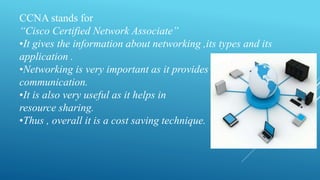
CCNA stands for
“Cisco Certified Network Associate”
•It gives the information about networking ,its types and its
application .
•Networking is very important as it provides
communication.
•It is also very useful as it helps in
resource sharing.
•Thus , overall it is a cost saving technique.
TYPES OF NETWORKING
 LAN – It stands for local area network.
Egg: network within a campus .
 MAN – It stands for metropolitan area network.
Egg: network connecting various cities.
 WAN – It stands for wide area network.
Egg : internet on a whole world.
Networking Devices
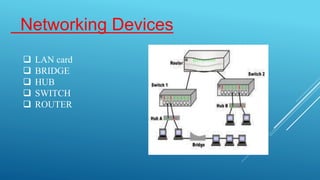
 LAN card
 BRIDGE
 HUB
 SWITCH
 ROUTER
Subnetting and Supernetting
About subnetting & Supernetting
In subnetting, a network is divided into several smaller
subnetwork with each subnetwork(or subnet) having its
own subnetwork address.
In supernetting, an organization can combine several
class C addresses to create a larger range of
addresses(supernetwork).
Classless Interdomain Routing(CIDR)
Supernetting means assigning a set of class C addresses to and organization
that needs more than 254 host addresses.
However , when these class C addresses are entered into the routing table,
each occupies one entry in the routing table./ 256 entries in the routing
table.
The classless interdomain routing(CIDR) technique is devised to reduce
the number of routing table entries.
In this technique, instead of entering each single class C address with its
corresponding default mask(255.255.255.0), the router can use the
supernet mask and the lowest network address in the group.
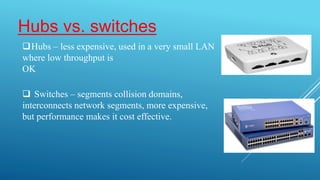
Hubs vs. switches
Hubs – less expensive, used in a very small LAN
where low throughput is
OK
 Switches – segments collision domains,
interconnects network segments, more expensive,
but performance makes it cost effective.
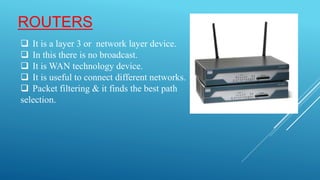
ROUTERS
 It is a layer 3 or network layer device.
 In this there is no broadcast.
 It is WAN technology device.
 It is useful to connect different networks.
 Packet filtering & it finds the best path
selection.
Router Configuration
Router always has two configurations: —
 Running configuration:
 In RAM, determines how the router is currently operating
 Is modified using the configure command
 To see it: show running-config
 Startup configuration:
 In NVRAM, determines how the router will operate after next reload
 Is modified using the copy command
 To see it: show startup-config
Router Access Modes
Modes:
1). USER Mode: using for security purpose
2). ENABLE Mode: using for if you want to check
configuration
3). GLOBAL Mode: using for configuration in router
4). ROM Monitor: useful for password recovery &
new IOS upload session
Logging Into The Router
 Connect router to console port or telnet to router
– router>
– router>enable
– password
– router#
– router#?
 Configuring the router
– Terminal (entering the commands directly)
– router# configure terminal
– router(config)#
USER MODE
PROMPT
PRIVILEDGED MODE
PROMPT
Deleting Your router’s Configuration
To delete your router’s configuration
Router#erase startup-config
OR
Router#write erase
Router#reload
Router will startup again, but in setup mode, since Startup config
file does not exists
ROUTING
 Routing is the exchange of routes between different networks .
 There are three types of routing:
 Default routing
 Static routing
 Dynamic routing
DYNAMIC ROUTING
A routing protocol is the communication used between
routers.
A routing protocol allows one router to share information
with other routers.
The information a router gets from another router, using a
routing protocol, is used to build & maintain a routing
table.
Examples of routing protocols:
1). RIP [ROUTING INFORMATION PROTOCOL]
2.) EIGRP[ENHANCED INTERIOR GATEWAY
ROUTING PROTOCOL]
3. OSPF[OPEN SHORTEST PATH FIRST]
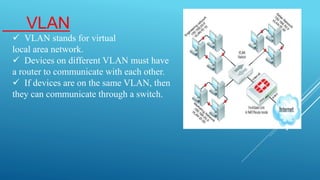
VLAN
 VLAN stands for virtual
local area network.
 Devices on different VLAN must have
a router to communicate with each other.
 If devices are on the same VLAN, then
they can communicate through a switch.
INTRODUCTION TO THE PROJECT:
This Network will let us to consider a enterprise with several desks and users in
various departments to access the Google servers .
We here demonstrate the concepts of packet flow in the LAN and WAN , default
routing .
In a LAN we have used the Cisco switches and configured the VLAN concept
and inter Vlan routing .
IP Addressing is categorized into two different types the LAN uses private
addressing and for WAN communications towards ISP (internet service
provider) we used the Port Address Translation (PAT) .
DNS Server and other concepts .
TOPOLOGY :
bank network design.pptx

bank network design.pptx

  • 1.
    PERFORMANCE EVALUATION OF VARIOUSROUTING PROTOCOL USING MANET MENTOR –Er. Aanchal Kamra (CHANDIGARH UNIVERSITY, Mohali) SUBMITTED BY – Anil Singh (16BCS2501) Siddhartha (17BCS9011) Tanmay (16bcs2462)
  • 2.
  • 3.
    CCNA stands for “CiscoCertified Network Associate” •It gives the information about networking ,its types and its application . •Networking is very important as it provides communication. •It is also very useful as it helps in resource sharing. •Thus , overall it is a cost saving technique.
  • 4.
    TYPES OF NETWORKING LAN – It stands for local area network. Egg: network within a campus .  MAN – It stands for metropolitan area network. Egg: network connecting various cities.  WAN – It stands for wide area network. Egg : internet on a whole world.
  • 5.
    Networking Devices  LANcard  BRIDGE  HUB  SWITCH  ROUTER
  • 6.
    Subnetting and Supernetting Aboutsubnetting & Supernetting In subnetting, a network is divided into several smaller subnetwork with each subnetwork(or subnet) having its own subnetwork address. In supernetting, an organization can combine several class C addresses to create a larger range of addresses(supernetwork).
  • 7.
    Classless Interdomain Routing(CIDR) Supernettingmeans assigning a set of class C addresses to and organization that needs more than 254 host addresses. However , when these class C addresses are entered into the routing table, each occupies one entry in the routing table./ 256 entries in the routing table. The classless interdomain routing(CIDR) technique is devised to reduce the number of routing table entries. In this technique, instead of entering each single class C address with its corresponding default mask(255.255.255.0), the router can use the supernet mask and the lowest network address in the group.
  • 8.
    Hubs vs. switches Hubs– less expensive, used in a very small LAN where low throughput is OK  Switches – segments collision domains, interconnects network segments, more expensive, but performance makes it cost effective.
  • 9.
    ROUTERS  It isa layer 3 or network layer device.  In this there is no broadcast.  It is WAN technology device.  It is useful to connect different networks.  Packet filtering & it finds the best path selection.
  • 10.
    Router Configuration Router alwayshas two configurations: —  Running configuration:  In RAM, determines how the router is currently operating  Is modified using the configure command  To see it: show running-config  Startup configuration:  In NVRAM, determines how the router will operate after next reload  Is modified using the copy command  To see it: show startup-config
  • 11.
    Router Access Modes Modes: 1).USER Mode: using for security purpose 2). ENABLE Mode: using for if you want to check configuration 3). GLOBAL Mode: using for configuration in router 4). ROM Monitor: useful for password recovery & new IOS upload session
  • 12.
    Logging Into TheRouter  Connect router to console port or telnet to router – router> – router>enable – password – router# – router#?  Configuring the router – Terminal (entering the commands directly) – router# configure terminal – router(config)# USER MODE PROMPT PRIVILEDGED MODE PROMPT
  • 13.
    Deleting Your router’sConfiguration To delete your router’s configuration Router#erase startup-config OR Router#write erase Router#reload Router will startup again, but in setup mode, since Startup config file does not exists
  • 14.
    ROUTING  Routing isthe exchange of routes between different networks .  There are three types of routing:  Default routing  Static routing  Dynamic routing
  • 15.
    DYNAMIC ROUTING A routingprotocol is the communication used between routers. A routing protocol allows one router to share information with other routers. The information a router gets from another router, using a routing protocol, is used to build & maintain a routing table. Examples of routing protocols: 1). RIP [ROUTING INFORMATION PROTOCOL] 2.) EIGRP[ENHANCED INTERIOR GATEWAY ROUTING PROTOCOL] 3. OSPF[OPEN SHORTEST PATH FIRST]
  • 16.
    VLAN  VLAN standsfor virtual local area network.  Devices on different VLAN must have a router to communicate with each other.  If devices are on the same VLAN, then they can communicate through a switch.
  • 17.
    INTRODUCTION TO THEPROJECT: This Network will let us to consider a enterprise with several desks and users in various departments to access the Google servers . We here demonstrate the concepts of packet flow in the LAN and WAN , default routing . In a LAN we have used the Cisco switches and configured the VLAN concept and inter Vlan routing . IP Addressing is categorized into two different types the LAN uses private addressing and for WAN communications towards ISP (internet service provider) we used the Port Address Translation (PAT) . DNS Server and other concepts .
  • 18.