1
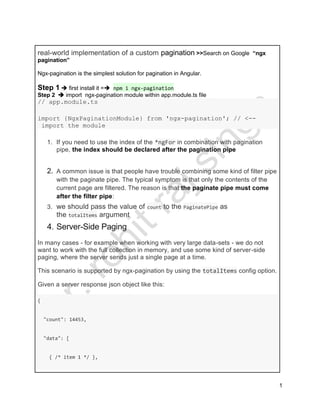
real-world implementation of a custom pagination >>Search on Google “ngx
pagination”
Ngx-pagination is the simplest solution for pagination in Angular.
Step 1  first install it = npm i ngx-pagination
Step 2  import ngx-pagination module within app.module.ts file
// app.module.ts
import {NgxPaginationModule} from 'ngx-pagination'; // <--
import the module
1. If you need to use the index of the *ngFor in combination with pagination
pipe, the index should be declared after the pagination pipe
2. A common issue is that people have trouble combining some kind of filter pipe
with the paginate pipe. The typical symptom is that only the contents of the
current page are filtered. The reason is that the paginate pipe must come
after the filter pipe:
3. we should pass the value of count to the PaginatePipe as
the totalItems argument
4. Server-Side Paging
In many cases - for example when working with very large data-sets - we do not
want to work with the full collection in memory, and use some kind of server-side
paging, where the server sends just a single page at a time.
This scenario is supported by ngx-pagination by using the totalItems config option.
Given a server response json object like this:
{
"count": 14453,
"data": [
{ /* item 1 */ },
2
{ /* item 2 */ },
{ /* item 3 */ },
{ /* ... */ },
{ /* item 10 */ }
]
}
we should pass the value of count to the PaginatePipe as
the totalItems argument
5. Styling
The PaginationControlsComponent can be styled by simply overriding the default
styles. To overcome Angular's view encapsulation, you may need to use
the /deep/ operator to target it (depending on the type of encapsulation your
component is using).
To avoid specificity issues, just add your own custom class name to the element,
which will allow your styles to override the defaults:
// head
<style>
.my-pagination /deep/ .ngx-pagination .current {
background: red;
}
</style>
3
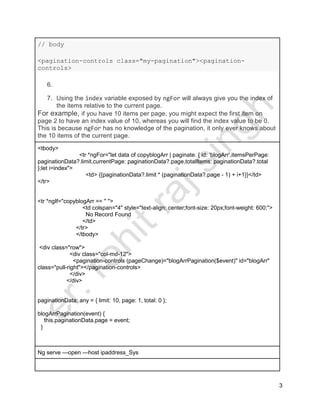
// body
<pagination-controls class="my-pagination"><pagination-
controls>
6.
7. Using the index variable exposed by ngFor will always give you the index of
the items relative to the current page.
For example, if you have 10 items per page, you might expect the first item on
page 2 to have an index value of 10, whereas you will find the index value to be 0.
This is because ngFor has no knowledge of the pagination, it only ever knows about
the 10 items of the current page.
<tbody>
<tr *ngFor="let data of copyblogArr | paginate: { id: 'blogArr',itemsPerPage:
paginationData?.limit,currentPage: paginationData?.page,totalItems: paginationData?.total
};let i=index">
<td> {{paginationData?.limit * (paginationData?.page - 1) + i+1}}</td>
</tr>
<tr *ngIf="copyblogArr == '' ">
<td colspan="4" style="text-align: center;font-size: 20px;font-weight: 600;">
No Record Found
</td>
</tr>
</tbody>
<div class="row">
<div class="col-md-12">
<pagination-controls (pageChange)="blogArrPagination($event)" id="blogArr"
class="pull-right"></pagination-controls>
</div>
</div>
paginationData: any = { limit: 10, page: 1, total: 0 };
blogArrPagination(event) {
this.paginationData.page = event;
}
Ng serve —open —host ipaddress_Sys
4

Custom pagination

  • 1.
    1 real-world implementation ofa custom pagination >>Search on Google “ngx pagination” Ngx-pagination is the simplest solution for pagination in Angular. Step 1  first install it = npm i ngx-pagination Step 2  import ngx-pagination module within app.module.ts file // app.module.ts import {NgxPaginationModule} from 'ngx-pagination'; // <-- import the module 1. If you need to use the index of the *ngFor in combination with pagination pipe, the index should be declared after the pagination pipe 2. A common issue is that people have trouble combining some kind of filter pipe with the paginate pipe. The typical symptom is that only the contents of the current page are filtered. The reason is that the paginate pipe must come after the filter pipe: 3. we should pass the value of count to the PaginatePipe as the totalItems argument 4. Server-Side Paging In many cases - for example when working with very large data-sets - we do not want to work with the full collection in memory, and use some kind of server-side paging, where the server sends just a single page at a time. This scenario is supported by ngx-pagination by using the totalItems config option. Given a server response json object like this: { "count": 14453, "data": [ { /* item 1 */ },
  • 2.
    2 { /* item2 */ }, { /* item 3 */ }, { /* ... */ }, { /* item 10 */ } ] } we should pass the value of count to the PaginatePipe as the totalItems argument 5. Styling The PaginationControlsComponent can be styled by simply overriding the default styles. To overcome Angular's view encapsulation, you may need to use the /deep/ operator to target it (depending on the type of encapsulation your component is using). To avoid specificity issues, just add your own custom class name to the element, which will allow your styles to override the defaults: // head <style> .my-pagination /deep/ .ngx-pagination .current { background: red; } </style>
  • 3.
    3 // body <pagination-controls class="my-pagination"><pagination- controls> 6. 7.Using the index variable exposed by ngFor will always give you the index of the items relative to the current page. For example, if you have 10 items per page, you might expect the first item on page 2 to have an index value of 10, whereas you will find the index value to be 0. This is because ngFor has no knowledge of the pagination, it only ever knows about the 10 items of the current page. <tbody> <tr *ngFor="let data of copyblogArr | paginate: { id: 'blogArr',itemsPerPage: paginationData?.limit,currentPage: paginationData?.page,totalItems: paginationData?.total };let i=index"> <td> {{paginationData?.limit * (paginationData?.page - 1) + i+1}}</td> </tr> <tr *ngIf="copyblogArr == '' "> <td colspan="4" style="text-align: center;font-size: 20px;font-weight: 600;"> No Record Found </td> </tr> </tbody> <div class="row"> <div class="col-md-12"> <pagination-controls (pageChange)="blogArrPagination($event)" id="blogArr" class="pull-right"></pagination-controls> </div> </div> paginationData: any = { limit: 10, page: 1, total: 0 }; blogArrPagination(event) { this.paginationData.page = event; } Ng serve —open —host ipaddress_Sys
  • 4.