鄭毓融
23 October 2017
CI/CD with Kubernetes
Agenda
Introduction of Continuous Integration and Continuous Deployment/Delivery
- What is CI/CD?
- Run CI/CD with Kubernetes?
Setup Jenkins with Kubernetes
- Setup minikube & jenkins
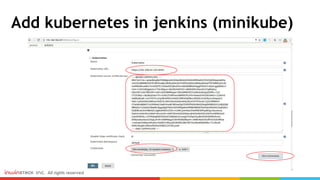
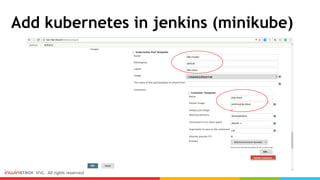
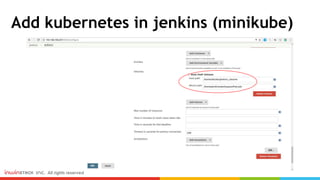
- Add kubernetes in jenkins
- Test
Summary
2
Introduction of Continuous Integration and Continuous
Delivery (CI/CD)
What is CI/CD and Why need that?
Continuous Integration -
「 持續整合 」 目的在儘快讓新功能的程式碼整合到現存的基礎程式庫(codebase) 中來進行測試。
Continuous Deploy -
「 持續部署 」 的目的就是要讓軟體可以快速自動部署到不同的環境, 至於有多少環境需要部署則
會根據不同公司的持續交付管線(pipeline) 的設計而定。
Continuous Delivery -
「 持續交付 」 是將新的特性儘快交付到最終使用者(end-user) 的手中 。
簡單來說就是盡量減少手動人力,將一些日常工作交給自動化工具。例如:環境建置、單元測試、日
誌紀錄、產品部署。
What is CI/CD?
引用自:
山姆鍋對持續整合、持續部署、持續交付的定義
DevOps:持續整合&持續交付(Docker、CircleCI、AWS)
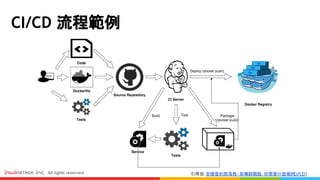
CI/CD 流程範例
引用自: 安德魯的部落格- 架構師觀點:你需要什麼樣的CI/CD?
Run CI/CD with Kubernetes
引用自: Achieving CI/CD with Kubernetes
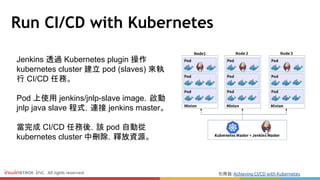
Jenkins 透過 Kubernetes plugin 操作
kubernetes cluster 建立 pod (slaves) 來執
行 CI/CD 任務。
Pod 上使用 jenkins/jnlp-slave image,啟動
jnlp java slave 程式,連接 jenkins master。
當完成 CI/CD 任務後,該 pod 自動從
kubernetes cluster 中刪除,釋放資源。
Setup Jenkins with Kubernetes
Use kubernetes-plugin in jenkins
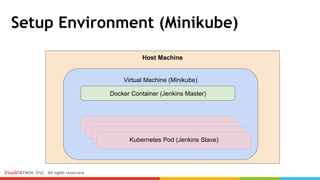
Setup Environment (Minikube)
Host Machine
Virtual Machine (Minikube)
Docker Container (Jenkins Master)
Kubernetes Pod (Jenkins Slave)
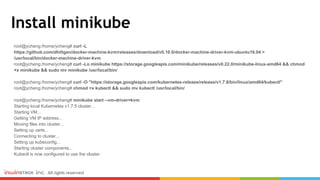
Install minikube
root@ycheng:/home/ycheng# curl -L
https://github.com/dhiltgen/docker-machine-kvm/releases/download/v0.10.0/docker-machine-driver-kvm-ubuntu16.04 >
/usr/local/bin/docker-machine-driver-kvm
root@ycheng:/home/ycheng# curl -Lo minikube https://storage.googleapis.com/minikube/releases/v0.22.0/minikube-linux-amd64 && chmod
+x minikube && sudo mv minikube /usr/local/bin/
root@ycheng:/home/ycheng# curl -O "https://storage.googleapis.com/kubernetes-release/release/v1.7.8/bin/linux/amd64/kubectl"
root@ycheng:/home/ycheng# chmod +x kubectl && sudo mv kubectl /usr/local/bin/
root@ycheng:/home/ycheng# minikube start --vm-driver=kvm
Starting local Kubernetes v1.7.5 cluster...
Starting VM...
Getting VM IP address...
Moving files into cluster...
Setting up certs...
Connecting to cluster...
Setting up kubeconfig...
Starting cluster components...
Kubectl is now configured to use the cluster.
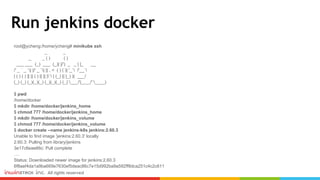
Run jenkins docker
root@ycheng:/home/ycheng# minikube ssh
_ _
_ _ ( ) ( )
___ ___ (_) ___ (_)| |/') _ _ | |_ __
/' _ ` _ `| |/' _ `| || , < ( ) ( )| '_` /'__`
| ( ) ( ) || || ( ) || || |` | (_) || |_) )( ___/
(_) (_) (_)(_)(_) (_)(_)(_) (_)`___/'(_,__/'`____)
$ pwd
/home/docker
$ mkdir /home/docker/jenkins_home
$ chmod 777 /home/docker/jenkins_home
$ mkdir /home/docker/jenkins_volume
$ chmod 777 /home/docker/jenkins_volume
$ docker create --name jenkins-k8s jenkins:2.60.3
Unable to find image 'jenkins:2.60.3' locally
2.60.3: Pulling from library/jenkins
3e17c6eae66c: Pull complete
….
Status: Downloaded newer image for jenkins:2.60.3
6f8aef4da1a9ba669e7630ef5deac86c7e15d992ba9a592ff8dca251c4c2c611
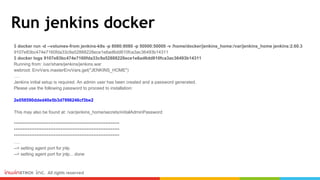
Run jenkins docker
$ docker run -d --volumes-from jenkins-k8s -p 8080:8080 -p 50000:50000 -v /home/docker/jenkins_home:/var/jenkins_home jenkins:2.60.3
9107e83bc474e7160fda33c9a52888228ece1e6ad6dd810fca3ac36493b14311
$ docker logs 9107e83bc474e7160fda33c9a52888228ece1e6ad6dd810fca3ac36493b14311
Running from: /usr/share/jenkins/jenkins.war
webroot: EnvVars.masterEnvVars.get("JENKINS_HOME")
….
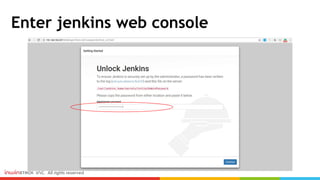
Jenkins initial setup is required. An admin user has been created and a password generated.
Please use the following password to proceed to installation:
2e058590dded40e5b3d7996246cf3be2
This may also be found at: /var/jenkins_home/secrets/initialAdminPassword
*************************************************************
*************************************************************
*************************************************************
….
--> setting agent port for jnlp
--> setting agent port for jnlp... done
Enter jenkins web console
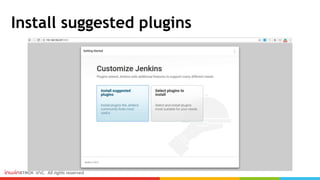
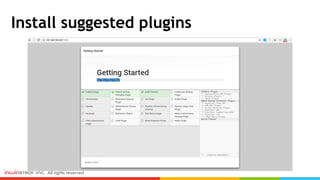
Install suggested plugins
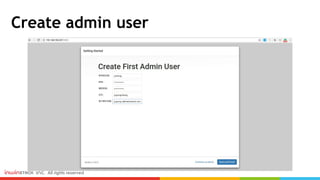
Create admin user
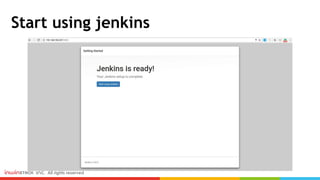
Start using jenkins
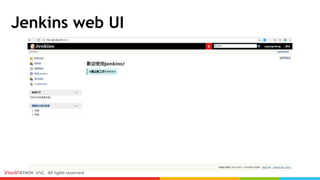
Jenkins web UI
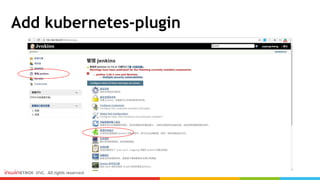
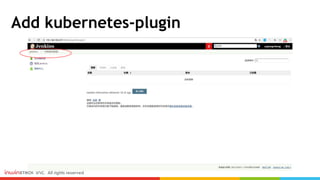
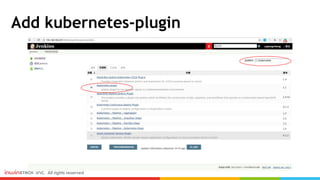
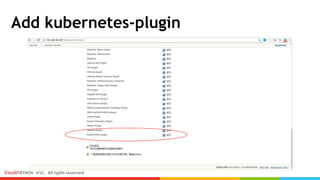
Add kubernetes-plugin
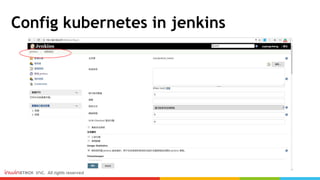
Config kubernetes in jenkins
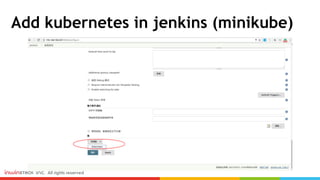
Add kubernetes in jenkins (minikube)
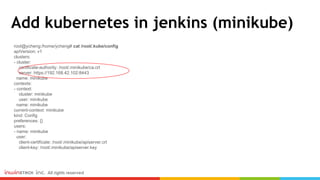
root@ycheng:/home/ycheng# cat /root/.kube/config
apiVersion: v1
clusters:
- cluster:
certificate-authority: /root/.minikube/ca.crt
server: https://192.168.42.102:8443
name: minikube
contexts:
- context:
cluster: minikube
user: minikube
name: minikube
current-context: minikube
kind: Config
preferences: {}
users:
- name: minikube
user:
client-certificate: /root/.minikube/apiserver.crt
client-key: /root/.minikube/apiserver.key
Add kubernetes in jenkins (minikube)
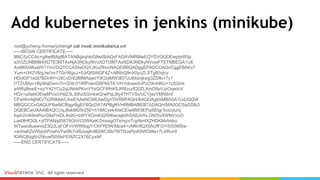
root@ycheng:/home/ycheng# cat /root/.minikube/ca.crt
-----BEGIN CERTIFICATE-----
MIIC5zCCAc+gAwIBAgIBATANBgkqhkiG9w0BAQsFADAVMRMwEQYDVQQDEwptaW5p
a3ViZUNBMB4XDTE3MTAxNjA3NDkyNVoXDTI3MTAxNDA3NDkyNVowFTETMBEGA1UE
AxMKbWluaWt1YmVDQTCCASIwDQYJKoZIhvcNAQEBBQADggEPADCCAQoCggEBAKv7
Yum+t342V8/gJw//sv77Gr/WguJ+0JrQISAIQF4Z+ABitbQ9nX0yoZLSTg80qIcy
HDclGF1sQt7BDnfH+UtiCvDrEdMMAqwcYtKGdMW3El7uU6tisnjkwg3ZDflv+7y1
l7TZUMyc+ByWql2wm7h+D3b1f1IRPnevGBPKkTK1HYmIowe5nPzOXnHKU+1zSGmt
wW6yBswE+xz/Y42YCu2qUNnkPKmVYeQCF8fH4SJRBzczfQ0ZLXmO9y/LtzOqedcV
HQv+p0sklG6/ia8Poxn/HdZ3L30hzSGmkwQrwPqL8ty47HTVSx/oC1/jssYMN9mf
CFwWinNjNKV7s2RtMekCAwEAAaNCMEAwDgYDVR0PAQH/BAQDAgKkMB0GA1UdJQQW
MBQGCCsGAQUFBwMCBggrBgEFBQcDATAPBgNVHRMBAf8EBTADAQH/MA0GCSqGSIb3
DQEBCwUAA4IBAQCUqJ8skMD5rZ50+h1IMCyek40eCEiwMW3EPqdiEtgr3oxzdurq
foph2mA9mPyvG9sFmDLAxlXi+bWYXOmKd2I0I6wcejk0hSAEdVhLO925vXWMzVuO
Liet0lHfOGL+zlTPANq858T6GhVC0WKeK/2moxgOTxHq/oTcpNmfXZHDKMvfmlxc
WTwao8uewveZ3QJLaFOFnVWRNqgY/OhFRDW/Mpa4+vNf6r9QX5AUfFGY/0/03MSw
+eohaKZsWbjxAPzwhvYw0lb7nRlJusjfn9lGWCI8b7W75UsPjnK6WOMe+7LXRuHI
fGRiCBzg8n29bvefS05lsFEf8ZC2X76CyxAF
-----END CERTIFICATE-----
Add kubernetes in jenkins (minikube)
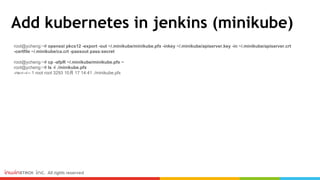
root@ycheng:~# openssl pkcs12 -export -out ~/.minikube/minikube.pfx -inkey ~/.minikube/apiserver.key -in ~/.minikube/apiserver.crt
-certfile ~/.minikube/ca.crt -passout pass:secret
root@ycheng:~# cp -afpR ~/.minikube/minikube.pfx ~
root@ycheng:~# ls -l ./minikube.pfx
-rw-r--r-- 1 root root 3293 10月 17 14:41 ./minikube.pfx
Add kubernetes in jenkins (minikube)
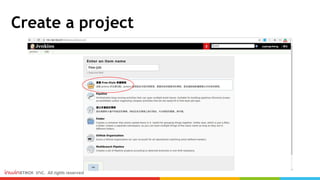
Create a project
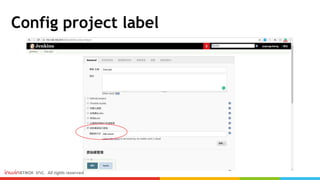
Config project label
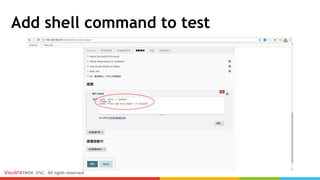
Add shell command to test
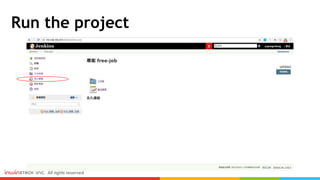
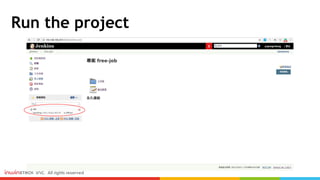
Run the project
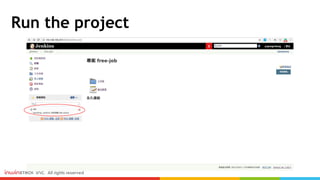
Run the project
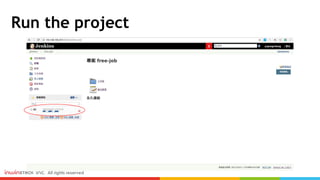
Run the project
Run the project
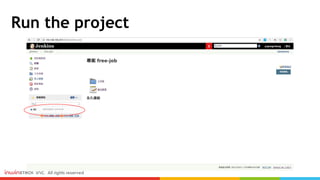
Run the project
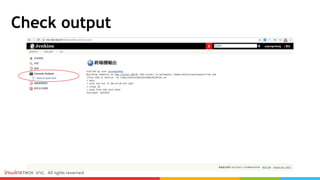
Check output
Check output
root@ycheng:~# minikube ssh
_ _
_ _ ( ) ( )
___ ___ (_) ___ (_)| |/') _ _ | |_ __
/' _ ` _ `| |/' _ `| || , < ( ) ( )| '_` /'__`
| ( ) ( ) || || ( ) || || |` | (_) || |_) )( ___/
(_) (_) (_)(_)(_) (_)(_)(_) (_)`___/'(_,__/'`____)
$ ls -l ./jenkins_volume/
total 4
-rw-r--r-- 1 10000 10000 48 Oct 17 09:14 output
$ cat ./jenkins_volume/output
Tue Oct 17 09:14:39 UTC 2017
free-job-test-done
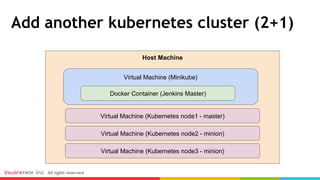
Add another kubernetes cluster (2+1)
Host Machine
Virtual Machine (Minikube)
Docker Container (Jenkins Master)
Virtual Machine (Kubernetes node1 - master)
Virtual Machine (Kubernetes node2 - minion)
Virtual Machine (Kubernetes node3 - minion)
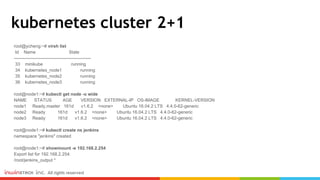
kubernetes cluster 2+1
root@ycheng:~# virsh list
Id Name State
----------------------------------------------------
33 minikube running
34 kubernetes_node1 running
35 kubernetes_node2 running
36 kubernetes_node3 running
root@node1:~# kubectl get node -o wide
NAME STATUS AGE VERSION EXTERNAL-IP OS-IMAGE KERNEL-VERSION
node1 Ready,master 161d v1.6.2 <none> Ubuntu 16.04.2 LTS 4.4.0-62-generic
node2 Ready 161d v1.6.2 <none> Ubuntu 16.04.2 LTS 4.4.0-62-generic
node3 Ready 161d v1.6.2 <none> Ubuntu 16.04.2 LTS 4.4.0-62-generic
root@node1:~# kubectl create ns jenkins
namespace "jenkins" created
root@node1:~# showmount -e 192.168.2.254
Export list for 192.168.2.254:
/root/jenkins_output *
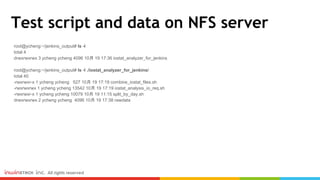
Test script and data on NFS server
root@ycheng:~/jenkins_output# ls -l
total 4
drwxrwxrwx 3 ycheng ycheng 4096 10月 19 17:36 iostat_analyzer_for_jenkins
root@ycheng:~/jenkins_output# ls -l ./iostat_analyzer_for_jenkins/
total 40
-rwxrwxr-x 1 ycheng ycheng 527 10月 19 17:19 combine_iostat_files.sh
-rwxrwxrwx 1 ycheng ycheng 13542 10月 19 17:19 iostat_analysis_io_req.sh
-rwxrwxr-x 1 ycheng ycheng 10079 10月 19 11:15 split_by_day.sh
drwxrwxrwx 2 ycheng ycheng 4096 10月 19 17:38 rawdata
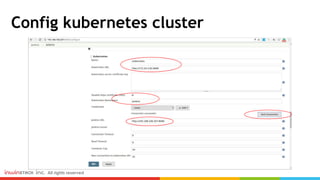
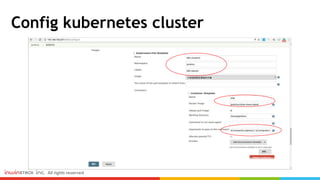
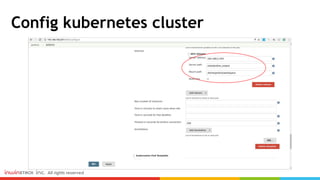
Config kubernetes cluster
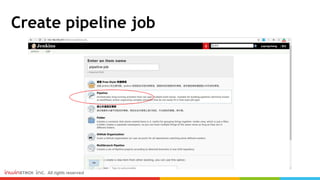
Create pipeline job
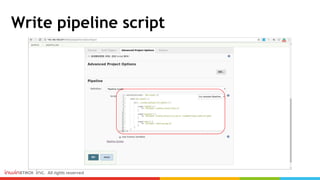
Write pipeline script
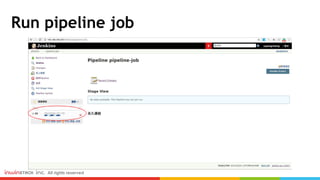
Run pipeline job
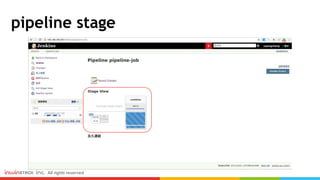
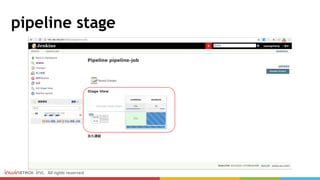
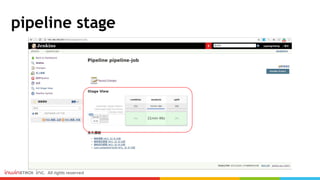
pipeline stage
pipeline stage
pipeline stage
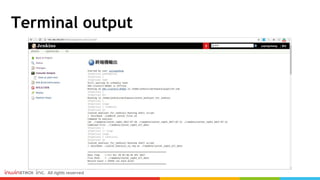
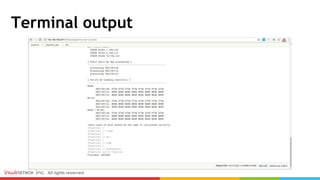
Terminal output
Terminal output
Summary
Summary
Continuous Integration
Continuous Deploy
Continuous Delivery
CI/CD with Kubernetes
Other CI/CD Tools :
- Travis CI
- Circle CI
- Drone.io
- gitlab
- & more...
References
https://samkuo.me/post/2013/10/continuous-integration-deployment-delivery/
http://blog.amowu.com/2015/04/devops-continuous-integration-delivery-docker-circl
eci-aws-beanstalk.html
http://columns.chicken-house.net/2017/08/05/what-cicd-do-you-need/
https://docs.docker.com/samples/library/jenkins/
https://travis-ci.org/
http://try.drone.io/
https://dzone.com/articles/achieving-cicd-with-kubernetes
www.inwinstack.com
Thank You!
迎 棧 科 技 股 份 有 限 公 司

Cantainer CI/ CD with Kubernetes

  • 1.
  • 2.
    Agenda Introduction of ContinuousIntegration and Continuous Deployment/Delivery - What is CI/CD? - Run CI/CD with Kubernetes? Setup Jenkins with Kubernetes - Setup minikube & jenkins - Add kubernetes in jenkins - Test Summary 2
  • 3.
    Introduction of ContinuousIntegration and Continuous Delivery (CI/CD) What is CI/CD and Why need that?
  • 4.
    Continuous Integration - 「持續整合 」 目的在儘快讓新功能的程式碼整合到現存的基礎程式庫(codebase) 中來進行測試。 Continuous Deploy - 「 持續部署 」 的目的就是要讓軟體可以快速自動部署到不同的環境, 至於有多少環境需要部署則 會根據不同公司的持續交付管線(pipeline) 的設計而定。 Continuous Delivery - 「 持續交付 」 是將新的特性儘快交付到最終使用者(end-user) 的手中 。 簡單來說就是盡量減少手動人力,將一些日常工作交給自動化工具。例如:環境建置、單元測試、日 誌紀錄、產品部署。 What is CI/CD? 引用自: 山姆鍋對持續整合、持續部署、持續交付的定義 DevOps:持續整合&持續交付(Docker、CircleCI、AWS)
  • 5.
    CI/CD 流程範例 引用自: 安德魯的部落格-架構師觀點:你需要什麼樣的CI/CD?
  • 6.
    Run CI/CD withKubernetes 引用自: Achieving CI/CD with Kubernetes Jenkins 透過 Kubernetes plugin 操作 kubernetes cluster 建立 pod (slaves) 來執 行 CI/CD 任務。 Pod 上使用 jenkins/jnlp-slave image,啟動 jnlp java slave 程式,連接 jenkins master。 當完成 CI/CD 任務後,該 pod 自動從 kubernetes cluster 中刪除,釋放資源。
  • 7.
    Setup Jenkins withKubernetes Use kubernetes-plugin in jenkins
  • 8.
    Setup Environment (Minikube) HostMachine Virtual Machine (Minikube) Docker Container (Jenkins Master) Kubernetes Pod (Jenkins Slave) Kubernetes Pod (Jenkins Slave) Kubernetes Pod (Jenkins Slave) Kubernetes Pod (Jenkins Slave)
  • 9.
    Install minikube root@ycheng:/home/ycheng# curl-L https://github.com/dhiltgen/docker-machine-kvm/releases/download/v0.10.0/docker-machine-driver-kvm-ubuntu16.04 > /usr/local/bin/docker-machine-driver-kvm root@ycheng:/home/ycheng# curl -Lo minikube https://storage.googleapis.com/minikube/releases/v0.22.0/minikube-linux-amd64 && chmod +x minikube && sudo mv minikube /usr/local/bin/ root@ycheng:/home/ycheng# curl -O "https://storage.googleapis.com/kubernetes-release/release/v1.7.8/bin/linux/amd64/kubectl" root@ycheng:/home/ycheng# chmod +x kubectl && sudo mv kubectl /usr/local/bin/ root@ycheng:/home/ycheng# minikube start --vm-driver=kvm Starting local Kubernetes v1.7.5 cluster... Starting VM... Getting VM IP address... Moving files into cluster... Setting up certs... Connecting to cluster... Setting up kubeconfig... Starting cluster components... Kubectl is now configured to use the cluster.
  • 10.
    Run jenkins docker root@ycheng:/home/ycheng#minikube ssh _ _ _ _ ( ) ( ) ___ ___ (_) ___ (_)| |/') _ _ | |_ __ /' _ ` _ `| |/' _ `| || , < ( ) ( )| '_` /'__` | ( ) ( ) || || ( ) || || |` | (_) || |_) )( ___/ (_) (_) (_)(_)(_) (_)(_)(_) (_)`___/'(_,__/'`____) $ pwd /home/docker $ mkdir /home/docker/jenkins_home $ chmod 777 /home/docker/jenkins_home $ mkdir /home/docker/jenkins_volume $ chmod 777 /home/docker/jenkins_volume $ docker create --name jenkins-k8s jenkins:2.60.3 Unable to find image 'jenkins:2.60.3' locally 2.60.3: Pulling from library/jenkins 3e17c6eae66c: Pull complete …. Status: Downloaded newer image for jenkins:2.60.3 6f8aef4da1a9ba669e7630ef5deac86c7e15d992ba9a592ff8dca251c4c2c611
  • 11.
    Run jenkins docker $docker run -d --volumes-from jenkins-k8s -p 8080:8080 -p 50000:50000 -v /home/docker/jenkins_home:/var/jenkins_home jenkins:2.60.3 9107e83bc474e7160fda33c9a52888228ece1e6ad6dd810fca3ac36493b14311 $ docker logs 9107e83bc474e7160fda33c9a52888228ece1e6ad6dd810fca3ac36493b14311 Running from: /usr/share/jenkins/jenkins.war webroot: EnvVars.masterEnvVars.get("JENKINS_HOME") …. Jenkins initial setup is required. An admin user has been created and a password generated. Please use the following password to proceed to installation: 2e058590dded40e5b3d7996246cf3be2 This may also be found at: /var/jenkins_home/secrets/initialAdminPassword ************************************************************* ************************************************************* ************************************************************* …. --> setting agent port for jnlp --> setting agent port for jnlp... done
  • 12.
  • 13.
  • 14.
  • 15.
  • 16.
  • 17.
  • 18.
  • 19.
  • 20.
  • 21.
  • 22.
  • 23.
    Add kubernetes injenkins (minikube)
  • 24.
    Add kubernetes injenkins (minikube) root@ycheng:/home/ycheng# cat /root/.kube/config apiVersion: v1 clusters: - cluster: certificate-authority: /root/.minikube/ca.crt server: https://192.168.42.102:8443 name: minikube contexts: - context: cluster: minikube user: minikube name: minikube current-context: minikube kind: Config preferences: {} users: - name: minikube user: client-certificate: /root/.minikube/apiserver.crt client-key: /root/.minikube/apiserver.key
  • 25.
    Add kubernetes injenkins (minikube) root@ycheng:/home/ycheng# cat /root/.minikube/ca.crt -----BEGIN CERTIFICATE----- MIIC5zCCAc+gAwIBAgIBATANBgkqhkiG9w0BAQsFADAVMRMwEQYDVQQDEwptaW5p a3ViZUNBMB4XDTE3MTAxNjA3NDkyNVoXDTI3MTAxNDA3NDkyNVowFTETMBEGA1UE AxMKbWluaWt1YmVDQTCCASIwDQYJKoZIhvcNAQEBBQADggEPADCCAQoCggEBAKv7 Yum+t342V8/gJw//sv77Gr/WguJ+0JrQISAIQF4Z+ABitbQ9nX0yoZLSTg80qIcy HDclGF1sQt7BDnfH+UtiCvDrEdMMAqwcYtKGdMW3El7uU6tisnjkwg3ZDflv+7y1 l7TZUMyc+ByWql2wm7h+D3b1f1IRPnevGBPKkTK1HYmIowe5nPzOXnHKU+1zSGmt wW6yBswE+xz/Y42YCu2qUNnkPKmVYeQCF8fH4SJRBzczfQ0ZLXmO9y/LtzOqedcV HQv+p0sklG6/ia8Poxn/HdZ3L30hzSGmkwQrwPqL8ty47HTVSx/oC1/jssYMN9mf CFwWinNjNKV7s2RtMekCAwEAAaNCMEAwDgYDVR0PAQH/BAQDAgKkMB0GA1UdJQQW MBQGCCsGAQUFBwMCBggrBgEFBQcDATAPBgNVHRMBAf8EBTADAQH/MA0GCSqGSIb3 DQEBCwUAA4IBAQCUqJ8skMD5rZ50+h1IMCyek40eCEiwMW3EPqdiEtgr3oxzdurq foph2mA9mPyvG9sFmDLAxlXi+bWYXOmKd2I0I6wcejk0hSAEdVhLO925vXWMzVuO Liet0lHfOGL+zlTPANq858T6GhVC0WKeK/2moxgOTxHq/oTcpNmfXZHDKMvfmlxc WTwao8uewveZ3QJLaFOFnVWRNqgY/OhFRDW/Mpa4+vNf6r9QX5AUfFGY/0/03MSw +eohaKZsWbjxAPzwhvYw0lb7nRlJusjfn9lGWCI8b7W75UsPjnK6WOMe+7LXRuHI fGRiCBzg8n29bvefS05lsFEf8ZC2X76CyxAF -----END CERTIFICATE-----
  • 26.
    Add kubernetes injenkins (minikube) root@ycheng:~# openssl pkcs12 -export -out ~/.minikube/minikube.pfx -inkey ~/.minikube/apiserver.key -in ~/.minikube/apiserver.crt -certfile ~/.minikube/ca.crt -passout pass:secret root@ycheng:~# cp -afpR ~/.minikube/minikube.pfx ~ root@ycheng:~# ls -l ./minikube.pfx -rw-r--r-- 1 root root 3293 10月 17 14:41 ./minikube.pfx
  • 27.
    Add kubernetes injenkins (minikube)
  • 28.
    Add kubernetes injenkins (minikube)
  • 29.
    Add kubernetes injenkins (minikube)
  • 30.
    Add kubernetes injenkins (minikube)
  • 31.
  • 32.
  • 33.
  • 34.
  • 35.
  • 36.
  • 37.
  • 38.
  • 39.
  • 40.
    Check output root@ycheng:~# minikubessh _ _ _ _ ( ) ( ) ___ ___ (_) ___ (_)| |/') _ _ | |_ __ /' _ ` _ `| |/' _ `| || , < ( ) ( )| '_` /'__` | ( ) ( ) || || ( ) || || |` | (_) || |_) )( ___/ (_) (_) (_)(_)(_) (_)(_)(_) (_)`___/'(_,__/'`____) $ ls -l ./jenkins_volume/ total 4 -rw-r--r-- 1 10000 10000 48 Oct 17 09:14 output $ cat ./jenkins_volume/output Tue Oct 17 09:14:39 UTC 2017 free-job-test-done
  • 41.
    Add another kubernetescluster (2+1) Host Machine Virtual Machine (Minikube) Docker Container (Jenkins Master) Virtual Machine (Kubernetes node1 - master) Virtual Machine (Kubernetes node2 - minion) Virtual Machine (Kubernetes node3 - minion)
  • 42.
    kubernetes cluster 2+1 root@ycheng:~#virsh list Id Name State ---------------------------------------------------- 33 minikube running 34 kubernetes_node1 running 35 kubernetes_node2 running 36 kubernetes_node3 running root@node1:~# kubectl get node -o wide NAME STATUS AGE VERSION EXTERNAL-IP OS-IMAGE KERNEL-VERSION node1 Ready,master 161d v1.6.2 <none> Ubuntu 16.04.2 LTS 4.4.0-62-generic node2 Ready 161d v1.6.2 <none> Ubuntu 16.04.2 LTS 4.4.0-62-generic node3 Ready 161d v1.6.2 <none> Ubuntu 16.04.2 LTS 4.4.0-62-generic root@node1:~# kubectl create ns jenkins namespace "jenkins" created root@node1:~# showmount -e 192.168.2.254 Export list for 192.168.2.254: /root/jenkins_output *
  • 43.
    Test script anddata on NFS server root@ycheng:~/jenkins_output# ls -l total 4 drwxrwxrwx 3 ycheng ycheng 4096 10月 19 17:36 iostat_analyzer_for_jenkins root@ycheng:~/jenkins_output# ls -l ./iostat_analyzer_for_jenkins/ total 40 -rwxrwxr-x 1 ycheng ycheng 527 10月 19 17:19 combine_iostat_files.sh -rwxrwxrwx 1 ycheng ycheng 13542 10月 19 17:19 iostat_analysis_io_req.sh -rwxrwxr-x 1 ycheng ycheng 10079 10月 19 11:15 split_by_day.sh drwxrwxrwx 2 ycheng ycheng 4096 10月 19 17:38 rawdata
  • 44.
  • 45.
  • 46.
  • 47.
  • 48.
  • 49.
  • 50.
  • 51.
  • 52.
  • 53.
  • 54.
  • 55.
  • 56.
    Summary Continuous Integration Continuous Deploy ContinuousDelivery CI/CD with Kubernetes Other CI/CD Tools : - Travis CI - Circle CI - Drone.io - gitlab - & more...
  • 57.
  • 58.
    www.inwinstack.com Thank You! 迎 棧科 技 股 份 有 限 公 司