CONFIDENTIAL designator
Kubelet with no Kubernetes
Control Plane
Rob Szumski
OpenShift Product Manager
1
CONFIDENTIAL designator
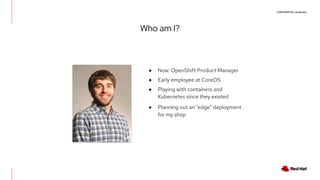
Who am I?
● Now: OpenShift Product Manager
● Early employee at CoreOS
● Playing with containers and
Kubernetes since they existed
● Planning out an “edge” deployment
for my shop
CONFIDENTIAL designator
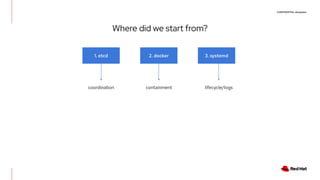
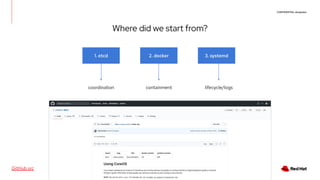
Where did we start from?
1. etcd 2. docker 3. systemd
coordination containment lifecycle/logs
CONFIDENTIAL designator
Where did we start from?
1. etcd 2. docker 3. systemd
coordination containment lifecycle/logs
GitHub src
CONFIDENTIAL designator
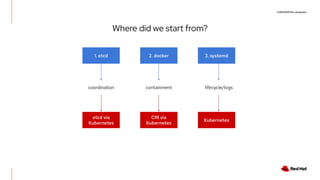
Where did we start from?
1. etcd 2. docker 3. systemd
coordination containment lifecycle/logs
etcd via
Kubernetes
CRI via
Kubernetes
Kubernetes
CONFIDENTIAL designator
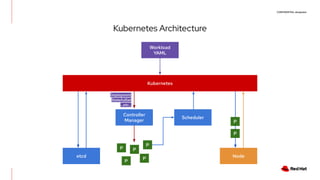
Kubernetes Architecture
Kubernetes
Workload
YAML
Controller
Manager
etcd
Scheduler
Deployment
StatefulSet
...etc...
Node
P
P
P
P
P
P
P
CONFIDENTIAL designator
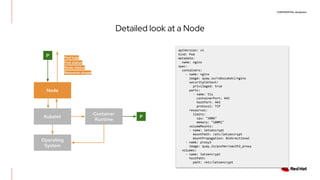
Detailed look at a Node
Node
P
Kubelet
Operating
System
Container
Runtime
P
apiVersion: v1
kind: Pod
metadata:
name: nginx
spec:
containers:
- name: nginx
image: quay.io/robszumski/nginx
securityContext:
privileged: true
ports:
- name: tls
containerPort: 443
hostPort: 443
protocol: TCP
resources:
limits:
cpu: "100m"
memory: "100Mi"
volumeMounts:
- name: letsencrypt
mountPath: /etc/letsencrypt
mountPropagation: Bidirectional
- name: proxy3
image: quay.io/pusher/oauth2_proxy
volumes:
- name: letsencrypt
hostPath:
path: /etc/letsencrypt
Pod logs
Pod status
Node status
Resource usage
CONFIDENTIAL designator
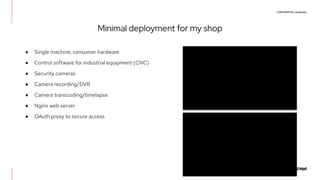
Minimal deployment for my shop
● Single machine, consumer hardware
● Control software for industrial equipment (CNC)
● Security cameras
● Camera recording/DVR
● Camera transcoding/timelapse
● Nginx web server
● OAuth proxy to secure access
STRICTLY INTERNAL ONLY
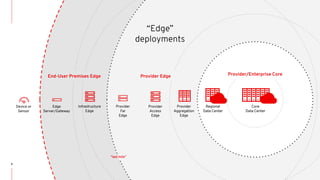
End-User Premises Edge Provider Edge Provider/Enterprise Core
Edge
Server/Gateway
Regional
Data Center
Infrastructure
Edge
Provider
Far
Edge
Provider
Access
Edge
Provider
Aggregation
Edge
Core
Data Center
Device or
Sensor
9
“last mile”
“Edge”
deployments
CONFIDENTIAL designator
Other edge examples
CONFIDENTIAL designator
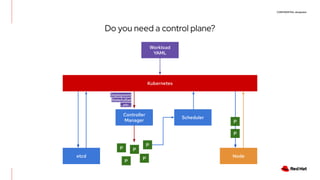
Do you need a control plane?
Kubernetes
Workload
YAML
Controller
Manager
etcd
Scheduler
Deployment
StatefulSet
...etc...
Node
P
P
P
P
P
P
P
CONFIDENTIAL designator
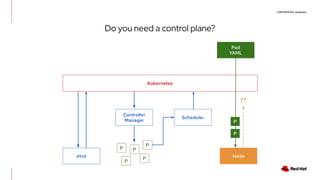
Do you need a control plane?
Kubernetes
Pod
YAML
Controller
Manager
etcd
Scheduler
Node
P
P
P
P
P
P
P
??
CONFIDENTIAL designator
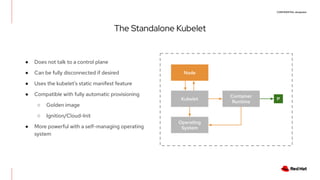
The Standalone Kubelet
● Does not talk to a control plane
● Can be fully disconnected if desired
● Uses the kubelet’s static manifest feature
● Compatible with fully automatic provisioning
○ Golden image
○ Ignition/Cloud-Init
● More powerful with a self-managing operating
system
Node
Kubelet
Operating
System
Container
Runtime
P
CONFIDENTIAL designator
The Standalone Kubelet
$ systemctl cat kubelet
# /etc/systemd/system/kubelet.service
[Unit]
Description=Kubernetes Kubelet Server
After=crio.service
Requires=crio.service
[Service]
WorkingDirectory=/var/lib/kubelet
EnvironmentFile=-/etc/kubernetes/config
EnvironmentFile=-/etc/kubernetes/kubelet
ExecStart=/usr/bin/kubelet 
$KUBE_LOGTOSTDERR 
$KUBE_LOG_LEVEL 
$KUBELET_API_SERVER 
$KUBELET_ADDRESS 
$KUBELET_PORT 
$KUBELET_HOSTNAME 
$KUBE_ALLOW_PRIV 
$KUBELET_ARGS
Restart=on-failure
KillMode=process
[Install]
WantedBy=multi-user.target
$ cat /etc/kubernetes/kubelet
###
# kubernetes kubelet (minion) config
# The address for the info server to serve on (set to
0.0.0.0 or "" for all interfaces)
KUBELET_ADDRESS="--address=127.0.0.1"
# The port for the info server to serve on
# KUBELET_PORT="--port=10250"
# You may leave this blank to use the actual hostname
KUBELET_HOSTNAME="--hostname-override=127.0.0.1"
# Add your own!
KUBELET_ARGS="--cgroup-driver=systemd --fail-swap-on=false
--pod-manifest-path=/etc/kubernetes/manifests
--container-runtime=remote
--container-runtime-endpoint=unix:///var/run/crio/crio.sock
--runtime-request-timeout=10m"
CONFIDENTIAL designator
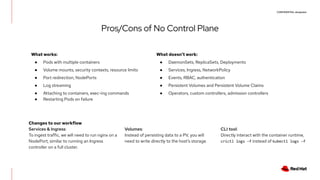
Pros/Cons of No Control Plane
What works:
● Pods with multiple containers
● Volume mounts, security contexts, resource limits
● Port redirection, NodePorts
● Log streaming
● Attaching to containers, exec-ing commands
● Restarting Pods on failure
What doesn’t work:
● DaemonSets, ReplicaSets, Deployments
● Services, Ingress, NetworkPolicy
● Events, RBAC, authentication
● Persistent Volumes and Persistent Volume Claims
● Operators, custom controllers, admission controllers
Changes to our workflow
Services & Ingress:
To ingest traffic, we will need to run nginx on a
NodePort, similar to running an Ingress
controller on a full cluster.
Volumes:
Instead of persisting data to a PV, you will
need to write directly to the host’s storage.
CLI tool:
Directly interact with the container runtime,
crictl logs -f instead of kubectl logs -f
CONFIDENTIAL designator
Running a Container
$ ssh root@fedora
$ crictl ps
CONTAINER IMAGE STATE
proxy3 quay.io/pusher/oauth2_proxy@sha256:b5c44a0aba0e146a776a6a2a07353a3dde3ee78230ebfc56bc973e37ec68e425 Running
nginx7 quay.io/robszumski/nginx-for-drone@sha256:aee669959c886caaf7fa0c4d11ff35f645b68e0b3eceea1280ff1221d88aac36 Running
cncjs9 quay.io/robszumski/cncjs@sha256:3d11bc247c023035f2f2c22ba4fa13c5c43d7c28d8f87588c0f7bdfd3b82121c Running
transcode15 quay.io/robszumski/rtsp-to-mjpg@sha256:52dd81db58e5e7c9433da0eedb1c02074114459d4802addc08c7fe8f418aead5 Running
$ scp pod.yaml root@fedora:/etc/kubernetes/manifests
Deployment:
List running workloads:
$ crictl logs 86fadc1aee09c
[2020/07/05 20:15:46] [oauthproxy.go:252] mapping path "/" => upstream "http://192.168.7.62:8080/"
[2020/07/05 20:15:46] [http.go:57] HTTP: listening on :4180
[2020/07/05 20:18:45] [google.go:270] refreshed access token Session{email:xxxx@robszumski.com user:168129640651108868061
PreferredUsername: token:true id_token:true created:2020-07-05 16:49:23.445238687 +0000 UTC expires:2020-07-05 21:18:44 +0000 UTC
refresh_token:true} (expired on 2020-07-05 20:08:08 +0000 UTC)
173.53.xx.xxx - xxxx@robszumski.com [2020/07/05 20:18:44] xxxx.robszumski.com GET - "/oauth2/auth" HTTP/1.0 "Mozilla/5.0 (Macintosh;
Intel Mac OS X 10_14_6) AppleWebKit/537.36 (KHTML, like Gecko) Chrome/81.0.4044.129 Safari/537.36" 202 0 1.221
Stream logs:
CONFIDENTIAL designator
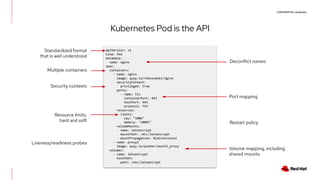
Kubernetes Pod is the API
Deconflict names
apiVersion: v1
kind: Pod
metadata:
name: nginx
spec:
containers:
- name: nginx
image: quay.io/robszumski/nginx
securityContext:
privileged: true
ports:
- name: tls
containerPort: 443
hostPort: 443
protocol: TCP
resources:
limits:
cpu: "100m"
memory: "100Mi"
volumeMounts:
- name: letsencrypt
mountPath: /etc/letsencrypt
mountPropagation: Bidirectional
- name: proxy3
image: quay.io/pusher/oauth2_proxy
volumes:
- name: letsencrypt
hostPath:
path: /etc/letsencrypt
Standardized format
that is well understood
Multiple containers
Port mapping
Resource limits,
hard and soft
Volume mapping, including
shared mounts
Security contexts
Liveness/readiness probes
Restart policy
CONFIDENTIAL designator
Node
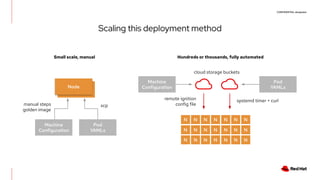
Scaling this deployment method
Node
N
N
N
N
N
N
N
N
N
N
N
N
N
N
N
N
N
N
N
N
N
manual steps
golden image
scp
Machine
Configuration
Pod
YAMLs
systemd timer + curlremote ignition
config file
cloud storage buckets
Machine
Configuration
Pod
YAMLs
Small scale, manual Hundreds or thousands, fully automated
CONFIDENTIAL designator
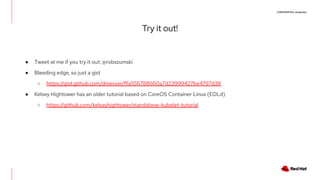
Try it out!
● Tweet at me if you try it out: @robszumski
● Bleeding edge, so just a gist
○ https://gist.github.com/dmesser/ffa556788660a7d23999427be4797d38
● Kelsey Hightower has an older tutorial based on CoreOS Container Linux (EOLd)
○ https://github.com/kelseyhightower/standalone-kubelet-tutorial
CONFIDENTIAL designator
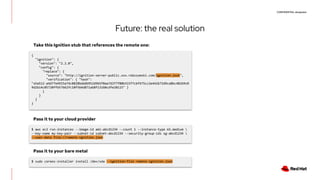
Future: the real solution
{
"ignition": {
"version": "2.2.0",
"config": {
"replace": {
"source": "http://ignition-server-public.xxx.robszumski.com/ignition.json",
"verification": { "hash":
"sha512-a4d77e4915a74c0828bdddb952d965f0aa7d2f7f80b315f7cbf475cc2e442b72d9ca8bc48269c0
9d2b14c05720ffb57662fc10f564d871ab8f13160cdfe20115" }
}
}
}
}
Take this Ignition stub that references the remote one:
Pass it to your cloud provider
$ aws ec2 run-instances --image-id ami-abcd1234 --count 1 --instance-type m3.medium 
--key-name my-key-pair --subnet-id subnet-abcd1234 --security-group-ids sg-abcd1234 
--user-data file://remote-ignition.json
Pass it to your bare metal
$ sudo coreos-installer install /dev/sda --ignition-file remote-ignition.json

Kubelet with no Kubernetes Masters | DevNation Tech Talk

  • 1.
    CONFIDENTIAL designator Kubelet withno Kubernetes Control Plane Rob Szumski OpenShift Product Manager 1
  • 2.
    CONFIDENTIAL designator Who amI? ● Now: OpenShift Product Manager ● Early employee at CoreOS ● Playing with containers and Kubernetes since they existed ● Planning out an “edge” deployment for my shop
  • 3.
    CONFIDENTIAL designator Where didwe start from? 1. etcd 2. docker 3. systemd coordination containment lifecycle/logs
  • 4.
    CONFIDENTIAL designator Where didwe start from? 1. etcd 2. docker 3. systemd coordination containment lifecycle/logs GitHub src
  • 5.
    CONFIDENTIAL designator Where didwe start from? 1. etcd 2. docker 3. systemd coordination containment lifecycle/logs etcd via Kubernetes CRI via Kubernetes Kubernetes
  • 6.
  • 7.
    CONFIDENTIAL designator Detailed lookat a Node Node P Kubelet Operating System Container Runtime P apiVersion: v1 kind: Pod metadata: name: nginx spec: containers: - name: nginx image: quay.io/robszumski/nginx securityContext: privileged: true ports: - name: tls containerPort: 443 hostPort: 443 protocol: TCP resources: limits: cpu: "100m" memory: "100Mi" volumeMounts: - name: letsencrypt mountPath: /etc/letsencrypt mountPropagation: Bidirectional - name: proxy3 image: quay.io/pusher/oauth2_proxy volumes: - name: letsencrypt hostPath: path: /etc/letsencrypt Pod logs Pod status Node status Resource usage
  • 8.
    CONFIDENTIAL designator Minimal deploymentfor my shop ● Single machine, consumer hardware ● Control software for industrial equipment (CNC) ● Security cameras ● Camera recording/DVR ● Camera transcoding/timelapse ● Nginx web server ● OAuth proxy to secure access
  • 9.
    STRICTLY INTERNAL ONLY End-UserPremises Edge Provider Edge Provider/Enterprise Core Edge Server/Gateway Regional Data Center Infrastructure Edge Provider Far Edge Provider Access Edge Provider Aggregation Edge Core Data Center Device or Sensor 9 “last mile” “Edge” deployments
  • 10.
  • 11.
    CONFIDENTIAL designator Do youneed a control plane? Kubernetes Workload YAML Controller Manager etcd Scheduler Deployment StatefulSet ...etc... Node P P P P P P P
  • 12.
    CONFIDENTIAL designator Do youneed a control plane? Kubernetes Pod YAML Controller Manager etcd Scheduler Node P P P P P P P ??
  • 13.
    CONFIDENTIAL designator The StandaloneKubelet ● Does not talk to a control plane ● Can be fully disconnected if desired ● Uses the kubelet’s static manifest feature ● Compatible with fully automatic provisioning ○ Golden image ○ Ignition/Cloud-Init ● More powerful with a self-managing operating system Node Kubelet Operating System Container Runtime P
  • 14.
    CONFIDENTIAL designator The StandaloneKubelet $ systemctl cat kubelet # /etc/systemd/system/kubelet.service [Unit] Description=Kubernetes Kubelet Server After=crio.service Requires=crio.service [Service] WorkingDirectory=/var/lib/kubelet EnvironmentFile=-/etc/kubernetes/config EnvironmentFile=-/etc/kubernetes/kubelet ExecStart=/usr/bin/kubelet $KUBE_LOGTOSTDERR $KUBE_LOG_LEVEL $KUBELET_API_SERVER $KUBELET_ADDRESS $KUBELET_PORT $KUBELET_HOSTNAME $KUBE_ALLOW_PRIV $KUBELET_ARGS Restart=on-failure KillMode=process [Install] WantedBy=multi-user.target $ cat /etc/kubernetes/kubelet ### # kubernetes kubelet (minion) config # The address for the info server to serve on (set to 0.0.0.0 or "" for all interfaces) KUBELET_ADDRESS="--address=127.0.0.1" # The port for the info server to serve on # KUBELET_PORT="--port=10250" # You may leave this blank to use the actual hostname KUBELET_HOSTNAME="--hostname-override=127.0.0.1" # Add your own! KUBELET_ARGS="--cgroup-driver=systemd --fail-swap-on=false --pod-manifest-path=/etc/kubernetes/manifests --container-runtime=remote --container-runtime-endpoint=unix:///var/run/crio/crio.sock --runtime-request-timeout=10m"
  • 15.
    CONFIDENTIAL designator Pros/Cons ofNo Control Plane What works: ● Pods with multiple containers ● Volume mounts, security contexts, resource limits ● Port redirection, NodePorts ● Log streaming ● Attaching to containers, exec-ing commands ● Restarting Pods on failure What doesn’t work: ● DaemonSets, ReplicaSets, Deployments ● Services, Ingress, NetworkPolicy ● Events, RBAC, authentication ● Persistent Volumes and Persistent Volume Claims ● Operators, custom controllers, admission controllers Changes to our workflow Services & Ingress: To ingest traffic, we will need to run nginx on a NodePort, similar to running an Ingress controller on a full cluster. Volumes: Instead of persisting data to a PV, you will need to write directly to the host’s storage. CLI tool: Directly interact with the container runtime, crictl logs -f instead of kubectl logs -f
  • 16.
    CONFIDENTIAL designator Running aContainer $ ssh root@fedora $ crictl ps CONTAINER IMAGE STATE proxy3 quay.io/pusher/oauth2_proxy@sha256:b5c44a0aba0e146a776a6a2a07353a3dde3ee78230ebfc56bc973e37ec68e425 Running nginx7 quay.io/robszumski/nginx-for-drone@sha256:aee669959c886caaf7fa0c4d11ff35f645b68e0b3eceea1280ff1221d88aac36 Running cncjs9 quay.io/robszumski/cncjs@sha256:3d11bc247c023035f2f2c22ba4fa13c5c43d7c28d8f87588c0f7bdfd3b82121c Running transcode15 quay.io/robszumski/rtsp-to-mjpg@sha256:52dd81db58e5e7c9433da0eedb1c02074114459d4802addc08c7fe8f418aead5 Running $ scp pod.yaml root@fedora:/etc/kubernetes/manifests Deployment: List running workloads: $ crictl logs 86fadc1aee09c [2020/07/05 20:15:46] [oauthproxy.go:252] mapping path "/" => upstream "http://192.168.7.62:8080/" [2020/07/05 20:15:46] [http.go:57] HTTP: listening on :4180 [2020/07/05 20:18:45] [google.go:270] refreshed access token Session{email:xxxx@robszumski.com user:168129640651108868061 PreferredUsername: token:true id_token:true created:2020-07-05 16:49:23.445238687 +0000 UTC expires:2020-07-05 21:18:44 +0000 UTC refresh_token:true} (expired on 2020-07-05 20:08:08 +0000 UTC) 173.53.xx.xxx - xxxx@robszumski.com [2020/07/05 20:18:44] xxxx.robszumski.com GET - "/oauth2/auth" HTTP/1.0 "Mozilla/5.0 (Macintosh; Intel Mac OS X 10_14_6) AppleWebKit/537.36 (KHTML, like Gecko) Chrome/81.0.4044.129 Safari/537.36" 202 0 1.221 Stream logs:
  • 17.
    CONFIDENTIAL designator Kubernetes Podis the API Deconflict names apiVersion: v1 kind: Pod metadata: name: nginx spec: containers: - name: nginx image: quay.io/robszumski/nginx securityContext: privileged: true ports: - name: tls containerPort: 443 hostPort: 443 protocol: TCP resources: limits: cpu: "100m" memory: "100Mi" volumeMounts: - name: letsencrypt mountPath: /etc/letsencrypt mountPropagation: Bidirectional - name: proxy3 image: quay.io/pusher/oauth2_proxy volumes: - name: letsencrypt hostPath: path: /etc/letsencrypt Standardized format that is well understood Multiple containers Port mapping Resource limits, hard and soft Volume mapping, including shared mounts Security contexts Liveness/readiness probes Restart policy
  • 18.
    CONFIDENTIAL designator Node Scaling thisdeployment method Node N N N N N N N N N N N N N N N N N N N N N manual steps golden image scp Machine Configuration Pod YAMLs systemd timer + curlremote ignition config file cloud storage buckets Machine Configuration Pod YAMLs Small scale, manual Hundreds or thousands, fully automated
  • 19.
    CONFIDENTIAL designator Try itout! ● Tweet at me if you try it out: @robszumski ● Bleeding edge, so just a gist ○ https://gist.github.com/dmesser/ffa556788660a7d23999427be4797d38 ● Kelsey Hightower has an older tutorial based on CoreOS Container Linux (EOLd) ○ https://github.com/kelseyhightower/standalone-kubelet-tutorial
  • 20.
    CONFIDENTIAL designator Future: thereal solution { "ignition": { "version": "2.2.0", "config": { "replace": { "source": "http://ignition-server-public.xxx.robszumski.com/ignition.json", "verification": { "hash": "sha512-a4d77e4915a74c0828bdddb952d965f0aa7d2f7f80b315f7cbf475cc2e442b72d9ca8bc48269c0 9d2b14c05720ffb57662fc10f564d871ab8f13160cdfe20115" } } } } } Take this Ignition stub that references the remote one: Pass it to your cloud provider $ aws ec2 run-instances --image-id ami-abcd1234 --count 1 --instance-type m3.medium --key-name my-key-pair --subnet-id subnet-abcd1234 --security-group-ids sg-abcd1234 --user-data file://remote-ignition.json Pass it to your bare metal $ sudo coreos-installer install /dev/sda --ignition-file remote-ignition.json